
Short description
📄 DuplicateLayouts is an AutoCAD and Civil 3D AutoLISP utility for duplicating layout tabs from a dialog-driven workflow.
🔁 It lets CAD users select one or more existing paper-space layouts, assign copy counts, create unique layout names automatically, and manage layout duplication without manually repeating the AutoCAD LAYOUT Copy command.
Command:
🚀 Main command: DuplicateLayouts
🧰 Load the LSP file with APPLOAD, then run the command from the AutoCAD command line.
Description:
📄 DuplicateLayouts is an SEO-friendly AutoCAD layout duplication tool designed for drawing sheets, paper-space tabs, plotting workflows, and Civil 3D sheet production.
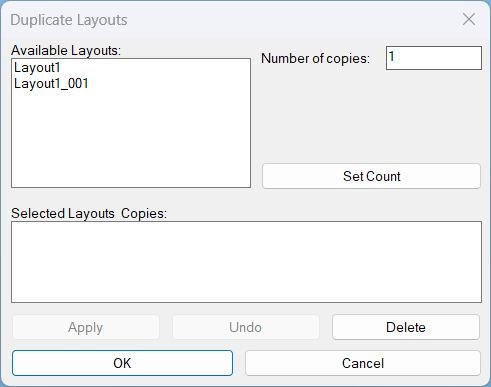
🔁 The routine builds a temporary DCL dialog named Duplicate Layouts with an Available Layouts list, Number of copies input, Selected Layouts and Copies summary, Apply, Undo, Delete, OK, and Cancel controls.
🧠 Each selected source layout can receive its own copy count. The tool generates unique names by appending three-digit suffixes such as Layout_001, Layout_002, and Layout_003.
🧩 Layout duplication is performed through the AutoCAD -LAYOUT Copy workflow, with fallback command keywords to improve compatibility across localized or command-option variations.
🗑️ The Delete button can remove a selected entry from the summary list or delete an actual layout tab from the drawing when a layout is selected in the Available Layouts list.
📌 This is useful for batch sheet creation, repeating plotting layouts, Civil 3D plan set preparation, viewport-based drawing sheets, and production drawings where many similar tabs must be generated quickly.
Helper function: (if any)
🧩 DL_WriteDCL dynamically writes the temporary dup_layouts.dcl dialog file.
🧩 DL_GetLayoutNames collects all drawing layouts except Model for the available layout list.
🧩 DL_Pad3 formats generated layout suffixes with three digits.
🧩 DL_LayoutExistsP verifies whether a proposed layout name already exists in the Layouts collection.
🧩 DL_NextUniqueName creates the next available unique destination layout name.
🧩 DL_CopyLayoutSafe runs -LAYOUT Copy with fallback option names to duplicate source tabs.
🧩 DL_DoDuplicate processes the selected layout and copy-count map inside an AutoCAD undo mark.
🧩 DL_DeleteLayoutFromDrawing deletes a selected layout tab safely and moves CTAB to Model when needed.
🧩 DL_DoUndo performs a single AutoCAD UNDO step for the latest Apply or Delete action.
Functionalities:
✅ Select layout tabs from a DCL list box and assign individual copy counts.
✅ Build a summary list of source layouts and requested copy quantities before committing changes.
✅ Duplicate multiple paper-space layouts in one operation.
✅ Automatically avoid name collisions by generating Layout_001-style unique names.
✅ Apply changes while keeping the dialog open for repeated duplication batches.
✅ Use OK to duplicate selected layouts and close the tool.
✅ Use Undo to roll back the latest session operation.
✅ Delete a selected summary row or delete a drawing layout tab directly from the dialog.
✅ Exclude Model from duplication targets to protect the model-space tab.
Result:
🎯 The result is a faster layout duplication workflow for AutoCAD and Civil 3D drawings.
📄 Users can create many paper-space tabs from existing layouts without repeating manual LAYOUT Copy operations.
✅ DuplicateLayouts improves sheet setup speed, reduces layout naming mistakes, and supports consistent production drawing preparation for plotting, plan sheets, and sheet-set workflows.
Images, animations etc.
XAML code:
<ResourceDictionary
 xmlns="http://schemas.microsoft.com/winfx/2006/xaml/presentation"
 xmlns:x="http://schemas.microsoft.com/winfx/2006/xaml"
 xmlns:src="clr-namespace:Autodesk.Windows;assembly=AdWindows">

 <src:RibbonToolTip x:Key="DuplicateLayouts">
 <src:RibbonToolTip.ExpandedContent>
 <StackPanel>
 <TextBlock Background="AntiqueWhite" TextAlignment="Left">
<Bold>Function Syntax: DuplicateLayouts</Bold>
<LineBreak/>
<Bold>Version: 1.1 Date: 20.06.2026 6:38:55PM</Bold>
<LineBreak/>
<Hyperlink>N/A</Hyperlink>
<LineBreak/>

<Bold>DuplicateLayouts summary</Bold><LineBreak/>
This program opens a <DarkRed>Dialog UI (DCL)</DarkRed> that lets the user pick existing <DarkRed>layout tabs</DarkRed>, set how many copies to create for each one, then duplicates them using the AutoCAD <DarkRed>-LAYOUT Copy</DarkRed> command with safe fallbacks and unique naming.<LineBreak/>

<Bold>What the user must do</Bold><LineBreak/>
Run the command <DarkRed>DuplicateLayouts</DarkRed> to open the dialog.<LineBreak/>
Select a layout from <DarkRed>Available Layouts</DarkRed> and enter a <DarkRed>Number of copies</DarkRed>, then press <DarkRed>Set Count</DarkRed> to add it to the summary list.<LineBreak/>
Press <DarkRed>Apply</DarkRed> to duplicate and keep the dialog open, or press <DarkRed>OK</DarkRed> to duplicate and exit.<LineBreak/>
Optionally use <DarkRed>Undo</DarkRed> to undo the most recent session operation, or use <DarkRed>Delete</DarkRed> to remove an entry from the summary or delete an actual layout tab from the drawing depending on selection context.<LineBreak/>

<Bold>Key actions and controls</Bold><LineBreak/>
<Bold>Available Layouts list</Bold> shows all layouts except <DarkRed>Model</DarkRed>.<LineBreak/>
<Bold>Number of copies</Bold> input controls how many duplicates to create for the currently selected available layout.<LineBreak/>
<Bold>Set Count</Bold> adds or updates the selected layout in the summary map as <DarkRed>layoutName : copyCount</DarkRed>.<LineBreak/>
<Bold>Selected Layouts and Copies</Bold> summary shows the queued duplication plan.<LineBreak/>
<Bold>Apply</Bold> duplicates the queued items and reopens the dialog.<LineBreak/>
<Bold>OK</Bold> duplicates if there are queued items, otherwise exits without changes.<LineBreak/>
<Bold>Undo</Bold> runs a single step undo for the most recent session operation and reopens the dialog.<LineBreak/>
<Bold>Delete</Bold> behaves in two ways based on where the selection is made.<LineBreak/>
If a summary row is selected, <DarkRed>Delete</DarkRed> removes that queued item from the summary list only.<LineBreak/>
If no summary row is selected but an available layout is selected, <DarkRed>Delete</DarkRed> deletes that layout tab from the drawing.<LineBreak/>

<Bold>Functionalities</Bold><LineBreak/>
• <DarkRed>DCL dialog</DarkRed> driven workflow for selecting layouts and copy counts.<LineBreak/>
• Builds the available layout list by reading the drawing Layouts collection and excluding <DarkRed>Model</DarkRed>.<LineBreak/>
• Stores session state in globals so the dialog can be reopened without losing selections and counts.<LineBreak/>
• Creates duplicates by calling <DarkRed>-LAYOUT Copy</DarkRed> with multiple fallback variants to maximize compatibility.<LineBreak/>
• Generates unique destination names in the format <DarkRed>BaseName_###</DarkRed> using zero padded numbering and existence checks.<LineBreak/>
• Wraps duplication batches in an undo mark so each Apply or OK duplication can be undone in a single step.<LineBreak/>
• Provides session undo via <DarkRed>UNDO 1</DarkRed> limited to operations performed during the current dialog session.<LineBreak/>
• Deletes a real layout tab by switching away from that tab if active, then calling the layout object delete method, and tracking it as undoable.<LineBreak/>
• Keeps <DarkRed>OK</DarkRed> enabled at all times and disables <DarkRed>Apply</DarkRed> when nothing is queued, and disables <DarkRed>Undo</DarkRed> when no session operations exist.<LineBreak/>
• Writes a temporary DCL file, loads it, runs the dialog loop, then unloads the dialog and deletes the temp DCL file on exit.<LineBreak/>

<Bold>Important behaviors and safeguards</Bold><LineBreak/>
The tool will not duplicate anything unless at least one layout has been added to the summary using <DarkRed>Set Count</DarkRed>.<LineBreak/>
When <DarkRed>OK</DarkRed> is pressed with no queued items, the program exits silently without alerts.<LineBreak/>
When <DarkRed>Apply</DarkRed> is pressed with no queued items, the program shows an alert telling the user no layouts are selected.<LineBreak/>
The tool never lists or duplicates <DarkRed>Model</DarkRed> and will block deletion of Model with an alert.<LineBreak/>
If the active tab is being deleted, the program switches to <DarkRed>Model</DarkRed> first to avoid deleting the current tab.<LineBreak/>
Undo tracking is session based using an internal counter, so the dialog only enables Undo when it knows it executed at least one undo mark operation in this run.<LineBreak/>

<Bold>Summary result</Bold><LineBreak/>
This tool provides a dialog based batch process to queue multiple layouts with copy counts, duplicate them into uniquely named layout tabs, optionally delete a selected layout tab, and undo the most recent session operations using AutoCAD undo.<LineBreak/>

<Bold><Run Foreground="DodgerBlue">Description</Run></Bold><LineBreak/>
<Run Foreground="White">📄 DuplicateLayouts is an AutoCAD and Civil 3D AutoLISP utility for duplicating layout tabs from a dialog-driven workflow.</Run><LineBreak/>
<Run Foreground="White">🔁 It lets CAD users select one or more existing paper-space layouts, assign copy counts, create unique layout names automatically, and manage layout duplication without manually repeating the AutoCAD LAYOUT Copy command.</Run><LineBreak/>
<LineBreak/>
<Bold><Run Foreground="DodgerBlue">Function Syntax</Run></Bold><LineBreak/>
<Run Foreground="White">🚀 Main dialog command: </Run><Bold><Run Foreground="Orange">DuplicateLayouts</Run></Bold><LineBreak/>
<Run Foreground="White">🧰 Load the LSP with APPLOAD and run the command in AutoCAD or Civil 3D.</Run><LineBreak/>
<LineBreak/>
<Bold><Run Foreground="DodgerBlue">SEO Optimized Overview</Run></Bold><LineBreak/>
<Run Foreground="White">📄 DuplicateLayouts is an SEO-friendly AutoCAD layout duplication tool designed for drawing sheets, paper-space tabs, plotting workflows, and Civil 3D sheet production.</Run><LineBreak/>
<Run Foreground="White">🔁 The routine builds a temporary DCL dialog named Duplicate Layouts with an Available Layouts list, Number of copies input, Selected Layouts and Copies summary, Apply, Undo, Delete, OK, and Cancel controls.</Run><LineBreak/>
<Run Foreground="White">🧠 Each selected source layout can receive its own copy count. The tool generates unique names by appending three-digit suffixes such as Layout_001, Layout_002, and Layout_003.</Run><LineBreak/>
<Run Foreground="White">🧩 Layout duplication is performed through the AutoCAD -LAYOUT Copy workflow, with fallback command keywords to improve compatibility across localized or command-option variations.</Run><LineBreak/>
<Run Foreground="White">🗑️ The Delete button can remove a selected entry from the summary list or delete an actual layout tab from the drawing when a layout is selected in the Available Layouts list.</Run><LineBreak/>
<Run Foreground="White">📌 This is useful for batch sheet creation, repeating plotting layouts, Civil 3D plan set preparation, viewport-based drawing sheets, and production drawings where many similar tabs must be generated quickly.</Run><LineBreak/>
<LineBreak/>
<Bold><Run Foreground="LimeGreen">Primary Workflow</Run></Bold><LineBreak/>
<Run Foreground="White">1️⃣ Load DuplicateLayouts into AutoCAD or Civil 3D with APPLOAD.</Run><LineBreak/>
<Run Foreground="White">2️⃣ Run DuplicateLayouts from the command line.</Run><LineBreak/>
<Run Foreground="White">3️⃣ Use the dialog or command prompts to select the target layouts, layers, viewports, or plot settings.</Run><LineBreak/>
<Run Foreground="White">4️⃣ Review the preview, status list, or command-line feedback before applying changes.</Run><LineBreak/>
<Run Foreground="White">5️⃣ Apply the operation and verify the result in the active drawing.</Run><LineBreak/>
<LineBreak/>
<Bold><Run Foreground="DodgerBlue">Main Functionalities</Run></Bold><LineBreak/>
<Run Foreground="White">✅ Select layout tabs from a DCL list box and assign individual copy counts.</Run><LineBreak/>
<Run Foreground="White">✅ Build a summary list of source layouts and requested copy quantities before committing changes.</Run><LineBreak/>
<Run Foreground="White">✅ Duplicate multiple paper-space layouts in one operation.</Run><LineBreak/>
<Run Foreground="White">✅ Automatically avoid name collisions by generating Layout_001-style unique names.</Run><LineBreak/>
<Run Foreground="White">✅ Apply changes while keeping the dialog open for repeated duplication batches.</Run><LineBreak/>
<Run Foreground="White">✅ Use OK to duplicate selected layouts and close the tool.</Run><LineBreak/>
<Run Foreground="White">✅ Use Undo to roll back the latest session operation.</Run><LineBreak/>
<Run Foreground="White">✅ Delete a selected summary row or delete a drawing layout tab directly from the dialog.</Run><LineBreak/>
<Run Foreground="White">✅ Exclude Model from duplication targets to protect the model-space tab.</Run><LineBreak/>
<LineBreak/>
<Bold><Run Foreground="DodgerBlue">Important Commands and Helper Functions</Run></Bold><LineBreak/>
<Run Foreground="White">🧩 DL_WriteDCL dynamically writes the temporary dup_layouts.dcl dialog file.</Run><LineBreak/>
<Run Foreground="White">🧩 DL_GetLayoutNames collects all drawing layouts except Model for the available layout list.</Run><LineBreak/>
<Run Foreground="White">🧩 DL_Pad3 formats generated layout suffixes with three digits.</Run><LineBreak/>
<Run Foreground="White">🧩 DL_LayoutExistsP verifies whether a proposed layout name already exists in the Layouts collection.</Run><LineBreak/>
<Run Foreground="White">🧩 DL_NextUniqueName creates the next available unique destination layout name.</Run><LineBreak/>
<Run Foreground="White">🧩 DL_CopyLayoutSafe runs -LAYOUT Copy with fallback option names to duplicate source tabs.</Run><LineBreak/>
<Run Foreground="White">🧩 DL_DoDuplicate processes the selected layout and copy-count map inside an AutoCAD undo mark.</Run><LineBreak/>
<Run Foreground="White">🧩 DL_DeleteLayoutFromDrawing deletes a selected layout tab safely and moves CTAB to Model when needed.</Run><LineBreak/>
<Run Foreground="White">🧩 DL_DoUndo performs a single AutoCAD UNDO step for the latest Apply or Delete action.</Run><LineBreak/>
<LineBreak/>
<Bold><Run Foreground="LimeGreen">Practical Result</Run></Bold><LineBreak/>
<Run Foreground="White">🎯 The result is a faster layout duplication workflow for AutoCAD and Civil 3D drawings.</Run><LineBreak/>
<Run Foreground="White">📄 Users can create many paper-space tabs from existing layouts without repeating manual LAYOUT Copy operations.</Run><LineBreak/>
<Run Foreground="White">✅ DuplicateLayouts improves sheet setup speed, reduces layout naming mistakes, and supports consistent production drawing preparation for plotting, plan sheets, and sheet-set workflows.</Run><LineBreak/>
<LineBreak/>
<Bold><Run Foreground="DarkRed">Important Notes</Run></Bold><LineBreak/>
<Run Foreground="White">⚠️ The routine modifies layout tabs in the active drawing, so testing on a backup drawing is recommended before large batch operations.</Run><LineBreak/>
<Run Foreground="White">⚠️ Delete can remove a real layout tab from the drawing when no summary row is selected and an available layout is selected.</Run><LineBreak/>
<Run Foreground="White">⚠️ Undo relies on AutoCAD's UNDO command for the latest session operation.</Run><LineBreak/>
<Run Foreground="White">⚠️ Generated names use the source layout name plus a three-digit suffix; rename manually later if a different sheet naming standard is required.</Run><LineBreak/>
<LineBreak/>
<Bold><Run Foreground="Yellow">Tags</Run></Bold><LineBreak/>
<Run Foreground="Yellow">🏷️ AutoCAD, 🏷️ Civil 3D, 🏷️ AutoLISP, 🏷️ Visual LISP, 🏷️ DCL dialog, 🏷️ CAD automation, 🏷️ CAD productivity, 🏷️ Layout tabs, 🏷️ Paper space, 🏷️ Duplicate layouts, 🏷️ Batch layout creation, 🏷️ Sheet setup, 🏷️ Plan sheets, 🏷️ Plot layouts, 🏷️ LAYOUT Copy, 🏷️ Undo workflow, 🏷️ Drawing production</Run><LineBreak/>


</TextBlock>

<Grid>
<Image Source="Image_000.jpg" Stretch="Uniform"/>
</Grid>


 <!-- Use MediaElement for GIF (static first frame) and Image as fallback -->


</StackPanel>
 </src:RibbonToolTip.ExpandedContent>
 </src:RibbonToolTip>


</ResourceDictionary>