
Short description
🚀 ProfileElevations is an AutoCAD Civil 3D .NET Framework plugin for managing ProfileView elevation ranges, profile view styles, band set styles, split profile view datums, and profile source elevation calculations.
📐 It helps Civil 3D users review multiple profile views in a grid, calculate source minimum and maximum elevations from profiles and network parts, apply consistent user-defined elevation ranges, and reduce repetitive manual editing in Profile View Properties.
🟢 The main benefit is faster Civil 3D profile view management, better drawing quality control, consistent vertical ranges, cleaner plan production, and safer batch editing with undo, redo, CSV export, import, logging, and settings.
Command:
🧰 Load the compiled plugin with NETLOAD by selecting ProfileElevations.dll in AutoCAD Civil 3D.
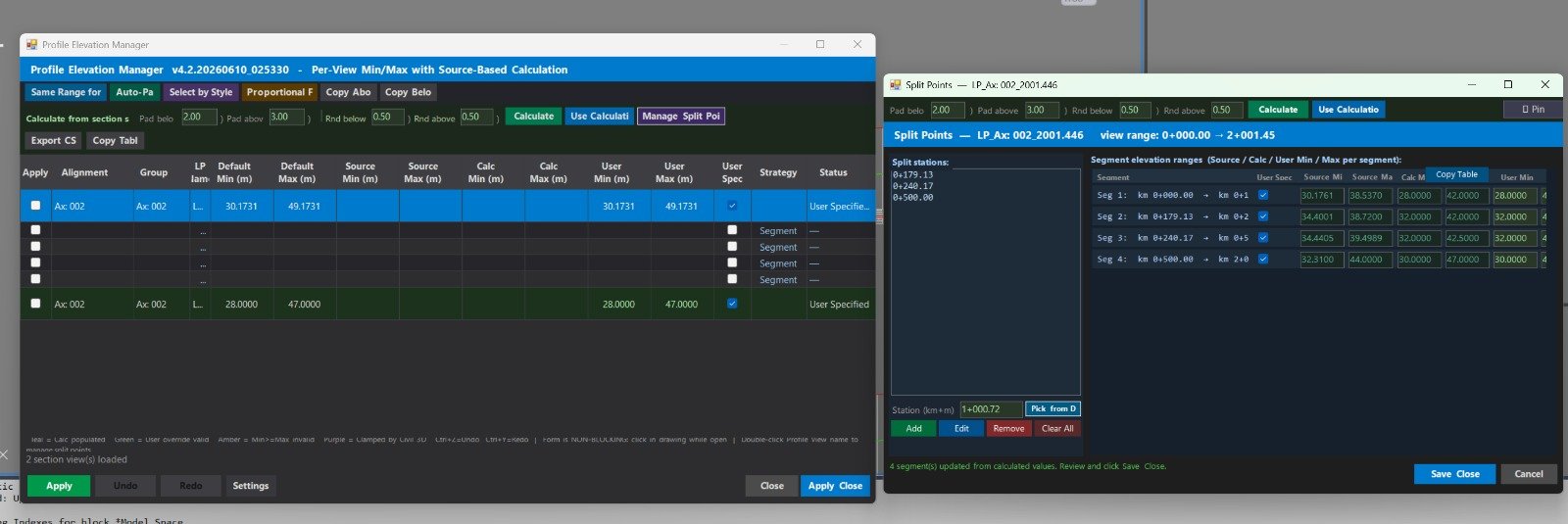
🚀 Run ProfileElevations to open the main modeless Profile View Elevation Manager for batch elevation range editing.
🎨 Run ProfileViewStyles to open the Profile View Style Manager for applying Profile View styles and band set styles.
⚙️ Run ProfileElevSettings to open the settings dialog for logging, decimal separator, auto-pad, pad below, pad above, and rounding defaults.
📤 Run ProfileElevExportLsp to write an AutoLISP auto-load file that can NETLOAD the DLL from a trusted AutoCAD startup workflow.
📌 ProfileElevPickStation is an internal command used by the split points workflow to pick a station from the drawing while the modeless form is open.
🏗️ Target platform: AutoCAD Civil 3D, .NET Framework 4.8, x64, WinForms, AutoCAD managed API, Civil 3D managed API, and Civil 3D ProfileView objects.
Description:
Helper function: (if any)
- 🚀 Command registration system –
ProfileElevationsPlugin.csregistersProfileElevations,ProfileViewStyles,ProfileElevSettings,ProfileElevExportLsp, andProfileElevPickStationas AutoCAD commands. - 🔍 ProfileView collection engine –
ProfileDataCollector.Collect()reads the active Civil 3D document, traverses alignments, collects profile view ids withAlignment.GetProfileViewIds(), and builds the main profile view data model. - 📐 Elevation API wrapper –
PvElevandPvElevReflectcentralize Civil 3D elevation range access, includingElevationMin,ElevationMax, and automatic or user-defined range handling. - 🧠 Safe API probe layer –
ProfileApiProbeuses guarded access and reflection for Civil 3D API members that can differ by version, reducing plugin breakage across Civil 3D installations. - 📊 Source elevation collector –
ProfileSourceCollectorcalculates source minimum and maximum elevations by sampling profiles, profile PVIs, station overlaps, and profile view network parts. - 🧩 Network part elevation logic – the collector can use pipe values such as
StartInvert,EndInvert,StartCrown, andEndCrown, plus structure values such as rim and sump elevations. - 🔄 Batch elevation apply engine –
ProfileElevationEngine.Apply()writes elevation overrides through a document lock and transaction, disables split profile view state before elevation writes, and re-applies split datum data where required. - ↩️ Undo and redo system –
UndoRedoStack<T>,ElevationBatch, andStyleBatchstore snapshots so elevation edits and style edits can be reversed or redone. - 🎨 Style apply engine –
ProfileStyleApplyEngineapplies Profile View styles and band set styles to selected Civil 3D profile views with undo and redo support. - 🧮 Validation logic –
ElevationValidatorvalidates numeric elevation inputs and helps prevent invalid user min and user max values before applying changes to the drawing. - 📤 CSV round-trip tools –
ProfileCsvExport.ExportToFile()andProfileCsvExport.ImportFromFile()support reusable CSV workflows for elevation override tables. - 📌 Split station picking relay –
StationPickRelayandProfileElevPickStationallow a modeless split points form to temporarily request a station pick from the AutoCAD editor. - 🔐 Settings and logging –
PluginSettingsstores HKCU registry settings, whileProfileLoggerwrites command-line and optional file diagnostics. - 🧰 Deployment helper –
ProfileElevExportLspcreates an AutoLISP loader script, and the MSBuild deploy target can copyProfileElevations.dllto a configured deployment folder.
Functionalities:
- 🚀 Open a Profile View Elevation Manager – launches a modeless Civil 3D grid for reviewing and editing many profile view elevation ranges at once.
- 🔍 Scan Civil 3D ProfileViews – lists profile views from alignments with alignment name, profile view name, station range, current min, current max, automatic range state, and status information.
- 📐 Edit user-defined elevation ranges – lets the user enter User Min, User Max, and User Specified values for selected profile views.
- 🧠 Calculate source min and max elevations – derives source elevation ranges from Civil 3D profiles, dense profile sampling, profile PVIs, and network parts shown in profile views.
- 🔢 Apply pad and rounding rules – uses pad below, pad above, rounding below, and rounding above controls to generate practical plotted profile view ranges.
- 📌 Transfer calculated values – copies rounded calculated minimum and maximum values into editable user override fields for fast review before applying.
- 🧩 Manage split profile view stations – opens a split points form where users can add, edit, remove, pick, calculate, and apply segment-based station elevation ranges.
- 🎯 Pick station from drawing – uses
ProfileElevPickStationto convert a clicked point in the profile view into a Civil 3D station value. - 🎨 Batch-apply Profile View styles – changes profile view style and band set style for multiple profile views from a dedicated manager.
- 🔄 Undo and redo changes – supports Undo and Redo buttons plus
Ctrl+ZandCtrl+Ykeyboard shortcuts in the main workflows. - 🟧 Use visual row status colors – highlights valid overrides, invalid input, and clamped round-trip validation results to improve quality control.
- 📋 Copy table data to clipboard – exports tab-separated grid data for direct paste into Excel, reports, QA sheets, or project documentation.
- 📤 Export and import CSV elevation overrides – saves and restores elevation table values for review, coordination, or repeatable batch workflows.
- 🧹 Reset, global range, auto-pad, and propagation tools – supports fast cleanup actions such as reset selected rows, same range for all, auto-pad, copy above, copy below, and proportional propagation controls where available in the UI.
- ⚙️ Configure plugin settings – stores log options, decimal separator, default pad values, and rounding values in the Windows registry.
- 📘 Generate an AutoLISP loader – creates an auto-load LSP file so the plugin can be loaded through an AutoCAD startup workflow.
- 🔒 Safe Civil 3D database editing – uses document locks, transactions, helper wrappers, split-safe elevation write order, and error logging to reduce the risk of failed batch updates.
Result:
✅ The final result is a professional AutoCAD Civil 3D productivity plugin for ProfileView elevation range management, profile view style management, split profile view control, source elevation calculation, CSV reporting, and safer batch drawing updates.
🟢 It helps Civil 3D users save time, avoid repetitive Profile View Properties editing, create consistent vertical profile ranges, improve quality control, reduce manual drafting mistakes, and manage large profile view sets more efficiently.
Images, animations etc.
XAML code:
<ResourceDictionary
xmlns="http://schemas.microsoft.com/winfx/2006/xaml/presentation"
xmlns:x="http://schemas.microsoft.com/winfx/2006/xaml"
xmlns:src="clr-namespace:Autodesk.Windows;assembly=AdWindows">

<src:RibbonToolTip x:Key="ProfileElevations">
<src:RibbonToolTip.ExpandedContent>
<StackPanel>
<TextBlock Background="AntiqueWhite" TextAlignment="Left">
<Bold>Function Syntax: Command</Bold>
<LineBreak/>
<Bold>Version: 1.0 Date: 08.06.2026 20:45:58</Bold>
<LineBreak/>
<LineBreak/>
<Hyperlink>N/A</Hyperlink>
<LineBreak/>
</TextBlock>
<Grid>
<Image Source="PNG" Stretch="Uniform"/>
</Grid>
<Grid>
<MediaElement Source="GIF" Stretch="Uniform" Visibility="Visible"/>
</Grid>
</StackPanel>
</src:RibbonToolTip.ExpandedContent>
</src:RibbonToolTip>
</ResourceDictionary>