
Short description
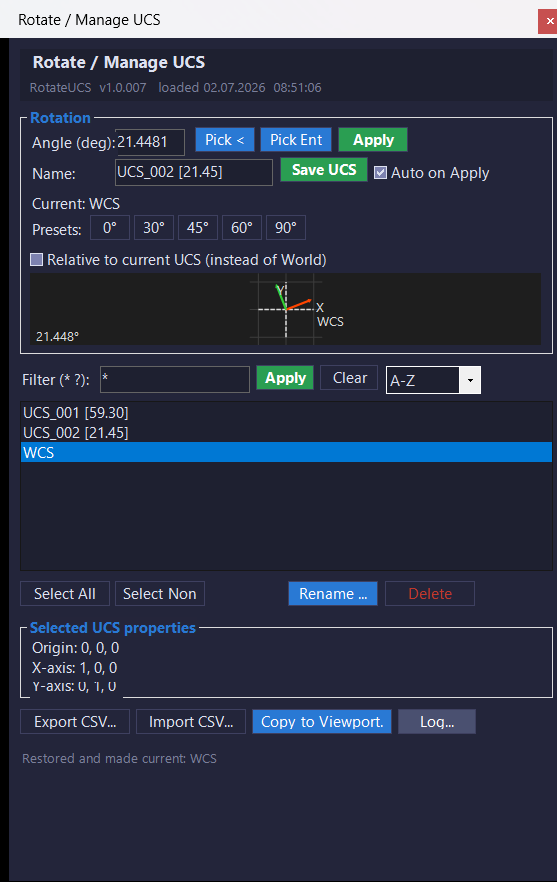
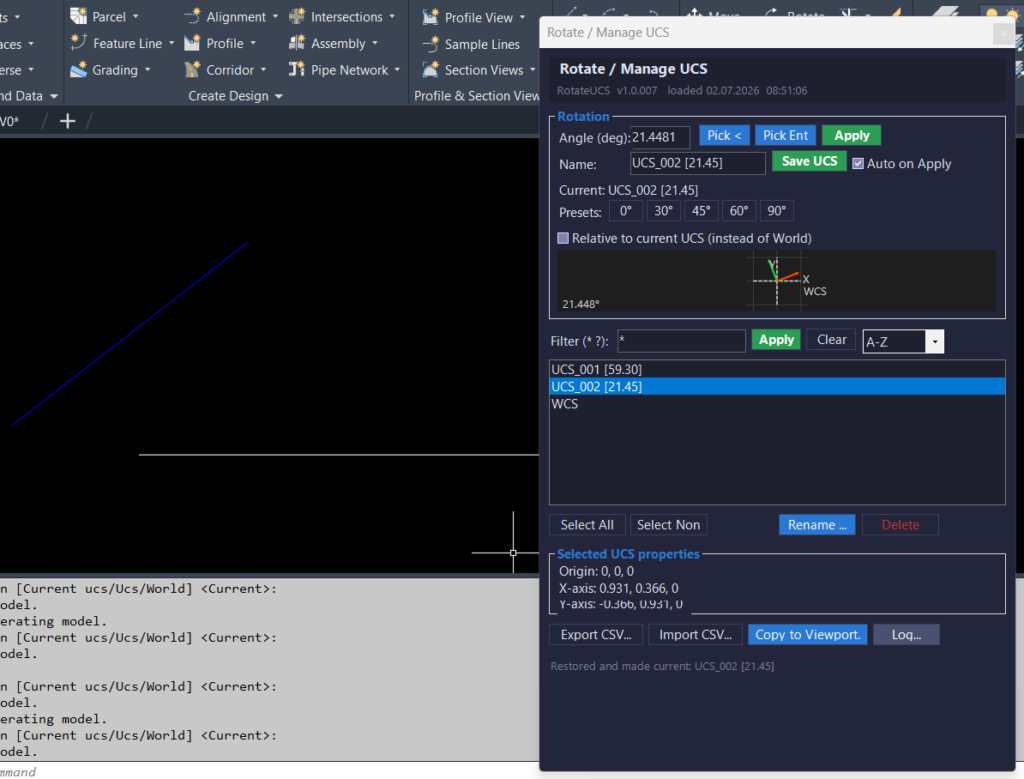
🧭 RotateUcsCs is an AutoCAD and Civil 3D C# .NET plugin that replaces a traditional RotateUCS AutoLISP DCL tool with a modeless WinForms UCS management palette. It helps users rotate UCS by typed angle, picked angle, or selected entity angle, save named UCS records, restore UCS definitions, export and import UCS data, copy UCS settings to layout viewports, and manage UCS workflows with a live preview, viewport highlight, and detailed logging.
Command:
📌 Main commands:
⚡ Quick angle command:
📐 Quick entity command:
🧰 Loading method: build
🪟
📘 On load, the plugin prints the version banner from
🎯 Target platform: AutoCAD and Autodesk Civil 3D with .NET Framework 4.8, x64, Windows Forms, AutoCAD managed APIs, and references such as
ROTATEUCS and RUCS.⚡ Quick angle command:
RU1 asks for an angle, rotates the UCS, auto-saves the UCS, restores it, and aligns the view.📐 Quick entity command:
RUE asks the user to select an entity, extracts its angle, rotates the UCS, auto-saves the UCS, restores it, and aligns the view.🧰 Loading method: build
RotateUcsCs.csproj as x64, then load RotateUcsCs.dll in AutoCAD or Civil 3D using NETLOAD.🪟
ROTATEUCS and RUCS open a modeless WinForms palette named Rotate / Manage UCS.📘 On load, the plugin prints the version banner from
BuildInfo.BuildStamp and lists the available commands.🎯 Target platform: AutoCAD and Autodesk Civil 3D with .NET Framework 4.8, x64, Windows Forms, AutoCAD managed APIs, and references such as
AcCoreMgd, AcDbMgd, AcMgd, and AcWindows.
Description:
🧠 RotateUcsCs is a C# .NET port of a RotateUCS AutoLISP DCL workflow. Instead of using a DCL dialog and command-line sequencing, the project provides a modeless WinForms palette that uses AutoCAD managed APIs to rotate, save, restore, rename, delete, export, import, and preview named UCS records.
The main user workflow starts with
The tool can save the current UCS as a named UCS using automatic naming such as
The palette also includes workflow features that are useful for Civil 3D and AutoCAD production drafting: a live 2D UCS preview, transient viewport UCS highlighting, CSV export and import for named UCS definitions, copy-to-layout-viewport support, persistent registry settings, a dark CAD-style UI theme, and a detachable log window. Although it can run inside Civil 3D, the plugin manages AutoCAD UCS and viewport behavior only. It does not directly modify
The main user workflow starts with
ROTATEUCS or RUCS. The palette lets the user type a rotation angle, use preset angle buttons, pick an angle from the drawing, or pick an entity and extract its natural angle. The plugin supports entity angle extraction from AutoCAD geometry such as Line, Polyline, Polyline2d, Polyline3d, Arc, Xline, Ray, and Spline.The tool can save the current UCS as a named UCS using automatic naming such as
UCS_001 [45.00]. It can also restore named UCS records, rename existing UCS definitions, delete selected named UCS records, filter the UCS list with wildcard patterns, sort by several modes, and display origin and axis information for the selected UCS.The palette also includes workflow features that are useful for Civil 3D and AutoCAD production drafting: a live 2D UCS preview, transient viewport UCS highlighting, CSV export and import for named UCS definitions, copy-to-layout-viewport support, persistent registry settings, a dark CAD-style UI theme, and a detachable log window. Although it can run inside Civil 3D, the plugin manages AutoCAD UCS and viewport behavior only. It does not directly modify
ProfileView, SectionView, Alignment, corridors, surfaces, labels, bands, pipe networks, point groups, or Civil 3D styles.
Helper function: (if any)
- 🚀 Plugin initialization —
RotateUcsApp.Initializeprints the load banner, build stamp, and available commands when the DLL is loaded. - 🧩 Palette instance manager —
RotateUcsPaletteHostkeeps a single modelessRotateUcsPaletteinstance alive and activates it when the command is run again. - 📌 Command registration — the
Commandsclass exposesROTATEUCS,RUCS,RU1, andRUEthrough AutoCADCommandMethodattributes. - 🧠 UCS service layer —
UcsServicemanages UCS enumeration, filtering, sorting, rotation, save, restore, rename, delete, CSV import, CSV export, and viewport UCS transfer. - 🔢 Angle normalization —
NormalizeAnglekeeps rotation values inside the 0 to 360 degree range. - 📐 Entity angle extraction —
EntityAngleExtractor.GetAngleDegreesreads supported AutoCAD geometry and returns the most useful angle for UCS rotation. - 🧩 Polyline segment logic — the entity extractor uses nearest segment midpoint logic so picked polyline angles come from the segment closest to the pick point.
- 🎯 Arc tangent logic — arc angle extraction calculates the radius angle from the arc center to the picked point, then adds 90 degrees to obtain the tangent direction.
- 🔍 Wildcard filter helper —
WildcardMatch.IsMatchsupports simple*and?wildcard matching for UCS list filtering. - 📘 2D preview control —
UcsPreviewControldraws WCS reference axes and rotated UCS X and Y axes using GDI drawing. - 🎯 Viewport highlight helper —
UcsHighlighterusesTransientManagerto draw temporary X-axis, Y-axis, and origin marker graphics in the AutoCAD viewport. - 💾 Registry settings —
Settings.LoadandSettings.Savepersist user options underHKCU\Software\RotateUCS. - 📋 Logging system —
Loggerwrites timestamped log lines to memory and to daily log files under%AppData%\RotateUCS\Logs. - 🪟 Detached log viewer —
LogWindowdisplays the session log, saves logs to a chosen file, and opens the log folder in Windows Explorer. - 🎨 Dark UI theme —
C3DThemeapplies the project’s dark CAD interface styling to WinForms controls. - ✏️ Rename prompt —
InputBox.Showprovides a small modal text prompt used when renaming a UCS record. - 📘 Build metadata —
BuildInfo.VersionandBuildInfo.BuildStampstore the plugin version and load banner stamp.
Functionalities:
- 🚀 Open a modeless UCS manager —
ROTATEUCSandRUCSopen a floating WinForms palette for UCS rotation and named UCS management. - ⚡ Run quick no-dialog UCS rotation —
RU1rotates the UCS by a typed angle and immediately saves, restores, and aligns the view. - 📐 Run quick entity-based UCS rotation —
RUEextracts an entity angle, rotates the UCS, saves the UCS, restores it, and applies PLAN current behavior. - 🔢 Rotate UCS by typed angle — the palette applies a typed angle using AutoCAD managed matrix operations instead of command-line UCS calls.
- 📌 Use common angle presets — preset buttons quickly set common UCS rotation angles such as 0, 30, 45, 60, and 90 degrees.
- 📐 Pick angle from drawing —
Editor.GetAngleallows interactive angle selection, with an absolute-bearing correction when relative mode is off. - 🧩 Pick supported entity angle — the plugin extracts angles from lines, polylines, arcs, xlines, rays, and splines.
- 🔄 Rotate relative to current UCS — the user can choose whether the rotation is applied from WCS or relative to the current UCS.
- 💾 Save named UCS records — the current UCS can be saved into the AutoCAD UCS table through
UcsTableRecord. - 🏷️ Auto-generate UCS names — the plugin creates names such as
UCS_001 [45.00]using the next available sequence number. - 📚 Browse existing UCS records — the palette lists WCS and drawing-defined UCS records.
- 🔍 Filter UCS names with wildcards — users can filter the UCS list with
*and?. - 📊 Sort UCS records — the list can be sorted A-Z, Z-A, by length, or with the current UCS first.
- 🔎 Restore by double-click — double-clicking a list item restores the selected UCS and aligns the view.
- 📝 Show UCS properties — the palette displays origin, X-axis, and Y-axis values for the selected UCS.
- 🎯 Highlight selected UCS in the viewport — a transient X and Y axis marker is drawn for the selected UCS row.
- 📘 Preview UCS rotation live — the custom preview panel shows the rotated UCS axes while the angle changes.
- ✏️ Rename selected UCS — one selected named UCS can be renamed from the palette.
- 🧹 Delete selected UCS records — selected named UCS records can be deleted while WCS is protected.
- 📤 Export UCS definitions to CSV — names, origins, and axis vectors can be exported for backup or transfer.
- 📥 Import UCS definitions from CSV — saved UCS definitions can be recreated or overwritten from CSV data.
- 🪟 Copy UCS to paper-space viewport — a selected UCS can be applied to a selected layout viewport using per-viewport UCS settings.
- 📋 View and save logs — the detached log window records session messages and supports manual log saving.
- 💾 Remember user settings — angle, name, filter, relative mode, auto-save state, sort mode, and dialog location persist between sessions.
- 🔴 Important limitation — this plugin manages AutoCAD UCS records and viewport UCS behavior only. It does not directly edit Civil 3D objects such as
ProfileView,SectionView,Alignment, surfaces, labels, bands, corridors, or pipe networks. - 🔴 CSV limitation — CSV import uses simple comma splitting and should be tested carefully with unusual UCS names or complex CSV values.
- 🔴 Build path limitation — the project imports a machine-specific ObjectARX reference props file and may require reference path edits on another workstation.
- 🔐 Platform limitation — this is a Windows AutoCAD and Civil 3D .NET plugin, not an AutoLISP-only workflow.
Result:
📘 The final result is a faster and more visual UCS management workflow for AutoCAD and Civil 3D. Users can rotate the UCS by typed angle, picked angle, or selected entity angle, save and restore named UCS records, preview UCS orientation, highlight selected UCS axes in the drawing, export and import UCS definitions, copy UCS settings into layout viewports, and review detailed logs. This improves productivity, reduces repetitive UCS command-line work, supports cleaner viewport orientation control, and helps CAD teams manage drawing navigation and drafting orientation with fewer manual steps.
Images, animations etc.
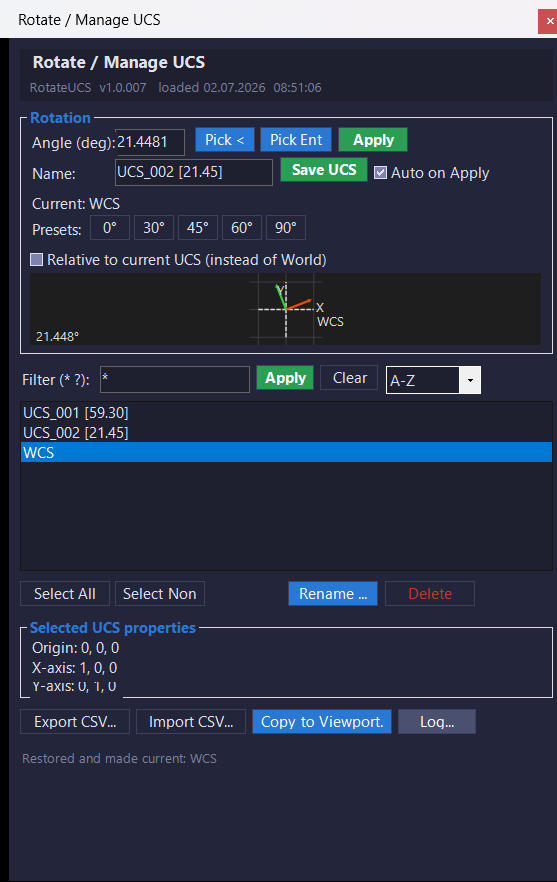
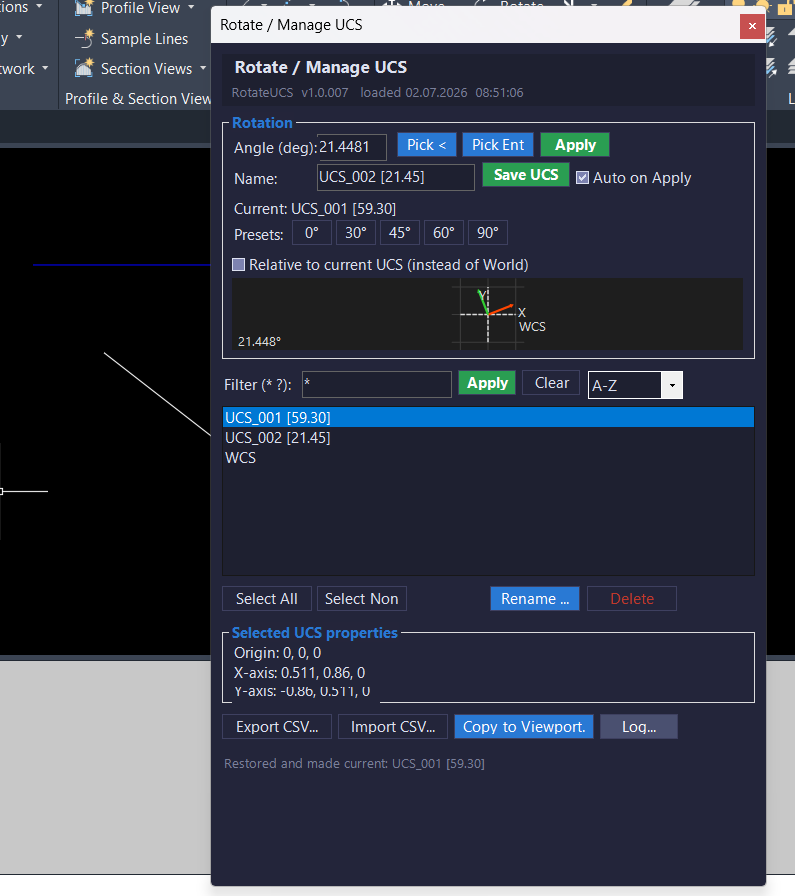
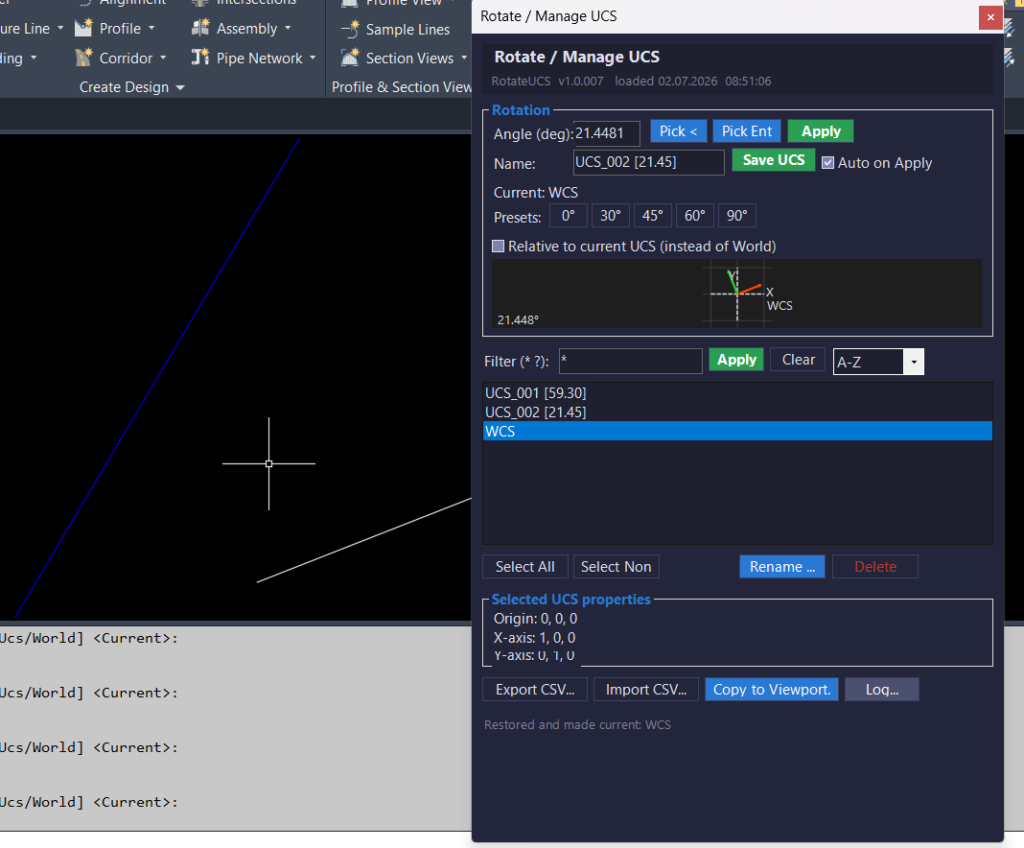
Additional info:
Based on / Source code:
Open Website
Share this page:
Subscribe
Login
0 Comments
Oldest
Categories: AutoCAD_Lips
Categories: AutoCAD_Lips