
Short description
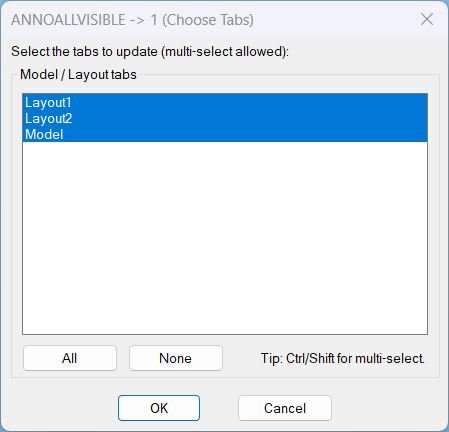
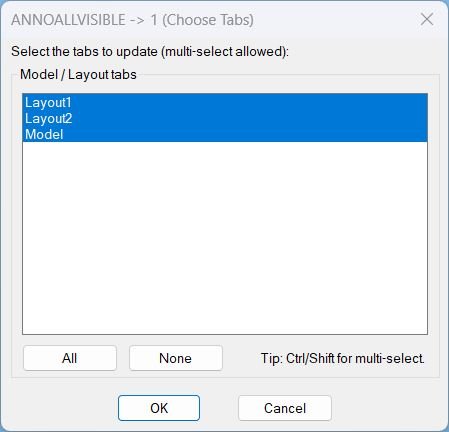
- Opens a DCL picker to choose Model and Layout tabs, then sets ANNOALLVISIBLE to 1 on the selected tabs.
- Includes quick selection controls for All and None before applying changes.
Command:
- Command: AAON
Description:
- Generates a temporary DCL dialog at runtime listing all tabs, including Model, with multi-select enabled.
- On confirmation, switches to each selected tab and runs ANNOALLVISIBLE with value 1 to enable annotation visibility for that tab.
- Preserves and restores user context by saving CTAB, TILEMODE, and MSPACE before changes, then restoring them afterward.
Helper function: (if any)
- AAON:WriteDcl writes the dialog definition to a temporary .dcl file used for the session.
- AAON:GetTabNames collects tab names from the document layouts via ActiveX and returns them in display order, including Model.
- AAON:MakeAllIndexString creates the list box index string needed to select every item by default and via the All button.
- AAON:IdxList->Names converts the list box selection index string into a list of tab names to process.
- AAON:SetAnnoAllVisible1 iterates selected tabs, forces paperspace on layout tabs when applicable, runs ANNOALLVISIBLE to set it to 1, then restores previous state.
- c:AAON orchestrates the workflow: builds the tab list, loads the dialog, handles All and None actions, applies updates, and performs cleanup.
Functionalities:
- Runtime DCL generation creates and loads a temporary dialog file for tab selection.
- Multi-select tab picker supports choosing any combination of Model and Layout tabs to update.
- All selects every listed tab by setting the list box to an auto-generated index string.
- None clears the list box selection to prevent changes from being applied.
- Per-tab application switches CTAB to each selected tab and applies ANNOALLVISIBLE value 1.
- Layout handling forces paperspace on layout tabs by setting MSPACE to false when in a layout context.
- State restoration restores prior CTAB, TILEMODE, and MSPACE after processing completes.
Result:
- If the user confirms a selection, ANNOALLVISIBLE is set to 1 on each selected tab and the previous tab and mode settings are restored.
- If no tabs are selected, prints AAON: Nothing selected. No changes made.
- If the dialog is cancelled, prints AAON: Cancelled.
- If the dialog cannot be loaded, prints AAON: Could not load dialog.
- Always unloads the dialog and deletes the temporary DCL file at the end of execution.
Images, animations etc.
Log in to download.
Log in
Log in
XAML code:
<ResourceDictionary
    xmlns="http://schemas.microsoft.com/winfx/2006/xaml/presentation"
    xmlns:x="http://schemas.microsoft.com/winfx/2006/xaml"
    xmlns:src="clr-namespace:Autodesk.Windows;assembly=AdWindows">

    <src:RibbonToolTip x:Key="AnnoAllOn">
        <src:RibbonToolTip.ExpandedContent>
            <StackPanel>
                <TextBlock Background="AntiqueWhite" TextAlignment="Left">
				<Bold>Function Syntax: AAON</Bold>
				<LineBreak/>
				<Hyperlink>AI+https://forums.autodesk.com/t5/autocad-forum/annotative-objects-not-displaying-in-layout-viewports/td-p/7949416</Hyperlink>
				<LineBreak/>
<Bold>Key user interface behavior</Bold><LineBreak/>
The program generates a temporary <Bold><Span Foreground="DarkRed">DCL</Span></Bold> dialog at runtime, loads it, then removes the temporary DCL file after completion.<LineBreak/>
The dialog displays all available tabs including <Bold>Model</Bold> and every <Bold>Layout</Bold> name from the drawing.<LineBreak/>
Multi-selection is supported, including standard Ctrl and Shift selection behavior.<LineBreak/>

<Bold>Functionalities</Bold><LineBreak/>
• <Bold>Builds a dialog dynamically</Bold> by writing a DCL definition into a temporary file (for example <Span Foreground="DarkRed">AAON.dcl</Span>).<LineBreak/>
• <Bold>Lists all drawing tabs</Bold> (Model plus all Layout tabs) by querying the active document layouts collection.<LineBreak/>
• <Bold>Defaults to selecting all tabs</Bold> when the dialog opens, so the change applies to every tab unless the user limits the scope.<LineBreak/>
• <Bold>Provides quick selection controls</Bold> using dialog buttons:<LineBreak/>
• <Span Foreground="DarkRed">All</Span> selects every tab in the list box.<LineBreak/>
• <Span Foreground="DarkRed">None</Span> clears the selection completely.<LineBreak/>
• <Bold>Applies the change per selected tab</Bold> by iterating through selected tab names, switching to each tab via <Span Foreground="DarkRed">CTAB</Span>, then setting <Span Foreground="DarkRed">ANNOALLVISIBLE</Span> to <Span Foreground="DarkRed">1</Span>.<LineBreak/>
• <Bold>For layout tabs, forces Paper Space</Bold> before setting the value by setting the document <Span Foreground="DarkRed">MSPACE</Span> to false when <Span Foreground="DarkRed">TILEMODE</Span> indicates a layout environment.<LineBreak/>
• <Bold>Restores the prior working state</Bold> after completion, returning <Span Foreground="DarkRed">CTAB</Span>, <Span Foreground="DarkRed">TILEMODE</Span>, and <Span Foreground="DarkRed">MSPACE</Span> to their original values as applicable.<LineBreak/>
• <Bold>Provides safe exit behavior</Bold> by making no changes when the user cancels or selects nothing.<LineBreak/>

<Bold>Important technical notes</Bold><LineBreak/>
<Span Foreground="DarkRed">ANNOALLVISIBLE</Span> is stored per Model tab and per Layout tab, so updating it correctly requires switching tabs rather than targeting viewport entities.<LineBreak/>
The variable is set by issuing the AutoCAD command line call <Span Foreground="DarkRed">._ANNOALLVISIBLE</Span> with the value <Span Foreground="DarkRed">1</Span> on each chosen tab.<LineBreak/>

<Bold>Major components in the code</Bold><LineBreak/>
<Bold><Span Foreground="DarkRed">AAON:WriteDcl</Span></Bold> writes the DCL dialog definition to a temporary file for runtime UI creation.<LineBreak/>
<Bold><Span Foreground="DarkRed">AAON:GetTabNames</Span></Bold> collects tab names (Model plus layouts) from the active document layout collection.<LineBreak/>
<Bold><Span Foreground="DarkRed">AAON:MakeAllIndexString</Span></Bold> generates the index list string to select all items by default such as 0 1 2 ... n-1.<LineBreak/>
<Bold><Span Foreground="DarkRed">AAON:IdxList->Names</Span></Bold> converts selected list box indices into the corresponding tab name strings.<LineBreak/>
<Bold><Span Foreground="DarkRed">AAON:SetAnnoAllVisible1</Span></Bold> switches tabs, forces Paper Space on layouts, applies <Span Foreground="DarkRed">ANNOALLVISIBLE</Span> to <Span Foreground="DarkRed">1</Span>, then restores the original state.<LineBreak/>
<Bold><Span Foreground="DarkRed">c:AAON</Span></Bold> is the command entry point that builds the dialog, captures the selection, executes the update, and cleans up resources.<LineBreak/>

<Bold>Outputs and user feedback</Bold><LineBreak/>
If one or more tabs are selected, the program applies the update and exits without additional prompts.<LineBreak/>
If no tabs are selected, it prints: A AON: Nothing selected. No changes made.<LineBreak/>
If the user cancels, it prints: A AON: Cancelled.<LineBreak/>
If the dialog fails to load, it prints: A AON: Could not load dialog.<LineBreak/>

</TextBlock>

                <!-- Use MediaElement for GIF (static first frame) and Image as fallback -->


            </StackPanel>
        </src:RibbonToolTip.ExpandedContent>
    </src:RibbonToolTip>
</ResourceDictionary>
Additional info:
Based on / Source code:
Open Website
Share this page:
Subscribe
Login
0 Comments
Oldest