
Short description
🧩 ParallelPolylinesOption is a DCL utility for closing two parallel open curves into one joined polyline or reopening a closed lightweight polyline into two parallel open sides.
➗ Both close and unclose workflows can automatically generate a midpoint centerline polyline on layer _HILFSLINIEN.
🎛️ The dialog provides Close Unclose Centerline Apply Undo OK and Cancel controls.
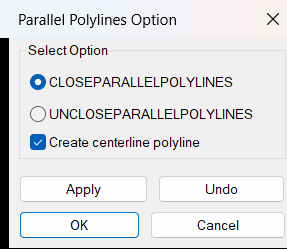
Command:
Main dialog: ParallelPolylinesOption
Direct close: CLOSEPARALLELPOLYLINES
Direct unclose: UNCLOSEPARALLELPOLYLINES
Description:
🔗 Close mode accepts LWPOLYLINE LINE ARC and SPLINE entities and converts supported selections to lightweight polylines for processing.
2️⃣ Exactly two resulting polylines are required for the close workflow.
➗ When enabled the centerline is created while the two side polylines are still separate.
📏 The routine evaluates the two possible endpoint pairings and chooses the pairing with the shorter total connector distance.
➕ Two connector LINE entities are created and PEDIT Multiple Join combines the pair into one polyline.
✂️ Unclose mode accepts closed LWPOLYLINE objects and identifies the two shortest closed segments as end connectors.
↔️ The remaining vertex paths are rebuilt as two separate open lightweight polylines.
🧬 Layer color linetype and lineweight are preserved for the rebuilt unclosed sides.
🎛️ Apply and Undo use AutoCAD UNDO marks and Cancel rolls back Apply operations from the dialog session.
Helper function: (if any)
PPO-SS->LWPolylines converts supported close mode source entities.
PPO-CreateCenterline uses parametric point averaging between the two sides.
PPO-DoCloseParallelPolylines performs endpoint linking and PEDIT Join.
PPO-DoUncloseParallelPolylines rebuilds the two open side paths.
Functionalities:
✅ Close parallel sides – joins two open sides into one polyline.
✅ Unclose closed parallel shape – splits a closed lightweight polyline into two open side polylines.
✅ LINE conversion – accepts line source geometry in close mode.
✅ ARC conversion – accepts arc source geometry in close mode.
✅ SPLINE conversion – accepts spline source geometry in close mode.
✅ Automatic endpoint pairing – chooses the shortest total end connection arrangement.
✅ Centerline generation – creates midpoint geometry on _HILFSLINIEN.
✅ Shortest connector detection – unclose mode removes the two shortest boundary segments.
✅ Property preservation – rebuilds unclosed sides with source layer color linetype and lineweight.
✅ Apply and Undo – supports iterative dialog operations.
✅ Cancel rollback – reverses Apply operations from the current run.
Result:
🎯 Close mode produces one joined polyline from two parallel sides and two end connectors.
↔️ Unclose mode produces two open lightweight polyline sides from a suitable closed polyline.
➗ An optional centerline can be generated in either workflow.
Images, animations etc.
XAML code:
<ResourceDictionary xmlns="http://schemas.microsoft.com/winfx/2006/xaml/presentation" xmlns:src="clr-namespace:Autodesk.Windows;assembly=AdWindows" xmlns:x="http://schemas.microsoft.com/winfx/2006/xaml">
<src:RibbonToolTip x:Key="ParallelPolylinesOption">
<src:RibbonToolTip.ExpandedContent>
<StackPanel>
<TextBlock Background="AntiqueWhite" TextAlignment="Left">
<Bold>Function Syntax: ParallelPolylinesOption / CLOSEPARALLELPOLYLINES / UNCLOSEPARALLELPOLYLINES</Bold>
<LineBreak />
<Bold>Version: 1.0 Date: 22.06.2026 10:38:26AM</Bold>
<LineBreak />
<Hyperlink>N/A</Hyperlink>
<LineBreak />
<Bold>
<Run Foreground="DodgerBlue">Description</Run>
</Bold>
<LineBreak />
<Run Foreground="White">🧩 ParallelPolylinesOption is a DCL utility for closing two parallel open curves into one joined polyline or reopening a closed lightweight polyline into two parallel open sides.</Run>
<LineBreak />
<Run Foreground="White">➗ Both close and unclose workflows can automatically generate a midpoint centerline polyline on layer _HILFSLINIEN.</Run>
<LineBreak />
<Run Foreground="White">🎛️ The dialog provides Close Unclose Centerline Apply Undo OK and Cancel controls.</Run>
<LineBreak />
<LineBreak />
<Bold>
<Run Foreground="DodgerBlue">Function Syntax</Run>
</Bold>
<LineBreak />
<Run Foreground="White">Main dialog: </Run>
<Bold>
<Run Foreground="Orange">ParallelPolylinesOption</Run>
</Bold>
<LineBreak />
<Run Foreground="White">Direct close: </Run>
<Bold>
<Run Foreground="Orange">CLOSEPARALLELPOLYLINES</Run>
</Bold>
<LineBreak />
<Run Foreground="White">Direct unclose: </Run>
<Bold>
<Run Foreground="Orange">UNCLOSEPARALLELPOLYLINES</Run>
</Bold>
<LineBreak />
<LineBreak />
<Bold>
<Run Foreground="DodgerBlue">SEO Optimized Overview</Run>
</Bold>
<LineBreak />
<Run Foreground="White">🔗 Close mode accepts LWPOLYLINE LINE ARC and SPLINE entities and converts supported selections to lightweight polylines for processing.</Run>
<LineBreak />
<Run Foreground="White">2️⃣ Exactly two resulting polylines are required for the close workflow.</Run>
<LineBreak />
<Run Foreground="White">➗ When enabled the centerline is created while the two side polylines are still separate.</Run>
<LineBreak />
<Run Foreground="White">📏 The routine evaluates the two possible endpoint pairings and chooses the pairing with the shorter total connector distance.</Run>
<LineBreak />
<Run Foreground="White">➕ Two connector LINE entities are created and PEDIT Multiple Join combines the pair into one polyline.</Run>
<LineBreak />
<Run Foreground="White">✂️ Unclose mode accepts closed LWPOLYLINE objects and identifies the two shortest closed segments as end connectors.</Run>
<LineBreak />
<Run Foreground="White">↔️ The remaining vertex paths are rebuilt as two separate open lightweight polylines.</Run>
<LineBreak />
<Run Foreground="White">🧬 Layer color linetype and lineweight are preserved for the rebuilt unclosed sides.</Run>
<LineBreak />
<Run Foreground="White">🎛️ Apply and Undo use AutoCAD UNDO marks and Cancel rolls back Apply operations from the dialog session.</Run>
<LineBreak />
<LineBreak />
<Bold>
<Run Foreground="LimeGreen">Primary Workflow</Run>
</Bold>
<LineBreak />
<Run Foreground="White">• Run ParallelPolylinesOption or one of the direct commands.</Run>
<LineBreak />
<Run Foreground="White">• Choose Close or Unclose and optionally enable Create centerline polyline.</Run>
<LineBreak />
<Run Foreground="White">• In Close mode select exactly two open source sides.</Run>
<LineBreak />
<Run Foreground="White">• In Unclose mode select one or more closed lightweight polylines.</Run>
<LineBreak />
<Run Foreground="White">• The selected geometry is joined or split and an optional centerline is created.</Run>
<LineBreak />
<Run Foreground="White">• Use Apply Undo OK and Cancel when working through the DCL.</Run>
<LineBreak />
<LineBreak />
<Bold>
<Run Foreground="LimeGreen">Functionalities</Run>
</Bold>
<LineBreak />
<Run Foreground="White">✅ </Run>
<Bold>
<Run Foreground="LimeGreen">Close parallel sides</Run>
</Bold>
<Run Foreground="White"> - joins two open sides into one polyline.</Run>
<LineBreak />
<Run Foreground="White">✅ </Run>
<Bold>
<Run Foreground="LimeGreen">Unclose closed parallel shape</Run>
</Bold>
<Run Foreground="White"> - splits a closed lightweight polyline into two open side polylines.</Run>
<LineBreak />
<Run Foreground="White">✅ </Run>
<Bold>
<Run Foreground="LimeGreen">LINE conversion</Run>
</Bold>
<Run Foreground="White"> - accepts line source geometry in close mode.</Run>
<LineBreak />
<Run Foreground="White">✅ </Run>
<Bold>
<Run Foreground="LimeGreen">ARC conversion</Run>
</Bold>
<Run Foreground="White"> - accepts arc source geometry in close mode.</Run>
<LineBreak />
<Run Foreground="White">✅ </Run>
<Bold>
<Run Foreground="LimeGreen">SPLINE conversion</Run>
</Bold>
<Run Foreground="White"> - accepts spline source geometry in close mode.</Run>
<LineBreak />
<Run Foreground="White">✅ </Run>
<Bold>
<Run Foreground="LimeGreen">Automatic endpoint pairing</Run>
</Bold>
<Run Foreground="White"> - chooses the shortest total end connection arrangement.</Run>
<LineBreak />
<Run Foreground="White">✅ </Run>
<Bold>
<Run Foreground="LimeGreen">Centerline generation</Run>
</Bold>
<Run Foreground="White"> - creates midpoint geometry on _HILFSLINIEN.</Run>
<LineBreak />
<Run Foreground="White">✅ </Run>
<Bold>
<Run Foreground="LimeGreen">Shortest connector detection</Run>
</Bold>
<Run Foreground="White"> - unclose mode removes the two shortest boundary segments.</Run>
<LineBreak />
<Run Foreground="White">✅ </Run>
<Bold>
<Run Foreground="LimeGreen">Property preservation</Run>
</Bold>
<Run Foreground="White"> - rebuilds unclosed sides with source layer color linetype and lineweight.</Run>
<LineBreak />
<Run Foreground="White">✅ </Run>
<Bold>
<Run Foreground="LimeGreen">Apply and Undo</Run>
</Bold>
<Run Foreground="White"> - supports iterative dialog operations.</Run>
<LineBreak />
<Run Foreground="White">✅ </Run>
<Bold>
<Run Foreground="LimeGreen">Cancel rollback</Run>
</Bold>
<Run Foreground="White"> - reverses Apply operations from the current run.</Run>
<LineBreak />
<LineBreak />
<Bold>
<Run Foreground="DodgerBlue">Important Commands and Aspects</Run>
</Bold>
<LineBreak />
<Run Foreground="White">🧩 PPO-SS->LWPolylines converts supported close mode source entities.</Run>
<LineBreak />
<Run Foreground="White">🧩 PPO-CreateCenterline uses parametric point averaging between the two sides.</Run>
<LineBreak />
<Run Foreground="White">🧩 PPO-DoCloseParallelPolylines performs endpoint linking and PEDIT Join.</Run>
<LineBreak />
<Run Foreground="White">🧩 PPO-DoUncloseParallelPolylines rebuilds the two open side paths.</Run>
<LineBreak />
<LineBreak />
<Bold>
<Run Foreground="DodgerBlue">Result</Run>
</Bold>
<LineBreak />
<Run Foreground="White">🎯 Close mode produces one joined polyline from two parallel sides and two end connectors.</Run>
<LineBreak />
<Run Foreground="White">↔️ Unclose mode produces two open lightweight polyline sides from a suitable closed polyline.</Run>
<LineBreak />
<Run Foreground="White">➗ An optional centerline can be generated in either workflow.</Run>
<LineBreak />
<LineBreak />
<Bold>
<Run Foreground="DarkRed">Important Notes</Run>
</Bold>
<LineBreak />
<Run Foreground="White">⚠️ </Run>
<Bold>
<Run Foreground="DarkRed">Close mode requires exactly two resulting lightweight polylines after source conversion.</Run>
</Bold>
<LineBreak />
<Run Foreground="White">⚠️ </Run>
<Bold>
<Run Foreground="DarkRed">Unclose mode identifies the two shortest closed polyline segments as the end connectors to remove.</Run>
</Bold>
<LineBreak />
<Run Foreground="White">⚠️ </Run>
<Bold>
<Run Foreground="DarkRed">The default centerline option is enabled.</Run>
</Bold>
<LineBreak />
<LineBreak />
<Bold>
<Run Foreground="Yellow">SEO Keywords</Run>
</Bold>
<LineBreak />
<Run Foreground="Yellow">🏷️ AutoCAD, 🏷️ Civil 3D, 🏷️ AutoLISP, 🏷️ ParallelPolylinesOption, 🏷️ Close parallel polylines, 🏷️ Unclose polyline, 🏷️ Centerline, 🏷️ PEDIT Join, 🏷️ LWPOLYLINE, 🏷️ _HILFSLINIEN, 🏷️ DCL</Run>
<LineBreak />
</TextBlock>
<Grid>
<Image Source="Image_000.png" Stretch="Uniform" />
</Grid>
</StackPanel>
</src:RibbonToolTip.ExpandedContent>
</src:RibbonToolTip>
</ResourceDictionary>