
Short description
SwapBlockAssignLayer is an AutoCAD AutoLISP utility that replaces selected drawing objects with instances of an existing named block, using a DCL block selector and remembered last-used block choice.
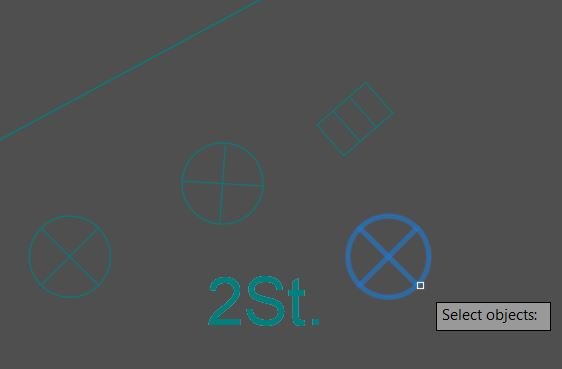
Command:
SwapBlockAssignLayer
Description:
🚀 SwapBlockAssignLayer is an AutoCAD AutoLISP block replacement tool for converting selected drawing entities into inserted block references.
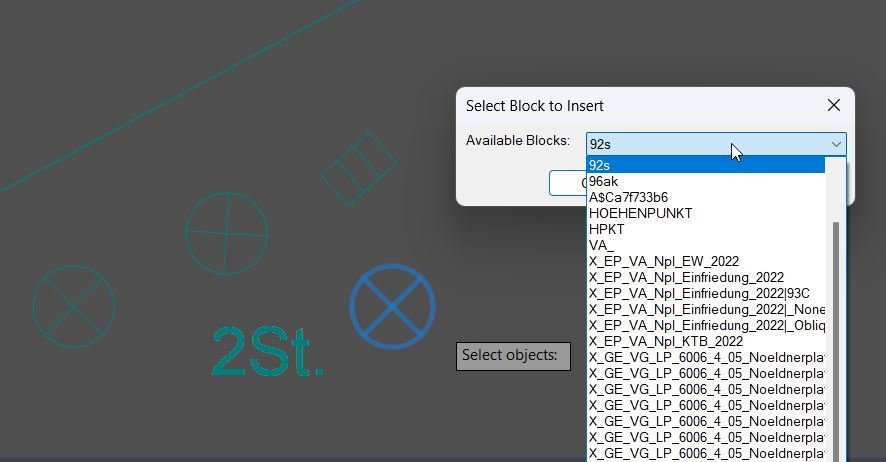
The command prompts the user to select objects, displays a DCL popup list of available named blocks in the current drawing, remembers the last selected block through an environment variable, inserts the chosen block at each selected object’s insertion point or bounding-box center, and deletes the original selected object after replacement.
It is useful for CAD cleanup, converting placeholder geometry into standardized blocks, replacing temporary symbols with real block references, and improving drawing consistency in AutoCAD and Civil 3D production drawings.
Helper function: (if any)
LM-style helper logic is not used here; the routine relies on AutoLISP, Visual LISP COM calls, a temporary DCL dialog, block-table scanning with tblnext, object property checks, bounding-box fallback, and vla-InsertBlock.
Functionalities:
• 🧩 Command entry point: SwapBlockAssignLayer.
• 🔎 Prompts the user to select objects that should be replaced by block instances.
• 📋 Scans the drawing block table and lists user-defined named blocks.
• 🚫 Filters anonymous and system block names beginning with an asterisk.
• 🪟 Builds a temporary DCL dialog named DuplicateToBlockInsert for block selection.
• 💾 Remembers the last selected block with the DuplicateToBlockInsert_LastBlock environment variable.
• 📍 Uses the object InsertionPoint when available.
• 📐 Falls back to the center of the object bounding box when no insertion point property exists.
• 🧭 Inserts the replacement block using the current UCS X direction for rotation.
• 🧹 Deletes the original selected entity after inserting the replacement block.
• ✅ Reports how many selected objects were replaced.
Result:
✅ Selected objects are replaced with instances of the chosen existing block, placed at each object’s insertion point or bounding-box center, while the original selected objects are removed.
Images, animations etc.

XAML code:
<ResourceDictionary
xmlns="http://schemas.microsoft.com/winfx/2006/xaml/presentation"
xmlns:x="http://schemas.microsoft.com/winfx/2006/xaml"
xmlns:src="clr-namespace:Autodesk.Windows;assembly=AdWindows">
<src:RibbonToolTip x:Key="SwapBlockAssignLayer">
<src:RibbonToolTip.ExpandedContent>
<StackPanel>
<TextBlock Background="AntiqueWhite" TextAlignment="Left">
<Bold>Function Syntax: SwapBlockAssignLayer</Bold>
<LineBreak/>
<Bold>Version: 1.1 Date: 20.06.2026 6:38:49PM</Bold>
<LineBreak/>
<Hyperlink>AI+https://www.cadtutor.net/forum/topic/21571-replace-selected-block-or-blocks-with-another-block/</Hyperlink>
<LineBreak/>
<Bold><Run Foreground="DodgerBlue">Description</Run></Bold><LineBreak/>
<Run Foreground="White">🚀 </Run><Bold><Run Foreground="Orange">SwapBlockAssignLayer</Run></Bold><Run Foreground="White"> is an AutoCAD AutoLISP utility for replacing selected drawing objects with instances of an existing named block from the current drawing.</Run><LineBreak/>
<Run Foreground="White">The tool helps CAD users convert temporary geometry, placeholder symbols, or manually drafted objects into standardized block references for cleaner AutoCAD and Civil 3D drawings.</Run><LineBreak/>
<Bold><Run Foreground="DodgerBlue">Command</Run></Bold><LineBreak/>
<Run Foreground="White">🧩 Run </Run><Bold><Run Foreground="Orange">SwapBlockAssignLayer</Run></Bold><Run Foreground="White"> in the AutoCAD command line.</Run><LineBreak/>
<Run Foreground="White">The routine asks the user to select the objects to replace, then opens a DCL block-selection dialog.</Run><LineBreak/>
<Bold><Run Foreground="LimeGreen">Functionalities</Run></Bold><LineBreak/>
<Run Foreground="White">🔎 </Run><Bold><Run Foreground="LimeGreen">Object selection workflow</Run></Bold><Run Foreground="White"> - prompts the user to select drawing entities that should be replaced by block references.</Run><LineBreak/>
<Run Foreground="White">📋 </Run><Bold><Run Foreground="LimeGreen">Named block scanner</Run></Bold><Run Foreground="White"> - reads the drawing block table and lists available user-defined blocks.</Run><LineBreak/>
<Run Foreground="White">🚫 </Run><Bold><Run Foreground="LimeGreen">Anonymous block filtering</Run></Bold><Run Foreground="White"> - skips anonymous and system block definitions whose names begin with an asterisk.</Run><LineBreak/>
<Run Foreground="White">🪟 </Run><Bold><Run Foreground="LimeGreen">DCL dialog selection</Run></Bold><Run Foreground="White"> - creates a temporary dialog named </Run><Bold><Run Foreground="Orange">DuplicateToBlockInsert</Run></Bold><Run Foreground="White"> with a popup list of available blocks.</Run><LineBreak/>
<Run Foreground="White">💾 </Run><Bold><Run Foreground="LimeGreen">Last block memory</Run></Bold><Run Foreground="White"> - stores the last used block in </Run><Bold><Run Foreground="Orange">DuplicateToBlockInsert_LastBlock</Run></Bold><Run Foreground="White"> and preselects it on the next run.</Run><LineBreak/>
<Run Foreground="White">📍 </Run><Bold><Run Foreground="LimeGreen">Insertion point detection</Run></Bold><Run Foreground="White"> - uses the selected object's insertion point when available.</Run><LineBreak/>
<Run Foreground="White">📐 </Run><Bold><Run Foreground="LimeGreen">Bounding-box fallback</Run></Bold><Run Foreground="White"> - calculates the object center from its bounding box when an insertion point is not available.</Run><LineBreak/>
<Run Foreground="White">🧭 </Run><Bold><Run Foreground="LimeGreen">UCS-aware rotation</Run></Bold><Run Foreground="White"> - inserts the replacement block using the current UCS X direction for rotation.</Run><LineBreak/>
<Run Foreground="White">🧹 </Run><Bold><Run Foreground="LimeGreen">Cleanup replacement</Run></Bold><Run Foreground="White"> - deletes the original selected object after inserting the new block reference.</Run><LineBreak/>
<Bold><Run Foreground="DodgerBlue">Technical Notes</Run></Bold><LineBreak/>
<Run Foreground="White">⚙️ The code uses </Run><Bold><Run Foreground="Orange">tblnext</Run></Bold><Run Foreground="White">, </Run><Bold><Run Foreground="Orange">ssget</Run></Bold><Run Foreground="White">, </Run><Bold><Run Foreground="Orange">vlax-ename->vla-object</Run></Bold><Run Foreground="White">, </Run><Bold><Run Foreground="Orange">vla-GetBoundingBox</Run></Bold><Run Foreground="White">, </Run><Bold><Run Foreground="Orange">vla-InsertBlock</Run></Bold><Run Foreground="White">, and </Run><Bold><Run Foreground="Orange">vla-Delete</Run></Bold><Run Foreground="White">.</Run><LineBreak/>
<Run Foreground="White">⚠️ The uploaded code does not explicitly assign the inserted block reference to the original entity layer, even though the file name includes AssignLayer.</Run><LineBreak/>
<Run Foreground="White">⚠️ Test on a copy of the drawing because the original selected entities are deleted after replacement.</Run><LineBreak/>
<Bold><Run Foreground="DodgerBlue">Practical Result</Run></Bold><LineBreak/>
<Run Foreground="White">✅ Selected drawing objects are converted into consistent block references, placed at each object's insertion point or bounding-box center, helping standardize CAD content and reduce manual block replacement work.</Run><LineBreak/>
<Bold><Run Foreground="Gold">Tags</Run></Bold><LineBreak/>
<Run Foreground="Gold">🏷️ AutoCAD, 🏷️ AutoLISP, 🏷️ Civil 3D, 🏷️ Block Replacement, 🏷️ DCL Dialog, 🏷️ Drawing Cleanup, 🏷️ CAD Automation</Run><LineBreak/>
</TextBlock>
<Grid>
<Image Source="Image_000.jpg" Stretch="Uniform"/>
</Grid>
<Grid>
<Image Source="Image_001.jpg" Stretch="Uniform"/>
</Grid>
<Grid>
<Image Source="Image_002.jpg" Stretch="Uniform"/>
</Grid>
<!-- Use MediaElement for GIF (static first frame) and Image as fallback -->
</StackPanel>
</src:RibbonToolTip.ExpandedContent>
</src:RibbonToolTip>
</ResourceDictionary>