
Short description
🧩 ConvertMultiplePolylines is an AutoCAD AutoLISP utility for converting LINE and legacy 2D POLYLINE geometry into a modern lightweight polyline workflow.
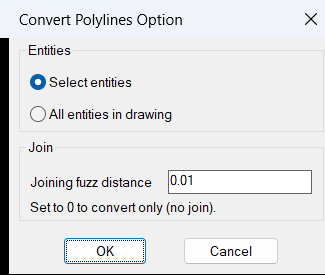
🎛️ The embedded DCL dialog lets the user process selected entities or all compatible entities in the drawing and define a joining fuzz distance.
🔗 A positive fuzz distance activates PEDIT joining with Extend jointype while a value of 0 performs conversion without joining.
Command:
🚀 Main command: ConvertMultiplePolylines
🎛️ Processing modes: Select entities or All entities in drawing
📏 Default joining fuzz distance: 0.01
🔗 Set joining fuzz distance to 0 for conversion only
Description:
🧩 ConvertMultiplePolylines combines old polyline conversion and PEDIT based joining in one AutoCAD command.
📐 Supported source objects are LINE LWPOLYLINE and old style 2D POLYLINE entities.
🔄 Old 2D POLYLINE objects are rebuilt as LWPOLYLINE entities before the final PEDIT operation.
🧬 The legacy polyline conversion preserves supported vertex coordinates widths bulges elevation closed state pline generation state layer linetype color linetype scale lineweight thickness normal and XData.
🎛️ The DCL interface provides Select entities and All entities in drawing modes together with an editable joining fuzz distance.
🔗 When the fuzz distance is greater than 0 the routine uses PEDIT Multiple Join with Extend jointype.
📌 When the fuzz distance is 0 or less the routine performs conversion through PEDIT without the Join operation.
🖱️ Selected entity mode first uses the current implied selection when available and otherwise prompts the user for objects.
🌐 All entities mode scans the drawing for LINE LWPOLYLINE and valid old style 2D POLYLINE entities.
Helper function: (if any)
🧩 plm:_dialog creates and manages the temporary DCL conversion options interface.
🧩 plm:_is2dpoly identifies old style 2D POLYLINE entities while excluding 3D polylines polyface meshes and polygon meshes.
🧩 OldStyle2LwPolyline rebuilds a valid old 2D POLYLINE as an LWPOLYLINE and deletes the original after successful creation.
🧩 plm:_collect_pset_from_ss prepares a working selection set containing LINE LWPOLYLINE and converted 2D POLYLINE entities.
🧩 plm:_pset_has_lines detects whether PEDIT must answer Yes to convert LINE entities into polylines.
🧩 plm:_run_pedit performs the final PEDIT conversion or conversion plus joining operation.
Functionalities:
✅ 🎛️ Embedded DCL interface – provides processing mode and joining fuzz controls.
✅ 🖱️ Selected entities mode – processes an implied selection or prompts for LINE LWPOLYLINE and POLYLINE objects.
✅ 🌐 All entities mode – collects all compatible drawing entities automatically.
✅ 🔄 Old 2D POLYLINE conversion – rebuilds legacy planar POLYLINE entities as LWPOLYLINE objects.
✅ 📐 LINE conversion – uses PEDIT Multiple to convert LINE entities into polyline geometry.
✅ 🔗 Optional joining – joins compatible working geometry when the fuzz distance is greater than 0.
✅ 📏 Adjustable fuzz distance – controls the maximum joining tolerance used by PEDIT.
✅ ➡️ Extend jointype – uses the PEDIT Join Extend option when joining is enabled.
✅ 🧬 Property preservation – transfers important entity and vertex properties from old 2D polylines.
✅ 🚫 3D polyline exclusion – rejects 3D polylines polyface meshes and polygon meshes from legacy conversion.
✅ 💾 Persistent session defaults – remembers the last processing mode and fuzz value while the AutoCAD session remains active.
Result:
🎯 The result is a cleaned and modernized polyline set containing lightweight polyline geometry produced from compatible LINE and old 2D POLYLINE entities.
🔗 When joining is enabled compatible objects are also joined through PEDIT using the selected fuzz tolerance and Extend jointype.
🧰 The routine is useful for preparing legacy or fragmented CAD geometry for editing cleanup quantity takeoff boundary creation and Civil 3D workflows.
Images, animations etc.
XAML code:
<ResourceDictionary
xmlns="http://schemas.microsoft.com/winfx/2006/xaml/presentation"
xmlns:x="http://schemas.microsoft.com/winfx/2006/xaml"
xmlns:src="clr-namespace:Autodesk.Windows;assembly=AdWindows">

<src:RibbonToolTip x:Key="ConvertMultiplePolylines">
<src:RibbonToolTip.ExpandedContent>
<StackPanel>
<TextBlock Background="AntiqueWhite" TextAlignment="ConvertMultiplePolylines">
<Bold>Function Syntax: ConvertMultiplePolylines</Bold>
<LineBreak/>
<Bold>Version: 1.0 Date: 20.06.2026 6:38:58PM</Bold>
<LineBreak/>
<Hyperlink>AI</Hyperlink>
<LineBreak/>
<Bold><Run Foreground="DodgerBlue">Description</Run></Bold><LineBreak/>
<Run Foreground="White">🧩 ConvertMultiplePolylines is an AutoCAD AutoLISP utility for converting and optionally joining LINE old 2D POLYLINE and LWPOLYLINE geometry.</Run><LineBreak/>
<Run Foreground="LimeGreen">📌 The program combines </Run><Bold><Run Foreground="Orange">legacy 2D POLYLINE conversion</Run></Bold><Run Foreground="LimeGreen"> with </Run><Bold><Run Foreground="Orange">PEDIT joining</Run></Bold><Run Foreground="LimeGreen"> in one configurable workflow.</Run><LineBreak/>
<Run Foreground="White">🎛️ An embedded DCL dialog lets the user process selected entities or all compatible entities in the drawing and define the joining fuzz distance.</Run><LineBreak/>
<Bold><Run Foreground="DodgerBlue">Function Syntax</Run></Bold><LineBreak/>
<Run Foreground="White">🚀 Main command: </Run><Bold><Run Foreground="Orange">ConvertMultiplePolylines</Run></Bold><LineBreak/>
<Run Foreground="White">🎛️ Processing mode: </Run><Bold><Run Foreground="Orange">Select entities</Run></Bold><Run Foreground="White"> or </Run><Bold><Run Foreground="Orange">All entities in drawing</Run></Bold><LineBreak/>
<Run Foreground="White">📏 Default joining fuzz distance: </Run><Bold><Run Foreground="Orange">0.01</Run></Bold><LineBreak/>
<Run Foreground="White">🔗 Set the fuzz distance to </Run><Bold><Run Foreground="Orange">0</Run></Bold><Run Foreground="White"> for conversion only with no joining.</Run><LineBreak/>
<Bold><Run Foreground="DodgerBlue">SEO Optimized Overview</Run></Bold><LineBreak/>
<Run Foreground="White">📐 Supported source objects are </Run><Bold><Run Foreground="Orange">LINE</Run></Bold><Run Foreground="White"> </Run><Bold><Run Foreground="Orange">LWPOLYLINE</Run></Bold><Run Foreground="White"> and valid old style </Run><Bold><Run Foreground="Orange">2D POLYLINE</Run></Bold><Run Foreground="White"> entities.</Run><LineBreak/>
<Run Foreground="White">🔄 Old 2D POLYLINE objects are rebuilt as modern LWPOLYLINE entities before the final PEDIT operation.</Run><LineBreak/>
<Run Foreground="White">🧬 The legacy conversion preserves supported vertex coordinates widths bulges elevation closed state pline generation state and important entity properties.</Run><LineBreak/>
<Run Foreground="White">🔗 When the fuzz distance is greater than 0 the routine uses </Run><Bold><Run Foreground="Orange">PEDIT Multiple Join</Run></Bold><Run Foreground="White"> with </Run><Bold><Run Foreground="Orange">Extend</Run></Bold><Run Foreground="White"> jointype.</Run><LineBreak/>
<Run Foreground="White">📌 When the fuzz distance is 0 or less the routine performs the conversion workflow without the Join operation.</Run><LineBreak/>
<Run Foreground="White">🖱️ Selected entities mode first uses the current implied AutoCAD selection when one is available and otherwise prompts for objects.</Run><LineBreak/>
<Run Foreground="White">🌐 All entities mode automatically searches the complete drawing for compatible LINE LWPOLYLINE and old 2D POLYLINE entities.</Run><LineBreak/>
<Bold><Run Foreground="LimeGreen">Primary Workflow</Run></Bold><LineBreak/>
<Run Foreground="White">• Run </Run><Bold><Run Foreground="Orange">ConvertMultiplePolylines</Run></Bold><Run Foreground="White"> from the AutoCAD command line.</Run><LineBreak/>
<Run Foreground="White">• Choose </Run><Bold><Run Foreground="Orange">Select entities</Run></Bold><Run Foreground="White"> or </Run><Bold><Run Foreground="Orange">All entities in drawing</Run></Bold><Run Foreground="White">.</Run><LineBreak/>
<Run Foreground="White">• Enter the required </Run><Bold><Run Foreground="Orange">Joining fuzz distance</Run></Bold><Run Foreground="White">.</Run><LineBreak/>
<Run Foreground="White">• In selected mode use the implied selection or select LINE LWPOLYLINE and POLYLINE objects.</Run><LineBreak/>
<Run Foreground="White">• Valid old style 2D POLYLINE entities are converted to LWPOLYLINE objects.</Run><LineBreak/>
<Run Foreground="White">• LINE and LWPOLYLINE objects are added to the working selection set.</Run><LineBreak/>
<Run Foreground="White">• The routine runs </Run><Bold><Run Foreground="Orange">PEDIT</Run></Bold><Run Foreground="White"> for conversion only or conversion plus joining according to the fuzz value.</Run><LineBreak/>
<Bold><Run Foreground="LimeGreen">Functionalities</Run></Bold><LineBreak/>
<Run Foreground="White">✅ </Run><Bold><Run Foreground="LimeGreen">Embedded DCL interface</Run></Bold><Run Foreground="White"> - provides processing mode and joining fuzz controls.</Run><LineBreak/>
<Run Foreground="White">✅ </Run><Bold><Run Foreground="LimeGreen">Selected entities mode</Run></Bold><Run Foreground="White"> - processes only user selected compatible geometry.</Run><LineBreak/>
<Run Foreground="White">✅ </Run><Bold><Run Foreground="LimeGreen">Implied selection support</Run></Bold><Run Foreground="White"> - uses already selected AutoCAD objects when available.</Run><LineBreak/>
<Run Foreground="White">✅ </Run><Bold><Run Foreground="LimeGreen">All entities mode</Run></Bold><Run Foreground="White"> - automatically gathers compatible objects from the drawing.</Run><LineBreak/>
<Run Foreground="White">✅ </Run><Bold><Run Foreground="LimeGreen">Old 2D POLYLINE conversion</Run></Bold><Run Foreground="White"> - rebuilds valid legacy planar polylines as modern LWPOLYLINE objects.</Run><LineBreak/>
<Run Foreground="White">✅ </Run><Bold><Run Foreground="LimeGreen">LINE conversion</Run></Bold><Run Foreground="White"> - uses PEDIT Multiple to convert LINE objects into polyline geometry.</Run><LineBreak/>
<Run Foreground="White">✅ </Run><Bold><Run Foreground="LimeGreen">Optional polyline joining</Run></Bold><Run Foreground="White"> - joins compatible objects when the fuzz distance is greater than 0.</Run><LineBreak/>
<Run Foreground="White">✅ </Run><Bold><Run Foreground="LimeGreen">Adjustable fuzz tolerance</Run></Bold><Run Foreground="White"> - controls the maximum distance accepted by the PEDIT joining operation.</Run><LineBreak/>
<Run Foreground="White">✅ </Run><Bold><Run Foreground="LimeGreen">Extend jointype</Run></Bold><Run Foreground="White"> - uses the PEDIT Join Extend option when joining is enabled.</Run><LineBreak/>
<Run Foreground="White">✅ </Run><Bold><Run Foreground="LimeGreen">Vertex data preservation</Run></Bold><Run Foreground="White"> - retains coordinates start width end width and bulge data from old 2D polylines.</Run><LineBreak/>
<Run Foreground="White">✅ </Run><Bold><Run Foreground="LimeGreen">Entity property preservation</Run></Bold><Run Foreground="White"> - retains supported layer linetype color linetype scale lineweight thickness normal and XData properties.</Run><LineBreak/>
<Run Foreground="White">✅ </Run><Bold><Run Foreground="LimeGreen">3D geometry exclusion</Run></Bold><Run Foreground="White"> - prevents 3D polylines polyface meshes and polygon meshes from entering the legacy conversion.</Run><LineBreak/>
<Run Foreground="White">✅ </Run><Bold><Run Foreground="LimeGreen">Session defaults</Run></Bold><Run Foreground="White"> - remembers the last processing mode and fuzz value while the AutoCAD session remains active.</Run><LineBreak/>
<Bold><Run Foreground="DodgerBlue">Important Commands and Aspects</Run></Bold><LineBreak/>
<Run Foreground="White">🧩 </Run><Bold><Run Foreground="Orange">OldStyle2LwPolyline</Run></Bold><Run Foreground="White"> rebuilds a valid old 2D POLYLINE as an LWPOLYLINE.</Run><LineBreak/>
<Run Foreground="White">🧩 </Run><Bold><Run Foreground="Orange">plm:_is2dpoly</Run></Bold><Run Foreground="White"> rejects 3D polylines polyface meshes and polygon meshes.</Run><LineBreak/>
<Run Foreground="White">🧩 </Run><Bold><Run Foreground="Orange">plm:_collect_pset_from_ss</Run></Bold><Run Foreground="White"> prepares the working selection set.</Run><LineBreak/>
<Run Foreground="White">🧩 </Run><Bold><Run Foreground="Orange">plm:_run_pedit</Run></Bold><Run Foreground="White"> performs conversion only or conversion plus joining.</Run><LineBreak/>
<Run Foreground="White">🧩 </Run><Bold><Run Foreground="Orange">PEDIT</Run></Bold><Run Foreground="White"> is the final AutoCAD conversion and joining engine.</Run><LineBreak/>
<Bold><Run Foreground="DodgerBlue">Result</Run></Bold><LineBreak/>
<Run Foreground="White">🎯 The result is a cleaned and modernized polyline set containing lightweight polyline geometry produced from compatible LINE and old 2D POLYLINE entities.</Run><LineBreak/>
<Run Foreground="White">🔗 When joining is enabled compatible geometry is also joined using the selected fuzz tolerance and Extend jointype.</Run><LineBreak/>
<Run Foreground="White">🧰 This workflow is useful for CAD cleanup legacy drawing conversion boundary preparation quantity takeoff and Civil 3D geometry preparation.</Run><LineBreak/>
<Bold><Run Foreground="DarkRed">Important Notes</Run></Bold><LineBreak/>
<Run Foreground="White">⚠️ </Run><Bold><Run Foreground="DarkRed">Only planar old style 2D POLYLINE entities are converted</Run></Bold><Run Foreground="White"> by the legacy conversion routine.</Run><LineBreak/>
<Run Foreground="White">⚠️ </Run><Bold><Run Foreground="DarkRed">3D polylines polyface meshes and polygon meshes are excluded</Run></Bold><Run Foreground="White"> from legacy conversion.</Run><LineBreak/>
<Run Foreground="White">⚠️ </Run><Bold><Run Foreground="DarkRed">A fuzz value greater than 0 enables joining</Run></Bold><Run Foreground="White"> while a value of 0 performs conversion only.</Run><LineBreak/>
<Run Foreground="White">⚠️ If the entered fuzz value cannot be interpreted as a distance the routine falls back to 0.01.</Run><LineBreak/>
<Run Foreground="White">⚠️ The original old 2D POLYLINE is deleted only after the replacement LWPOLYLINE has been created successfully.</Run><LineBreak/>
<Bold><Run Foreground="Yellow">SEO Keywords</Run></Bold><LineBreak/>
<Run Foreground="Yellow">🏷️ AutoCAD, 🏷️ Civil 3D, 🏷️ AutoLISP, 🏷️ ConvertMultiplePolylines, 🏷️ LWPOLYLINE, 🏷️ 2D POLYLINE, 🏷️ LINE conversion, 🏷️ PEDIT, 🏷️ Polyline join, 🏷️ Fuzz distance, 🏷️ Extend jointype, 🏷️ DCL, 🏷️ Legacy polyline conversion, 🏷️ CAD cleanup, 🏷️ CAD automation, 🏷️ CAD productivity</Run><LineBreak/>


</TextBlock>

<Grid>
<Image Source="Image_000.png" Stretch="Uniform"/>
</Grid>

<Grid>
<Image Source="Image_001.jpg" Stretch="Uniform"/>
</Grid>

</StackPanel>
</src:RibbonToolTip.ExpandedContent>
</src:RibbonToolTip>
</ResourceDictionary>