
Short description
📋 LayersName2Clipboard is an AutoCAD AutoLISP utility that extracts unique layer names from selected entities and copies them to the Windows clipboard.
🔎 It is useful for quick layer reporting, documentation, filters, QA lists, and transferring selected layer names into Excel, Notepad, scripts, or CAD management tools.
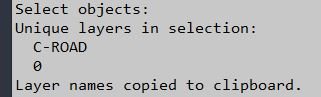
Command:
🚀 Main command: LayersName2Clipboard
🧩 Load the LSP in AutoCAD or Civil 3D, then type the command at the command line.
Description:
📋 This AutoCAD layer extraction command asks the user to select entities, reads each entity’s DXF layer name, and builds a unique layer list.
🔎 The routine uses DXF group code 8 from entget data, which directly represents the entity layer.
🧠 Duplicate layer names are removed so each selected layer appears only once.
📄 The final output is printed in the AutoCAD command line and copied as a newline-separated text list to the Windows clipboard.
⚙️ Clipboard transfer is handled through the Windows htmlfile ActiveX object.
Helper function: (if any)
🧩 ClipPut sends text to the Windows clipboard through htmlfile parentWindow clipboardData.
🧩 C:LayersName2Clipboard is the main command that collects the selection, reads entity data, removes duplicates, prints the result, and copies it.
Functionalities:
✅ Select AutoCAD entities and extract their layer names.
✅ Use entget and DXF group 8 for reliable layer-name reading.
✅ Remove duplicate layer names from the selection.
✅ Preserve first-detected order by reversing the accumulated list before output.
✅ Copy the clean layer list to the Windows clipboard.
✅ Print the same layer list in the AutoCAD command line.
Result:
✅ A clean newline-separated list of unique selected layer names is copied to the clipboard.
✅ The user can paste the layer list into Excel, TXT files, filters, documentation, or support tickets.
Images, animations etc.
XAML code:
<ResourceDictionary
xmlns="http://schemas.microsoft.com/winfx/2006/xaml/presentation"
xmlns:x="http://schemas.microsoft.com/winfx/2006/xaml"
xmlns:src="clr-namespace:Autodesk.Windows;assembly=AdWindows">

<src:RibbonToolTip x:Key="LayersName2Clipboard">
<src:RibbonToolTip.ExpandedContent>
<StackPanel>
<TextBlock Background="AntiqueWhite" TextAlignment="Left">
<Bold>Function Syntax: LayersName2Clipboard</Bold>
<LineBreak/>
<Bold>Version: 1.1 Date: 20.06.2026 6:38:54PM</Bold>
<LineBreak/>
<Hyperlink>AI</Hyperlink>
<LineBreak/>
<Bold>Description</Bold><LineBreak/>
This routine <Run Foreground="DarkRed">LayersName2Clipboard</Run> allows the user to select one or more drawing entities and automatically extract their unique layer names, display them in the command line, and copy them to the clipboard for reuse.<LineBreak/>

<Bold>Workflow</Bold><LineBreak/>
The user runs the command <Run Foreground="Red">LayersName2Clipboard</Run>, selects the desired objects on screen (lines, polylines, blocks, and other entities), and then the program analyzes the selection, lists all distinct layer names in the command line, and prepares a clean text list of those layer names in the clipboard.<LineBreak/>

<Bold>Functionalities</Bold><LineBreak/>
• Prompts the user to select one or more entities from the drawing (lines, polylines, blocks, text, and other supported objects).<LineBreak/>
• Reads the <Run Foreground="DarkRed">layer</Run> property of each selected entity and collects all layer names used by the selection.<LineBreak/>
• Filters the collected list so that only <Run Foreground="Red">unique layer names</Run> are kept, automatically ignoring duplicates.<LineBreak/>
• Displays the resulting unique layer names in the AutoCAD command line, prefixed by the text <Run Foreground="DarkRed">Unique layers in selection:</Run> for quick visual feedback.<LineBreak/>
• Builds a plain text list containing only the layer names (one per line), without the header text, so that the content is clean for external use.<LineBreak/>
• Copies this plain text list of unique layer names directly to the Windows <Run Foreground="Red">clipboard</Run>, making it ready for immediate paste into text editors, spreadsheets, documentation, or external tools.<LineBreak/>
• Notifies the user when the layer names have been successfully copied to the clipboard.<LineBreak/>

<Bold>Key Aspects</Bold><LineBreak/>
• Command name: <Run Foreground="Red">LayersName2Clipboard</Run>.<LineBreak/>
• Only layer names of the selected entities are processed and exported.<LineBreak/>
• Duplicate layer names are suppressed so that the clipboard contains a concise list of distinct layers only.<LineBreak/>
• The on screen output shows both a descriptive header and the layers, while the clipboard content contains just the bare layer names for cleaner reuse.<LineBreak/>

<Bold><Run Foreground="DodgerBlue">Description</Run></Bold><LineBreak/>
<Run Foreground="White">📋 LayersName2Clipboard is an AutoCAD AutoLISP utility that extracts unique layer names from selected entities and copies them to the Windows clipboard.</Run><LineBreak/>
<Run Foreground="White">🔎 It is useful for quick layer reporting, documentation, filters, QA lists, and transferring selected layer names into Excel, Notepad, scripts, or CAD management tools.</Run><LineBreak/>
<LineBreak/>
<Bold><Run Foreground="DodgerBlue">Function Syntax</Run></Bold><LineBreak/>
<Run Foreground="White">🚀 Main command: </Run><Bold><Run Foreground="Orange">LayersName2Clipboard</Run></Bold><LineBreak/>
<Run Foreground="White">📌 Load the LSP file with APPLOAD or from your AutoCAD startup suite, then run the command from the command line.</Run><LineBreak/>
<LineBreak/>
<Bold><Run Foreground="DodgerBlue">SEO Optimized Overview</Run></Bold><LineBreak/>
<Run Foreground="White">📋 This AutoCAD layer extraction command asks the user to select entities, reads each entity's DXF layer name, and builds a unique layer list.</Run><LineBreak/>
<Run Foreground="White">🔎 The routine uses DXF group code 8 from entget data, which directly represents the entity layer.</Run><LineBreak/>
<Run Foreground="White">🧠 Duplicate layer names are removed so each selected layer appears only once.</Run><LineBreak/>
<Run Foreground="White">📄 The final output is printed in the AutoCAD command line and copied as a newline-separated text list to the Windows clipboard.</Run><LineBreak/>
<Run Foreground="White">⚙️ Clipboard transfer is handled through the Windows htmlfile ActiveX object.</Run><LineBreak/>
<LineBreak/>
<Bold><Run Foreground="LimeGreen">Primary Workflow</Run></Bold><LineBreak/>
<Run Foreground="White">1️⃣ Run LayersName2Clipboard.</Run><LineBreak/>
<Run Foreground="White">2️⃣ Select the objects whose layer names must be reported.</Run><LineBreak/>
<Run Foreground="White">3️⃣ The tool reads each entity's DXF layer name and removes duplicates.</Run><LineBreak/>
<Run Foreground="White">4️⃣ The unique layer names are printed in the command line.</Run><LineBreak/>
<Run Foreground="White">5️⃣ Paste the newline-separated layer list from the Windows clipboard into Excel, TXT, or another CAD tool.</Run><LineBreak/>
<LineBreak/>
<Bold><Run Foreground="LimeGreen">Core Functionalities</Run></Bold><LineBreak/>
<Run Foreground="White">✅ Select AutoCAD entities and extract their layer names.</Run><LineBreak/>
<Run Foreground="White">✅ Use entget and DXF group 8 for reliable layer-name reading.</Run><LineBreak/>
<Run Foreground="White">✅ Remove duplicate layer names from the selection.</Run><LineBreak/>
<Run Foreground="White">✅ Preserve first-detected order by reversing the accumulated list before output.</Run><LineBreak/>
<Run Foreground="White">✅ Copy the clean layer list to the Windows clipboard.</Run><LineBreak/>
<Run Foreground="White">✅ Print the same layer list in the AutoCAD command line.</Run><LineBreak/>
<LineBreak/>
<Bold><Run Foreground="DodgerBlue">Important Commands and Helper Functions</Run></Bold><LineBreak/>
<Run Foreground="White">🧩 ClipPut sends text to the Windows clipboard through htmlfile parentWindow clipboardData.</Run><LineBreak/>
<Run Foreground="White">🧩 C:LayersName2Clipboard is the main command that collects the selection, reads entity data, removes duplicates, prints the result, and copies it.</Run><LineBreak/>
<LineBreak/>
<Bold><Run Foreground="LimeGreen">Result</Run></Bold><LineBreak/>
<Run Foreground="White">✅ A clean newline-separated list of unique selected layer names is copied to the clipboard.</Run><LineBreak/>
<Run Foreground="White">✅ The user can paste the layer list into Excel, TXT files, filters, documentation, or support tickets.</Run><LineBreak/>
<LineBreak/>
<Bold><Run Foreground="DarkOrange">Operational Notes</Run></Bold><LineBreak/>
<Run Foreground="White">📌 The command works on selected entities, not on every drawing layer.</Run><LineBreak/>
<Run Foreground="DarkRed">⚠️ Clipboard support depends on Windows ActiveX availability through the htmlfile object.</Run><LineBreak/>
<Run Foreground="White">📌 Only layer names are copied; object counts and properties are not included.</Run><LineBreak/>
<LineBreak/>
<Bold><Run Foreground="DodgerBlue">Best Use Cases</Run></Bold><LineBreak/>
<Run Foreground="White">📋 Quick selected-object layer reports.</Run><LineBreak/>
<Run Foreground="White">🔎 Preparing filter lists from actual drawing objects.</Run><LineBreak/>
<Run Foreground="White">📊 Copying layer names to Excel or support notes.</Run><LineBreak/>
<LineBreak/>
<Bold><Run Foreground="Yellow">Tags</Run></Bold><LineBreak/>
<Run Foreground="Yellow">🏷️ AutoCAD, 🏷️ AutoLISP, 🏷️ Civil 3D, 🏷️ Layer Names, 🏷️ Clipboard, 🏷️ Layer Extractor, 🏷️ DXF Group 8, 🏷️ CAD Reporting, 🏷️ QA Workflow</Run><LineBreak/>


</TextBlock>

<Grid>
<Image Source="Image_000.jpg" Stretch="Uniform"/>
</Grid>

</StackPanel>
</src:RibbonToolTip.ExpandedContent>
</src:RibbonToolTip>
</ResourceDictionary>