
Short description
Offset supported curve geometry nested inside AutoCAD and Civil 3D Xrefs into the host drawing with a modeless picker dialog, layer-copy support, flip direction control, undo, and diagnostic logging.
Command:
XREFOFFSETLAYER
XREFOFFSETLAYER_006
XOL
XOFFSETCPLAYS
XOFFSETCPLAYS_006
Description:
🚀 XrefOffsetLayer is an AutoCAD and Civil 3D .NET plugin for offsetting supported curve entities that are nested inside attached Xrefs, including nested Xref chains.
Run XREFOFFSETLAYER, XREFOFFSETLAYER_006, or the short alias XOL to open a modeless picker dialog. The user can pick Xref entities, set an offset distance, flip the offset side, choose a target layer strategy, and apply offsets into the active drawing without editing the source Xref.
The plugin is designed for CAD production workflows where Xref geometry needs to be referenced, offset, and recreated in the host drawing while preserving a clear visual process and diagnostic log.
Helper function: (if any)
- Plugin.cs defines AutoCAD command registration, load messages, versioned command aliases, and
IExtensionApplicationstartup behavior. - XolCommandRunner.cs opens the modeless offset dialog and runs the standalone Xref layer-copy command.
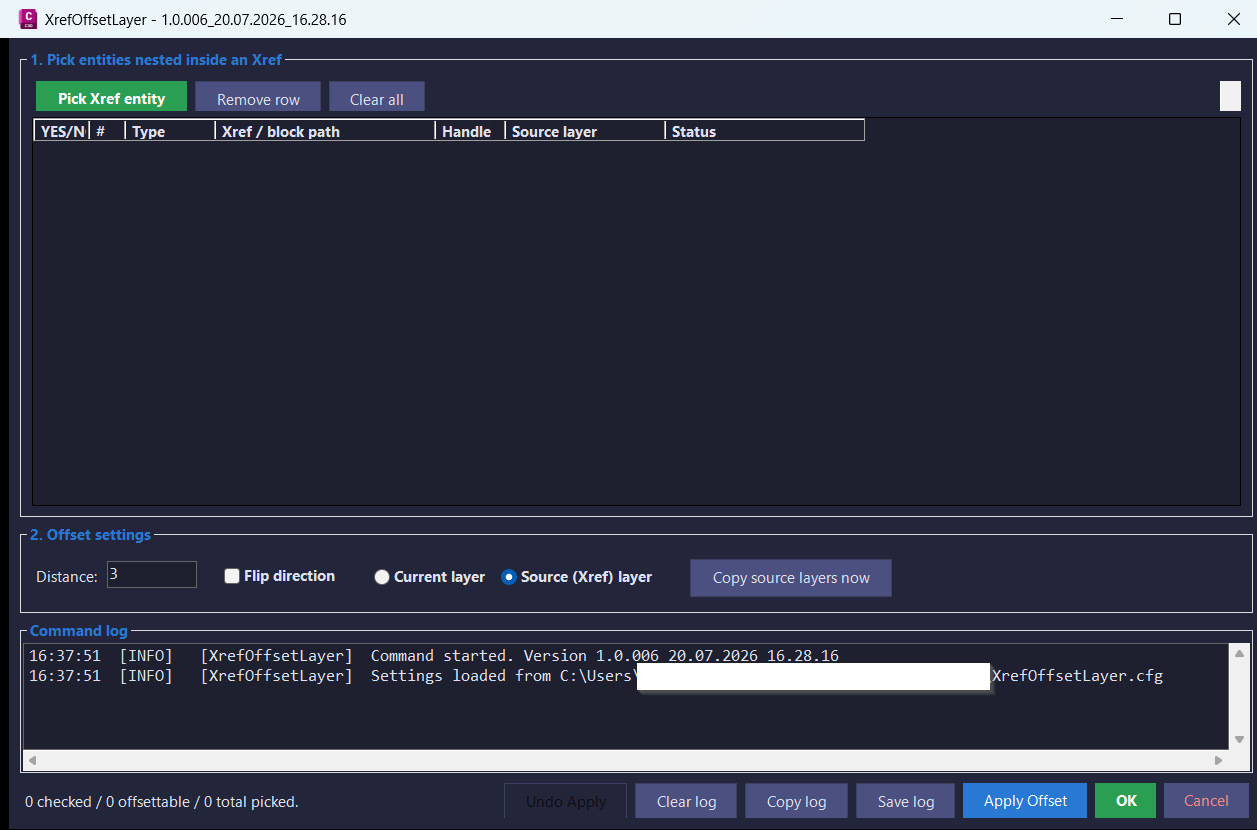
- XolForm.cs builds the WinForms interface, entity grid, distance controls, layer mode controls, undo button, clipboard export, and log panel.
- XolOffsetEngine.cs clones picked Xref curves into the host drawing, runs
Curve.GetOffsetCurves, transforms the results through nested containers, and appends the final offset geometry. - XolLayerCloner.cs clones source Xref layer definitions into the host drawing and repoints offset entities from dependent layers to host layers.
- XolNestedPicker.cs handles nested entity selection,
FullSubentityPathconstruction, highlighting, and Xref validation. - XolSettings.cs persists dialog position, size, offset distance, layer mode, and flip direction in
%APPDATA%\XrefOffsetLayer\XrefOffsetLayer.cfg. - XolLogger.cs records live command messages and saves diagnostic logs for troubleshooting and future improvements.
Functionalities:
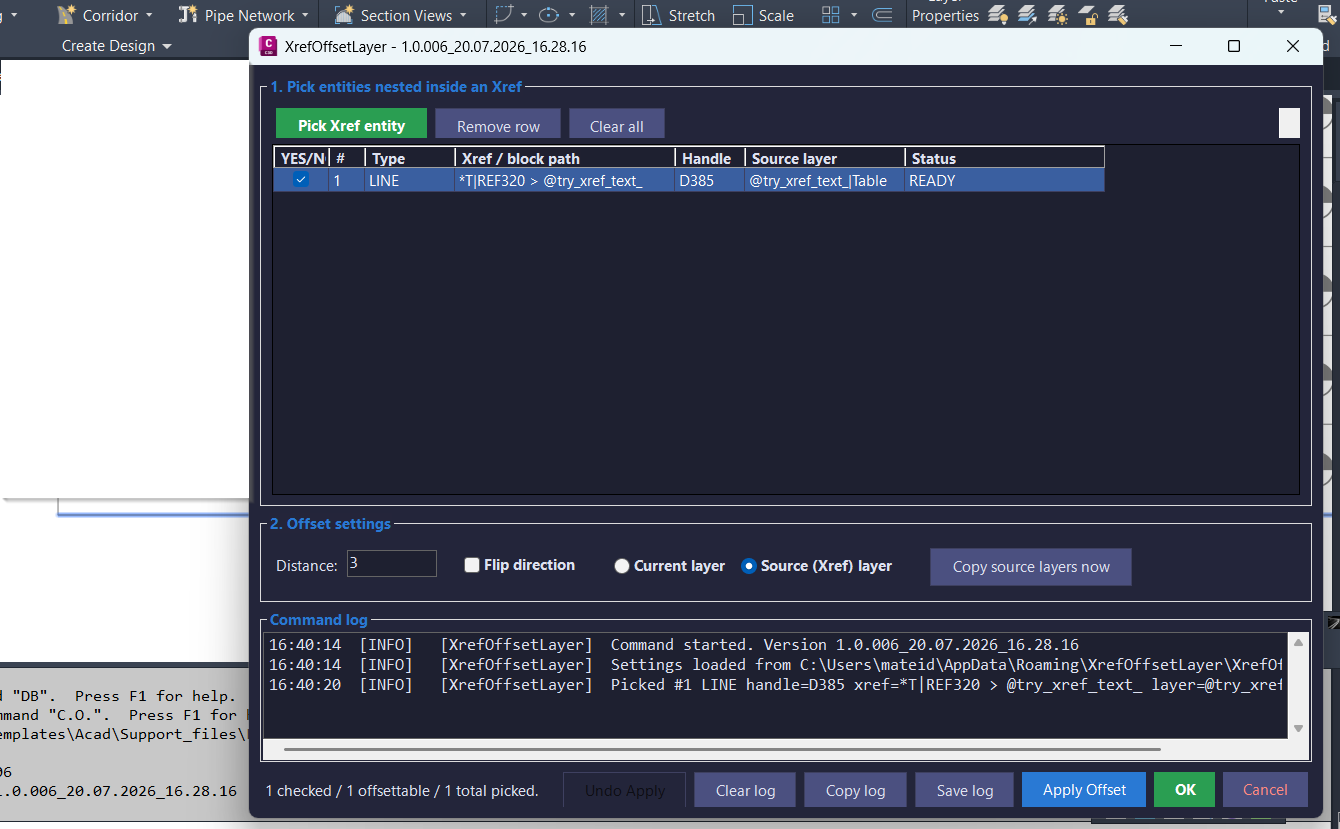
- 🔍 Pick individual entities nested inside Xrefs using a dedicated modeless dialog.
- 📐 Offset supported curve objects such as lines, arcs, circles, ellipses, lightweight polylines, and splines.
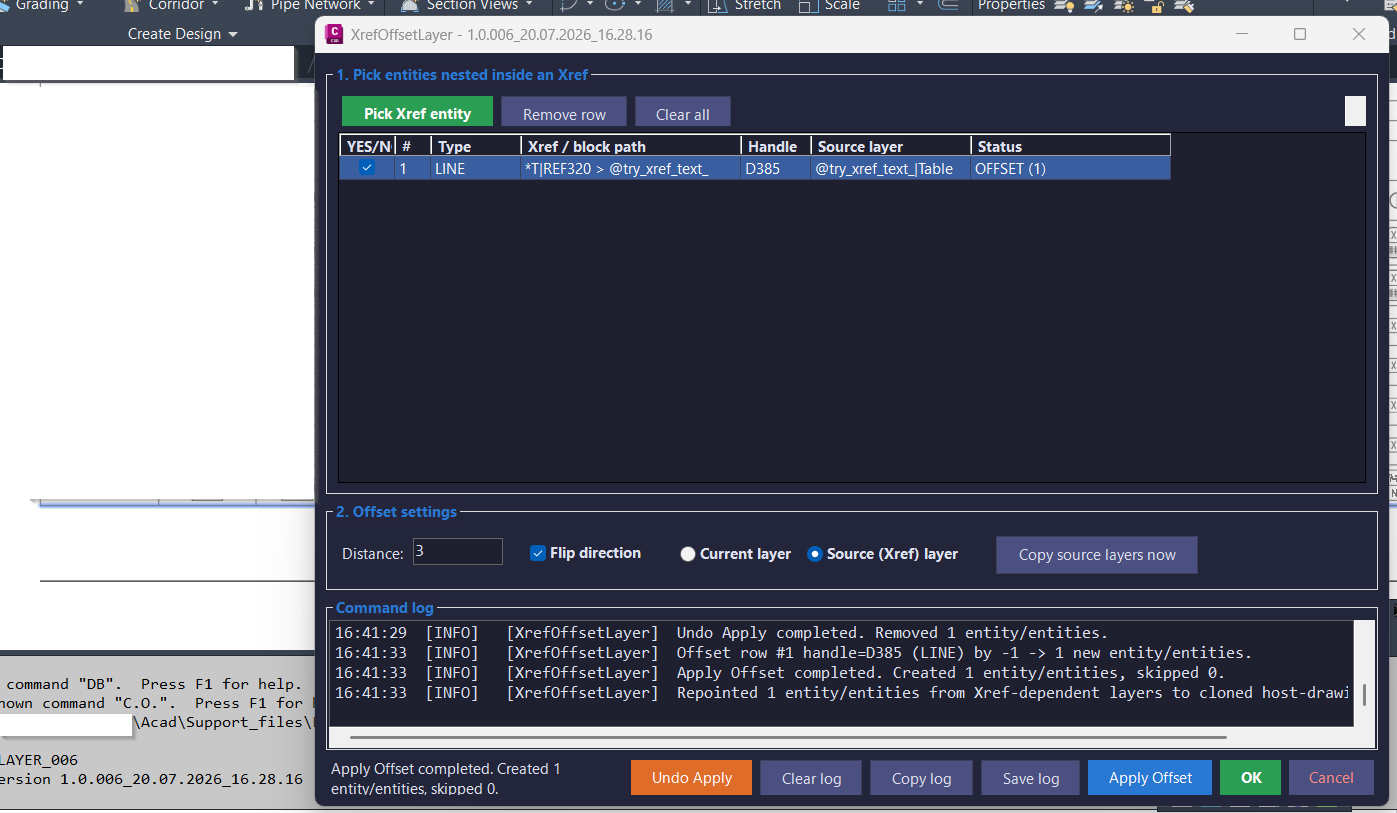
- 🔄 Use Flip direction to offset to the opposite side without typing a negative distance.
- 🏷️ Choose between placing offsets on the current host layer or on a cloned source Xref layer.
- 📂 Run
XOFFSETCPLAYSto clone Xref-dependent layer definitions from the source drawing into the host drawing. - 🧩 Supports nested Xref containers by transforming created geometry through the full block reference path.
- 📊 Displays picked entities in a grid with apply status, entity type, handle, layer, block path, and readiness state.
- 📋 Copies the entity table to the clipboard as tab-separated data for Excel or Notepad review.
- ↩️ Provides Undo Apply for the last offset operation in the dialog session.
- 📝 Includes live log, copy log, save log, and clear log workflows for repeatable diagnostics.
Result:
✅ The result is a safer and faster AutoCAD Xref offset workflow: selected Xref curve geometry is recreated as real host-drawing geometry, offset by the requested distance, with optional source-layer cloning and a visible audit trail.
This improves Civil 3D production efficiency when users need offset geometry from references without binding, exploding, or manually tracing Xref content.
Images, animations etc.
XAML code:
<ResourceDictionary
xmlns="http://schemas.microsoft.com/winfx/2006/xaml/presentation"
xmlns:x="http://schemas.microsoft.com/winfx/2006/xaml"
xmlns:src="clr-namespace:Autodesk.Windows;assembly=AdWindows">

<src:RibbonToolTip x:Key="XrefOffsetLayer">
<src:RibbonToolTip.ExpandedContent>
<StackPanel>
<TextBlock Background="AntiqueWhite" TextAlignment="Left">
<Bold>Function Syntax: XREFOFFSETLAYER_006 / XREFOFFSETLAYER / XOL / XOFFSETCPLAYS_006 / XOFFSETCPLAYS</Bold>
<LineBreak/>
<Bold>Version: 1.0 Date: 20.07.2026 08:28:32</Bold>
<LineBreak/>
<Bold>Version: 1.0 Date: 20.07.2026 4:28:17PM</Bold>
<LineBreak/>
<Hyperlink>https://keanw.com/2009/05/enabling-autocads-offset-to-work-on-the-contents-of-xrefs-using-net.html</Hyperlink>
<LineBreak/>


<Bold><Run Foreground="DodgerBlue">🚀 XrefOffsetLayer_006</Run></Bold><LineBreak/>
<Run Foreground="White">XrefOffsetLayer_006 is an AutoCAD and Civil 3D 2024 .NET utility for selecting curve entities nested inside Xrefs and creating editable offset copies in the host drawing.</Run><LineBreak/>
<Run Foreground="LimeGreen">It improves Xref-based CAD workflows by combining individual nested-entity picking, batch offset controls, nested-transform handling, current or source layer placement, session undo, and diagnostic logging.</Run><LineBreak/>
<Bold><Run Foreground="DodgerBlue">Main Commands</Run></Bold><LineBreak/>
<Run Foreground="White">🧰 Run </Run><Bold><Run Foreground="Orange">XREFOFFSETLAYER_006</Run></Bold><Run Foreground="White"> to start the collision-safe build-specific Xref picker and offset workflow.</Run><LineBreak/>
<Run Foreground="White">⚙️ Run </Run><Bold><Run Foreground="Orange">XREFOFFSETLAYER</Run></Bold><Run Foreground="White"> as the stable full-name convenience alias.</Run><LineBreak/>
<Run Foreground="White">⚡ Run </Run><Bold><Run Foreground="Orange">XOL</Run></Bold><Run Foreground="White"> as the short everyday alias.</Run><LineBreak/>
<Run Foreground="White">🗂️ Run </Run><Bold><Run Foreground="Orange">XOFFSETCPLAYS_006</Run></Bold><Run Foreground="White"> or </Run><Bold><Run Foreground="Orange">XOFFSETCPLAYS</Run></Bold><Run Foreground="White"> to clone used Xref source layers into the host drawing and repoint eligible entities.</Run><LineBreak/>
<Bold><Run Foreground="DodgerBlue">SEO Optimized Description</Run></Bold><LineBreak/>
<Run Foreground="White">📐 This AutoCAD Xref offset tool lets users select real curves nested inside attached or nested Xrefs, enter one offset distance, choose the offset side, and create checked offset copies in the active drawing space.</Run><LineBreak/>
<Run Foreground="White">🔍 The utility supports CAD cleanup, Xref drafting, utility plans, Civil 3D production, referenced-base mapping, linework extraction, parallel geometry creation, and workflows where selected Xref curves must become editable host-drawing offsets.</Run><LineBreak/>
<Run Foreground="White">🧠 It uses </Run><Bold><Run Foreground="Orange">Editor.GetNestedEntity</Run></Bold><Run Foreground="White"> and </Run><Bold><Run Foreground="Orange">FullSubentityPath</Run></Bold><Run Foreground="White"> for exact nested picks, then transforms a temporary clone through every container before calling </Run><Bold><Run Foreground="Orange">Curve.GetOffsetCurves</Run></Bold><Run Foreground="White">.</Run><LineBreak/>
<Run Foreground="White">📌 XrefOffsetLayer_006 is useful for CAD technicians, Civil 3D users, survey drafting, utility networks, roadway plans, base-map tracing, construction documents, and repetitive Xref geometry offset tasks.</Run><LineBreak/>
<Bold><Run Foreground="LimeGreen">Functionalities</Run></Bold><LineBreak/>
<Run Foreground="White">🚀 </Run><Bold><Run Foreground="LimeGreen">Modeless C# workflow</Run></Bold><Run Foreground="White"> - keeps a resizable, minimizable, and maximizable Windows Forms interface open while users select and process Xref entities.</Run><LineBreak/>
<Run Foreground="White">🎯 </Run><Bold><Run Foreground="LimeGreen">Real nested entity picking</Run></Bold><Run Foreground="White"> - obtains the actual nested ObjectId and its full block-reference container chain.</Run><LineBreak/>
<Run Foreground="White">🔒 </Run><Bold><Run Foreground="LimeGreen">Xref-only validation</Run></Bold><Run Foreground="White"> - rejects entities that are nested only in normal blocks and are not inside an external reference.</Run><LineBreak/>
<Run Foreground="White">✨ </Run><Bold><Run Foreground="LimeGreen">Individual highlighting</Run></Bold><Run Foreground="White"> - highlights only the selected nested piece through a FullSubentityPath.</Run><LineBreak/>
<Run Foreground="White">📋 </Run><Bold><Run Foreground="LimeGreen">Multiple-pick grid</Run></Bold><Run Foreground="White"> - displays YES/NO, index, type, Xref or block path, handle, source layer, and processing status.</Run><LineBreak/>
<Run Foreground="White">🚫 </Run><Bold><Run Foreground="LimeGreen">Unsupported-pick protection</Run></Bold><Run Foreground="White"> - rejects duplicate picks, text objects, Polyline3d entities, and non-Curve objects or marks them as not offsettable.</Run><LineBreak/>
<Run Foreground="White">📐 </Run><Bold><Run Foreground="LimeGreen">Supported curve offsets</Run></Bold><Run Foreground="White"> - processes common lines, arcs, circles, ellipses, lightweight polylines, and splines when AutoCAD supports the selected shape and distance.</Run><LineBreak/>
<Run Foreground="White">↔️ </Run><Bold><Run Foreground="LimeGreen">Distance and direction</Run></Bold><Run Foreground="White"> - accepts a non-zero distance and uses </Run><Bold><Run Foreground="Orange">Flip direction</Run></Bold><Run Foreground="White"> to reverse the signed offset side.</Run><LineBreak/>
<Run Foreground="White">☑️ </Run><Bold><Run Foreground="LimeGreen">Selective Apply</Run></Bold><Run Foreground="White"> - creates offsets only for checked and apply-capable rows.</Run><LineBreak/>
<Run Foreground="White">🧭 </Run><Bold><Run Foreground="LimeGreen">Nested transform handling</Run></Bold><Run Foreground="White"> - applies every Xref and block transform in innermost-to-outermost order so nested geometry lands in the correct world position.</Run><LineBreak/>
<Run Foreground="White">🛡️ </Run><Bold><Run Foreground="LimeGreen">Host-resident offset engine</Run></Bold><Run Foreground="White"> - appends a temporary clone to the current space before offsetting, preventing cross-database </Run><Bold><Run Foreground="Orange">eWrongDatabase</Run></Bold><Run Foreground="White"> failures.</Run><LineBreak/>
<Run Foreground="White">🧹 </Run><Bold><Run Foreground="LimeGreen">Temporary clone cleanup</Run></Bold><Run Foreground="White"> - erases the host stand-in after the offset result is created so only the new offset geometry remains.</Run><LineBreak/>
<Run Foreground="White">🗂️ </Run><Bold><Run Foreground="LimeGreen">Current layer mode</Run></Bold><Run Foreground="White"> - places generated offset entities directly on the active AutoCAD layer.</Run><LineBreak/>
<Run Foreground="White">📁 </Run><Bold><Run Foreground="LimeGreen">Source Xref layer mode</Run></Bold><Run Foreground="White"> - preserves source-layer organization and automatically runs the source-layer cloning workflow after a successful Apply.</Run><LineBreak/>
<Run Foreground="White">🔄 </Run><Bold><Run Foreground="LimeGreen">Copy source layers</Run></Bold><Run Foreground="White"> - reads source Xref drawings, clones matching unmangled layer definitions into the host drawing, and repoints eligible current-space entities.</Run><LineBreak/>
<Run Foreground="White">✅ </Run><Bold><Run Foreground="LimeGreen">Apply and OK behavior</Run></Bold><Run Foreground="White"> - Apply Offset creates confirmed geometry and keeps the form open, while OK performs the same operation and closes it.</Run><LineBreak/>
<Run Foreground="White">↩️ </Run><Bold><Run Foreground="LimeGreen">Undo Apply</Run></Bold><Run Foreground="White"> - removes every entity created by the latest Apply Offset operation during the active dialog session.</Run><LineBreak/>
<Run Foreground="White">🧹 </Run><Bold><Run Foreground="LimeGreen">Row and highlight cleanup</Run></Bold><Run Foreground="White"> - removes one selected row or clears all picks and their viewport highlights.</Run><LineBreak/>
<Run Foreground="White">📊 </Run><Bold><Run Foreground="LimeGreen">Copy entity table</Run></Bold><Run Foreground="White"> - copies all grid headers and rows as tab-separated text for Excel or Notepad.</Run><LineBreak/>
<Run Foreground="White">📝 </Run><Bold><Run Foreground="LimeGreen">Command logging</Run></Bold><Run Foreground="White"> - records picks, Xref paths, handles, layers, offsets, created results, skips, layer-copy activity, and errors.</Run><LineBreak/>
<Run Foreground="White">📋 </Run><Bold><Run Foreground="LimeGreen">Clear, copy, and save log</Run></Bold><Run Foreground="White"> - clears logger history, copies the current log, or saves a timestamped diagnostic TXT file with picked-entity details.</Run><LineBreak/>
<Run Foreground="White">💾 </Run><Bold><Run Foreground="LimeGreen">Persistent settings</Run></Bold><Run Foreground="White"> - saves window bounds, current or source layer mode, last distance, and Flip direction in </Run><Bold><Run Foreground="Orange">XrefOffsetLayer.cfg</Run></Bold><Run Foreground="White">.</Run><LineBreak/>
<Run Foreground="White">🧪 </Run><Bold><Run Foreground="LimeGreen">Side-by-side test builds</Run></Bold><Run Foreground="White"> - uses generated build-numbered DLL and primary command names so several NETLOADed versions can coexist.</Run><LineBreak/>
<Bold><Run Foreground="DodgerBlue">Practical Result</Run></Bold><LineBreak/>
<Run Foreground="White">✅ The result is editable host-drawing offset geometry created from checked curves inside attached or nested Xrefs, with correct nested transformations and without modifying the referenced source drawing.</Run><LineBreak/>
<Run Foreground="LimeGreen">This makes XrefOffsetLayer_006 useful for Xref drafting, Civil 3D support drawings, base-map offsets, utility linework, CAD production cleanup, and selective referenced-geometry extraction.</Run><LineBreak/>
<Bold><Run Foreground="DarkRed">Important Note</Run></Bold><LineBreak/>
<Run Foreground="White">This command creates new geometry in the host drawing and does not change the Xref source. Curve.GetOffsetCurves determines which entity types, shapes, and distances can produce a valid offset.</Run><LineBreak/>
<Run Foreground="White">There is no interactive pick-a-side step. Use Flip direction and Undo Apply when needed. Undo Apply removes only the latest result while the dialog remains open, and source-layer cloning requires access to the external DWG files.</Run><LineBreak/>


</TextBlock>

<Grid>
<Image Source="Image_000.png" Stretch="Uniform"/>
</Grid>

<Grid>
<Image Source="Image_001.png" Stretch="Uniform"/>
</Grid>

<Grid>
<Image Source="Image_002.png" Stretch="Uniform"/>
</Grid>

</StackPanel>
</src:RibbonToolTip.ExpandedContent>
</src:RibbonToolTip>
</ResourceDictionary>