
Short description
🧵🔤 Create and apply AutoCAD linetypes with embedded text characters, layer creation, TrueColor selection, lineweight, transparency, CELTSCALE, THICKNESS, and multi-layer assignment.
Command:
🚀 Primary command: MAKELT2
🧵 Alias helper: makelt2 calls c:makelt2.
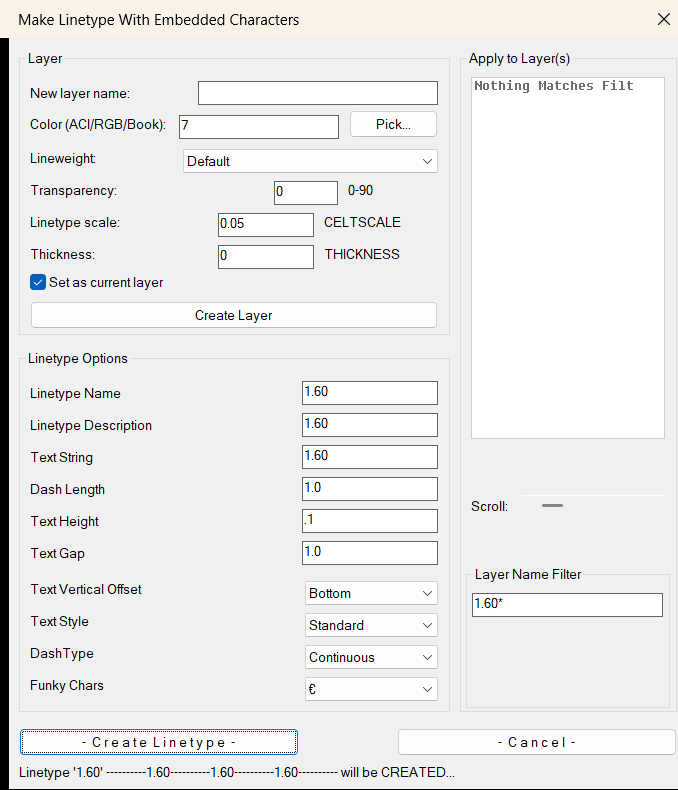
🪟 Dialog title: Make Linetype With Embedded Characters.
🖊️ Main action button: Create Linetype.
Description:
🧵 LinetypeWithCharacters2 is an AutoCAD AutoLISP utility for creating or redefining custom linetypes that contain embedded text characters.
🔤 The tool builds a temporary LIN definition using the selected text string, text style, dash pattern, text height, text gap, and vertical offset, then loads the linetype through the AutoCAD command workflow.
🎨 The dialog also includes a layer creation and update section with ACI, RGB, Color Book input, Pick color, lineweight, transparency from 0 to 90, CELTSCALE, THICKNESS, and optional Set Current logic.
📂 Users can apply the generated linetype to one target layer or multiple selected layers from a filtered layer list, making the tool useful for CAD standards, utility linework, Civil 3D drafting, signage lines, fence lines, cable routes, and annotation-based linetypes.
Helper function: (if any)
🧩 MK2:_writeDCL writes the embedded DCL dialog to a unique temporary file.
🧹 MK2:_sanitize_ltname removes invalid AutoCAD linetype name characters.
👁️ MK2:_showlt and MK2:_ltdesc generate the linetype preview text shown in the dialog status line.
📏 rjp-txtwdth calculates text width so the embedded text segment can be positioned correctly inside the LIN definition.
🎨 MK2:_pickColorTC opens AutoCAD color selection with TrueColor support and ACI fallback.
🏷️ MK2:_create_layer_core creates or updates layer properties using DXF color, lineweight, transparency, CELTSCALE, THICKNESS, and CLAYER settings.
💾 MK2:_readreg and MK2:_writereg store reusable settings under HKEY_CURRENT_USER.
Functionalities:
🚀 Launches a DCL-based linetype builder with the MAKELT2 command.
🔤 Creates or redefines AutoCAD linetypes with embedded text strings.
📐 Controls dash length, dash pattern, text height, text gap, vertical offset, and text style.
✨ Provides a Funky Chars dropdown for inserting special characters into the linetype text string.
🎨 Creates or updates layers with ACI, RGB, or Color Book color values.
🖱️ Supports Pick color using AutoCAD TrueColor or Color Index dialogs.
📏 Applies layer lineweight from a predefined lineweight list.
🟦 Applies transparency values from 0 to 90.
⚙️ Sets CELTSCALE and THICKNESS defaults for the created layer workflow.
📌 Optionally sets the created layer as the current layer.
📂 Applies the generated linetype to one layer or multiple selected layers.
🔍 Includes layer filtering and horizontal scroll handling for long layer names.
💾 Remembers common linetype and layer defaults in the Windows registry.
🔄 Regenerates the drawing after successful linetype assignment.
Result:
✅ The result is a custom AutoCAD linetype loaded into the drawing and assigned to the chosen layer or layers.
✅ The selected layer can also be created or updated with color, lineweight, transparency, CELTSCALE, THICKNESS, and current-layer settings.
✅ The workflow reduces manual LIN file editing and makes it faster to create production-ready text-based linetypes for CAD and Civil 3D drawings.
Images, animations etc.
XAML code:
<ResourceDictionary
xmlns="http://schemas.microsoft.com/winfx/2006/xaml/presentation"
xmlns:x="http://schemas.microsoft.com/winfx/2006/xaml"
xmlns:src="clr-namespace:Autodesk.Windows;assembly=AdWindows">

<src:RibbonToolTip x:Key="LinetypeWithCharacters2">
<src:RibbonToolTip.ExpandedContent>
<StackPanel>
<TextBlock Background="AntiqueWhite" TextAlignment="Left">
<Bold>Function Syntax: MAKELT2</Bold>
<LineBreak/>
<Bold>Version: 1.0 Date: 20.06.2026 6:38:50PM</Bold>
<LineBreak/>
<Hyperlink>AI+https://www.theswamp.org/index.php?topic=47058.0</Hyperlink>
<LineBreak/>


<Bold><Run Foreground="DodgerBlue">Function Syntax: LinetypeWithCharacters2</Run></Bold><LineBreak/>
<Bold><Run Foreground="Orange">Version: 1.0</Run></Bold><LineBreak/>
<Bold><Run Foreground="DodgerBlue">🧵 SEO Friendly Description</Run></Bold><LineBreak/>
<Run Foreground="White">🧵 LinetypeWithCharacters2 is an AutoCAD AutoLISP utility for creating custom linetypes with embedded text characters directly from a DCL dialog.</Run><LineBreak/>
<Run Foreground="LimeGreen">🔤 It is useful for CAD standards, Civil 3D drafting, utility linework, cable routes, drainage lines, fence lines, signal routes, and annotation-based linetype production.</Run><LineBreak/>
<Run Foreground="White">🎨 The tool also creates or updates layers with color, lineweight, transparency, CELTSCALE, THICKNESS, and current-layer settings.</Run><LineBreak/>
<Run Foreground="White">📂 The final linetype can be applied to one target layer or multiple selected layers from a filtered layer list.</Run><LineBreak/>
<Bold><Run Foreground="DodgerBlue">🚀 Main Command</Run></Bold><LineBreak/>
<Run Foreground="White">🪟 Run </Run><Bold><Run Foreground="Orange">MAKELT2</Run></Bold><Run Foreground="White"> in the AutoCAD command line to open the </Run><Bold><Run Foreground="LimeGreen">Make Linetype With Embedded Characters</Run></Bold><Run Foreground="White"> dialog.</Run><LineBreak/>
<Run Foreground="White">🧵 The helper function </Run><Bold><Run Foreground="Orange">makelt2</Run></Bold><Run Foreground="White"> calls the same command workflow.</Run><LineBreak/>
<Bold><Run Foreground="DodgerBlue">🧰 Dialog Workflow</Run></Bold><LineBreak/>
<Run Foreground="White">🏷️ Enter a new layer name or update an existing layer.</Run><LineBreak/>
<Run Foreground="White">🎨 Define layer color using </Run><Bold><Run Foreground="LimeGreen">ACI</Run></Bold><Run Foreground="White">, </Run><Bold><Run Foreground="LimeGreen">RGB</Run></Bold><Run Foreground="White">, or </Run><Bold><Run Foreground="LimeGreen">Color Book</Run></Bold><Run Foreground="White"> values.</Run><LineBreak/>
<Run Foreground="White">🖱️ Use </Run><Bold><Run Foreground="Orange">Pick...</Run></Bold><Run Foreground="White"> to select a color from the AutoCAD TrueColor or Color Index dialog.</Run><LineBreak/>
<Run Foreground="White">📏 Select lineweight, transparency, linetype scale, and thickness for the target layer workflow.</Run><LineBreak/>
<Run Foreground="White">📌 Enable </Run><Bold><Run Foreground="LimeGreen">Set as current layer</Run></Bold><Run Foreground="White"> when the created or updated layer should become the active drawing layer.</Run><LineBreak/>
<Bold><Run Foreground="LimeGreen">🧵 Linetype Options</Run></Bold><LineBreak/>
<Run Foreground="White">🔤 Define the linetype name, linetype description, embedded text string, dash length, text height, and text gap.</Run><LineBreak/>
<Run Foreground="White">↕️ Choose the text vertical offset to control how the embedded text sits inside the linetype pattern.</Run><LineBreak/>
<Run Foreground="White">🖊️ Select the AutoCAD text style used by the embedded linetype text segment.</Run><LineBreak/>
<Run Foreground="White">📐 Select the dash type used to generate the dash pattern around the text.</Run><LineBreak/>
<Run Foreground="White">✨ Use the </Run><Bold><Run Foreground="Orange">Funky Chars</Run></Bold><Run Foreground="White"> dropdown to insert special characters into the linetype text string.</Run><LineBreak/>
<Bold><Run Foreground="LimeGreen">⚙️ Functionalities</Run></Bold><LineBreak/>
<Run Foreground="White">🚀 </Run><Bold><Run Foreground="LimeGreen">Create text-based linetypes</Run></Bold><Run Foreground="White"> - generates AutoCAD linetypes with embedded characters and readable labels.</Run><LineBreak/>
<Run Foreground="White">🔄 </Run><Bold><Run Foreground="LimeGreen">Redefine existing linetypes</Run></Bold><Run Foreground="White"> - updates an existing linetype name when the same definition already exists.</Run><LineBreak/>
<Run Foreground="White">🧹 </Run><Bold><Run Foreground="LimeGreen">Sanitize linetype names</Run></Bold><Run Foreground="White"> - removes invalid characters before the LIN definition is created.</Run><LineBreak/>
<Run Foreground="White">📂 </Run><Bold><Run Foreground="LimeGreen">Apply to multiple layers</Run></Bold><Run Foreground="White"> - assigns the generated linetype to selected layers from the filtered layer list.</Run><LineBreak/>
<Run Foreground="White">🔍 </Run><Bold><Run Foreground="LimeGreen">Layer filtering</Run></Bold><Run Foreground="White"> - filters layer names and supports long names with horizontal scroll logic.</Run><LineBreak/>
<Run Foreground="White">🎨 </Run><Bold><Run Foreground="LimeGreen">Advanced layer properties</Run></Bold><Run Foreground="White"> - supports ACI, RGB, Color Book, lineweight, transparency, CELTSCALE, and THICKNESS.</Run><LineBreak/>
<Run Foreground="White">💾 </Run><Bold><Run Foreground="LimeGreen">Registry memory</Run></Bold><Run Foreground="White"> - stores reusable defaults for faster repeated linetype creation.</Run><LineBreak/>
<Run Foreground="White">🧩 </Run><Bold><Run Foreground="LimeGreen">Temporary DCL and LIN generation</Run></Bold><Run Foreground="White"> - writes temporary support files, loads the linetype, then cleans up automatically.</Run><LineBreak/>
<Bold><Run Foreground="DodgerBlue">📘 Helper Functions</Run></Bold><LineBreak/>
<Run Foreground="White">🪟 </Run><Bold><Run Foreground="Orange">MK2:_writeDCL</Run></Bold><Run Foreground="White"> creates the embedded dialog dynamically.</Run><LineBreak/>
<Run Foreground="White">🧹 </Run><Bold><Run Foreground="Orange">MK2:_sanitize_ltname</Run></Bold><Run Foreground="White"> cleans invalid linetype characters.</Run><LineBreak/>
<Run Foreground="White">👁️ </Run><Bold><Run Foreground="Orange">MK2:_showlt</Run></Bold><Run Foreground="White"> builds the linetype preview message.</Run><LineBreak/>
<Run Foreground="White">📏 </Run><Bold><Run Foreground="Orange">rjp-txtwdth</Run></Bold><Run Foreground="White"> measures text width for correct embedded-text placement.</Run><LineBreak/>
<Run Foreground="White">🎨 </Run><Bold><Run Foreground="Orange">MK2:_pickColorTC</Run></Bold><Run Foreground="White"> handles AutoCAD TrueColor and Color Index selection.</Run><LineBreak/>
<Run Foreground="White">🏷️ </Run><Bold><Run Foreground="Orange">MK2:_create_layer_core</Run></Bold><Run Foreground="White"> creates or updates layer records and layer properties.</Run><LineBreak/>
<Bold><Run Foreground="DodgerBlue">✅ Result</Run></Bold><LineBreak/>
<Run Foreground="White">✅ The result is a production-ready AutoCAD linetype containing embedded text characters, loaded into the drawing and assigned to the chosen layer or layers.</Run><LineBreak/>
<Run Foreground="LimeGreen">✅ The tool reduces manual LIN file editing and improves CAD productivity when creating repeated Civil 3D, utility, cable, fence, drainage, signal, and annotation linetypes.</Run><LineBreak/>
<Bold><Run Foreground="DarkRed">⚠️ Important Notes</Run></Bold><LineBreak/>
<Run Foreground="White">⚠️ The routine creates a temporary LIN file and loads it using the AutoCAD </Run><Bold><Run Foreground="Orange">-LINETYPE</Run></Bold><Run Foreground="White"> command workflow.</Run><LineBreak/>
<Run Foreground="White">⚠️ Existing linetype names can be redefined, so verify the linetype name before applying it to project layers.</Run><LineBreak/>
<Run Foreground="White">🔒 Layer linetype selection is intentionally handled by the linetype workflow, not by a separate layer linetype field.</Run><LineBreak/>


</TextBlock>

<Grid>
<Image Source="Image_000.png" Stretch="Uniform"/>
</Grid>

</StackPanel>
</src:RibbonToolTip.ExpandedContent>
</src:RibbonToolTip>
</ResourceDictionary>