
Short description
🚀 DelSelectBlock is an AutoCAD AutoLISP and DCL utility for deleting every block reference that matches a selected raw block name in the active DWG drawing. It helps CAD users quickly remove repeated block instances, manage block cleanup, optionally purge the block definition, and keep deletion settings saved between sessions.
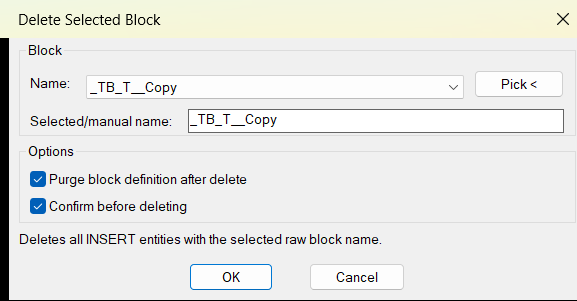
Command:
🧰 Load the LISP file with APPLOAD or by loading DelSelectBlock_DCL.lsp.
▶️ Run DelSelectBlock at the AutoCAD command line to open the generated DCL dialog.
📌 The workflow is: choose a block name from the list, type a block name manually, or use Pick < to select a block reference from the drawing, then press OK to delete all matching INSERT entities.
🔒 The target platform is AutoCAD with Visual LISP COM support through vl-load-com.
Description:
📘 DelSelectBlock scans the active AutoCAD drawing for block references and builds a dialog-based list of available raw block names. The user can select a block name, type a manual name, or pick a block reference directly from model space or paper space.
🔍 After the user confirms the operation, the program finds every INSERT entity whose raw block name matches the selected value. It then deletes those block references using ActiveX vla-delete.
🧹 The tool is useful for AutoCAD drafting cleanup, repeated symbol removal, DWG block management, drawing simplification, and fast removal of unwanted block instances across the entire drawing.
🔐 The dialog saves the last block name, confirmation setting, purge setting, block history, and dialog position in DelSelectBlock.cfg. The configuration file is written to ROAMABLEROOTPREFIX, the drawing folder, or the temporary folder depending on what AutoCAD paths are available.
Important: this command is destructive. It deletes all matching block references in the drawing. Use the confirmation option and standard AutoCAD undo carefully.
Helper function: (if any)
- 🚀 Command entry point –
C:DelSelectBlockloads settings, opens the dialog, counts matching block references, asks for confirmation when enabled, deletes matching references, and reports the result. - 🧩 Dynamic DCL generation –
DSB:DclLines,DSB:WriteDcl, andDSB:UniqueDialogNamecreate a temporary DCL dialog file at runtime, so no external DCL file is required. - 📋 Block name collection –
DSB:InsertBlockNamesscans the drawing withssget "_X"and theINSERTfilter to collect unique raw block names. - 🧠 History and settings logic –
DSB:AddHistory,DSB:LoadSettings, andDSB:SaveSettingspreserve the last used block name, recent block names, options, and dialog position. - 🔍 Pick from drawing workflow –
DSB:PickBlockNamelets the user select a block reference, validates that the object type isINSERT, and returns the selected raw block name. - 🔐 Wildcard-safe block matching –
DSB:EscapeWildcardsescapes wildcard characters such as*,?,#, brackets, commas, and backticks so anonymous block names can be matched literally. - 🧹 Deletion engine –
DSB:DeleteByNamebuilds a selection set by name, converts each entity to a VLA object withvlax-ename->vla-object, and deletes it withvla-delete. - 🔴 Optional purge logic –
DSB:PurgeBlockByNameattempts to delete the block definition from theBlockscollection after matching instances are deleted. - 📌 Confirmation safety –
DSB:ConfirmDeleteasks the user whether to delete the detected number of instances when the confirmation toggle is enabled. - 📘 Failure reporting – locked layers, protected entities, or other deletion failures are counted and reported to the AutoCAD command line.
Functionalities:
- 🚀 Delete selected block name – removes every block reference in the active drawing that matches the chosen raw block name.
- 🔍 Scan all block references – lists available
INSERTblock names from the current DWG without manually searching the drawing. - 📌 Pick block from drawing – lets the user select one block reference and automatically fills the dialog with its block name.
- 📝 Manual block name input – allows direct typing of a raw block name for advanced cleanup workflows.
- 🧠 Recent block history – remembers the last used block names so repeated cleanup operations are faster.
- 🔒 Optional confirmation – shows the number of matching instances before deletion to reduce accidental drawing changes.
- 🧹 Optional block definition purge – attempts to remove the block definition after all matching references are deleted.
- 🎨 Persistent DCL position – saves and restores the dialog position for a smoother CAD production workflow.
- 📋 Configuration file support – stores options in
DelSelectBlock.cfgusing AutoCAD roaming, drawing, or temporary paths. - 🔐 Wildcard-safe selection – supports literal matching of special raw block names, including anonymous dynamic block names.
- 🧰 Command-line feedback – reports how many block instances were deleted and how many could not be removed.
Result:
✅ The final result is a practical AutoCAD block cleanup utility that helps users remove repeated block references from a DWG faster than manual selection. It centralizes block name selection, drawing-based picking, confirmation, optional purge, saved settings, and deletion reporting in one DCL workflow. This improves CAD drafting productivity, supports cleaner drawings, reduces repetitive manual erase operations, and helps control unwanted block content in production AutoCAD files.
Images, animations etc.
XAML code:
<ResourceDictionary
xmlns="http://schemas.microsoft.com/winfx/2006/xaml/presentation"
xmlns:x="http://schemas.microsoft.com/winfx/2006/xaml"
xmlns:src="clr-namespace:Autodesk.Windows;assembly=AdWindows">
<src:RibbonToolTip x:Key="DelSelectBlock">
<src:RibbonToolTip.ExpandedContent>
<StackPanel>
<TextBlock Background="AntiqueWhite" TextAlignment="Left">
<Bold>Function Syntax: DelSelectBlock</Bold>
<LineBreak/>
<Bold>Version: 1.0 Date: 09.07.2026 6:26:32PM</Bold>
<LineBreak/>
<Hyperlink>https://forums.augi.com/showthread.php?36146-Remove-Delete-Block-from-multiple-Layouts-at-the-same-time</Hyperlink>
<LineBreak/>
<Bold><Run Foreground="DodgerBlue">short_description</Run></Bold><LineBreak/>
<Run Foreground="White">🚀 DelSelectBlock is an AutoCAD AutoLISP and DCL utility for deleting every block reference that matches a selected raw block name in the active DWG drawing.</Run><LineBreak/>
<Run Foreground="LimeGreen">It helps CAD users remove repeated block instances, manage drawing cleanup, optionally purge block definitions, and keep deletion settings saved between sessions.</Run><LineBreak/>
<Bold><Run Foreground="DodgerBlue">command</Run></Bold><LineBreak/>
<Run Foreground="White">🧰 Load the LISP file with </Run><Bold><Run Foreground="Orange">APPLOAD</Run></Bold><Run Foreground="White"> or load </Run><Bold><Run Foreground="Orange">DelSelectBlock_DCL.lsp</Run></Bold><Run Foreground="White"> from the AutoCAD command line.</Run><LineBreak/>
<Run Foreground="White">▶️ Run </Run><Bold><Run Foreground="Orange">DelSelectBlock</Run></Bold><Run Foreground="White"> to open the generated DCL dialog.</Run><LineBreak/>
<Run Foreground="White">📌 Select a block name, type a raw name manually, or use </Run><Bold><Run Foreground="Orange">Pick <</Run></Bold><Run Foreground="White"> to choose a block reference from the drawing.</Run><LineBreak/>
<Run Foreground="White">🔒 The target platform is AutoCAD with Visual LISP COM support through </Run><Bold><Run Foreground="Orange">vl-load-com</Run></Bold><Run Foreground="White">.</Run><LineBreak/>
<Bold><Run Foreground="DodgerBlue">description</Run></Bold><LineBreak/>
<Run Foreground="White">📘 DelSelectBlock scans the active AutoCAD drawing for block references and builds a dialog list of available raw block names.</Run><LineBreak/>
<Run Foreground="White">🔍 The user can select a block from the popup list, type a manual raw name, or pick an entity from the drawing to fill the name field.</Run><LineBreak/>
<Run Foreground="White">🧹 After confirmation, the program finds all matching </Run><Bold><Run Foreground="Orange">INSERT</Run></Bold><Run Foreground="White"> entities and deletes them with ActiveX object deletion.</Run><LineBreak/>
<Run Foreground="LimeGreen">The tool is useful for AutoCAD block cleanup, repeated symbol removal, DWG simplification, and faster production drawing management.</Run><LineBreak/>
<Bold><Run Foreground="DarkRed">Important:</Run></Bold><Run Foreground="White"> this command is destructive because it deletes all matching block references in the drawing.</Run><LineBreak/>
<Bold><Run Foreground="LimeGreen">helper_function</Run></Bold><LineBreak/>
<Run Foreground="White">• 🚀 <Bold><Run Foreground="LimeGreen">Command entry point</Run></Bold><Run Foreground="White"> - </Run><Bold><Run Foreground="Orange">C:DelSelectBlock</Run></Bold><Run Foreground="White"> loads settings, opens the dialog, counts matches, confirms deletion, deletes objects, and reports the result.</Run><LineBreak/>
<Run Foreground="White">• 🧩 <Bold><Run Foreground="LimeGreen">Dynamic DCL generation</Run></Bold><Run Foreground="White"> - </Run><Bold><Run Foreground="Orange">DSB:DclLines</Run></Bold><Run Foreground="White">, </Run><Bold><Run Foreground="Orange">DSB:WriteDcl</Run></Bold><Run Foreground="White">, and </Run><Bold><Run Foreground="Orange">DSB:UniqueDialogName</Run></Bold><Run Foreground="White"> create the temporary dialog at runtime.</Run><LineBreak/>
<Run Foreground="White">• 📋 <Bold><Run Foreground="LimeGreen">Block name scan</Run></Bold><Run Foreground="White"> - </Run><Bold><Run Foreground="Orange">DSB:InsertBlockNames</Run></Bold><Run Foreground="White"> uses </Run><Bold><Run Foreground="Orange">ssget "_X"</Run></Bold><Run Foreground="White"> with the </Run><Bold><Run Foreground="Orange">INSERT</Run></Bold><Run Foreground="White"> filter to collect unique block names.</Run><LineBreak/>
<Run Foreground="White">• 🧠 <Bold><Run Foreground="LimeGreen">Settings persistence</Run></Bold><Run Foreground="White"> - </Run><Bold><Run Foreground="Orange">DSB:LoadSettings</Run></Bold><Run Foreground="White"> and </Run><Bold><Run Foreground="Orange">DSB:SaveSettings</Run></Bold><Run Foreground="White"> manage </Run><Bold><Run Foreground="Orange">DelSelectBlock.cfg</Run></Bold><Run Foreground="White">, history, options, and dialog position.</Run><LineBreak/>
<Run Foreground="White">• 🔍 <Bold><Run Foreground="LimeGreen">Pick from drawing</Run></Bold><Run Foreground="White"> - </Run><Bold><Run Foreground="Orange">DSB:PickBlockName</Run></Bold><Run Foreground="White"> validates selected entities and accepts only block references.</Run><LineBreak/>
<Run Foreground="White">• 🔐 <Bold><Run Foreground="LimeGreen">Wildcard-safe matching</Run></Bold><Run Foreground="White"> - </Run><Bold><Run Foreground="Orange">DSB:EscapeWildcards</Run></Bold><Run Foreground="White"> escapes special characters so anonymous and dynamic raw block names can match literally.</Run><LineBreak/>
<Run Foreground="White">• 🧹 <Bold><Run Foreground="LimeGreen">Deletion engine</Run></Bold><Run Foreground="White"> - </Run><Bold><Run Foreground="Orange">DSB:DeleteByName</Run></Bold><Run Foreground="White"> converts entities with </Run><Bold><Run Foreground="Orange">vlax-ename->vla-object</Run></Bold><Run Foreground="White"> and deletes them with </Run><Bold><Run Foreground="Orange">vla-delete</Run></Bold><Run Foreground="White">.</Run><LineBreak/>
<Run Foreground="White">• 🔴 <Bold><Run Foreground="DarkRed">Optional purge logic</Run></Bold><Run Foreground="White"> - </Run><Bold><Run Foreground="Orange">DSB:PurgeBlockByName</Run></Bold><Run Foreground="White"> attempts to remove the matching block definition after instances are deleted.</Run><LineBreak/>
<Run Foreground="White">• 📌 <Bold><Run Foreground="LimeGreen">Delete confirmation</Run></Bold><Run Foreground="White"> - </Run><Bold><Run Foreground="Orange">DSB:ConfirmDelete</Run></Bold><Run Foreground="White"> shows how many instances will be deleted when confirmation is enabled.</Run><LineBreak/>
<Bold><Run Foreground="LimeGreen">functionalities</Run></Bold><LineBreak/>
<Run Foreground="White">🚀 </Run><Bold><Run Foreground="LimeGreen">Delete selected block name</Run></Bold><Run Foreground="White"> - removes every block reference in the active drawing that matches the chosen raw block name.</Run><LineBreak/>
<Run Foreground="White">🔍 </Run><Bold><Run Foreground="LimeGreen">Scan all block references</Run></Bold><Run Foreground="White"> - lists available INSERT block names from the current DWG.</Run><LineBreak/>
<Run Foreground="White">📌 </Run><Bold><Run Foreground="LimeGreen">Pick block from drawing</Run></Bold><Run Foreground="White"> - selects one block reference and fills the dialog with its raw block name.</Run><LineBreak/>
<Run Foreground="White">📝 </Run><Bold><Run Foreground="LimeGreen">Manual block name input</Run></Bold><Run Foreground="White"> - supports direct typing of a raw block name for advanced cleanup.</Run><LineBreak/>
<Run Foreground="White">🧠 </Run><Bold><Run Foreground="LimeGreen">Recent block history</Run></Bold><Run Foreground="White"> - remembers recent block names and makes repeated cleanup faster.</Run><LineBreak/>
<Run Foreground="White">🔒 </Run><Bold><Run Foreground="LimeGreen">Optional confirmation</Run></Bold><Run Foreground="White"> - shows the number of matching instances before deletion.</Run><LineBreak/>
<Run Foreground="White">🧹 </Run><Bold><Run Foreground="LimeGreen">Optional block definition purge</Run></Bold><Run Foreground="White"> - attempts to remove the matching block definition after deleting references.</Run><LineBreak/>
<Run Foreground="White">🎨 </Run><Bold><Run Foreground="LimeGreen">Persistent dialog position</Run></Bold><Run Foreground="White"> - saves and restores the DCL window position.</Run><LineBreak/>
<Run Foreground="White">📋 </Run><Bold><Run Foreground="LimeGreen">Configuration file support</Run></Bold><Run Foreground="White"> - stores options in DelSelectBlock.cfg.</Run><LineBreak/>
<Run Foreground="White">🔐 </Run><Bold><Run Foreground="LimeGreen">Wildcard-safe selection</Run></Bold><Run Foreground="White"> - handles special raw block names including anonymous dynamic names.</Run><LineBreak/>
<Run Foreground="White">🧰 </Run><Bold><Run Foreground="LimeGreen">Command-line feedback</Run></Bold><Run Foreground="White"> - reports deleted and failed instances.</Run><LineBreak/>
<Bold><Run Foreground="DodgerBlue">result</Run></Bold><LineBreak/>
<Run Foreground="White">✅ The final result is a practical AutoCAD block cleanup utility that removes repeated block references from a DWG faster than manual selection.</Run><LineBreak/>
<Run Foreground="LimeGreen">It centralizes block name selection, drawing-based picking, confirmation, optional purge, saved settings, and deletion reporting in one DCL workflow.</Run><LineBreak/>
<Bold><Run Foreground="DodgerBlue">additional_info</Run></Bold><LineBreak/>
<Run Foreground="White">🔴 </Run><Bold><Run Foreground="DarkRed">Destructive operation</Run></Bold><Run Foreground="White"> - matching block references are deleted from the drawing.</Run><LineBreak/>
<Run Foreground="White">⚠️ </Run><Bold><Run Foreground="DarkRed">Raw name matching</Run></Bold><Run Foreground="White"> - the code uses block reference group code 2, so dynamic blocks may be matched by anonymous raw names instead of effective names.</Run><LineBreak/>
<Run Foreground="White">📌 </Run><Bold><Run Foreground="DarkRed">Global drawing scope</Run></Bold><Run Foreground="White"> - the code uses ssget "_X", so matching block references can be found across the drawing database.</Run><LineBreak/>
<Run Foreground="White">🔒 </Run><Bold><Run Foreground="DarkRed">Layer limitation</Run></Bold><Run Foreground="White"> - objects on locked layers or protected objects may fail to delete and are reported as failed.</Run><LineBreak/>
<Run Foreground="White">🧹 </Run><Bold><Run Foreground="DarkRed">Purge limitation</Run></Bold><Run Foreground="White"> - block definition deletion may fail if the definition is still referenced or protected.</Run><LineBreak/>
<Run Foreground="White">📘 </Run><Bold><Run Foreground="DarkRed">DCL note</Run></Bold><Run Foreground="White"> - the dialog is generated as a temporary file at runtime and removed after use.</Run><LineBreak/>
</TextBlock>
<Grid>
<Image Source="Image_000.png" Stretch="Uniform"/>
</Grid>
<!-- Use MediaElement for GIF (static first frame) and Image as fallback -->
</StackPanel>
</src:RibbonToolTip.ExpandedContent>
</src:RibbonToolTip>
</ResourceDictionary>