
Short description
🔁 SEO-friendly AutoCAD LISP tool for replacing multiple block types in one workflow using a visual DCL rule list, dual block selectors, wildcard filters, preview counts, and optional preservation of insertion point, rotation, and scale.
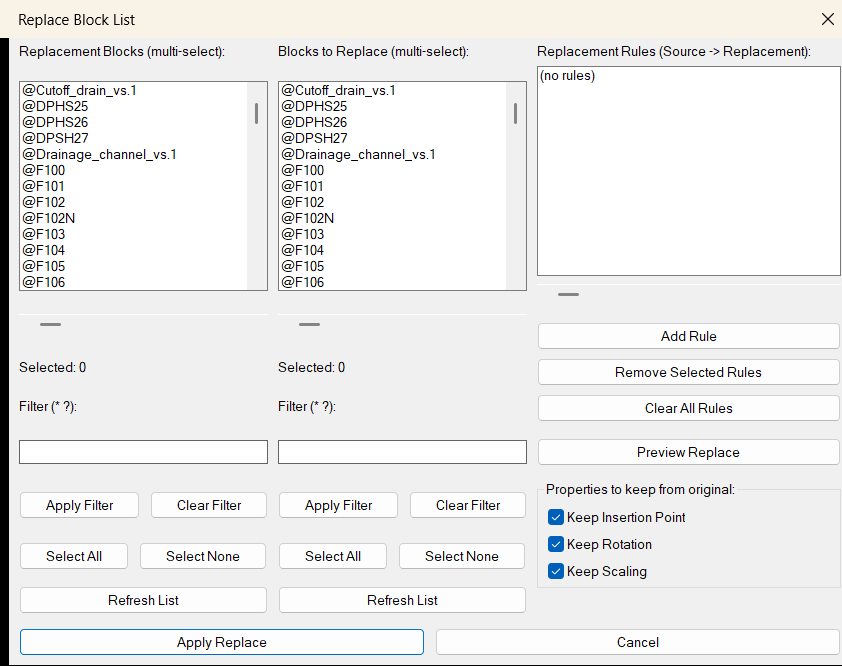
Command:
🚀 Main command:
ReplaceBlockList
🧩 AutoLISP command definition:
(defun c:ReplaceBlockList ...)
📌 Workflow:
1. Run ReplaceBlockList.
2. Select one or more replacement blocks from the left panel.
3. Select the matching source blocks to replace from the right panel.
4. Add paired rules in the format SourceBlock -> ReplacementBlock.
5. Preview the number of source instances that will be replaced.
6. Apply the replacement operation.
Description:
🔁 ReplaceBlockList is an AutoCAD block replacement utility designed for batch block management inside production drawings. It provides a visual DCL dialog with two synchronized multi-select block panels: one for replacement blocks and one for blocks that should be replaced.
🧱 The tool scans the active drawing block table, lists normal block definitions, and excludes xrefs, layout blocks, and anonymous block names from the selectable definition lists. Users can filter both lists with wildcard patterns, select multiple items, create replacement rules, preview affected instance counts, and apply all rules in one controlled operation.
📋 Each rule is stored as a clear Source -> Replacement pair. When applied, the routine finds source block references drawing-wide, copies the first inserted instance of the selected replacement block, transfers selected geometric properties from the original source reference, and deletes the old source block reference.
⚙️ The optional preserve toggles allow the user to keep the original block insertion point, rotation, and effective X/Y/Z scale. This makes the command useful for symbol swaps, title block cleanup, CAD standards migration, drawing modernization, and large-scale block replacement tasks.
💾 The tool stores filters, replacement rules, and keep-property settings in a temporary configuration file so the same replacement setup can be reused between sessions.
Helper function: (if any)
🧩 Important helper functions:
- 📁
REBL:CfgFilebuilds the settings file path in the system temporary folder. - 💾
REBL:SaveSettingssaves replacement filters, source filters, rules, and keep-property toggles. - 📥
REBL:LoadSettingsrestores the saved dialog state and replacement rule list. - ↔️
REBL:HScrollsupports horizontal scrolling for long block names in DCL list boxes. - 🧱
REBL:GetBlockNamesscans normal block definitions and skips xrefs, layouts, and anonymous names. - 🔍
REBL:FilterNamesfilters block names with wildcard matching. - ☑️
REBL:ParseMultiSelconverts DCL multi-select indexes into usable AutoLISP lists. - 📋
REBL:SelectedNamesreturns selected block names from the visible list. - 🪟
REBL:WriteDCLwrites the main temporary DCL dialog for the block replacement interface. - 👁️
REBL:WritePreviewDCLwrites the replacement preview dialog. - 🔢
REBL:CountInstancescounts drawing-wide instances of a source block name. - 🔎
REBL:ShowPreviewdisplays the replacement rule preview with instance counts. - 🔁
REBL:ReplaceAllperforms the actual source-to-replacement block swap.
Functionalities:
- 🚀 Launches a dedicated AutoCAD DCL dialog with the
ReplaceBlockListcommand. - 🧱 Lists available non-xref, non-layout, non-anonymous block definitions from the active drawing.
- 📌 Provides two multi-select panels: replacement blocks on the left and source blocks to replace on the right.
- 🔍 Supports wildcard filtering with patterns such as
*and?for both block lists. - ☑️ Includes Select All, Select None, Clear Filter, Apply Filter, and Refresh List controls for each panel.
- 📋 Builds multiple replacement rules in the format
SourceBlock -> ReplacementBlock. - 🧠 Pairs selected blocks by list index, so replacement selection 1 maps to source selection 1.
- 🛑 Skips invalid rules where the source and replacement names are the same.
- 🛡️ Skips duplicate source rules to avoid replacing the same source block twice in one run.
- 👁️ Previews every rule with the number of source instances that will be affected.
- 📐 Preserves insertion point when the Keep Insertion Point toggle is enabled.
- 🧭 Preserves block rotation when the Keep Rotation toggle is enabled.
- 📏 Preserves effective X, Y, and Z scale when the Keep Scaling toggle is enabled.
- 🔄 Uses the first inserted replacement block reference as the template for new copies.
- 🧹 Deletes old source block references after the replacement copy is created.
- ↩️ Wraps the apply operation in an AutoCAD undo mark for easier rollback.
- 💾 Remembers filters, rules, and preserve toggles in
ReplaceBlockList.cfg.
Result:
✅ The result is a faster and safer AutoCAD block replacement workflow for drawings with many repeated symbols, details, callouts, blocks, or CAD standard updates.
🔁 Instead of manually finding, copying, placing, rotating, scaling, and deleting block references one by one, ReplaceBlockList lets the user define multiple source-to-replacement rules and process them in a single batch.
📊 The preview dialog gives a clear count of affected source instances before replacement, helping reduce mistakes in large drawings.
Images, animations etc.
XAML code:
<ResourceDictionary
xmlns="http://schemas.microsoft.com/winfx/2006/xaml/presentation"
xmlns:x="http://schemas.microsoft.com/winfx/2006/xaml"
xmlns:src="clr-namespace:Autodesk.Windows;assembly=AdWindows">

<src:RibbonToolTip x:Key="ReplaceBlockList">
<src:RibbonToolTip.ExpandedContent>
<StackPanel>
<TextBlock Background="AntiqueWhite" TextAlignment="Left">
<Bold>Function Syntax: ReplaceBlockList</Bold>
<LineBreak/>
<Bold>Version: 1.0 Date: 20.06.2026 6:38:49PM</Bold>
<LineBreak/>
<Hyperlink>WEB</Hyperlink>
<LineBreak/>


<Bold><Run Foreground="DodgerBlue">Function Syntax: ReplaceBlockList</Run></Bold><LineBreak/>
<Bold><Run Foreground="Orange">Command: ReplaceBlockList</Run></Bold><LineBreak/>
<Bold><Run Foreground="LimeGreen">SEO Friendly AutoCAD Block Replacement Utility</Run></Bold><LineBreak/>
<Run Foreground="White">🔁 ReplaceBlockList is an AutoCAD LISP tool for batch block replacement using a visual DCL rule list, dual multi-select block panels, wildcard filters, preview counts, and optional property preservation.</Run><LineBreak/>
<Run Foreground="LimeGreen">🚀 Run </Run><Bold><Run Foreground="Orange">ReplaceBlockList</Run></Bold><Run Foreground="LimeGreen"> to open the replacement manager and build multiple source-to-replacement block rules in one workflow.</Run><LineBreak/>
<Bold><Run Foreground="DodgerBlue">Main Purpose</Run></Bold><LineBreak/>
<Run Foreground="White">🧱 This utility helps CAD users replace many block references across the active drawing without manually copying, aligning, scaling, rotating, and deleting blocks one by one.</Run><LineBreak/>
<Run Foreground="White">📋 The dialog creates clear </Run><Bold><Run Foreground="Orange">SourceBlock -> ReplacementBlock</Run></Bold><Run Foreground="White"> rules and applies them drawing-wide after previewing the number of affected source instances.</Run><LineBreak/>
<Bold><Run Foreground="DodgerBlue">SEO Optimized Description</Run></Bold><LineBreak/>
<Run Foreground="White">🔁 ReplaceBlockList is useful for AutoCAD block replacement, CAD standards cleanup, drawing modernization, symbol swapping, repeated detail updates, block library migration, and production drawing correction.</Run><LineBreak/>
<Run Foreground="White">🔍 The routine scans normal block definitions, filters out xrefs, layout blocks, and anonymous names, then displays the usable block names in an organized DCL interface.</Run><LineBreak/>
<Run Foreground="White">🧠 Users can create multiple replacement rules at once by selecting matching block names from the replacement list and the source list.</Run><LineBreak/>
<Bold><Run Foreground="LimeGreen">Functionalities</Run></Bold><LineBreak/>
<Run Foreground="White">🚀 </Run><Bold><Run Foreground="LimeGreen">Dedicated command</Run></Bold><Run Foreground="White"> - starts the full replacement interface with </Run><Bold><Run Foreground="Orange">ReplaceBlockList</Run></Bold><Run Foreground="White">.</Run><LineBreak/>
<Run Foreground="White">🧱 </Run><Bold><Run Foreground="LimeGreen">Block table scan</Run></Bold><Run Foreground="White"> - lists non-xref, non-layout, non-anonymous block definitions from the active drawing.</Run><LineBreak/>
<Run Foreground="White">📌 </Run><Bold><Run Foreground="LimeGreen">Dual multi-select panels</Run></Bold><Run Foreground="White"> - uses replacement blocks on the left and source blocks to replace on the right.</Run><LineBreak/>
<Run Foreground="White">🔍 </Run><Bold><Run Foreground="LimeGreen">Wildcard filters</Run></Bold><Run Foreground="White"> - supports search patterns such as </Run><Bold><Run Foreground="Orange">*</Run></Bold><Run Foreground="White"> and </Run><Bold><Run Foreground="Orange">?</Run></Bold><Run Foreground="White">.</Run><LineBreak/>
<Run Foreground="White">☑️ </Run><Bold><Run Foreground="LimeGreen">Selection controls</Run></Bold><Run Foreground="White"> - includes Select All, Select None, Apply Filter, Clear Filter, and Refresh List buttons.</Run><LineBreak/>
<Run Foreground="White">📋 </Run><Bold><Run Foreground="LimeGreen">Rule-based replacement</Run></Bold><Run Foreground="White"> - builds visible </Run><Bold><Run Foreground="Orange">Source -> Replacement</Run></Bold><Run Foreground="White"> rules before editing the drawing.</Run><LineBreak/>
<Run Foreground="White">👁️ </Run><Bold><Run Foreground="LimeGreen">Preview before apply</Run></Bold><Run Foreground="White"> - shows each rule with source instance counts before the replacement is executed.</Run><LineBreak/>
<Run Foreground="White">📐 </Run><Bold><Run Foreground="LimeGreen">Keep insertion point</Run></Bold><Run Foreground="White"> - can preserve the original source block placement.</Run><LineBreak/>
<Run Foreground="White">🧭 </Run><Bold><Run Foreground="LimeGreen">Keep rotation</Run></Bold><Run Foreground="White"> - can preserve the source block rotation angle.</Run><LineBreak/>
<Run Foreground="White">📏 </Run><Bold><Run Foreground="LimeGreen">Keep scale</Run></Bold><Run Foreground="White"> - can preserve effective X, Y, and Z scale factors.</Run><LineBreak/>
<Run Foreground="White">💾 </Run><Bold><Run Foreground="LimeGreen">Saved settings</Run></Bold><Run Foreground="White"> - remembers filters, rules, and keep-property toggles in </Run><Bold><Run Foreground="Orange">ReplaceBlockList.cfg</Run></Bold><Run Foreground="White">.</Run><LineBreak/>
<Run Foreground="White">↩️ </Run><Bold><Run Foreground="LimeGreen">Undo grouped operation</Run></Bold><Run Foreground="White"> - wraps the apply process in an AutoCAD undo mark.</Run><LineBreak/>
<Bold><Run Foreground="DodgerBlue">Helper Functions</Run></Bold><LineBreak/>
<Run Foreground="White">🧩 </Run><Bold><Run Foreground="Orange">REBL:GetBlockNames</Run></Bold><Run Foreground="White"> scans available block names.</Run><LineBreak/>
<Run Foreground="White">🔍 </Run><Bold><Run Foreground="Orange">REBL:FilterNames</Run></Bold><Run Foreground="White"> applies wildcard filtering.</Run><LineBreak/>
<Run Foreground="White">📋 </Run><Bold><Run Foreground="Orange">REBL:ShowPreview</Run></Bold><Run Foreground="White"> displays replacement rules and counts.</Run><LineBreak/>
<Run Foreground="White">🔁 </Run><Bold><Run Foreground="Orange">REBL:ReplaceAll</Run></Bold><Run Foreground="White"> copies the replacement reference, applies selected source properties, and deletes the old source reference.</Run><LineBreak/>
<Bold><Run Foreground="DodgerBlue">Result</Run></Bold><LineBreak/>
<Run Foreground="White">✅ The final result is a faster AutoCAD block cleanup workflow for replacing many drawing symbols, detail blocks, annotation blocks, and CAD standard blocks with controlled rule-based automation.</Run><LineBreak/>
<Run Foreground="LimeGreen">📊 The preview count and saved rules make repeated block replacement tasks easier to check, repeat, and manage.</Run><LineBreak/>
<Bold><Run Foreground="DarkRed">Important Notes</Run></Bold><LineBreak/>
<Run Foreground="White">⚠️ The operation is destructive because old source block references are deleted after replacement copies are created.</Run><LineBreak/>
<Run Foreground="White">📌 A replacement block must already have at least one inserted reference in the drawing because the tool copies the first matching replacement reference as the template.</Run><LineBreak/>
<Run Foreground="White">⚙️ Only insertion point, rotation, and scale are optionally copied from the source reference. Other properties can come from the replacement template block reference.</Run><LineBreak/>
<Run Foreground="White">🛡️ Review the preview list and keep an AutoCAD backup or use Undo when testing new replacement rules.</Run><LineBreak/>


</TextBlock>

<Grid>
<Image Source="Image_000.png" Stretch="Uniform"/>
</Grid>

</StackPanel>
</src:RibbonToolTip.ExpandedContent>
</src:RibbonToolTip>
</ResourceDictionary>