
Short description
🚀 DelUnusedBlocks is an AutoCAD AutoLISP and DCL cleanup utility for finding and deleting unused block definitions from the active DWG drawing.
🧹 The tool scans the AutoCAD block table, filters out inserted blocks, xrefs, layout blocks, anonymous blocks, and dependent definitions, then displays only deletable unused block names in a multi-select dialog.
✅ It helps CAD users reduce drawing clutter, improve DWG performance, simplify block libraries, and automate safe AutoCAD block cleanup workflows.
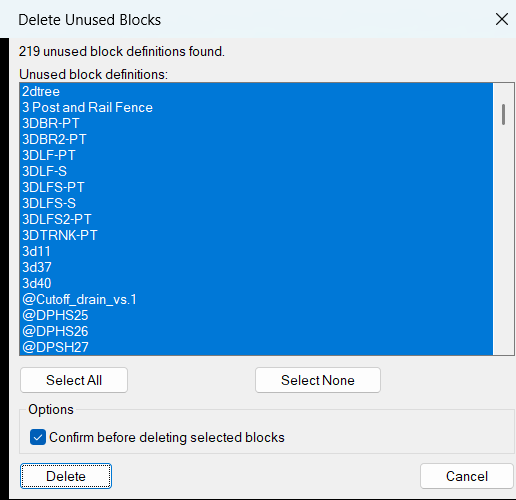
Command:
🧰 Load the LISP file with APPLOAD or another AutoCAD startup loading method.
🚀 Run DelUnusedBlocks to open the generated DCL dialog named Delete Unused Blocks.
📌 The target platform is AutoCAD with Visual LISP and ActiveX COM support through vl-load-com.
📄 Main source file: DelUnusedBlocks_DCL.lsp.
💾 User settings are stored in DelUnusedBlocks.cfg, normally under ROAMABLEROOTPREFIX, with fallback paths using DWGPREFIX, TEMPPREFIX, or the current folder.
Description:
📘 DelUnusedBlocks is a practical AutoCAD AutoLISP tool for cleaning unused block definitions from DWG files through a generated DCL interface. The user runs DelUnusedBlocks, and the program scans the drawing block table for block definitions that can be deleted safely because they are not inserted in the drawing.
🔍 The routine uses tblnext on the BLOCK table, checks the block flag value from DXF group code 70, excludes xrefs, xref-dependent definitions, externally dependent blocks, resolved xrefs, layout blocks, and anonymous/system definitions, then removes any block names that still have matching INSERT references found by ssget "_X".
🧠 The cleaned list is shown in a multi-select DCL list box. The user can choose all unused blocks, choose none, select individual unused block definitions, and optionally require confirmation before deletion. The selected block definitions are then deleted from the drawing database using ActiveX methods such as vla-item and vla-delete.
💾 The dialog remembers the previous confirmation setting, previous selected block names, and dialog position through DelUnusedBlocks.cfg. This makes repeated AutoCAD cleanup sessions faster and more consistent.
🔴 Important: this utility deletes unused block definitions from the DWG block table. It does not delete placed block references because inserted blocks are filtered out, but deleting block definitions is still a drawing cleanup action that should be used on a saved or backed-up DWG when required.
Helper function: (if any)
- 🚀 Command entry point —
c:DelUnusedBlocksstarts the AutoCAD block cleanup workflow, scans unused definitions, builds the DCL dialog, reads settings, and launches deletion. - 🔍 Unused block detection — the code uses
tblnext "BLOCK", DXF group code70, andDUB:block-inserted-pto find block definitions that are not currently inserted in the drawing. - 🔒 Protected block filtering — anonymous blocks, xrefs, externally dependent blocks, xref-dependent definitions, resolved xrefs, and layout block records are skipped using the block table flag mask.
- 📋 DCL dialog generation —
DUB:write-dclandDUB:dcl-textcreate a temporary DCL file at runtime with a multi-select list box, Select All, Select None, confirmation toggle, Delete, and Cancel buttons. - 🧠 Selection state mapping —
DUB:all-index-string,DUB:names->index-string, andDUB:index-string->namesconvert between DCL list indexes and real block names so saved selections can be restored. - 🧹 Deletion engine —
DUB:delete-selectedloops through selected unused block names and callsDUB:delete-blockto remove each definition withvla-delete. - ⚠️ Confirmation safety —
DUB:yes-pasks for Yes or No confirmation before deleting selected definitions when the confirmation toggle is enabled. - 💾 Persistent settings —
DUB:read-cfg,DUB:write-state,DUB:write-cfg, andDUB:cfg-pathstore confirmation preference, last selected names, and dialog position inDelUnusedBlocks.cfg. - 📌 Dialog position restore —
DUB:restore-dialog-pointandDUB:valid-point-premember the previous DCL window position using the Lee Mac dialog-position pattern. - 🔐 Safe COM wrapper —
LM:catchapplywraps ActiveX calls withvl-catch-all-apply, helping the tool avoid hard failures when a block cannot be accessed or deleted.
Functionalities:
- 🚀 Run a dedicated AutoCAD cleanup command — use
DelUnusedBlocksto start a focused unused block definition cleanup workflow. - 🔍 Scan unused block definitions — automatically checks the active DWG block table and finds block definitions that are not inserted in the drawing.
- 🔒 Skip protected block types — excludes xrefs, xref-dependent blocks, externally dependent blocks, layout blocks, and other non-deletable block records.
- 📋 Use a generated DCL dialog — displays unused block names in a practical multi-select list instead of forcing command-line-only cleanup.
- 🟢 Select all unused blocks — quickly marks every detected unused block definition for deletion.
- ⚪ Select none — clears the current selection when the user wants to manually choose only specific block names.
- ⚠️ Confirm before delete — optional confirmation helps prevent accidental cleanup actions in production DWG files.
- 🧹 Delete selected unused blocks — removes the selected unused definitions from the AutoCAD block table with ActiveX database operations.
- 💾 Remember user settings — saves dialog position, confirmation preference, and previous selected block names in
DelUnusedBlocks.cfg. - 📌 Restore previous selection — attempts to reselect previously chosen block names when they still exist in the next cleanup session.
- 📊 Command-line reporting — prints deleted block names and the total number of deleted unused block definitions.
- 🔐 Graceful cancel behavior — preserves settings and exits cleanly when the user cancels or closes the dialog.
Result:
✅ The final result is a cleaner AutoCAD DWG file with selected unused block definitions removed from the drawing database.
🧹 This reduces unnecessary block table clutter, supports better CAD standards management, improves block library maintenance, and can make drawing audits, cleanup routines, and project handover workflows easier.
🚀 For AutoCAD and Civil 3D production users, DelUnusedBlocks provides a faster, more controlled alternative to manually inspecting unused blocks one by one.
Images, animations etc.
XAML code:
<ResourceDictionary
xmlns="http://schemas.microsoft.com/winfx/2006/xaml/presentation"
xmlns:x="http://schemas.microsoft.com/winfx/2006/xaml"
xmlns:src="clr-namespace:Autodesk.Windows;assembly=AdWindows">
<src:RibbonToolTip x:Key="DelUnusedBlocks">
<src:RibbonToolTip.ExpandedContent>
<StackPanel>
<TextBlock Background="AntiqueWhite" TextAlignment="Left">
<Bold>Function Syntax: DelUnusedBlocks</Bold>
<LineBreak/>
<Hyperlink>N/A </Hyperlink>
<LineBreak/>
<Bold><Run Foreground="DodgerBlue">short_description:</Run></Bold><LineBreak/>
<Run Foreground="White">🚀 DelUnusedBlocks is an AutoCAD AutoLISP and DCL cleanup utility for detecting and deleting unused block definitions from the active DWG drawing.</Run><LineBreak/>
<Run Foreground="White">🧹 It scans the block table, removes inserted blocks from the candidate list, excludes xrefs, layout blocks, anonymous blocks, and dependent records, then shows only deletable unused block names.</Run><LineBreak/>
<Run Foreground="LimeGreen">✅ The main benefit is faster AutoCAD drawing cleanup, reduced DWG clutter, better block library management, and improved CAD standards control.</Run><LineBreak/>
<LineBreak/>
<Bold><Run Foreground="DodgerBlue">command:</Run></Bold><LineBreak/>
<Run Foreground="White">🧰 Load the LISP with </Run><Bold><Run Foreground="Orange">APPLOAD</Run></Bold><Run Foreground="White"> or an AutoCAD startup loading method.</Run><LineBreak/>
<Run Foreground="White">🚀 Run </Run><Bold><Run Foreground="Orange">DelUnusedBlocks</Run></Bold><Run Foreground="White"> to open the generated DCL dialog named Delete Unused Blocks.</Run><LineBreak/>
<Run Foreground="White">📄 Main source file: </Run><Bold><Run Foreground="Orange">DelUnusedBlocks_DCL.lsp</Run></Bold><Run Foreground="White">.</Run><LineBreak/>
<Run Foreground="White">💾 Settings are saved in </Run><Bold><Run Foreground="Orange">DelUnusedBlocks.cfg</Run></Bold><Run Foreground="White"> using ROAMABLEROOTPREFIX, DWGPREFIX, TEMPPREFIX, or the current folder as fallback locations.</Run><LineBreak/>
<LineBreak/>
<Bold><Run Foreground="DodgerBlue">description:</Run></Bold><LineBreak/>
<Run Foreground="White">📘 This AutoCAD cleanup tool helps the user delete unused block definitions through a DCL multi-select dialog instead of manual block table inspection.</Run><LineBreak/>
<Run Foreground="White">🔍 The program uses </Run><Bold><Run Foreground="Orange">tblnext</Run></Bold><Run Foreground="White"> on the BLOCK table and checks DXF group code </Run><Bold><Run Foreground="Orange">70</Run></Bold><Run Foreground="White"> to exclude non-deletable records.</Run><LineBreak/>
<Run Foreground="White">🧠 It removes block names that still have inserted references by using </Run><Bold><Run Foreground="Orange">ssget "_X"</Run></Bold><Run Foreground="White"> with an INSERT filter.</Run><LineBreak/>
<Run Foreground="White">📋 The dialog lists unused block definitions, supports multi-selection, Select All, Select None, and an optional confirmation toggle.</Run><LineBreak/>
<Run Foreground="White">🧹 Selected unused definitions are deleted with ActiveX database calls such as </Run><Bold><Run Foreground="Orange">vla-item</Run></Bold><Run Foreground="White"> and </Run><Bold><Run Foreground="Orange">vla-delete</Run></Bold><Run Foreground="White">.</Run><LineBreak/>
<Bold><Run Foreground="DarkRed">Important:</Run></Bold><Run Foreground="White"> this is a cleanup command that deletes selected unused block definitions from the DWG block table.</Run><LineBreak/>
<LineBreak/>
<Bold><Run Foreground="LimeGreen">helper_function:</Run></Bold><LineBreak/>
<Run Foreground="White">🚀 </Run><Bold><Run Foreground="LimeGreen">Command entry point</Run></Bold><Run Foreground="White"> - </Run><Bold><Run Foreground="Orange">c:DelUnusedBlocks</Run></Bold><Run Foreground="White"> starts the scan, DCL dialog, settings read, user selection, and deletion workflow.</Run><LineBreak/>
<Run Foreground="White">🔍 </Run><Bold><Run Foreground="LimeGreen">Unused block detection</Run></Bold><Run Foreground="White"> - </Run><Bold><Run Foreground="Orange">DUB:block-inserted-p</Run></Bold><Run Foreground="White"> checks whether a block name still has INSERT references in the drawing.</Run><LineBreak/>
<Run Foreground="White">🔒 </Run><Bold><Run Foreground="LimeGreen">Protected block filtering</Run></Bold><Run Foreground="White"> - </Run><Bold><Run Foreground="Orange">DXF 70 flag mask</Run></Bold><Run Foreground="White"> skips anonymous blocks, xrefs, externally dependent blocks, xref-dependent definitions, resolved xrefs, and layout blocks.</Run><LineBreak/>
<Run Foreground="White">📋 </Run><Bold><Run Foreground="LimeGreen">DCL generator</Run></Bold><Run Foreground="White"> - </Run><Bold><Run Foreground="Orange">DUB:write-dcl and DUB:dcl-text</Run></Bold><Run Foreground="White"> write a temporary DCL file with a multi-select list, selection buttons, confirmation toggle, Delete, and Cancel.</Run><LineBreak/>
<Run Foreground="White">🧠 </Run><Bold><Run Foreground="LimeGreen">Index and name mapping</Run></Bold><Run Foreground="White"> - </Run><Bold><Run Foreground="Orange">DUB:names->index-string and DUB:index-string->names</Run></Bold><Run Foreground="White"> converts saved block names to DCL list indexes and back.</Run><LineBreak/>
<Run Foreground="White">🧹 </Run><Bold><Run Foreground="LimeGreen">Deletion engine</Run></Bold><Run Foreground="White"> - </Run><Bold><Run Foreground="Orange">DUB:delete-selected and DUB:delete-block</Run></Bold><Run Foreground="White"> delete selected unused block definitions using AutoCAD ActiveX methods.</Run><LineBreak/>
<Run Foreground="White">⚠️ </Run><Bold><Run Foreground="LimeGreen">Confirmation prompt</Run></Bold><Run Foreground="White"> - </Run><Bold><Run Foreground="Orange">DUB:yes-p</Run></Bold><Run Foreground="White"> asks Yes or No before deletion when confirmation is enabled.</Run><LineBreak/>
<Run Foreground="White">💾 </Run><Bold><Run Foreground="LimeGreen">Persistent settings</Run></Bold><Run Foreground="White"> - </Run><Bold><Run Foreground="Orange">DUB:read-cfg and DUB:write-state</Run></Bold><Run Foreground="White"> save confirmation, last selected names, and dialog coordinates in DelUnusedBlocks.cfg.</Run><LineBreak/>
<Run Foreground="White">🔐 </Run><Bold><Run Foreground="LimeGreen">Safe COM wrapper</Run></Bold><Run Foreground="White"> - </Run><Bold><Run Foreground="Orange">LM:catchapply</Run></Bold><Run Foreground="White"> uses vl-catch-all-apply to reduce hard failures when COM operations fail.</Run><LineBreak/>
<LineBreak/>
<Bold><Run Foreground="LimeGreen">functionalities:</Run></Bold><LineBreak/>
<Run Foreground="White">🚀 </Run><Bold><Run Foreground="LimeGreen">Dedicated AutoCAD cleanup command</Run></Bold><Run Foreground="White"> - runs DelUnusedBlocks for unused block definition cleanup.</Run><LineBreak/>
<Run Foreground="White">🔍 </Run><Bold><Run Foreground="LimeGreen">Automatic unused block scan</Run></Bold><Run Foreground="White"> - finds block definitions that are not inserted in the active DWG.</Run><LineBreak/>
<Run Foreground="White">🔒 </Run><Bold><Run Foreground="LimeGreen">Protected record exclusion</Run></Bold><Run Foreground="White"> - skips xrefs, dependent blocks, layout records, and anonymous/system definitions.</Run><LineBreak/>
<Run Foreground="White">📋 </Run><Bold><Run Foreground="LimeGreen">Generated DCL interface</Run></Bold><Run Foreground="White"> - shows unused blocks in a multi-select dialog.</Run><LineBreak/>
<Run Foreground="White">🟢 </Run><Bold><Run Foreground="LimeGreen">Select All</Run></Bold><Run Foreground="White"> - marks every detected unused block definition.</Run><LineBreak/>
<Run Foreground="White">⚪ </Run><Bold><Run Foreground="LimeGreen">Select None</Run></Bold><Run Foreground="White"> - clears the DCL selection for manual picking.</Run><LineBreak/>
<Run Foreground="White">⚠️ </Run><Bold><Run Foreground="LimeGreen">Confirmation option</Run></Bold><Run Foreground="White"> - can ask the user before deleting selected block definitions.</Run><LineBreak/>
<Run Foreground="White">🧹 </Run><Bold><Run Foreground="LimeGreen">Delete selected unused blocks</Run></Bold><Run Foreground="White"> - removes chosen unused definitions from the block table.</Run><LineBreak/>
<Run Foreground="White">💾 </Run><Bold><Run Foreground="LimeGreen">Save user settings</Run></Bold><Run Foreground="White"> - remembers dialog position, confirmation state, and previous selections.</Run><LineBreak/>
<Run Foreground="White">📊 </Run><Bold><Run Foreground="LimeGreen">Command-line report</Run></Bold><Run Foreground="White"> - prints deleted names and the total number of deleted unused blocks.</Run><LineBreak/>
<Run Foreground="White">🔐 </Run><Bold><Run Foreground="LimeGreen">Clean cancel behavior</Run></Bold><Run Foreground="White"> - preserves settings and exits without deleting when cancelled.</Run><LineBreak/>
<LineBreak/>
<Bold><Run Foreground="DodgerBlue">result:</Run></Bold><LineBreak/>
<Run Foreground="White">✅ The final result is a cleaner AutoCAD DWG with selected unused block definitions removed from the drawing database.</Run><LineBreak/>
<Run Foreground="LimeGreen">🚀 The tool improves block cleanup speed, CAD standard maintenance, drawing audit preparation, DWG performance hygiene, and project handover quality.</Run><LineBreak/>
<LineBreak/>
<Bold><Run Foreground="DodgerBlue">additional_info:</Run></Bold><LineBreak/>
<Bold><Run Foreground="DarkRed">🔴 Destructive action:</Run></Bold><Run Foreground="White"> selected unused block definitions are deleted, so save or back up important drawings before running cleanup.</Run><LineBreak/>
<Run Foreground="White">🔒 Inserted blocks are protected because the routine excludes block definitions that still have matching </Run><Bold><Run Foreground="Orange">INSERT</Run></Bold><Run Foreground="White"> references.</Run><LineBreak/>
<Run Foreground="White">⚠️ The code does not create a custom undo mark. AutoCAD standard undo behavior may still apply depending on command history.</Run><LineBreak/>
<Run Foreground="White">📌 In complex dynamic block or anonymous block workflows, review the detected list carefully before deleting.</Run><LineBreak/>
<Run Foreground="White">🧰 Requires AutoCAD Visual LISP and COM support through </Run><Bold><Run Foreground="Orange">vl-load-com</Run></Bold><Run Foreground="White">.</Run><LineBreak/>
</TextBlock>
<!-- Use MediaElement for GIF (static first frame) and Image as fallback -->
</StackPanel>
</src:RibbonToolTip.ExpandedContent>
</src:RibbonToolTip>
</ResourceDictionary>