
Short description
Rectangle-based AutoLISP trim and erase utility for keeping or removing geometry inside or outside a selected boundary.
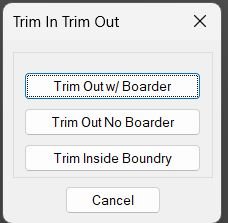
Command:
CUT
SCB
SC
SCD
Description:
TrimIn_TrimOut_Boundary is an AutoLISP boundary-cleanup routine based on the enhanced multi-trim SECTION workflow by Bob Jones with a dialog interface added by Jim Arthur. It prompts the user for two rectangle corners and then trims and erases geometry either outside or inside the rectangle.
The command can leave a rectangular polyline border, trim outside while deleting the temporary border, or delete and trim geometry inside the rectangle depending on the selected operation.
Helper function: (if any)
c:cut launches the dialog-based workflow and routes the chosen option.
c:scb runs section with a retained rectangular border.
c:sc runs section without retaining the border.
c:scd deletes/trims entities inside the selected rectangle.
section builds the rectangular boundary, computes trim-fence points, performs erase and trim command calls, and restores system variables.
newerr restores CMDECHO and HIGHLIGHT after cancellation or error.
cut_x loads cut.dcl, reads the selected option, and executes the matching command.
Functionalities:
Allows the user to define a rectangular boundary from two corner points.
Offers three trimming modes: outside with border, outside without border, and inside deletion.
Creates a temporary closed PLINE rectangle used as the trim boundary.
Uses AutoCAD ERASE and TRIM operations to remove and cut geometry relative to the rectangle.
Uses four fence trim passes around the boundary to improve trim reliability.
Saves and restores CMDECHO and HIGHLIGHT system variables.
Result:
The drawing is trimmed or cleaned according to the selected rectangular operation. Depending on the mode, the routine either leaves a visible rectangular polyline border or removes the temporary border after trimming.
Images, animations etc.
XAML code:
<ResourceDictionary
 xmlns="http://schemas.microsoft.com/winfx/2006/xaml/presentation"
 xmlns:x="http://schemas.microsoft.com/winfx/2006/xaml"
 xmlns:src="clr-namespace:Autodesk.Windows;assembly=AdWindows">

 <src:RibbonToolTip x:Key="TrimIn_TrimOut_Boundary">
 <src:RibbonToolTip.ExpandedContent>
 <StackPanel>
 <TextBlock Background="AntiqueWhite" TextAlignment="Left">
<Bold>Function Syntax: cut / scb / sc / scd</Bold>
<LineBreak/>
<Bold>Version: 1.1 Date: 28.04.2026 3:17:47PM</Bold>
<LineBreak/>
<Hyperlink>https://blog.draftsperson.net/free-lisp-routines/</Hyperlink>
<LineBreak/>
<RichTextBox>
    <FlowDocument>
        <Paragraph>
            <Bold>Program Description</Bold>
<LineBreak/>
The first command, SCB, will erase and trim all entities outside of the rectangle and leave a polyline border.
<LineBreak/>
The second command, SC, will erase and trim all entities outside of the rectangle but will not leave a border.
<LineBreak/>
The final command, SCD, will erase and trim all entities inside of the rectangle and will not leave a border.
<LineBreak/>
        </Paragraph>
		    </FlowDocument>
</RichTextBox>
</TextBlock>

<Grid>
<Image Source="Image_000.jpg" Stretch="Uniform"/>
</Grid>


 <!-- Use MediaElement for GIF (static first frame) and Image as fallback -->
</StackPanel>
 </src:RibbonToolTip.ExpandedContent>
 </src:RibbonToolTip>


</ResourceDictionary>