
Short description
🚀 DynamicBlockCounter is an AutoCAD and Civil 3D AutoLISP block counting utility for standard blocks, dynamic blocks, xrefs, and visibility-state summaries in the current drawing layout. It helps CAD users quickly audit DWG block usage, count dynamic block visibility states, and export clean TXT or CSV reports for drawing coordination, quantity checking, and CAD cleanup workflows.
Command:
🧰 Load the LISP with APPLOAD or by adding DynamicBlockCounter.lsp to the AutoCAD startup suite.
▶️ Run DBCOUNT or c:dbcount to start the Dynamic Block Counter workflow.
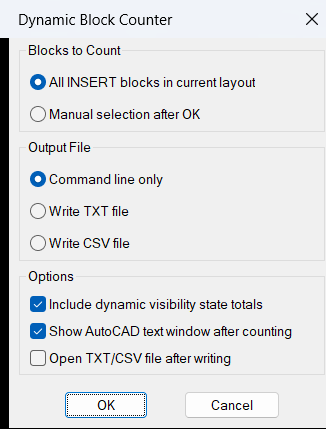
📌 The command scans INSERT entities in the current AutoCAD layout, prompts the user to select blocks to count or press Enter to count all detected blocks, prints the summary to the command line, and optionally exports the result to TXT or CSV.
🎯 Target platform: AutoCAD and Civil 3D with Visual LISP COM support enabled by vl-load-com.
Description:
📘 DynamicBlockCounter is a practical AutoCAD AutoLISP utility designed to count block references, dynamic block references, and xref-style insert references in the active DWG layout. The tool is useful for CAD managers, Civil 3D designers, BIM coordinators, drafting teams, and production users who need a fast block quantity report without manually inspecting the drawing.
🔍 The workflow is simple: the user runs DBCOUNT, the program scans the current layout for INSERT entities, and then the user can either select a subset of blocks or count all detected blocks. The routine resolves the effective block name using LM:blockname, so anonymous dynamic block names are reported by their real visible block name where supported.
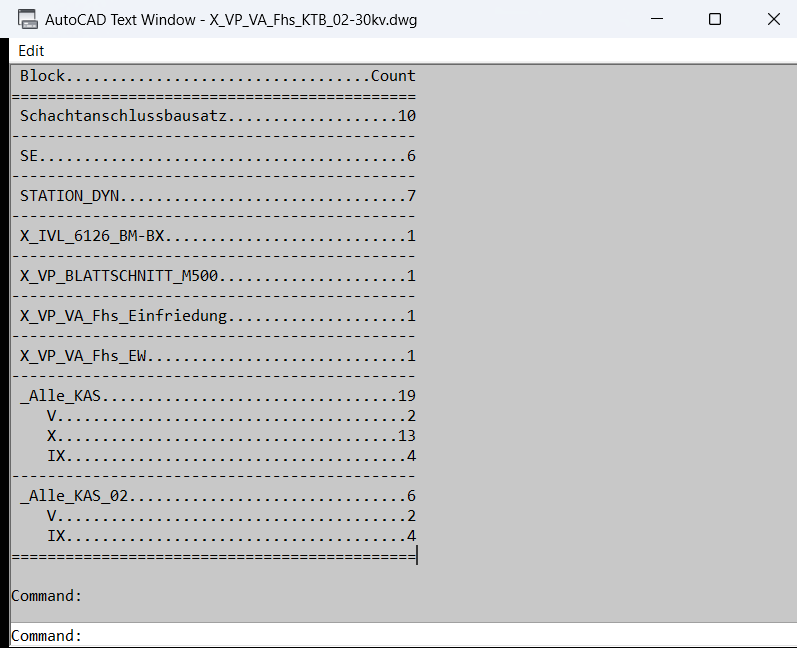
🧩 For dynamic blocks that contain a visibility parameter, the program does more than count the block name. It reads the visibility parameter name from the block definition extension dictionary and then extracts each selected block reference visibility value through getdynamicblockproperties. This makes it possible to report totals per visibility state, such as different manhole types, sign types, object variants, symbols, or Civil 3D plan production block configurations.
📊 After processing the selection, the routine prints a formatted block count table to the AutoCAD command line and opens the text screen with textpage. The user may also choose TXT or CSV export. The output file is automatically created in the active drawing folder using the current drawing name as the base filename.
🧠 This LISP does not modify drawing geometry. It is a reporting and audit tool for AutoCAD and Civil 3D block management, dynamic block quantity extraction, xref reference review, DWG cleanup, symbol counting, visibility-state checking, and CAD production quality control.
Helper function: (if any)
- 🚀 Command entry point –
c:dbcountstarts the block counting workflow and controls selection, counting, command-line reporting, and optional file export. - 🔍 Current layout scan –
ssget "_X"searches forINSERTobjects in the current layout, usingCTABwhen in paper space andModelwhen in model space. - 🧩 Effective block name detection –
LM:blocknameusesEffectiveNamewhen available, which gives clearer results for dynamic blocks that normally use anonymous internal names. - 🔢 Nested count accumulator –
LM:nassoc++builds and increments a nested association list so each block name and optional visibility state is counted reliably. - 👁️ Visibility parameter lookup –
LM:getvisibilityparameternamereads theACAD_ENHANCEDBLOCKextension dictionary and finds theBLOCKVISIBILITYPARAMETERdefinition when a dynamic block supports visibility states. - 📐 Dynamic property reading –
vlax-invokewithgetdynamicblockpropertiesextracts the current visibility value from each dynamic block reference. - 📝 Command-line formatting –
LM:padbetweencreates aligned block count output using separator lines and padded columns for easy reading in AutoCAD text history. - 📤 TXT and CSV export –
LM:uniquefilenameprevents file overwrite by creating a unique report filename in the drawing folder before writing the block count data. - 🔐 Error-safe cleanup – the local
*error*handler closes open files, restoresNOMUTT, and avoids noisy messages when the user cancels the command.
Functionalities:
- 🚀 Count all blocks in the current layout – press Enter at the selection prompt to count every detected
INSERTobject in the active model or layout context. - 🎯 Count selected blocks only – select specific block references when only part of the drawing should be audited.
- 🧩 Support dynamic blocks – resolves dynamic block effective names so reports use readable block names instead of anonymous internal names.
- 👁️ Visibility state reporting – counts each visibility state separately for dynamic blocks that use a visibility parameter.
- 📌 Include xref-style inserts – processes reference objects that appear as
INSERTentities in the current drawing layout. - 📊 Formatted AutoCAD command-line report – prints block names, visibility states, and counts in a structured table.
- 📤 Export block counts to TXT – creates a tab-delimited report for documentation, review, or quick sharing.
- 📤 Export block counts to CSV – creates a spreadsheet-friendly report for Excel, quantity checking, and project coordination.
- 🧠 Automatic unique filenames – avoids overwriting previous reports by adding a numeric suffix when an output file already exists.
- 🔒 Non-destructive drawing audit – reads block information and writes reports without editing, moving, deleting, or changing the drawing entities.
Result:
✅ The final result is a fast AutoCAD and Civil 3D block quantity report that shows how many standard blocks, dynamic blocks, xrefs, and visibility-state variants exist in the current layout or selected set. The tool improves CAD productivity, drawing quality control, block library auditing, Civil 3D plan production review, quantity verification, and DWG cleanup by replacing manual block counting with a repeatable AutoLISP reporting workflow.
Images, animations etc.
XAML code:
<ResourceDictionary
 xmlns="http://schemas.microsoft.com/winfx/2006/xaml/presentation"
 xmlns:x="http://schemas.microsoft.com/winfx/2006/xaml"
 xmlns:src="clr-namespace:Autodesk.Windows;assembly=AdWindows">

 <src:RibbonToolTip x:Key="DynamicBlockCounter">
 <src:RibbonToolTip.ExpandedContent>
 <StackPanel>
 <TextBlock Background="AntiqueWhite" TextAlignment="Left">
<Bold>Function Syntax: DBCount</Bold>
<LineBreak/>
<Bold>Version: 1.0 Date: 06.07.2026 4:25:36PM</Bold>
<LineBreak/>
<Hyperlink>https://www.lee-mac.com/dynamicblockcounter.html</Hyperlink>
<LineBreak/>

id: dbcounter01
<Bold><Run Foreground="DodgerBlue">SEO Description</Run></Bold><LineBreak/>
<Run Foreground="White">🚀 DynamicBlockCounter is an AutoCAD and Civil 3D AutoLISP block counting utility for standard blocks, dynamic blocks, xrefs, and visibility-state summaries in the current drawing layout.</Run><LineBreak/>
<Run Foreground="LimeGreen">The main benefit is faster DWG block auditing, cleaner CAD quantity checking, and exportable AutoCAD Civil 3D block count reports.</Run><LineBreak/>
<LineBreak/>
command: |
<Bold><Run Foreground="DodgerBlue">Main Command and Loading Method</Run></Bold><LineBreak/>
<Run Foreground="White">🧰 Load the LISP with </Run><Bold><Run Foreground="Orange">APPLOAD</Run></Bold><Run Foreground="White"> or from the AutoCAD startup suite.</Run><LineBreak/>
<Run Foreground="White">▶️ Run </Run><Bold><Run Foreground="Orange">DBCOUNT</Run></Bold><Run Foreground="White"> to open the dynamic block counting workflow.</Run><LineBreak/>
<Run Foreground="White">📌 The command scans </Run><Bold><Run Foreground="Orange">INSERT</Run></Bold><Run Foreground="White"> entities in the current layout, lets the user count all or selected blocks, and can export </Run><Bold><Run Foreground="Orange">TXT</Run></Bold><Run Foreground="White"> or </Run><Bold><Run Foreground="Orange">CSV</Run></Bold><Run Foreground="White"> reports.</Run><LineBreak/>
<Run Foreground="White">🎯 Target platform: AutoCAD and Civil 3D with Visual LISP COM support through </Run><Bold><Run Foreground="Orange">vl-load-com</Run></Bold><Run Foreground="White">.</Run><LineBreak/>
<LineBreak/>
description: |
<Bold><Run Foreground="DodgerBlue">Detailed Description</Run></Bold><LineBreak/>
<Run Foreground="White">📘 This AutoLISP program counts block references, dynamic block references, and xref-style insert references in the active DWG layout.</Run><LineBreak/>
<Run Foreground="White">🔍 The user runs </Run><Bold><Run Foreground="Orange">DBCOUNT</Run></Bold><Run Foreground="White">, selects specific blocks or presses Enter to count all detected layout blocks, and receives a formatted block count table in the AutoCAD command line.</Run><LineBreak/>
<Run Foreground="White">🧩 For dynamic blocks, the routine resolves the effective block name so anonymous dynamic block names are shown as readable production block names.</Run><LineBreak/>
<Run Foreground="White">👁️ When a dynamic block has a visibility parameter, the routine also counts how many references use each visibility state.</Run><LineBreak/>
<Run Foreground="White">📊 The user can export the result to a </Run><Bold><Run Foreground="Orange">TXT</Run></Bold><Run Foreground="White"> or </Run><Bold><Run Foreground="Orange">CSV</Run></Bold><Run Foreground="White"> file created in the current drawing folder.</Run><LineBreak/>
<Run Foreground="LimeGreen">This makes the code useful for AutoCAD Civil 3D block management, DWG cleanup, symbol quantity checking, xref review, and CAD production reporting.</Run><LineBreak/>
<LineBreak/>
helper_function: |
<Bold><Run Foreground="LimeGreen">Helper Logic</Run></Bold><LineBreak/>
<Run Foreground="White">🚀 </Run><Bold><Run Foreground="LimeGreen">Command entry point</Run></Bold><Run Foreground="White"> - </Run><Bold><Run Foreground="Orange">c:dbcount</Run></Bold><Run Foreground="White"> controls selection, counting, reporting, and export.</Run><LineBreak/>
<Run Foreground="White">🔍 </Run><Bold><Run Foreground="LimeGreen">Current layout scan</Run></Bold><Run Foreground="White"> - </Run><Bold><Run Foreground="Orange">ssget "_X"</Run></Bold><Run Foreground="White"> finds </Run><Bold><Run Foreground="Orange">INSERT</Run></Bold><Run Foreground="White"> entities in model space or the current paper layout.</Run><LineBreak/>
<Run Foreground="White">🧩 </Run><Bold><Run Foreground="LimeGreen">Effective block name detection</Run></Bold><Run Foreground="White"> - </Run><Bold><Run Foreground="Orange">LM:blockname</Run></Bold><Run Foreground="White"> uses </Run><Bold><Run Foreground="Orange">EffectiveName</Run></Bold><Run Foreground="White"> when available.</Run><LineBreak/>
<Run Foreground="White">🔢 </Run><Bold><Run Foreground="LimeGreen">Count accumulator</Run></Bold><Run Foreground="White"> - </Run><Bold><Run Foreground="Orange">LM:nassoc++</Run></Bold><Run Foreground="White"> increments block and visibility-state counts in a nested association list.</Run><LineBreak/>
<Run Foreground="White">👁️ </Run><Bold><Run Foreground="LimeGreen">Visibility parameter lookup</Run></Bold><Run Foreground="White"> - </Run><Bold><Run Foreground="Orange">LM:getvisibilityparametername</Run></Bold><Run Foreground="White"> reads the </Run><Bold><Run Foreground="Orange">ACAD_ENHANCEDBLOCK</Run></Bold><Run Foreground="White"> extension dictionary.</Run><LineBreak/>
<Run Foreground="White">📐 </Run><Bold><Run Foreground="LimeGreen">Dynamic property reading</Run></Bold><Run Foreground="White"> - </Run><Bold><Run Foreground="Orange">getdynamicblockproperties</Run></Bold><Run Foreground="White"> extracts each selected dynamic block visibility value.</Run><LineBreak/>
<Run Foreground="White">📝 </Run><Bold><Run Foreground="LimeGreen">Formatted output</Run></Bold><Run Foreground="White"> - </Run><Bold><Run Foreground="Orange">LM:padbetween</Run></Bold><Run Foreground="White"> creates aligned command-line report rows.</Run><LineBreak/>
<Run Foreground="White">📤 </Run><Bold><Run Foreground="LimeGreen">Unique report filename</Run></Bold><Run Foreground="White"> - </Run><Bold><Run Foreground="Orange">LM:uniquefilename</Run></Bold><Run Foreground="White"> prevents TXT and CSV reports from overwriting older files.</Run><LineBreak/>
<Run Foreground="White">🔐 </Run><Bold><Run Foreground="LimeGreen">Error-safe cleanup</Run></Bold><Run Foreground="White"> - the local </Run><Bold><Run Foreground="Orange">*error*</Run></Bold><Run Foreground="White"> function closes open file handles and restores </Run><Bold><Run Foreground="Orange">NOMUTT</Run></Bold><Run Foreground="White">.</Run><LineBreak/>
<LineBreak/>
functionalities: |
<Bold><Run Foreground="LimeGreen">Functionalities</Run></Bold><LineBreak/>
<Run Foreground="White">🚀 </Run><Bold><Run Foreground="LimeGreen">Count all current-layout blocks</Run></Bold><Run Foreground="White"> - counts every detected block reference when the user presses Enter at the selection prompt.</Run><LineBreak/>
<Run Foreground="White">🎯 </Run><Bold><Run Foreground="LimeGreen">Count selected blocks only</Run></Bold><Run Foreground="White"> - lets the user audit only specific selected block references.</Run><LineBreak/>
<Run Foreground="White">🧩 </Run><Bold><Run Foreground="LimeGreen">Dynamic block support</Run></Bold><Run Foreground="White"> - reports readable effective names instead of anonymous dynamic block names.</Run><LineBreak/>
<Run Foreground="White">👁️ </Run><Bold><Run Foreground="LimeGreen">Visibility-state counts</Run></Bold><Run Foreground="White"> - lists the quantity of each dynamic block visibility state when supported.</Run><LineBreak/>
<Run Foreground="White">📌 </Run><Bold><Run Foreground="LimeGreen">Xref-style insert counting</Run></Bold><Run Foreground="White"> - processes reference objects that appear as </Run><Bold><Run Foreground="Orange">INSERT</Run></Bold><Run Foreground="White"> entities.</Run><LineBreak/>
<Run Foreground="White">📊 </Run><Bold><Run Foreground="LimeGreen">Command-line report</Run></Bold><Run Foreground="White"> - prints block names, visibility rows, and counts in a clean AutoCAD text table.</Run><LineBreak/>
<Run Foreground="White">📤 </Run><Bold><Run Foreground="LimeGreen">TXT export</Run></Bold><Run Foreground="White"> - creates a tab-delimited report for documentation or checking.</Run><LineBreak/>
<Run Foreground="White">📤 </Run><Bold><Run Foreground="LimeGreen">CSV export</Run></Bold><Run Foreground="White"> - creates an Excel-friendly block count file for coordination and quantity review.</Run><LineBreak/>
<Run Foreground="White">🔒 </Run><Bold><Run Foreground="LimeGreen">Non-destructive audit</Run></Bold><Run Foreground="White"> - reads drawing block data without modifying AutoCAD geometry.</Run><LineBreak/>
<LineBreak/>
result: |
<Bold><Run Foreground="DodgerBlue">Final Result</Run></Bold><LineBreak/>
<Run Foreground="White">✅ The final result is a fast AutoCAD and Civil 3D block count report showing standard block totals, dynamic block totals, xref-style insert totals, and visibility-state breakdowns.</Run><LineBreak/>
<Run Foreground="LimeGreen">It improves CAD productivity, Civil 3D drawing quality control, symbol quantity verification, block library auditing, DWG cleanup, and project reporting.</Run><LineBreak/>
<LineBreak/>
additional_info: |
<Bold><Run Foreground="DarkOrange">Additional Information and Limitations</Run></Bold><LineBreak/>
<Run Foreground="DarkRed">🔴 Important:</Run><Run Foreground="White"> the routine scans the current layout context only and should be run separately in other layouts if needed.</Run><LineBreak/>
<Run Foreground="DarkOrange">🟧 Visibility limitation:</Run><Run Foreground="White"> visibility-state output is available only for dynamic blocks that contain a valid visibility parameter.</Run><LineBreak/>
<Run Foreground="White">📌 Exported reports are created in the active drawing folder with the DWG filename as the base file name.</Run><LineBreak/>
<Run Foreground="White">🔐 The command does not create, delete, move, explode, or edit block references.</Run><LineBreak/>
<Run Foreground="White">📘 The source header identifies the original utility as Lee Mac Dynamic Block Counter version 1.1 from 2013-11-27.</Run><LineBreak/>


</TextBlock>

<Grid>
<Image Source="Image_000.png" Stretch="Uniform"/>
</Grid>

<Grid>
<Image Source="Image_001.png" Stretch="Uniform"/>
</Grid>

</StackPanel>
 </src:RibbonToolTip.ExpandedContent>
 </src:RibbonToolTip>

</ResourceDictionary>