
Short description
📏 AutoCAD LISP utility for calculating total lightweight polyline length by layer and exporting a clean TXT or CSV length report.
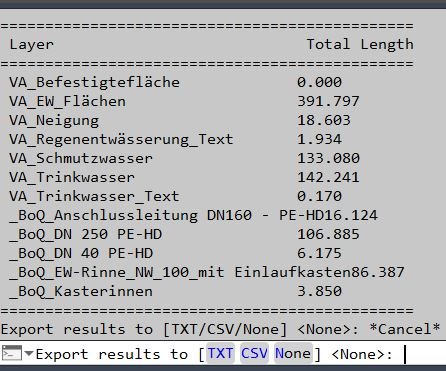
Command:
🚀 Command: PLLengthByLayer
Description:
📏 PLLengthByLayer is an AutoCAD AutoLISP reporting tool that scans the active drawing for all LWPOLYLINE objects and summarizes their total length grouped by layer.
🚀 Run the PLLengthByLayer command to automatically collect every lightweight polyline in the drawing, read its layer name, calculate its object length through ActiveX, and build a layer-based total length table.
📊 The result is printed directly in the AutoCAD command line with each layer name and its accumulated polyline length, making it useful for CAD quantity checks, layer audits, design measurement review, road marking quantities, utility layout checks, and civil drafting production workflows.
📤 After the command-line summary, the tool can optionally export the results to TXT or CSV in the current DWG folder. The export uses a unique filename based on PLLengthByLayer so existing reports are not overwritten.
🧰 This routine is lightweight, non-destructive, and works as a quick AutoCAD length takeoff helper for drawings where layer names are used to separate design categories, disciplines, or quantity items.
Helper function: (if any)
🧩 Helper functions:
– vl-string-pad-right pads layer names in the command-line table for readable alignment.
– LM:uniquefilename creates a safe TXT or CSV output path without overwriting an existing report.
– The error handler closes the export file handle if an error occurs during report writing.
– ActiveX object access is used to read each lightweight polyline length.
Functionalities:
✅ Main functionalities:
– 🔍 Scans the full drawing for LWPOLYLINE objects with ssget “_X”.
– 🏷️ Reads the layer of each lightweight polyline.
– 📏 Calculates polyline length with vla-get-length.
– 📊 Groups and totals lengths by layer.
– 🔤 Sorts layer names alphabetically for the printed report.
– 🧾 Prints a command-line table with layer name and total length.
– 📤 Offers TXT, CSV, or no export after the summary.
– 💾 Writes exported reports to the current DWG folder.
– 🔐 Uses unique filenames to avoid overwriting previous exports.
– 🧹 Closes file handles safely through the local error handler.
Result:
✅ Final result:
A clear AutoCAD layer-length report showing the total lightweight polyline length for each layer, with optional TXT or CSV export for documentation, quantity review, Excel processing, or project QA.
Images, animations etc.
XAML code:
<ResourceDictionary
 xmlns="http://schemas.microsoft.com/winfx/2006/xaml/presentation"
 xmlns:x="http://schemas.microsoft.com/winfx/2006/xaml"
 xmlns:src="clr-namespace:Autodesk.Windows;assembly=AdWindows">

 <src:RibbonToolTip x:Key="PLLengthByLayer">
 <src:RibbonToolTip.ExpandedContent>
 <StackPanel>
 <TextBlock Background="AntiqueWhite" TextAlignment="Left">
<Bold>Function Syntax: PLLengthByLayer</Bold>
<LineBreak/>
<Bold>Version: 1.0 Date: 20.06.2026 6:38:49PM</Bold>
<LineBreak/>
<Hyperlink>N/A</Hyperlink>
<LineBreak/>


<Bold><Run Foreground="DodgerBlue">📏 Function Syntax: PLLengthByLayer</Run></Bold><LineBreak/>
<Bold><Run Foreground="LimeGreen">Version: 1.0</Run></Bold><LineBreak/>
<Bold><Run Foreground="Orange">🚀 Command</Run></Bold><LineBreak/>
<Run Foreground="White">Type </Run><Bold><Run Foreground="Orange">PLLengthByLayer</Run></Bold><Run Foreground="White"> in the AutoCAD command line to calculate total lightweight polyline length grouped by layer.</Run><LineBreak/>
<Bold><Run Foreground="DodgerBlue">📘 SEO Optimized Description</Run></Bold><LineBreak/>
<Run Foreground="White">📏 PLLengthByLayer is an AutoCAD AutoLISP length takeoff utility that scans all </Run><Bold><Run Foreground="Orange">LWPOLYLINE</Run></Bold><Run Foreground="White"> objects in the active drawing and reports their total length by layer.</Run><LineBreak/>
<Run Foreground="White">📊 The tool reads each polyline layer, calculates its length with ActiveX, totals the values per layer, and prints a clean command-line summary.</Run><LineBreak/>
<Run Foreground="White">🧰 It is useful for CAD quantity checks, civil drafting reviews, road marking length totals, utility alignment measurements, layer audits, and AutoCAD production QA workflows.</Run><LineBreak/>
<Run Foreground="White">📤 After the report is printed, the user can export the result to </Run><Bold><Run Foreground="LimeGreen">TXT</Run></Bold><Run Foreground="White"> or </Run><Bold><Run Foreground="LimeGreen">CSV</Run></Bold><Run Foreground="White"> in the current DWG folder.</Run><LineBreak/>
<Bold><Run Foreground="LimeGreen">✅ Functionalities</Run></Bold><LineBreak/>
<Run Foreground="White">🔍 </Run><Bold><Run Foreground="LimeGreen">Drawing-wide scan</Run></Bold><Run Foreground="White"> - finds all lightweight polylines using </Run><Bold><Run Foreground="Orange">ssget "_X"</Run></Bold><Run Foreground="White">.</Run><LineBreak/>
<Run Foreground="White">🏷️ </Run><Bold><Run Foreground="LimeGreen">Layer detection</Run></Bold><Run Foreground="White"> - reads the layer name from every polyline entity.</Run><LineBreak/>
<Run Foreground="White">📏 </Run><Bold><Run Foreground="LimeGreen">Length calculation</Run></Bold><Run Foreground="White"> - retrieves object length with </Run><Bold><Run Foreground="Orange">vla-get-length</Run></Bold><Run Foreground="White">.</Run><LineBreak/>
<Run Foreground="White">📊 </Run><Bold><Run Foreground="LimeGreen">Grouped totals</Run></Bold><Run Foreground="White"> - accumulates the total length for each layer.</Run><LineBreak/>
<Run Foreground="White">🔤 </Run><Bold><Run Foreground="LimeGreen">Alphabetical output</Run></Bold><Run Foreground="White"> - sorts layer names before printing the summary.</Run><LineBreak/>
<Run Foreground="White">🧾 </Run><Bold><Run Foreground="LimeGreen">Command-line report</Run></Bold><Run Foreground="White"> - displays a readable table with layer and total length columns.</Run><LineBreak/>
<Run Foreground="White">📤 </Run><Bold><Run Foreground="LimeGreen">TXT or CSV export</Run></Bold><Run Foreground="White"> - saves the layer-length table for documentation or Excel processing.</Run><LineBreak/>
<Run Foreground="White">🔐 </Run><Bold><Run Foreground="LimeGreen">Unique filenames</Run></Bold><Run Foreground="White"> - uses </Run><Bold><Run Foreground="Orange">LM:uniquefilename</Run></Bold><Run Foreground="White"> to avoid overwriting previous reports.</Run><LineBreak/>
<Run Foreground="White">🧹 </Run><Bold><Run Foreground="LimeGreen">Safe file handling</Run></Bold><Run Foreground="White"> - closes the export file handle through the local error handler if a problem occurs.</Run><LineBreak/>
<Bold><Run Foreground="DodgerBlue">🧩 Helper Functions</Run></Bold><LineBreak/>
<Run Foreground="White">🧱 </Run><Bold><Run Foreground="Orange">vl-string-pad-right</Run></Bold><Run Foreground="White"> formats the command-line table by padding layer names to a fixed width.</Run><LineBreak/>
<Run Foreground="White">💾 </Run><Bold><Run Foreground="Orange">LM:uniquefilename</Run></Bold><Run Foreground="White"> creates a safe export filename in the DWG folder.</Run><LineBreak/>
<Bold><Run Foreground="DodgerBlue">✅ Practical Result</Run></Bold><LineBreak/>
<Run Foreground="White">The final result is a fast AutoCAD layer-based polyline length report for quantity takeoff, measurement verification, civil design checking, and project documentation.</Run><LineBreak/>
<Bold><Run Foreground="DarkRed">⚠️ Important Note</Run></Bold><LineBreak/>
<Run Foreground="White">This routine processes only lightweight polylines, scans the full drawing, uses current drawing units, and writes exported numeric values with three decimal places.</Run><LineBreak/>


</TextBlock>

<Grid>
<Image Source="Image_000.jpg" Stretch="Uniform"/>
</Grid>


 <!-- Use MediaElement for GIF (static first frame) and Image as fallback -->
</StackPanel>
 </src:RibbonToolTip.ExpandedContent>
 </src:RibbonToolTip>
</ResourceDictionary>