
Short description
ChangingBlockLayer_001 is an AutoCAD and Civil 3D 2024 .NET utility with a modeless C# interface for selecting real entities nested inside block references and changing their layer through a reviewable grid with individual highlighting, Xref protection, selective Apply, and session-level undo.
Command:
Primary command: CHANGEBLOCKLAYER_001
Secondary commands: CHANGEBLOCKLAYER, CNL
Run CHANGEBLOCKLAYER_001 in the AutoCAD command line for the collision-safe build-specific command. Run CHANGEBLOCKLAYER or CNL as convenience aliases.
Description:
ChangingBlockLayer_001 provides a modeless AutoCAD and Civil 3D 2024 workflow for changing the layer of entities nested inside block references. The project is written in C# for .NET Framework 4.8 and uses a build-numbered DLL and primary command so multiple numbered test builds can be NETLOADed side by side without assembly-name or command-name conflicts.
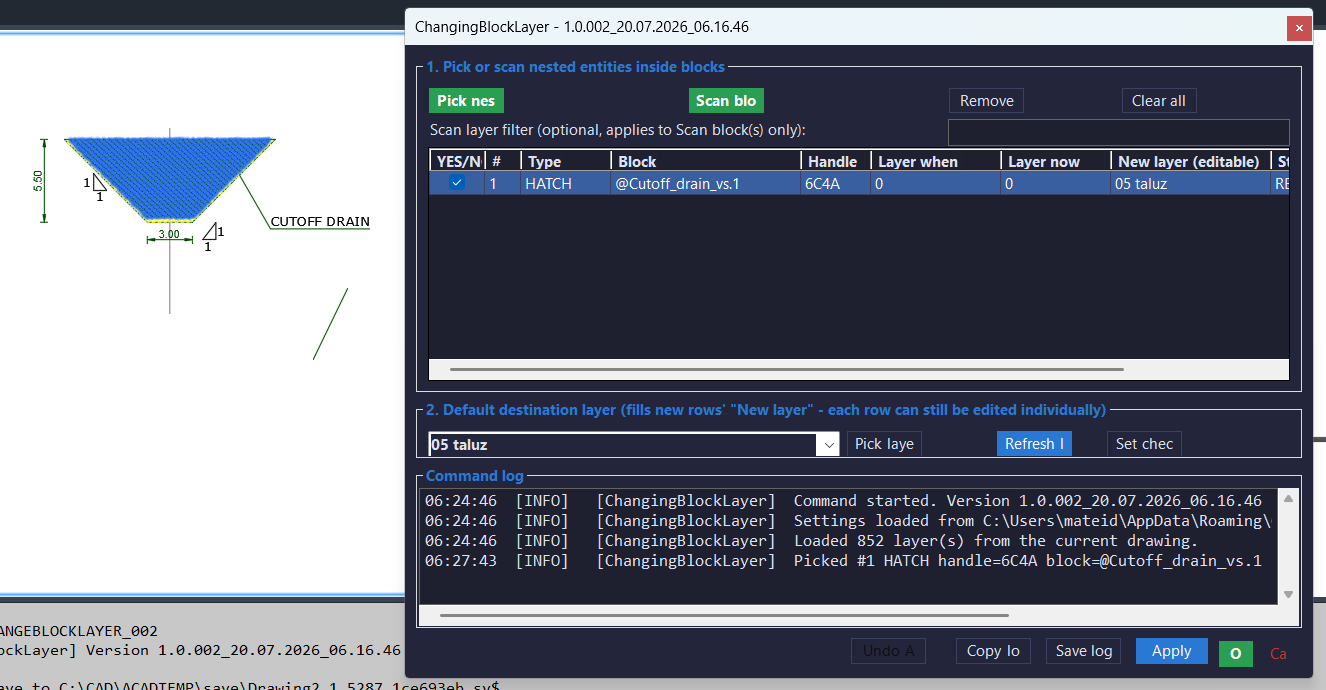
The tool uses Editor.GetNestedEntity to obtain the real ObjectId of the selected nested entity together with its chain of containing block references. It reverses the container chain, appends the entity ObjectId, builds a FullSubentityPath, and highlights only the selected nested piece in the viewport instead of highlighting the complete outer block reference.
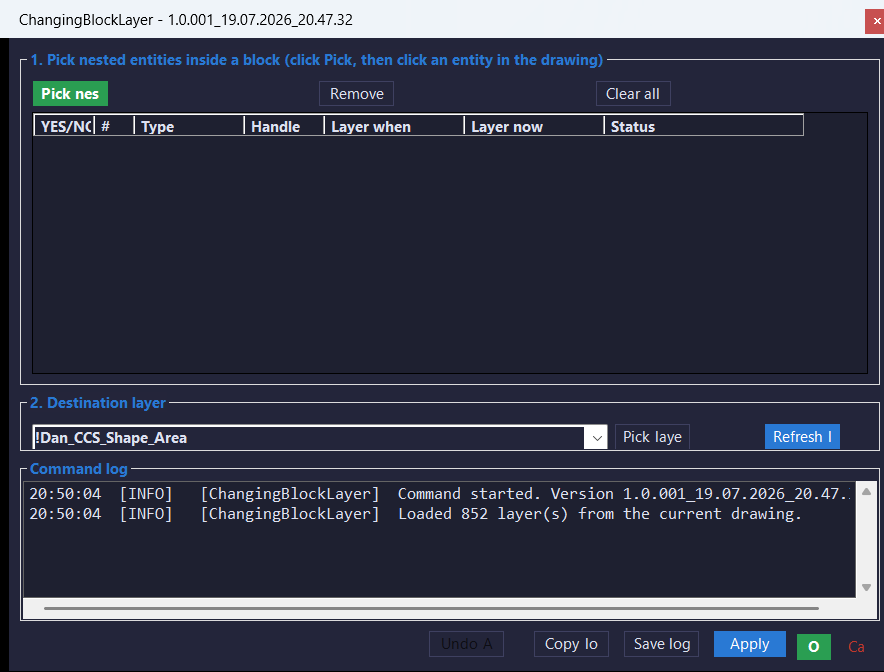
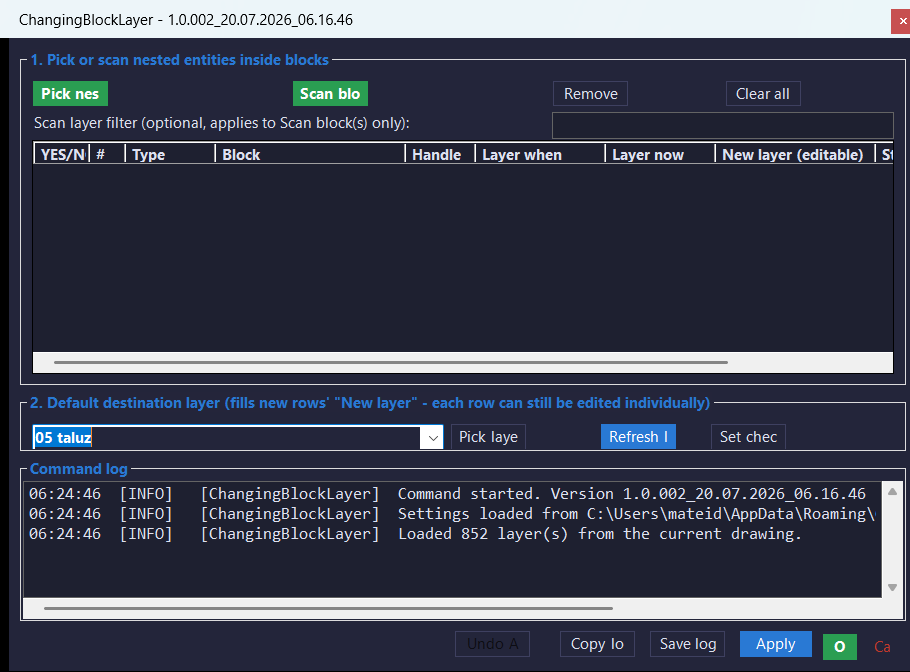
Users can click Pick nested entity repeatedly to accumulate multiple candidates in a modeless grid. Each row displays an Apply checkbox, row index, entity type, handle, layer when picked, current layer, and processing status. Rows can be reviewed, individually enabled or disabled, removed, or cleared before any drawing change is committed.
The destination layer is selected from an autocomplete dropdown populated from the current drawing’s LayerTable. Users can refresh the layer list or click Pick layer from entity and select either a top-level entity or an entity nested inside a block to use its layer as the destination. Apply validates that the typed or selected layer exists before changing any entity.
Each selected entity’s container chain is checked for externally referenced block definitions. Entities inside Xrefs are marked INSIDE XREF (not modifiable), shown as protected rows, automatically unchecked, and excluded from Apply so the command does not report a change that cannot be written back to the referenced drawing.
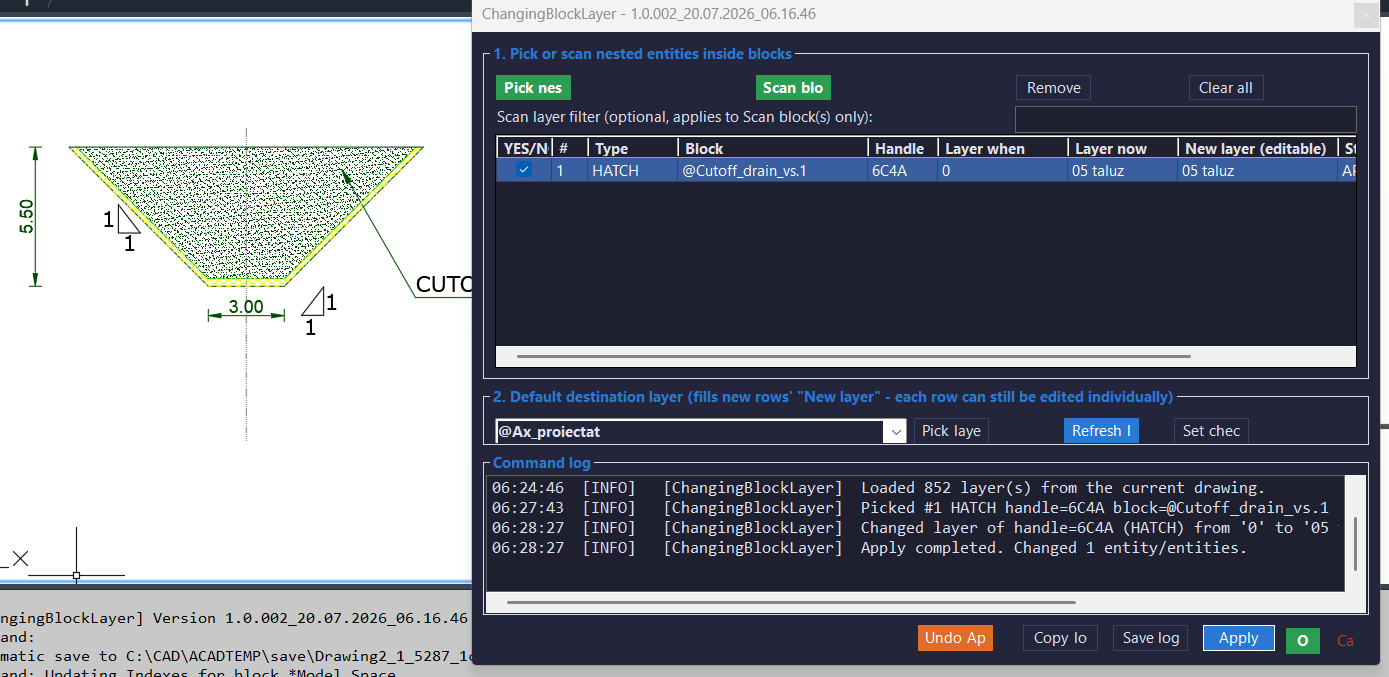
Apply changes only checked, modifiable rows and leaves the dialog open. OK performs the same confirmed layer change and then closes the form. Undo Apply restores the original layers from the latest Apply operation during the current dialog session. Remove row and Clear all also remove the corresponding nested-subentity highlights.
The command log records selections, handles, entity types, original and destination layers, skipped Xref rows, errors, Apply totals, and undo results. The log can be copied to the Windows clipboard or saved as a timestamped diagnostic text file in the ChangingBlockLayer application-data folder.
Helper function: (if any)
Main components include Plugin for build-version reporting and command registration, CblCommandRunner for opening and replacing the modeless form, CblForm for nested-entity picking, destination-layer selection, the candidate grid, highlighting, Apply, OK, Undo Apply, and logging, CblNestedPicker.BuildPath for constructing FullSubentityPath values, CblNestedPicker.SetHighlight for highlighting or unhighlighting only the selected nested entity, CblNestedPicker.IsInsideXref for Xref-container detection, CblLayerChanger.ApplyChecked for validating the destination layer and changing checked entity layers, CblLayerChanger.UndoApply for restoring original layers from the latest operation, CblLogger for live and saved diagnostic logs, Models for candidate and undo records, and C3DTheme for the Civil 3D-inspired Windows Forms appearance.
Functionalities:
– Registers the collision-safe CHANGEBLOCKLAYER_001 command.
– Registers CHANGEBLOCKLAYER and CNL as stable convenience aliases.
– Uses a modeless, resizable C# Windows Forms interface.
– Lets users click Pick nested entity repeatedly while the form remains open.
– Uses Editor.GetNestedEntity to retrieve the real ObjectId of the selected entity.
– Retrieves the complete chain of containing block-reference ObjectIds.
– Builds a FullSubentityPath by reversing the container chain and appending the nested entity.
– Highlights only the selected nested piece rather than the entire outer block reference.
– Accumulates multiple picked entities in a reviewable grid.
– Displays Apply, index, type, handle, original layer, current layer, and status columns.
– Checks newly selected modifiable rows by default.
– Detects whether any containing block definition is an external reference.
– Marks Xref-contained entities as INSIDE XREF (not modifiable).
– Disables and clears the Apply checkbox for Xref-contained rows.
– Loads all current drawing layer names from the LayerTable.
– Sorts destination layers alphabetically.
– Provides autocomplete in the destination-layer dropdown.
– Refreshes the destination-layer list from the current drawing.
– Lets users type a destination layer name and validates that it exists before Apply.
– Lets users pick a destination layer from a top-level entity.
– Lets users pick a destination layer from an entity nested inside a block.
– Removes an individual selected row and clears its viewport highlight.
– Clears all rows and removes all nested-subentity highlights.
– Shows checked, modifiable, and total-picked counts.
– Confirms the number of checked entities and destination layer before changing geometry.
– Changes only checked, modifiable entities.
– Changes the real entity Layer property inside a normal AutoCAD transaction.
– Regenerates the drawing after Apply so the new layer properties are visible.
– Updates row status to READY, APPLIED to the current layer, NOT FOUND, or INSIDE XREF.
– Keeps the modeless form open after Apply.
– Applies the same confirmed change and closes the form after OK.
– Warns when no destination layer is selected.
– Warns when no modifiable rows are checked.
– Allows OK to close without changes only after explicit confirmation.
– Stores the original layer of every successfully changed entity.
– Restores the latest Apply operation through Undo Apply while the dialog remains open.
– Enables Undo Apply only when a restorable Apply record exists.
– Maintains a timestamped live command log.
– Copies the command log to the Windows clipboard.
– Saves a diagnostic log with version information and picked nested-entity details.
– Uses build-numbered assembly and command generation for side-by-side test builds.
– Targets .NET Framework 4.8 and x64 AutoCAD or Civil 3D 2024 environments.
Result:
The project changes the Layer property of checked, modifiable entities selected inside block references. Because the selected ObjectId belongs to the block definition rather than to an exploded copy, the modification is applied to the actual block content. The grid, individual highlighting, Xref detection, destination-layer validation, confirmation prompt, live logging, and session-level Undo Apply provide control over the operation.
Images, animations etc.
XAML code:
<ResourceDictionary
xmlns="http://schemas.microsoft.com/winfx/2006/xaml/presentation"
xmlns:x="http://schemas.microsoft.com/winfx/2006/xaml"
xmlns:src="clr-namespace:Autodesk.Windows;assembly=AdWindows">

<src:RibbonToolTip x:Key="Changeblocklayer">
<src:RibbonToolTip.ExpandedContent>
<StackPanel>
<TextBlock Background="AntiqueWhite" TextAlignment="Left">
<Bold>Function Syntax: CHANGEBLOCKLAYER_ / CHANGEBLOCKLAYER / CNL</Bold>
<LineBreak/>
<Bold>Version: 1.0 Date: 19.07.2026 20:42:21</Bold>
<LineBreak/>
<Bold>Version: 1.0 Date: 20.07.2026 6:16:47AM</Bold>
<LineBreak/>
<Hyperlink>https://keanw.com/2010/06/changing-the-layer-of-an-entity-in-an-autocad-block-using-net.html</Hyperlink>
<LineBreak/>

<Bold><Run Foreground="DodgerBlue">🚀 ChangingBlockLayer_001</Run></Bold><LineBreak/>
<Run Foreground="White">ChangingBlockLayer_001 is an AutoCAD and Civil 3D 2024 .NET utility with a modeless C# interface for changing the layer of real entities selected inside block references.</Run><LineBreak/>
<Run Foreground="LimeGreen">It improves nested block editing by highlighting only the selected subentity, collecting multiple picks in a reviewable grid, protecting Xref content, and changing only checked modifiable rows.</Run><LineBreak/>
<Bold><Run Foreground="DodgerBlue">Main Commands</Run></Bold><LineBreak/>
<Run Foreground="White">🧰 Run </Run><Bold><Run Foreground="Orange">CHANGEBLOCKLAYER_001</Run></Bold><Run Foreground="White"> to start the collision-safe build-specific command.</Run><LineBreak/>
<Run Foreground="White">⚙️ Run </Run><Bold><Run Foreground="Orange">CHANGEBLOCKLAYER</Run></Bold><Run Foreground="White"> as the stable full-name convenience alias.</Run><LineBreak/>
<Run Foreground="White">⚡ Run </Run><Bold><Run Foreground="Orange">CNL</Run></Bold><Run Foreground="White"> as the short Change Nested Layer alias.</Run><LineBreak/>
<Bold><Run Foreground="DodgerBlue">SEO Optimized Description</Run></Bold><LineBreak/>
<Run Foreground="White">📐 This AutoCAD nested block layer editor lets users select actual entities inside block references, choose an existing destination layer, and change only the checked entities after reviewing their handles, types, layers, and statuses.</Run><LineBreak/>
<Run Foreground="White">🔍 The utility supports CAD standards, block-definition cleanup, nested geometry organization, Civil 3D production, symbol maintenance, layer normalization, and workflows where individual components inside reusable blocks must be reassigned to another layer.</Run><LineBreak/>
<Run Foreground="White">🧠 It uses </Run><Bold><Run Foreground="Orange">Editor.GetNestedEntity</Run></Bold><Run Foreground="White"> to retrieve the real nested ObjectId and container chain, then builds a </Run><Bold><Run Foreground="Orange">FullSubentityPath</Run></Bold><Run Foreground="White"> so only the selected piece is highlighted in the viewport.</Run><LineBreak/>
<Run Foreground="White">📌 ChangingBlockLayer_001 is useful for CAD technicians, Civil 3D users, survey drafting, utility plans, construction details, reusable symbol libraries, annotation blocks, and block-layer standardization.</Run><LineBreak/>
<Bold><Run Foreground="LimeGreen">Functionalities</Run></Bold><LineBreak/>
<Run Foreground="White">🚀 </Run><Bold><Run Foreground="LimeGreen">Modeless C# workflow</Run></Bold><Run Foreground="White"> - keeps the resizable interface open while users pick nested entities and review the candidate grid.</Run><LineBreak/>
<Run Foreground="White">🎯 </Run><Bold><Run Foreground="LimeGreen">Real nested ObjectIds</Run></Bold><Run Foreground="White"> - selects the actual entity stored in the block definition rather than creating or editing an exploded copy.</Run><LineBreak/>
<Run Foreground="White">✨ </Run><Bold><Run Foreground="LimeGreen">Individual subentity highlighting</Run></Bold><Run Foreground="White"> - builds a FullSubentityPath and highlights only the clicked nested piece instead of the complete block reference.</Run><LineBreak/>
<Run Foreground="White">📋 </Run><Bold><Run Foreground="LimeGreen">Multiple-pick grid</Run></Bold><Run Foreground="White"> - accumulates repeated nested selections and displays Apply, index, type, handle, original layer, current layer, and status.</Run><LineBreak/>
<Run Foreground="White">☑️ </Run><Bold><Run Foreground="LimeGreen">Selective application</Run></Bold><Run Foreground="White"> - changes only rows checked in the </Run><Bold><Run Foreground="Orange">YES/NO</Run></Bold><Run Foreground="White"> column.</Run><LineBreak/>
<Run Foreground="White">🔒 </Run><Bold><Run Foreground="LimeGreen">Xref protection</Run></Bold><Run Foreground="White"> - detects external-reference containers, labels those rows </Run><Bold><Run Foreground="Orange">INSIDE XREF</Run></Bold><Run Foreground="White">, and excludes them from Apply.</Run><LineBreak/>
<Run Foreground="White">🗂️ </Run><Bold><Run Foreground="LimeGreen">Drawing layer dropdown</Run></Bold><Run Foreground="White"> - loads and alphabetically sorts layer names from the active drawing with autocomplete support.</Run><LineBreak/>
<Run Foreground="White">🔄 </Run><Bold><Run Foreground="LimeGreen">Refresh layers</Run></Bold><Run Foreground="White"> - reloads the destination-layer list when drawing layers change during the session.</Run><LineBreak/>
<Run Foreground="White">🖱️ </Run><Bold><Run Foreground="LimeGreen">Pick layer from entity</Run></Bold><Run Foreground="White"> - uses a top-level or nested entity's current layer as the destination layer.</Run><LineBreak/>
<Run Foreground="White">✅ </Run><Bold><Run Foreground="LimeGreen">Destination validation</Run></Bold><Run Foreground="White"> - verifies that the typed or selected layer exists in the current drawing before changing any object.</Run><LineBreak/>
<Run Foreground="White">🧹 </Run><Bold><Run Foreground="LimeGreen">Remove and Clear controls</Run></Bold><Run Foreground="White"> - removes unwanted rows and clears their individual viewport highlights.</Run><LineBreak/>
<Run Foreground="White">🔢 </Run><Bold><Run Foreground="LimeGreen">Live row counts</Run></Bold><Run Foreground="White"> - displays checked, modifiable, and total-picked entity totals.</Run><LineBreak/>
<Run Foreground="White">🛡️ </Run><Bold><Run Foreground="LimeGreen">Confirmation safeguards</Run></Bold><Run Foreground="White"> - warns about missing layers or unchecked rows and confirms the final entity count and destination layer before Apply.</Run><LineBreak/>
<Run Foreground="White">🔄 </Run><Bold><Run Foreground="LimeGreen">Apply and OK behavior</Run></Bold><Run Foreground="White"> - Apply changes checked entities and keeps the form open, while OK performs the same operation and then closes it.</Run><LineBreak/>
<Run Foreground="White">↩️ </Run><Bold><Run Foreground="LimeGreen">Undo Apply</Run></Bold><Run Foreground="White"> - restores the original layers from the latest Apply operation during the active dialog session.</Run><LineBreak/>
<Run Foreground="White">📝 </Run><Bold><Run Foreground="LimeGreen">Diagnostic logging</Run></Bold><Run Foreground="White"> - records selected handles, entity types, layers, Xref skips, successful changes, errors, and undo results.</Run><LineBreak/>
<Run Foreground="White">📋 </Run><Bold><Run Foreground="LimeGreen">Copy and save log</Run></Bold><Run Foreground="White"> - copies the live log to the Windows clipboard or saves a timestamped diagnostic TXT file.</Run><LineBreak/>
<Run Foreground="White">🧪 </Run><Bold><Run Foreground="LimeGreen">Side-by-side test builds</Run></Bold><Run Foreground="White"> - uses a generated build number in the DLL and primary command so multiple NETLOADed versions can coexist in one AutoCAD session.</Run><LineBreak/>
<Bold><Run Foreground="DodgerBlue">Practical Result</Run></Bold><LineBreak/>
<Run Foreground="White">✅ The result is a controlled AutoCAD block-definition editing workflow that changes the layer of only the checked real nested entities and immediately regenerates the drawing to show their new layer properties.</Run><LineBreak/>
<Run Foreground="LimeGreen">This makes ChangingBlockLayer_001 useful for nested block cleanup, CAD standards enforcement, symbol maintenance, Civil 3D drafting support, and reusable block-library management.</Run><LineBreak/>
<Bold><Run Foreground="DarkRed">Important Note</Run></Bold><LineBreak/>
<Run Foreground="White">Changing a selected nested entity modifies the object stored in the block definition. Every block reference that uses the same definition may therefore display the new layer assignment, not only the block instance that was clicked.</Run><LineBreak/>
<Run Foreground="White">Entities inside Xrefs are excluded, selection is performed one entity at a time, and Undo Apply restores only the latest Apply operation while the dialog remains open. After OK closes the form, use AutoCAD UNDO when needed.</Run><LineBreak/>


</TextBlock>

<Grid>
<Image Source="2026-07-19 20_50_11-ChangingBlockLayer - 1.0.001_19.07.2026_20.47.32.png" Stretch="Uniform"/>
</Grid>

<Grid>
<Image Source="2026-07-20 06_27_25-ChangingBlockLayer - 1.0.002_20.07.2026_06.16.46.png" Stretch="Uniform"/>
</Grid>

<Grid>
<Image Source="2026-07-20 06_27_48-Autodesk Civil 3D 2024 - [Drawing2.dwg].png" Stretch="Uniform"/>
</Grid>

<Grid>
<Image Source="2026-07-20 06_28_35-Autodesk Civil 3D 2024 - [Drawing2.dwg].png" Stretch="Uniform"/>
</Grid>

</StackPanel>
</src:RibbonToolTip.ExpandedContent>
</src:RibbonToolTip>
</ResourceDictionary>