
Short description
AutoCAD .NET Framework 4.8 project configuration for building the AECVersionPlugin diagnostic command, designed for Civil 3D and AutoCAD AEC version checking workflows.
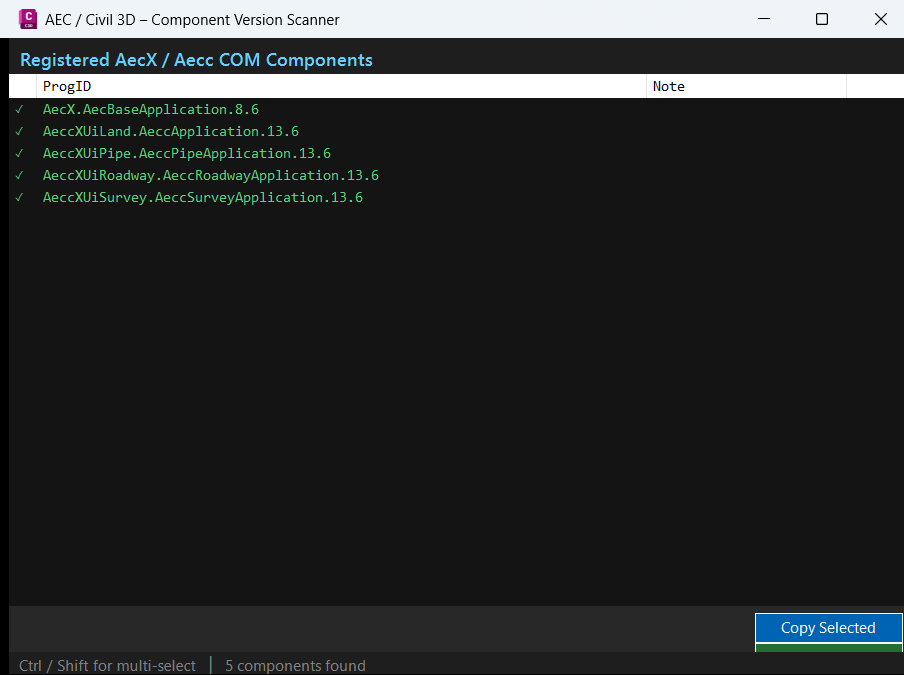
Command:
Primary AutoCAD command documented by the project file:
AECVERSION– loadAECVersionPlugin.dllwithNETLOAD, then run the command from the AutoCAD command line.
The uploaded file is the Visual Studio project file, so command implementation details depend on the C# source files used with this project.
Description:
AECVersionPlugin is a Visual Studio C# project setup for an AutoCAD and Civil 3D .NET plugin that is intended to expose the AECVERSION command after loading AECVersionPlugin.dll with NETLOAD.
The project targets .NET Framework 4.8, builds as a class library, uses x64 platform settings, and enables Windows Forms support for dialog-based AutoCAD plugin interfaces. It references the core AutoCAD managed assemblies required for command registration, database access, and application/document interaction.
This makes the project suitable for CAD managers, Civil 3D administrators, BIM/CAD support teams, and AutoCAD plugin developers who need a structured project file for building an AEC version diagnostic utility.
Helper function: (if any)
Microsoft.NET.Sdk– SDK-style project format for modern Visual Studio builds.net48– targets .NET Framework 4.8 for AutoCAD managed plugin compatibility.Library– builds a DLL that can be loaded into AutoCAD withNETLOAD.x64– matches the 64-bit AutoCAD and Civil 3D runtime requirement.UseWindowsForms– enables WinForms-based dialogs for plugin UI workflows.accoremgd.dll– AutoCAD command registration and runtime API reference.acdbmgd.dll– AutoCAD database managed API reference.acmgd.dll– AutoCAD application and document manager API reference.
Functionalities:
- 🚀 AutoCAD .NET plugin build setup – prepares a managed DLL project for loading into AutoCAD and Civil 3D.
- 🔧 Command-ready reference structure – includes
accoremgd,acdbmgd, andacmgdreferences needed by typical AutoCAD commands. - 📐 64-bit platform targeting – configures
x64so the DLL matches the AutoCAD runtime architecture. - 🧩 Visual Studio friendly configuration – uses C# language version 9.0 and a clean SDK-style project file.
- 🪟 Windows Forms support – allows dialog-based version scanners, diagnostic panels, and result windows.
- 📦 Copy Local disabled – keeps Autodesk DLL references external so AutoCAD loads its own runtime assemblies.
- 📌 Documented loading workflow – notes the expected
NETLOADandAECVERSIONusage path directly in the project comments.
Result:
The result is a clean Visual Studio project file for compiling AECVersionPlugin.dll, an AutoCAD and Civil 3D diagnostic plugin intended to run through the AECVERSION command after NETLOAD.
It provides the build foundation for a managed AEC version scanner while preserving the correct Autodesk reference behavior required by AutoCAD plugin deployment.
Images, animations etc.
XAML code:
<ResourceDictionary
xmlns="http://schemas.microsoft.com/winfx/2006/xaml/presentation"
xmlns:x="http://schemas.microsoft.com/winfx/2006/xaml"
xmlns:src="clr-namespace:Autodesk.Windows;assembly=AdWindows">

<src:RibbonToolTip x:Key="AECVersion">
<src:RibbonToolTip.ExpandedContent>
<StackPanel>
<TextBlock Background="AntiqueWhite" TextAlignment="Left">
<Bold>Function Syntax: AECVersion</Bold>
<LineBreak/>
<Bold>Version: 1.0 Date: 12.06.2026 2:35:14PM</Bold>
<LineBreak/>
<Hyperlink>https://forums.autodesk.com/t5/civil-3d-customization-forum/dynamically-get-aec-library-versions-aecbaseapplication/td-p/12953062</Hyperlink>
<LineBreak/>

<Bold><Run Foreground="DodgerBlue">🚀 AECVersionPlugin - AutoCAD Civil 3D AEC Version Diagnostic Project</Run></Bold><LineBreak/>
<Run Foreground="White">AECVersionPlugin is a Visual Studio C# project configuration for building an AutoCAD and Civil 3D .NET plugin DLL.</Run><LineBreak/>
<Run Foreground="LimeGreen">It is designed as the build foundation for the </Run><Bold><Run Foreground="Orange">AECVERSION</Run></Bold><Run Foreground="LimeGreen"> diagnostic command workflow.</Run><LineBreak/>
<LineBreak/>
<Bold><Run Foreground="DodgerBlue">Command</Run></Bold><LineBreak/>
<Run Foreground="White">🧰 Load </Run><Bold><Run Foreground="Orange">AECVersionPlugin.dll</Run></Bold><Run Foreground="White"> with </Run><Bold><Run Foreground="Orange">NETLOAD</Run></Bold><Run Foreground="White">, then run </Run><Bold><Run Foreground="Orange">AECVERSION</Run></Bold><Run Foreground="White"> from the AutoCAD command line.</Run><LineBreak/>
<LineBreak/>
<Bold><Run Foreground="LimeGreen">Project Configuration</Run></Bold><LineBreak/>
<Run Foreground="White">📦 Targets </Run><Bold><Run Foreground="Orange">.NET Framework 4.8</Run></Bold><Run Foreground="White"> using the SDK-style </Run><Bold><Run Foreground="Orange">Microsoft.NET.Sdk</Run></Bold><Run Foreground="White"> project format.</Run><LineBreak/>
<Run Foreground="White">🔧 Builds as a </Run><Bold><Run Foreground="Orange">Library</Run></Bold><Run Foreground="White"> so the output is a loadable AutoCAD plugin DLL.</Run><LineBreak/>
<Run Foreground="White">📐 Uses </Run><Bold><Run Foreground="Orange">x64</Run></Bold><Run Foreground="White"> platform targeting to match the 64-bit AutoCAD and Civil 3D runtime.</Run><LineBreak/>
<Run Foreground="White">🪟 Enables </Run><Bold><Run Foreground="Orange">Windows Forms</Run></Bold><Run Foreground="White"> for dialog-based diagnostic tools and result windows.</Run><LineBreak/>
<Run Foreground="White">🧩 Uses C# language version </Run><Bold><Run Foreground="Orange">9.0</Run></Bold><Run Foreground="White"> with nullable disabled for traditional AutoCAD plugin compatibility.</Run><LineBreak/>
<LineBreak/>
<Bold><Run Foreground="LimeGreen">AutoCAD References</Run></Bold><LineBreak/>
<Run Foreground="White">🔐 </Run><Bold><Run Foreground="Orange">accoremgd.dll</Run></Bold><Run Foreground="White"> - AutoCAD runtime command registration and command API reference.</Run><LineBreak/>
<Run Foreground="White">📊 </Run><Bold><Run Foreground="Orange">acdbmgd.dll</Run></Bold><Run Foreground="White"> - AutoCAD database managed API reference.</Run><LineBreak/>
<Run Foreground="White">📘 </Run><Bold><Run Foreground="Orange">acmgd.dll</Run></Bold><Run Foreground="White"> - AutoCAD application and document manager API reference.</Run><LineBreak/>
<Run Foreground="White">✅ All Autodesk references are configured with </Run><Bold><Run Foreground="Orange">Copy Local = false</Run></Bold><Run Foreground="White"> so AutoCAD loads its own runtime assemblies.</Run><LineBreak/>
<LineBreak/>
<Bold><Run Foreground="DodgerBlue">SEO Optimized Description</Run></Bold><LineBreak/>
<Run Foreground="White">🔍 AECVersionPlugin is useful for CAD managers, Civil 3D administrators, BIM support teams, and AutoCAD plugin developers who need a managed AEC version diagnostic plugin project.</Run><LineBreak/>
<Run Foreground="White">📌 The project supports AutoCAD .NET plugin deployment, Civil 3D diagnostic workflows, AEC version checking, Visual Studio build setup, and managed DLL loading through NETLOAD.</Run><LineBreak/>
<LineBreak/>
<Bold><Run Foreground="DarkRed">Important Note</Run></Bold><LineBreak/>
<Run Foreground="White">The uploaded project file references AutoCAD 2024 paths. Update the </Run><Bold><Run Foreground="Orange">HintPath</Run></Bold><Run Foreground="White"> values when building against another AutoCAD or Civil 3D installation.</Run><LineBreak/>
<Run Foreground="White">Only the project file was provided, so this description documents the build configuration and loading workflow rather than full C# command implementation logic.</Run><LineBreak/>


</TextBlock>


<Grid>
<Image Source="Image_000.png" Stretch="Uniform"/>
</Grid>

</StackPanel>
</src:RibbonToolTip.ExpandedContent>
</src:RibbonToolTip>
</ResourceDictionary>