
Short description
AutoCAD and Civil 3D .NET utility for searching ribbon commands, auditing CUIX button data, and loading LSP, VLX, FAS, and DLL tools from a structured Help_File library.
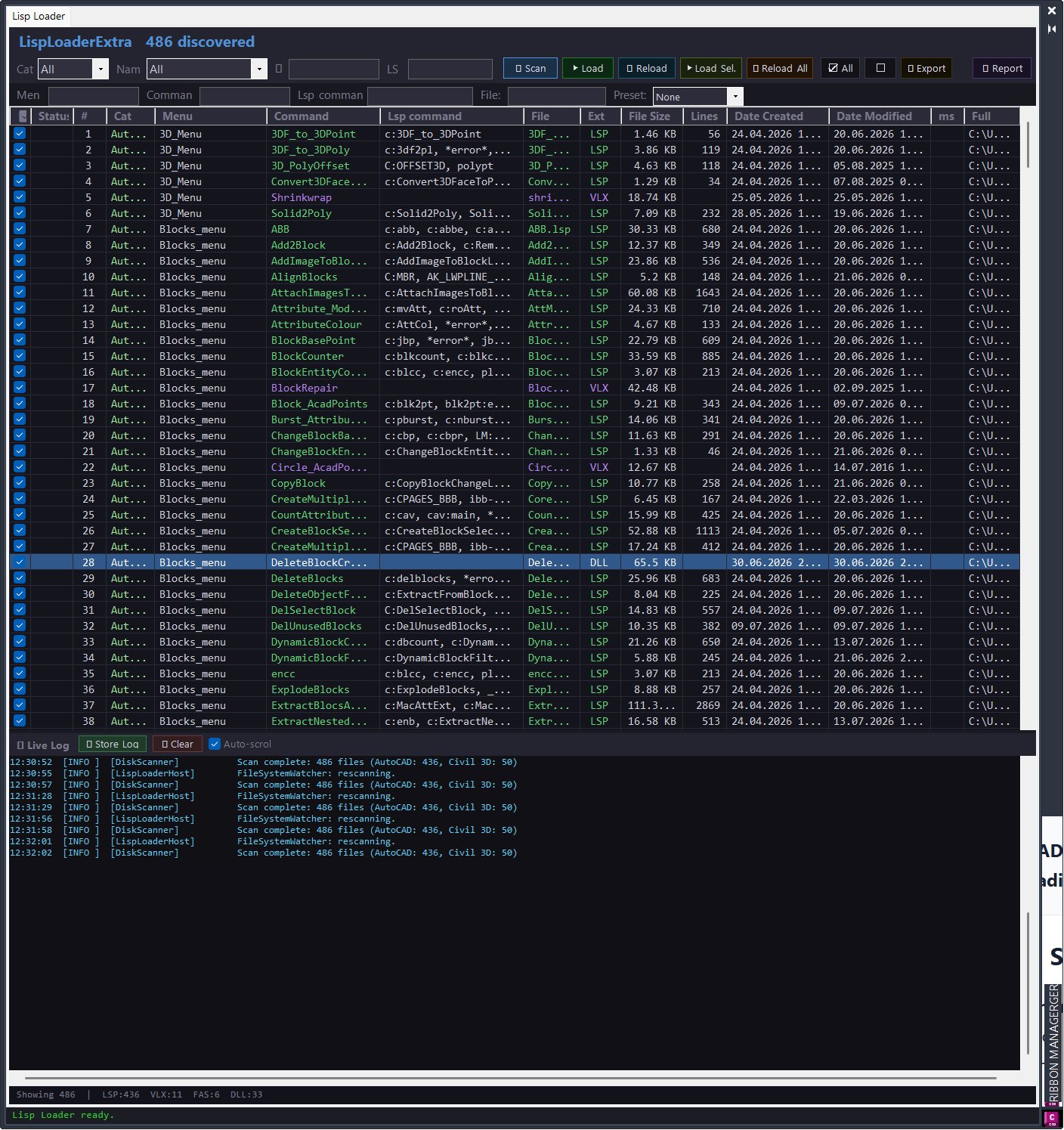
Command:
Main AutoCAD commands:
– CMDSEARCH opens the modeless Command Search palette.
– CMDSEARCHCLOSE closes the Command Search palette.
– LISPLOADEXTRA opens the standalone Lisp Loader window.
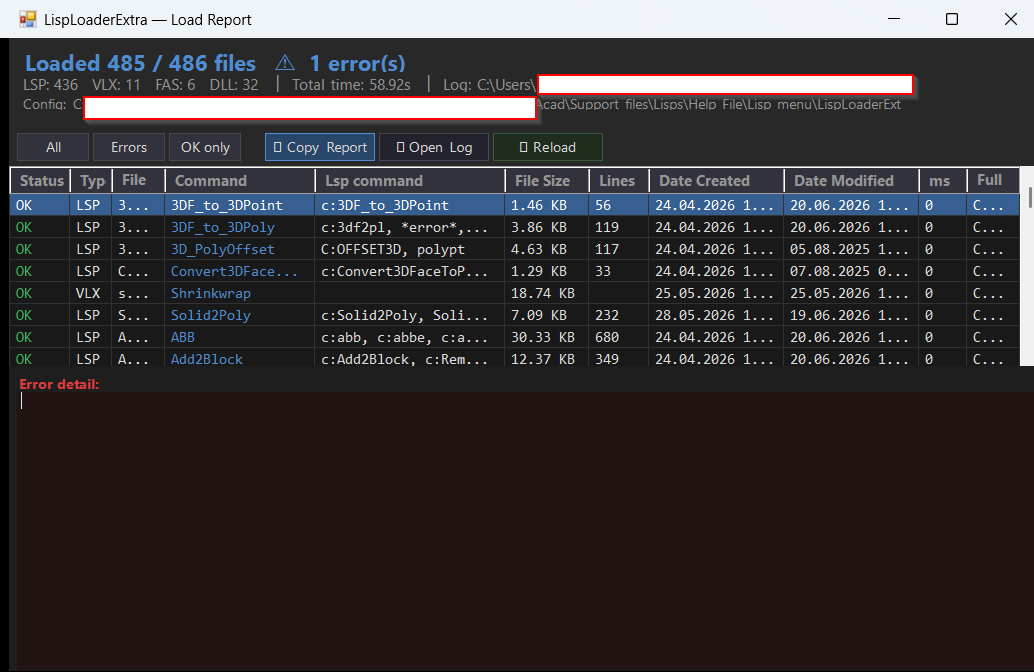
– LISPLOADREPORT opens the load session report.
– CMDSEARCHTESTS runs the internal parser and filter self-tests.
– LISPLOADDIAG scans loaded assemblies for LISP-related invocation methods and writes diagnostics to the log.
Description:
CommandSearch Lisp Loader Only is a C# AutoCAD and Civil 3D plugin built for CAD managers and production users who maintain large ribbon, CUIX, LISP, VLX, FAS, and DLL command libraries.
The project combines a Command Search palette with a dedicated Lisp Loader workflow. It reads ribbon button data from selected CUIX files, displays command names, macros, panels, groups, image paths, XAML help references, and LSP command links, then helps validate and maintain the command library from one interface.
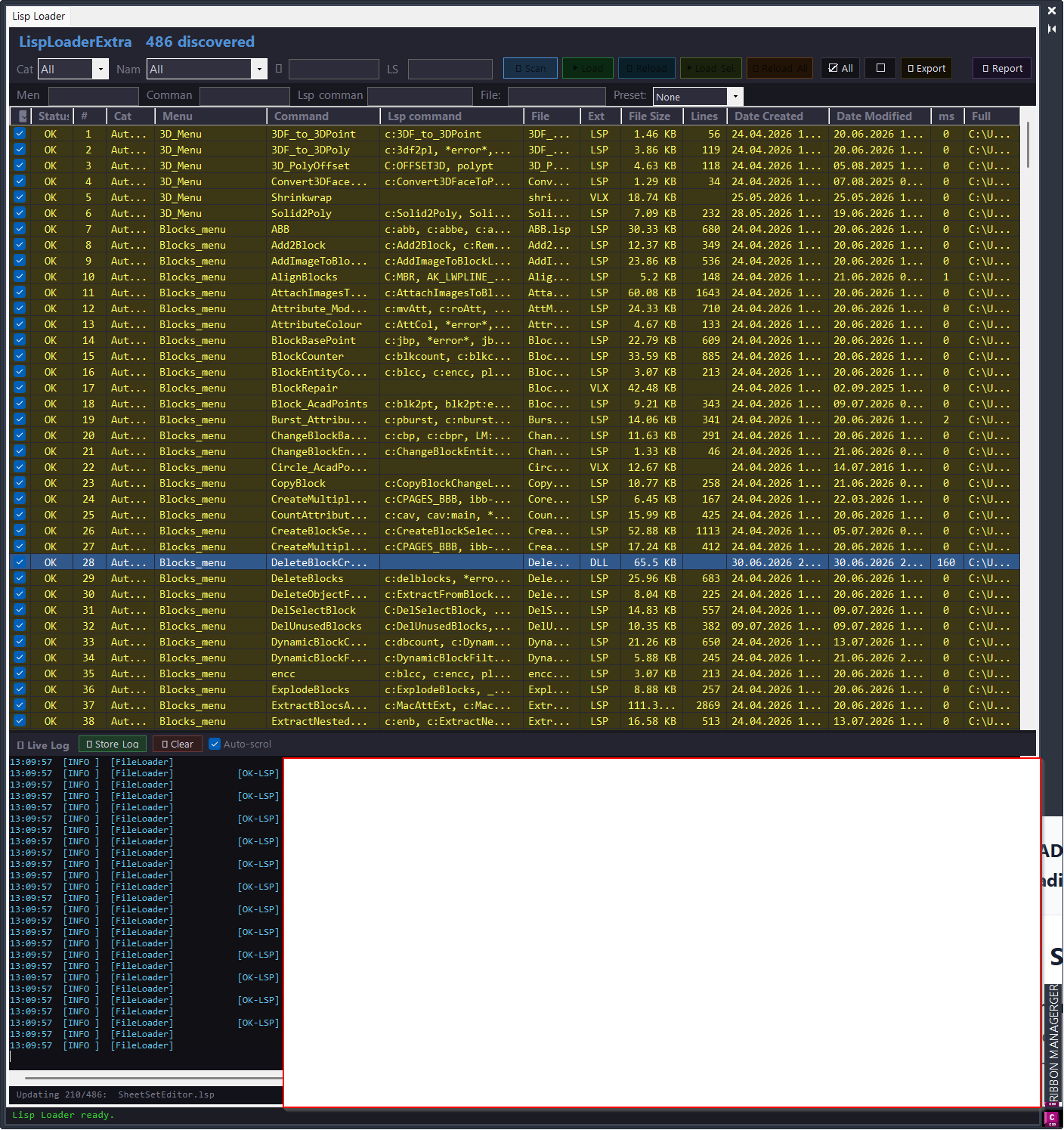
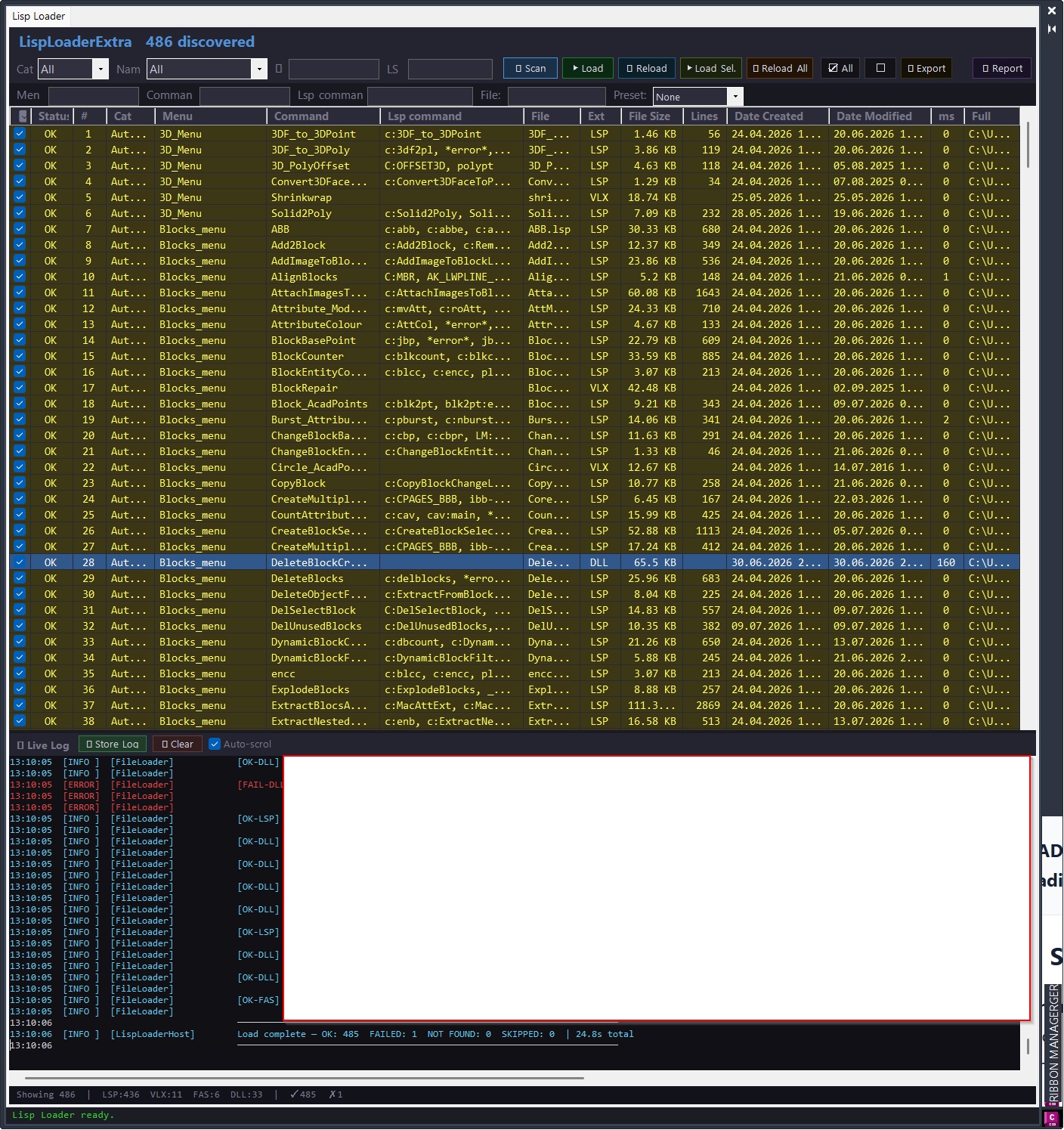
The Lisp Loader scans configured Help_File folders, detects loadable AutoCAD support files, extracts AutoLISP command defuns, displays file metadata, loads checked or selected tools, supports reload-all workflows, and records results in a live log and report window.
The uploaded project is a Visual Studio C# project targeting .NET Framework 4.8 and x64. It depends on local AutoCAD and Civil 3D references through the AutoCAD_Civil3D_refferences.props import, so a full build requires that local reference environment.
Helper function: (if any)
Key project modules:
– PluginApp.cs initializes the AutoCAD extension, prints the version banner, and hides the palette on terminate.
– Commands/CommandSearchCommands.cs registers CMDSEARCH, CMDSEARCHCLOSE, LISPLOADEXTRA, LISPLOADREPORT, CMDSEARCHTESTS, and LISPLOADDIAG.
– UI/CommandSearchPalette.cs builds the modeless ribbon command search and maintenance palette.
– UI/AddButtonDialog.cs provides Add and Edit button dialogs for ribbon command metadata.
– Engine/CuixEngine.cs reads and writes CUIX XML data from RibbonRoot.cui, MenuGroup.cui, QuickAccessToolbarRoot.cui, and workspace data.
– Engine/ButtonData.cs stores ribbon button, macro, image, XAML, and command metadata.
– Lisp/LispLoaderHost.cs provides the embedded Lisp Loader user control.
– Lisp/LoaderWindow.cs provides the standalone loader window launched by LISPLOADEXTRA.
– Lisp/DiskScanner.cs scans Help_File folders for loadable LSP, VLX, FAS, and DLL files.
– Lisp/FileLoader.cs loads support files safely through AutoCAD application context, batch loading, SendStringToExecute, and acedInvoke fallback logic.
– Lisp/LspAnalyzer.cs and Lisp/LspCommandExtractor.cs extract AutoLISP defun command data while avoiding comments and strings.
– Lisp/CommandValidationService.cs detects duplicate commands, missing images, missing XAML files, macro-to-defun mismatches, missing dependencies, and hard-coded path warnings.
– Lisp/ReportWindow.cs, ReportExportService.cs, LoadSession.cs, LoadResult.cs, and LogManager.cs handle reporting, export, history, and live logging.
– Lisp/AdvancedFilter.cs provides wildcard, exclude, empty, missing, duplicate, and numeric filter logic.
– Lisp/FileMetadataService.cs, LayoutSettingsStore.cs, ConfigReader.cs, EditorLauncher.cs, DocumentationGenerator.cs, VersionStamp.cs, and CoreLogicSelfTests.cs support metadata, persistence, configuration, editing, documentation, versioning, and tests.
Functionalities:
– Search ribbon commands from selected CUIX files.
– Filter by panel, group, command name, macro text, LSP command, XAML key, and missing or duplicate metadata.
– Add, edit, delete, duplicate, move, run, load and run, and reload ribbon command rows.
– Read CUIX data directly from ZIP-based CUIX XML files without Autodesk.AutoCAD.Customization.
– Work with [username]_ribbon_ panel naming conventions.
– Audit PNG image paths, XAML help files, XAML SourceKey values, duplicate command names, duplicate macro strings, and missing LSP command links.
– Scan structured Help_File folders for LSP, VLX, FAS, and DLL loader files.
– Extract AutoLISP C: defun command names and display them in loader columns.
– Load checked files, load selected rows, reload checked files, and reload all visible loader files.
– Use a batch loading path that enters AutoCAD application context once per reload session.
– Watch disk changes and rescan when support files are modified.
– Persist checked rows, filters, column widths, and layout state between sessions.
– Open file folders, open source files in an editor, copy paths, copy row data, and jump to LSP command lines.
– Record scan, load, warning, error, and diagnostic messages in a live log panel.
– Export loader paths, CSV or HTML validation reports, and command documentation.
– Run CMDSEARCHTESTS to verify core parser and filter logic.
– Run LISPLOADDIAG to inspect available LISP invocation methods in loaded assemblies.
Result:
The result is a centralized CAD command administration tool that helps teams keep AutoCAD and Civil 3D ribbon buttons, LISP loaders, CUIX metadata, help references, images, and command libraries organized and easier to validate.
It is especially useful when a production environment contains many custom commands, many Help_File folders, many partial CUI entries, and frequent LISP or DLL updates that need to be scanned, loaded, reported, and verified.
Images, animations etc.
XAML code:
<ResourceDictionary
xmlns="http://schemas.microsoft.com/winfx/2006/xaml/presentation"
xmlns:x="http://schemas.microsoft.com/winfx/2006/xaml"
xmlns:src="clr-namespace:Autodesk.Windows;assembly=AdWindows">

<src:RibbonToolTip x:Key="CommandSearch">
<src:RibbonToolTip.ExpandedContent>
<StackPanel>
<TextBlock Background="AntiqueWhite" TextAlignment="Left">
<Bold>Function Syntax: CMDSEARCH / CMDSEARCHCLOSE / LISPLOADEXTRA / LISPLOADREPORT / CMDSEARCHTESTS / LISPLOADDIAG</Bold>
<LineBreak/>
<LineBreak/>
<Bold>Version: 1.2 Date: 02.07.2026 1:49:00PM</Bold>
<LineBreak/>
<Hyperlink>N/A</Hyperlink>

<Bold><Run Foreground="DarkRed">CommandSearch Lisp Loader Only</Run></Bold><LineBreak/>
<Bold><Run Foreground="DodgerBlue">Version</Run></Bold><Run Foreground="White"> 1.0.012</Run><LineBreak/>
<LineBreak/>
<Run Foreground="White">?? CommandSearch Lisp Loader Only is an AutoCAD and Civil 3D .NET utility for command search, CUIX ribbon auditing, LISP loading, and CAD command library maintenance.</Run><LineBreak/>
<Run Foreground="LimeGreen">It helps CAD managers and production users find commands faster, validate ribbon metadata, load updated support files, and keep large Help_File libraries organized.</Run><LineBreak/>
<LineBreak/>
<Bold><Run Foreground="DodgerBlue">Main Commands</Run></Bold><LineBreak/>
<Run Foreground="White">?? </Run><Bold><Run Foreground="Orange">CMDSEARCH</Run></Bold><Run Foreground="White"> - opens the modeless Command Search palette.</Run><LineBreak/>
<Run Foreground="White">?? </Run><Bold><Run Foreground="Orange">CMDSEARCHCLOSE</Run></Bold><Run Foreground="White"> - closes the Command Search palette.</Run><LineBreak/>
<Run Foreground="White">?? </Run><Bold><Run Foreground="Orange">LISPLOADEXTRA</Run></Bold><Run Foreground="White"> - opens the standalone Lisp Loader window.</Run><LineBreak/>
<Run Foreground="White">?? </Run><Bold><Run Foreground="Orange">LISPLOADREPORT</Run></Bold><Run Foreground="White"> - opens the load session report.</Run><LineBreak/>
<Run Foreground="White">?? </Run><Bold><Run Foreground="Orange">CMDSEARCHTESTS</Run></Bold><Run Foreground="White"> - runs core parser and filter self-tests.</Run><LineBreak/>
<Run Foreground="White">?? </Run><Bold><Run Foreground="Orange">LISPLOADDIAG</Run></Bold><Run Foreground="White"> - writes LISP invocation diagnostics to the log.</Run><LineBreak/>
<LineBreak/>
<Bold><Run Foreground="DodgerBlue">SEO Optimized Description</Run></Bold><LineBreak/>
<Run Foreground="White">?? The plugin scans AutoCAD and Civil 3D ribbon command data from selected CUIX files and displays commands, macros, groups, PNG references, XAML help files, help keys, created dates, and modified dates.</Run><LineBreak/>
<Run Foreground="White">?? The Lisp Loader scans structured Help_File folders for LSP, VLX, FAS, and DLL files and extracts AutoLISP C: defun command names for filtering and validation.</Run><LineBreak/>
<Run Foreground="White">?? The tool is useful for CAD managers, Civil 3D teams, drafting technicians, and developers who maintain many custom commands, ribbon buttons, loaders, icons, and help files.</Run><LineBreak/>
<Run Foreground="White">?? CommandSearch improves CAD production reliability by centralizing command discovery, CUIX checking, LISP loading, report review, and command-library cleanup.</Run><LineBreak/>
<LineBreak/>
<Bold><Run Foreground="LimeGreen">Functionalities</Run></Bold><LineBreak/>
<Run Foreground="White">?? </Run><Bold><Run Foreground="LimeGreen">Command Search palette</Run></Bold><Run Foreground="White"> - opens a modeless AutoCAD palette with ribbon command search and management tools.</Run><LineBreak/>
<Run Foreground="White">?? </Run><Bold><Run Foreground="LimeGreen">CUIX reader and editor</Run></Bold><Run Foreground="White"> - reads RibbonRoot.cui, MenuGroup.cui, QuickAccessToolbarRoot.cui, and workspace data from CUIX files.</Run><LineBreak/>
<Run Foreground="White">?? </Run><Bold><Run Foreground="LimeGreen">Advanced filters</Run></Bold><Run Foreground="White"> - filters by command, macro, LSP command, XAML key, panel, group, missing data, duplicates, and numeric metadata.</Run><LineBreak/>
<Run Foreground="White">?? </Run><Bold><Run Foreground="LimeGreen">Ribbon button management</Run></Bold><Run Foreground="White"> - supports add, edit, delete, duplicate, move, run, load and run, and reload workflows.</Run><LineBreak/>
<Run Foreground="White">?? </Run><Bold><Run Foreground="LimeGreen">Lisp Loader scanning</Run></Bold><Run Foreground="White"> - detects LSP, VLX, FAS, and DLL files from Help_File folders.</Run><LineBreak/>
<Run Foreground="White">?? </Run><Bold><Run Foreground="LimeGreen">Batch load and reload</Run></Bold><Run Foreground="White"> - loads checked files, selected rows, visible rows, or all loader files through AutoCAD application context.</Run><LineBreak/>
<Run Foreground="White">?? </Run><Bold><Run Foreground="LimeGreen">Validation and reports</Run></Bold><Run Foreground="White"> - finds missing images, missing XAML help files, empty SourceKey values, duplicate commands, and macro-to-defun mismatches.</Run><LineBreak/>
<Run Foreground="White">?? </Run><Bold><Run Foreground="LimeGreen">Live logging</Run></Bold><Run Foreground="White"> - records scan, load, warning, error, and diagnostic messages with report export support.</Run><LineBreak/>
<Run Foreground="White">?? </Run><Bold><Run Foreground="LimeGreen">Persistent settings</Run></Bold><Run Foreground="White"> - remembers checked rows, filters, layouts, and column widths between sessions.</Run><LineBreak/>
<Run Foreground="White">?? </Run><Bold><Run Foreground="LimeGreen">Safer maintenance</Run></Bold><Run Foreground="White"> - uses CUIX backup and validation workflows before changing production ribbon data.</Run><LineBreak/>
<LineBreak/>
<Bold><Run Foreground="DodgerBlue">Project Modules</Run></Bold><LineBreak/>
<Run Foreground="White">?? Commands layer registers CMDSEARCH, CMDSEARCHCLOSE, LISPLOADEXTRA, LISPLOADREPORT, CMDSEARCHTESTS, and LISPLOADDIAG.</Run><LineBreak/>
<Run Foreground="White">?? Ribbon layer manages CUIX command rows, images, XAML references, panel grouping, and command metadata.</Run><LineBreak/>
<Run Foreground="White">?? Lisp Loader layer scans files, extracts LSP commands, loads support files, and records session results.</Run><LineBreak/>
<Run Foreground="White">?? Validation layer checks duplicates, missing files, missing dependencies, hard-coded paths, empty help keys, and command mismatches.</Run><LineBreak/>
<Run Foreground="White">?? Reporting layer exports reports, stores logs, and shows load-session summaries.</Run><LineBreak/>
<LineBreak/>
<Bold><Run Foreground="DodgerBlue">Practical Result</Run></Bold><LineBreak/>
<Run Foreground="White">? The result is a centralized AutoCAD and Civil 3D command administration workflow for keeping CUIX ribbon buttons, LISP loaders, icons, XAML help references, and support files easier to find, load, validate, and maintain.</Run><LineBreak/>
<LineBreak/>
<Bold><Run Foreground="DarkRed">Important Note</Run></Bold><LineBreak/>
<Run Foreground="White">?? The Visual Studio project targets .NET Framework 4.8 and x64 and requires the local AutoCAD and Civil 3D reference props file to build successfully.</Run><LineBreak/>
<Run Foreground="White">?? Because the CUIX engine can modify ZIP-contained XML data, test on backup CUIX files before applying changes to a production CAD environment.</Run><LineBreak/>


</TextBlock>
<Grid>
<Image Source="PNG" Stretch="Uniform"/>
</Grid>
<Grid>
<MediaElement Source="GIF" Stretch="Uniform" Visibility="Visible"/>
</Grid>
</StackPanel>
</src:RibbonToolTip.ExpandedContent>
</src:RibbonToolTip>


</ResourceDictionary>