
Short description
Purpose: Add or remove prefixes and suffixes (with wildcard patterns) and round numeric text content for TEXT/MTEXT/ATTRIB/INSERT attributes Core idea: Use fixed-string and wildcard-based string comparisons to strip or template-rebuild text, plus optional rounding of numeric strings Persistence: Remembers last-used settings in environment variables (PSOT_*) for fast reuse across sessions and commands
Command:
Main command: PREF_SUFF_OKR_TXT — opens the Prefix/Suffix/Round dialog and applies the chosen operation Quick commands: • PREF — uses stored prefix Add/Remove values and applies prefix operation directly • SUFF — uses stored suffix Add/Remove values and applies suffix operation directly • OKR_TXT — uses stored digit count and rounds numeric text directly Selection: Prompts to select TEXT, MTEXT, INSERT (first ATTRIB only), and standalone ATTRIB entities for processing
Description:
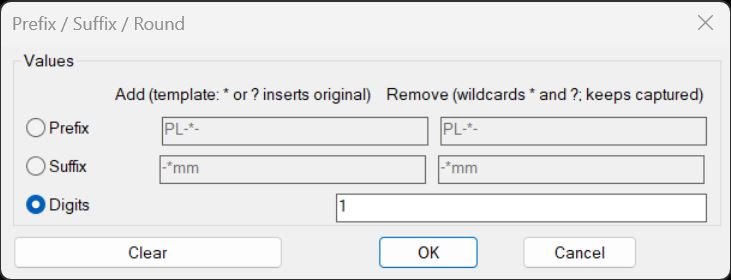
The routine provides a DCL-based interface where you can choose between three actions: Prefix, Suffix, or Digits (rounding). Depending on the row selected, you can specify Add and Remove templates for prefix or suffix, or a number of digits for rounding numeric text. Prefix and Suffix operations support both fixed strings and wildcard templates that can capture parts of the original text and reinsert them using “*” and “?” placeholders, while the Remove side can strip matching patterns or wildcards from the beginning or end. The rounding option scans text content and converts numeric-only strings to rounded values with the specified number of decimal digits, leaving nonnumeric text unchanged. All operations can be reused without reopening the dialog by calling the PREF, SUFF, or OKR_TXT helper commands that rely on stored values.
Helper function: (if any)
• PSOT-Get / PSOT-Put — Read and write persistent settings (PSOT_ACT, PSOT_PFX_ADD, PSOT_PFX_REM, PSOT_SFX_ADD, PSOT_SFX_REM, PSOT_DIG) via environment variables • PSOT-Starts-With / PSOT-Ends-With — Simple string prefix/suffix checks for non-wildcard patterns • PSOT-Reverse — Reverses a string to help implement suffix wildcard matching via prefix logic • PSOT-Pattern-All-Stars — Verifies if the rest of the wildcard pattern consists only of “*” characters • PSOT-WC-Match-CAP-Core — Core recursive wildcard matcher with capture, handling “*” and “?” and returning match length and captured substring • PSOT-WC-Prefix-Match-CAP / PSOT-WC-Suffix-Match-CAP — Anchored wildcard matching at start or end of a string, with capture support • PSOT-Has-Wild — Detects whether a string contains “*” or “?” wildcards • PSOT-ReplaceAllChar — Replaces all occurrences of a single character in a string with a replacement substring • PSOT-Template-Apply — Applies a template string to a source text by replacing “?” and “*” with the original text • PSOT-AddPrefix / PSOT-AddSuffix — Adds fixed or wildcard-templated prefix/suffix to the text • PSOT-RemovePrefix / PSOT-RemoveSuffix — Removes fixed or wildcard-templated prefix/suffix, keeping captured wildcard portions where appropriate • PSOT-RoundNumberString — Parses a numeric string with distof and formats it with rtos to a given number of decimal digits • PSOT-EntType / PSOT-ReadText / PSOT-WriteText — Small wrappers for reading/writing DXF group 1 text content based on entity type • PSOT-FirstAttribOfInsert — Finds the first ATTRIB under an INSERT by walking entnext links until ATTRIB or SEQEND is found • PSOT-Transform — Dispatches text through the appropriate transform operation (prefix add/remove, suffix add/remove, or rounding) • PSOT-ProcessOne-Op — Applies the chosen transform to a single entity, including first attribute of a block insert when applicable • PSOT-Iterate-Selection-Op — Prompts selection and loops through the selection set, calling PSOT-ProcessOne-Op for each entity • PSOT-TempDclFile / PSOT-RunDialog — Build, load, and manage the temporary DCL dialog, including enabling/disabling inputs based on selected radio button and saving the user’s last choices
Functionalities:
• Prefix add/remove — Add or strip prefixes to/from text, with either literal strings or wildcard patterns that can embed or preserve parts of the original text • Suffix add/remove — Add or strip suffixes similarly, with anchored wildcard matching at the end of the string • Wildcard templates — Patterns can use “*” and “?” such that the original text is reinserted into a new structured form (e.g., “PRE_*_SUF”, “?OLD?”) • Safe numeric rounding — Numeric-only texts are converted to rounded values with a given number of decimal digits, while non-numeric text is left unchanged • Per-entity text source — For INSERT, only the first attribute’s text is modified; for TEXT/MTEXT/ATTRIB, the DXF 1 text string is directly edited • Dialog radio logic — Uses USERR1 system variable and radio buttons to switch between Prefix, Suffix, and Digits modes, enabling/disabling relevant input fields dynamically • Persistent UI state — Stores the last active mode and input values (prefix/suffix add/remove strings and rounding digits) so they appear pre-filled next time • One-shot and quick commands — You can run the full dialog via PREF_SUFF_OKR_TXT or quickly reapply the last stored prefix, suffix, or rounding via PREF, SUFF, OKR_TXT
Result:
• Transformed text entities — Selected TEXT, MTEXT, ATTRIB, and first attributes of INSERTs have their string content updated based on the chosen prefix, suffix, or rounding rules • Cleaned prefixes/suffixes — Unwanted leading or trailing patterns can be removed, even when partially matched with wildcards, while keeping important captured segments • Formatted numeric text — Number-only labels can be normalized to a consistent decimal precision using the Digits mode • Batch processing summary — After selection, the routine reports how many items were processed, giving quick feedback on scope • Reusable configuration — Users can repeat transformations on new selections without reconfiguring, thanks to stored PSOT_* environment values and helper commands PREF, SUFF, and OKR_TXT
Images, animations etc.
Log in to download.
Log in
Log in
XAML code:
<ResourceDictionary
xmlns="http://schemas.microsoft.com/winfx/2006/xaml/presentation"
xmlns:x="http://schemas.microsoft.com/winfx/2006/xaml"
xmlns:src="clr-namespace:Autodesk.Windows;assembly=AdWindows">

<src:RibbonToolTip x:Key="PREF_SUFF_OKR_TXT">
<src:RibbonToolTip.ExpandedContent>
<StackPanel>
<TextBlock Background="AntiqueWhite" TextAlignment="Left">
<Bold>Function Syntax: PREF_SUFF_OKR_TXT</Bold>
<LineBreak/>
<Bold>Version: 1 Date: 0509.2025</Bold>
<LineBreak/>
<LineBreak/>
<Hyperlink>N/A</Hyperlink>
<LineBreak/>
<Bold>Description</Bold><LineBreak/>
This LISP defines a small “text mass-edit” utility with a DCL dialog and several commands for adding/removing prefixes or suffixes (including wildcard-aware patterns), and for rounding numeric text to a specified number of decimal digits. It operates on <Run Foreground="Red">TEXT</Run>, <Run Foreground="Red">MTEXT</Run>, <Run Foreground="Red">ATTRIB</Run>, and <Run Foreground="Red">INSERT</Run> (but only the <Run Foreground="Red">first</Run> attribute of the INSERT is edited). It persists dialog settings using environment variables (<Run Foreground="DarkRed">getenv/setenv</Run>).<LineBreak/>
<LineBreak/>

<Bold>Commands provided</Bold><LineBreak/>
- <Run Foreground="Red">PREF_SUFF_OKR_TXT</Run> — main command, shows the dialog and then runs the chosen operation.<LineBreak/>
- <Run Foreground="Red">PREF</Run> — runs stored Prefix Add/Remove directly (no dialog).<LineBreak/>
- <Run Foreground="Red">SUFF</Run> — runs stored Suffix Add/Remove directly (no dialog).<LineBreak/>
- <Run Foreground="Red">OKR_TXT</Run> — rounds numeric text using stored digit count (no dialog).<LineBreak/>
<LineBreak/>

<Bold>What the dialog does</Bold><LineBreak/>
The dialog (written to a temp DCL at runtime) has three “modes” selected via radio buttons:<LineBreak/>
1) <Bold>Prefix</Bold> (rbPref): enables two input boxes:<LineBreak/>
   - Add (templated) value: <Run Foreground="DarkRed">pfx_add</Run><LineBreak/>
   - Remove (wildcard) value: <Run Foreground="DarkRed">pfx_rem</Run><LineBreak/>
2) <Bold>Suffix</Bold> (rbSuff): enables two input boxes:<LineBreak/>
   - Add (templated) value: <Run Foreground="DarkRed">sfx_add</Run><LineBreak/>
   - Remove (wildcard) value: <Run Foreground="DarkRed">sfx_rem</Run><LineBreak/>
3) <Bold>Digits</Bold> (rbOkr): enables one input box:<LineBreak/>
   - Digits (integer): <Run Foreground="DarkRed">digits</Run><LineBreak/>
There is also a <Bold>Clear</Bold> button that clears all inputs and sets digits to 0, plus OK/Cancel.<LineBreak/>
<LineBreak/>

<Bold>Persistence (saved defaults)</Bold><LineBreak/>
The routine stores and reloads its last-used settings via environment variables:<LineBreak/>
- <Run Foreground="DarkRed">PSOT_ACT</Run> (1=Prefix, 2=Suffix, 3=Digits; default 3)<LineBreak/>
- <Run Foreground="DarkRed">PSOT_PFX_ADD</Run>, <Run Foreground="DarkRed">PSOT_PFX_REM</Run><LineBreak/>
- <Run Foreground="DarkRed">PSOT_SFX_ADD</Run>, <Run Foreground="DarkRed">PSOT_SFX_REM</Run><LineBreak/>
- <Run Foreground="DarkRed">PSOT_DIG</Run> (digits string; default “0”)<LineBreak/>
It also uses <Run Foreground="DarkRed">USERR1</Run> as a temporary “mode flag” while the dialog is open (1/2/3).<LineBreak/>
<LineBreak/>

<Bold>Selection scope and entity behavior</Bold><LineBreak/>
When an operation runs (prefix/suffix add/remove or rounding), it prompts:<LineBreak/>
<Run Foreground="DarkRed">Select TEXT/MTEXT/INSERT (first ATTRIB will be updated):</Run><LineBreak/>
and performs <Run Foreground="DarkRed">(ssget '((0 . "TEXT,MTEXT,INSERT,ATTRIB")))</Run>.<LineBreak/>
For each selected item:<LineBreak/>
- If it is TEXT / MTEXT / ATTRIB: edits group code 1 (text content) in-place via <Run Foreground="DarkRed">entmod</Run>.<LineBreak/>
- If it is INSERT: finds the first attached attribute entity (ATTRIB) and edits that attribute’s group code 1 only. It does <Bold>not</Bold> iterate all attributes; only the first ATTRIB following the INSERT in the entity chain is modified.<LineBreak/>
<LineBreak/>

<Bold>Prefix/Suffix Add behavior (templated)</Bold><LineBreak/>
Add operations support two modes depending on whether the add string contains wildcards:<LineBreak/>
- If the add string contains no <Run Foreground="DarkRed">*</Run> or <Run Foreground="DarkRed">?</Run>: it is literal concatenation.<LineBreak/>
  - Prefix Add: <Run Foreground="DarkRed">(strcat pfx txt)</Run><LineBreak/>
  - Suffix Add: <Run Foreground="DarkRed">(strcat txt sfx)</Run><LineBreak/>
- If the add string contains <Run Foreground="DarkRed">*</Run> or <Run Foreground="DarkRed">?</Run>: it is treated as a template, where every occurrence of <Run Foreground="DarkRed">*</Run> and <Run Foreground="DarkRed">?</Run> is replaced by the original text (the same text is substituted for both wildcard characters).<LineBreak/>
  - Implementation: <Run Foreground="DarkRed">PSOT-Template-Apply</Run> does “replace all ? with txt” then “replace all * with txt”.<LineBreak/>
<LineBreak/>
Example (template add):<LineBreak/>
- Original text: <Run Foreground="DarkRed">ABC</Run><LineBreak/>
- Prefix add pattern: <Run Foreground="DarkRed">"[?]-"</Run> ⇒ becomes <Run Foreground="DarkRed">"[ABC]-"</Run><LineBreak/>
- Suffix add pattern: <Run Foreground="DarkRed">"-*"</Run> ⇒ becomes <Run Foreground="DarkRed">"-ABC"</Run> appended, i.e. <Run Foreground="DarkRed">ABC-ABC</Run><LineBreak/>
Note: because both “*” and “?” are replaced with the full original text, templates are “macro insertion,” not classic wildcard matching semantics.<LineBreak/>
<LineBreak/>

<Bold>Prefix/Suffix Remove behavior (wildcard-aware, capture-retaining)</Bold><LineBreak/>
Remove operations have two distinct behaviors depending on whether the remove pattern includes wildcards:<LineBreak/>
- <Bold>No wildcards</Bold> (<Run Foreground="DarkRed">*</Run> or <Run Foreground="DarkRed">?</Run> absent): strict string comparison removal.<LineBreak/>
  - Prefix Remove: if text starts with pfx, remove exactly that pfx.<LineBreak/>
  - Suffix Remove: if text ends with sfx, remove exactly that sfx.<LineBreak/>
- <Bold>Wildcard pattern present</Bold>: uses a custom anchored wildcard engine for prefix or suffix matching, and then removes the matched portion while keeping a “captured” substring that comes from matching wildcard regions.<LineBreak/>
<LineBreak/>

<Bold>How the wildcard engine works</Bold><LineBreak/>
Supported pattern characters:<LineBreak/>
- <Run Foreground="DarkRed">*</Run> matches any sequence (including empty).<LineBreak/>
- <Run Foreground="DarkRed">?</Run> matches any single character.<LineBreak/>
All other characters must match exactly (case-sensitive as written).<LineBreak/>
<LineBreak/>
The engine is anchored by design:<LineBreak/>
- Prefix remove uses <Run Foreground="DarkRed">PSOT-WC-Prefix-Match-CAP</Run> which attempts to match the pattern from the beginning of the string.<LineBreak/>
- Suffix remove uses <Run Foreground="DarkRed">PSOT-WC-Suffix-Match-CAP</Run>, which reverses both string and pattern, runs the same prefix engine, then reverses the captured result back.<LineBreak/>
<LineBreak/>
Return value from the wildcard engine is either nil (no match) or a two-element list:<LineBreak/>
- <Run Foreground="DarkRed">(len cap)</Run><LineBreak/>
Where:<LineBreak/>
- <Run Foreground="DarkRed">len</Run> = number of characters from the source string consumed by the match.<LineBreak/>
- <Run Foreground="DarkRed">cap</Run> = concatenation of characters consumed specifically via wildcard steps (from both “*” and “?” expansions), in left-to-right order.<LineBreak/>
<LineBreak/>

<Bold>“Keeps captured” removal logic</Bold><LineBreak/>
When a wildcard prefix match succeeds for text <Run Foreground="DarkRed">txt</Run> and pattern <Run Foreground="DarkRed">pfx</Run>, the prefix remover returns:<LineBreak/>
<Run Foreground="DarkRed">(strcat cap (substr txt (1+ len)))</Run><LineBreak/>
Meaning: it removes the matched prefix of length len, but it prepends the captured wildcard text (cap) back to the front.<LineBreak/>
<LineBreak/>
When a wildcard suffix match succeeds for text <Run Foreground="DarkRed">txt</Run> and pattern <Run Foreground="DarkRed">sfx</Run>, the suffix remover returns:<LineBreak/>
<Run Foreground="DarkRed">(strcat (substr txt 1 (- (strlen txt) len)) cap)</Run><LineBreak/>
Meaning: it removes the matched suffix of length len, but appends the captured wildcard text (cap) back at the end.<LineBreak/>
<LineBreak/>
This is a deliberate “remove wrapper but preserve wildcard-captured portion” behavior, not a traditional regex replace. Practically, it is useful for removing known surrounding patterns while retaining the variable part matched by wildcards.<LineBreak/>
<LineBreak/>

<Bold>Concrete wildcard examples</Bold><LineBreak/>
(1) Prefix remove with capture:<LineBreak/>
- Text: <Run Foreground="DarkRed">PRE_123_X</Run><LineBreak/>
- Remove prefix patt


</TextBlock>

<Grid>
<Image Source="PrefixSuffixRound_000.jpg" Stretch="Uniform"/>
</Grid>

<Grid>
<MediaElement
 Source="GIF"
 Stretch="Uniform"
 Visibility="Visible"/>
 </Grid>

</StackPanel>
</src:RibbonToolTip.ExpandedContent>
</src:RibbonToolTip>
</ResourceDictionary>
Additional info:
Learn more:
Open Website
Share this page:
Subscribe
Login
0 Comments
Oldest
Tags: 🏷️ Autocad Lisps, 🏷️ Text_menu
Tags: 🏷️ Autocad Lisps, 🏷️ Text_menu