
Short description
Sort / Purpose: Export cleaned text from selected drawing annotations directly to the Windows clipboard in a copy ready format.
• Clipboard Export: Gathers text from TEXT, MTEXT, attributes, dimensions, multileaders, and blocks, then sends the processed result to the clipboard.
• Two Output Styles: Lets you choose between one line concatenated text without paragraphs or line by line text keeping logical paragraphs.
• Formatting Cleanup: Strips MText formatting codes and Unicode markers so that the clipboard content is clean, readable, and ready for pasting into external applications.
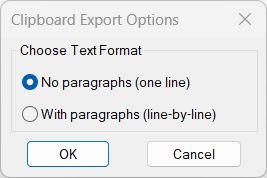
Command:
Command name: CTC
How to run: Type CTC in the command line and press Enter to open the export options dialog.
• CTC_1: Runs automatically if “No paragraphs (one line)” is chosen.
• CTC_2: Runs automatically if “With paragraphs (line-by-line)” is chosen.
Description:
• Dialog Selection: Opens a DCL window where the user chooses one of two export modes for clipboard text.
• Interactive Workflow: The last selected radio button option is remembered and pre-selected on the next run.
• Text Extraction: Reads content from TEXT, MTEXT, DIMENSION, MULTILEADER, ATTRIB, ATTDEF, and blocks with attributes.
• Formatting Cleanup: Removes U+ codes, inline MTEXT formatting, paragraph markers, and replaces them with clean characters.
• Clipboard Output: Automatically transfers the cleaned text directly into the Windows clipboard via HTMLfile COM object.
Helper function: (if any)
Internal helper procedures used:
• writeCTCDCL: Generates a temporary DCL file containing the radio button dialog layout.
• radioCTCDCL: Loads, displays, and manages the dialog interaction and stores the user’s chosen option.
Text-cleaning functions:
• StripMTextCodes_1: Produces one-line output by removing formatting, Unicode codes, and replacing line breaks with spaces.
• StripMTextCodes_2: Produces paragraph-friendly multi-line output with cleaner break insertion rules.
System / COM functions:
• vlax-create-object: Creates an HTMLfile object to write cleaned text into the clipboard.
• vlax-release-object: Ensures clean memory cleanup and prevents COM object leaks.
• ssget / entget / vlax-ename->vla-object: Collects and analyzes selected entities to extract readable text.
Functionalities:
• Two Export Modes: Choose between flat single-line text or structured line-by-line paragraphs.
• MTEXT Formatting Removal: Eliminates all inline codes such as A1;, H0.7;, fArial;, L, O, etc.
• Unicode Handling: Converts U+XXXX hexadecimal escape sequences into real characters (≥ ≤ ± °).
• Paragraph Logic: Cleans unwanted “P” markers while preserving valid words like “PE-HD”.
• Clipboard Automation: Sends the processed result directly to the Windows clipboard without prompting.
• Wide Object Support: Works with TEXT, MTEXT, DIMENSION, MULTILEADER, attributes, and attribute blocks.
• Error Safety: Custom *error* handler ensures clipboard object is released even during failures.
Result:
Result: The selected annotation content is cleaned, normalized, stripped of formatting codes, and copied directly to the Windows clipboard in the chosen text format.
• Mode 1 (rb01): Produces one continuous clean text line suitable for Excel cells, filenames, or compact notes.
• Mode 2 (rb02): Produces structured multi-line text for documentation, emails, or reports.
• Clean Output: All MTEXT formatting, Unicode escapes, control codes, and garbage strings are removed, leaving readable plain text only.
• Universal Use: The clipboard result can be pasted instantly into Word, Excel, Notepad, Outlook, or any external application.
Copy code:
Images, animations etc.
Log in to download.
Log in
Log in
XAML code:
<ResourceDictionary
xmlns="http://schemas.microsoft.com/winfx/2006/xaml/presentation"
xmlns:x="http://schemas.microsoft.com/winfx/2006/xaml"
xmlns:src="clr-namespace:Autodesk.Windows;assembly=AdWindows">

<src:RibbonToolTip x:Key="Copy_to_Clipboard">
<src:RibbonToolTip.ExpandedContent>
<StackPanel>
<TextBlock Background="AntiqueWhite" TextAlignment="Left">
<Bold>Function Syntax: ctc</Bold>
<LineBreak/>
<Bold>Version: 1 Date: 08.09.2025</Bold>
<LineBreak/>
<LineBreak/>
<Hyperlink>AI + https://www.theswamp.org/index.php?topic=21764.msg263322#msg263322</Hyperlink>
<LineBreak/>
<Bold>Purpose</Bold><LineBreak/>
This program lets the user copy text content from selected AutoCAD objects to the Windows clipboard, with a choice of output formatting (single line versus paragraph style).<LineBreak/>
<LineBreak/>

<Bold>Primary Command</Bold><LineBreak/>
<Span Foreground="DarkRed"><Bold>CTC</Bold></Span> launches a dialog to choose the export mode, then runs the corresponding copy routine.<LineBreak/>
<LineBreak/>

<Bold>User Workflow</Bold><LineBreak/>
1. Run <Span Foreground="DarkRed"><Bold>CTC</Bold></Span> in the AutoCAD command line.<LineBreak/>
2. A dialog titled <Span Foreground="DarkRed"><Bold>Clipboard Export Options</Bold></Span> appears with two radio options.<LineBreak/>
3. Choose one format and click <Span Foreground="DarkRed"><Bold>OK</Bold></Span> or <Span Foreground="DarkRed"><Bold>Cancel</Bold></Span>.<LineBreak/>
4. If OK, the program prompts the user to select objects in the drawing.<LineBreak/>
5. The program extracts text from each selected object, cleans MTEXT formatting codes, and copies the final result to the clipboard.<LineBreak/>
<LineBreak/>

<Bold>Dialog and Option Memory</Bold><LineBreak/>
The dialog is generated at runtime into a temporary DCL file and loaded dynamically.<LineBreak/>
The last chosen radio option is remembered between runs in <Span Foreground="DarkRed"><Bold>*ctc-last-option*</Bold></Span> (defaults to <Span Foreground="DarkRed"><Bold>rb01</Bold></Span> on first run).<LineBreak/>
<LineBreak/>

<Bold>Supported Object Types for Selection</Bold><LineBreak/>
The selection filter includes the following DXF types:<LineBreak/>
<Span Foreground="DarkRed"><Bold>TEXT</Bold></Span><LineBreak/>
<Span Foreground="DarkRed"><Bold>MTEXT</Bold></Span><LineBreak/>
<Span Foreground="DarkRed"><Bold>ATTRIB</Bold></Span><LineBreak/>
<Span Foreground="DarkRed"><Bold>ATTDEF</Bold></Span><LineBreak/>
<Span Foreground="DarkRed"><Bold>DIMENSION</Bold></Span><LineBreak/>
<Span Foreground="DarkRed"><Bold>MULTILEADER</Bold></Span><LineBreak/>
<Span Foreground="DarkRed"><Bold>INSERT</Bold></Span> (blocks, including attributes when present)<LineBreak/>
<LineBreak/>

<Bold>Modes and Output Formats</Bold><LineBreak/>
<ul><LineBreak/>
  <li><Bold>Mode 1</Bold> <Span Foreground="DarkRed"><Bold>CTC_1</Bold></Span> and option <Span Foreground="DarkRed"><Bold>rb01</Bold></Span>  No paragraphs, intended to produce a more single line style by removing linefeed characters and normalizing spacing during cleanup, while still appending each extracted item into the final clipboard text.<LineBreak/></li><LineBreak/>
  <li><Bold>Mode 2</Bold> <Span Foreground="DarkRed"><Bold>CTC_2</Bold></Span> and option <Span Foreground="DarkRed"><Bold>rb02</Bold></Span>  With paragraphs, intended to preserve a line by line structure, including inserting line breaks for specific known words that begin with P in the source content.<LineBreak/></li><LineBreak/>
</ul><LineBreak/>
<LineBreak/>

<Bold>Key Functionalities</Bold><LineBreak/>
<ul><LineBreak/>
  <li><Bold>Interactive option selection</Bold> using a temporary DCL dialog written by <Span Foreground="DarkRed"><Bold>writeCTCDCL</Bold></Span> and displayed by <Span Foreground="DarkRed"><Bold>radioCTCDCL</Bold></Span>.<LineBreak/></li><LineBreak/>
  <li><Bold>Dispatch to the selected routine</Bold> via <Span Foreground="DarkRed"><Bold>c:CTC</Bold></Span> which calls <Span Foreground="DarkRed"><Bold>c:CTC_1</Bold></Span> or <Span Foreground="DarkRed"><Bold>c:CTC_2</Bold></Span> based on the chosen radio button.<LineBreak/></li><LineBreak/>
  <li><Bold>Batch extraction of text</Bold> from each selected object, building a combined output string named <Span Foreground="DarkRed"><Bold>rawText</Bold></Span>.<LineBreak/></li><LineBreak/>
  <li><Bold>Cleaning and normalization</Bold> of MTEXT and formatting artifacts using <Span Foreground="DarkRed"><Bold>StripMTextCodes_1</Bold></Span> or <Span Foreground="DarkRed"><Bold>StripMTextCodes_2</Bold></Span>.<LineBreak/></li><LineBreak/>
  <li><Bold>Clipboard export</Bold> using the COM object <Span Foreground="DarkRed"><Bold>htmlfile</Bold></Span> and its <Span Foreground="DarkRed"><Bold>clipboarddata</Bold></Span> interface with <Span Foreground="DarkRed"><Bold>setdata</Bold></Span> to write plain text to the clipboard.<LineBreak/></li><LineBreak/>
  <li><Bold>Error handling and cleanup</Bold> via a local <Span Foreground="DarkRed"><Bold>*error*</Bold></Span> function that releases COM objects and runs garbage collection to reduce leaked handles.<LineBreak/></li><LineBreak/>
</ul><LineBreak/>
<LineBreak/>

<Bold>Extraction Rules by Object Type</Bold><LineBreak/>
<ul><LineBreak/>
  <li><Bold>TEXT, MTEXT, ATTRIB, ATTDEF</Bold> Extracts the primary text value from DXF group 1 and then cleans it with the selected strip function.<LineBreak/></li><LineBreak/>
  <li><Bold>DIMENSION</Bold> Reads the text override first, and if empty uses the numeric measurement converted to text, then cleans it.<LineBreak/></li><LineBreak/>
  <li><Bold>MULTILEADER</Bold> Reads the leader text string from the object and then cleans it.<LineBreak/></li><LineBreak/>
  <li><Bold>INSERT blocks</Bold><LineBreak/>
    If the block has attributes, it iterates attributes and appends each attribute text string after cleaning.<LineBreak/>
    If the block has no attributes, it uses the effective block name as the output text.<LineBreak/>
  </li><LineBreak/>
</ul><LineBreak/>
<LineBreak/>

<Bold>Text Cleaning and Normalization Details</Bold><LineBreak/>
The program contains two cleaning functions that remove AutoCAD MTEXT markup and normalize spacing, with slightly different paragraph behavior per mode.<LineBreak/>
<LineBreak/>

<Bold>Unicode and Special Symbol Handling</Bold><LineBreak/>
Both strip functions attempt to convert sequences of the form <Span Foreground="DarkRed"><Bold>\U+xxxx</Bold></Span> into actual characters using hex conversion, and also explicitly substitute common sequences into symbols such as ≥ ≤ ± and °.<LineBreak/>
<LineBreak/>

<Bold>Removal of MTEXT Formatting Codes</Bold><LineBreak/>
Both strip functions remove or delete common inline formatting sequences and patterns, including items like font, height, color, alignment, underline, overline, and other backslash driven codes that typically end with a semicolon.<LineBreak/>
They also remove a curated list of known garbage fragments that appear in the specific content the script is designed to process.<LineBreak/>
<LineBreak/>

<Bold>Whitespace and Line Break Normalization</Bold><LineBreak/>
<ul><LineBreak/>
  <li>Replaces the MTEXT non breaking space marker <Span Foreground="DarkRed"><Bold>\~</Bold></Span> with a normal space.<LineBreak/></li><LineBreak/>
  <li>Replaces actual linefeed characters with spaces to normalize raw input prior to other cleanup operations.<LineBreak/></li><LineBreak/>
  <li>Collapses multiple consecutive spaces down to single spaces.<LineBreak/></li><LineBreak/>
</ul><LineBreak/>
<LineBreak/>

<Bold>Mode Specific Paragraph Behavior</Bold><LineBreak/>
<ul><LineBreak/>
  <li><Bold>CTC_1 strip function</Bold> includes logic intended to remove stray P artifacts that can appear due to paragraph markers, with a special exception to avoid breaking the token PE-HD.<LineBreak/></li><LineBreak/>
  <li><Bold>CTC_2 strip function</Bold> introduces paragraph line breaks for a known list of P prefixed words by replacing those words with the same word without the leading P and inserting a linefeed before it.<LineBreak/></li><LineBreak/>
  <li><Bold>CTC_2 strip function</Bold> also collapses double line breaks into single line breaks at the end of cleanup.<LineBreak/></li><LineBreak/>
</ul><LineBreak/>
<LineBreak/>

<Bold>User Visible Output</Bold><LineBreak/>
<ul><LineBreak/>
  <li>If text is found, the command prints a message indicating how many objects were processed and echoes the copied text to the command line, and the same text is placed into the clipboard.<LineBreak/></li><LineBreak/>
  <li>If no readable text is found, it prints a message indicating that nothing readable was found.<LineBreak/></li><LineBreak/>
  <li>If the selection is empty or the user cancels, it prints a cancel message and exits cleanly.<LineBreak/></li><LineBreak/>
</ul><LineBreak/>
<LineBreak/>

<Bold>Important Commands and Symbols to Recognize</Bold><LineBreak/>
<Span Foreground="DarkRed"><Bold>CTC</Bold></Span> main entry point command.<LineBreak/>
<Span Foreground="DarkRed"><Bold>CTC_1</Bold></Span> copy to clipboard without paragraph style cleaning.<LineBreak/>
<Span Foreground="DarkRed"><Bold>CTC_2</Bold></Span> copy to clipboard with paragraph style cleaning.<LineBreak/>
<Span Foreground="DarkRed"><Bold>writeCTCDCL</Bold></Span> creates the DCL dialog definition file.<LineBreak/>
<Span Foreground="DarkRed"><Bold>radioCTCDCL</Bold></Span> shows the dialog and returns the selected option.<LineBreak/>
<Span Foreground="DarkRed"><Bold>*ctc-last-option*</Bold></Span> stores the last selected dialog option for the next run.<LineBreak/>
<Span Foreground="DarkRed"><Bold>htmlfile</Bold></Span> COM object used to access Windows clipboard data.<LineBreak/>
<LineBreak/>

<Bold>Operational Summary</Bold><LineBreak/>
This program will require the user to select supported objects in the drawing, then it will extract relevant text content, sanitize MTEXT formatting codes and known artifacts, and copy the resulting text to the clipboard in either a normalized single line style or a paragraph oriented line by line style, depending on the chosen dialog option.<LineBreak/>


</TextBlock>

<Grid>
<Image Source="Copy_to_Clipboard_000.jpg" Stretch="Uniform"/>
</Grid>

<Grid>
<MediaElement
 Source="GIF"
 Stretch="Uniform"
 Visibility="Visible"/>
 </Grid>

</StackPanel>
</src:RibbonToolTip.ExpandedContent>
</src:RibbonToolTip>
</ResourceDictionary>
Additional info:
Based on / Source code:
Open Website
Based on / Source code:
Open Website
Based on / Source code:
Open Website
Share this page:
Subscribe
Login
0 Comments
Oldest
Tags: 🏷️ Autocad Lisps, 🏷️ Text_menu
Tags: 🏷️ Autocad Lisps, 🏷️ Text_menu