
Short description
🧩 MiddleLinePolylines_2 provides the CPL_2 command for generating a simple two vertex centerline between two open curves.
📍 The routine averages the start points of the first and last selected curve and averages their end points.
📐 A new two vertex LWPOLYLINE is created in ModelSpace from those two midpoint positions.
Command:
Main command: CPL_2
Description:
🖱️ The command accepts a general AutoCAD selection set and requires at least two selected objects.
1️⃣ The first object in the selection set becomes the first source curve.
2️⃣ The last object in the selection set becomes the second source curve.
📐 Curve API functions read start and end points from LINE LWPOLYLINE POLYLINE ARC SPLINE ELLIPSE and similar open curve objects.
🔒 Closed curves are rejected when the start and end coordinates are equal.
➗ The source start positions are averaged to create the first centerline vertex and the source end positions are averaged to create the second.
⬇️ Z is explicitly forced to 0 because the result is a two dimensional lightweight polyline.
📦 The new LWPOLYLINE is created directly in ModelSpace through COM.
Helper function: (if any)
vlax-curve-getStartPoint reads source start coordinates.
vlax-curve-getEndPoint reads source end coordinates.
vla-AddLightWeightPolyline creates the final two vertex result.
Functionalities:
✅ Simple endpoint average – creates the centerline from averaged start and end positions.
✅ General curve API – works with several open AutoCAD curve types.
✅ First and last selection logic – uses only the first and last objects from the selection set.
✅ Closed curve guard – skips processing when a selected source appears closed.
✅ Two vertex result – creates a straight LWPOLYLINE with two vertices.
✅ COM creation – adds the lightweight polyline directly to ModelSpace.
✅ 2D output – forces the generated Z coordinate to zero.
Result:
🎯 The result is one straight two vertex LWPOLYLINE centered between the start and end positions of the first and last selected source curves.
Images, animations etc.
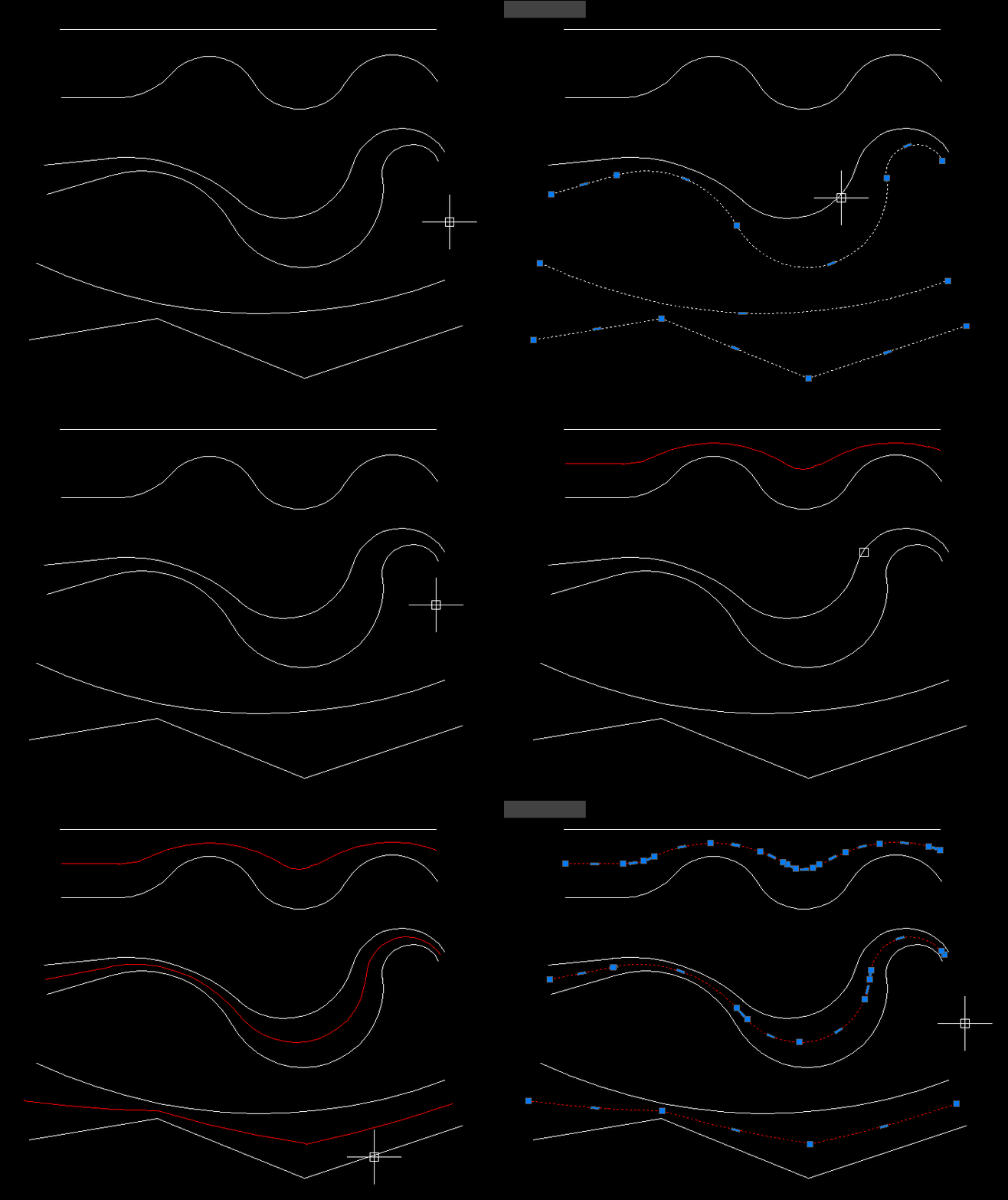
XAML code:
<ResourceDictionary
xmlns="http://schemas.microsoft.com/winfx/2006/xaml/presentation"
xmlns:x="http://schemas.microsoft.com/winfx/2006/xaml"
xmlns:src="clr-namespace:Autodesk.Windows;assembly=AdWindows">

<src:RibbonToolTip x:Key="CenterPline_2">
<src:RibbonToolTip.ExpandedContent>
<StackPanel>
<TextBlock Background="AntiqueWhite" TextAlignment="Left">
<Bold>Function Syntax: CPL_2</Bold>
<LineBreak/>
<Bold>Version: 1.0 Date: 20.06.2026 6:38:59PM</Bold>
<LineBreak/>
<Hyperlink>AI + https://www.cadtutor.net/forum/topic/49702-centerline-between-two-polylines/</Hyperlink>
<LineBreak/>

<Bold><Run Foreground="DodgerBlue">Description</Run></Bold><LineBreak/>
<Run Foreground="White">🧩 MiddleLinePolylines_2 provides the CPL_2 command for generating a simple two vertex centerline between two open curves.</Run><LineBreak/>
<Run Foreground="White">📍 The routine averages the start points of the first and last selected curve and averages their end points.</Run><LineBreak/>
<Run Foreground="White">📐 A new two vertex LWPOLYLINE is created in ModelSpace from those two midpoint positions.</Run><LineBreak/>
<LineBreak/>
<Bold><Run Foreground="DodgerBlue">Function Syntax</Run></Bold><LineBreak/>
<Run Foreground="White">Main command: </Run><Bold><Run Foreground="Orange">CPL_2</Run></Bold><LineBreak/>
<LineBreak/>
<Bold><Run Foreground="DodgerBlue">SEO Optimized Overview</Run></Bold><LineBreak/>
<Run Foreground="White">🖱️ The command accepts a general AutoCAD selection set and requires at least two selected objects.</Run><LineBreak/>
<Run Foreground="White">1️⃣ The first object in the selection set becomes the first source curve.</Run><LineBreak/>
<Run Foreground="White">2️⃣ The last object in the selection set becomes the second source curve.</Run><LineBreak/>
<Run Foreground="White">📐 Curve API functions read start and end points from LINE LWPOLYLINE POLYLINE ARC SPLINE ELLIPSE and similar open curve objects.</Run><LineBreak/>
<Run Foreground="White">🔒 Closed curves are rejected when the start and end coordinates are equal.</Run><LineBreak/>
<Run Foreground="White">➗ The source start positions are averaged to create the first centerline vertex and the source end positions are averaged to create the second.</Run><LineBreak/>
<Run Foreground="White">⬇️ Z is explicitly forced to 0 because the result is a two dimensional lightweight polyline.</Run><LineBreak/>
<Run Foreground="White">📦 The new LWPOLYLINE is created directly in ModelSpace through COM.</Run><LineBreak/>
<LineBreak/>
<Bold><Run Foreground="LimeGreen">Primary Workflow</Run></Bold><LineBreak/>
<Run Foreground="White">• Run CPL_2.</Run><LineBreak/>
<Run Foreground="White">• Select at least two curve objects.</Run><LineBreak/>
<Run Foreground="White">• The routine uses the first selected and last selected objects.</Run><LineBreak/>
<Run Foreground="White">• Start and end points are read through the AutoCAD curve API.</Run><LineBreak/>
<Run Foreground="White">• Start midpoints and end midpoints are calculated.</Run><LineBreak/>
<Run Foreground="White">• A two vertex LWPOLYLINE is created in ModelSpace.</Run><LineBreak/>
<LineBreak/>
<Bold><Run Foreground="LimeGreen">Functionalities</Run></Bold><LineBreak/>
<Run Foreground="White">✅ </Run><Bold><Run Foreground="LimeGreen">Simple endpoint average</Run></Bold><Run Foreground="White"> - creates the centerline from averaged start and end positions.</Run><LineBreak/>
<Run Foreground="White">✅ </Run><Bold><Run Foreground="LimeGreen">General curve API</Run></Bold><Run Foreground="White"> - works with several open AutoCAD curve types.</Run><LineBreak/>
<Run Foreground="White">✅ </Run><Bold><Run Foreground="LimeGreen">First and last selection logic</Run></Bold><Run Foreground="White"> - uses only the first and last objects from the selection set.</Run><LineBreak/>
<Run Foreground="White">✅ </Run><Bold><Run Foreground="LimeGreen">Closed curve guard</Run></Bold><Run Foreground="White"> - skips processing when a selected source appears closed.</Run><LineBreak/>
<Run Foreground="White">✅ </Run><Bold><Run Foreground="LimeGreen">Two vertex result</Run></Bold><Run Foreground="White"> - creates a straight LWPOLYLINE with two vertices.</Run><LineBreak/>
<Run Foreground="White">✅ </Run><Bold><Run Foreground="LimeGreen">COM creation</Run></Bold><Run Foreground="White"> - adds the lightweight polyline directly to ModelSpace.</Run><LineBreak/>
<Run Foreground="White">✅ </Run><Bold><Run Foreground="LimeGreen">2D output</Run></Bold><Run Foreground="White"> - forces the generated Z coordinate to zero.</Run><LineBreak/>
<LineBreak/>
<Bold><Run Foreground="DodgerBlue">Important Commands and Aspects</Run></Bold><LineBreak/>
<Run Foreground="White">🧩 vlax-curve-getStartPoint reads source start coordinates.</Run><LineBreak/>
<Run Foreground="White">🧩 vlax-curve-getEndPoint reads source end coordinates.</Run><LineBreak/>
<Run Foreground="White">🧩 vla-AddLightWeightPolyline creates the final two vertex result.</Run><LineBreak/>
<LineBreak/>
<Bold><Run Foreground="DodgerBlue">Result</Run></Bold><LineBreak/>
<Run Foreground="White">🎯 The result is one straight two vertex LWPOLYLINE centered between the start and end positions of the first and last selected source curves.</Run><LineBreak/>
<LineBreak/>
<Bold><Run Foreground="DarkRed">Important Notes</Run></Bold><LineBreak/>
<Run Foreground="White">⚠️ </Run><Bold><Run Foreground="DarkRed">The command does not calculate a detailed average path along curved source geometry.</Run></Bold><LineBreak/>
<Run Foreground="White">⚠️ </Run><Bold><Run Foreground="DarkRed">Only the first and last objects from the selection set are used.</Run></Bold><LineBreak/>
<Run Foreground="White">⚠️ </Run><Bold><Run Foreground="DarkRed">Result Z values are forced to zero.</Run></Bold><LineBreak/>
<Run Foreground="White">⚠️ </Run><Bold><Run Foreground="DarkRed">The source comment identifies this as a COM only one go centerline method.</Run></Bold><LineBreak/>
<LineBreak/>
<Bold><Run Foreground="Yellow">SEO Keywords</Run></Bold><LineBreak/>
<Run Foreground="Yellow">🏷️ AutoCAD, 🏷️ Civil 3D, 🏷️ AutoLISP, 🏷️ CPL_2, 🏷️ MiddleLinePolylines_2, 🏷️ Centerline, 🏷️ Endpoint midpoint, 🏷️ LWPOLYLINE, 🏷️ COM, 🏷️ CAD automation</Run><LineBreak/>


</TextBlock>

<Grid>
<MediaElement
 Source="Animation_000.gif"
 Stretch="Uniform"
 Visibility="Visible"/>
 </Grid>

</StackPanel>
</src:RibbonToolTip.ExpandedContent>
</src:RibbonToolTip>
</ResourceDictionary>