
MH2SurfacesProfilesElevationTool_vs.00
Short description
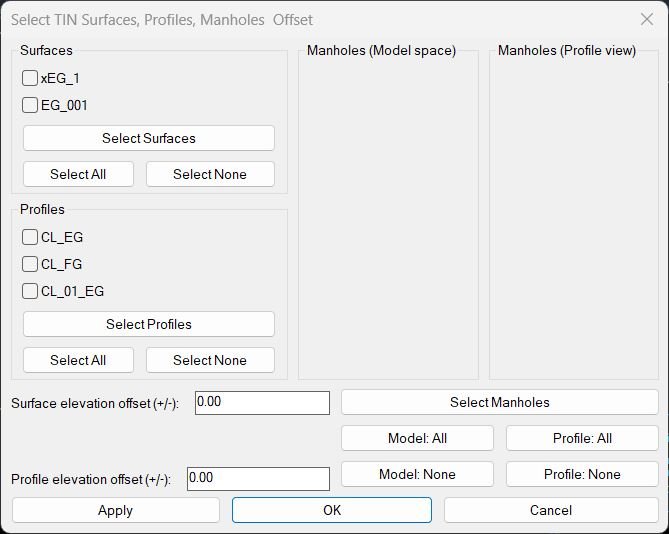
This LISP adjusts Civil 3D manhole structures so their rim elevations follow selected TIN surfaces or profiles, with elevation offsets, batch selection and a dialog that supports live Apply preview and final confirmation.
MH2SurfacesProfilesElevationTool_vs.01
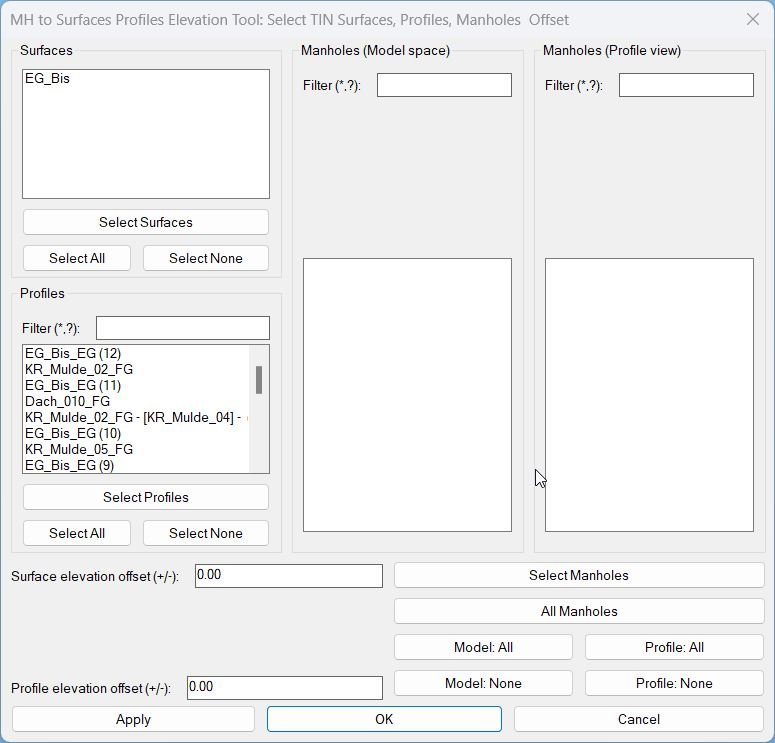
Sort / Purpose: Civil 3D utility to set structure (manhole) elevations based on TIN Surfaces and/or Profiles, using a scrollable dialog with filters. • Scope: Works withAeccDbStructureand profile-view network parts, using profiles or surfaces as elevation sources, with separate offsets. • Priority: For each manhole, it tries Profiles first; if no valid profile elevation, it falls back to Surfaces.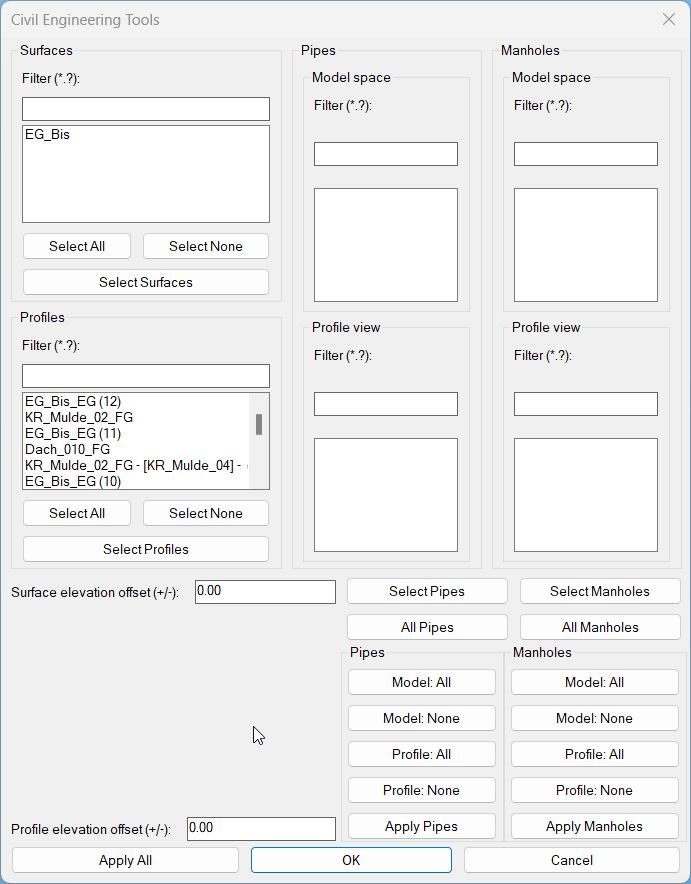
MHPipes2SurfacesProfilesElevationTool_vs.01
Sort / Purpose: A pipe-only shortcut command that still launches the same full UI. User may ignore manhole lists if not needed.- Type: Shortcut alias to the master interface
- Scope: Provides access to all pipe-related elevations
- Goal: Simpler entry for users working only with pipes
XAML code:
<ResourceDictionary
xmlns="http://schemas.microsoft.com/winfx/2006/xaml/presentation"
xmlns:x="http://schemas.microsoft.com/winfx/2006/xaml"
xmlns:src="clr-namespace:Autodesk.Windows;assembly=AdWindows">

<src:RibbonToolTip x:Key="MH2SurfacesProfilesElevationTool">
<src:RibbonToolTip.ExpandedContent>
<StackPanel>
<TextBlock Background="AntiqueWhite" TextAlignment="MH2SurfacesProfilesElevationTool">
<Bold>Function Syntax: MH2SurfacesProfilesElevationTool</Bold>
<LineBreak/>
<Bold>Version: 1 Date: 14.11.2025</Bold>
<LineBreak/>
<LineBreak/>
<Hyperlink>WEB</Hyperlink>
<LineBreak/>
<div class="bgc-Sort-Description">
  <span class="txt-bold">Short description</span><span class="LineBreak"></span>
  This LISP adjusts Civil 3D manhole structures to match selected TIN surfaces and or profiles using elevation offsets, with an interactive dialog for selecting surfaces, profiles and manholes and applying changes live.<span class="LineBreak"></span>
</div>

<div class="bgc-Command">
  <span class="txt-bold">Main command</span><span class="LineBreak"></span>
  • <Span Foreground="DarkRed">MHtoSurface</Span> – opens the manhole elevation adjustment dialog and controls the entire workflow.<span class="LineBreak"></span>
</div>

<div class="bgc-Description">
  <span class="txt-bold">What this program does</span><span class="LineBreak"></span>
  • Lists all <Span Foreground="DarkRed">TIN surfaces</Span> and all <Span Foreground="DarkRed">profiles</Span> in the drawing and lets the user check which ones will control manhole elevations.<span class="LineBreak"></span>
  • Allows selection of <Span Foreground="DarkRed">manholes in Model space</Span> and <Span Foreground="DarkRed">manholes in Profile view</Span> and shows them in two groups with checkboxes.<span class="LineBreak"></span>
  • For every checked manhole tries to get elevation from the selected <Span Foreground="Red">profiles</Span> first then falls back to selected <Span Foreground="Red">TIN surfaces</Span> if profile elevation is not valid at that position.<span class="LineBreak"></span>
  • Applies independent numeric offsets for <Span Foreground="DarkRed">surface elevation</Span> and <Span Foreground="DarkRed">profile elevation</Span> before setting the final manhole rim level.<span class="LineBreak"></span>
  • Updates manhole <Span Foreground="Red">RimElevation</Span> and the Z value of the structure Position so the 3D graphics match the design elevation.<span class="LineBreak"></span>
</div>

<div class="bgc-Helper-function">
  <span class="txt-bold">Important helper logic</span><span class="LineBreak"></span>
  • <Span Foreground="DarkRed">MH-AddStructuresFromDrawing</Span> – inspects user selection and adds AeccDbStructure objects and structures mapped from profile view network parts into the lists.<span class="LineBreak"></span>
  • <Span Foreground="DarkRed">MH-SelectSurfacesFromDrawing</Span> – enables graphical selection of TIN surfaces and auto checks the matching surface items in the dialog.<span class="LineBreak"></span>
  • <Span Foreground="DarkRed">MH-SelectProfilesFromDrawing</Span> – enables graphical selection of profiles and auto checks their entries in the profile list.<span class="LineBreak"></span>
  • <Span Foreground="Red">MH-SetStructureElevToSources</Span> – core function that finds elevation at the manhole XY from profiles or surfaces and sets the rim elevation with offsets.<span class="LineBreak"></span>
  • <Span Foreground="DarkRed">MH-ApplyCurrent</Span> – applies current selections and offsets to all chosen manholes and runs a REGEN so the vertical change is visible immediately.<span class="LineBreak"></span>
</div>

<div class="bgc-Functionalities">
  <span class="txt-bold">Functionalities</span><span class="LineBreak"></span>
  • <Span Foreground="DarkRed">Surface selection area</Span><span class="LineBreak"></span>
    – Displays all TIN surfaces with checkboxes, initially unchecked.<span class="LineBreak"></span>
    – <Span Foreground="Red">Select Surfaces</Span> button lets the user pick surfaces in the drawing and auto checks their entries.<span class="LineBreak"></span>
    – <Span Foreground="Red">Select All</Span> and <Span Foreground="Red">Select None</Span> toggle all surface checkboxes at once.<span class="LineBreak"></span>
  • <Span Foreground="DarkRed">Profile selection area</Span><span class="LineBreak"></span>
    – Lists all profiles found under alignments with checkboxes, initially unchecked.<span class="LineBreak"></span>
    – <Span Foreground="Red">Select Profiles</Span> button allows picking profiles from profile views and auto checks them.<span class="LineBreak"></span>
    – <Span Foreground="Red">Select All</Span> and <Span Foreground="Red">Select None</Span> for profiles.<span class="LineBreak"></span>
  • <Span Foreground="DarkRed">Manholes (Model space)</Span> list<span class="LineBreak"></span>
    – Shows each selected AeccDbStructure from plan view as “DisplayName – PartSizeName” one below another.<span class="LineBreak"></span>
    – Checkboxes control which model manholes are active for elevation adjustment.<span class="LineBreak"></span>
    – <Span Foreground="Red">Model: All</Span> and <Span Foreground="Red">Model: None</Span> buttons select or deselect all model manholes.<span class="LineBreak"></span>
  • <Span Foreground="DarkRed">Manholes (Profile view)</Span> list<span class="LineBreak"></span>
    – Shows manholes that were selected through profile view network graphics and mapped back to their model structures.<span class="LineBreak"></span>
    – Checkboxes control which of these profile based manholes are processed.<span class="LineBreak"></span>
    – <Span Foreground="Red">Profile: All</Span> and <Span Foreground="Red">Profile: None</Span> select or deselect all profile view manholes.<span class="LineBreak"></span>
  • <Span Foreground="DarkRed">Select Manholes button</Span><span class="LineBreak"></span>
    – Wide button that spans beneath both manhole columns and allows repeated selection of structures from plan and profile views.<span class="LineBreak"></span>
  • <Span Foreground="DarkRed">Elevation offset controls</Span><span class="LineBreak"></span>
    – Edit box for <Span Foreground="Red">Surface elevation offset</Span> applied when elevations come from TIN surfaces.<span class="LineBreak"></span>
    – Edit box for <Span Foreground="Red">Profile elevation offset</Span> applied when elevations come from profiles.<span class="LineBreak"></span>
  • <Span Foreground="DarkRed">Source priority</Span><span class="LineBreak"></span>
    – For every manhole the routine first projects its XY to each checked alignment and tries to get profile elevation at that station.<span class="LineBreak"></span>
    – If no valid profile elevation is found, the routine queries each checked surface for elevation at the same XY until one returns a valid value.<span class="LineBreak"></span>
  • <Span Foreground="DarkRed">Control buttons</Span><span class="LineBreak"></span>
    – <Span Foreground="Red">Apply</Span> adjusts all checked manholes using current selections and offsets, regenerates the drawing and keeps the dialog open.<span class="LineBreak"></span>
    – <Span Foreground="Red">OK</Span> performs the same adjustment then closes the dialog.<span class="LineBreak"></span>
    – <Span Foreground="Red">Cancel</Span> closes the dialog without running another adjustment.<span class="LineBreak"></span>
</div>

<div class="bgc-Result">
  <span class="txt-bold">Result</span><span class="LineBreak"></span>
  • Checked manholes are set to new rim elevations derived from either the chosen profiles or TIN surfaces plus the specified offsets.<span class="LineBreak"></span>
  • Manholes selected from profile views are correctly mapped back to their model structures before elevation is changed.<span class="LineBreak"></span>
  • The designer can iteratively tune offsets and selections with Apply until the network fits the required profiles and surfaces, then confirm with OK or exit with Cancel.<span class="LineBreak"></span>
</div>


</TextBlock>

<Grid>
<Image Source="PNG" Stretch="Uniform"/>
</Grid>

<Grid>
<MediaElement
 Source="GIF"
 Stretch="Uniform"
 Visibility="Visible"/>
 </Grid>

</StackPanel>
</src:RibbonToolTip.ExpandedContent>
</src:RibbonToolTip>
</ResourceDictionary>