
Short description
📐 LinFileDraw is an AutoCAD AutoLISP and DCL utility for reading linetype definitions from a selected *.LIN file and drawing clean sample polyline rows with MText labels in the current UCS.
Command:
🚀 Primary commands:
– LINPL
– LINPOLY
🧰 Command-line load message:
– LINPL 004 loaded. Run LINPL or LINPOLY.
Description:
📘 LinFileDraw helps AutoCAD and Civil 3D users preview, test, and document linetypes from external LIN definition files directly inside the drawing.
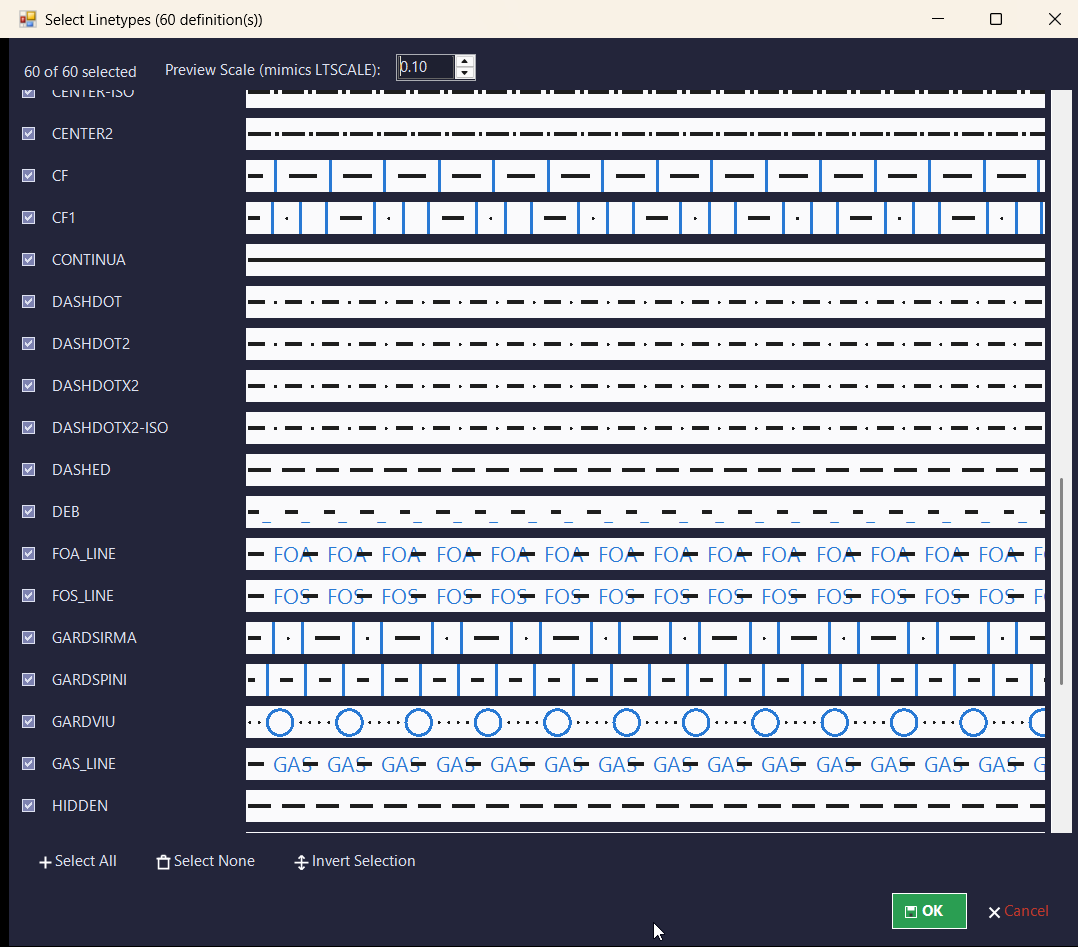
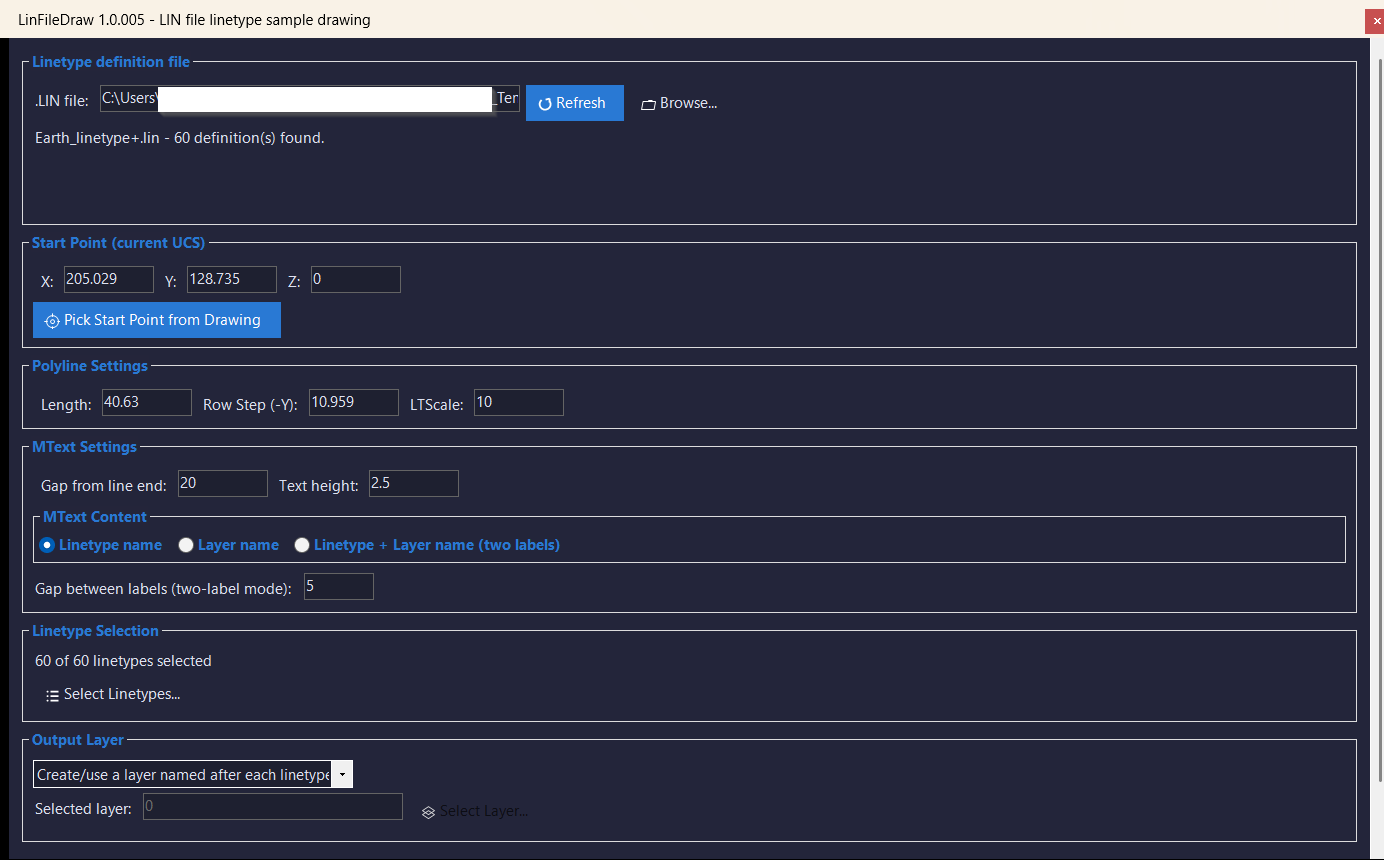
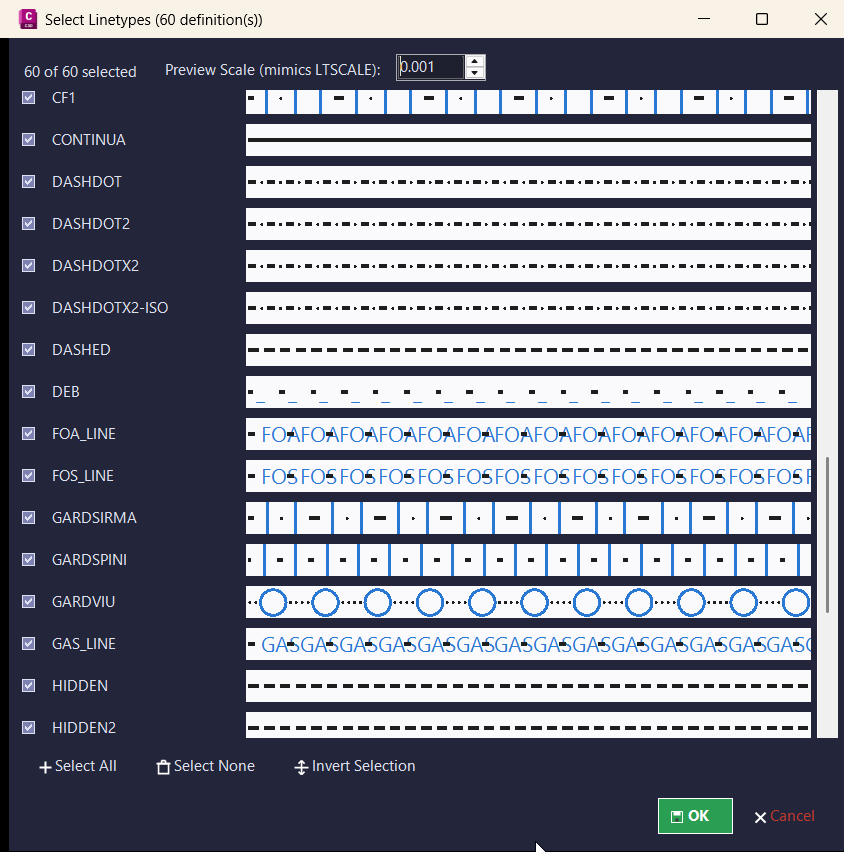
🔍 The routine reads linetype names from a selected *.LIN file, displays the available definitions in an embedded DCL interface, and lets the user choose which linetypes should be drawn as sample rows.
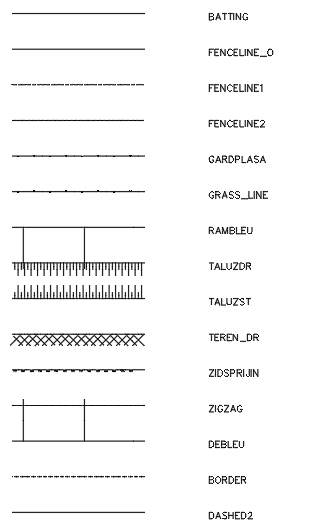
📐 For every selected linetype, the tool creates a horizontal LWPOLYLINE sample and optional MText labels. The generated geometry respects the current UCS for the start point, row direction, object placement, normal vector, and text direction.
🏷️ Output can be organized automatically by linetype layer, placed on the current layer, or directed to a selected existing layer. This makes the routine practical for creating CAD linetype legends, linetype QA drawings, template checks, and Civil 3D drafting standards documentation.
💾 The dialog remembers accepted settings, selected linetypes, and dialog positions in a CFG file, so the same LIN file workflow can be reopened quickly in later AutoCAD sessions.
Helper function: (if any)
🧩 Main internal helper groups:
– linpl:write-dcl creates a uniquely named temporary embedded DCL dialog.
– linpl:cfg-read and linpl:cfg-write persist LIN file path, geometry settings, layer options, selected linetypes, and dialog coordinates.
– linpl:read-linetypes parses linetype names from the selected *.LIN file.
– linpl:ui-load-file refreshes the linetype list and preserves valid selections.
– linpl:show-main-dialog, linpl:show-types-dialog, and linpl:show-layer-dialog manage the main settings window, linetype selection, and layer selection.
– linpl:temporarily-add-lin-folder and linpl:restore-support-path temporarily add the LIN folder to the AutoCAD support path during loading.
– linpl:load-linetype-result loads each selected linetype with safe error handling.
– linpl:draw-one-row creates the sample polyline and MText label objects.
– linpl:undo-last-batch removes the last generated sample batch during the current session.
Functionalities:
🚀 Embedded DCL interface for selecting a LIN file and controlling the full drawing workflow.
📂 Browse and refresh support for external *.LIN linetype definition files.
🔍 Automatic parsing of linetype names from LIN definitions.
✅ Multi-select linetype dialog with Select All, Select None, and Invert actions.
📐 Draws one sample LWPOLYLINE row per selected linetype.
🏷️ Creates MText labels showing the linetype name, the layer name, or both.
📊 Adjustable sample length, row step, linetype scale, text height, line-to-label gap, and label-to-label gap.
🎯 Start point can be typed manually or picked from the drawing.
🧭 Current UCS support for point picking, sample geometry, row layout, and text orientation.
🧱 Output layer modes include layer per linetype, current layer, or selected existing layer.
🟢 Automatic layer creation when using the layer-per-linetype mode.
🔄 Draw, Apply, Undo, OK, and Cancel workflow for iterative testing.
💾 Persistent CFG memory for accepted settings and dialog positions across AutoCAD restarts.
🛡️ Safe linetype loading with skipped-item reporting when a linetype cannot be loaded.
⚠️ Reports common LIN loading problems, including missing SHX shape or font files.
Result:
✅ The result is a clean AutoCAD linetype sample legend generated from a LIN file, with selected linetypes drawn as scaled polyline examples and labeled with readable MText.
📌 This is useful for CAD managers, Civil 3D template maintainers, drafting teams, and users who need to validate custom linetypes, prepare linetype documentation, or compare LIN definitions directly in model space.
Images, animations etc.
XAML code:
<ResourceDictionary
xmlns="http://schemas.microsoft.com/winfx/2006/xaml/presentation"
xmlns:x="http://schemas.microsoft.com/winfx/2006/xaml"
xmlns:src="clr-namespace:Autodesk.Windows;assembly=AdWindows">

<src:RibbonToolTip x:Key="LinFileDraw">
<src:RibbonToolTip.ExpandedContent>
<StackPanel>
<TextBlock Background="AntiqueWhite" TextAlignment="Left">
<Bold>Function Syntax: LINFILEDRAW_ / LINPL_ / LINPOLY_ / LFD_PICKPOINT_</Bold>
<LineBreak/>
<Bold>Version: 1.0 Date: 21.07.2026 8:55:01AM</Bold>
<LineBreak/>
<Hyperlink>N/A</Hyperlink>
<LineBreak/>


<Bold>Function Syntax: LinFileDraw</Bold><LineBreak/>
<Bold>Version: 4.0.0 / LINPL 004</Bold>
<LineBreak/>
<Bold>Version: 1.1 Date: 21.07.2026 4:51:52PM</Bold><LineBreak/>
<Bold><Run Foreground="DodgerBlue">🚀 Main Commands</Run></Bold><LineBreak/>
<Run Foreground="White">Run </Run><Bold><Run Foreground="Orange">LINPL</Run></Bold><Run Foreground="White"> in the AutoCAD command line to open the LIN file linetype sample drawing dialog.</Run><LineBreak/>
<Run Foreground="White">The uploaded code also defines the alias </Run><Bold><Run Foreground="Orange">LINPOLY</Run></Bold><Run Foreground="White"> for the same linetype drawing workflow.</Run><LineBreak/>
<Bold><Run Foreground="DodgerBlue">📘 SEO Optimized Description</Run></Bold><LineBreak/>
<Run Foreground="White">LinFileDraw is an AutoCAD and Civil 3D AutoLISP utility for reading linetype definitions from an external </Run><Bold><Run Foreground="Orange">*.LIN</Run></Bold><Run Foreground="White"> file and drawing clear linetype sample rows in model space.</Run><LineBreak/>
<Run Foreground="White">The tool creates one horizontal </Run><Bold><Run Foreground="Orange">LWPOLYLINE</Run></Bold><Run Foreground="White"> sample per selected linetype and adds optional </Run><Bold><Run Foreground="Orange">MTEXT</Run></Bold><Run Foreground="White"> labels for linetype names, layer names, or both values.</Run><LineBreak/>
<Run Foreground="LimeGreen">The main benefit is faster linetype validation, cleaner CAD standard documentation, easier LIN file testing, and quicker creation of AutoCAD linetype legend drawings.</Run><LineBreak/>
<Bold><Run Foreground="DodgerBlue">🧰 Dialog Workflow</Run></Bold><LineBreak/>
<Run Foreground="White">📂 Select or browse to a </Run><Bold><Run Foreground="Orange">*.LIN</Run></Bold><Run Foreground="White"> linetype definition file.</Run><LineBreak/>
<Run Foreground="White">🔄 Refresh the LIN file to reload the detected linetype definitions.</Run><LineBreak/>
<Run Foreground="White">🎯 Type a start point or use </Run><Bold><Run Foreground="Orange">Pick Start Point from Drawing</Run></Bold><Run Foreground="White"> to define the first sample location.</Run><LineBreak/>
<Run Foreground="White">📐 Configure sample </Run><Bold><Run Foreground="Orange">Length</Run></Bold><Run Foreground="White">, </Run><Bold><Run Foreground="Orange">Row Step</Run></Bold><Run Foreground="White">, </Run><Bold><Run Foreground="Orange">LTScale</Run></Bold><Run Foreground="White">, label gap, and text height.</Run><LineBreak/>
<Run Foreground="White">✅ Use the linetype selection dialog to choose all, none, invert, or manually select the linetypes to draw.</Run><LineBreak/>
<Bold><Run Foreground="LimeGreen">Functionalities</Run></Bold><LineBreak/>
<Run Foreground="White">🚀 </Run><Bold><Run Foreground="LimeGreen">Embedded DCL interface</Run></Bold><Run Foreground="White"> - creates a temporary uniquely named DCL file for every run.</Run><LineBreak/>
<Run Foreground="White">📂 </Run><Bold><Run Foreground="LimeGreen">LIN file browser</Run></Bold><Run Foreground="White"> - selects and refreshes external AutoCAD linetype definition files.</Run><LineBreak/>
<Run Foreground="White">🔍 </Run><Bold><Run Foreground="LimeGreen">Automatic linetype parsing</Run></Bold><Run Foreground="White"> - reads linetype names directly from lines beginning with </Run><Bold><Run Foreground="Orange">*</Run></Bold><Run Foreground="White"> inside the selected LIN file.</Run><LineBreak/>
<Run Foreground="White">✅ </Run><Bold><Run Foreground="LimeGreen">Multi-select linetype list</Run></Bold><Run Foreground="White"> - supports Select All, Select None, and Invert selection.</Run><LineBreak/>
<Run Foreground="White">📐 </Run><Bold><Run Foreground="LimeGreen">Sample polyline creation</Run></Bold><Run Foreground="White"> - draws one scaled horizontal LWPOLYLINE sample for every selected linetype.</Run><LineBreak/>
<Run Foreground="White">🏷️ </Run><Bold><Run Foreground="LimeGreen">Flexible MText labels</Run></Bold><Run Foreground="White"> - labels can show linetype name, layer name, or both linetype and layer name.</Run><LineBreak/>
<Run Foreground="White">🧱 </Run><Bold><Run Foreground="LimeGreen">Layer output modes</Run></Bold><Run Foreground="White"> - creates or uses a layer named after each linetype, draws on the current layer, or draws on a selected existing layer.</Run><LineBreak/>
<Run Foreground="White">🧭 </Run><Bold><Run Foreground="LimeGreen">Current UCS support</Run></Bold><Run Foreground="White"> - respects UCS for the start point, sample geometry, row layout, object normal, and MText direction.</Run><LineBreak/>
<Run Foreground="White">🔄 </Run><Bold><Run Foreground="LimeGreen">Apply and Undo workflow</Run></Bold><Run Foreground="White"> - Apply draws and reopens the dialog, while Undo removes the last generated batch.</Run><LineBreak/>
<Run Foreground="White">💾 </Run><Bold><Run Foreground="LimeGreen">Persistent settings</Run></Bold><Run Foreground="White"> - saves LIN file path, drawing values, selected linetypes, layer settings, and dialog positions to a CFG file.</Run><LineBreak/>
<Run Foreground="White">🛡️ </Run><Bold><Run Foreground="LimeGreen">Safe linetype loading</Run></Bold><Run Foreground="White"> - temporarily adds the LIN folder to the AutoCAD support path and reports skipped linetypes instead of stopping the full batch.</Run><LineBreak/>
<Bold><Run Foreground="DodgerBlue">🧩 Important Helper Functions</Run></Bold><LineBreak/>
<Run Foreground="White">• </Run><Bold><Run Foreground="Orange">linpl:write-dcl</Run></Bold><Run Foreground="White"> creates the embedded DCL dialogs.</Run><LineBreak/>
<Run Foreground="White">• </Run><Bold><Run Foreground="Orange">linpl:read-linetypes</Run></Bold><Run Foreground="White"> extracts linetype names from the selected LIN file.</Run><LineBreak/>
<Run Foreground="White">• </Run><Bold><Run Foreground="Orange">linpl:draw-batch</Run></Bold><Run Foreground="White"> loads selected linetypes and generates the sample rows.</Run><LineBreak/>
<Run Foreground="White">• </Run><Bold><Run Foreground="Orange">linpl:undo-last-batch</Run></Bold><Run Foreground="White"> erases the last generated LINPL object batch.</Run><LineBreak/>
<Bold><Run Foreground="DodgerBlue">✅ Practical Result</Run></Bold><LineBreak/>
<Run Foreground="White">The final result is a clean AutoCAD linetype sample legend generated from a selected LIN file, with readable labels and organized layer output.</Run><LineBreak/>
<Run Foreground="LimeGreen">This helps CAD managers, Civil 3D template maintainers, and drafting teams validate custom linetypes and document drawing standards faster.</Run><LineBreak/>
<Bold><Run Foreground="DarkRed">⚠️ Important Notes</Run></Bold><LineBreak/>
<Run Foreground="White">This routine creates drawing geometry. Use the dialog </Run><Bold><Run Foreground="Orange">Undo</Run></Bold><Run Foreground="White"> button or AutoCAD undo if the generated sample batch must be removed.</Run><LineBreak/>
<Run Foreground="White">Linetypes with missing </Run><Bold><Run Foreground="Orange">SHX</Run></Bold><Run Foreground="White"> shape or font dependencies can be skipped and reported by the routine.</Run><LineBreak/>
<Run Foreground="White">The primary command in the uploaded code is </Run><Bold><Run Foreground="Orange">LINPL</Run></Bold><Run Foreground="White">. Verify the </Run><Bold><Run Foreground="Orange">LINPOLY</Run></Bold><Run Foreground="White"> alias in AutoCAD if it is used directly.</Run><LineBreak/>


</TextBlock>

<Grid>
<Image Source="Image_000.png" Stretch="Uniform"/>
</Grid>

<Grid>
<Image Source="Image_001.png" Stretch="Uniform"/>
</Grid>

<Grid>
<Image Source="Image_002.png" Stretch="Uniform"/>
</Grid>

<Grid>
<Image Source="Image_003.png" Stretch="Uniform"/>
</Grid>


</StackPanel>
</src:RibbonToolTip.ExpandedContent>
</src:RibbonToolTip>


<src:RibbonToolTip x:Key="LinFileDraw_1.0">
<src:RibbonToolTip.ExpandedContent>
<StackPanel>
<TextBlock Background="AntiqueWhite" TextAlignment="Left">
<Bold>Function Syntax: LINPL / LINPOLY</Bold>
<LineBreak/>
<Bold>Version: 1.0 Date: 21.07.2026 8:55:01AM</Bold>
<LineBreak/>
<Hyperlink>N/A</Hyperlink>
<LineBreak/>


<Bold><Run Foreground="DodgerBlue">🚀 LinFileDraw</Run></Bold><LineBreak/>
<Run Foreground="White">LinFileDraw is an AutoCAD and Civil 3D .NET WinForms utility for reading </Run><Bold><Run Foreground="Orange">*.LIN</Run></Bold><Run Foreground="White"> linetype files, previewing linetype patterns, and drawing clean sample rows in the active drawing.</Run><LineBreak/>
<Run Foreground="LimeGreen">It improves linetype library documentation, CAD standards checking, Civil 3D template review, and production drawing setup by turning LIN definitions into visible polyline samples.</Run><LineBreak/>
<Bold><Run Foreground="DodgerBlue">Main Commands</Run></Bold><LineBreak/>
<Run Foreground="White">🧰 Run </Run><Bold><Run Foreground="Orange">LINFILEDRAW_008</Run></Bold><Run Foreground="White"> to open the main LinFileDraw dialog.</Run><LineBreak/>
<Run Foreground="White">⚡ Run </Run><Bold><Run Foreground="Orange">LINPL_008</Run></Bold><Run Foreground="White"> or </Run><Bold><Run Foreground="Orange">LINPOLY_008</Run></Bold><Run Foreground="White"> as aliases for the same workflow.</Run><LineBreak/>
<Run Foreground="White">📌 </Run><Bold><Run Foreground="Orange">LFD_PICKPOINT_008</Run></Bold><Run Foreground="White"> is a hidden helper command used internally for safe point picking from a modeless dialog.</Run><LineBreak/>
<Bold><Run Foreground="DodgerBlue">SEO Optimized Description</Run></Bold><LineBreak/>
<Run Foreground="White">📘 This AutoCAD Civil 3D plugin loads external linetype definition files, scans all available linetype names, and lets users select which definitions should be drawn as a visual sample sheet.</Run><LineBreak/>
<Run Foreground="White">🔍 The linetype selector includes real previews for dash, gap, dot, text, and common shape-based LIN patterns, including definitions split across multiple physical lines.</Run><LineBreak/>
<Run Foreground="White">📐 Build </Run><Bold><Run Foreground="Orange">008</Run></Bold><Run Foreground="White"> draws actual AutoCAD </Run><Bold><Run Foreground="Orange">LWPolyline</Run></Bold><Run Foreground="White"> sample rows instead of simple line entities, with UCS-aware point handling and valid OCS conversion.</Run><LineBreak/>
<Run Foreground="White">🧠 LinFileDraw is useful for CAD managers, Civil 3D users, drafting technicians, template administrators, infrastructure teams, and anyone who needs to verify or document project linetype libraries quickly.</Run><LineBreak/>
<Bold><Run Foreground="LimeGreen">Functionalities</Run></Bold><LineBreak/>
<Run Foreground="White">🚀 </Run><Bold><Run Foreground="LimeGreen">Modeless tool window</Run></Bold><Run Foreground="White"> - opens a screen-adaptive WinForms interface without blocking normal AutoCAD and Civil 3D work.</Run><LineBreak/>
<Run Foreground="White">📂 </Run><Bold><Run Foreground="LimeGreen">LIN file browsing</Run></Bold><Run Foreground="White"> - lets users browse, load, refresh, and validate external </Run><Bold><Run Foreground="Orange">*.LIN</Run></Bold><Run Foreground="White"> linetype files.</Run><LineBreak/>
<Run Foreground="White">🔍 </Run><Bold><Run Foreground="LimeGreen">Linetype scanning</Run></Bold><Run Foreground="White"> - reads linetype names, removes duplicates, and reports how many definitions are available.</Run><LineBreak/>
<Run Foreground="White">👁️ </Run><Bold><Run Foreground="LimeGreen">Pattern preview rows</Run></Bold><Run Foreground="White"> - displays a preview beside every linetype in the selection dialog so users can inspect patterns before drawing.</Run><LineBreak/>
<Run Foreground="White">🧩 </Run><Bold><Run Foreground="LimeGreen">Complex LIN parsing</Run></Bold><Run Foreground="White"> - handles dash, gap, dot, embedded text, common shape markers, and multi-line linetype definitions.</Run><LineBreak/>
<Run Foreground="White">🎚️ </Run><Bold><Run Foreground="LimeGreen">Preview scale control</Run></Bold><Run Foreground="White"> - mimics linetype scale behavior for clearer inspection of dense or large patterns.</Run><LineBreak/>
<Run Foreground="White">📐 </Run><Bold><Run Foreground="LimeGreen">Polyline sample drawing</Run></Bold><Run Foreground="White"> - creates generated linetype samples as real </Run><Bold><Run Foreground="Orange">LWPolyline</Run></Bold><Run Foreground="White"> entities.</Run><LineBreak/>
<Run Foreground="White">🧭 </Run><Bold><Run Foreground="LimeGreen">UCS-aware placement</Run></Bold><Run Foreground="White"> - supports typed start coordinates and drawing point selection while respecting the current UCS orientation.</Run><LineBreak/>
<Run Foreground="White">📏 </Run><Bold><Run Foreground="LimeGreen">Drawing parameter control</Run></Bold><Run Foreground="White"> - controls sample length, row step, linetype scale, MText gap, text height, and two-label spacing.</Run><LineBreak/>
<Run Foreground="White">🏷️ </Run><Bold><Run Foreground="LimeGreen">MText label modes</Run></Bold><Run Foreground="White"> - labels each row by linetype name, layer name, or linetype plus layer name.</Run><LineBreak/>
<Run Foreground="White">📂 </Run><Bold><Run Foreground="LimeGreen">Layer output modes</Run></Bold><Run Foreground="White"> - draws on one layer per linetype, on the current layer, or on a selected existing output layer.</Run><LineBreak/>
<Run Foreground="White">🔒 </Run><Bold><Run Foreground="LimeGreen">Safe point picking</Run></Bold><Run Foreground="White"> - routes modeless drawing input through </Run><Bold><Run Foreground="Orange">SendStringToExecute</Run></Bold><Run Foreground="White"> and a hidden helper command to avoid AutoCAD freezing.</Run><LineBreak/>
<Run Foreground="White">↩️ </Run><Bold><Run Foreground="LimeGreen">Undo generated batch</Run></Bold><Run Foreground="White"> - erases the last tool-generated entity batch from the current session.</Run><LineBreak/>
<Run Foreground="White">💾 </Run><Bold><Run Foreground="LimeGreen">Persistent settings</Run></Bold><Run Foreground="White"> - stores user preferences in JSON files under </Run><Bold><Run Foreground="Orange">%APPDATA%\LinFileDraw</Run></Bold><Run Foreground="White">.</Run><LineBreak/>
<Run Foreground="White">📝 </Run><Bold><Run Foreground="LimeGreen">Diagnostic logging</Run></Bold><Run Foreground="White"> - records load, draw, skipped linetype, and undo information in timestamped logs.</Run><LineBreak/>
<Bold><Run Foreground="DodgerBlue">Project Modules</Run></Bold><LineBreak/>
<Run Foreground="White">🧱 </Run><Bold><Run Foreground="Orange">Commands.cs</Run></Bold><Run Foreground="White"> registers the extension application, command aliases, build banner, and hidden point-pick helper.</Run><LineBreak/>
<Run Foreground="White">🖥️ </Run><Bold><Run Foreground="Orange">MainForm.cs</Run></Bold><Run Foreground="White"> manages the main WinForms interface, file loading, draw settings, layer mode, selection workflow, and action buttons.</Run><LineBreak/>
<Run Foreground="White">🎛️ </Run><Bold><Run Foreground="Orange">TypeSelectionForm.cs</Run></Bold><Run Foreground="White"> provides linetype selection, per-row preview panels, preview scale, select all, select none, and invert selection.</Run><LineBreak/>
<Run Foreground="White">🧩 </Run><Bold><Run Foreground="Orange">LinFileReader.cs</Run></Bold><Run Foreground="White"> parses LIN names and pattern definitions, including multi-line complex patterns.</Run><LineBreak/>
<Run Foreground="White">📐 </Run><Bold><Run Foreground="Orange">LinetypeSampleDrawer.cs</Run></Bold><Run Foreground="White"> creates polylines, loads linetypes, resolves layers, creates labels, and handles undo batches.</Run><LineBreak/>
<Run Foreground="White">🎨 </Run><Bold><Run Foreground="Orange">PatternRenderer.cs</Run></Bold><Run Foreground="White"> draws linetype thumbnails for dash, gap, dot, text, and common shape descriptors.</Run><LineBreak/>
<Bold><Run Foreground="DodgerBlue">Practical Result</Run></Bold><LineBreak/>
<Run Foreground="White">✅ The final result is a clean linetype sample drawing generated from a selected LIN file, with organized polyline rows, optional text labels, controlled layers, saved settings, logging, and session undo.</Run><LineBreak/>
<Run Foreground="LimeGreen">This makes LinFileDraw useful for AutoCAD linetype documentation, Civil 3D standards libraries, project setup checks, drafting QA, and CAD manager review workflows.</Run><LineBreak/>
<Bold><Run Foreground="DarkRed">Important Note</Run></Bold><LineBreak/>
<Run Foreground="White">This is a compiled AutoCAD and Civil 3D .NET plugin. It requires </Run><Bold><Run Foreground="Orange">NETLOAD</Run></Bold><Run Foreground="White">, valid AutoCAD references, .NET Framework 4.8, and an x64 AutoCAD host.</Run><LineBreak/>
<Run Foreground="White">The command names are versioned with the </Run><Bold><Run Foreground="Orange">008</Run></Bold><Run Foreground="White"> suffix. Undo applies only to entities generated by the current LinFileDraw session.</Run><LineBreak/>


</TextBlock>

<Grid>
<Image Source="Image_000.png" Stretch="Uniform"/>
</Grid>

<Grid>
<Image Source="Image_001.png" Stretch="Uniform"/>
</Grid>

<Grid>
<Image Source="Image_002.png" Stretch="Uniform"/>
</Grid>

<Grid>
<Image Source="Image_003.png" Stretch="Uniform"/>
</Grid>

<Grid>
<Image Source="Image_004.png" Stretch="Uniform"/>
</Grid>


</StackPanel>
</src:RibbonToolTip.ExpandedContent>
</src:RibbonToolTip>


</ResourceDictionary>