
Short description
🚀 AttachImagesToBlocks is an AutoCAD and Civil 3D AutoLISP utility for matching PDF files and raster images to drawing block references, then attaching, copying, renaming, or embedding those files using a shared DCL dialog. It helps CAD users automate sheet-image placement, page-to-block matching, block-based underlay workflows, file renaming, and drawing production cleanup.
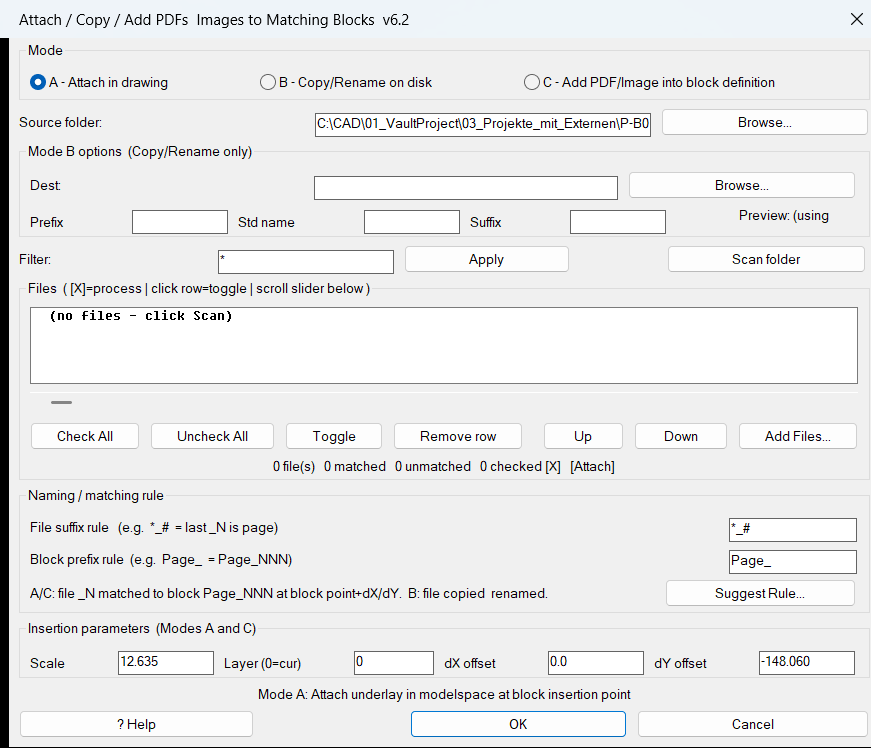
Command:
🧰 Load the LISP with APPLOAD or (load "AttachImagesToBlocks.lsp").
🚀 Run AttachImagesToBlocks for Mode A, which attaches matched PDF or image files in model space at the matching block insertion point plus optional dX and dY offsets.
📤 Run CopyPDFsToBlocks for Mode B, which copies and renames matched PDF files on disk without changing the drawing.
🧩 Run AddPDFsToBlockDefs for Mode C, which attaches a PDF or image temporarily in model space, transforms it into the matched block definition, and removes the temporary model space copy.
📘 Target platform: AutoCAD and Civil 3D with AutoLISP, Visual LISP COM support, DCL dialog support, and the AutoCAD -ATTACH command.
Description:
📘 AttachImagesToBlocks is a production-focused AutoLISP and DCL tool for AutoCAD and Civil 3D users who need to connect external PDF sheets or raster image files with matching block references in the active DWG.
🔍 The user opens one shared dialog, selects a source folder, scans PDF and image files, defines the file-page extraction rule, defines the block-name prefix rule, and lets the matching engine pair each file with a drawing block using the extracted page number.
📐 The routine supports three practical workflows. In attach mode, matched files are placed in model space at the corresponding block insertion point with configurable scale, layer, horizontal offset, and vertical offset. In copy and rename mode, matching files are copied to a destination folder and renamed from the block name or from a user-defined pattern. In add-to-block-definition mode, the file is attached temporarily, transformed from model space into the block definition coordinate system, copied into the block table record, and the temporary model space entity is deleted.
🧠 The dialog includes scan, folder browse, destination folder browse, select all, select none, toggle, remove, move up, move down, add external files, rule suggestion, help, filter, horizontal list scrolling, rename preview, and summary counters. This makes it useful for automated DWG underlay placement, PDF sheet indexing, raster image attachment, block definition enrichment, and Civil 3D plan production workflows.
🔒 Settings are saved beside the drawing in AIB_settings.cfg, so scale, offsets, layer, folder paths, matching rules, filters, and rename pattern values can be reused during the next command run.
Helper function: (if any)
- 🚀 Command entry points –
c:AttachImagesToBlocks,c:CopyPDFsToBlocks, andc:AddPDFsToBlockDefsstart the three user workflows while sharing the same DCL dialog and matching engine. - 🔍 Folder scan engine –
AIB:scan-foldersearches forpdf,jpg,jpeg,png,tif,tiff, andbmpfiles and supports wildcard filtering throughwcmatch. - 📌 Page-number extraction –
AIB:image-page-numreads either leading digits before the first underscore with##_*or trailing digits after the last underscore with*_#. - 🏷️ Block-name matching –
AIB:block-page-numextracts the digit run after a configured block prefix such asPage_, allowing files and blocks to match by page number. - 🧩 Match table builder –
AIB:build-matchescreates row records containing file path, base name, page number, selection state, matched block name, block reference object, block entity handle, and block insertion point. - 🎨 DCL interface generator –
AIB:write-dclwrites the runtime DCL layout, including the mode radio buttons, folder fields, matching rules, offsets, layer input, rename pattern, list box, help dialog, and suggestion dialog. - 🧠 Rule suggestion system –
AIB:suggest-rulesscores file-rule and block-prefix combinations and suggests the best matching pattern based on real files and block names in the drawing. - 📘 Help and live examples –
AIB:show-help-dlgexplains the matching rules and shows examples from the currently scanned files and model space blocks. - 📐 Attachment executor –
AIB:attach-and-captureruns the unified AutoCAD-ATTACHcommand, supports PDFs and raster images, and detects the newly created entity by comparing the drawing selection set before and after attachment. - 🧹 Layer preparation –
AIB:ensure-layercreates or activates the configured layer before attachment so generated underlays can be organized consistently. - 📤 Copy and rename workflow –
AIB:exec-copycopies files with WindowsScripting.FileSystemObjectand can name outputs from the matched block name or from a pattern using prefix, standard name, suffix, and three-digit page number. - 🔄 Block-definition embedding –
AIB:ref->def,AIB:add-obj-to-blkdef, andAIB:exec-add2blktransform the attached underlay from model space into block-definition coordinates, copy it into the block table record, and delete the temporary model space object. - 🔒 Configuration persistence –
AIB:run-dialogreads and writesAIB_settings.cfgin the DWG folder to preserve scale, offsets, layer, folders, matching rules, filter, and rename settings.
Functionalities:
- 🚀 Attach PDFs and images to blocks – places matched files in model space at the corresponding block insertion point with user-defined scale and offsets.
- 📤 Copy and rename PDFs by block name – creates organized PDF copies on disk using matched block names or custom naming patterns.
- 🧩 Add underlays into block definitions – embeds the attached PDF or image into the matched block definition instead of leaving it only in model space.
- 🔍 Scan folders for supported file types – reads PDF, JPG, JPEG, PNG, TIF, TIFF, and BMP files from a selected folder.
- 🏷️ Match files to blocks by page number – pairs file names and block names using editable rules such as
*_#,##_*, andPage_. - 🧠 Suggest matching rules automatically – analyzes real file names and block names, then proposes rule combinations with the highest match count.
- 📌 Filter and manually add files – narrows scanned files with a wildcard filter and allows additional files to be added manually through the dialog.
- 🔢 Control selection rows – supports select all, select none, toggle row, remove row, move row up, move row down, and horizontal scrolling for long names.
- 📐 Apply offset and scale settings – uses configured
dX,dY, and scale values when attaching files at block insertion points. - 🧹 Use a target layer – creates or activates a layer before attachment for cleaner CAD underlay organization.
- 📝 Preview rename results – shows how the output name pattern will look before copying files.
- 📘 Display built-in rule help – explains file suffix rules, block prefix rules, and live examples from the current DWG and folder scan.
- 🔒 Group operations into undo marks – attach and embed actions are wrapped in AutoCAD undo workflows so the user can reverse the batch operation.
- 🔐 Save reusable settings – stores the last used configuration in the drawing folder for repeated production use.
Result:
✅ The final result is a practical AutoCAD and Civil 3D automation tool that connects external PDF and raster image files with named drawing blocks, attaches them at the correct insertion points, copies and renames files for document management, or embeds underlays directly into block definitions. It reduces repetitive manual attaching, improves sheet-to-block coordination, speeds up DWG preparation, and supports cleaner CAD and Civil 3D production workflows.
Images, animations etc.
XAML code:
<ResourceDictionary
xmlns="http://schemas.microsoft.com/winfx/2006/xaml/presentation"
xmlns:x="http://schemas.microsoft.com/winfx/2006/xaml"
xmlns:src="clr-namespace:Autodesk.Windows;assembly=AdWindows">
<src:RibbonToolTip x:Key="AttributeColour">
<src:RibbonToolTip.ExpandedContent>
<StackPanel>
<TextBlock Background="AntiqueWhite" TextAlignment="Left">
<Bold>Function Syntax: AttachImagesToBlocks / CopyPDFsToBlocks / AddPDFsToBlockDefs</Bold>
<LineBreak/>
<Bold>Version: 1.1 Date: 20.06.2026 6:38:47PM</Bold>
<LineBreak/>
<Hyperlink>N/A</Hyperlink>
<Bold><Run Foreground="DodgerBlue">short_description:</Run></Bold><LineBreak/>
<Run Foreground="White">🚀 AttachImagesToBlocks is an AutoCAD and Civil 3D AutoLISP utility for matching </Run><Bold><Run Foreground="DarkRed">PDF files</Run></Bold><Run Foreground="White"> and </Run><Bold><Run Foreground="DarkRed">raster images</Run></Bold><Run Foreground="White"> to drawing block references.</Run><LineBreak/>
<Run Foreground="White">It can attach files in model space, copy and rename PDFs on disk, or embed the attached underlay into the matched block definition.</Run><LineBreak/>
<Run Foreground="LimeGreen">The main benefit is faster block-based underlay placement, cleaner file naming, and improved AutoCAD Civil 3D production automation.</Run><LineBreak/>
<Bold><Run Foreground="DodgerBlue">command:</Run></Bold><LineBreak/>
<Run Foreground="White">🧰 Load the LISP with </Run><Bold><Run Foreground="Orange">APPLOAD</Run></Bold><Run Foreground="White"> or </Run><Bold><Run Foreground="Orange">(load "AttachImagesToBlocks.lsp")</Run></Bold><Run Foreground="White">.</Run><LineBreak/>
<Run Foreground="White">🚀 Run </Run><Bold><Run Foreground="Orange">AttachImagesToBlocks</Run></Bold><Run Foreground="White"> to attach matched PDF or image files in model space at block insertion points.</Run><LineBreak/>
<Run Foreground="White">📤 Run </Run><Bold><Run Foreground="Orange">CopyPDFsToBlocks</Run></Bold><Run Foreground="White"> to copy and rename PDF files on disk without modifying the drawing.</Run><LineBreak/>
<Run Foreground="White">🧩 Run </Run><Bold><Run Foreground="Orange">AddPDFsToBlockDefs</Run></Bold><Run Foreground="White"> to attach a matched file, transform it into the block definition, and remove the temporary model space copy.</Run><LineBreak/>
<Run Foreground="White">📘 Target platform: AutoCAD and Civil 3D with AutoLISP, Visual LISP COM, DCL dialogs, and the AutoCAD </Run><Bold><Run Foreground="Orange">-ATTACH</Run></Bold><Run Foreground="White"> command.</Run><LineBreak/>
<Bold><Run Foreground="DodgerBlue">description:</Run></Bold><LineBreak/>
<Run Foreground="White">📘 This AutoLISP program opens one shared DCL dialog for attaching, copying, renaming, and embedding external PDF or raster image files based on matching block references.</Run><LineBreak/>
<Run Foreground="White">🔍 The user selects a source folder, scans supported files, defines the file page rule, defines the block prefix rule, and reviews the matched rows in the list.</Run><LineBreak/>
<Run Foreground="White">📐 In attach mode, the tool places the matched file at the block insertion point plus optional </Run><Bold><Run Foreground="DarkRed">dX</Run></Bold><Run Foreground="White"> and </Run><Bold><Run Foreground="DarkRed">dY</Run></Bold><Run Foreground="White"> offsets with a user-defined scale.</Run><LineBreak/>
<Run Foreground="White">📤 In copy and rename mode, the tool creates renamed PDF copies using the matched block name or a custom prefix, standard name, suffix, and page number pattern.</Run><LineBreak/>
<Run Foreground="White">🧩 In add-to-block-definition mode, the routine attaches the file temporarily, transforms it from model space into the block coordinate system, copies it into the block table record, and deletes the temporary entity.</Run><LineBreak/>
<Run Foreground="LimeGreen">This is useful for AutoCAD Civil 3D plan production, PDF sheet indexing, underlay placement, raster image management, and block-based drawing organization.</Run><LineBreak/>
<Bold><Run Foreground="LimeGreen">helper_function:</Run></Bold><LineBreak/>
<Run Foreground="White">🚀 </Run><Bold><Run Foreground="LimeGreen">Command entry points</Run></Bold><Run Foreground="White"> - </Run><Bold><Run Foreground="Orange">c:AttachImagesToBlocks</Run></Bold><Run Foreground="White">, </Run><Bold><Run Foreground="Orange">c:CopyPDFsToBlocks</Run></Bold><Run Foreground="White">, and </Run><Bold><Run Foreground="Orange">c:AddPDFsToBlockDefs</Run></Bold><Run Foreground="White"> start the three workflows.</Run><LineBreak/>
<Run Foreground="White">🔍 </Run><Bold><Run Foreground="LimeGreen">Folder scan engine</Run></Bold><Run Foreground="White"> - </Run><Bold><Run Foreground="Orange">AIB:scan-folder</Run></Bold><Run Foreground="White"> collects PDF, JPG, JPEG, PNG, TIF, TIFF, and BMP files and applies wildcard filtering.</Run><LineBreak/>
<Run Foreground="White">📌 </Run><Bold><Run Foreground="LimeGreen">File page parser</Run></Bold><Run Foreground="White"> - </Run><Bold><Run Foreground="Orange">AIB:image-page-num</Run></Bold><Run Foreground="White"> extracts leading or trailing page numbers using rules like </Run><Bold><Run Foreground="Orange">##_*</Run></Bold><Run Foreground="White"> and </Run><Bold><Run Foreground="Orange">*_#</Run></Bold><Run Foreground="White">.</Run><LineBreak/>
<Run Foreground="White">🏷️ </Run><Bold><Run Foreground="LimeGreen">Block page parser</Run></Bold><Run Foreground="White"> - </Run><Bold><Run Foreground="Orange">AIB:block-page-num</Run></Bold><Run Foreground="White"> extracts digits after a block prefix such as </Run><Bold><Run Foreground="Orange">Page_</Run></Bold><Run Foreground="White">.</Run><LineBreak/>
<Run Foreground="White">🧩 </Run><Bold><Run Foreground="LimeGreen">Match builder</Run></Bold><Run Foreground="White"> - </Run><Bold><Run Foreground="Orange">AIB:build-matches</Run></Bold><Run Foreground="White"> links each file row to a matched block name, block reference, entity name, and insertion point.</Run><LineBreak/>
<Run Foreground="White">🎨 </Run><Bold><Run Foreground="LimeGreen">DCL dialog generator</Run></Bold><Run Foreground="White"> - </Run><Bold><Run Foreground="Orange">AIB:write-dcl</Run></Bold><Run Foreground="White"> builds the runtime interface with mode radio buttons, folder fields, matching rules, list controls, help, and suggestions.</Run><LineBreak/>
<Run Foreground="White">🧠 </Run><Bold><Run Foreground="LimeGreen">Suggestion engine</Run></Bold><Run Foreground="White"> - </Run><Bold><Run Foreground="Orange">AIB:suggest-rules</Run></Bold><Run Foreground="White"> scores possible file rules and block prefixes to suggest the best match setup.</Run><LineBreak/>
<Run Foreground="White">📐 </Run><Bold><Run Foreground="LimeGreen">Attachment capture</Run></Bold><Run Foreground="White"> - </Run><Bold><Run Foreground="Orange">AIB:attach-and-capture</Run></Bold><Run Foreground="White"> runs </Run><Bold><Run Foreground="Orange">-ATTACH</Run></Bold><Run Foreground="White"> and detects the newly created underlay entity.</Run><LineBreak/>
<Run Foreground="White">🔄 </Run><Bold><Run Foreground="LimeGreen">Block-definition transform</Run></Bold><Run Foreground="White"> - </Run><Bold><Run Foreground="Orange">AIB:ref->def</Run></Bold><Run Foreground="White"> and </Run><Bold><Run Foreground="Orange">AIB:add-obj-to-blkdef</Run></Bold><Run Foreground="White"> transform temporary model space geometry into block definition coordinates.</Run><LineBreak/>
<Run Foreground="White">📤 </Run><Bold><Run Foreground="LimeGreen">Copy workflow</Run></Bold><Run Foreground="White"> - </Run><Bold><Run Foreground="Orange">AIB:exec-copy</Run></Bold><Run Foreground="White"> copies and renames files using the matched block name or a custom rename pattern.</Run><LineBreak/>
<Run Foreground="White">🔒 </Run><Bold><Run Foreground="LimeGreen">Settings persistence</Run></Bold><Run Foreground="White"> - </Run><Bold><Run Foreground="Orange">AIB:run-dialog</Run></Bold><Run Foreground="White"> saves scale, offsets, layer, folders, rules, filters, and naming values to </Run><Bold><Run Foreground="Orange">AIB_settings.cfg</Run></Bold><Run Foreground="White">.</Run><LineBreak/>
<Bold><Run Foreground="LimeGreen">functionalities:</Run></Bold><LineBreak/>
<Run Foreground="White">🚀 </Run><Bold><Run Foreground="LimeGreen">Attach files to block locations</Run></Bold><Run Foreground="White"> - places matched PDF or image files at block insertion points in model space.</Run><LineBreak/>
<Run Foreground="White">📤 </Run><Bold><Run Foreground="LimeGreen">Copy and rename PDFs</Run></Bold><Run Foreground="White"> - creates organized PDF copies using block names or user-defined naming patterns.</Run><LineBreak/>
<Run Foreground="White">🧩 </Run><Bold><Run Foreground="LimeGreen">Embed files into block definitions</Run></Bold><Run Foreground="White"> - moves an attached underlay from model space into the matched block definition.</Run><LineBreak/>
<Run Foreground="White">🔍 </Run><Bold><Run Foreground="LimeGreen">Scan supported file types</Run></Bold><Run Foreground="White"> - detects PDF, JPG, JPEG, PNG, TIF, TIFF, and BMP files.</Run><LineBreak/>
<Run Foreground="White">🏷️ </Run><Bold><Run Foreground="LimeGreen">Match by page number</Run></Bold><Run Foreground="White"> - pairs files and blocks using extracted page numbers from file names and block names.</Run><LineBreak/>
<Run Foreground="White">🧠 </Run><Bold><Run Foreground="LimeGreen">Suggest matching rules</Run></Bold><Run Foreground="White"> - helps users discover the correct file rule and block prefix automatically.</Run><LineBreak/>
<Run Foreground="White">🔢 </Run><Bold><Run Foreground="LimeGreen">Manage match rows</Run></Bold><Run Foreground="White"> - supports select all, select none, toggle, remove, move up, move down, and add external files.</Run><LineBreak/>
<Run Foreground="White">📐 </Run><Bold><Run Foreground="LimeGreen">Use offsets and scale</Run></Bold><Run Foreground="White"> - controls placement with </Run><Bold><Run Foreground="Orange">dX</Run></Bold><Run Foreground="White">, </Run><Bold><Run Foreground="Orange">dY</Run></Bold><Run Foreground="White">, and scale settings.</Run><LineBreak/>
<Run Foreground="White">🧹 </Run><Bold><Run Foreground="LimeGreen">Organize generated underlays by layer</Run></Bold><Run Foreground="White"> - creates or activates a target layer before placement.</Run><LineBreak/>
<Run Foreground="White">📝 </Run><Bold><Run Foreground="LimeGreen">Preview rename pattern</Run></Bold><Run Foreground="White"> - shows the expected output naming format before copying files.</Run><LineBreak/>
<Run Foreground="White">📘 </Run><Bold><Run Foreground="LimeGreen">Use built-in help</Run></Bold><Run Foreground="White"> - displays matching rule documentation and live examples from the scanned files and drawing blocks.</Run><LineBreak/>
<Run Foreground="White">🔒 </Run><Bold><Run Foreground="LimeGreen">Undo batch attachment</Run></Bold><Run Foreground="White"> - wraps attachment and embedding operations in AutoCAD undo logic.</Run><LineBreak/>
<Bold><Run Foreground="DodgerBlue">result:</Run></Bold><LineBreak/>
<Run Foreground="White">✅ The final result is a practical AutoCAD and Civil 3D automation tool that links external PDF and raster files to matching drawing blocks.</Run><LineBreak/>
<Run Foreground="LimeGreen">It reduces manual attachment work, improves file naming consistency, supports block-based underlay workflows, and speeds up CAD production drawing management.</Run><LineBreak/>
<Bold><Run Foreground="DarkOrange">additional_info:</Run></Bold><LineBreak/>
<Run Foreground="White">📌 This utility works with external files, block references, underlays, images, file copying, and drawing organization.</Run><LineBreak/>
<Run Foreground="White">🔴 It does not create Civil 3D alignments, profiles, section views, corridors, surfaces, labels, or bands.</Run><LineBreak/>
<Run Foreground="White">🟧 </Run><Bold><Run Foreground="Orange">AIB:get-blockrefs</Run></Bold><Run Foreground="White"> scans model space block references, so block matching is model space focused.</Run><LineBreak/>
<Run Foreground="White">🔐 Folder browsing and file copying use Windows COM objects including </Run><Bold><Run Foreground="Orange">Shell.Application</Run></Bold><Run Foreground="White"> and </Run><Bold><Run Foreground="Orange">Scripting.FileSystemObject</Run></Bold><Run Foreground="White">.</Run><LineBreak/>
<Run Foreground="White">🧰 The routine uses the unified AutoCAD </Run><Bold><Run Foreground="Orange">-ATTACH</Run></Bold><Run Foreground="White"> command for PDF and raster attachment compatibility.</Run><LineBreak/>
<Run Foreground="White">📌 For PDF files, the attach command uses page </Run><Bold><Run Foreground="Orange">1</Run></Bold><Run Foreground="White">; the parsed page number is used for matching file names to block names.</Run><LineBreak/>
<Run Foreground="White">🧠 Settings are saved to </Run><Bold><Run Foreground="Orange">AIB_settings.cfg</Run></Bold><Run Foreground="White"> in the current DWG folder.</Run><LineBreak/>
</TextBlock>
<Grid>
<Image Source="Image_000.png" Stretch="Uniform"/>
</Grid>
</StackPanel>
</src:RibbonToolTip.ExpandedContent>
</src:RibbonToolTip>
</ResourceDictionary>