

Pipes2SurfacesProfilesElevationTool_vs.00
Short description This LISP lets the user align Civil 3D pipes to chosen TIN surfaces and or profiles using elevation offsets, with a dialog that supports multi selection, live Apply preview and final OK or Cancel confirmation.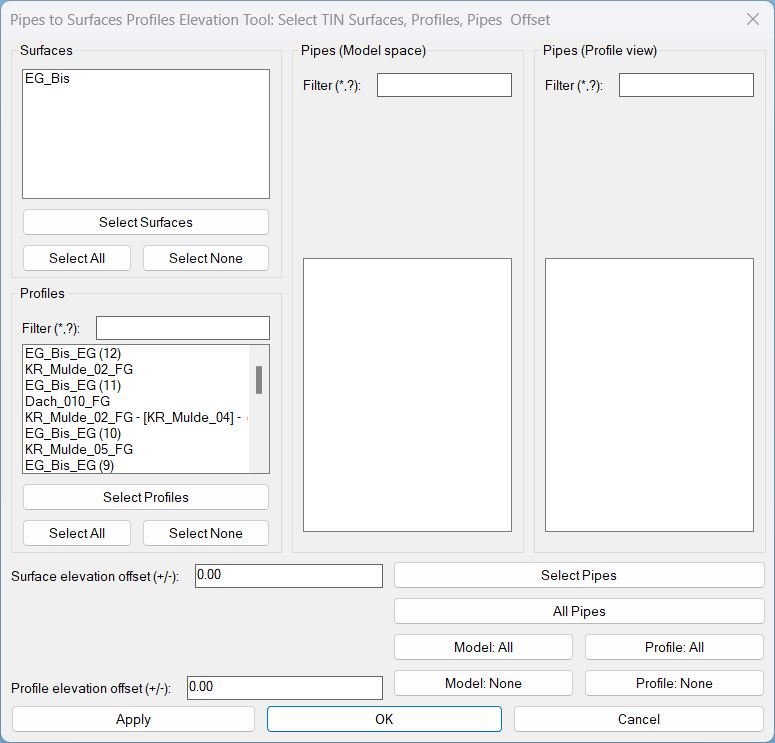
Pipes2SurfacesProfilesElevationTool_vs.01
Sort / Purpose: Civil 3D utility to set pipe invert elevations from selected TIN Surfaces and/or Profiles, using separate elevation offsets for each source and a scrollable, filterable UI for many pipes. • Scope: Works with AeccDbPipe (model), pipe profile-views, TIN Surfaces and Profiles, using wildcard filters and “Apply” inside the dialog so you can tweak/preview without closing it. • Priority: For each pipe, it tries Profiles first, then falls back to Surfaces if no valid profile elevation is found at pipe ends.
XAML code:
<ResourceDictionary
xmlns="http://schemas.microsoft.com/winfx/2006/xaml/presentation"
xmlns:x="http://schemas.microsoft.com/winfx/2006/xaml"
xmlns:src="clr-namespace:Autodesk.Windows;assembly=AdWindows">

<src:RibbonToolTip x:Key="Pipes2SurfacesProfilesElevationTool">
<src:RibbonToolTip.ExpandedContent>
<StackPanel>
<TextBlock Background="AntiqueWhite" TextAlignment="Left">
<Bold>Function Syntax: Command</Bold>
<LineBreak/>
<Bold>Version: 1 Date: 14.11.2025</Bold>
<LineBreak/>
<LineBreak/>
<Hyperlink>WEB</Hyperlink>
<LineBreak/>
<Bold>Description</Bold><LineBreak/>
This AutoLISP program provides an advanced interface for adjusting Civil 3D pipe elevations based on TIN Surfaces and Profiles. It allows the user to graphically select surfaces, profiles and pipes, apply different elevation offsets, and preview the results in real time without closing the dialog.<LineBreak/>
<LineBreak/>

<Bold>Key Features</Bold><LineBreak/>
• <Bold Foreground="DarkRed">Interactive DCL Interface</Bold> containing multiple grouped sections for: Surfaces, Profiles, Pipes from Model space and Pipes from Profile view.<LineBreak/>
• Surfaces and Profiles are listed vertically, each with <Bold Foreground="DarkRed">individual checkboxes</Bold>.<LineBreak/>
• All Surfaces and all Profiles are initially <Bold Foreground="DarkRed">unchecked</Bold> to ensure intentional selection.<LineBreak/>
• Pipes from both Model space and Profile view are automatically <Bold Foreground="DarkRed">checked</Bold> once added.<LineBreak/>
• A unified <Bold Foreground="Red">Select Pipes</Bold> button allows multi selection of pipes from Model space and Profile views.<LineBreak/>
• Automatic detection and mapping of <Bold Foreground="DarkRed">AeccDbGraphProfileNetworkPart</Bold> to the underlying model pipe using <Bold Foreground="Red">GetModelNetworkPart</Bold>.<LineBreak/>
• Ability to select Surfaces and Profiles directly from the drawing, automatically checking their corresponding items in the dialog.<LineBreak/>
<LineBreak/>

<Bold>Batch Selection Tools</Bold><LineBreak/>
• <Bold Foreground="DarkRed">Select All</Bold> and <Bold Foreground="DarkRed">Select None</Bold> buttons for Surfaces.<LineBreak/>
• <Bold Foreground="DarkRed">Select All</Bold> and <Bold Foreground="DarkRed">Select None</Bold> buttons for Profiles.<LineBreak/>
• <Bold Foreground="Red">Model: All</Bold> and <Bold Foreground="Red">Model: None</Bold> for pipes in Model space.<LineBreak/>
• <Bold Foreground="Red">Profile: All</Bold> and <Bold Foreground="Red">Profile: None</Bold> for pipes from Profile view.<LineBreak/>
<LineBreak/>

<Bold>Elevation Offset Control</Bold><LineBreak/>
• Separate numeric fields for:<LineBreak/>
  – <Bold Foreground="DarkRed">Surface elevation offset</Bold><LineBreak/>
  – <Bold Foreground="DarkRed">Profile elevation offset</Bold><LineBreak/>
• Each offset is applied independently to the corresponding elevation source.<LineBreak/>
<LineBreak/>

<Bold>Elevation Calculation Logic</Bold><LineBreak/>
• For each pipe the program attempts to determine elevation from a <Bold Foreground="DarkRed">Profile</Bold> first.<LineBreak/>
• If profile elev cannot be evaluated (e.g. pipe is not on that alignment), it falls back to the first valid <Bold Foreground="Red">TIN Surface</Bold> elevation found.<LineBreak/>
• Final pipe elevation is computed as:<LineBreak/>
  <Bold Foreground="DarkRed">profile elev or surface elev</Bold> plus <Bold Foreground="DarkRed">offset</Bold> plus <Bold Foreground="DarkRed">half internal diameter</Bold>.<LineBreak/>
<LineBreak/>

<Bold>Real Time Elevation Update</Bold><LineBreak/>
• The <Bold Foreground="Red">Apply</Bold> button performs the full elevation calculation immediately.<LineBreak/>
• The dialog remains open so the user can tweak values and reapply repeatedly.<LineBreak/>
• A <Bold Foreground="DarkRed">REGEN</Bold> command is issued automatically so changes are instantly visible.<LineBreak/>
<LineBreak/>

<Bold>Final Execution Commands</Bold><LineBreak/>
• Clicking <Bold Foreground="Red">OK</Bold>:<LineBreak/>
  – Applies elevations<LineBreak/>
  – Closes the dialog<LineBreak/>
• Clicking <Bold Foreground="DarkRed">Cancel</Bold>:<LineBreak/>
  – Closes the dialog without modification<LineBreak/>
<LineBreak/>

<Bold>Supported Civil 3D Entities</Bold><LineBreak/>
• AeccDbPipe (Model space pipe)<LineBreak/>
• AeccDbGraphProfileNetworkPart (Profile view pipe representation)<LineBreak/>
• AeccDbTinSurface (TIN Surfaces)<LineBreak/>
• AeccDbVAlignmentProfile (Profiles under Alignments)<LineBreak/>
<LineBreak/>

<Bold>Important Functions</Bold><LineBreak/>
• <Italic Foreground="DarkRed">PipeSurf-AddPipesFromDrawing</Italic> – Detects and adds pipes.<LineBreak/>
• <Italic Foreground="Red">SetPipeInvertsToElevSources</Italic> – Core engine that calculates elevations from Profiles and Surfaces.<LineBreak/>
• <Italic Foreground="DarkRed">PipeSurf-ApplyCurrent</Italic> – Updates pipes and performs REGEN.<LineBreak/>
• <Italic Foreground="Red">PipeSurf-ShowMainDialog</Italic> – Manages the dynamic DCL interface.<LineBreak/>
• <Italic Foreground="DarkRed">c:PipeToSurface</Italic> – Main user command.<LineBreak/>
<LineBreak/>

<Bold>User Workflow Summary</Bold><LineBreak/>
1. Run <Bold Foreground="DarkRed">PipeToSurface</Bold> command.<LineBreak/>
2. Select and check desired Surfaces and Profiles (manual or drawing selection).<LineBreak/>
3. Select pipes using <Bold Foreground="Red">Select Pipes</Bold> button.<LineBreak/>
4. Adjust Surface and Profile offsets.<LineBreak/>
5. Preview results using <Bold Foreground="DarkRed">Apply</Bold>.<LineBreak/>
6. Confirm changes using <Bold Foreground="Red">OK</Bold> or discard using Cancel.<LineBreak/>
<LineBreak/>

<Bold>Notes</Bold><LineBreak/>
• Section view pipes (AeccDbSectionPipeNetwork) are not supported, and are safely ignored.<LineBreak/>
• The routine ensures only valid pipes are modified.<LineBreak/>
<LineBreak/>


</TextBlock>

<Grid>
<Image Source="PNG" Stretch="Uniform"/>
</Grid>

<Grid>
<MediaElement
 Source="GIF"
 Stretch="Uniform"
 Visibility="Visible"/>
 </Grid>

</StackPanel>
</src:RibbonToolTip.ExpandedContent>
</src:RibbonToolTip>
</ResourceDictionary>