
Short description
📄 Copy2Layouts is an AutoCAD and Civil 3D AutoLISP utility for copying selected objects from the current drawing to multiple paper-space layouts from one DCL dialog.
🔍 It adds a wildcard layout filter, Select All / Select None, total selected object count, and VLA CopyObjects automation for faster sheet layout replication.
Command:
🚀 Main command: Copy2Layouts
🚀 Macro alias: _Copy2Layouts
🔍 Layout filter supports AutoCAD wildcard patterns using * and ?
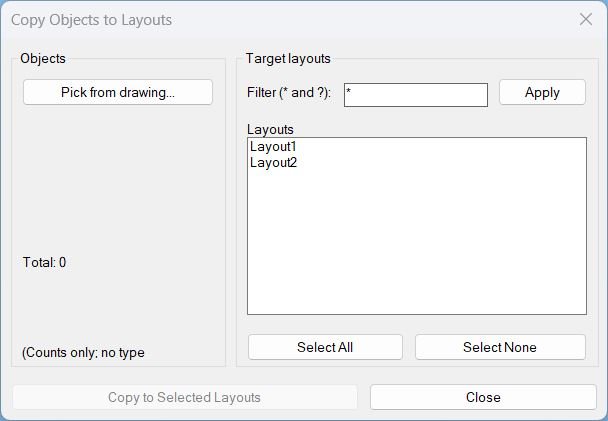
🧰 The dialog lets the user pick objects, filter target layouts, multi-select layouts, and copy the selection to the selected layout blocks.
Description:
📄 Copy2Layouts is an SEO-friendly AutoCAD layout copy tool for duplicating selected drawing objects to multiple Paper Space layouts in the current drawing.
🧰 The routine builds a temporary DCL interface with a Pick from drawing button, total object count, target layout list, wildcard layout filter, Select All / Select None, Copy to Selected Layouts, and Close.
🔍 The layout filter supports * and ? wildcards, making it easier to copy details only to selected layout naming groups such as 01*, A-??, plan sheets, or detail sheets.
🧠 The tool converts selected enames to VLA objects, builds a safe array, and calls vla-CopyObjects into each selected layout’s Paper Space block.
📌 This is useful for Civil 3D sheet notes, north arrows, legends, revision clouds, symbols, stamps, details, and other repeated paper-space annotation objects.
Helper function: (if any)
🧩 lc:unique-dialog-name generates a unique DCL dialog name per run to avoid dialog naming conflicts.
🧩 lc:_dcl-text creates the dialog definition for object picking, total count, layout filtering, selection, and copy actions.
🧩 lc:get-paper-layouts returns Paper Space layouts and excludes Model.
🧩 lc:apply-layout-filter applies case-insensitive wildcard filtering to the layout list.
🧩 lc:do-pick prompts for source objects and stores the selection set for the dialog workflow.
🧩 lc:copy-to-layouts converts selected entities to VLA objects, creates a safe array, and copies objects to target layout blocks.
🧩 lc:do-copy validates selected objects and target layouts, starts an UNDO group, performs the copy, and reports completion.
🧩 c:_Copy2Layouts provides a macro-friendly alias for toolbar/ribbon command macros.
Functionalities:
✅ 📄 Copy selected objects to multiple Paper Space layouts in the current drawing.
✅ 🔍 Filter target layouts using * and ? wildcard patterns.
✅ 🧰 Pick source objects from the drawing directly from the dialog.
✅ 🔢 Show only total selected object count to keep the interface compact.
✅ ✅ Select all or none of the currently filtered layouts.
✅ 🧠 Use vla-CopyObjects for COM-based object duplication into layout blocks.
✅ 🛡️ Filter conversion errors to avoid breaking on proxy/custom objects that cannot be converted.
✅ ↩️ Wrap the copy operation in an AutoCAD UNDO group for easier rollback.
✅ 🚀 Provide _Copy2Layouts alias for AutoCAD macro integration.
Result:
🎯 The result is a faster Paper Space object replication workflow inside a single AutoCAD or Civil 3D drawing.
✅ Users can place selected notes, symbols, legends, stamps, detail objects, or sheet graphics onto many selected layouts without repeatedly activating each layout and using copy/paste.
Images, animations etc.


XAML code:
<ResourceDictionary
xmlns="http://schemas.microsoft.com/winfx/2006/xaml/presentation"
xmlns:x="http://schemas.microsoft.com/winfx/2006/xaml"
xmlns:src="clr-namespace:Autodesk.Windows;assembly=AdWindows">

<src:RibbonToolTip x:Key="Copy2Layouts">
<src:RibbonToolTip.ExpandedContent>
<StackPanel>
<TextBlock Background="AntiqueWhite" TextAlignment="Copy2Layouts">
<Bold>Function Syntax: Copy2Layouts / _Copy2Layouts</Bold>
<LineBreak/>
<Bold>Version: 1.1 Date: 20.06.2026 6:38:55PM</Bold>
<LineBreak/>
<Hyperlink>AI+https://www.lee-mac.com/copytolayouts.html</Hyperlink>
<LineBreak/>
<Bold>Description</Bold><LineBreak/>
<Run>This program provides a dialog-driven workflow to </Run><Run Foreground="DarkRed">pick objects from the drawing</Run><Run>, then </Run><Run Foreground="DarkRed">copy the selected objects</Run><Run> into one or more </Run><Run Foreground="DarkRed">selected paper-space layouts</Run><Run>.</Run><LineBreak/>
<Bold>Primary User Actions</Bold><LineBreak/>
<Run>1) The user runs the command </Run><Run Foreground="DarkRed">LCOPYLAYOUTS</Run><Run> (or the macro-safe alias </Run><Run Foreground="DarkRed">_LCOPYLAYOUTS</Run><Run>).</Run><LineBreak/>
<Run>2) The dialog opens and the user clicks </Run><Run Foreground="DarkRed">Pick from drawing</Run><Run> to select objects on screen.</Run><LineBreak/>
<Run>3) The program shows the </Run><Run Foreground="Red">total count</Run><Run> of the selected objects.</Run><LineBreak/>
<Run>4) The user filters layout names using a wildcard pattern, selects one or more layouts, then clicks </Run><Run Foreground="DarkRed">Copy to Selected Layouts</Run><Run>.</Run><LineBreak/>
<Bold>Functionalities</Bold><LineBreak/>
<Run>• </Run><Run Foreground="DarkRed">Pick from drawing</Run><Run>: prompts the user to select any objects in the active drawing and stores the selection set for reuse.</Run><LineBreak/>
<Run>• </Run><Run Foreground="Red">Selection count only</Run><Run>: displays only the number of selected objects and does not classify objects by entity type.</Run><LineBreak/>
<Run>• </Run><Run Foreground="DarkRed">Layout list with multi-select</Run><Run>: presents a list of paper-space layouts and allows selecting multiple targets.</Run><LineBreak/>
<Run>• </Run><Run Foreground="DarkRed">Select All</Run><Run>: selects every layout currently visible in the list (after filtering).</Run><LineBreak/>
<Run>• </Run><Run Foreground="DarkRed">Select None</Run><Run>: clears all currently selected layouts.</Run><LineBreak/>
<Run>• </Run><Run Foreground="DarkRed">Layout name filter</Run><Run>: filters the layouts list using wildcard matching with </Run><Run Foreground="DarkRed">*</Run><Run> and </Run><Run Foreground="DarkRed">?</Run><Run>, then refreshes the list when the user clicks </Run><Run Foreground="DarkRed">Apply</Run><Run>.</Run><LineBreak/>
<Run>• </Run><Run Foreground="DarkRed">Copy to selected layouts</Run><Run>: copies the selected objects into each chosen layout’s paper-space block using COM automation.</Run><LineBreak/>
<Run>• </Run><Run Foreground="Red">Conversion safety</Run><Run>: skips objects that cannot be converted to VLA objects (commonly proxy or custom objects) so the copy operation can proceed without failing.</Run><LineBreak/>
<Run>• </Run><Run Foreground="Red">Unique dialog name each run</Run><Run>: generates a unique DCL dialog name and temporary file each time the command is executed to avoid naming collisions.</Run><LineBreak/>
<Bold>Important Notes and Constraints</Bold><LineBreak/>
<Run>• Targets </Run><Run Foreground="DarkRed">paper-space layouts only</Run><Run>: the layout list excludes </Run><Run Foreground="DarkRed">Model</Run><Run>.</Run><LineBreak/>
<Run>• By default, it </Run><Run Foreground="Red">skips copying to the current layout tab</Run><Run> to reduce accidental duplication.</Run><LineBreak/>
<Run>• Copy is executed with an </Run><Run Foreground="DarkRed">UNDO Begin</Run><Run> and </Run><Run Foreground="DarkRed">UNDO End</Run><Run> wrapper, allowing the user to undo the full copy operation in one step.</Run><LineBreak/>
<Run>• The program disables </Run><Run Foreground="DarkRed">Copy to Selected Layouts</Run><Run> until a valid selection set exists.</Run><LineBreak/>
<Bold>Recognizable Commands and Controls</Bold><LineBreak/>
<Run>• Command name: </Run><Run Foreground="DarkRed">LCOPYLAYOUTS</Run><LineBreak/>
<Run>• Alias for macros: </Run><Run Foreground="DarkRed">_LCOPYLAYOUTS</Run><LineBreak/>
<Run>• Dialog buttons: </Run><Run Foreground="DarkRed">Pick from drawing</Run><Run>, </Run><Run Foreground="DarkRed">Select All</Run><Run>, </Run><Run Foreground="DarkRed">Select None</Run><Run>, </Run><Run Foreground="DarkRed">Apply</Run><Run>, </Run><Run Foreground="DarkRed">Copy to Selected Layouts</Run><Run>, </Run><Run Foreground="DarkRed">Close</Run><Run>.</Run><LineBreak/>
<Bold>Example Usage Narrative</Bold><LineBreak/>
<Run>This program will require the user to </Run><Run Foreground="DarkRed">select objects</Run><Run> from the drawing using the </Run><Run Foreground="DarkRed">Pick from drawing</Run><Run> button. The program will then show the </Run><Run Foreground="Red">total number of selected objects</Run><Run>. The user can optionally apply a </Run><Run Foreground="DarkRed">wildcard filter</Run><Run> to reduce the list of layouts, then </Run><Run Foreground="DarkRed">select one or more layouts</Run><Run> and run </Run><Run Foreground="DarkRed">Copy to Selected Layouts</Run><Run> to copy the selected objects into the chosen layouts.</Run><LineBreak/>

<Bold><Run Foreground="DodgerBlue">Description</Run></Bold><LineBreak/><Run Foreground="White">📄 Copy2Layouts is an AutoCAD and Civil 3D AutoLISP tool that copies selected objects to multiple Paper Space layouts from a single DCL dialog.</Run><LineBreak/><Run Foreground="LimeGreen">🔍 It improves multi-layout sheet production with wildcard layout filtering, selected-object counting, Select All / None controls, and COM-based CopyObjects automation.</Run><LineBreak/>
<Bold><Run Foreground="DodgerBlue">Function Syntax</Run></Bold><LineBreak/><Run Foreground="White">🚀 Main command: </Run><Bold><Run Foreground="Orange">Copy2Layouts</Run></Bold><Run Foreground="White"></Run><LineBreak/><Run Foreground="White">🚀 Macro alias: </Run><Bold><Run Foreground="Orange">_Copy2Layouts</Run></Bold><Run Foreground="White"></Run><LineBreak/><Run Foreground="White">🔍 Layout filter: </Run><Bold><Run Foreground="Orange">* and ? wildcards</Run></Bold><Run Foreground="White"></Run><LineBreak/>
<Bold><Run Foreground="DodgerBlue">SEO Optimized Overview</Run></Bold><LineBreak/><Run Foreground="White">📄 This AutoCAD layout utility duplicates selected objects into selected Paper Space layout blocks in the current drawing.</Run><LineBreak/><Run Foreground="White">🔍 The target layout list can be filtered using wildcard patterns such as </Run><Bold><Run Foreground="Orange">*</Run></Bold><Run Foreground="White">, </Run><Bold><Run Foreground="Orange">01*</Run></Bold><Run Foreground="White">, or </Run><Bold><Run Foreground="Orange">A-??</Run></Bold><Run Foreground="White">.</Run><LineBreak/><Run Foreground="White">🧠 The routine converts selected entities to VLA objects and uses </Run><Bold><Run Foreground="Orange">vla-CopyObjects</Run></Bold><Run Foreground="White"> for reliable COM-based duplication.</Run><LineBreak/><Run Foreground="White">↩️ The copy step is wrapped in an </Run><Bold><Run Foreground="Orange">UNDO Begin/End</Run></Bold><Run Foreground="White"> group so the result can be rolled back more easily.</Run><LineBreak/><Run Foreground="White">📌 The workflow supports repeated Civil 3D sheet notes, legends, north arrows, stamps, details, and paper-space standards.</Run><LineBreak/>
<Bold><Run Foreground="LimeGreen">Primary Workflow</Run></Bold><LineBreak/><Run Foreground="White">1️⃣ Run </Run><Bold><Run Foreground="Orange">Copy2Layouts</Run></Bold><Run Foreground="White"> or </Run><Bold><Run Foreground="Orange">_Copy2Layouts</Run></Bold><Run Foreground="White"> at the AutoCAD command line.</Run><LineBreak/><Run Foreground="White">2️⃣ Click </Run><Bold><Run Foreground="Orange">Pick from drawing...</Run></Bold><Run Foreground="White"> and select the objects to copy.</Run><LineBreak/><Run Foreground="White">3️⃣ Filter the target layout list using </Run><Bold><Run Foreground="Orange">*</Run></Bold><Run Foreground="White"> and </Run><Bold><Run Foreground="Orange">?</Run></Bold><Run Foreground="White"> if needed.</Run><LineBreak/><Run Foreground="White">4️⃣ Select the required layouts or use Select All / Select None.</Run><LineBreak/><Run Foreground="White">5️⃣ Click </Run><Bold><Run Foreground="Orange">Copy to Selected Layouts</Run></Bold><Run Foreground="White"> to create copies in the target Paper Space layouts.</Run><LineBreak/>
<Bold><Run Foreground="LimeGreen">Functionalities</Run></Bold><LineBreak/><Run Foreground="White">📄 </Run><Bold><Run Foreground="LimeGreen">Copy to multiple layouts</Run></Bold><Run Foreground="White"> - duplicates selected objects into selected Paper Space layout blocks.</Run><LineBreak/><Run Foreground="White">🔍 </Run><Bold><Run Foreground="LimeGreen">Wildcard layout filter</Run></Bold><Run Foreground="White"> - supports * and ? matching for layout names.</Run><LineBreak/><Run Foreground="White">🧰 </Run><Bold><Run Foreground="LimeGreen">Dialog-based picking</Run></Bold><Run Foreground="White"> - lets the user pick objects and keep the dialog workflow open.</Run><LineBreak/><Run Foreground="White">🔢 </Run><Bold><Run Foreground="LimeGreen">Total count display</Run></Bold><Run Foreground="White"> - shows the number of selected objects without cluttering the dialog.</Run><LineBreak/><Run Foreground="White">✅ </Run><Bold><Run Foreground="LimeGreen">Selection controls</Run></Bold><Run Foreground="White"> - selects all or none of the currently filtered target layouts.</Run><LineBreak/><Run Foreground="White">🧠 </Run><Bold><Run Foreground="LimeGreen">COM CopyObjects</Run></Bold><Run Foreground="White"> - uses VLA object arrays and vla-CopyObjects for copying.</Run><LineBreak/><Run Foreground="White">↩️ </Run><Bold><Run Foreground="LimeGreen">Undo group</Run></Bold><Run Foreground="White"> - wraps the copy operation for easier rollback.</Run><LineBreak/><Run Foreground="White">🚀 </Run><Bold><Run Foreground="LimeGreen">Macro alias</Run></Bold><Run Foreground="White"> - provides _Copy2Layouts for toolbar or ribbon macros.</Run><LineBreak/>
<Bold><Run Foreground="DodgerBlue">Key Commands and Helper Functions</Run></Bold><LineBreak/><Run Foreground="White">🧩 </Run><Bold><Run Foreground="Orange">C:Copy2Layouts</Run></Bold><Run Foreground="White"> - opens the copy-to-layouts dialog workflow.</Run><LineBreak/><Run Foreground="White">🧩 </Run><Bold><Run Foreground="Orange">C:_Copy2Layouts</Run></Bold><Run Foreground="White"> - runs the macro-friendly alias.</Run><LineBreak/><Run Foreground="White">🧩 </Run><Bold><Run Foreground="Orange">lc:apply-layout-filter</Run></Bold><Run Foreground="White"> - filters target layout names using wildcard matching.</Run><LineBreak/><Run Foreground="White">🧩 </Run><Bold><Run Foreground="Orange">lc:do-pick</Run></Bold><Run Foreground="White"> - collects the source selection set from the drawing.</Run><LineBreak/><Run Foreground="White">🧩 </Run><Bold><Run Foreground="Orange">lc:copy-to-layouts</Run></Bold><Run Foreground="White"> - copies the VLA object array into selected layout blocks.</Run><LineBreak/><Run Foreground="White">🧩 </Run><Bold><Run Foreground="Orange">vla-CopyObjects</Run></Bold><Run Foreground="White"> - performs the COM-based object duplication.</Run><LineBreak/><Run Foreground="White">🧩 </Run><Bold><Run Foreground="Orange">vlax-make-safearray / vlax-make-variant</Run></Bold><Run Foreground="White"> - builds the object array required for CopyObjects.</Run><LineBreak/>
<Bold><Run Foreground="DodgerBlue">Practical Result</Run></Bold><LineBreak/><Run Foreground="White">✅ The final result is a faster way to copy repeated Paper Space content to many layouts in one AutoCAD drawing.</Run><LineBreak/><Run Foreground="LimeGreen">🎯 Copy2Layouts improves sheet preparation, layout standardization, annotation repetition, and Civil 3D drawing package production.</Run><LineBreak/>
<Bold><Run Foreground="DarkRed">Important Notes</Run></Bold><LineBreak/><Run Foreground="White">⚠️ Model Space is excluded from the target layout list.</Run><LineBreak/><Run Foreground="White">⚠️ The current source layout is skipped during copy to avoid duplicate objects in the active layout.</Run><LineBreak/><Run Foreground="White">⚠️ Proxy or custom objects may not convert into VLA objects and can be skipped.</Run><LineBreak/><Run Foreground="White">⚠️ Review copied content before saving large production drawing sets.</Run><LineBreak/>
<Bold><Run Foreground="Yellow">Tags</Run></Bold><LineBreak/><Run Foreground="Yellow">🏷️ AutoCAD, 🏷️ Civil 3D, 🏷️ AutoLISP, 🏷️ Visual LISP, 🏷️ DCL dialog, 🏷️ CopyObjects, 🏷️ Paper Space, 🏷️ Layouts, 🏷️ Wildcard filter, 🏷️ Copy to layouts, 🏷️ Sheet automation, 🏷️ CAD productivity, 🏷️ Layout manager, 🏷️ Annotation copy, 🏷️ Civil 3D sheets, 🏷️ Drawing production</Run><LineBreak/>


</TextBlock>

<Grid>
<Image Source="Image_000.jpg" Stretch="Uniform"/>
</Grid>

<Grid>
<Image Source="Image_001.jpg" Stretch="Uniform"/>
</Grid>

<Grid>
<Image Source="Image_002.jpg" Stretch="Uniform"/>
</Grid>

</StackPanel>
</src:RibbonToolTip.ExpandedContent>
</src:RibbonToolTip>
</ResourceDictionary>