
Short description
🧩 C3D_NamespaceFix is an AutoCAD and Civil 3D diagnostic AutoLISP routine for checking the state of core arithmetic symbols and Visual LISP COM support.
🔎 When loaded it checks whether the multiplication symbol is currently a normal AutoLISP SUBR and attempts vl-load-com when it is not.
📊 The routine then prints a namespace report for the multiplication addition subtraction and division symbols together with multiplication and COM tests.
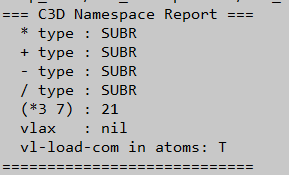
Command:
🚀 Startup behavior: the diagnostic runs immediately when C3D_NamespaceFix.lsp is loaded.
⚙️ Recovery attempt: vl-load-com can be called up to two times when the multiplication symbol is not reported as a SUBR.
📊 Output: C3D Namespace Report in the AutoCAD command line.
Description:
🧩 C3D_NamespaceFix is intended to diagnose AutoLISP namespace problems that can affect core arithmetic operators and Visual LISP COM functions in AutoCAD or Civil 3D.
🔎 The routine first evaluates the multiplication symbol and checks whether its type is SUBR.
⚙️ If the multiplication symbol is not a SUBR the routine calls vl-load-com and performs the same check again for a second recovery attempt.
📊 After this attempt the file prints the detected types of the multiplication addition subtraction and division symbols.
🧪 It safely tests multiplication through vl-catch-all-apply and reports the result of multiplying 3 by 7.
🔌 It also tests access to the AutoCAD COM object through vlax-get-acad-object and reports whether that protected call produced an error.
🧠 Finally it checks whether vl-load-com exists in the AutoLISP atom table.
Helper function: (if any)
🧩 type and eval are used to inspect the current symbol definitions.
🧩 vl-load-com attempts to initialize Visual LISP COM functionality.
🧩 vl-catch-all-apply protects the multiplication and COM diagnostic tests.
🧩 vl-catch-all-error-p identifies whether the protected COM test returned an error.
🧩 atoms-family and member verify whether vl-load-com is present in the current atom table.
Functionalities:
✅ 🔎 Checks whether the multiplication symbol is currently a SUBR.
✅ ⚙️ Attempts vl-load-com when the multiplication symbol does not have the expected type.
✅ 🔁 Performs a second vl-load-com attempt when the condition remains unresolved.
✅ 📊 Reports the current type of the multiplication addition subtraction and division symbols.
✅ 🧪 Tests multiplication using a protected call with the values 3 and 7.
✅ 🔌 Tests whether vlax-get-acad-object can be called without a trapped COM error.
✅ 🧠 Checks whether vl-load-com exists in the AutoLISP atom table.
✅ 🖥️ Prints the complete diagnostic report directly to the AutoCAD command line.
Result:
🎯 The result is a compact AutoCAD namespace and Visual LISP COM diagnostic report.
🧪 The user can see whether the core arithmetic symbols appear to retain normal function definitions and whether a protected multiplication test succeeds.
🔌 The report also indicates whether the AutoCAD COM access test produces an error and whether vl-load-com is present in the atom table.
Images, animations etc.
XAML code:
<ResourceDictionary
xmlns="http://schemas.microsoft.com/winfx/2006/xaml/presentation"
xmlns:x="http://schemas.microsoft.com/winfx/2006/xaml"
xmlns:src="clr-namespace:Autodesk.Windows;assembly=AdWindows">

<src:RibbonToolTip x:Key="C3D_NamespaceFix">
<src:RibbonToolTip.ExpandedContent>
<StackPanel>
<TextBlock Background="AntiqueWhite" TextAlignment="Left">
<Bold>Function Syntax: C3D_NamespaceFix</Bold>
<LineBreak/>
<Bold>Version: 1.0 Date: 20.06.2026 3:11:44PM</Bold>
<LineBreak/>
<Hyperlink>N/A</Hyperlink>
<LineBreak/>


<Bold><Run Foreground="DodgerBlue">Description</Run></Bold><LineBreak/>
<Run Foreground="White">🧩 C3D_NamespaceFix is an AutoCAD and Civil 3D diagnostic AutoLISP routine designed to inspect possible namespace problems affecting core arithmetic symbols and Visual LISP COM support.</Run><LineBreak/>
<Run Foreground="LimeGreen">📌 The routine checks the current state of the multiplication addition subtraction and division symbols and prints the results directly to the AutoCAD command line.</Run><LineBreak/>
<LineBreak/>
<Bold><Run Foreground="DodgerBlue">Execution</Run></Bold><LineBreak/>
<Run Foreground="White">🚀 There is </Run><Bold><Run Foreground="DarkRed">no separate AutoCAD command</Run></Bold><Run Foreground="White"> defined by this LISP.</Run><LineBreak/>
<Run Foreground="White">⚙️ The diagnostic runs immediately when </Run><Bold><Run Foreground="Orange">C3D_NamespaceFix.lsp</Run></Bold><Run Foreground="White"> is loaded.</Run><LineBreak/>
<LineBreak/>
<Bold><Run Foreground="DodgerBlue">Primary Workflow</Run></Bold><LineBreak/>
<Run Foreground="White">• The routine evaluates the multiplication symbol and checks whether its current type is </Run><Bold><Run Foreground="Orange">SUBR</Run></Bold><Run Foreground="White">.</Run><LineBreak/>
<Run Foreground="White">• If the multiplication symbol is not a SUBR the routine calls </Run><Bold><Run Foreground="Orange">vl-load-com</Run></Bold><Run Foreground="White">.</Run><LineBreak/>
<Run Foreground="White">• The same condition is checked again and </Run><Bold><Run Foreground="Orange">vl-load-com</Run></Bold><Run Foreground="White"> can be called a second time.</Run><LineBreak/>
<Run Foreground="White">• A </Run><Bold><Run Foreground="Orange">C3D Namespace Report</Run></Bold><Run Foreground="White"> header is printed.</Run><LineBreak/>
<Run Foreground="White">• The routine reports the detected type of the multiplication addition subtraction and division symbols.</Run><LineBreak/>
<Run Foreground="White">• Multiplication is tested through </Run><Bold><Run Foreground="Orange">vl-catch-all-apply</Run></Bold><Run Foreground="White"> using 3 and 7.</Run><LineBreak/>
<Run Foreground="White">• AutoCAD COM access is tested through </Run><Bold><Run Foreground="Orange">vlax-get-acad-object</Run></Bold><Run Foreground="White"> inside a protected call.</Run><LineBreak/>
<Run Foreground="White">• The routine checks whether </Run><Bold><Run Foreground="Orange">vl-load-com</Run></Bold><Run Foreground="White"> is present in the current AutoLISP atom table.</Run><LineBreak/>
<LineBreak/>
<Bold><Run Foreground="LimeGreen">Functionalities</Run></Bold><LineBreak/>
<Run Foreground="White">✅ </Run><Bold><Run Foreground="LimeGreen">Namespace inspection</Run></Bold><Run Foreground="White"> - checks the current function type associated with important arithmetic symbols.</Run><LineBreak/>
<Run Foreground="White">✅ </Run><Bold><Run Foreground="LimeGreen">Visual LISP initialization attempt</Run></Bold><Run Foreground="White"> - calls vl-load-com when the multiplication symbol does not have the expected SUBR type.</Run><LineBreak/>
<Run Foreground="White">✅ </Run><Bold><Run Foreground="LimeGreen">Second recovery attempt</Run></Bold><Run Foreground="White"> - repeats vl-load-com when the multiplication symbol still does not report the expected type.</Run><LineBreak/>
<Run Foreground="White">✅ </Run><Bold><Run Foreground="LimeGreen">Arithmetic type report</Run></Bold><Run Foreground="White"> - displays the current type of multiplication addition subtraction and division.</Run><LineBreak/>
<Run Foreground="White">✅ </Run><Bold><Run Foreground="LimeGreen">Protected multiplication test</Run></Bold><Run Foreground="White"> - evaluates the multiplication function through vl-catch-all-apply.</Run><LineBreak/>
<Run Foreground="White">✅ </Run><Bold><Run Foreground="LimeGreen">COM availability test</Run></Bold><Run Foreground="White"> - checks whether vlax-get-acad-object produces a trapped error.</Run><LineBreak/>
<Run Foreground="White">✅ </Run><Bold><Run Foreground="LimeGreen">Atom table verification</Run></Bold><Run Foreground="White"> - verifies whether vl-load-com exists in the AutoLISP symbol table.</Run><LineBreak/>
<Run Foreground="White">✅ </Run><Bold><Run Foreground="LimeGreen">Command line diagnostics</Run></Bold><Run Foreground="White"> - prints all results in one compact namespace report.</Run><LineBreak/>
<LineBreak/>
<Bold><Run Foreground="DodgerBlue">Important Diagnostic Elements</Run></Bold><LineBreak/>
<Run Foreground="White">🔎 </Run><Bold><Run Foreground="Orange">SUBR</Run></Bold><Run Foreground="White"> is the expected function type checked for the multiplication symbol.</Run><LineBreak/>
<Run Foreground="White">⚙️ </Run><Bold><Run Foreground="Orange">vl-load-com</Run></Bold><Run Foreground="White"> is the only recovery action attempted by the current source.</Run><LineBreak/>
<Run Foreground="White">🧪 </Run><Bold><Run Foreground="Orange">vl-catch-all-apply</Run></Bold><Run Foreground="White"> protects the multiplication and AutoCAD COM tests.</Run><LineBreak/>
<Run Foreground="White">🔌 </Run><Bold><Run Foreground="Orange">vlax-get-acad-object</Run></Bold><Run Foreground="White"> is used to test Visual LISP COM access to AutoCAD.</Run><LineBreak/>
<Run Foreground="White">🧠 </Run><Bold><Run Foreground="Orange">atoms-family</Run></Bold><Run Foreground="White"> is used to verify that vl-load-com exists in the atom table.</Run><LineBreak/>
<LineBreak/>
<Bold><Run Foreground="DarkRed">Important Notes</Run></Bold><LineBreak/>
<Run Foreground="White">⚠️ </Run><Bold><Run Foreground="DarkRed">The routine does not directly redefine the arithmetic operators</Run></Bold><Run Foreground="White"> multiplication addition subtraction or division.</Run><LineBreak/>
<Run Foreground="White">⚠️ </Run><Bold><Run Foreground="DarkRed">The implemented fix action is limited to vl-load-com</Run></Bold><Run Foreground="White"> and therefore the file is primarily a diagnostic utility.</Run><LineBreak/>
<Run Foreground="White">⚠️ The file name suggests namespace repair but the actual source mainly reports symbol state and tests Visual LISP COM availability.</Run><LineBreak/>
<Run Foreground="White">⚠️ No drawing objects are selected modified created or deleted by this routine.</Run><LineBreak/>
<LineBreak/>
<Bold><Run Foreground="Yellow">SEO Keywords</Run></Bold><LineBreak/>
<Run Foreground="Yellow">🏷️ AutoCAD  🏷️ Civil 3D  🏷️ AutoLISP  🏷️ Visual LISP  🏷️ Namespace diagnostics  🏷️ vl-load-com  🏷️ COM diagnostics  🏷️ AutoCAD troubleshooting  🏷️ Civil 3D troubleshooting  🏷️ SUBR  🏷️ vl-catch-all-apply  🏷️ vlax-get-acad-object  🏷️ CAD diagnostics  🏷️ CAD automation</Run><LineBreak/>


</TextBlock>

<Grid>
<Image Source="Image_000.png" Stretch="Uniform"/>
</Grid>

</StackPanel>
</src:RibbonToolTip.ExpandedContent>
</src:RibbonToolTip>
</ResourceDictionary>