
Short description
CMDSEARCHExtra is an AutoCAD and Civil 3D .NET command search, Ribbon CUIX manager, and Lisp Loader utility that helps CAD users find commands, audit Ribbon metadata, load LSP/VLX/FAS/DLL tools, validate support files, and export command documentation from one productivity palette.
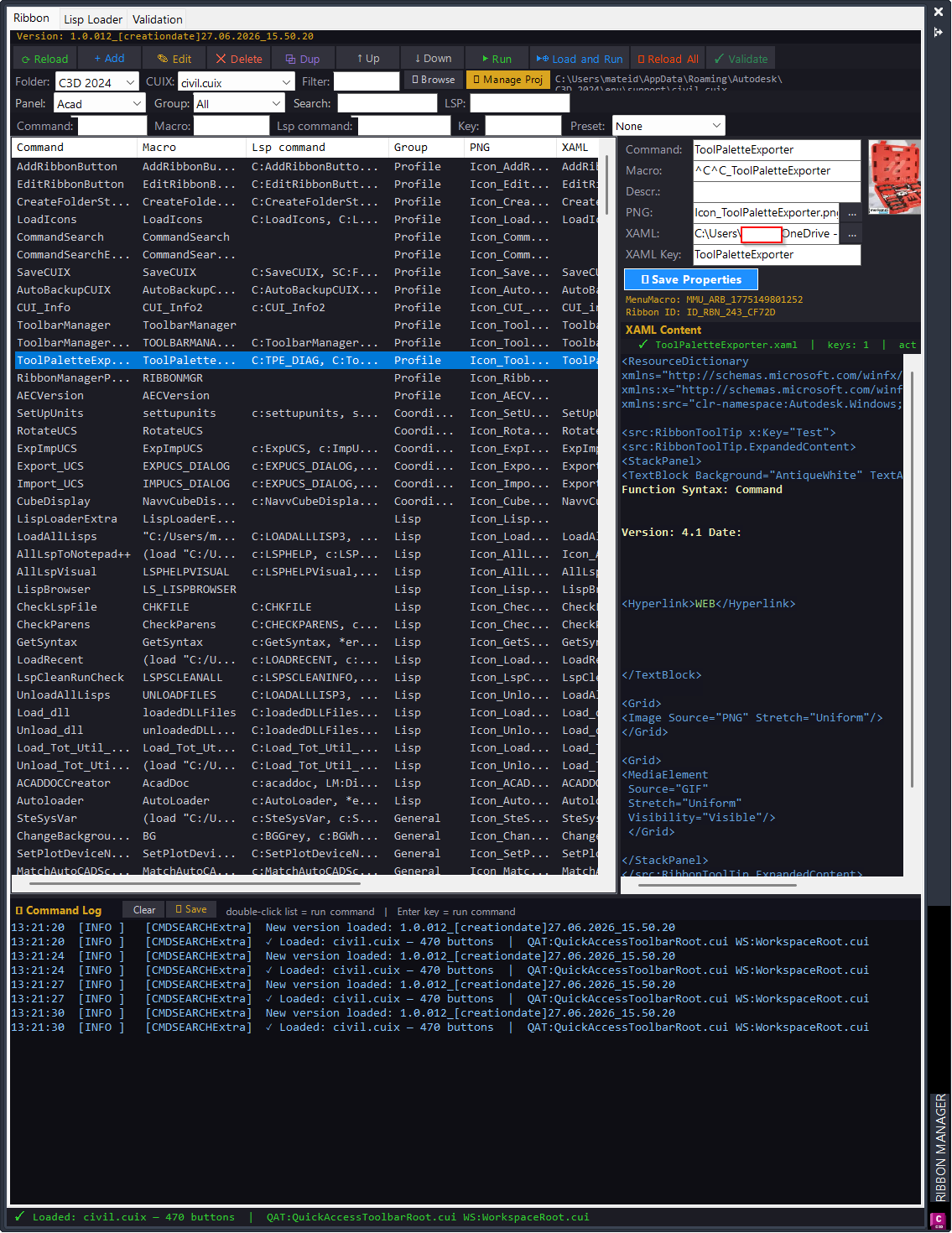
Command:
Primary commands: CMDSEARCHExtra opens the Command Search palette; CMDSEARCHExtraCLOSE closes it; LISPLOADEXTRA opens the standalone Lisp Loader; LISPLOADREPORT opens the load-session report; CMDSEARCHExtraTESTS runs parser and filter self-tests; LISPLOADDIAG writes LISP-related diagnostic method information to the log.
Description:
CMDSEARCHExtra is a productivity project for AutoCAD and Civil 3D built as a .NET Framework 4.8 x64 plugin. It combines a modeless Ribbon command search palette with a dedicated Lisp Loader, a CUIX inspection engine, validation tools, metadata auditing, and documentation export.
The project assembly is CMDSEARCHExtra.dll and the uploaded source declares AssemblyVersion 1.0.012. The main command is CMDSEARCHExtra, which opens a command-management palette for loaded CUIX command data. The palette can browse Ribbon commands, show macros, resolve linked images and XAML help keys, filter by command, macro, LSP command, group, source key, file size, created date, and modified date, and run commands directly from the grid.
The Lisp Loader side scans AutoCAD and Civil 3D support folders for LSP, VLX, FAS, and DLL files. It extracts AutoLISP command definitions, shows category/menu/command metadata, loads checked or selected files, tracks OK, failed, missing, and skipped results, records live logs, and opens detailed reports.
The project also includes validation logic for duplicate Ribbon commands, duplicate XAML keys, duplicate LSP commands, missing macros, missing files, macro-to-defun consistency, hard-coded paths, dependency warnings, and large-file checks. Validation data can be exported to CSV or HTML, and the documentation generator can create an HTML command catalog.
CUIX write operations use a timestamped backup workflow before modifying the live CUIX file. This is important because the tool can add, edit, delete, duplicate, move, and repath Ribbon command button data.
Helper function: (if any)
Key helper modules include CommandSearchPalette for the modeless UI, CuixEngine for CUIX XML and ZIP editing, ButtonData for Ribbon command records, LispLoaderHost and LoaderWindow for embedded and standalone loader interfaces, DiskScanner for folder discovery, FileLoader for LSP/VLX/FAS/DLL loading, LspCommandExtractor and LspAnalyzer for AutoLISP parsing, AdvancedFilter for wildcard and numeric filters, CommandValidationService for audit rules, ReportExportService for CSV/HTML export, DocumentationGenerator for command catalog output, FileMetadataService for date/size/backup metadata, and LogManager for live diagnostics.
Functionalities:
• Modeless AutoCAD command search palette opened with CMDSEARCHExtra.
• Ribbon CUIX command browsing with command, macro, group, PNG, XAML key, file size, created date, and modified date columns.
• Advanced filtering by command, macro, LSP command, group, source key, empty values, duplicate values, wildcard patterns, and preset filters.
• Direct command execution, load-and-run support, reload visible commands, and command row context actions.
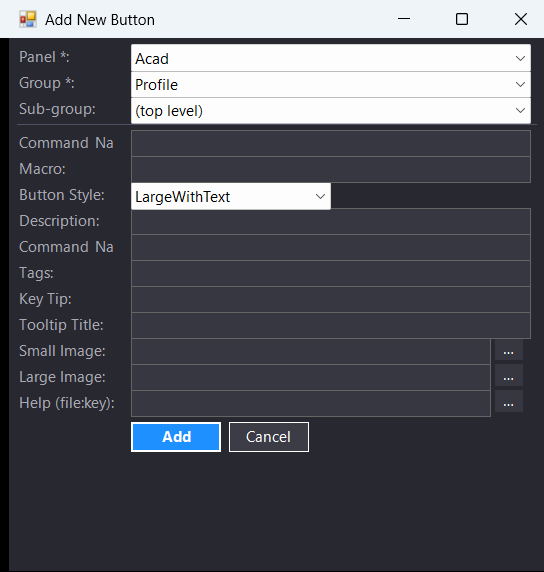
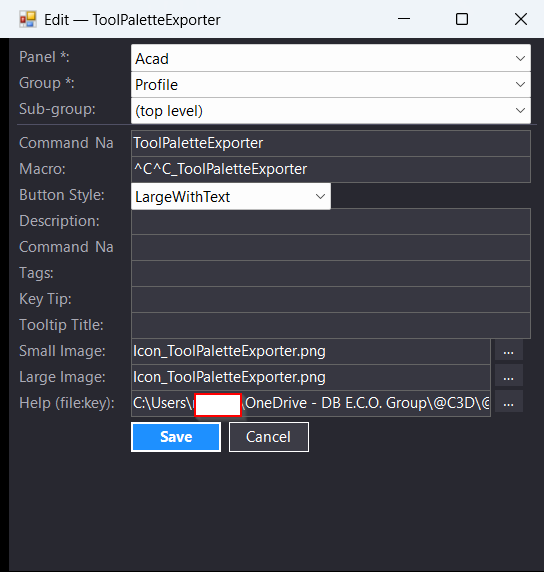
• Ribbon button management for add, edit, delete, duplicate, move, save properties, browse image, browse XAML, and preview help content workflows.
• CUIX engine for reading Ribbon panels, groups, subgroups, buttons, menu macros, QAT data, workspaces, double click actions, and ZIP entries.
• Image path audit tools for finding missing Ribbon icons, checking existing paths, rebatching missing images, and setting common icon folders.
• Embedded Lisp Loader tab and standalone LISPLOADEXTRA window.
• AutoCAD and Civil 3D support folder scanning for LSP, VLX, FAS, and DLL files.
• Load checked, load selected, reload, report, export checked paths, live log, open folder, open file, copy path, and open-at-command-line workflows.
• FileSystemWatcher based automatic rescan when supported files are created, deleted, renamed, or modified.
• AutoLISP analysis that ignores comments and string literals while extracting command defuns, helper defuns, line numbers, and dependencies.
• Validation tab for duplicate command names, duplicate XAML keys, duplicate macro strings, missing macros, missing files, macro-to-defun mismatch, hard-coded path warnings, dependency checks, large-file warnings, and duplicate LSP commands.
• CSV and HTML export for validation results.
• HTML command catalog generation for Ribbon command documentation.
• Timestamped CUIX backup before saving changes.
• Layout persistence for filters, column widths, and repeated CAD management sessions.
• Diagnostic command LISPLOADDIAG for scanning loaded assemblies for LISP-related invocation methods.
• Core parser and filter self-test command CMDSEARCHExtraTESTS.
Result:
The result is a centralized AutoCAD and Civil 3D command administration environment. CAD managers can audit Ribbon commands, validate CUIX links, detect missing LISP files, load support tools, repair metadata, export reports, and produce command documentation without manually searching through CUIX XML, support folders, or scattered toolbar resources.
Images, animations etc.
XAML code:
<ResourceDictionary
xmlns="http://schemas.microsoft.com/winfx/2006/xaml/presentation"
xmlns:x="http://schemas.microsoft.com/winfx/2006/xaml"
xmlns:src="clr-namespace:Autodesk.Windows;assembly=AdWindows">
<src:RibbonToolTip x:Key="CommandSearchExtra">
<src:RibbonToolTip.ExpandedContent>
<StackPanel>
<TextBlock Background="AntiqueWhite" TextAlignment="Left">
<Bold>Function Syntax: CMDSEARCHExtra / CMDSEARCHExtraCLOSE / LISPLOADEXTRA / LISPLOADREPORT / CMDSEARCHExtraTESTS / LISPLOADDIAG</Bold>
<LineBreak/>
<Bold>Version: 1.0 Date: 27.06.2026 15:48:58</Bold>
<LineBreak/>
<Bold>Version: 1.1 Date: 27.06.2026 16:01:07</Bold>
<LineBreak/>
<Bold>Version: 1.2 Date: 27.06.2026 3:45:41PM</Bold>
<LineBreak/>
<Hyperlink>N/A</Hyperlink>
<Bold><Run Foreground="DarkRed">Description</Run></Bold><LineBreak/>
<Run>This command opens the optimized Command Search Extra palette for faster inspection of ribbon commands, LSP files, command metadata, validation results, and loader information.</Run><LineBreak/>
<Bold><Run Foreground="DarkRed">Main Command</Run></Bold><LineBreak/>
<Run Foreground="Red" FontWeight="Bold">CMDSEARCHExtra</Run><LineBreak/>
<Bold><Run Foreground="DarkRed">Purpose</Run></Bold><LineBreak/>
<Run>The program provides an extended and optimized version of the command management tool.</Run><LineBreak/>
<Run>It is designed to reduce loading time by using cached metadata, shared filtering logic, and faster LSP command extraction.</Run><LineBreak/>
<Bold><Run Foreground="DarkRed">Workflow</Run></Bold><LineBreak/>
<Run> The user opens the palette by running </Run><Run Foreground="Red" FontWeight="Bold">CMDSEARCHExtra</Run><Run>.</Run><LineBreak/>
<Run> The program loads ribbon data, LSP loader data, file metadata, line counts, dates, and validation information.</Run><LineBreak/>
<Run> The user can switch between the Ribbon tab and the Lisp Loader tab.</Run><LineBreak/>
<Run> The user can filter data in each tab using command-specific column filters.</Run><LineBreak/>
<Run> The user can review command issues, missing files, duplicates, and inconsistent LSP command references.</Run><LineBreak/>
<Bold><Run Foreground="DarkRed">Functionalities</Run></Bold><LineBreak/>
<Run> Displays ribbon commands with command, macro, LSP command, key, file size, created date, and modified date.</Run><LineBreak/>
<Run> Displays Lisp Loader files with menu, command folder, LSP command, file, extension, line count, file size, created date, and modified date.</Run><LineBreak/>
<Run> Adds filters above important columns in both tabs.</Run><LineBreak/>
<Run> Supports wildcard filters using </Run><Run Foreground="Red" FontWeight="Bold">*</Run><Run> and </Run><Run Foreground="Red" FontWeight="Bold">?</Run><Run>.</Run><LineBreak/>
<Run> Supports advanced filter expressions such as </Run><Run Foreground="DarkOrange" FontWeight="Bold">empty:</Run><Run>, </Run><Run Foreground="DarkOrange" FontWeight="Bold">missing:</Run><Run>, </Run><Run Foreground="DarkOrange" FontWeight="Bold">dup:</Run><Run>, </Run><Run Foreground="DarkOrange" FontWeight="Bold">size>1MB</Run><Run>, and </Run><Run Foreground="DarkOrange" FontWeight="Bold">lines>1000</Run><Run>.</Run><LineBreak/>
<Run> Extracts LSP commands only from the main command folder and ignores helper folders such as </Run><Run Foreground="DarkRed" FontWeight="Bold">ss</Run><Run>.</Run><LineBreak/>
<Run> Shows the number of lines in LSP files after the extension column.</Run><LineBreak/>
<Run> Detects duplicate commands and duplicate LSP command names.</Run><LineBreak/>
<Run> Opens LSP files directly at the detected command line when supported by the editor.</Run><LineBreak/>
<Run> Saves column widths and filter settings to improve repeated use.</Run><LineBreak/>
<Run> Uses metadata and analyzer caches to improve loading performance.</Run><LineBreak/>
<Bold><Run Foreground="DarkRed">Important Commands</Run></Bold><LineBreak/>
<Run Foreground="Red" FontWeight="Bold">CMDSEARCHExtra</Run><Run> opens the optimized extra palette.</Run><LineBreak/>
<Run Foreground="Red" FontWeight="Bold">CMDSEARCHExtraCLOSE</Run><Run> closes the extra palette.</Run><LineBreak/>
<Run Foreground="Red" FontWeight="Bold">CMDSEARCHExtraTESTS</Run><Run> runs internal self-tests for core helper logic.</Run><LineBreak/>
<Bold><Run Foreground="DarkRed">Important Notes</Run></Bold><LineBreak/>
<Run> </Run><Run Foreground="Red" FontWeight="Bold">CMDSEARCHExtra</Run><Run> is the recommended version when the folder contains many LSP, PNG, and XAML files.</Run><LineBreak/>
<Run> The cache reduces repeated disk scanning and repeated LSP parsing.</Run><LineBreak/>
<Run> The validation tools help find broken command references before deployment.</Run><LineBreak/>
<Bold><Run Foreground="DarkGreen">Result</Run></Bold><LineBreak/>
<Run>The command gives the user a faster and more complete interface for searching, filtering, validating, documenting, and maintaining ribbon commands and LSP loader files.</Run><LineBreak/>
</TextBlock>
<Grid>
<Image Source="Image_000.png" Stretch="Uniform"/>
</Grid>
<Grid>
<Image Source="Image_001.png" Stretch="Uniform"/>
</Grid>
<Grid>
<Image Source="Image_002.png" Stretch="Uniform"/>
</Grid>
</StackPanel>
</src:RibbonToolTip.ExpandedContent>
</src:RibbonToolTip>
<src:RibbonToolTip x:Key="CommandSearchExtra_1.1">
<src:RibbonToolTip.ExpandedContent>
<StackPanel>
<TextBlock Background="AntiqueWhite" TextAlignment="Left">
<Bold>Function Syntax: CommandSearchExtra</Bold>
<LineBreak/>
<Bold>Version: 1.1 Date: 27.06.2026 16:01:07</Bold>
<LineBreak/>
<Hyperlink>N/A</Hyperlink>
<Bold><Run Foreground="DarkRed">Description</Run></Bold><LineBreak/>
<Run Foreground="White">?? CMDSEARCHExtra is an AutoCAD and Civil 3D command search, Ribbon CUIX manager, and Lisp Loader plugin for CAD managers and production teams.</Run><LineBreak/>
<Run Foreground="LimeGreen">It helps users find commands, audit Ribbon metadata, validate support files, load LSP/VLX/FAS/DLL tools, and export CAD command documentation.</Run><LineBreak/>
<LineBreak/>
<Bold><Run Foreground="DodgerBlue">Main Commands</Run></Bold><LineBreak/>
<Run Foreground="White">?? Run </Run><Bold><Run Foreground="Orange">CMDSEARCHExtra</Run></Bold><Run Foreground="White"> to open the modeless Command Search palette.</Run><LineBreak/>
<Run Foreground="White">?? Run </Run><Bold><Run Foreground="Orange">CMDSEARCHExtraCLOSE</Run></Bold><Run Foreground="White"> to close the palette.</Run><LineBreak/>
<Run Foreground="White">?? Run </Run><Bold><Run Foreground="Orange">LISPLOADEXTRA</Run></Bold><Run Foreground="White"> to open the standalone Lisp Loader window.</Run><LineBreak/>
<Run Foreground="White">?? Run </Run><Bold><Run Foreground="Orange">LISPLOADREPORT</Run></Bold><Run Foreground="White"> to open the load-session report.</Run><LineBreak/>
<Run Foreground="White">?? Run </Run><Bold><Run Foreground="Orange">CMDSEARCHExtraTESTS</Run></Bold><Run Foreground="White"> to run parser and filter self-tests.</Run><LineBreak/>
<Run Foreground="White">?? Run </Run><Bold><Run Foreground="Orange">LISPLOADDIAG</Run></Bold><Run Foreground="White"> to scan loaded assemblies for LISP-related diagnostic methods.</Run><LineBreak/>
<LineBreak/>
<Bold><Run Foreground="DodgerBlue">SEO Optimized Description</Run></Bold><LineBreak/>
<Run Foreground="White">?? This AutoCAD Civil 3D utility combines command search, CUIX Ribbon management, Lisp Loader automation, validation reporting, and command documentation export.</Run><LineBreak/>
<Run Foreground="White">?? The Ribbon side displays command names, macros, groups, PNG image references, XAML help keys, file size, created date, and modified date.</Run><LineBreak/>
<Run Foreground="White">?? The Lisp Loader scans AutoCAD and Civil 3D support folders for LSP, VLX, FAS, and DLL files, extracts command definitions, and loads checked or selected tools.</Run><LineBreak/>
<Run Foreground="White">?? The validation engine helps detect duplicate Ribbon commands, duplicate XAML keys, missing macros, missing files, macro-to-defun mismatch, hard-coded paths, dependency warnings, and large file risks.</Run><LineBreak/>
<LineBreak/>
<Bold><Run Foreground="LimeGreen">Functionalities</Run></Bold><LineBreak/>
<Run Foreground="White">?? </Run><Bold><Run Foreground="LimeGreen">Command Search palette</Run></Bold><Run Foreground="White"> - opens a modeless AutoCAD interface for finding, filtering, previewing, running, and managing commands.</Run><LineBreak/>
<Run Foreground="White">?? </Run><Bold><Run Foreground="LimeGreen">Advanced filters</Run></Bold><Run Foreground="White"> - supports wildcard search, empty values, duplicate values, negative filters, preset filters, and numeric comparisons.</Run><LineBreak/>
<Run Foreground="White">?? </Run><Bold><Run Foreground="LimeGreen">CUIX inspection</Run></Bold><Run Foreground="White"> - reads Ribbon panels, groups, subgroups, buttons, menu macros, workspace data, QAT data, double click actions, and ZIP entries.</Run><LineBreak/>
<Run Foreground="White">??? </Run><Bold><Run Foreground="LimeGreen">Ribbon button editing</Run></Bold><Run Foreground="White"> - supports add, edit, delete, duplicate, move, save properties, browse PNG, browse XAML, and help preview workflows.</Run><LineBreak/>
<Run Foreground="White">?? </Run><Bold><Run Foreground="LimeGreen">Lisp Loader</Run></Bold><Run Foreground="White"> - scans and loads LSP, VLX, FAS, and DLL support files from configured AutoCAD and Civil 3D help folders.</Run><LineBreak/>
<Run Foreground="White">?? </Run><Bold><Run Foreground="LimeGreen">Validation reports</Run></Bold><Run Foreground="White"> - checks duplicate commands, duplicate XAML keys, missing files, broken macro links, dependencies, and large files.</Run><LineBreak/>
<Run Foreground="White">?? </Run><Bold><Run Foreground="LimeGreen">CSV and HTML export</Run></Bold><Run Foreground="White"> - exports validation results and creates a Ribbon command documentation catalog.</Run><LineBreak/>
<Run Foreground="White">?? </Run><Bold><Run Foreground="LimeGreen">Timestamped CUIX backup</Run></Bold><Run Foreground="White"> - creates a backup before writing changes to the live CUIX file.</Run><LineBreak/>
<Run Foreground="White">?? </Run><Bold><Run Foreground="LimeGreen">Automatic rescan</Run></Bold><Run Foreground="White"> - uses FileSystemWatcher to detect support-file changes and refresh loader data.</Run><LineBreak/>
<LineBreak/>
<Bold><Run Foreground="DodgerBlue">Module Breakdown</Run></Bold><LineBreak/>
<Run Foreground="White">?? CommandSearchPalette.cs manages the main command search UI, Ribbon actions, filters, previews, image audit, validation, and embedded loader tabs.</Run><LineBreak/>
<Run Foreground="White">?? CuixEngine.cs reads and writes CUIX ZIP/XML content, Ribbon panels, buttons, menu macros, QAT data, workspaces, and double click actions.</Run><LineBreak/>
<Run Foreground="White">?? LispLoaderHost.cs and LoaderWindow.cs provide embedded and standalone Lisp Loader workflows.</Run><LineBreak/>
<Run Foreground="White">?? DiskScanner.cs, FileLoader.cs, LspCommandExtractor.cs, and LspAnalyzer.cs scan, load, and analyze LISP-related support files.</Run><LineBreak/>
<Run Foreground="White">?? CommandValidationService.cs, ReportExportService.cs, and DocumentationGenerator.cs create audits, CSV/HTML reports, and command documentation.</Run><LineBreak/>
<LineBreak/>
<Bold><Run Foreground="DodgerBlue">Practical Result</Run></Bold><LineBreak/>
<Run Foreground="White">? CMDSEARCHExtra gives AutoCAD and Civil 3D users one centralized place to search commands, manage Ribbon CUIX data, load support files, validate broken links, and document command libraries.</Run><LineBreak/>
<Run Foreground="LimeGreen">This improves CAD administration, workspace cleanup, CUIX quality control, Lisp Loader reliability, and daily production efficiency.</Run><LineBreak/>
<LineBreak/>
<Bold><Run Foreground="DarkRed">Important Note</Run></Bold><LineBreak/>
<Run Foreground="White">This package targets .NET Framework 4.8 x64 and needs local AutoCAD/Civil 3D references for building. Because it can edit CUIX files and load external code, use trusted support folders and keep current CUIX backups.</Run><LineBreak/>
</TextBlock>
<Grid>
<Image Source="PNG" Stretch="Uniform"/>
</Grid>
<Grid>
<MediaElement Source="GIF" Stretch="Uniform" Visibility="Visible"/>
</Grid>
</StackPanel>
</src:RibbonToolTip.ExpandedContent>
</src:RibbonToolTip>
</ResourceDictionary>