
Short description
🧹 PurgeUnusedLayers is an AutoCAD AutoLISP cleanup utility with an embedded DCL dialog for scanning and deleting unused drawing layers.
🔒 It protects key layers such as 0 and DEFPOINTS, can skip Xref layers, and lets users purge selected layers or all detected unused layers.
Command:
🚀 Main command: PURGEUNUSEDLAYERS
🧩 Load the LSP in AutoCAD or Civil 3D, then type the command at the command line.
Description:
🧹 This AutoCAD layer purge tool scans the active drawing layer table and identifies layers that have no entities assigned to them.
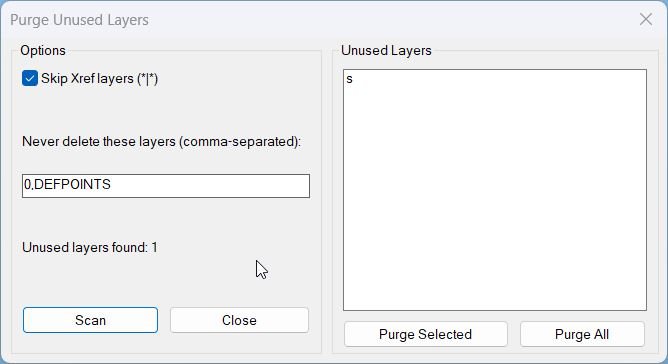
🎛️ The embedded DCL dialog is written to the temporary folder each run and shows options, status text, and a multi-select list of unused layers.
🔒 The default protected list includes 0 and DEFPOINTS, and the user can add more comma-separated layer names that must never be deleted.
🔗 A Skip Xref layers option protects xref-dependent layers containing the | separator.
🗑️ The user can run Scan, then Purge Selected or Purge All from the dialog.
📊 After deletion, the command reports how many layers were deleted and how many failed to delete.
Helper function: (if any)
🧩 PUL:_DCLLines returns the embedded DCL layout for the Purge Unused Layers dialog.
🧩 PUL:_EnsureDCL writes purgeunusedlayers.dcl to the AutoCAD temporary folder.
🧩 PUL:_AllLayers reads all layer names from the LAYER table.
🧩 PUL:_ScanUnusedLayers detects unused layers while respecting current layer, protected names, and xref skip rules.
🧩 PUL:_ParseIdxList converts list_box selection indexes into a usable AutoLISP list.
🧩 PUL:_TryLayDel calls -LAYDEL safely for one layer.
🧩 PUL:_PurgeLayers deletes selected layers and counts deleted versus failed results.
🧩 PUL:_UpdateFromDialog refreshes the scan result based on the current dialog options.
Functionalities:
✅ Open a DCL dialog for unused-layer cleanup.
✅ Scan all layers in the active drawing for assigned entities.
✅ Protect 0, DEFPOINTS, the current layer, and user-defined skip layers.
✅ Optionally skip Xref-dependent layers matching *|*.
✅ Display unused layers in a multi-select list.
✅ Purge selected unused layers or purge all detected unused layers.
✅ Report deleted and failed layer counts.
✅ Clean up the temporary DCL file after use.
Result:
✅ Unused layers are identified and can be deleted from the active DWG.
✅ Critical layers and xref layers can be protected from accidental removal.
✅ The drawing layer table becomes cleaner for standards checking, plotting, file exchange, and template maintenance.
Images, animations etc.
XAML code:
<ResourceDictionary
 xmlns="http://schemas.microsoft.com/winfx/2006/xaml/presentation"
 xmlns:x="http://schemas.microsoft.com/winfx/2006/xaml"
 xmlns:src="clr-namespace:Autodesk.Windows;assembly=AdWindows">

 <src:RibbonToolTip x:Key="PurgeUnusedLayers">
 <src:RibbonToolTip.ExpandedContent>
 <StackPanel>
 <TextBlock Background="AntiqueWhite" TextAlignment="Left">
<Bold>Function Syntax: PurgeUnusedLayers</Bold>
<LineBreak/>
<Bold>Version: 1.1 Date: 20.06.2026 6:38:54PM</Bold>
<LineBreak/>
<Hyperlink>N/A</Hyperlink>


<Bold>Command name</Bold><LineBreak/>
<Run>PURGEUNUSEDLAYERS (type </Run><Run Foreground="DarkRed">PURGEUNUSEDLAYERS</Run><Run> at the AutoCAD command line)</Run><LineBreak/>
<Bold>Description</Bold><LineBreak/>
<Run>This routine provides a dialog-based tool to </Run><Run Foreground="DarkRed">scan</Run><Run> the drawing for unused layers and then </Run><Run Foreground="DarkRed">delete</Run><Run> them either by selecting specific layers or purging all unused layers at once.</Run><LineBreak/>
<Bold>Prerequisites</Bold><LineBreak/>
<Run>• Requires Visual LISP COM support via </Run><Run Foreground="DarkRed">(vl-load-com)</Run><Run>.</Run><LineBreak/>
<Run>• Requires permission to write a temporary DCL file in the folder provided by </Run><Run Foreground="DarkRed">TEMPPREFIX</Run><Run>.</Run><LineBreak/>
<Bold>User interaction</Bold><LineBreak/>
<Run>• The command opens a </Run><Run Foreground="DarkRed">DCL dialog</Run><Run> titled Purge Unused Layers.</Run><LineBreak/>
<Run>• The dialog supports:</Run><LineBreak/>
<Run>  • Toggle: </Run><Run Foreground="DarkRed">Skip Xref layers (*|*)</Run><Run>.</Run><LineBreak/>
<Run>  • Edit box: </Run><Run Foreground="DarkRed">Never delete these layers</Run><Run> (comma-separated list, default 0,DEFPOINTS).</Run><LineBreak/>
<Run>  • Button: </Run><Run Foreground="DarkRed">Scan</Run><Run> to refresh the unused layer list.</Run><LineBreak/>
<Run>  • List box: multi-select list of detected unused layers.</Run><LineBreak/>
<Run>  • Button: </Run><Run Foreground="DarkRed">Purge Selected</Run><Run>.</Run><LineBreak/>
<Run>  • Button: </Run><Run Foreground="DarkRed">Purge All</Run><Run>.</Run><LineBreak/>
<Run>  • Button: </Run><Run Foreground="DarkRed">Close</Run><Run>.</Run><LineBreak/>
<Bold>High-level workflow</Bold><LineBreak/>
<Run>• Builds the dialog definition in memory using </Run><Run Foreground="DarkRed">PUL:_DCLLines</Run><Run> and writes it to a temp DCL file every run.</Run><LineBreak/>
<Run>• Loads the DCL with </Run><Run Foreground="DarkRed">load_dialog</Run><Run>, opens it with </Run><Run Foreground="DarkRed">new_dialog</Run><Run>, and runs it with </Run><Run Foreground="DarkRed">start_dialog</Run><Run>.</Run><LineBreak/>
<Run>• Performs an initial </Run><Run Foreground="DarkRed">scan</Run><Run> when the dialog opens, then updates automatically when the user changes options.</Run><LineBreak/>
<Run>• Scanning logic checks each layer name for entity usage by running </Run><Run Foreground="DarkRed">ssget "_X"</Run><Run> filtered by layer.</Run><LineBreak/>
<Run>• Results are displayed in a list box and a status label shows the count of unused layers.</Run><LineBreak/>
<Run>• If the user chooses to purge, the routine attempts deletion using </Run><Run Foreground="DarkRed">-LAYDEL</Run><Run> and verifies success by checking layer existence in the table afterwards.</Run><LineBreak/>
<Bold>Functionalities</Bold><LineBreak/>
<Run>• Detects unused layers by scanning the drawing database.</Run><LineBreak/>
<Run>• Excludes the </Run><Run Foreground="DarkRed">current layer (CLAYER)</Run><Run> from purge candidates.</Run><LineBreak/>
<Run>• Always protects </Run><Run Foreground="DarkRed">0</Run><Run> and </Run><Run Foreground="DarkRed">DEFPOINTS</Run><Run> from deletion, even if the user does not list them.</Run><LineBreak/>
<Run>• Allows user-defined protected layers via a comma-separated list.</Run><LineBreak/>
<Run>• Optionally excludes layers that look like xref layers by pattern </Run><Run Foreground="DarkRed">*|*</Run><Run>.</Run><LineBreak/>
<Run>• Supports multi-select purging of only the layers chosen in the dialog.</Run><LineBreak/>
<Run>• Supports one-click purging of all currently detected unused layers.</Run><LineBreak/>
<Run>• Reports results after purge: number deleted and number failed.</Run><LineBreak/>
<Bold>Unused-layer detection rules</Bold><LineBreak/>
<Run>• Builds a full layer list using </Run><Run Foreground="DarkRed">tblnext "LAYER"</Run><Run>.</Run><LineBreak/>
<Run>• A layer is considered unused if no entities exist on it, determined by:</Run><LineBreak/>
<Run>  • <Run Foreground="DarkRed">ssget "_X" (list (cons 8 layerName))</Run> returns nil.</Run><LineBreak/>
<Run>• A layer is excluded from the candidate list if:</Run><LineBreak/>
<Run>  • It is in the user-defined skip list.</Run><LineBreak/>
<Run>  • It is the current layer from </Run><Run Foreground="DarkRed">CLAYER</Run><Run>.</Run><LineBreak/>
<Run>  • Skip Xref layers is enabled and the name matches </Run><Run Foreground="DarkRed">*|*</Run><Run>.</Run><LineBreak/>
<Bold>Purge behavior</Bold><LineBreak/>
<Run>• Purge Selected:</Run><LineBreak/>
<Run>  • Reads the list_box selection indexes returned as a space-separated string.</Run><LineBreak/>
<Run>  • Converts indexes to a list using </Run><Run Foreground="DarkRed">PUL:_ParseIdxList</Run><Run>.</Run><LineBreak/>
<Run>  • Maps indexes back to layer names and attempts to delete only those layers.</Run><LineBreak/>
<Run>• Purge All:</Run><LineBreak/>
<Run>  • Attempts to delete every layer in the current unused-layer list.</Run><LineBreak/>
<Bold>Important commands and calls highlighted</Bold><LineBreak/>
<Run>• <Run Foreground="DarkRed">PUL:_EnsureDCL</Run> — writes the DCL file to the temp directory each run to avoid stale dialogs.</Run><LineBreak/>
<Run>• <Run Foreground="DarkRed">action_tile</Run> — wires Scan and option changes to live refresh of results.</Run><LineBreak/>
<Run>• <Run Foreground="DarkRed">tblnext</Run> — enumerates layers in the drawing.</Run><LineBreak/>
<Run>• <Run Foreground="DarkRed">ssget "_X"</Run> with layer filter — detects whether any entities exist on a layer.</Run><LineBreak/>
<Run>• <Run Foreground="DarkRed">-LAYDEL</Run> via </Run><Run Foreground="DarkRed">vl-cmdf</Run><Run> — attempts to delete layers.</Run><LineBreak/>
<Run>• <Run Foreground="DarkRed">vl-catch-all-apply</Run> — prevents hard failures if -LAYDEL errors on protected or constrained layers.</Run><LineBreak/>
<Run>• <Run Foreground="DarkRed">tblsearch "LAYER"</Run> — verifies whether a layer was actually removed.</Run><LineBreak/>
<Bold>Outputs and messages</Bold><LineBreak/>
<Run>• On load: prints </Run><Run Foreground="DarkRed">Loaded: PURGEUNUSEDLAYERS (dialog-based unused layer purge)</Run><Run>.</Run><LineBreak/>
<Run>• If cancelled: prints </Run><Run Foreground="DarkRed">Cancelled</Run><Run>.</Run><LineBreak/>
<Run>• If Purge Selected with nothing selected: prints </Run><Run Foreground="DarkRed">No layers selected</Run><Run>.</Run><LineBreak/>
<Run>• If no unused layers exist: prints </Run><Run Foreground="DarkRed">No unused layers found</Run><Run>.</Run><LineBreak/>
<Run>• After purging: prints </Run><Run Foreground="DarkRed">Deleted: N | Failed: M</Run><Run>.</Run><LineBreak/>
<Bold>Operational notes and limitations</Bold><LineBreak/>
<Run>• A layer can appear unused by entity scan but still fail deletion due to dependencies, locks, plot states, viewport usage, or other AutoCAD constraints; such cases increment the Failed count.</Run><LineBreak/>
<Run>• The unused detection checks only for entities on the layer; it does not explicitly inspect non-entity dependencies such as layer states, filters, dimension style references, or external constraints.</Run><LineBreak/>
<Run>• The Skip Xref option relies on name matching </Run><Run Foreground="DarkRed">*|*</Run><Run>, which is a conventional xref layer naming pattern.</Run><LineBreak/>

<Bold><Run Foreground="DodgerBlue">Description</Run></Bold><LineBreak/>
<Run Foreground="White">🧹 PurgeUnusedLayers is an AutoCAD AutoLISP cleanup utility with an embedded DCL dialog for scanning and deleting unused drawing layers.</Run><LineBreak/>
<Run Foreground="White">🔒 It protects key layers such as 0 and DEFPOINTS, can skip Xref layers, and lets users purge selected layers or all detected unused layers.</Run><LineBreak/>
<LineBreak/>
<Bold><Run Foreground="DodgerBlue">Function Syntax</Run></Bold><LineBreak/>
<Run Foreground="White">🚀 Main command: </Run><Bold><Run Foreground="Orange">PURGEUNUSEDLAYERS</Run></Bold><LineBreak/>
<Run Foreground="White">📌 Load the LSP file with APPLOAD or from your AutoCAD startup suite, then run the command from the command line.</Run><LineBreak/>
<LineBreak/>
<Bold><Run Foreground="DodgerBlue">SEO Optimized Overview</Run></Bold><LineBreak/>
<Run Foreground="White">🧹 This AutoCAD layer purge tool scans the active drawing layer table and identifies layers that have no entities assigned to them.</Run><LineBreak/>
<Run Foreground="White">🎛️ The embedded DCL dialog is written to the temporary folder each run and shows options, status text, and a multi-select list of unused layers.</Run><LineBreak/>
<Run Foreground="White">🔒 The default protected list includes 0 and DEFPOINTS, and the user can add more comma-separated layer names that must never be deleted.</Run><LineBreak/>
<Run Foreground="White">🔗 A Skip Xref layers option protects xref-dependent layers containing the | separator.</Run><LineBreak/>
<Run Foreground="White">🗑️ The user can run Scan, then Purge Selected or Purge All from the dialog.</Run><LineBreak/>
<Run Foreground="White">📊 After deletion, the command reports how many layers were deleted and how many failed to delete.</Run><LineBreak/>
<LineBreak/>
<Bold><Run Foreground="LimeGreen">Primary Workflow</Run></Bold><LineBreak/>
<Run Foreground="White">1️⃣ Run PURGEUNUSEDLAYERS.</Run><LineBreak/>
<Run Foreground="White">2️⃣ Keep Skip Xref layers enabled when xref layers should be protected.</Run><LineBreak/>
<Run Foreground="White">3️⃣ Review or edit the Never delete layer list, including 0 and DEFPOINTS.</Run><LineBreak/>
<Run Foreground="White">4️⃣ Click Scan to populate the unused-layer list.</Run><LineBreak/>
<Run Foreground="White">5️⃣ Purge only selected layers or purge all listed layers after review.</Run><LineBreak/>
<LineBreak/>
<Bold><Run Foreground="LimeGreen">Core Functionalities</Run></Bold><LineBreak/>
<Run Foreground="White">✅ Open a DCL dialog for unused-layer cleanup.</Run><LineBreak/>
<Run Foreground="White">✅ Scan all layers in the active drawing for assigned entities.</Run><LineBreak/>
<Run Foreground="White">✅ Protect 0, DEFPOINTS, the current layer, and user-defined skip layers.</Run><LineBreak/>
<Run Foreground="White">✅ Optionally skip Xref-dependent layers matching *|*.</Run><LineBreak/>
<Run Foreground="White">✅ Display unused layers in a multi-select list.</Run><LineBreak/>
<Run Foreground="White">✅ Purge selected unused layers or purge all detected unused layers.</Run><LineBreak/>
<Run Foreground="White">✅ Report deleted and failed layer counts.</Run><LineBreak/>
<Run Foreground="White">✅ Clean up the temporary DCL file after use.</Run><LineBreak/>
<LineBreak/>
<Bold><Run Foreground="DodgerBlue">Important Commands and Helper Functions</Run></Bold><LineBreak/>
<Run Foreground="White">🧩 PUL:_DCLLines returns the embedded DCL layout for the Purge Unused Layers dialog.</Run><LineBreak/>
<Run Foreground="White">🧩 PUL:_EnsureDCL writes purgeunusedlayers.dcl to the AutoCAD temporary folder.</Run><LineBreak/>
<Run Foreground="White">🧩 PUL:_AllLayers reads all layer names from the LAYER table.</Run><LineBreak/>
<Run Foreground="White">🧩 PUL:_ScanUnusedLayers detects unused layers while respecting current layer, protected names, and xref skip rules.</Run><LineBreak/>
<Run Foreground="White">🧩 PUL:_ParseIdxList converts list_box selection indexes into a usable AutoLISP list.</Run><LineBreak/>
<Run Foreground="White">🧩 PUL:_TryLayDel calls -LAYDEL safely for one layer.</Run><LineBreak/>
<Run Foreground="White">🧩 PUL:_PurgeLayers deletes selected layers and counts deleted versus failed results.</Run><LineBreak/>
<Run Foreground="White">🧩 PUL:_UpdateFromDialog refreshes the scan result based on the current dialog options.</Run><LineBreak/>
<LineBreak/>
<Bold><Run Foreground="LimeGreen">Result</Run></Bold><LineBreak/>
<Run Foreground="White">✅ Unused layers are identified and can be deleted from the active DWG.</Run><LineBreak/>
<Run Foreground="White">✅ Critical layers and xref layers can be protected from accidental removal.</Run><LineBreak/>
<Run Foreground="White">✅ The drawing layer table becomes cleaner for standards checking, plotting, file exchange, and template maintenance.</Run><LineBreak/>
<LineBreak/>
<Bold><Run Foreground="DarkOrange">Operational Notes</Run></Bold><LineBreak/>
<Run Foreground="DarkRed">⚠️ This is a destructive cleanup command because it deletes layers.</Run><LineBreak/>
<Run Foreground="DarkRed">⚠️ Use Scan first and review the unused-layer list before choosing Purge All.</Run><LineBreak/>
<Run Foreground="White">📌 Some layers can fail to delete if they are protected, current, referenced by objects not detected by a simple layer selection, or blocked by AutoCAD rules.</Run><LineBreak/>
<LineBreak/>
<Bold><Run Foreground="DodgerBlue">Best Use Cases</Run></Bold><LineBreak/>
<Run Foreground="White">🧹 Cleaning project drawings before issue or archive.</Run><LineBreak/>
<Run Foreground="White">📦 Reducing clutter in layer-heavy Civil 3D files.</Run><LineBreak/>
<Run Foreground="White">🔒 Controlled layer purge with protected names and xref-layer safeguards.</Run><LineBreak/>
<LineBreak/>
<Bold><Run Foreground="Yellow">Tags</Run></Bold><LineBreak/>
<Run Foreground="Yellow">🏷️ AutoCAD, 🏷️ AutoLISP, 🏷️ Civil 3D, 🏷️ Purge Layers, 🏷️ Unused Layers, 🏷️ LAYDEL, 🏷️ Layer Cleanup, 🏷️ DCL Dialog, 🏷️ CAD Standards, 🏷️ Drawing Cleanup</Run><LineBreak/>

</TextBlock>

<Grid>
<Image Source="Image_000.jpg" Stretch="Uniform"/>
</Grid>


 <!-- Use MediaElement for GIF (static first frame) and Image as fallback -->


 </StackPanel>
 </src:RibbonToolTip.ExpandedContent>
 </src:RibbonToolTip>
</ResourceDictionary>