
Short description
🚀 DeleteBlockCrossings is an AutoCAD and Civil 3D 2024 .NET plugin for detecting and trimming curves that cross selected block references. It replaces the older ABBS workflow with a modeless C# interface, crossing diagnostics, preview feedback, apply control, undo support, and exportable logs for faster DWG cleanup and CAD production quality control.
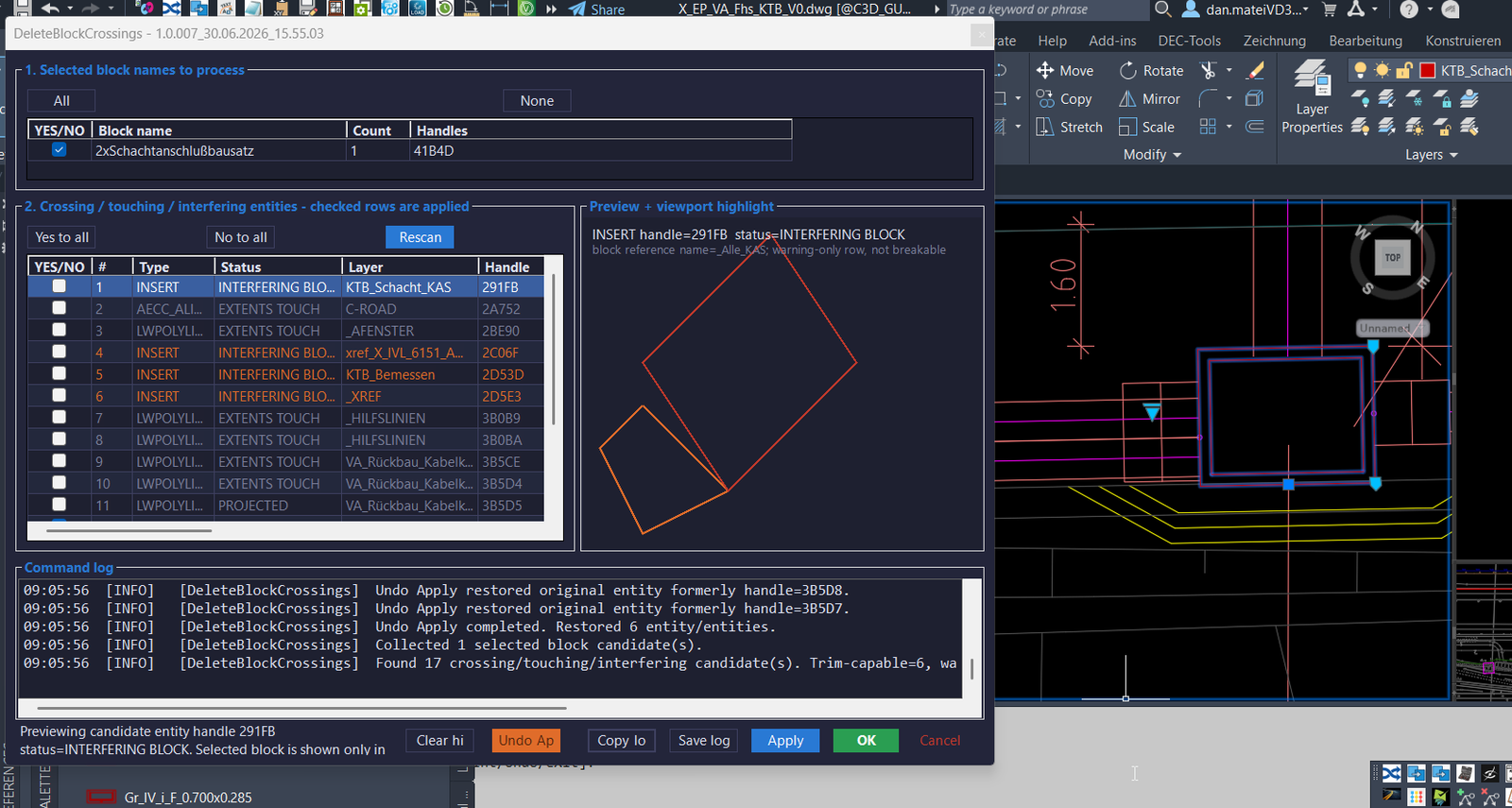
Command:
🧰 Load the plugin with NETLOAD by selecting the compiled DeleteBlockCrossings_yyyyMMdd_HHmmss.dll or the active build output DLL.
🚀 Main commands: DELETEBLOCKCROSSINGS, DBC, and ABBS compatibility alias.
📌 The command can use an existing pickfirst block selection, or it prompts the user to select AutoCAD block references using an INSERT selection filter.
🧩 Target platform: AutoCAD and Civil 3D 2024 x64, C# .NET Framework 4.8, ObjectARX managed API, WinForms modeless dialog, and timestamped DLL build output to avoid AutoCAD file locking.
Description:
📘 DeleteBlockCrossings is a productivity tool for AutoCAD and Civil 3D users who need to clean up lines, polylines, splines, arcs, and other curve geometry where it crosses selected block references. The user selects one or more blocks in the drawing, runs DELETEBLOCKCROSSINGS, DBC, or ABBS, and the plugin opens a modeless C# control panel.
🔍 The program reads the selected block references, resolves their effective block names, builds block frames from the block definition and block transform, then scans the same owner drawing space for candidate curves and nearby block references. It classifies the detected geometry as CROSSING, TOUCHING, CROSSING – CHECK, PROJECTED, EXTENTS TOUCH, or INTERFERING BLOCK.
📐 Rows marked as CROSSING are trim-capable when the plugin can calculate a safe two-point break pair. These rows can be checked and processed. Warning-only rows remain visible for CAD review, but their checkboxes are disabled because the code does not have a safe automatic trim operation for those cases.
🧠 The plugin uses AutoCAD database transactions, block frame geometry, intersection checks, sampled curve diagnostics, preview geometry, and split-curve processing to remove the part of each crossing curve that falls inside the selected block frame. This helps users automate repetitive block crossing cleanup while still showing diagnostics before modifying the drawing.
📝 The modeless interface includes selected block groups, crossing and touching rows, preview and viewport highlight, command log, apply, undo apply, copy log, save log, clear highlight, OK, and Cancel actions. Settings are stored under %APPDATA%\DeleteBlockCrossings\DeleteBlockCrossings.cfg, and diagnostic logs can be saved as text files.
Helper function: (if any)
- 🚀 Command registration –
Plugin.csregistersDELETEBLOCKCROSSINGS,DBC, andABBSthrough AutoCADCommandMethodattributes. - 🧩 Command runner –
DeleteBlockCrossingsCommandRunner.Run()collects the pickfirst selection or prompts forINSERTentities, clears the implied selection, loads persisted settings, and opens the modeless form. - 🔍 Block candidate collector –
DbcScanner.CollectBlocks()reads selectedBlockReferenceobjects, resolves effective dynamic block names, stores handles, layers, owner spaces, and calculated block frames. - 📐 Crossing scanner –
DbcScanner.ScanCrossings()scans entities in the block owner space, detects curves and nearby block references, and creates practical diagnostics for trimming and review. - 🧠 Intersection and sampling logic –
GeometryUtil.Intersections(),PolylineSamplesTouchOrEnterPolygon(), andApproximateSamplePolygonIntersections()improve detection when AutoCADIntersectWithreturns incomplete points for splines or polylines. - 📊 Status classification – candidate rows are classified as
CROSSING,TOUCHING,CROSSING - CHECK,PROJECTED,EXTENTS TOUCH, orINTERFERING BLOCKto separate safe trim rows from review-only diagnostics. - ✂️ Trim engine –
DbcTrimmer.TrimChecked()processes checked trim-capable rows, splits curves at calculated break points withCurve.GetSplitCurves(), keeps outside pieces, and erases the original curve. - ↩️ Undo apply system –
TrimApplyRecordandUndoApply()store original entity clones and created object IDs so the last apply operation can be reverted. - 🎨 Preview and highlight –
PreviewSampler.Sample()and the WinForms preview panel display the selected block frame and candidate geometry while AutoCAD viewport highlighting helps identify the active row. - 🔐 Settings and diagnostics –
DbcSettingsstores form bounds and enabled block names, whileDbcLoggerrecords operation history and exports diagnostic reports. - 🧰 Build lock workaround – the project uses timestamped output folders and timestamped DLL names so AutoCAD does not block rebuilding the original DLL after
NETLOAD.
Functionalities:
- 🚀 Launch crossing cleanup workflow – run
DELETEBLOCKCROSSINGS,DBC, orABBSto open a modeless AutoCAD Civil 3D cleanup tool. - 📌 Select block references – use pickfirst selection or a prompted
INSERTfilter to choose the block references that define the cleanup zones. - 🔢 Group selected blocks by name – display selected block names, counts, handles, and process toggles so repeated block references can be enabled or disabled together.
- 🔍 Scan crossing and touching geometry – find curves, block references, extents overlaps, projected crossings, tangent contacts, and warning-only interference candidates.
- 📐 Trim safe crossing curves – automatically trim checked
CROSSINGrows by removing the curve portion inside the selected block frame. - 🟧 Show warning-only diagnostics – keep
TOUCHING,CROSSING - CHECK,PROJECTED,EXTENTS TOUCH, andINTERFERING BLOCKrows visible for manual QA review. - 🎨 Preview candidate geometry – display sampled entity geometry and block frame context in the preview panel for faster visual confirmation.
- 🔍 Viewport highlight – highlight the active candidate in the AutoCAD drawing without leaving the modeless management workflow.
- 🔄 Rescan after changing block filters – update selected block processing state and rebuild the crossing candidate table.
- ✅ Check all and none controls – quickly enable or disable block groups and trim-capable crossing rows before applying changes.
- ↩️ Undo last apply – restore original entities and erase generated curve pieces from the last trim operation.
- 📝 Copy and save logs – copy the live log or save a diagnostic report with version, selected block handles, candidate handles, statuses, and intersection points.
- 🔒 Persist user choices – remember form size, form position, and enabled block-name settings in
DeleteBlockCrossings.cfg. - 🧰 Developer-friendly build output – use timestamped local build folders to reduce DLL lock problems while testing with AutoCAD
NETLOAD.
Result:
✅ The final result is a practical AutoCAD and Civil 3D cleanup plugin that helps users identify and remove unwanted curve segments passing through selected blocks. It reduces manual trimming, improves DWG quality control, documents crossing diagnostics, supports visual review, and keeps a reversible apply workflow for safer production drawing cleanup.
Images, animations etc.
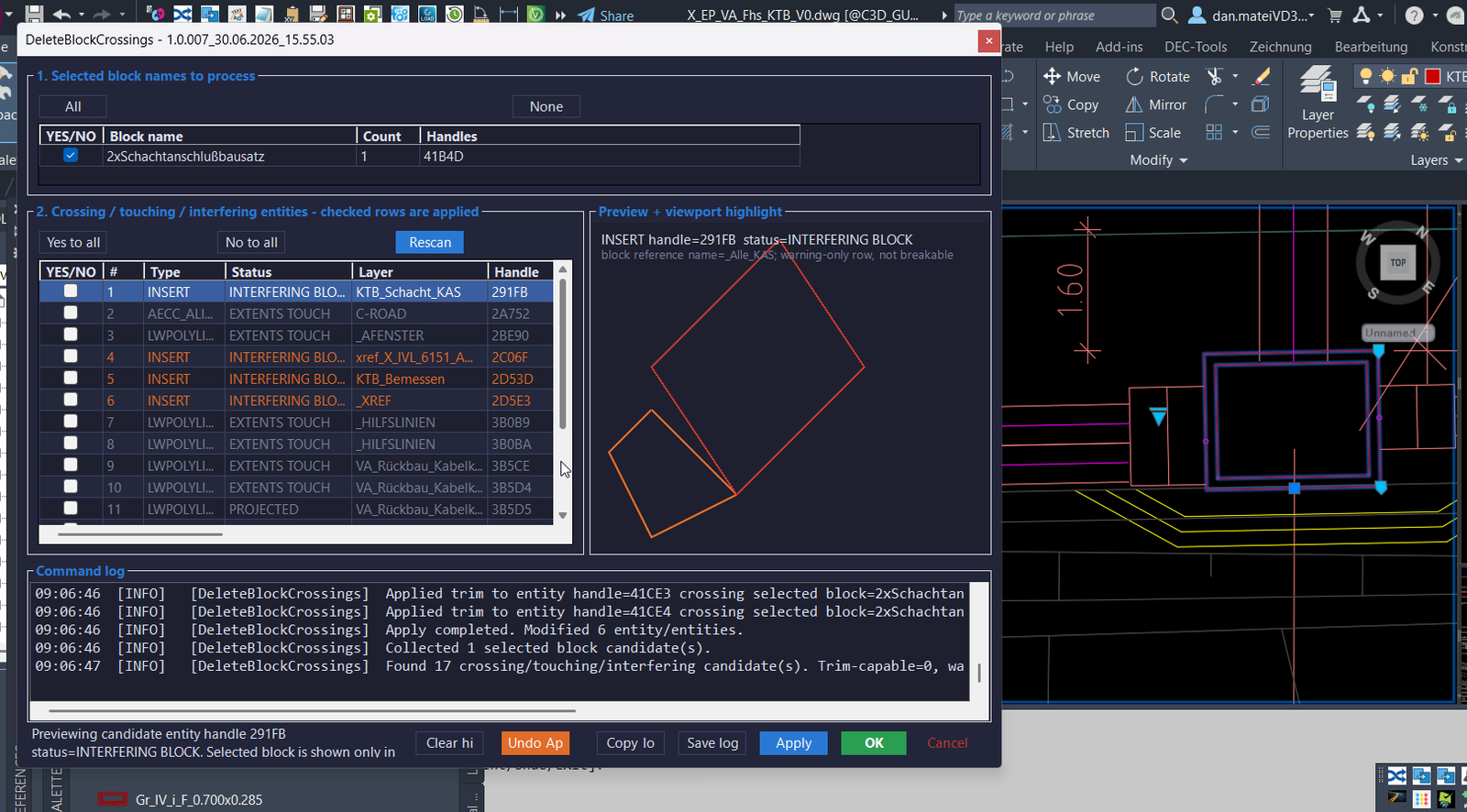
XAML code:
<ResourceDictionary
xmlns="http://schemas.microsoft.com/winfx/2006/xaml/presentation"
xmlns:x="http://schemas.microsoft.com/winfx/2006/xaml"
xmlns:src="clr-namespace:Autodesk.Windows;assembly=AdWindows">

<src:RibbonToolTip x:Key="DeleteBlockCrossings">
<src:RibbonToolTip.ExpandedContent>
<StackPanel>
<TextBlock Background="AntiqueWhite" TextAlignment="Left">
<Bold>Function Syntax: DELETEBLOCKCROSSINGS / DBC / ABBS</Bold>
<LineBreak/>
<Bold>Version: 1.0 Date: 30.06.2026 17:58:39</Bold>
<LineBreak/>
<Bold>Version: 1.1 Date: 30.06.2026 8:35:39PM</Bold>
<LineBreak/>
<Hyperlink>N/A</Hyperlink>

<Bold><Run Foreground="DodgerBlue">short_description:</Run></Bold><LineBreak/>
<Run Foreground="White">🚀 DeleteBlockCrossings is an AutoCAD and Civil 3D 2024 .NET plugin for detecting and trimming curves that cross selected block references.</Run><LineBreak/>
<Run Foreground="White">It replaces the older ABBS workflow with a modeless C# interface, crossing diagnostics, preview feedback, apply control, undo support, and exportable logs.</Run><LineBreak/>
<Run Foreground="LimeGreen">The main benefit is faster DWG cleanup, safer block crossing control, better CAD quality review, and fewer manual trim operations.</Run><LineBreak/>
<LineBreak/>
<Bold><Run Foreground="DodgerBlue">command:</Run></Bold><LineBreak/>
<Run Foreground="White">🧰 Load the plugin with NETLOAD by selecting the compiled DeleteBlockCrossings_yyyyMMdd_HHmmss.dll or the active build output DLL.</Run><LineBreak/>
<Bold><Run Foreground="Orange">🚀 Main commands: DELETEBLOCKCROSSINGS, DBC, and ABBS compatibility alias.</Run></Bold><LineBreak/>
<Run Foreground="White">📌 The command can use pickfirst block selection or prompt the user to select block references with an INSERT selection filter.</Run><LineBreak/>
<Run Foreground="White">🧩 Target platform: AutoCAD and Civil 3D 2024 x64, C# .NET Framework 4.8, ObjectARX managed API, and WinForms.</Run><LineBreak/>
<LineBreak/>
<Bold><Run Foreground="DodgerBlue">description:</Run></Bold><LineBreak/>
<Run Foreground="White">📘 The user selects one or more block references and runs DELETEBLOCKCROSSINGS, DBC, or ABBS.</Run><LineBreak/>
<Run Foreground="White">🔍 The plugin reads the selected block references, resolves effective dynamic block names, builds block frames, and scans the same owner drawing space.</Run><LineBreak/>
<Run Foreground="White">📐 It detects lines, arcs, polylines, splines, and other curve geometry that crosses, touches, projects through, or overlaps the selected block frames.</Run><LineBreak/>
<Run Foreground="White">🧠 Rows are classified as CROSSING, TOUCHING, CROSSING - CHECK, PROJECTED, EXTENTS TOUCH, or INTERFERING BLOCK.</Run><LineBreak/>
<Run Foreground="LimeGreen">✅ Only safe CROSSING rows with a reliable two-point break pair are enabled for automatic trimming.</Run><LineBreak/>
<Bold><Run Foreground="DarkRed">🔴 Warning-only rows remain visible for quality control but are not automatically trimmed.</Run></Bold><LineBreak/>
<Run Foreground="White">📝 The modeless interface provides selected block groups, crossing candidate rows, preview, viewport highlight, command log, apply, undo apply, copy log, and save log.</Run><LineBreak/>
<LineBreak/>
<Bold><Run Foreground="LimeGreen">helper_function:</Run></Bold><LineBreak/>
<Run Foreground="White">🚀 Command registration system - Plugin.cs registers DELETEBLOCKCROSSINGS, DBC, and ABBS as AutoCAD CommandMethod commands.</Run><LineBreak/>
<Run Foreground="White">🧩 Command runner - DeleteBlockCrossingsCommandRunner.Run() collects pickfirst or prompted block selection, clears implied selection, loads settings, and opens the modeless form.</Run><LineBreak/>
<Run Foreground="White">🔍 Block candidate collector - DbcScanner.CollectBlocks() reads BlockReference objects, handles, layers, owner spaces, and calculated block frames.</Run><LineBreak/>
<Run Foreground="White">📐 Crossing scanner - DbcScanner.ScanCrossings() searches the block owner space for curve crossings, touches, projected hits, extents overlaps, and interfering blocks.</Run><LineBreak/>
<Run Foreground="White">🧠 Geometry diagnostics - GeometryUtil.Intersections(), PolylineSamplesTouchOrEnterPolygon(), and ApproximateSamplePolygonIntersections() improve curve detection.</Run><LineBreak/>
<Run Foreground="White">📊 Status classification - the grid separates CROSSING trim rows from TOUCHING, CROSSING - CHECK, PROJECTED, EXTENTS TOUCH, and INTERFERING BLOCK diagnostics.</Run><LineBreak/>
<Run Foreground="White">✂️ Trim engine - DbcTrimmer.TrimChecked() uses Curve.GetSplitCurves() to keep outside pieces and erase the original crossing curve.</Run><LineBreak/>
<Run Foreground="White">↩️ Undo apply system - TrimApplyRecord and UndoApply() restore original cloned entities and erase generated curve pieces from the last apply operation.</Run><LineBreak/>
<Run Foreground="White">🎨 Preview and highlight - PreviewSampler.Sample() and the preview panel show candidate geometry and block frame context for visual checking.</Run><LineBreak/>
<Run Foreground="White">🔐 Settings and diagnostics - DbcSettings saves form and block settings, while DbcLogger saves versioned diagnostic reports.</Run><LineBreak/>
<LineBreak/>
<Bold><Run Foreground="LimeGreen">functionalities:</Run></Bold><LineBreak/>
<Run Foreground="White">🚀 Open DeleteBlockCrossings - runs a modeless AutoCAD Civil 3D block crossing cleanup panel.</Run><LineBreak/>
<Run Foreground="White">📌 Select block references - uses pickfirst or INSERT-filtered selection to define cleanup zones.</Run><LineBreak/>
<Run Foreground="White">🔢 Group selected blocks by name - shows block names, counts, handles, and process toggles.</Run><LineBreak/>
<Run Foreground="White">🔍 Scan crossing and touching entities - detects curves, block interference, extents overlap, and projected crossing diagnostics.</Run><LineBreak/>
<Run Foreground="LimeGreen">📐 Trim safe crossings - removes the curve portion located inside the selected block frame.</Run><LineBreak/>
<Run Foreground="White">🟧 Review warning-only candidates - keeps diagnostic rows visible for QA without unsafe automatic trimming.</Run><LineBreak/>
<Run Foreground="White">🎨 Preview selected candidate - shows sampled geometry and block frame context in the preview panel.</Run><LineBreak/>
<Run Foreground="White">🔍 Highlight in viewport - helps identify the active candidate in the AutoCAD drawing.</Run><LineBreak/>
<Run Foreground="White">🔄 Rescan candidates - updates crossing rows after changing selected block process toggles.</Run><LineBreak/>
<Run Foreground="White">✅ Check all and none controls - quickly controls trim-capable rows before applying changes.</Run><LineBreak/>
<Run Foreground="White">↩️ Undo last apply - restores original entities after the last trimming operation.</Run><LineBreak/>
<Run Foreground="White">📝 Copy and save logs - exports handles, statuses, intersection points, and command diagnostics.</Run><LineBreak/>
<Run Foreground="White">🔒 Persist settings - saves form bounds and block-name process states in DeleteBlockCrossings.cfg.</Run><LineBreak/>
<LineBreak/>
<Bold><Run Foreground="DodgerBlue">result:</Run></Bold><LineBreak/>
<Run Foreground="White">✅ The final result is a practical AutoCAD and Civil 3D cleanup plugin that identifies and removes unwanted curve segments passing through selected blocks.</Run><LineBreak/>
<Run Foreground="LimeGreen">It reduces manual trimming, improves DWG quality control, documents crossing diagnostics, supports visual review, and keeps a reversible apply workflow for safer production drawings.</Run><LineBreak/>
<LineBreak/>
<Bold><Run Foreground="DodgerBlue">additional_info:</Run></Bold><LineBreak/>
<Bold><Run Foreground="DarkRed">🔴 Important limitation: only CROSSING rows with reliable break pairs are automatically trim-capable.</Run></Bold><LineBreak/>
<Run Foreground="White">🟧 TOUCHING, CROSSING - CHECK, PROJECTED, EXTENTS TOUCH, and INTERFERING BLOCK rows are diagnostic rows only.</Run><LineBreak/>
<Bold><Run Foreground="DarkRed">🔴 Applying checked rows modifies the AutoCAD database by replacing original crossing curves with outside pieces.</Run></Bold><LineBreak/>
<Run Foreground="White">📌 Settings and logs are stored in %APPDATA%\DeleteBlockCrossings.</Run><LineBreak/>
<Run Foreground="White">🧰 Build requirement: C# .NET Framework 4.8, x64, AutoCAD Civil 3D 2024 managed references, and ObjectARX props configuration.</Run><LineBreak/>


</StackPanel>

</src:RibbonToolTip.ExpandedContent>
</src:RibbonToolTip>
<Grid>
<MediaElement
 Source="Image_000 - Copy.gif"
 Stretch="Uniform"
 Visibility="Visible"/>
 </Grid>


<Grid>
<Image Source="Image_000.png" Stretch="Uniform"/>
</Grid>

<Grid>
<Image Source="Image_001.png" Stretch="Uniform"/>
</Grid>

</ResourceDictionary>