
Short description
🗑️ Delete2Layouts is an AutoCAD AutoLISP utility for deleting all instances of one selected block or xref from chosen paper-space layouts.
🗂️ It provides a temporary DCL dialog with layout filtering, Select All/None controls, and a clear delete workflow for layout-based cleanup.
Command:
🚀 Main command: Delete2Layouts
🔁 Alias command: _Delete2Layouts
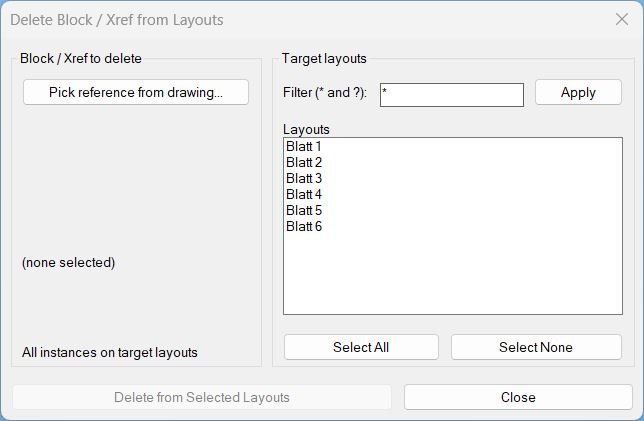
🧰 Pick one block or xref reference, filter target layouts with * and ?, select layouts, then delete matching INSERT instances from those layouts.
Description:
🗑️ Delete2Layouts is an SEO-friendly AutoCAD layout cleanup tool for removing a selected block or xref reference from multiple paper-space layouts.
📋 The routine opens a custom DCL dialog named Delete Block / Xref from Layouts, where the user can pick a reference from the drawing and choose target layouts.
🔍 Layout selection supports wildcard filtering with * and ?, making it useful for large sheet sets with many layout tabs.
🧱 The delete engine scans each selected layout block, compares INSERT names to the picked block or xref name, and deletes matching instances using vlax-invoke-method Delete.
🧹 After deletion, the routine attempts a block purge for the selected name and reports the total deleted instances.
Helper function: (if any)
🧩 ld:write-dcl creates the temporary DCL file used by the layout cleanup dialog.
🧩 ld:get-paper-layouts returns all layouts except Model.
🧩 ld:apply-layout-filter filters layout names using wcmatch wildcard logic.
🧩 ld:do-pick captures the selected INSERT name from a block or xref reference.
🧩 ld:delete-from-layouts scans selected layout blocks and deletes matching INSERT objects.
🧩 ld:do-delete validates selection, starts an undo group, executes deletion, and displays the final result alert.
🧩 ld:cleanup unloads the dialog and deletes the temporary DCL file.
Functionalities:
✅ Pick a block or xref reference from the drawing and capture its INSERT name.
✅ Filter paper-space layout tabs using AutoCAD wildcard patterns.
✅ Select all matching layouts or clear the layout selection.
✅ Delete all matching block/xref instances from selected layouts only.
✅ Preserve model space because the routine targets paper layouts returned by layoutlist.
✅ Wrap deletion inside an AutoCAD undo group for easier rollback.
✅ Attempt to purge the selected block name after layout deletion.
Result:
🗑️ Matching block or xref references are removed from the selected paper-space layouts.
📊 The final alert reports how many instances were deleted and from how many layouts.
🧹 The selected block name is passed to PURGE after deletion.
🗂️ The dialog closes cleanly and removes the temporary DCL resources.
Images, animations etc.
XAML code:
<ResourceDictionary
xmlns="http://schemas.microsoft.com/winfx/2006/xaml/presentation"
xmlns:x="http://schemas.microsoft.com/winfx/2006/xaml"
xmlns:src="clr-namespace:Autodesk.Windows;assembly=AdWindows">

<src:RibbonToolTip x:Key="Delete2Layouts">
<src:RibbonToolTip.ExpandedContent>
<StackPanel>
<TextBlock Background="AntiqueWhite" TextAlignment="Left">
<Bold>Function Syntax: Delete2Layouts / _Delete2Layouts</Bold>
<LineBreak/>
<Bold>Version: 1.1 Date: 20.06.2026 6:38:55PM</Bold>
<LineBreak/>
<Hyperlink>https://www.cadtutor.net/forum/topic/10119-delete-all-layouts-except-current/</Hyperlink>
<Hyperlink>https://www.lee-mac.com/deletefromlayouts.html</Hyperlink>
<LineBreak/>


<Bold><Run Foreground="DodgerBlue">Description</Run></Bold><LineBreak/>
<Run Foreground="White">🗑️ Delete2Layouts is an AutoCAD AutoLISP tool for deleting a picked block or xref reference from selected Paper Space layouts.</Run><LineBreak/>
<Run Foreground="LimeGreen">🗂️ It is optimized for large layout sets where the same title block, viewport marker, legend, xref, or sheet object must be removed from multiple tabs.</Run><LineBreak/>
<LineBreak/>
<Bold><Run Foreground="DodgerBlue">Function Syntax</Run></Bold><LineBreak/>
<Run Foreground="White">🚀 Main command: </Run><Bold><Run Foreground="Orange">Delete2Layouts</Run></Bold><LineBreak/>
<Run Foreground="White">🔁 Alias command: </Run><Bold><Run Foreground="Orange">_Delete2Layouts</Run></Bold><LineBreak/>
<LineBreak/>
<Bold><Run Foreground="DodgerBlue">SEO Optimized Overview</Run></Bold><LineBreak/>
<Run Foreground="White">🔎 This AutoCAD delete block from layouts tool helps clean paper-space sheets by removing repeated block or xref INSERT references from selected layouts only.</Run><LineBreak/>
<Run Foreground="White">📋 The dialog allows the user to pick one block/xref reference, filter target layout names with wildcard patterns, and select exactly where deletion should happen.</Run><LineBreak/>
<Run Foreground="White">🧱 The deletion engine scans each selected layout block, finds matching INSERT objects by name, and deletes them through ActiveX.</Run><LineBreak/>
<Run Foreground="White">🧹 After deleting matching layout references, the routine attempts to purge the selected block name.</Run><LineBreak/>
<LineBreak/>
<Bold><Run Foreground="DodgerBlue">Dialog Features</Run></Bold><LineBreak/>
<Run Foreground="White">📌 Button to pick a block or xref reference from the drawing.</Run><LineBreak/>
<Run Foreground="White">🔍 Layout filter field supporting * and ? wildcards.</Run><LineBreak/>
<Run Foreground="White">✅ Select All and Select None controls for layout selection.</Run><LineBreak/>
<Run Foreground="DarkRed">🗑️ Delete from Selected Layouts action button for the final cleanup operation.</Run><LineBreak/>
<LineBreak/>
<Bold><Run Foreground="DodgerBlue">Important Functions and Calls</Run></Bold><LineBreak/>
<Run Foreground="White">🧩 </Run><Bold><Run Foreground="Orange">ld:do-pick</Run></Bold><Run Foreground="White"> captures the selected INSERT entity name.</Run><LineBreak/>
<Run Foreground="White">🧩 </Run><Bold><Run Foreground="Orange">ld:apply-layout-filter</Run></Bold><Run Foreground="White"> filters layout names through wcmatch.</Run><LineBreak/>
<Run Foreground="White">🧩 </Run><Bold><Run Foreground="Orange">ld:delete-from-layouts</Run></Bold><Run Foreground="White"> scans target layouts and deletes matching references.</Run><LineBreak/>
<Run Foreground="White">🧩 </Run><Bold><Run Foreground="Orange">vlax-invoke-method Delete</Run></Bold><Run Foreground="White"> performs the actual object deletion.</Run><LineBreak/>
<Run Foreground="White">🧩 </Run><Bold><Run Foreground="Orange">PURGE</Run></Bold><Run Foreground="White"> is attempted for the selected block name after deletion.</Run><LineBreak/>
<LineBreak/>
<Bold><Run Foreground="DodgerBlue">Typical Workflow</Run></Bold><LineBreak/>
<Run Foreground="White">1️⃣ Run Delete2Layouts.</Run><LineBreak/>
<Run Foreground="White">2️⃣ Click Pick reference from drawing and select the block or xref to remove.</Run><LineBreak/>
<Run Foreground="White">3️⃣ Filter layout names if needed, then select the target layouts.</Run><LineBreak/>
<Run Foreground="White">4️⃣ Press Delete from Selected Layouts and review the final count.</Run><LineBreak/>
<LineBreak/>
<Bold><Run Foreground="DodgerBlue">Important Notes</Run></Bold><LineBreak/>
<Run Foreground="DarkRed">⚠️ This routine deletes content from selected layouts. Confirm the layout selection before running the delete action.</Run><LineBreak/>
<Run Foreground="White">📌 The routine targets paper-space layouts and does not scan Model Space.</Run><LineBreak/>

<Bold><Run Foreground="Yellow">Tags</Run></Bold><LineBreak/>
<Run Foreground="Yellow">🏷️ AutoCAD, 🏷️ AutoLISP, 🏷️ Civil 3D, 🏷️ Delete Xref, 🏷️ Delete Block, 🏷️ Layouts, 🏷️ Paper Space, 🏷️ Layout Filter, 🏷️ DCL Dialog, 🏷️ Drawing Cleanup, 🏷️ CAD Automation</Run><LineBreak/>


</TextBlock>

<Grid>
<Image Source="Image_000.jpg" Stretch="Uniform"/>
</Grid>

</StackPanel>
</src:RibbonToolTip.ExpandedContent>
</src:RibbonToolTip>
</ResourceDictionary>