
Short description
LayersImportExport_016 is an AutoCAD and Civil 3D 2024 .NET layer-management utility with a modeless C# interface for extracting, editing, exporting, importing, previewing, applying, and restoring drawing and Xref layer properties through CSV or XML workflows.
Command:
Primary command: LAYERSIMPORTEXPORT_016
Export command: LAYEREXPORT_016
Import command: LAYERIMPORT_016
Settings command: LAYERSETTINGS_016
Run LAYERSIMPORTEXPORT_016 to open the combined dialog on the Extract / Export tab. Run LAYEREXPORT_016, LAYERIMPORT_016, or LAYERSETTINGS_016 to open the corresponding tab directly.
Description:
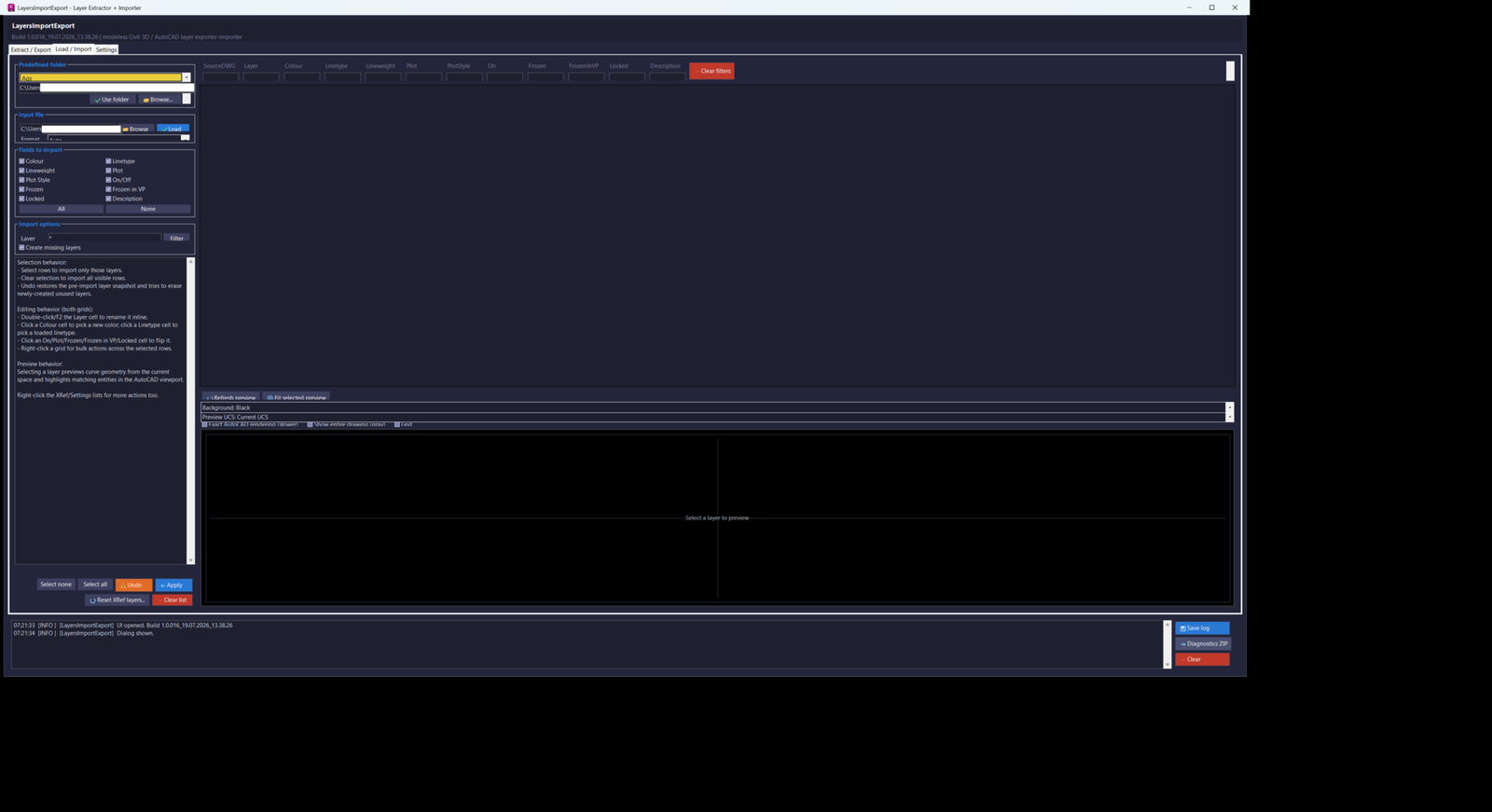
LayersImportExport_016 is a combined C#/.NET replacement for the legacy LayerExtractor.lsp and LayerImport.lsp workflows. It provides one modeless, resizable AutoCAD and Civil 3D 2024 dialog with Extract / Export, Load / Import, and Settings tabs.
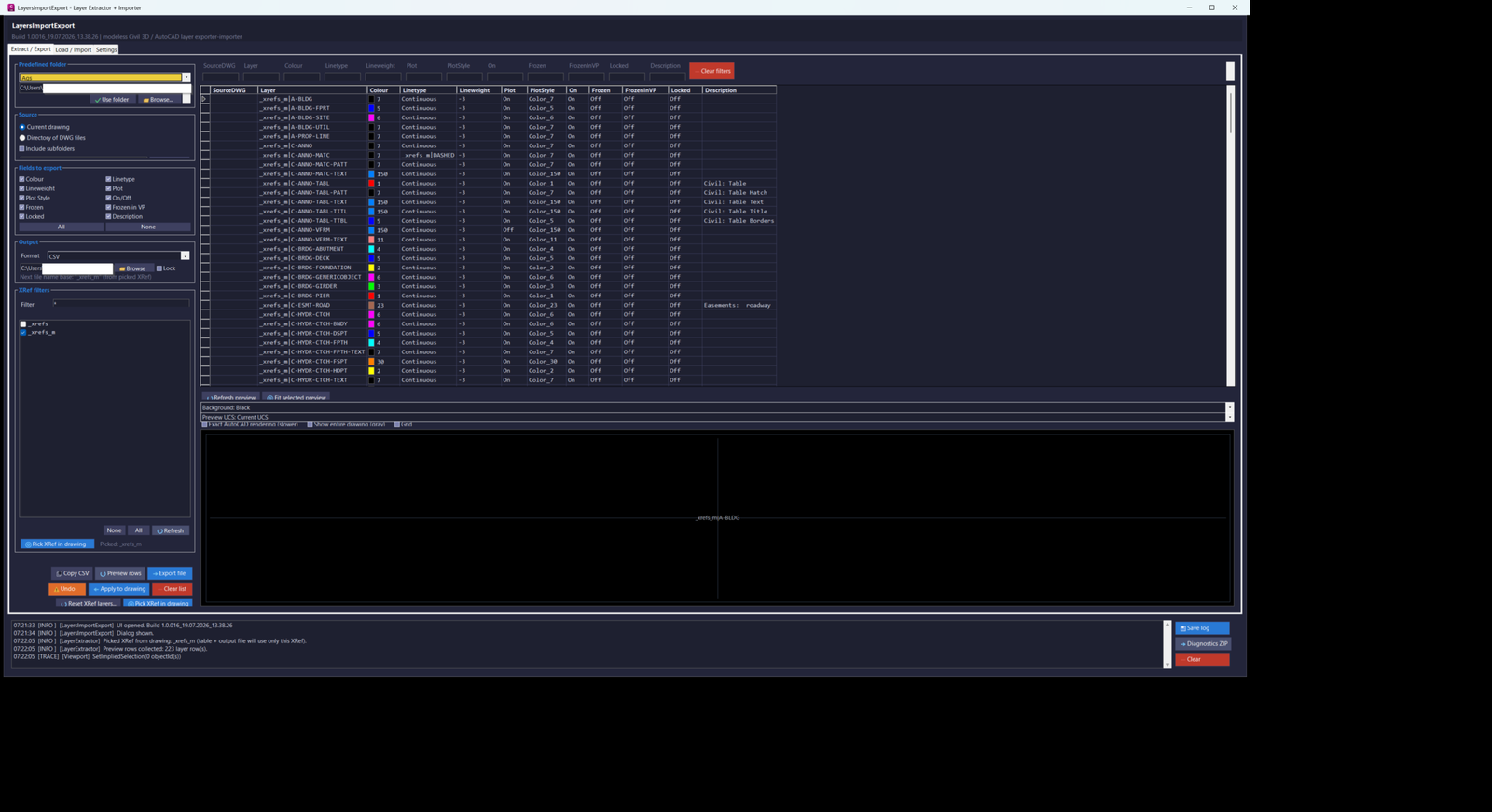
The Export workflow extracts layer definitions from the current drawing or from a directory of DWG files. Directory extraction runs in the background with progress reporting and cancellation. Users can include host-drawing layers, include Xref-dependent layers, restrict output to selected Xrefs, scan subfolders, choose individual property fields, filter the visible layer rows, edit pending values in the grid, copy rows as CSV, apply selected edited rows back to the current drawing, or export the result as UTF-8 CSV or XML.
Exportable and importable properties include layer name, colour, linetype, lineweight, plot state, plot style, on/off state, frozen state, viewport-frozen state, locked state, and description. Directory exports may also include the source DWG name. Colour values support both AutoCAD Colour Index values and true-colour values in TC:R,G,B form.
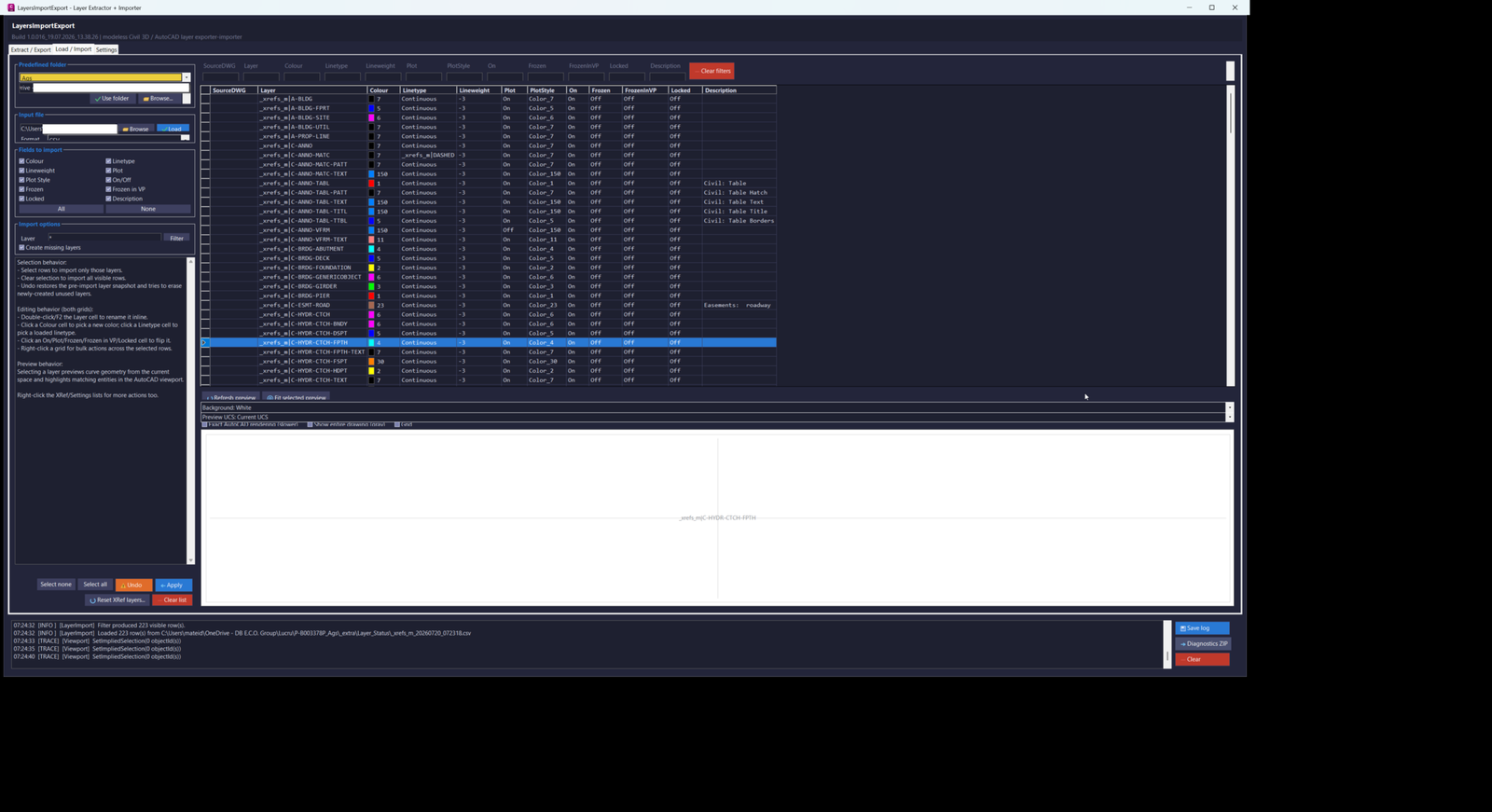
The Import workflow loads CSV or XML layer files, filters the rows, lets users select the property fields to apply, and can create missing layers, update existing layers, or perform both operations. The Apply process reports created, updated, skipped, and failed counts, displays cooperative progress and cancellation, and stores a layer snapshot for Undo.
Xref workflows include reading Xref-dependent layers, filtering by Xref owner, picking an Xref directly from the drawing, resolving selections made on nested entities or attributed content, naming the export after the selected Xref, previewing nested Xref geometry, and resetting local Xref-layer overrides from the resolved source DWG. Reset XRef Layers opens the external drawing as a read-only side database and restores matching Xref layer definitions, with confirmation and Undo support.
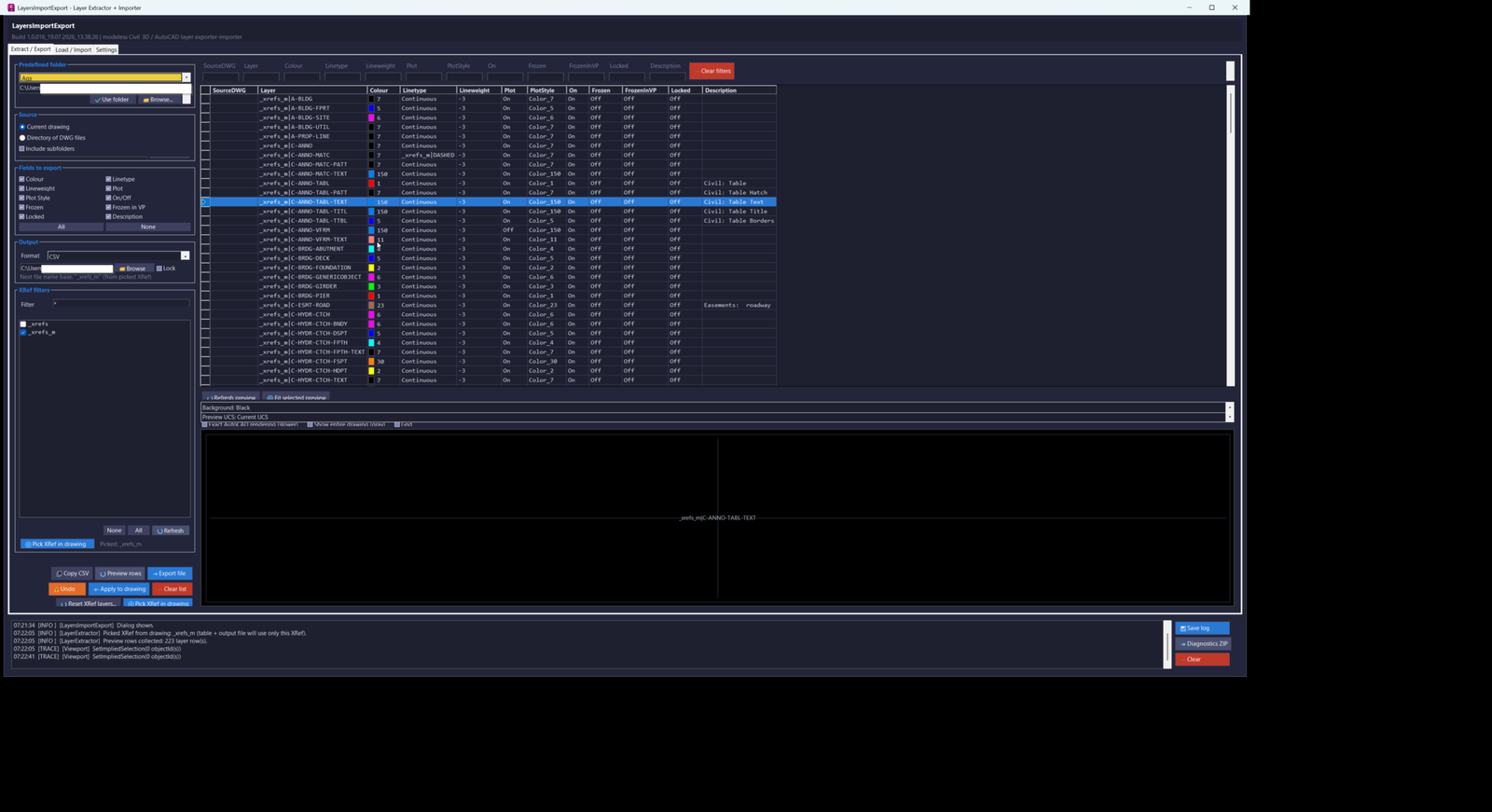
Both layer grids support inline or click-based editing. Users can rename pending layer rows, choose ACI or true colour, select loaded linetypes, choose standard AutoCAD lineweights, and toggle On, Plot, Frozen, Frozen in VP, and Locked states. Multi-row edits apply to the full selected row set. Per-column filters use case-insensitive text matching or explicit wildcard patterns.
The preview system includes a fast interactive GDI+ geometry preview and an optional Exact AutoCAD rendering mode backed by the AutoCAD GraphicsSystem. Users can zoom, pan, double-click to fit, refresh, fit the selected layer, change preview background, choose WCS, Current UCS, or a named UCS, toggle a grid, display the complete current space as gray context, and show the selected layer in its resolved colour. Build 016 re-enables exact rendering and adds detailed initialization, rebuild, entity-added, entity-skipped, context, and stack-trace diagnostics.
The Settings tab manages a schema-versioned ProjectFolders.json database shared by Export and Import. Project folders can be added, updated, renamed, duplicated, deleted, reordered, opened in Explorer, and assigned as default Export or Import locations. The database auto-saves, accepts the legacy bare-array format, backs up unreadable files before reseeding defaults, and works with the persistent LayersImportExport.cfg settings file.
The modeless interface includes viewport highlighting, context menus, generated button icons, responsive DPI-aware layouts, a live application log, log copying, saved log files, and diagnostics ZIP creation. The project targets .NET Framework 4.8 and uses build-numbered assembly and command names so multiple test builds can be NETLOADed side by side.
Helper function: (if any)
Main components include Commands for registering LAYERSIMPORTEXPORT_016, LAYEREXPORT_016, LAYERIMPORT_016, and LAYERSETTINGS_016; MainForm and its Export, Import, Settings, and ContextMenus partial classes for the modeless interface; LayerCadService for extracting current-drawing and directory layers, Xref selection, preview collection, viewport highlighting, snapshots, import application, Xref-layer reset, colour resolution, and linetype discovery; LayerFileCodec for UTF-8 CSV and XML reading and writing; LayerOptions and LayerColumns for selectable layer fields and row models; PreviewPanel and PreviewGeometry for GDI+ and AutoCAD GraphicsSystem previews; AciColorPickerDialog and ListPickerDialog for colour, linetype, and lineweight editing; ProjectFolderStore for the schema-versioned project-folder database; SettingsStore and AppSettings for persistent configuration; AppLog for live logs, saved logs, and diagnostic packages; WildcardUtil for column filters; ColourCodec for ACI and true-colour conversion; and ButtonIconFactory / C3DTheme for self-contained Civil 3D-style interface presentation.
Functionalities:
– Registers the collision-safe LAYERSIMPORTEXPORT_016 combined command.
– Registers LAYEREXPORT_016 to open the Extract / Export tab.
– Registers LAYERIMPORT_016 to open the Load / Import tab.
– Registers LAYERSETTINGS_016 to open the Settings tab.
– Uses a build-numbered assembly and command system for side-by-side NETLOAD testing.
– Targets AutoCAD and Civil 3D 2024 or later through .NET Framework 4.8.
– Opens one modeless and resizable Windows Forms interface.
– Extracts layer definitions from the active drawing.
– Extracts layers from all DWG files in a selected directory.
– Optionally scans DWG subfolders recursively.
– Runs directory extraction on a background thread with progress and cancellation.
– Reports DWG files that could not be read.
– Exports layer records as UTF-8 CSV.
– Exports layer records as XML.
– Imports layer records from CSV.
– Imports layer records from XML.
– Supports Layer, Colour, Linetype, Lineweight, Plot, PlotStyle, On, Frozen, FrozenInVP, Locked, and Description fields.
– Includes SourceDWG in directory-export records when required.
– Supports ACI colour values.
– Supports true-colour values stored as TC:R,G,B.
– Lets users choose which fields are included in Export.
– Lets users choose which fields are applied during Import.
– Creates missing layers when enabled.
– Updates existing layers when enabled.
– Reports created, updated, skipped, and failed layer counts.
– Shows Import Apply progress and supports cooperative cancellation.
– Captures a layer snapshot before live drawing changes.
– Restores the latest drawing-layer change through Undo.
– Applies selected edited Export-grid rows directly to existing layers in the current drawing.
– Confirms live drawing changes before Apply.
– Includes or excludes Xref-dependent layers during extraction.
– Restricts output to Xref layers only.
– Filters output by one or more selected Xref owners.
– Picks an Xref from a block reference, nested entity, or attribute-related selection in the viewport.
– Automatically checks the picked Xref and isolates its layer rows.
– Uses the picked Xref name as the export filename base.
– Displays the reason used to determine the next export filename.
– Recomputes timestamped output paths automatically unless the path is explicitly locked.
– Selects export folders from matched project names, chosen predefined folders, source folders, or fallback locations.
– Resets local Xref-layer overrides from the Xref source drawing.
– Opens the resolved Xref source DWG as a read-only side database.
– Confirms Xref reset operations and supports Undo.
– Lets users rename pending layer rows inline.
– Opens an AutoCAD-style ACI and true-colour picker from Colour cells.
– Lists loaded drawing linetypes for click-to-change editing.
– Lists standard AutoCAD lineweights for click-to-change editing.
– Toggles On, Plot, Frozen, Frozen in VP, and Locked states by clicking cells.
– Applies cell edits across multiple selected rows.
– Displays colour swatches for ACI and true-colour values.
– Displays boolean grid values as On or Off instead of raw numeric values.
– Provides per-column case-insensitive filters.
– Supports explicit asterisk and question-mark wildcard filters.
– Applies Export, Copy CSV, and Apply-to-drawing actions to the currently visible filtered rows.
– Provides right-click menus for preview, copying, selection, field editing, Xref actions, project folders, and logs.
– Copies selected grid rows as CSV to the Windows clipboard.
– Provides an interactive GDI+ preview with mouse-wheel zoom.
– Supports left, middle, or right-button preview panning.
– Fits preview geometry on double-click.
– Refreshes the preview and fits the selected layer.
– Debounces rapid grid-selection preview changes.
– Recurses through nested blocks and Xrefs for layer preview geometry.
– Caps recursive preview scans to protect responsiveness in large drawings.
– Shows selected layer geometry in its resolved colour.
– Optionally shows all other current-space geometry as gray context.
– Provides selectable black, white, and gray preview backgrounds.
– Provides WCS, Current UCS, and named-UCS preview orientations.
– Provides an optional preview grid.
– Provides optional Exact AutoCAD rendering through the AutoCAD GraphicsSystem.
– Re-enables Exact AutoCAD rendering in build 016.
– Logs GraphicsSystem initialization errors, rebuild errors, exception types, stack information, added entities, skipped entities, selected highlight, and context counts.
– Highlights matching top-level drawing objects through implied selection when possible.
– Manages a schema-versioned ProjectFolders.json database.
– Supports Add, Update, Rename, Duplicate, Delete, Top, Up, Down, and Bottom project-folder operations.
– Assigns separate default Export and Import folders.
– Highlights and automatically selects default project folders.
– Auto-selects a project folder from the active DWG filename when no saved or default choice applies.
– Opens configured project folders in Windows Explorer.
– Auto-saves project-folder changes.
– Reads legacy unversioned project-folder arrays.
– Backs up corrupted project-folder databases before reseeding defaults.
– Persists interface and workflow settings in LayersImportExport.cfg.
– Maintains a timestamped live application log.
– Copies log selections or the complete log.
– Saves logs under the LayersImportExport application-data folder.
– Creates a diagnostics ZIP for troubleshooting.
– Uses generated GDI+ button icons with no external image files.
– Uses DPI-aware sizing, anchoring, docking, and scrolling for smaller screens.
– Prevents Escape from accidentally closing the modeless dialog.
Result:
The project transfers complete or selected layer standards between AutoCAD drawings and CSV or XML files, applies edited or imported properties to the active drawing, resets Xref layer overrides from source files, previews layer geometry, and restores the latest layer-changing operation through Undo. It supports both one-drawing and multi-DWG workflows while providing filters, progress, cancellation, project-folder presets, logging, and diagnostics.
Images, animations etc.
XAML code:
<ResourceDictionary
xmlns="http://schemas.microsoft.com/winfx/2006/xaml/presentation"
xmlns:x="http://schemas.microsoft.com/winfx/2006/xaml"
xmlns:src="clr-namespace:Autodesk.Windows;assembly=AdWindows">

<src:RibbonToolTip x:Key="LayersImportExport">
<src:RibbonToolTip.ExpandedContent>
<StackPanel>
<TextBlock Background="AntiqueWhite" TextAlignment="Left">
<Bold>Function Syntax: LayersImportExport</Bold>
<LineBreak/>
<Bold>Version: 1.0 Date: 20.07.2026 07:05:08</Bold>
<LineBreak/>
<Bold>Version: 1.0 Date: 19.07.2026 1:38:28PM</Bold>
<LineBreak/>
<Hyperlink>N/A</Hyperlink>
<LineBreak/>

<Bold><Run Foreground="DodgerBlue">🚀 LayersImportExport_016</Run></Bold><LineBreak/>
<Run Foreground="White">LayersImportExport_016 is an AutoCAD and Civil 3D 2024 .NET utility for extracting, editing, exporting, importing, previewing, and applying drawing and Xref layer properties.</Run><LineBreak/>
<Run Foreground="LimeGreen">It combines layer export, layer import, live-drawing updates, Xref-layer reset, visual previews, project-folder presets, Undo, and diagnostics in one modeless C# interface.</Run><LineBreak/>
<Bold><Run Foreground="DodgerBlue">Main Commands</Run></Bold><LineBreak/>
<Run Foreground="White">🧰 Run </Run><Bold><Run Foreground="Orange">LAYERSIMPORTEXPORT_016</Run></Bold><Run Foreground="White"> to open the combined dialog on the Extract / Export tab.</Run><LineBreak/>
<Run Foreground="White">📤 Run </Run><Bold><Run Foreground="Orange">LAYEREXPORT_016</Run></Bold><Run Foreground="White"> to open the Extract / Export workflow directly.</Run><LineBreak/>
<Run Foreground="White">📥 Run </Run><Bold><Run Foreground="Orange">LAYERIMPORT_016</Run></Bold><Run Foreground="White"> to open the Load / Import workflow directly.</Run><LineBreak/>
<Run Foreground="White">⚙️ Run </Run><Bold><Run Foreground="Orange">LAYERSETTINGS_016</Run></Bold><Run Foreground="White"> to open the project-folder Settings tab directly.</Run><LineBreak/>
<Bold><Run Foreground="DodgerBlue">SEO Optimized Description</Run></Bold><LineBreak/>
<Run Foreground="White">📐 This AutoCAD layer import and export tool transfers layer standards between drawings and UTF-8 CSV or XML files while supporting property editing, filtering, preview, live Apply, and Undo.</Run><LineBreak/>
<Run Foreground="White">🔍 The utility supports CAD standards management, Civil 3D production, layer audits, drawing cleanup, project template coordination, multi-DWG extraction, Xref layer control, and repeatable layer-state deployment.</Run><LineBreak/>
<Run Foreground="White">🧠 It can read the active drawing or scan a directory of DWG files, process selected layer fields, preview nested block and Xref geometry, create missing layers, update existing layers, and restore Xref-dependent layer properties from the source DWG.</Run><LineBreak/>
<Run Foreground="White">📌 LayersImportExport_016 is useful for CAD technicians, Civil 3D users, BIM and CAD coordinators, survey drafting, utility projects, construction documentation, drawing-standard enforcement, and large project layer administration.</Run><LineBreak/>
<Bold><Run Foreground="LimeGreen">Functionalities</Run></Bold><LineBreak/>
<Run Foreground="White">🚀 </Run><Bold><Run Foreground="LimeGreen">Combined modeless workflow</Run></Bold><Run Foreground="White"> - provides Extract / Export, Load / Import, and Settings tabs in one resizable C# dialog.</Run><LineBreak/>
<Run Foreground="White">📂 </Run><Bold><Run Foreground="LimeGreen">Current drawing or DWG directory</Run></Bold><Run Foreground="White"> - extracts layers from the active drawing or scans a selected folder of drawing files.</Run><LineBreak/>
<Run Foreground="White">⏳ </Run><Bold><Run Foreground="LimeGreen">Background directory scan</Run></Bold><Run Foreground="White"> - processes multi-DWG extraction with progress, current-file reporting, cancellation, and failed-file summaries.</Run><LineBreak/>
<Run Foreground="White">📄 </Run><Bold><Run Foreground="LimeGreen">CSV and XML exchange</Run></Bold><Run Foreground="White"> - exports and imports UTF-8 layer records in </Run><Bold><Run Foreground="Orange">CSV</Run></Bold><Run Foreground="White"> or </Run><Bold><Run Foreground="Orange">XML</Run></Bold><Run Foreground="White"> format.</Run><LineBreak/>
<Run Foreground="White">🎨 </Run><Bold><Run Foreground="LimeGreen">Layer property fields</Run></Bold><Run Foreground="White"> - supports Colour, Linetype, Lineweight, Plot, PlotStyle, On, Frozen, FrozenInVP, Locked, and Description.</Run><LineBreak/>
<Run Foreground="White">🌈 </Run><Bold><Run Foreground="LimeGreen">ACI and true colour</Run></Bold><Run Foreground="White"> - round-trips AutoCAD Colour Index values and </Run><Bold><Run Foreground="Orange">TC:R,G,B</Run></Bold><Run Foreground="White"> true-colour values.</Run><LineBreak/>
<Run Foreground="White">🧩 </Run><Bold><Run Foreground="LimeGreen">Create and update layers</Run></Bold><Run Foreground="White"> - creates missing layers, updates existing layers, or performs both operations according to the Import options.</Run><LineBreak/>
<Run Foreground="White">🔢 </Run><Bold><Run Foreground="LimeGreen">Apply progress and totals</Run></Bold><Run Foreground="White"> - reports created, updated, skipped, and failed counts and supports cooperative cancellation.</Run><LineBreak/>
<Run Foreground="White">✏️ </Run><Bold><Run Foreground="LimeGreen">Editable layer grids</Run></Bold><Run Foreground="White"> - renames pending rows, changes colour, linetype, and lineweight, and toggles layer states before Export or Apply.</Run><LineBreak/>
<Run Foreground="White">☑️ </Run><Bold><Run Foreground="LimeGreen">Multi-row editing</Run></Bold><Run Foreground="White"> - applies colour, linetype, lineweight, and state changes across the complete selected row set.</Run><LineBreak/>
<Run Foreground="White">🔍 </Run><Bold><Run Foreground="LimeGreen">Per-column filters</Run></Bold><Run Foreground="White"> - combines case-insensitive text filters or explicit </Run><Bold><Run Foreground="Orange">*</Run></Bold><Run Foreground="White"> and </Run><Bold><Run Foreground="Orange">?</Run></Bold><Run Foreground="White"> wildcard patterns for every displayed property.</Run><LineBreak/>
<Run Foreground="White">✅ </Run><Bold><Run Foreground="LimeGreen">Apply Export edits to drawing</Run></Bold><Run Foreground="White"> - writes selected edited Export-grid rows back to existing layers in the live drawing after confirmation.</Run><LineBreak/>
<Run Foreground="White">↩️ </Run><Bold><Run Foreground="LimeGreen">Layer snapshot Undo</Run></Bold><Run Foreground="White"> - restores the latest Import Apply, Export Apply, or Xref reset operation from a saved layer snapshot.</Run><LineBreak/>
<Run Foreground="White">🧱 </Run><Bold><Run Foreground="LimeGreen">Xref layer workflows</Run></Bold><Run Foreground="White"> - includes Xref layers, restricts output to Xrefs, filters by Xref owner, and reads nested Xref content.</Run><LineBreak/>
<Run Foreground="White">🖱️ </Run><Bold><Run Foreground="LimeGreen">Pick Xref in drawing</Run></Bold><Run Foreground="White"> - resolves a selected Xref insert, nested entity, or attributed object and isolates its layers for export.</Run><LineBreak/>
<Run Foreground="White">🔄 </Run><Bold><Run Foreground="LimeGreen">Reset Xref layers</Run></Bold><Run Foreground="White"> - reads the resolved source DWG and restores locally overridden </Run><Bold><Run Foreground="Orange">XRefName|Layer</Run></Bold><Run Foreground="White"> definitions.</Run><LineBreak/>
<Run Foreground="White">🖼️ </Run><Bold><Run Foreground="LimeGreen">Interactive GDI+ preview</Run></Bold><Run Foreground="White"> - supports wheel zoom, drag pan, double-click fit, refresh, selected-layer fit, and crash-safe geometry drawing.</Run><LineBreak/>
<Run Foreground="White">🎯 </Run><Bold><Run Foreground="LimeGreen">Nested layer preview</Run></Bold><Run Foreground="White"> - recursively samples entities inside blocks and Xrefs and applies accumulated transforms to display their correct world position.</Run><LineBreak/>
<Run Foreground="White">🏙️ </Run><Bold><Run Foreground="LimeGreen">Drawing context preview</Run></Bold><Run Foreground="White"> - shows the selected layer in its resolved colour and optionally displays the complete current space as gray context.</Run><LineBreak/>
<Run Foreground="White">🧭 </Run><Bold><Run Foreground="LimeGreen">UCS preview control</Run></Bold><Run Foreground="White"> - previews geometry in WCS, the Current UCS, or any named UCS stored in the drawing.</Run><LineBreak/>
<Run Foreground="White">🖥️ </Run><Bold><Run Foreground="LimeGreen">Exact AutoCAD rendering</Run></Bold><Run Foreground="White"> - optionally uses the AutoCAD GraphicsSystem for native entity appearance, including linetypes, colours, lineweights, and block content.</Run><LineBreak/>
<Run Foreground="White">🛠️ </Run><Bold><Run Foreground="LimeGreen">Build 016 rendering diagnostics</Run></Bold><Run Foreground="White"> - logs GraphicsSystem initialization, rebuild summaries, added and skipped entities, context counts, exception types, and stack information.</Run><LineBreak/>
<Run Foreground="White">📁 </Run><Bold><Run Foreground="LimeGreen">Project folder database</Run></Bold><Run Foreground="White"> - manages named Export and Import folders through a persistent, schema-versioned JSON list.</Run><LineBreak/>
<Run Foreground="White">⭐ </Run><Bold><Run Foreground="LimeGreen">Default folder selection</Run></Bold><Run Foreground="White"> - highlights and auto-selects separate default Export and Import locations and can match folders from the active DWG name.</Run><LineBreak/>
<Run Foreground="White">🛡️ </Run><Bold><Run Foreground="LimeGreen">Corruption-safe settings</Run></Bold><Run Foreground="White"> - backs up an unreadable project-folder database before reseeding defaults and continues to read the legacy format.</Run><LineBreak/>
<Run Foreground="White">📝 </Run><Bold><Run Foreground="LimeGreen">Logs and diagnostics</Run></Bold><Run Foreground="White"> - provides a live timestamped log, clipboard copy, saved log files, and a troubleshooting diagnostics ZIP.</Run><LineBreak/>
<Run Foreground="White">🧪 </Run><Bold><Run Foreground="LimeGreen">Side-by-side test builds</Run></Bold><Run Foreground="White"> - generates build-numbered DLL and command names so several NETLOADed versions can coexist in one AutoCAD session.</Run><LineBreak/>
<Bold><Run Foreground="DodgerBlue">Practical Result</Run></Bold><LineBreak/>
<Run Foreground="White">✅ The result is a complete AutoCAD layer standards workflow that extracts, filters, edits, previews, exports, imports, applies, resets, and restores layer definitions across active drawings, Xrefs, and directories of DWG files.</Run><LineBreak/>
<Run Foreground="LimeGreen">This makes LayersImportExport_016 useful for Civil 3D production, CAD quality control, project setup, layer audits, drawing exchange, template coordination, and large multi-drawing layer administration.</Run><LineBreak/>
<Bold><Run Foreground="DarkRed">Important Note</Run></Bold><LineBreak/>
<Run Foreground="White">Apply to drawing, Import Apply, Reset XRef Layers, and Undo directly modify the active drawing's layer table. Review filtered rows, selected fields, create or update settings, Xref choices, and confirmation messages before proceeding.</Run><LineBreak/>
<Run Foreground="White">Exact AutoCAD rendering depends on the AutoCAD GraphicsSystem and may be version-sensitive. This package contains source code rather than a compiled plug-in, so build the .NET Framework 4.8 class library with the required AutoCAD or Civil 3D references and NETLOAD the generated DLL.</Run><LineBreak/>


</TextBlock>

<Grid>
<Image Source="2026-07-20 07_21_37-LayersImportExport - Layer Extractor + Importer.png" Stretch="Uniform"/>
</Grid>

<Grid>
<Image Source="2026-07-20 07_22_10-LayersImportExport - Layer Extractor + Importer.png" Stretch="Uniform"/>
</Grid>

<Grid>
<Image Source="2026-07-20 07_22_46-LayersImportExport - Layer Extractor + Importer.png" Stretch="Uniform"/>
</Grid>

<Grid>
<Image Source="2026-07-20 07_24_43-LayersImportExport - Layer Extractor + Importer.png" Stretch="Uniform"/>
</Grid>

</StackPanel>
</src:RibbonToolTip.ExpandedContent>
</src:RibbonToolTip>
</ResourceDictionary>