
Short description
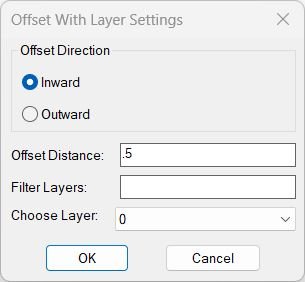
🧩 OffsetAndLayer offsets selected planar curve objects inward or outward by a chosen distance and assigns the new offset geometry to a selected drawing layer.
🎛️ A DCL dialog provides Inward or Outward direction offset distance layer name filtering and a layer dropdown.
💾 The last offset value selected layer and direction are stored in the AutoCAD environment for reuse.
Command:
Main command: OffsetAndLayer
Description:
📏 The default offset distance is 0.20 when no saved value exists.
🗂️ The layer list excludes Xref dependent layers containing the vertical bar separator.
🔎 The Filter Layers field performs case insensitive substring matching over the available layer names.
↔️ The direction can be selected as Inward or Outward and Inward is the default when no saved direction exists.
🖱️ After dialog acceptance the user selects POLYLINE ARC CIRCLE ELLIPSE or SPLINE style objects.
📐 The routine excludes AcDb3dPolyline and requires vlax curve planarity.
🧮 A first positive offset is created and its Area is compared with the source Area to determine whether the direction matches Inward or Outward.
🔄 When the first sign gives the wrong area relationship the offset is deleted and the opposite sign is tried.
🗂️ Successful new offset geometry is assigned to the selected target layer.
Helper function: (if any)
get-all-layers collects non Xref drawing layer names.
update-layer-list filters the DCL layer dropdown.
vla-offset creates candidate offset geometry.
Area comparison determines inward versus outward direction.
Functionalities:
✅ Inward offset – chooses the sign producing a smaller area when possible.
✅ Outward offset – chooses the sign producing a larger area when possible.
✅ Editable distance – accepts a numeric offset value.
✅ Layer filter – searches the available user layers by name.
✅ Layer dropdown – assigns new geometry to the chosen drawing layer.
✅ Xref layer exclusion – hides dependent Xref layers from the target list.
✅ Planar curve validation – skips non planar objects and 3D polylines.
✅ Automatic sign correction – retries the opposite offset sign when the first result moves in the wrong direction.
✅ Persistent settings – stores last distance layer and direction using setenv.
✅ Undo grouping – wraps the operation in an AutoCAD undo mark.
Result:
🎯 The result is offset curve geometry on the selected destination layer.
↔️ The routine attempts to ensure the resulting offset direction matches the requested Inward or Outward choice.
Images, animations etc.
XAML code:
<ResourceDictionary
xmlns="http://schemas.microsoft.com/winfx/2006/xaml/presentation"
xmlns:x="http://schemas.microsoft.com/winfx/2006/xaml"
xmlns:src="clr-namespace:Autodesk.Windows;assembly=AdWindows">

<src:RibbonToolTip x:Key="OffsetAndLayer">
<src:RibbonToolTip.ExpandedContent>
<StackPanel>
<TextBlock Background="AntiqueWhite" TextAlignment="Left">
<Bold>Function Syntax: OffsetAndLayer</Bold>
<LineBreak/>
<Bold>Version: 1.0 Date: 20.06.2026 6:39:00PM</Bold>
<LineBreak/>
<Hyperlink>N/A</Hyperlink>
<LineBreak/>
<Bold><Run Foreground="DodgerBlue">Description</Run></Bold><LineBreak/>
<Run Foreground="White">🧩 OffsetAndLayer offsets selected planar curve objects inward or outward by a chosen distance and assigns the new offset geometry to a selected drawing layer.</Run><LineBreak/>
<Run Foreground="White">🎛️ A DCL dialog provides Inward or Outward direction offset distance layer name filtering and a layer dropdown.</Run><LineBreak/>
<Run Foreground="White">💾 The last offset value selected layer and direction are stored in the AutoCAD environment for reuse.</Run><LineBreak/>
<LineBreak/>
<Bold><Run Foreground="DodgerBlue">Function Syntax</Run></Bold><LineBreak/>
<Run Foreground="White">Main command: </Run><Bold><Run Foreground="Orange">OffsetAndLayer</Run></Bold><LineBreak/>
<LineBreak/>
<Bold><Run Foreground="DodgerBlue">SEO Optimized Overview</Run></Bold><LineBreak/>
<Run Foreground="White">📏 The default offset distance is 0.20 when no saved value exists.</Run><LineBreak/>
<Run Foreground="White">🗂️ The layer list excludes Xref dependent layers containing the vertical bar separator.</Run><LineBreak/>
<Run Foreground="White">🔎 The Filter Layers field performs case insensitive substring matching over the available layer names.</Run><LineBreak/>
<Run Foreground="White">↔️ The direction can be selected as Inward or Outward and Inward is the default when no saved direction exists.</Run><LineBreak/>
<Run Foreground="White">🖱️ After dialog acceptance the user selects POLYLINE ARC CIRCLE ELLIPSE or SPLINE style objects.</Run><LineBreak/>
<Run Foreground="White">📐 The routine excludes AcDb3dPolyline and requires vlax curve planarity.</Run><LineBreak/>
<Run Foreground="White">🧮 A first positive offset is created and its Area is compared with the source Area to determine whether the direction matches Inward or Outward.</Run><LineBreak/>
<Run Foreground="White">🔄 When the first sign gives the wrong area relationship the offset is deleted and the opposite sign is tried.</Run><LineBreak/>
<Run Foreground="White">🗂️ Successful new offset geometry is assigned to the selected target layer.</Run><LineBreak/>
<LineBreak/>
<Bold><Run Foreground="LimeGreen">Primary Workflow</Run></Bold><LineBreak/>
<Run Foreground="White">• Run OffsetAndLayer.</Run><LineBreak/>
<Run Foreground="White">• Choose Inward or Outward.</Run><LineBreak/>
<Run Foreground="White">• Enter the offset distance.</Run><LineBreak/>
<Run Foreground="White">• Filter the layer list if required and choose the target layer.</Run><LineBreak/>
<Run Foreground="White">• Click OK.</Run><LineBreak/>
<Run Foreground="White">• Select the planar curve objects to offset.</Run><LineBreak/>
<Run Foreground="White">• The routine creates the requested directional offset and assigns each successful result to the selected layer.</Run><LineBreak/>
<LineBreak/>
<Bold><Run Foreground="LimeGreen">Functionalities</Run></Bold><LineBreak/>
<Run Foreground="White">✅ </Run><Bold><Run Foreground="LimeGreen">Inward offset</Run></Bold><Run Foreground="White"> - chooses the sign producing a smaller area when possible.</Run><LineBreak/>
<Run Foreground="White">✅ </Run><Bold><Run Foreground="LimeGreen">Outward offset</Run></Bold><Run Foreground="White"> - chooses the sign producing a larger area when possible.</Run><LineBreak/>
<Run Foreground="White">✅ </Run><Bold><Run Foreground="LimeGreen">Editable distance</Run></Bold><Run Foreground="White"> - accepts a numeric offset value.</Run><LineBreak/>
<Run Foreground="White">✅ </Run><Bold><Run Foreground="LimeGreen">Layer filter</Run></Bold><Run Foreground="White"> - searches the available user layers by name.</Run><LineBreak/>
<Run Foreground="White">✅ </Run><Bold><Run Foreground="LimeGreen">Layer dropdown</Run></Bold><Run Foreground="White"> - assigns new geometry to the chosen drawing layer.</Run><LineBreak/>
<Run Foreground="White">✅ </Run><Bold><Run Foreground="LimeGreen">Xref layer exclusion</Run></Bold><Run Foreground="White"> - hides dependent Xref layers from the target list.</Run><LineBreak/>
<Run Foreground="White">✅ </Run><Bold><Run Foreground="LimeGreen">Planar curve validation</Run></Bold><Run Foreground="White"> - skips non planar objects and 3D polylines.</Run><LineBreak/>
<Run Foreground="White">✅ </Run><Bold><Run Foreground="LimeGreen">Automatic sign correction</Run></Bold><Run Foreground="White"> - retries the opposite offset sign when the first result moves in the wrong direction.</Run><LineBreak/>
<Run Foreground="White">✅ </Run><Bold><Run Foreground="LimeGreen">Persistent settings</Run></Bold><Run Foreground="White"> - stores last distance layer and direction using setenv.</Run><LineBreak/>
<Run Foreground="White">✅ </Run><Bold><Run Foreground="LimeGreen">Undo grouping</Run></Bold><Run Foreground="White"> - wraps the operation in an AutoCAD undo mark.</Run><LineBreak/>
<LineBreak/>
<Bold><Run Foreground="DodgerBlue">Important Commands and Aspects</Run></Bold><LineBreak/>
<Run Foreground="White">🧩 get-all-layers collects non Xref drawing layer names.</Run><LineBreak/>
<Run Foreground="White">🧩 update-layer-list filters the DCL layer dropdown.</Run><LineBreak/>
<Run Foreground="White">🧩 vla-offset creates candidate offset geometry.</Run><LineBreak/>
<Run Foreground="White">🧩 Area comparison determines inward versus outward direction.</Run><LineBreak/>
<LineBreak/>
<Bold><Run Foreground="DodgerBlue">Result</Run></Bold><LineBreak/>
<Run Foreground="White">🎯 The result is offset curve geometry on the selected destination layer.</Run><LineBreak/>
<Run Foreground="White">↔️ The routine attempts to ensure the resulting offset direction matches the requested Inward or Outward choice.</Run><LineBreak/>
<LineBreak/>
<Bold><Run Foreground="DarkRed">Important Notes</Run></Bold><LineBreak/>
<Run Foreground="White">⚠️ </Run><Bold><Run Foreground="DarkRed">The direction test depends on the source and offset entities exposing meaningful Area values.</Run></Bold><LineBreak/>
<Run Foreground="White">⚠️ </Run><Bold><Run Foreground="DarkRed">AcDb3dPolyline entities are explicitly excluded.</Run></Bold><LineBreak/>
<Run Foreground="White">⚠️ </Run><Bold><Run Foreground="DarkRed">The current selection filter includes polyline arc circle ellipse and spline categories.</Run></Bold><LineBreak/>
<LineBreak/>
<Bold><Run Foreground="Yellow">SEO Keywords</Run></Bold><LineBreak/>
<Run Foreground="Yellow">🏷️ AutoCAD, 🏷️ Civil 3D, 🏷️ AutoLISP, 🏷️ OffsetAndLayer, 🏷️ Offset inward, 🏷️ Offset outward, 🏷️ Layer assignment, 🏷️ Layer filter, 🏷️ Planar curve, 🏷️ VLA Offset, 🏷️ CAD automation</Run><LineBreak/>


</TextBlock>

<Grid>
<Image Source="Image_000.jpg" Stretch="Uniform"/>
</Grid>

</StackPanel>
</src:RibbonToolTip.ExpandedContent>
</src:RibbonToolTip>
</ResourceDictionary>