
Short description
📋 CopyC3DEntitiesToClipboard.lsp is an AutoCAD Civil 3D AutoLISP clipboard utility that duplicates selected entities, explodes the temporary copies, extracts generated TEXT and MTEXT values, copies the cleaned text to the Windows clipboard, and erases the temporary exploded geometry. It helps Civil 3D users copy visible label information quickly without intentionally exploding the original selected objects.
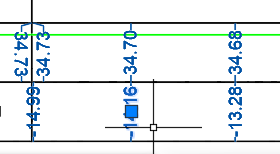
Command:
📌 Main command:
🧰 Loading method: load
📌 The command supports pickfirst selection through
📋 Each selected object is copied in place with
💥 The temporary copied object is exploded using
📋 The final plain-text output is copied to the Windows clipboard using
🎯 Target platform: AutoCAD and Autodesk Civil 3D with AutoLISP, Visual LISP COM support, and Windows clipboard support.
CopyC3DEntitiesToClipboard.🧰 Loading method: load
CopyC3DEntitiesToClipboard.lsp in AutoCAD or Civil 3D using APPLOAD, then run CopyC3DEntitiesToClipboard from the command line.📌 The command supports pickfirst selection through
ssget "_I" and normal manual selection through ssget.📋 Each selected object is copied in place with
vla-copy or the AutoCAD COPY command as fallback.💥 The temporary copied object is exploded using
EXPLODE so generated TEXT and MTEXT content can be extracted.📋 The final plain-text output is copied to the Windows clipboard using
htmlfile, MSForms.DataObject, or clip.exe.🎯 Target platform: AutoCAD and Autodesk Civil 3D with AutoLISP, Visual LISP COM support, and Windows clipboard support.
Helper function: (if any)
- 🔒 Error handler —
*error*restoresCMDECHOand suppresses normal cancel, break, and exit messages. - 🧠 Selection set validator —
_is-picksetchecks whether a returned value is a valid AutoCAD pickset. - 📌 Selection helper —
_get-picksetfirst triesssget "_I"for implied selection, then falls back to normalssget. - 📋 Copy-in-place helper —
_copy-in-placeduplicates an entity usingvla-copy, with AutoCADCOPYfrom0,0,0to0,0,0as fallback. - 💥 Explode collector —
_explode-collectrunsEXPLODE, collects the newly created entities, and attempts to explode nestedINSERTobjects. - 🧹 Text cleanup helper —
_clean-textusesStripMTextCodes_2when available and otherwise removes common MTEXT formatting tokens with a basic fallback routine. - 📝 Text extraction helper —
_text-from-entityextracts content fromTEXTandMTEXTentities created by the temporary explode. - 📋 Clipboard helper —
_clipboard-putattempts clipboard export throughhtmlfile, thenMSForms.DataObject, then a temporary file piped throughclip.exe. - 🧹 Temporary cleanup system — the main routine builds
ssDel, sets it as the active selection withsssetfirst, callsPSELECTwithPrevious, and erases the temporary exploded entities. - ↩️ Undo grouping — the routine wraps the main processing stage with
UNDO BEGINandUNDO ENDto keep the operation grouped in AutoCAD undo history.
Description:
🧠 This AutoLISP routine is designed for AutoCAD Civil 3D users who need to copy visible label text or annotation output from selected entities without manually exploding the original objects. The user runs
The command first checks for a pickfirst selection. If objects were already selected before the command started, the routine uses that selection. If not, it prompts the user to select objects manually. Each selected object is copied in place, then the copied entity is exploded. If the explode result includes nested block references, those
After the temporary explode process, the routine scans all created entities and extracts text from
The collected text is copied to the Windows clipboard as plain text, with each extracted item placed on its own line. The temporary exploded entities are then removed using a generated selection set,
CopyC3DEntitiesToClipboard, selects Civil 3D labels or other drawing entities, and the routine processes temporary copies of those objects.The command first checks for a pickfirst selection. If objects were already selected before the command started, the routine uses that selection. If not, it prompts the user to select objects manually. Each selected object is copied in place, then the copied entity is exploded. If the explode result includes nested block references, those
INSERT entities are also exploded so additional text can be discovered.After the temporary explode process, the routine scans all created entities and extracts text from
TEXT and MTEXT objects. For TEXT, it reads the DXF group 1 value. For MTEXT, it combines DXF groups 1 and 3 so longer MTEXT content is captured. The routine then cleans the extracted text with StripMTextCodes_2 if that helper function is available, or uses a basic fallback cleanup for common MTEXT formatting codes.The collected text is copied to the Windows clipboard as plain text, with each extracted item placed on its own line. The temporary exploded entities are then removed using a generated selection set,
PSELECT, Previous, and ERASE. This makes the workflow useful for Civil 3D label review, QA documentation, survey annotation extraction, construction notes, Excel transfer, report preparation, and drafting cleanup. The routine does not edit ProfileView, SectionView, Alignment, corridors, labels, bands, styles, point groups, or export tables directly. Its purpose is temporary explode-based text extraction and clipboard export.
Functionalities:
- 📌 Select Civil 3D labels or drawing entities — the user selects the objects that should be temporarily copied, exploded, and searched for text.
- 🧠 Use existing selection when available — the routine supports pickfirst workflows by reading the implied selection with
ssget "_I". - 📋 Duplicate selected objects before exploding — original selected objects are intended to remain unchanged because the routine processes copied entities.
- 💥 Explode temporary copies — copied objects are exploded so Civil 3D label display text and annotation text can become readable AutoCAD text objects.
- 🧩 Process nested block references — if exploded output contains
INSERTobjects, the routine attempts to explode them too. - 📝 Extract TEXT content — values from AutoCAD
TEXTentities are collected from the exploded temporary geometry. - 📝 Extract MTEXT content — long MTEXT content is assembled from DXF groups
1and3. - 🧹 Clean MTEXT control codes — formatting codes are removed or simplified before the text is copied.
- 📋 Copy plain text to the Windows clipboard — extracted text is copied as one item per line for easy pasting into Excel, Notepad, Word, emails, and reports.
- 🔐 Use multiple clipboard fallback methods — the routine tries
htmlfile,MSForms.DataObject, andclip.exeto improve clipboard reliability. - 🧹 Erase temporary exploded entities — created geometry is removed after clipboard export to keep the drawing clean.
- ↩️ Group the operation for undo — the command uses AutoCAD undo begin and end markers around the main process.
- ⚡ Fast command-line workflow — no DCL dialog is required, making the command suitable for repeated text extraction tasks.
- 🔴 Selection limitation — the code does not filter specifically for Civil 3D labels, so the user can select unsupported or non-explodable objects.
- 🔴 Explode result limitation — text is copied only when the temporary explode creates
TEXTorMTEXTentities. - 🔴 Cleanup limitation — if a copied entity cannot be exploded or does not produce tracked entities, the user should verify that no temporary copy remains after testing.
- 🔐 Platform limitation — clipboard export depends on Windows COM support and is not intended as a cross-platform AutoCAD workflow.
Result:
📘 The final result is a fast Civil 3D label-to-clipboard extraction workflow. Users can select Civil 3D labels or annotation-like entities, let the routine duplicate and explode temporary copies, collect visible TEXT and MTEXT values, copy clean plain text to the Windows clipboard, and remove the temporary exploded geometry. This improves productivity, reduces manual copying, supports faster QA documentation, helps transfer label data into Excel or reports, and avoids intentionally exploding the original Civil 3D design objects.
Images, animations etc.
XAML code:
<ResourceDictionary
    xmlns="http://schemas.microsoft.com/winfx/2006/xaml/presentation"
    xmlns:x="http://schemas.microsoft.com/winfx/2006/xaml"
    xmlns:src="clr-namespace:Autodesk.Windows;assembly=AdWindows">

    <src:RibbonToolTip x:Key="CopyC3DEntitiesToClipboard">
        <src:RibbonToolTip.ExpandedContent>
            <StackPanel>
                <TextBlock Background="AntiqueWhite" TextAlignment="Left">
				<Bold>Function Syntax: CopyC3DEntitiesToClipboard</Bold>
				<LineBreak/>
				<Hyperlink>AI</Hyperlink>
				<LineBreak/>

<Bold>Description</Bold><LineBreak/>
This AutoLISP routine extracts visible text from selected Civil 3D labels or AutoCAD entities by duplicating the selection, exploding the duplicated objects, collecting generated TEXT and MTEXT content, copying the cleaned text to the Windows clipboard, and deleting the temporary exploded entities afterward.<LineBreak/>
The original selected Civil 3D labels or AutoCAD objects are intended to remain unchanged because the routine works on copied objects instead of directly exploding the originals.<LineBreak/>
The main command is <Bold><Run Foreground="DarkRed">CopyC3DEntitiesToClipboard</Run></Bold>.<LineBreak/>
The routine is useful when Civil 3D labels need to be converted temporarily into plain text so their displayed values can be copied into Excel, Notepad, Word, emails, QA notes, reports, or project documentation.<LineBreak/>
The code works as a command-line utility and does not use a DCL dialog.<LineBreak/>
<LineBreak/>
<Bold>Main Command</Bold><LineBreak/>
• <Bold>📌 <Run Foreground="DarkRed">CopyC3DEntitiesToClipboard</Run></Bold> — starts the duplicate, explode, text extraction, clipboard copy, and cleanup workflow.<LineBreak/>
<LineBreak/>
<Bold>Loading Method</Bold><LineBreak/>
• <Bold>🧰 Load LISP File</Bold> — load the file <Run Foreground="DarkRed">CopyC3DEntitiesToClipboard.lsp</Run> in AutoCAD or Civil 3D using <Run Foreground="DarkRed">APPLOAD</Run>.<LineBreak/>
• <Bold>📌 Run Command</Bold> — run <Run Foreground="DarkRed">CopyC3DEntitiesToClipboard</Run> from the AutoCAD or Civil 3D command line.<LineBreak/>
<LineBreak/>
<Bold>User Workflow</Bold><LineBreak/>
• <Bold>🚀 Start Command</Bold> — the user runs <Run Foreground="DarkRed">CopyC3DEntitiesToClipboard</Run>.<LineBreak/>
• <Bold>📌 Select Objects</Bold> — the command prompts the user to select Civil 3D labels or other entities that may produce text after exploding.<LineBreak/>
• <Bold>🧠 Use Pickfirst When Available</Bold> — the routine first checks the implied selection using <Run Foreground="DarkRed">ssget "_I"</Run> and then falls back to a normal <Run Foreground="DarkRed">ssget</Run> selection if needed.<LineBreak/>
• <Bold>📋 Copy Objects In Place</Bold> — each selected object is duplicated in the same position before any explode operation is performed.<LineBreak/>
• <Bold>💥 Explode Temporary Copy</Bold> — the duplicated object is exploded with <Run Foreground="DarkRed">EXPLODE</Run> so generated AutoCAD entities can be inspected.<LineBreak/>
• <Bold>🧩 Explode Nested Blocks</Bold> — if the exploded result includes block references, the routine attempts to explode those nested <Run Foreground="DarkRed">INSERT</Run> entities too.<LineBreak/>
• <Bold>📝 Collect Text</Bold> — the routine searches the exploded entities for <Run Foreground="DarkRed">TEXT</Run> and <Run Foreground="DarkRed">MTEXT</Run> objects.<LineBreak/>
• <Bold>🧹 Clean MText Codes</Bold> — text is cleaned with <Run Foreground="DarkRed">StripMTextCodes_2</Run> if that helper exists, otherwise a basic fallback cleanup is used.<LineBreak/>
• <Bold>📋 Copy To Clipboard</Bold> — the extracted text is copied to the Windows clipboard using <Run Foreground="DarkRed">htmlfile</Run>, <Run Foreground="DarkRed">MSForms.DataObject</Run>, or <Run Foreground="DarkRed">clip.exe</Run> as fallback methods.<LineBreak/>
• <Bold>🧹 Delete Temporary Geometry</Bold> — the routine builds a selection set of the exploded temporary entities, uses <Run Foreground="DarkRed">PSELECT</Run> with <Run Foreground="DarkRed">Previous</Run>, then uses <Run Foreground="DarkRed">ERASE</Run> to remove the temporary exploded objects.<LineBreak/>
• <Bold>✅ Report Result</Bold> — the command line reports how many text items were copied to the clipboard.<LineBreak/>
<LineBreak/>
<Bold>Functionalities</Bold><LineBreak/>
• <Bold>📌 Pickfirst Selection Support</Bold> — the routine can use objects already selected before the command starts through <Run Foreground="DarkRed">ssget "_I"</Run>.<LineBreak/>
• <Bold>📌 Manual Selection Support</Bold> — if no pickfirst selection exists, the routine asks the user to select objects normally with <Run Foreground="DarkRed">ssget</Run>.<LineBreak/>
• <Bold>📋 Duplicate Before Explode</Bold> — the routine copies each selected entity in place so the original object is not intentionally exploded or modified.<LineBreak/>
• <Bold>🔄 COM Copy Fallback</Bold> — the routine first tries <Run Foreground="DarkRed">vla-copy</Run>, then falls back to the AutoCAD <Run Foreground="DarkRed">COPY</Run> command from <Run Foreground="DarkRed">0,0,0</Run> to <Run Foreground="DarkRed">0,0,0</Run> if COM copy fails.<LineBreak/>
• <Bold>💥 Temporary Explode Workflow</Bold> — the duplicated entity is exploded with <Run Foreground="DarkRed">EXPLODE</Run> so Civil 3D label graphics can become readable AutoCAD text objects.<LineBreak/>
• <Bold>🧩 Nested Block Explosion</Bold> — exploded <Run Foreground="DarkRed">INSERT</Run> entities are processed again so text inside nested blocks can also be collected.<LineBreak/>
• <Bold>📝 TEXT Extraction</Bold> — the routine reads the DXF group <Run Foreground="DarkRed">1</Run> value from <Run Foreground="DarkRed">TEXT</Run> objects.<LineBreak/>
• <Bold>📝 MTEXT Extraction</Bold> — the routine combines MTEXT DXF groups <Run Foreground="DarkRed">1</Run> and <Run Foreground="DarkRed">3</Run> to capture long MTEXT content.<LineBreak/>
• <Bold>🧹 MText Formatting Cleanup</Bold> — the routine removes or replaces common MTEXT control codes such as paragraph codes, underline codes, overline codes, and braces.<LineBreak/>
• <Bold>📋 Clipboard Export</Bold> — all extracted text is combined into a plain-text list and copied to the Windows clipboard.<LineBreak/>
• <Bold>🔐 Multiple Clipboard Methods</Bold> — the code tries <Run Foreground="DarkRed">htmlfile</Run> first, then <Run Foreground="DarkRed">MSForms.DataObject</Run>, then a temporary file piped through <Run Foreground="DarkRed">clip.exe</Run>.<LineBreak/>
• <Bold>🧹 Temporary Object Cleanup</Bold> — exploded temporary entities are erased after the text has been copied.<LineBreak/>
• <Bold>↩️ Undo Grouping</Bold> — the workflow is wrapped inside <Run Foreground="DarkRed">UNDO BEGIN</Run> and <Run Foreground="DarkRed">UNDO END</Run> so the operation can be treated as one undo group in AutoCAD.<LineBreak/>
• <Bold>🔇 Command Echo Control</Bold> — the routine sets <Run Foreground="DarkRed">CMDECHO</Run> to <Run Foreground="DarkRed">0</Run> during processing and restores the previous value afterward.<LineBreak/>
• <Bold>⚡ No Dialog Workflow</Bold> — the command runs directly from the command line without a DCL interface, making it fast for repeated label-to-clipboard extraction tasks.<LineBreak/>
<LineBreak/>
<Bold>Important Helper Logic</Bold><LineBreak/>
• <Bold>🔒 Error Handler</Bold> — <Run Foreground="DarkRed">*error*</Run> restores <Run Foreground="DarkRed">CMDECHO</Run> and suppresses normal cancel, break, and exit messages.<LineBreak/>
• <Bold>🧠 Pickset Validator</Bold> — <Run Foreground="DarkRed">_is-pickset</Run> checks whether a returned value is a valid AutoCAD selection set.<LineBreak/>
• <Bold>📌 Selection Helper</Bold> — <Run Foreground="DarkRed">_get-pickset</Run> retrieves the implied selection first and then asks the user to select objects if needed.<LineBreak/>
• <Bold>📋 Copy Helper</Bold> — <Run Foreground="DarkRed">_copy-in-place</Run> duplicates an entity using <Run Foreground="DarkRed">vla-copy</Run> or the AutoCAD <Run Foreground="DarkRed">COPY</Run> command as fallback.<LineBreak/>
• <Bold>💥 Explode Collector</Bold> — <Run Foreground="DarkRed">_explode-collect</Run> runs <Run Foreground="DarkRed">EXPLODE</Run>, collects all newly created entities, and attempts to explode nested block references.<LineBreak/>
• <Bold>🧹 Text Cleaner</Bold> — <Run Foreground="DarkRed">_clean-text</Run> uses <Run Foreground="DarkRed">StripMTextCodes_2</Run> when available and otherwise performs a basic MTEXT formatting cleanup.<LineBreak/>
• <Bold>📝 Text Reader</Bold> — <Run Foreground="DarkRed">_text-from-entity</Run> reads plain text from <Run Foreground="DarkRed">TEXT</Run> and <Run Foreground="DarkRed">MTEXT</Run> entities.<LineBreak/>
• <Bold>📋 Clipboard Helper</Bold> — <Run Foreground="DarkRed">_clipboard-put</Run> tries three Windows clipboard routes: <Run Foreground="DarkRed">htmlfile</Run>, <Run Foreground="DarkRed">MSForms.DataObject</Run>, and <Run Foreground="DarkRed">clip.exe</Run>.<LineBreak/>
• <Bold>🧹 Deletion Selection Builder</Bold> — the routine collects temporary exploded entities into <Run Foreground="DarkRed">ssDel</Run> and then erases them using <Run Foreground="DarkRed">PSELECT</Run> and <Run Foreground="DarkRed">ERASE</Run>.<LineBreak/>
<LineBreak/>
<Bold>Important Code Notes</Bold><LineBreak/>
• <Bold>📌 Command Name</Bold> — <Run Foreground="Red">the command name is CopyC3DEntitiesToClipboard.</Run><LineBreak/>
• <Bold>🔴 Platform Requirement</Bold> — <Run Foreground="Red">the clipboard workflow is Windows-specific because it uses COM objects and clip.exe.</Run><LineBreak/>
• <Bold>🔴 Selection Filter Note</Bold> — <Run Foreground="Red">the routine prompts for Civil 3D labels, but the code uses ssget without a Civil 3D label filter, so any selectable object can be chosen.</Run><LineBreak/>
• <Bold>🔴 Explode Dependency</Bold> — <Run Foreground="Red">text is collected only if the duplicated object explodes into TEXT or MTEXT entities.</Run><LineBreak/>
• <Bold>🔴 Text Cleanup Dependency</Bold> — <Run Foreground="Red">advanced MTEXT cleanup depends on StripMTextCodes_2 if that helper function is loaded. Otherwise the routine uses only a basic fallback cleanup.</Run><LineBreak/>
• <Bold>🔴 Non Explodable Object Note</Bold> — <Run Foreground="Red">if a copied object cannot be exploded, the copied temporary object may not produce text and should be checked in the drawing after testing.</Run><LineBreak/>
• <Bold>🔴 Undo Handler Note</Bold> — <Run Foreground="Red">the routine starts an AutoCAD undo group, but the error handler does not explicitly close the undo group if an unexpected error occurs after UNDO BEGIN.</Run><LineBreak/>
• <Bold>🔴 Clipboard Limitation</Bold> — <Run Foreground="Red">the routine copies plain text only. It does not create a CSV file, Excel file, table, report, label, band, ProfileView, SectionView, Alignment, or export database.</Run><LineBreak/>
• <Bold>🔴 Civil 3D Object Limitation</Bold> — <Run Foreground="Red">the routine does not modify Civil 3D objects. It only duplicates, explodes temporary copies, extracts text, copies text to the clipboard, and removes the temporary exploded entities.</Run><LineBreak/>
<LineBreak/>
<Bold>Final Result</Bold><LineBreak/>
The final result is a fast Civil 3D label and AutoCAD text extraction workflow.<LineBreak/>
The user can select labels or objects, let the routine duplicate and explode temporary copies, collect generated TEXT and MTEXT values, copy the cleaned result to the Windows clipboard, and automatically remove the temporary exploded geometry.<LineBreak/>
This improves productivity, reduces manual label copying, speeds up QA documentation, supports fast transfer to Excel or reports, and helps Civil 3D users extract visible label information without permanently exploding the original design objects.<LineBreak/>


</TextBlock>


</StackPanel>
</src:RibbonToolTip.ExpandedContent>
 </src:RibbonToolTip>

</ResourceDictionary>
Additional info:
Learn more:
Open Website
Share this page:
Subscribe
Login
0 Comments
Oldest
Tags: 🏷️ C3D_extra_menu, 🏷️ C3D_tools
Tags: 🏷️ C3D_extra_menu, 🏷️ C3D_tools