
Short description
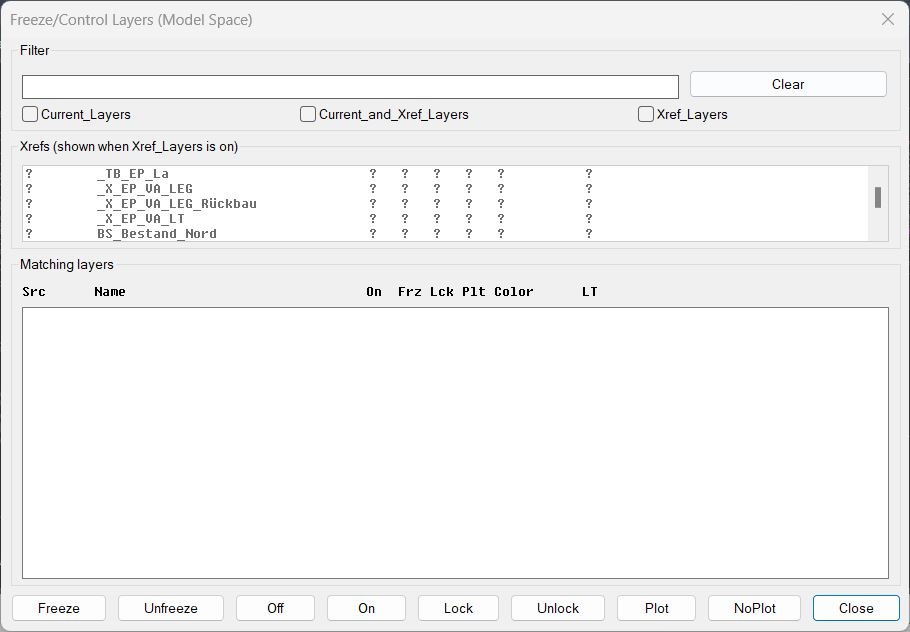
❄️ FreezeLayersInMS is an AutoCAD and Civil 3D DCL layer manager for filtering current and xref layers, then freezing, thawing, locking, plotting, or switching them on and off.
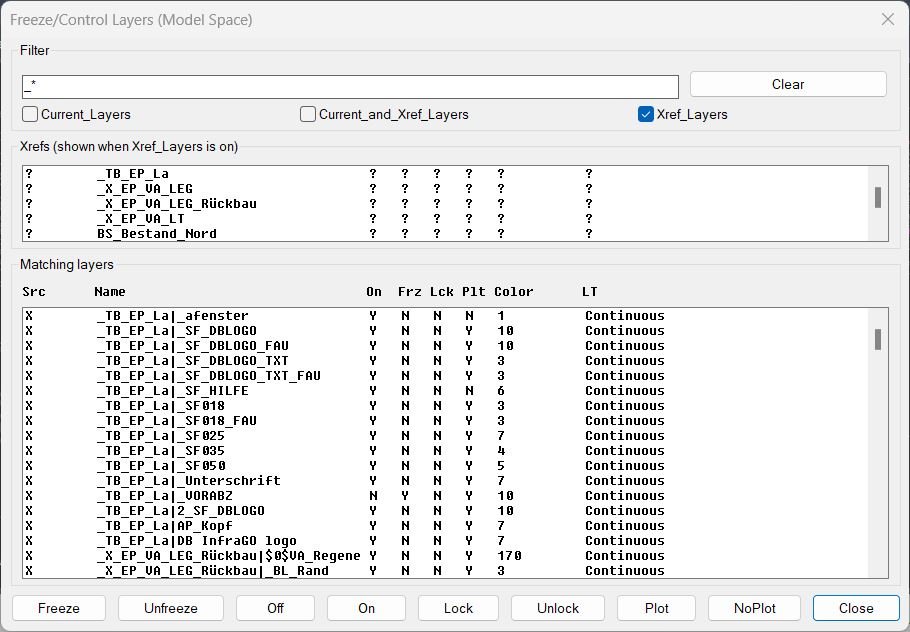
🔍 It displays matching layer status in a fixed-width table and hides xref prefixes for readability while preserving the true layer names for operations.
Command:
🚀 Main command: FLMS3
🔍 Filter by current layers, xref layers, or current and xref layers together.
🧰 Apply Freeze, Unfreeze, Off, On, Lock, Unlock, Plot, or NoPlot to selected matching layers.
Description:
❄️ FreezeLayersInMS is an SEO-friendly AutoCAD layer visibility manager for controlling local and xref layer states from a custom DCL dialog.
🔍 The dialog includes a name filter, xref filter, xref multi-selection list, and a matching-layers table with source, layer name, on/off state, freeze state, lock state, plot state, color, and linetype.
🧠 Xref layer names are displayed without the xref| prefix to keep the list readable, but operations still use the true full layer names internally.
📌 This is useful for Civil 3D model-space cleanup, xref coordination, layer QA, plan-production visibility control, and project-layer standard management.
Helper function: (if any)
🧩 flms3-get-all-xrefs enumerates xref block definitions available in the drawing.
🧩 flms3-get-layers builds the filtered current, xref, or combined layer list.
🧩 flms3-disp-line formats layer status columns for the DCL list box.
🧩 flms3-refresh-xrefs and flms3-refresh-layers keep the xref and layer lists synchronized with filters.
🧩 flms3-apply runs the selected layer-state action on selected layers.
🧩 flms3-snapshot and flms3-restore remember dialog state during the session.
Functionalities:
✅ Filter layer names with wildcard-aware text input.
✅ Work with current layers, xref layers, or both.
✅ Filter xref names separately before displaying their layers.
✅ Multi-select matching layers from a fixed-width DCL table.
✅ Apply Freeze, Unfreeze, Off, On, Lock, Unlock, Plot, and NoPlot actions.
✅ Display ACI color names where possible for faster layer review.
✅ Clear filters and refresh the layer list interactively.
Result:
🎯 The result is faster layer control inside ModelSpace, especially for drawings with many xrefs and long layer names.
🟢 Users can isolate the exact matching layers and apply visibility, locking, and plotting states without opening the full AutoCAD Layer Properties Manager.
Images, animations etc.
XAML code:
<ResourceDictionary
xmlns="http://schemas.microsoft.com/winfx/2006/xaml/presentation"
xmlns:x="http://schemas.microsoft.com/winfx/2006/xaml"
xmlns:src="clr-namespace:Autodesk.Windows;assembly=AdWindows">

<src:RibbonToolTip x:Key="FreezeLayersInMS">
<src:RibbonToolTip.ExpandedContent>
<StackPanel>
<TextBlock Background="AntiqueWhite" TextAlignment="Left">
<Bold>Function Syntax: FreezeLayersInMS</Bold>
<LineBreak/>
<Hyperlink>AI</Hyperlink>
<LineBreak/>
<TextBlock xml:space="preserve">
  <Bold>Description</Bold><LineBreak/>
  <Run>FreezeLayersInMS_full_xfFilter_v12_mod_addedcols_colorNames.lsp opens a DCL dialog to manage Model Space layers using VLA operations, showing faux columns with a sticky header.</Run><LineBreak/>
  <Run>Columns shown: Src, Name, On, Frz, Lck, Plt, Color, LT. Standard ACI colors (1–9) display as names (1 red, 2 yellow, 3 green, 4 cyan, 5 blue, 6 magenta, 7 white, 8 darkgray, 9 lightgray); other values remain numeric.</Run><LineBreak/>
  <LineBreak/>

  <Bold>How to Start</Bold><LineBreak/>
  <Run>Run command </Run><Run Foreground="DarkRed">FLMS3</Run><Run> to open the dialog.</Run><LineBreak/>
  <LineBreak/>

  <Bold>Main UI Areas</Bold><LineBreak/>
  <Run>• </Run><Run Foreground="DodgerBlue">Filter</Run><Run>: type a name pattern with optional wildcards (</Run><Run Foreground="DarkRed">*</Run><Run> and </Run><Run Foreground="DarkRed">?</Run><Run>) then press Enter to refresh.</Run><LineBreak/>
  <Run>• </Run><Run Foreground="DodgerBlue">Scope toggles</Run><Run>: </Run><Run Foreground="DarkRed">Current_Layers</Run><Run> </Run><Run Foreground="DarkRed">Current_and_Xref_Layers</Run><Run> </Run><Run Foreground="DarkRed">Xref_Layers</Run><Run>.</Run><LineBreak/>
  <Run>• </Run><Run Foreground="DodgerBlue">Xrefs list</Run><Run> </Run><Run Foreground="DarkRed">(lbXrefs)</Run><Run>: multi-select Xref names to limit which Xref layers appear when scope includes Xrefs.</Run><LineBreak/>
  <Run>• </Run><Run Foreground="DodgerBlue">Matching layers</Run><Run> </Run><Run Foreground="DarkRed">(lbLayers)</Run><Run>: multi-select target layers displayed as columns with a sticky header </Run><Run Foreground="DarkRed">(txtHdr)</Run><Run>.</Run><LineBreak/>
  <LineBreak/>

  <Bold>Functionality</Bold><LineBreak/>
  <Run>• Freeze layers: </Run><Run Foreground="DarkRed">Freeze</Run><Run>.</Run><LineBreak/>
  <Run>• Unfreeze layers: </Run><Run Foreground="DarkRed">Unfreeze</Run><Run>.</Run><LineBreak/>
  <Run>• Switch visibility: </Run><Run Foreground="DarkRed">Off</Run><Run> </Run><Run Foreground="DarkRed">On</Run><Run>.</Run><LineBreak/>
  <Run>• Lock state: </Run><Run Foreground="DarkRed">Lock</Run><Run> </Run><Run Foreground="DarkRed">Unlock</Run><Run>.</Run><LineBreak/>
  <Run>• Plot state: </Run><Run Foreground="DarkRed">Plot</Run><Run> </Run><Run Foreground="DarkRed">NoPlot</Run><Run>.</Run><LineBreak/>
  <Run>• Filtering: case-insensitive, supports wildcards (</Run><Run Foreground="DarkRed">*</Run><Run> and </Run><Run Foreground="DarkRed">?</Run><Run>), applies to full layer names including Xref prefixes.</Run><LineBreak/>
  <Run>• Xref scoping: choose </Run><Run Foreground="DarkRed">Current_Layers</Run><Run>, </Run><Run Foreground="DarkRed">Current_and_Xref_Layers</Run><Run>, or </Run><Run Foreground="DarkRed">Xref_Layers</Run><Run>; when an Xref mode is active the Xrefs list is enabled.</Run><LineBreak/>
  <Run>• Multi-select in both lists to act on many layers at once.</Run><LineBreak/>
  <Run>• Columns use a fixed-width font and padded text for easy scanning.</Run><LineBreak/>
  <LineBreak/>

  <Bold>Safety and Behavior</Bold><LineBreak/>
  <Run>• </Run><Run Foreground="OrangeRed">Src column</Run><Run>: shows C for current drawing layers and X for Xref layers.</Run><LineBreak/>
  <Run>• Color display: standard ACI colors show descriptive names; non-standard/other values remain numeric.</Run><LineBreak/>
  <LineBreak/>

  <Bold>Sticky Header and Row Format</Bold><LineBreak/>
  <Run>Header text is pinned above the list and rows are formatted as: </Run><Run Foreground="DarkRed">Src Name On Frz Lck Plt Color LT</Run><Run> with padded widths for alignment.</Run><LineBreak/>
  <LineBreak/>

  <Bold>Persistence</Bold><LineBreak/>
  <Run>• </Run><Run Foreground="DarkGreen">Remembers</Run><Run> filter text, scope toggles, and selected Xrefs between sessions.</Run><LineBreak/>
  <Run>• First run default: </Run><Run Foreground="DarkRed">Current_Layers</Run><Run> is checked.</Run><LineBreak/>
  <LineBreak/>

  <Bold>Notes</Bold><LineBreak/>
  <Run>Designed for Model Space management using VLA, ASCII-safe formatting, and fixed-width rendering for consistent columns.</Run><LineBreak/>
</TextBlock>

<Bold><Run Foreground="DodgerBlue">Description</Run></Bold><LineBreak/>
<Run Foreground="White">❄️ FreezeLayersInMS is an AutoCAD and Civil 3D DCL layer manager for filtering current and xref layers, then freezing, thawing, locking, plotting, or switching them on and off.</Run><LineBreak/>
<Run Foreground="White">🔍 It displays matching layer status in a fixed-width table and hides xref prefixes for readability while preserving the true layer names for operations.</Run><LineBreak/>
<LineBreak/>
<Bold><Run Foreground="DodgerBlue">Function Syntax</Run></Bold><LineBreak/>
<Run Foreground="White">🚀 Main command: </Run><Bold><Run Foreground="Orange">FLMS3</Run></Bold><LineBreak/>
<Run Foreground="White">🔍 Filter by current layers, xref layers, or current and xref layers together.</Run><LineBreak/>
<Run Foreground="White">🧰 Apply Freeze, Unfreeze, Off, On, Lock, Unlock, Plot, or NoPlot to selected matching layers.</Run><LineBreak/>
<LineBreak/>
<Bold><Run Foreground="DodgerBlue">SEO Optimized Overview</Run></Bold><LineBreak/>
<Run Foreground="White">❄️ FreezeLayersInMS is an SEO-friendly AutoCAD layer visibility manager for controlling local and xref layer states from a custom DCL dialog.</Run><LineBreak/>
<Run Foreground="White">🔍 The dialog includes a name filter, xref filter, xref multi-selection list, and a matching-layers table with source, layer name, on/off state, freeze state, lock state, plot state, color, and linetype.</Run><LineBreak/>
<Run Foreground="White">🧠 Xref layer names are displayed without the xref| prefix to keep the list readable, but operations still use the true full layer names internally.</Run><LineBreak/>
<Run Foreground="White">📌 This is useful for Civil 3D model-space cleanup, xref coordination, layer QA, plan-production visibility control, and project-layer standard management.</Run><LineBreak/>
<LineBreak/>
<Bold><Run Foreground="LimeGreen">Primary Workflow</Run></Bold><LineBreak/>
<Run Foreground="White">1️⃣ Load the AutoLISP file in AutoCAD or Civil 3D with APPLOAD or your menu loader.</Run><LineBreak/>
<Run Foreground="White">2️⃣ Run the command shown above from the AutoCAD command line.</Run><LineBreak/>
<Run Foreground="White">3️⃣ Follow the dialog, selection prompts, or file prompts used by FreezeLayersInMS.</Run><LineBreak/>
<Run Foreground="White">4️⃣ Review the command-line report and drawing result before continuing production work.</Run><LineBreak/>
<LineBreak/>
<Bold><Run Foreground="LimeGreen">Functionalities</Run></Bold><LineBreak/>
<Run Foreground="White">✅ Filter layer names with wildcard-aware text input.</Run><LineBreak/>
<Run Foreground="White">✅ Work with current layers, xref layers, or both.</Run><LineBreak/>
<Run Foreground="White">✅ Filter xref names separately before displaying their layers.</Run><LineBreak/>
<Run Foreground="White">✅ Multi-select matching layers from a fixed-width DCL table.</Run><LineBreak/>
<Run Foreground="White">✅ Apply Freeze, Unfreeze, Off, On, Lock, Unlock, Plot, and NoPlot actions.</Run><LineBreak/>
<Run Foreground="White">✅ Display ACI color names where possible for faster layer review.</Run><LineBreak/>
<Run Foreground="White">✅ Clear filters and refresh the layer list interactively.</Run><LineBreak/>
<LineBreak/>
<Bold><Run Foreground="DodgerBlue">Important Functions and AutoCAD API</Run></Bold><LineBreak/>
<Run Foreground="White">🧩 flms3-get-all-xrefs enumerates xref block definitions available in the drawing.</Run><LineBreak/>
<Run Foreground="White">🧩 flms3-get-layers builds the filtered current, xref, or combined layer list.</Run><LineBreak/>
<Run Foreground="White">🧩 flms3-disp-line formats layer status columns for the DCL list box.</Run><LineBreak/>
<Run Foreground="White">🧩 flms3-refresh-xrefs and flms3-refresh-layers keep the xref and layer lists synchronized with filters.</Run><LineBreak/>
<Run Foreground="White">🧩 flms3-apply runs the selected layer-state action on selected layers.</Run><LineBreak/>
<Run Foreground="White">🧩 flms3-snapshot and flms3-restore remember dialog state during the session.</Run><LineBreak/>
<LineBreak/>
<Bold><Run Foreground="LimeGreen">Result</Run></Bold><LineBreak/>
<Run Foreground="White">🎯 The result is faster layer control inside ModelSpace, especially for drawings with many xrefs and long layer names.</Run><LineBreak/>
<Run Foreground="White">🟢 Users can isolate the exact matching layers and apply visibility, locking, and plotting states without opening the full AutoCAD Layer Properties Manager.</Run><LineBreak/>
<LineBreak/>
<Bold><Run Foreground="DarkOrange">Operational Notes and Limitations</Run></Bold><LineBreak/>
<Run Foreground="White">⚠️ The routine changes real layer states in the active drawing.</Run><LineBreak/>
<Run Foreground="White">⚠️ Current-layer freezing is typically skipped or protected by AutoCAD, but users should still review the selected layers before applying actions.</Run><LineBreak/>
<Run Foreground="White">🧠 The display name may remove xref prefixes for readability; the actual xref layer name is still used under the hood.</Run><LineBreak/>
<LineBreak/>
<Bold><Run Foreground="Yellow">Tags</Run></Bold><LineBreak/>
<Run Foreground="Yellow">🏷️ AutoCAD, 🏷️ AutoLISP, 🏷️ Civil 3D, 🏷️ Layer Manager, 🏷️ Xref Layers, 🏷️ Freeze Layers, 🏷️ Plot Layers, 🏷️ DCL Dialog, 🏷️ CAD Standards</Run><LineBreak/>


</TextBlock>

<Grid>
<Image Source="FreezeLayersInMS_000.jpg" Stretch="Uniform"/>
</Grid>

<Grid>
<Image Source="FreezeLayersInMS_001.jpg" Stretch="Uniform"/>
</Grid>


</StackPanel>
</src:RibbonToolTip.ExpandedContent>
</src:RibbonToolTip>
</ResourceDictionary>