
Short description
❄️ FreezeLayersInVP is an AutoCAD and Civil 3D AutoLISP layer-control utility for freezing selected current and xref layers in viewport workflows.
🧊 It provides a DCL layer browser with filters, xref selection, layer-status columns, and VPLAYER-based freezing for selected layer names.
Command:
🚀 Main command: FreezeLayersInVP
🔁 Alias command: FLVP
🧰 Load the LSP file with APPLOAD, then run the command from the AutoCAD command line.
Description:
❄️ FreezeLayersInVP is an SEO-friendly AutoCAD viewport layer freeze tool for managing layer visibility in paper-space viewport production.
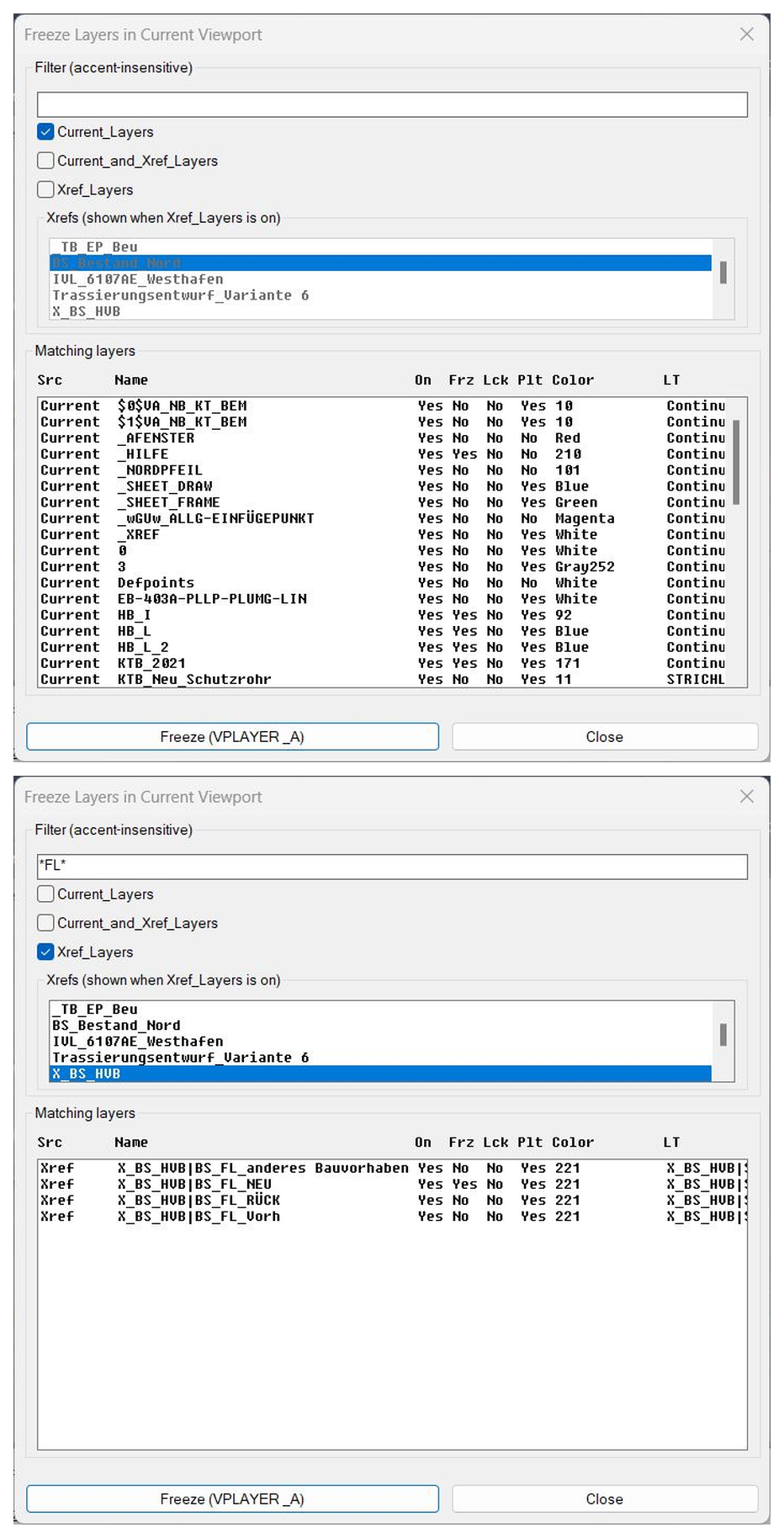
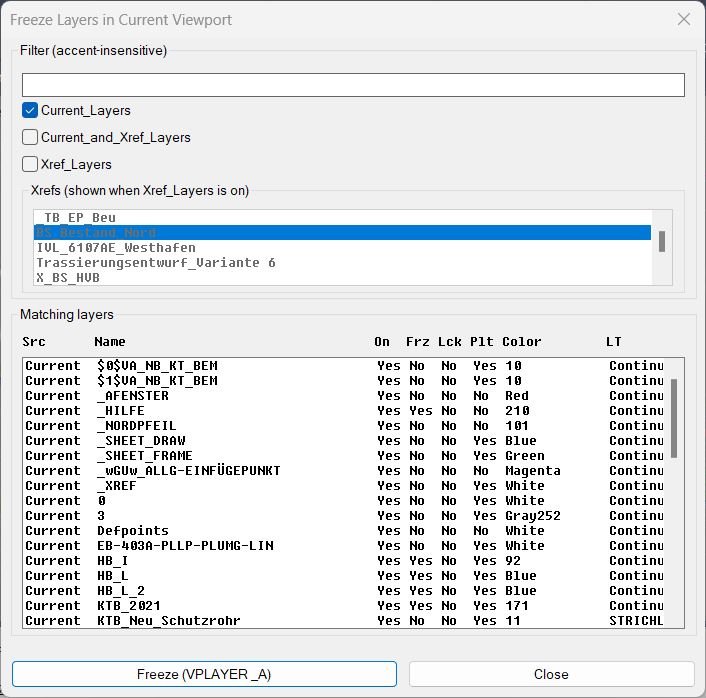
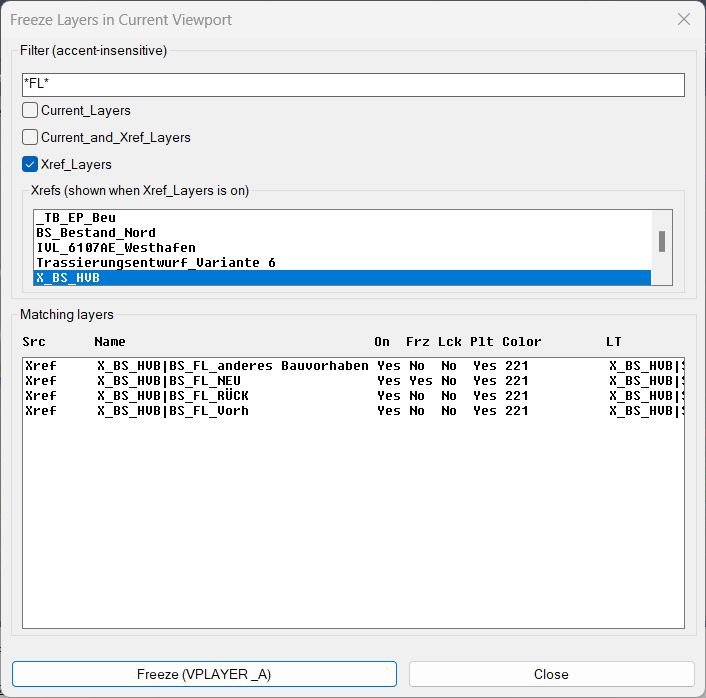
🧊 The routine opens a DCL dialog with a layer name filter, source toggles for Current, Current and Xref, and Xref layers, plus an xref picker for narrowing the displayed xref layer list.
🔍 The list uses faux columns for Src, Name, On, Frz, Lck, Plt, Color, LT, and Desc so the user can review layer status before freezing.
🌐 The filter supports wildcard-style layer searching and includes accent-insensitive normalization for German and Latin characters.
🧩 After confirmation, the selected layer names are passed to AutoCAD VPLAYER Freeze using command logic equivalent to VPLAYER freeze layer all viewports based on the current implementation.
📌 This is useful for Civil 3D sheets, xref-heavy layouts, plan production, viewport cleanup, layer visibility coordination, and fast paper-space layer management.
Helper function: (if any)
🧩 str-join joins selected layer or xref names for messages and environment storage.
🧩 split and parse-indexes convert DCL list-box selection strings into numeric row indexes.
🧩 deaccent normalizes accented characters to make layer filtering more reliable.
🧩 has-wildcards detects whether the filter pattern contains wildcard characters.
🧩 get-all-xrefs collects xref names used for the xref picker.
🧩 layer-xref-name extracts the xref prefix from layer names that contain the vertical-bar separator.
🧩 get-all-layers scans the drawing layer table and builds layer records.
🧩 filter-layers applies source toggles, selected xrefs, and the user filter pattern.
🧩 get-layer-props reads layer state values such as On, Freeze, Lock, Plot, Color, Linetype, and Description.
🧩 fill-layers-list rebuilds the fixed-width DCL layer table.
Functionalities:
✅ Browse drawing layers in a DCL layer manager style dialog.
✅ Filter layer names using wildcard patterns such as * and ?.
✅ Display current drawing layers, xref layers, or combined layer groups.
✅ Pick specific xrefs and show only layers belonging to those xrefs.
✅ Show layer status columns for On, Freeze, Lock, Plot, Color, Linetype, and Description.
✅ Multi-select layers from the filtered result table.
✅ Freeze selected layers through the AutoCAD VPLAYER command.
✅ Persist filter and source-toggle choices with environment variables between sessions.
✅ Provide FLVP as a fast command alias.
Result:
🎯 The result is faster viewport layer cleanup for AutoCAD and Civil 3D paper-space workflows.
🧊 Users can isolate the exact current or xref layers they want to freeze, review their status, and apply the viewport-freeze operation from one dialog.
✅ FreezeLayersInVP improves sheet readability, xref visibility control, and layout preparation for complex production drawings.
Images, animations etc.
XAML code:
<ResourceDictionary
xmlns="http://schemas.microsoft.com/winfx/2006/xaml/presentation"
xmlns:x="http://schemas.microsoft.com/winfx/2006/xaml"
xmlns:src="clr-namespace:Autodesk.Windows;assembly=AdWindows">

<src:RibbonToolTip x:Key="FreezeLayersInVP">
<src:RibbonToolTip.ExpandedContent>
<StackPanel>
<TextBlock Background="AntiqueWhite" TextAlignment="Left">
<Bold>Function Syntax: FreezeLayersInVP / FLVP</Bold>
<LineBreak/>
<Bold>Version: 1.1 Date: 20.06.2026 6:38:55PM</Bold>
<LineBreak/>
<Hyperlink>AI</Hyperlink>
<LineBreak/>
<Bold>FreezeLayersInVP (FLVP)</Bold><LineBreak/>

This program allows the user to <Run Foreground="DarkRed">filter</Run> and <Run Foreground="DarkRed">freeze layers</Run> directly in the <Run Foreground="DarkRed">current viewport</Run>.<LineBreak/>

<Bold>Key Functionalities:</Bold><LineBreak/>
• <Run Foreground="Red">Accent-insensitive search</Run>: typing <Run Foreground="DarkRed">Ruckbau</Run> will match <Run Foreground="DarkRed">Rückbau</Run>.<LineBreak/>
• Choose between <Run Foreground="DarkRed">Current_Layers</Run>, <Run Foreground="DarkRed">Xref_Layers</Run>, or <Run Foreground="DarkRed">Current_and_Xref_Layers</Run>.<LineBreak/>
• When <Run Foreground="DarkRed">Xref_Layers</Run> is selected, a list of attached <Run Foreground="DarkRed">Xrefs</Run> is displayed so you can filter by specific reference files.<LineBreak/>
Matching layers are displayed in a <Run Foreground="Red">multi-column list</Run> with fixed headers:<LineBreak/>
• <Run Foreground="DarkRed">Src</Run> (Current / Xref)<LineBreak/>
• <Run Foreground="DarkRed">Name</Run><LineBreak/>
• <Run Foreground="DarkRed">On</Run>, <Run Foreground="DarkRed">Frz</Run>, <Run Foreground="DarkRed">Lck</Run>, <Run Foreground="DarkRed">Plt</Run><LineBreak/>
• <Run Foreground="DarkRed">Color</Run> (with known ACI names, e.g. 4 = Cyan)<LineBreak/>
• <Run Foreground="DarkRed">Linetype</Run><LineBreak/>
• <Run Foreground="DarkRed">Description</Run><LineBreak/>
• Selected layers are frozen in the <Run Foreground="DarkRed">active viewport</Run> using the <Run Foreground="Red">VPLAYER</Run> command.<LineBreak/>
• <Run Foreground="DarkRed">Persistent settings</Run>: last filter text, selected mode (Current/Xref/Both), and chosen Xrefs are remembered across sessions.<LineBreak/>

<Bold>Usage:</Bold><LineBreak/>
1. Run the command <Run Foreground="DarkRed">FLVP</Run>.<LineBreak/>
2. Enter a filter text (accent-insensitive) to narrow down layers.<LineBreak/>
3. Choose which layers to include (Current, Xref, or Both).<LineBreak/>
4. Select one or more layers from the matching list.<LineBreak/>
5. Press <Run Foreground="Red">Freeze</Run> to apply.<LineBreak/>

<Bold><Run Foreground="DodgerBlue">Description</Run></Bold><LineBreak/>
<Run Foreground="White">❄️ FreezeLayersInVP is an AutoCAD and Civil 3D AutoLISP layer-control utility for freezing selected current and xref layers in viewport workflows.</Run><LineBreak/>
<Run Foreground="White">🧊 It provides a DCL layer browser with filters, xref selection, layer-status columns, and VPLAYER-based freezing for selected layer names.</Run><LineBreak/>
<LineBreak/>
<Bold><Run Foreground="DodgerBlue">Function Syntax</Run></Bold><LineBreak/>
<Run Foreground="White">🚀 Main dialog command: </Run><Bold><Run Foreground="Orange">FreezeLayersInVP</Run></Bold><LineBreak/>
<Run Foreground="White">🔁 Alias command: </Run><Bold><Run Foreground="Orange">FLVP</Run></Bold><LineBreak/>
<Run Foreground="White">🧰 Load the LSP with APPLOAD and run the command in AutoCAD or Civil 3D.</Run><LineBreak/>
<LineBreak/>
<Bold><Run Foreground="DodgerBlue">SEO Optimized Overview</Run></Bold><LineBreak/>
<Run Foreground="White">❄️ FreezeLayersInVP is an SEO-friendly AutoCAD viewport layer freeze tool for managing layer visibility in paper-space viewport production.</Run><LineBreak/>
<Run Foreground="White">🧊 The routine opens a DCL dialog with a layer name filter, source toggles for Current, Current and Xref, and Xref layers, plus an xref picker for narrowing the displayed xref layer list.</Run><LineBreak/>
<Run Foreground="White">🔍 The list uses faux columns for Src, Name, On, Frz, Lck, Plt, Color, LT, and Desc so the user can review layer status before freezing.</Run><LineBreak/>
<Run Foreground="White">🌐 The filter supports wildcard-style layer searching and includes accent-insensitive normalization for German and Latin characters.</Run><LineBreak/>
<Run Foreground="White">🧩 After confirmation, the selected layer names are passed to AutoCAD VPLAYER Freeze using command logic equivalent to VPLAYER freeze layer all viewports based on the current implementation.</Run><LineBreak/>
<Run Foreground="White">📌 This is useful for Civil 3D sheets, xref-heavy layouts, plan production, viewport cleanup, layer visibility coordination, and fast paper-space layer management.</Run><LineBreak/>
<LineBreak/>
<Bold><Run Foreground="LimeGreen">Primary Workflow</Run></Bold><LineBreak/>
<Run Foreground="White">1️⃣ Load FreezeLayersInVP into AutoCAD or Civil 3D with APPLOAD.</Run><LineBreak/>
<Run Foreground="White">2️⃣ Run FreezeLayersInVP from the command line.</Run><LineBreak/>
<Run Foreground="White">3️⃣ Use the dialog or command prompts to select the target layouts, layers, viewports, or plot settings.</Run><LineBreak/>
<Run Foreground="White">4️⃣ Review the preview, status list, or command-line feedback before applying changes.</Run><LineBreak/>
<Run Foreground="White">5️⃣ Apply the operation and verify the result in the active drawing.</Run><LineBreak/>
<LineBreak/>
<Bold><Run Foreground="DodgerBlue">Main Functionalities</Run></Bold><LineBreak/>
<Run Foreground="White">✅ Browse drawing layers in a DCL layer manager style dialog.</Run><LineBreak/>
<Run Foreground="White">✅ Filter layer names using wildcard patterns such as * and ?.</Run><LineBreak/>
<Run Foreground="White">✅ Display current drawing layers, xref layers, or combined layer groups.</Run><LineBreak/>
<Run Foreground="White">✅ Pick specific xrefs and show only layers belonging to those xrefs.</Run><LineBreak/>
<Run Foreground="White">✅ Show layer status columns for On, Freeze, Lock, Plot, Color, Linetype, and Description.</Run><LineBreak/>
<Run Foreground="White">✅ Multi-select layers from the filtered result table.</Run><LineBreak/>
<Run Foreground="White">✅ Freeze selected layers through the AutoCAD VPLAYER command.</Run><LineBreak/>
<Run Foreground="White">✅ Persist filter and source-toggle choices with environment variables between sessions.</Run><LineBreak/>
<Run Foreground="White">✅ Provide FLVP as a fast command alias.</Run><LineBreak/>
<LineBreak/>
<Bold><Run Foreground="DodgerBlue">Important Commands and Helper Functions</Run></Bold><LineBreak/>
<Run Foreground="White">🧩 str-join joins selected layer or xref names for messages and environment storage.</Run><LineBreak/>
<Run Foreground="White">🧩 split and parse-indexes convert DCL list-box selection strings into numeric row indexes.</Run><LineBreak/>
<Run Foreground="White">🧩 deaccent normalizes accented characters to make layer filtering more reliable.</Run><LineBreak/>
<Run Foreground="White">🧩 has-wildcards detects whether the filter pattern contains wildcard characters.</Run><LineBreak/>
<Run Foreground="White">🧩 get-all-xrefs collects xref names used for the xref picker.</Run><LineBreak/>
<Run Foreground="White">🧩 layer-xref-name extracts the xref prefix from layer names that contain the vertical-bar separator.</Run><LineBreak/>
<Run Foreground="White">🧩 get-all-layers scans the drawing layer table and builds layer records.</Run><LineBreak/>
<Run Foreground="White">🧩 filter-layers applies source toggles, selected xrefs, and the user filter pattern.</Run><LineBreak/>
<Run Foreground="White">🧩 get-layer-props reads layer state values such as On, Freeze, Lock, Plot, Color, Linetype, and Description.</Run><LineBreak/>
<Run Foreground="White">🧩 fill-layers-list rebuilds the fixed-width DCL layer table.</Run><LineBreak/>
<LineBreak/>
<Bold><Run Foreground="LimeGreen">Practical Result</Run></Bold><LineBreak/>
<Run Foreground="White">🎯 The result is faster viewport layer cleanup for AutoCAD and Civil 3D paper-space workflows.</Run><LineBreak/>
<Run Foreground="White">🧊 Users can isolate the exact current or xref layers they want to freeze, review their status, and apply the viewport-freeze operation from one dialog.</Run><LineBreak/>
<Run Foreground="White">✅ FreezeLayersInVP improves sheet readability, xref visibility control, and layout preparation for complex production drawings.</Run><LineBreak/>
<LineBreak/>
<Bold><Run Foreground="DarkRed">Important Notes</Run></Bold><LineBreak/>
<Run Foreground="White">⚠️ The routine uses VPLAYER freeze operations and therefore changes viewport layer visibility settings in the active drawing context.</Run><LineBreak/>
<Run Foreground="White">⚠️ The current implementation passes the All option in the VPLAYER call; verify whether your desired workflow is all viewports or current viewport before batch use.</Run><LineBreak/>
<Run Foreground="White">⚠️ Xref layer names must be available in the layer table for xref filtering and freezing.</Run><LineBreak/>
<Run Foreground="White">⚠️ On very large drawings, layer scanning and wide fixed-column list display may take additional time.</Run><LineBreak/>
<LineBreak/>
<Bold><Run Foreground="Yellow">Tags</Run></Bold><LineBreak/>
<Run Foreground="Yellow">🏷️ AutoCAD, 🏷️ Civil 3D, 🏷️ AutoLISP, 🏷️ Visual LISP, 🏷️ DCL dialog, 🏷️ CAD automation, 🏷️ CAD productivity, 🏷️ Viewport layers, 🏷️ VPLAYER, 🏷️ Layer freeze, 🏷️ Freeze layers, 🏷️ Xref layers, 🏷️ Layer filter, 🏷️ Paper space, 🏷️ Viewport visibility, 🏷️ Layer manager, 🏷️ FLVP, 🏷️ Civil 3D sheets</Run><LineBreak/>


</TextBlock>

<Grid>
<Image Source="Image_000.jpg" Stretch="Uniform"/>
</Grid>

<Grid>
<Image Source="Image_001.jpg" Stretch="Uniform"/>
</Grid>


</StackPanel>
</src:RibbonToolTip.ExpandedContent>
</src:RibbonToolTip>
</ResourceDictionary>
Leave a Reply
You must be logged in to post a comment.