
Short description
AutoCAD AutoLISP utility for adding, queueing, deleting, and debugging ribbon buttons inside CIVIL.cuix through a DCL-driven Ribbon Button Manager workflow.
Command:
Primary command: AddRibbonButton. Support commands: ARB_Debug, ARB_ApplyToCUI, and ARB_ApplyDebug.
Description:
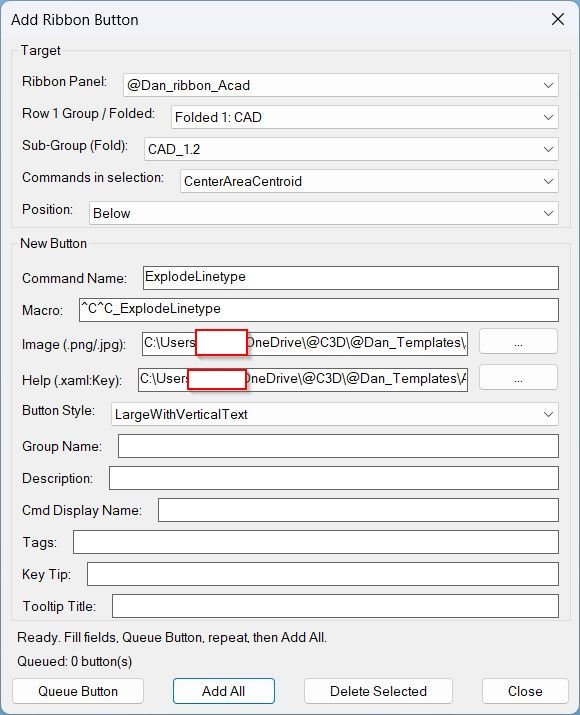
AddRibbonButton is an AutoCAD ribbon customization utility written in AutoLISP. It reads the CIVIL.cuix ribbon structure, displays @Dan_ribbon_* panels and groups in a DCL dialog, and lets the user create new ribbon command buttons with image, help XAML, macro, group, description, display name, tags, key tip, tooltip title, and button style settings. The tool can queue multiple buttons and patch the CUIX file in one operation using a temporary PowerShell workflow.
Helper function: (if any)
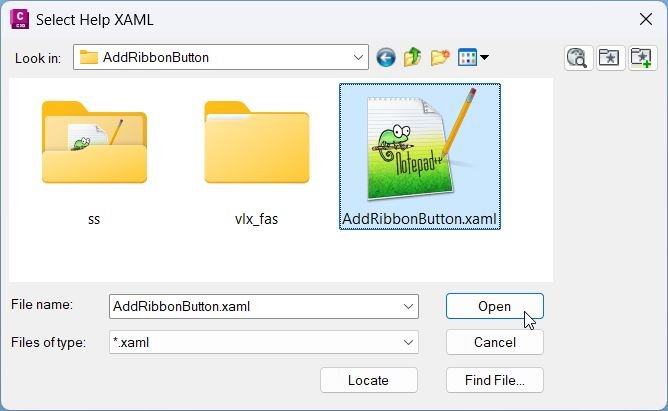
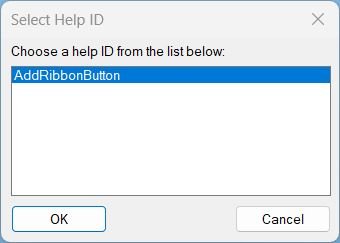
Key helpers include ARB:ReadStructure for scanning RibbonRoot.cui and MenuGroup.cui, ARB:ReadXamlKeys and ARB:XamlKeyPicker for help key selection, ARB:PatchAll for queued ribbon button insertion, ARB:DeleteCmd for removing an existing command button, ARB:ReadCmdPaths for copying image and help paths from a reference command, ARB:SaveSettings and ARB:LoadSettings for APPDATA persistence, and ARB:RibbonBase and ARB:GroupPath for automatic help folder path resolution.
Functionalities:
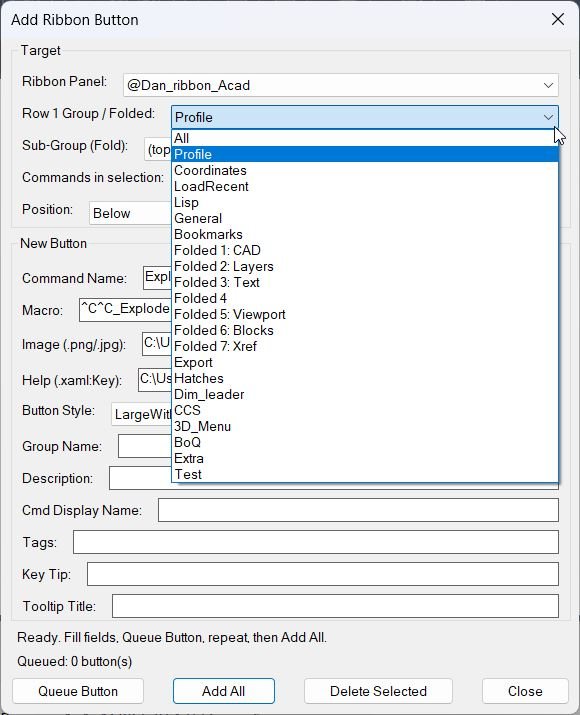
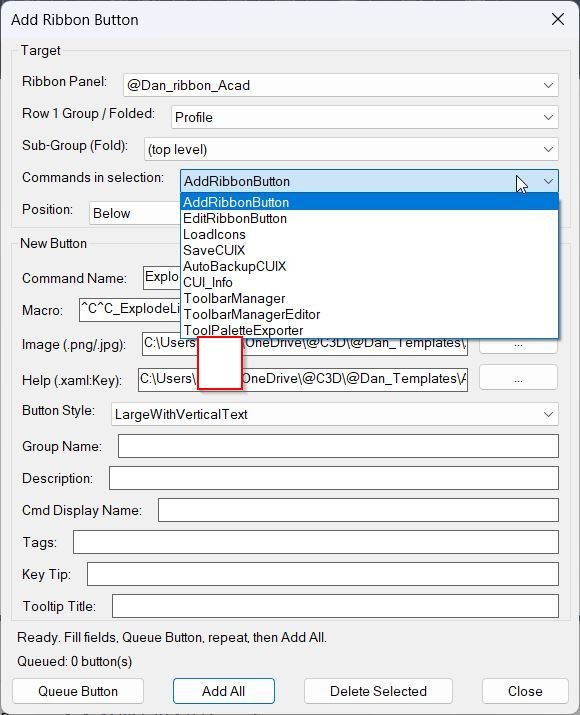
Reads loaded CIVIL.cuix ribbon data. Lists @Dan_ribbon_* ribbon panels, All groups, folded panels, sub-groups, and existing commands. Adds new RibbonCommandButton nodes below or above a selected reference command. Supports queueing several buttons before applying. Creates MenuMacro entries with macro text, command display name, description, tooltip metadata, image paths, and extended XAML help content. Auto-completes image paths and XAML help keys. Provides button styles including LargeWithText, LargeWithVerticalText, Large, SmallWithText, and SmallWithoutText. Can delete selected ribbon command buttons. Writes logs and diagnostic files to TEMP\ARB_Patch. Reloads CIVIL.cuix after successful patching.
Result:
The result is a faster and more controlled AutoCAD ribbon button creation workflow for CAD support folders, CUIX maintenance, help system linking, custom image assignment, and production ribbon organization.
Images, animations etc.
XAML code:
<ResourceDictionary
xmlns="http://schemas.microsoft.com/winfx/2006/xaml/presentation"
xmlns:x="http://schemas.microsoft.com/winfx/2006/xaml"
xmlns:src="clr-namespace:Autodesk.Windows;assembly=AdWindows">

<src:RibbonToolTip x:Key="AddRibbonButton">
<src:RibbonToolTip.ExpandedContent>
<StackPanel>
<TextBlock Background="AntiqueWhite" TextAlignment="Left">
<Bold>Function Syntax: AddRibbonButton / ARB_Debug / ARB_ApplyToCUI</Bold>
<LineBreak/>
<Bold>Version: 1 Date:04.04.2026</Bold>
<LineBreak/>
<LineBreak/>
<Hyperlink>WEB</Hyperlink>
<LineBreak/>


<Bold><Run Foreground="DodgerBlue">Function Syntax: AddRibbonButton</Run></Bold><LineBreak/>
<Bold><Run Foreground="Orange">Version: 8.5</Run></Bold><LineBreak/>
<LineBreak/>
<Run Foreground="White">🚀 AddRibbonButton is an AutoCAD and Civil 3D ribbon customization utility for creating, queueing, inserting, deleting, and debugging custom ribbon buttons inside CIVIL.cuix.</Run><LineBreak/>
<Run Foreground="LimeGreen">The main benefit is faster CAD menu administration, cleaner ribbon organization, easier help-system linking, and repeatable CUIX button deployment.</Run><LineBreak/>
<LineBreak/>
<Bold><Run Foreground="DodgerBlue">Main Command</Run></Bold><LineBreak/>
<Run Foreground="White">🧰 Run </Run><Bold><Run Foreground="Orange">AddRibbonButton</Run></Bold><Run Foreground="White"> in the AutoCAD command line to open the Add Ribbon Button dialog.</Run><LineBreak/>
<Run Foreground="White">Support commands include </Run><Bold><Run Foreground="Orange">ARB_Debug</Run></Bold><Run Foreground="White">, </Run><Bold><Run Foreground="Orange">ARB_ApplyToCUI</Run></Bold><Run Foreground="White">, and </Run><Bold><Run Foreground="Orange">ARB_ApplyDebug</Run></Bold><Run Foreground="White">.</Run><LineBreak/>
<LineBreak/>
<Bold><Run Foreground="DodgerBlue">SEO Optimized Description</Run></Bold><LineBreak/>
<Run Foreground="White">📘 This AutoLISP tool scans </Run><Bold><Run Foreground="Orange">CIVIL.cuix</Run></Bold><Run Foreground="White">, reads ribbon panel data from the CUIX XML files, and displays custom </Run><Bold><Run Foreground="Orange">@Dan_ribbon_*</Run></Bold><Run Foreground="White"> panels in a visual DCL interface.</Run><LineBreak/>
<Run Foreground="White">🔍 Users can select a ribbon panel, group, folded panel, sub-group, and reference command before inserting a new button above or below the selected command.</Run><LineBreak/>
<Run Foreground="White">🧠 The utility is useful for CAD managers, AutoCAD support teams, Civil 3D production environments, custom toolbar maintainers, and help-system authors.</Run><LineBreak/>
<Run Foreground="White">📌 AddRibbonButton improves ribbon automation by combining CUIX editing, command macro creation, image assignment, XAML help linking, and batch queueing in one workflow.</Run><LineBreak/>
<LineBreak/>
<Bold><Run Foreground="LimeGreen">Functionalities</Run></Bold><LineBreak/>
<Run Foreground="White">🚀 </Run><Bold><Run Foreground="LimeGreen">Create ribbon buttons</Run></Bold><Run Foreground="White"> - adds new AutoCAD ribbon command buttons to selected custom panels.</Run><LineBreak/>
<Run Foreground="White">📂 </Run><Bold><Run Foreground="LimeGreen">Read CUIX structure</Run></Bold><Run Foreground="White"> - scans </Run><Bold><Run Foreground="Orange">RibbonRoot.cui</Run></Bold><Run Foreground="White"> and </Run><Bold><Run Foreground="Orange">MenuGroup.cui</Run></Bold><Run Foreground="White"> after extracting </Run><Bold><Run Foreground="Orange">CIVIL.cuix</Run></Bold><Run Foreground="White">.</Run><LineBreak/>
<Run Foreground="White">🧩 </Run><Bold><Run Foreground="LimeGreen">Queue multiple buttons</Run></Bold><Run Foreground="White"> - stores several button definitions and applies them together with the Add All workflow.</Run><LineBreak/>
<Run Foreground="White">🔄 </Run><Bold><Run Foreground="LimeGreen">Control insertion position</Run></Bold><Run Foreground="White"> - inserts buttons above or below an existing reference command.</Run><LineBreak/>
<Run Foreground="White">🖼️ </Run><Bold><Run Foreground="LimeGreen">Assign button images</Run></Bold><Run Foreground="White"> - supports common image files such as PNG, JPG, JPEG, TIF, and BMP.</Run><LineBreak/>
<Run Foreground="White">📘 </Run><Bold><Run Foreground="LimeGreen">Connect XAML help</Run></Bold><Run Foreground="White"> - links ribbon buttons to external help tooltips using </Run><Bold><Run Foreground="Orange">.xaml:Key</Run></Bold><Run Foreground="White"> references.</Run><LineBreak/>
<Run Foreground="White">🔍 </Run><Bold><Run Foreground="LimeGreen">Auto-complete paths</Run></Bold><Run Foreground="White"> - detects image files in a folder and reads available XAML keys from a selected help file.</Run><LineBreak/>
<Run Foreground="White">🏷️ </Run><Bold><Run Foreground="LimeGreen">Store metadata</Run></Bold><Run Foreground="White"> - writes macro text, command display name, group name, description, tags, key tip, tooltip title, and button style.</Run><LineBreak/>
<Run Foreground="White">🧹 </Run><Bold><Run Foreground="LimeGreen">Delete selected command</Run></Bold><Run Foreground="White"> - removes an existing ribbon command button from the selected location.</Run><LineBreak/>
<Run Foreground="White">📝 </Run><Bold><Run Foreground="LimeGreen">Debug patch results</Run></Bold><Run Foreground="White"> - saves log files and exposes diagnostic commands for troubleshooting queued updates.</Run><LineBreak/>
<LineBreak/>
<Bold><Run Foreground="DodgerBlue">Practical Result</Run></Bold><LineBreak/>
<Run Foreground="White">✅ The final result is a faster AutoCAD ribbon customization workflow for CUIX editing, CAD production menus, custom button deployment, and Civil 3D help integration.</Run><LineBreak/>
<Run Foreground="LimeGreen">This SEO-friendly description highlights the value of AddRibbonButton for AutoCAD ribbon automation, Civil 3D CUIX management, command button creation, CAD menu deployment, and XAML help linking.</Run><LineBreak/>
<LineBreak/>
<Bold><Run Foreground="DarkRed">Important Note</Run></Bold><LineBreak/>
<Run Foreground="White">This tool directly modifies </Run><Bold><Run Foreground="DarkRed">CIVIL.cuix</Run></Bold><Run Foreground="White"> by extracting, editing, and repacking CUIX XML content. Back up the CUIX file before use.</Run><LineBreak/>
<Run Foreground="White">The uploaded version is tailored to </Run><Bold><Run Foreground="Orange">@Dan_ribbon_*</Run></Bold><Run Foreground="White"> panels and hard-coded Help_File paths, so other environments may require path adjustment.</Run><LineBreak/>


</TextBlock>
<Grid>
<Image Source="Image_000.jpg" Stretch="Uniform"/>
</Grid>

<Grid>
<Image Source="Image_001.jpg" Stretch="Uniform"/>
</Grid>

<Grid>
<Image Source="Image_002.jpg" Stretch="Uniform"/>
</Grid>

<Grid>
<Image Source="Image_003.jpg" Stretch="Uniform"/>
</Grid>

<Grid>
<Image Source="Image_004.jpg" Stretch="Uniform"/>
</Grid>
</StackPanel>
</src:RibbonToolTip.ExpandedContent>
</src:RibbonToolTip>
</ResourceDictionary>