
Short description
🧩 Slope_Ro calculates a slope ratio and angle from two user picked points.
📏 The current routine uses a fixed vertical run reference of 12 and reduces the calculated integer ratio using the greatest common divisor.
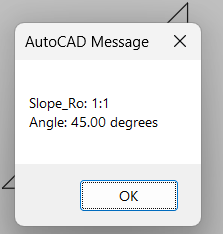
📢 The computed slope ratio and angle in degrees are displayed in an AutoCAD alert dialog.
Command:
Main command: SLOPE_01
Description:
📍 The user picks a starting point followed by an ending point.
🧮 The absolute XY slope is calculated from the coordinate differences.
📏 The source uses slope_v equal to 12 as a fixed imperial style reference.
➗ The integer horizontal component and 12 reference are simplified with a greatest common divisor loop.
📐 The slope angle is calculated with atan and converted to degrees.
📢 An alert displays Slope_Ro ratio and Angle.
↩️ The source starts an AutoCAD undo group although the current implementation does not create annotation geometry.
Helper function: (if any)
gcd simplifies the calculated integer ratio.
atan calculates the angular slope from the absolute slope value.
Functionalities:
✅ Two point slope – calculates slope from two picked XY coordinates.
✅ Fixed 12 reference – uses a 12 unit reference value.
✅ Ratio simplification – reduces the integer ratio with GCD.
✅ Angle calculation – reports the corresponding slope angle in degrees.
✅ Alert output – shows the result in a modal AutoCAD alert.
Result:
🎯 The current result is an alert containing the simplified Slope_Ro ratio and slope angle in degrees.
Images, animations etc.
XAML code:
<ResourceDictionary
xmlns="http://schemas.microsoft.com/winfx/2006/xaml/presentation"
xmlns:x="http://schemas.microsoft.com/winfx/2006/xaml"
xmlns:src="clr-namespace:Autodesk.Windows;assembly=AdWindows">

<src:RibbonToolTip x:Key="SLOPE_01">
<src:RibbonToolTip.ExpandedContent>
<StackPanel>
<TextBlock Background="AntiqueWhite" TextAlignment="Left">
<Bold>Function Syntax: SLOPE_01</Bold>
<LineBreak/>
<Bold>Version: 1.0 Date: 07.04.2025 7:44:18AM</Bold>
<LineBreak/>
<Hyperlink>AI+https://forums.augi.com/showthread.php?107096-Slopes-and-angles-of-a-polyline-in-2d-autocad</Hyperlink>
<LineBreak/>
<Bold><Run Foreground="DodgerBlue">Description</Run></Bold><LineBreak/>
<Run Foreground="White">🧩 Slope_Ro calculates a slope ratio and angle from two user picked points.</Run><LineBreak/>
<Run Foreground="White">📏 The current routine uses a fixed vertical run reference of 12 and reduces the calculated integer ratio using the greatest common divisor.</Run><LineBreak/>
<Run Foreground="White">📢 The computed slope ratio and angle in degrees are displayed in an AutoCAD alert dialog.</Run><LineBreak/>
<LineBreak/>
<Bold><Run Foreground="DodgerBlue">Function Syntax</Run></Bold><LineBreak/>
<Run Foreground="White">Main command: </Run><Bold><Run Foreground="Orange">SLOPE_01</Run></Bold><LineBreak/>
<LineBreak/>
<Bold><Run Foreground="DodgerBlue">SEO Optimized Overview</Run></Bold><LineBreak/>
<Run Foreground="White">📍 The user picks a starting point followed by an ending point.</Run><LineBreak/>
<Run Foreground="White">🧮 The absolute XY slope is calculated from the coordinate differences.</Run><LineBreak/>
<Run Foreground="White">📏 The source uses slope_v equal to 12 as a fixed imperial style reference.</Run><LineBreak/>
<Run Foreground="White">➗ The integer horizontal component and 12 reference are simplified with a greatest common divisor loop.</Run><LineBreak/>
<Run Foreground="White">📐 The slope angle is calculated with atan and converted to degrees.</Run><LineBreak/>
<Run Foreground="White">📢 An alert displays Slope_Ro ratio and Angle.</Run><LineBreak/>
<Run Foreground="White">↩️ The source starts an AutoCAD undo group although the current implementation does not create annotation geometry.</Run><LineBreak/>
<LineBreak/>
<Bold><Run Foreground="LimeGreen">Primary Workflow</Run></Bold><LineBreak/>
<Run Foreground="White">• Run SLOPE_01.</Run><LineBreak/>
<Run Foreground="White">• Pick the starting point.</Run><LineBreak/>
<Run Foreground="White">• Pick the ending point.</Run><LineBreak/>
<Run Foreground="White">• The routine calculates the slope ratio and angle.</Run><LineBreak/>
<Run Foreground="White">• Review the result in the alert dialog.</Run><LineBreak/>
<LineBreak/>
<Bold><Run Foreground="LimeGreen">Functionalities</Run></Bold><LineBreak/>
<Run Foreground="White">✅ </Run><Bold><Run Foreground="LimeGreen">Two point slope</Run></Bold><Run Foreground="White"> - calculates slope from two picked XY coordinates.</Run><LineBreak/>
<Run Foreground="White">✅ </Run><Bold><Run Foreground="LimeGreen">Fixed 12 reference</Run></Bold><Run Foreground="White"> - uses a 12 unit reference value.</Run><LineBreak/>
<Run Foreground="White">✅ </Run><Bold><Run Foreground="LimeGreen">Ratio simplification</Run></Bold><Run Foreground="White"> - reduces the integer ratio with GCD.</Run><LineBreak/>
<Run Foreground="White">✅ </Run><Bold><Run Foreground="LimeGreen">Angle calculation</Run></Bold><Run Foreground="White"> - reports the corresponding slope angle in degrees.</Run><LineBreak/>
<Run Foreground="White">✅ </Run><Bold><Run Foreground="LimeGreen">Alert output</Run></Bold><Run Foreground="White"> - shows the result in a modal AutoCAD alert.</Run><LineBreak/>
<LineBreak/>
<Bold><Run Foreground="DodgerBlue">Important Commands and Aspects</Run></Bold><LineBreak/>
<Run Foreground="White">🧩 gcd simplifies the calculated integer ratio.</Run><LineBreak/>
<Run Foreground="White">🧩 atan calculates the angular slope from the absolute slope value.</Run><LineBreak/>
<LineBreak/>
<Bold><Run Foreground="DodgerBlue">Result</Run></Bold><LineBreak/>
<Run Foreground="White">🎯 The current result is an alert containing the simplified Slope_Ro ratio and slope angle in degrees.</Run><LineBreak/>
<LineBreak/>
<Bold><Run Foreground="DarkRed">Important Notes</Run></Bold><LineBreak/>
<Run Foreground="White">⚠️ </Run><Bold><Run Foreground="DarkRed">The current source does not create line text symbol or dimension annotation geometry.</Run></Bold><LineBreak/>
<Run Foreground="White">⚠️ </Run><Bold><Run Foreground="DarkRed">The source comments contain a placeholder indicating that symbol creation and text placement could be added later.</Run></Bold><LineBreak/>
<Run Foreground="White">⚠️ </Run><Bold><Run Foreground="DarkRed">The calculation uses XY differences and a fixed reference value of 12.</Run></Bold><LineBreak/>
<LineBreak/>
<Bold><Run Foreground="Yellow">SEO Keywords</Run></Bold><LineBreak/>
<Run Foreground="Yellow">🏷️ AutoCAD, 🏷️ AutoLISP, 🏷️ Slope_Ro, 🏷️ SLOPE_01, 🏷️ Slope ratio, 🏷️ Slope angle, 🏷️ Grade, 🏷️ GCD, 🏷️ CAD calculation</Run><LineBreak/>

</TextBlock>

<Grid>
<Image Source="Image_000.png" Stretch="Uniform"/>
</Grid>

</StackPanel>
</src:RibbonToolTip.ExpandedContent>
</src:RibbonToolTip>
</ResourceDictionary>