
Short description
🚀 MatchProjectionStyles is an AutoCAD Civil 3D .NET Framework plugin for managing Section View styles, projected object styles, crossing marker styles, crossing label styles, and elevation options from one modeless manager.
📐 It scans Civil 3D alignments, sample line groups, sample lines, section views, and section crossing data, then lets production users review and apply style changes in a grid-based workflow.
✅ The main benefit is faster Civil 3D section view cleanup, consistent projection and crossing styling, fewer repetitive dialog steps, and better quality control for AutoCAD Civil 3D drawing production.
Command:
🧰 Load the compiled plugin with NETLOAD by selecting MatchProjectionStyles.dll.
🚀 Run MATCHPROJECTIONSTYLES to open the modeless Section Style Manager window.
📘 Run MATCHPROJECTIONSTYLESVERSION to print the loaded DLL path, plugin version, log file path, and DLL age.
🔍 Run MATCHPROJECTIONSTYLESDIAG to test the Civil 3D API connection and inspect alignment, section view, band set, and style availability.
🧠 Run MATCHPROJECTIONSTYLESDUMP to dump Section and Section View properties for troubleshooting Civil 3D projection and crossing data.
🧩 Target platform: AutoCAD Civil 3D x64, .NET Framework 4.8, C#, WinForms, and Autodesk Civil 3D managed APIs.
Description:
📘 MatchProjectionStyles is designed for Civil 3D users who need to control how projected objects and crossing objects appear inside multiple Section Views.
🔍 The plugin reads the active Civil 3D drawing, walks through Alignments, Sample Line Groups, Sample Lines, and Section Views, and builds a practical table of available projection and crossing rows.
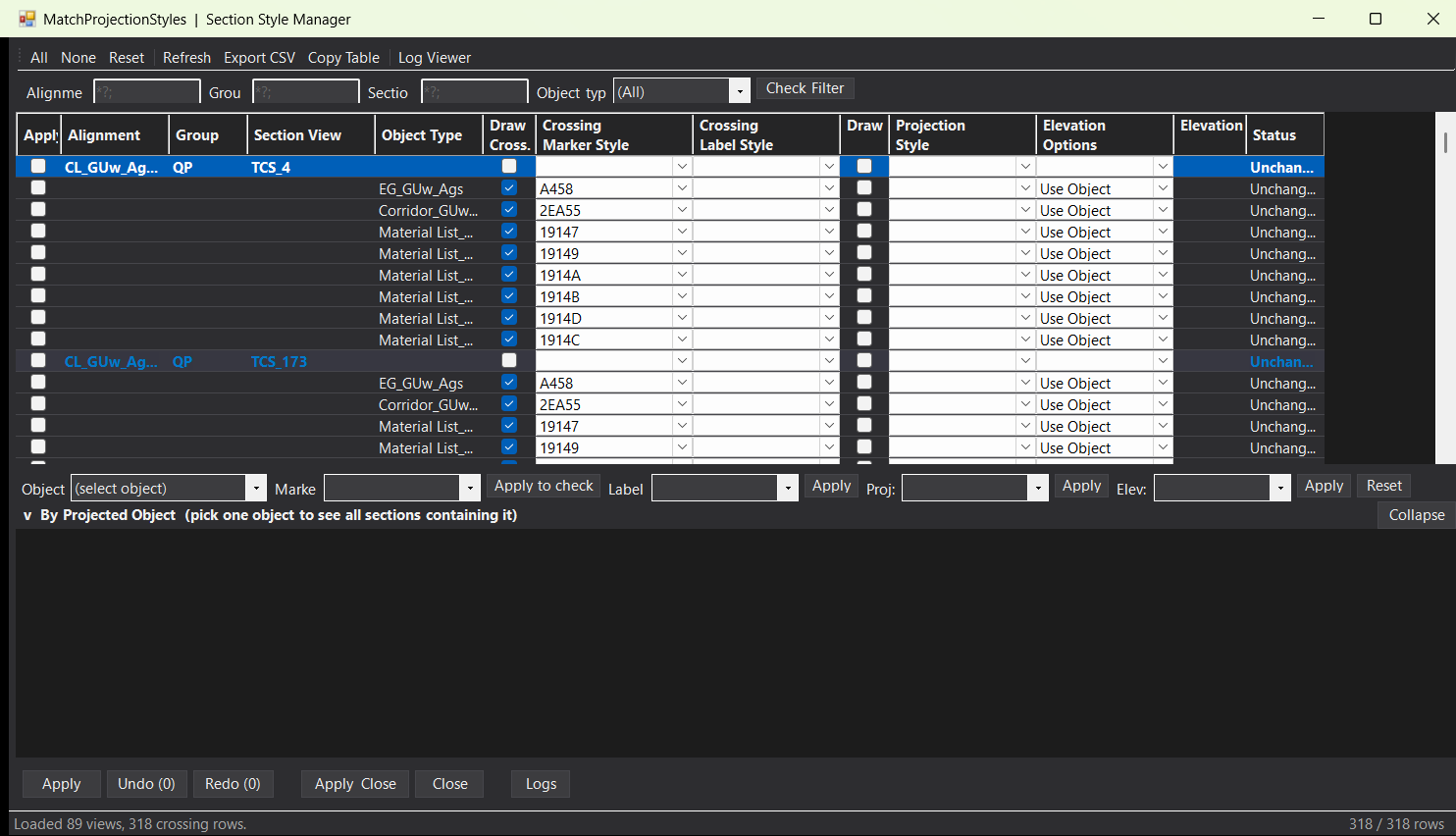
📊 The top grid presents Section View based rows with alignment name, group name, section view name, object type, source object name, draw crossing state, crossing marker style, crossing label style, draw projection state, projection style, elevation option, elevation value, and status.
🧠 The bottom object-centric panel lets the user choose a projected source object, such as a surface, corridor, feature line, COGO point, or other Civil 3D crossing object, and then bulk-edit every section that contains that object.
🎨 Users can apply Section View style changes, crossing marker style changes, crossing label style changes, projection style changes, draw toggles, and elevation option changes without manually opening the Civil 3D Projection and Crossing dialog for each view.
🔄 The form includes filtering, checking, unchecking, refresh, copy table, CSV export, undo, redo, log viewer, and apply workflows, which makes it useful for Civil 3D section production, corridor review, quantity workflows, and drawing standardization.
🔐 The code uses AutoCAD document locking and transactions when writing Civil 3D objects, creating a safer workflow for database updates inside the active drawing.
⚠️ Important limitation: this project does not create Alignments, Profile Views, Section Views, Sample Lines, labels, bands, or Civil 3D styles. Its purpose is to inspect and modify existing Section View, projection, crossing, and elevation style data where the Civil 3D API exposes writable properties.
Helper function: (if any)
- 🚀 Command registration –
MatchProjectionStylesPluginregistersMATCHPROJECTIONSTYLES,MATCHPROJECTIONSTYLESVERSION,MATCHPROJECTIONSTYLESDIAG, andMATCHPROJECTIONSTYLESDUMPas AutoCAD commands. - 🔍 Drawing data collection –
SectionDataCollector.CollectFromDoc()scans the Civil 3D document and builds a structured model of Section Views, crossing rows, projection rows, styles, labels, and elevation options. - 📐 Alignment and sample line traversal – the collector walks Civil 3D
Alignment,SampleLineGroup,SampleLine, andSectionViewobjects to discover the production section data available in the drawing. - 🧩 Crossing row model –
CrossingObjectRowstores source object name, Civil 3D object type, crossing marker style, crossing label style, projection style, projection label style, elevation option, elevation value, and pending changes. - 📊 Section View model –
ViewItemconnects each Section View to its alignment, group, current style, pending style, apply state, and crossing rows. - 🎨 Style application engine –
SectionStyleEngine.Apply()writes Section View style changes and per-crossing changes through AutoCAD transactions and Civil 3D managed objects. - 🔐 Safe document modification –
doc.LockDocument()andTransactionare used to reduceeLockViolationissues while modifying Civil 3D database objects. - 🧠 Civil 3D crossing-data reflection –
TryWriteSvCrossingState()attempts supported Civil 3D API patterns such asGetSectionCrossingData(), writable properties, and commit methods likeApply(),Save(),Update(), orCommit(). - 🔄 Bulk object-centric editing –
CrossingStyleEnginecan set crossing marker styles, crossing label styles, projection styles, elevation options, and draw states across multiple rows filtered by object type. - 🧹 Filtering and checking workflow – the main form supports wildcard-style filtering by alignment, group, section view, and object type, plus check all, check none, reset, and check filtered actions.
- 📤 Reporting and clipboard output –
OnExport()andOnCopyTable()support CSV export and tab-separated table copy for review, coordination, and QA documentation. - ↩️ Undo and redo support –
UndoRedoStack<StyleBatch>,StyleBatch,ViewSnapshot, andCrossingSnapshotstore previous style state so applied batches can be reverted. - 📝 Logging and diagnostics –
SectionLoggerandLogViewerFormrecord info, warning, error, debug, version, and diagnostic messages for troubleshooting Civil 3D API behavior. - 🎨 Dark WinForms UI theme –
Theme,PlaceholderTextBox, and custom grid styling create a readable production interface for long Civil 3D section style tables.
Functionalities:
- 🚀 Open Section Style Manager – launches a modeless AutoCAD Civil 3D window for managing Section View, crossing, and projection styles.
- 🔍 Scan Civil 3D Section Views – collects Section Views from alignments, sample line groups, and sample lines in the active drawing.
- 📊 Review crossing and projection rows – displays source object names, object categories, current style data, elevation options, and change status in a structured grid.
- 🎨 Change Section View styles – applies new Section View style selections to checked Section Views.
- 🟧 Change crossing marker styles – updates the marker style used by Civil 3D section crossing objects.
- 🏷️ Change crossing label styles – updates label style references when the Civil 3D object exposes writable label style properties.
- 📐 Change projection styles – prepares and applies projection style changes for projected Civil 3D objects where supported by the API.
- 🔢 Set elevation options – manages Use Object, Manual, and Surface based elevation option selections for crossing and projection data.
- 🧩 Bulk edit by projected object – choose one source object and apply marker, label, projection, or elevation settings across all Section Views that contain it.
- 🧠 Filter large drawings – filter by alignment, sample line group, section view name, object category, or individual source object name to focus on relevant rows.
- 🔄 Check, uncheck, reset, and refresh – quickly control which rows will be processed and reload Civil 3D data from the active drawing.
- ↩️ Undo and redo applied batches – reverse or reapply recent Section View and crossing style operations from the plugin UI.
- 📤 Export CSV and copy table data – send Section View style information to Excel, reports, QA logs, or coordination notes.
- 🧰 Run diagnostics and dumps – use diagnostic commands to inspect Civil 3D style collections, Section properties, crossing-data access, and loaded DLL details.
- 📝 Use log viewer – monitor warnings, errors, version information, and operation messages directly from the plugin.
Result:
✅ The final result is a productivity-focused AutoCAD Civil 3D Section View style manager that centralizes projection styles, crossing marker styles, crossing label styles, elevation options, filtering, export, diagnostics, undo, and batch apply workflows.
📐 It helps Civil 3D users clean up Section Views faster, enforce drawing standards, reduce repetitive manual edits, improve crossing and projection consistency, and manage complex corridor, surface, feature line, and sample line section drawings with better quality control.
Images, animations etc.
XAML code:
<ResourceDictionary
xmlns="http://schemas.microsoft.com/winfx/2006/xaml/presentation"
xmlns:x="http://schemas.microsoft.com/winfx/2006/xaml"
xmlns:src="clr-namespace:Autodesk.Windows;assembly=AdWindows">

<src:RibbonToolTip x:Key="MatchProjectionStyles">
<src:RibbonToolTip.ExpandedContent>
<StackPanel>
<TextBlock Background="AntiqueWhite" TextAlignment="Left">
<Bold>Function Syntax: MatchProjectionStyles / MatchProjectionStylesVersion / MatchProjectionStylesDiag / MatchProjectionStylesDump</Bold>
<LineBreak/>
<Bold>Version: 1.0 Date: 11.06.2026 1:19:26PM</Bold>
<LineBreak/>
<Hyperlink>N/A</Hyperlink>
<LineBreak/>


short_description:
<Bold><Run Foreground="DodgerBlue">Short SEO Description</Run></Bold><LineBreak/>
<Run Foreground="White">🚀 MatchProjectionStyles is an AutoCAD Civil 3D .NET Framework plugin for fast Section View projection and crossing style management.</Run><LineBreak/>
<Run Foreground="White">It helps CAD users inspect, filter, edit, export, undo, redo, and apply Civil 3D Section View style data from one modeless manager.</Run><LineBreak/>
<Run Foreground="LimeGreen">The main benefit is faster Civil 3D section drawing cleanup, consistent projected object styling, and improved AutoCAD Civil 3D productivity.</Run><LineBreak/>
<LineBreak/>
command:
<Bold><Run Foreground="DodgerBlue">Main Command and Loading Method</Run></Bold><LineBreak/>
<Run Foreground="White">🧰 Load the plugin with </Run><Bold><Run Foreground="Orange">NETLOAD</Run></Bold><Run Foreground="White"> by selecting </Run><Bold><Run Foreground="Orange">MatchProjectionStyles.dll</Run></Bold><Run Foreground="White">.</Run><LineBreak/>
<Run Foreground="White">Run </Run><Bold><Run Foreground="Orange">MATCHPROJECTIONSTYLES</Run></Bold><Run Foreground="White"> to open the Section Style Manager inside AutoCAD Civil 3D.</Run><LineBreak/>
<Run Foreground="White">Run </Run><Bold><Run Foreground="Orange">MATCHPROJECTIONSTYLESVERSION</Run></Bold><Run Foreground="White"> to show version, DLL path, DLL age, and log path information.</Run><LineBreak/>
<Run Foreground="White">Run </Run><Bold><Run Foreground="Orange">MATCHPROJECTIONSTYLESDIAG</Run></Bold><Run Foreground="White"> to run a Civil 3D API self-test.</Run><LineBreak/>
<Run Foreground="White">Run </Run><Bold><Run Foreground="Orange">MATCHPROJECTIONSTYLESDUMP</Run></Bold><Run Foreground="White"> to dump Section and Section View property data for troubleshooting.</Run><LineBreak/>
<Run Foreground="White">The target platform is AutoCAD Civil 3D x64 using a C# </Run><Bold><Run Foreground="Orange">.NET Framework 4.8</Run></Bold><Run Foreground="White"> plugin.</Run><LineBreak/>
<LineBreak/>
description:
<Bold><Run Foreground="DodgerBlue">Detailed Description</Run></Bold><LineBreak/>
<Run Foreground="White">📘 This plugin scans the active Civil 3D drawing and collects Alignments, Sample Line Groups, Sample Lines, Section Views, crossing objects, projection objects, styles, labels, and elevation options.</Run><LineBreak/>
<Run Foreground="White">🔍 The top grid displays Section View based data, including alignment, group, section view, object type, source object, crossing marker style, crossing label style, projection style, elevation option, elevation value, and status.</Run><LineBreak/>
<Run Foreground="White">🧠 The bottom object-centric panel lets the user pick one projected source object and bulk-edit every Section View row that contains that object.</Run><LineBreak/>
<Run Foreground="White">🎨 Users can change Section View styles, crossing marker styles, crossing label styles, projection styles, draw crossing options, draw projection options, and elevation options where the Civil 3D API exposes writable data.</Run><LineBreak/>
<Run Foreground="White">📊 The interface includes filtering, check all, check none, reset, refresh, copy table, CSV export, apply, apply and close, undo, redo, diagnostics, and log viewer tools.</Run><LineBreak/>
<Bold><Run Foreground="DarkRed">Important limitation:</Run></Bold><LineBreak/>
<Run Foreground="White">This project does not create Alignments, Profile Views, Section Views, Sample Lines, bands, labels, surfaces, corridors, or Civil 3D styles.</Run><LineBreak/>
<Run Foreground="White">Its purpose is AutoCAD Civil 3D Section View projection and crossing style management for existing drawing data.</Run><LineBreak/>
<LineBreak/>
helper_function:
<Bold><Run Foreground="DodgerBlue">Helper Logic</Run></Bold><LineBreak/>
<Run Foreground="White">🚀 </Run><Bold><Run Foreground="LimeGreen">Command registration system</Run></Bold><Run Foreground="White"> - </Run><Bold><Run Foreground="Orange">MatchProjectionStylesPlugin</Run></Bold><Run Foreground="White"> registers the main command, version command, diagnostic command, and dump command.</Run><LineBreak/>
<Run Foreground="White">🔍 </Run><Bold><Run Foreground="LimeGreen">Civil 3D data collector</Run></Bold><Run Foreground="White"> - </Run><Bold><Run Foreground="Orange">SectionDataCollector.CollectFromDoc()</Run></Bold><Run Foreground="White"> reads Civil 3D Section View, Section, crossing, projection, style, label, and elevation information.</Run><LineBreak/>
<Run Foreground="White">📐 </Run><Bold><Run Foreground="LimeGreen">Alignment traversal</Run></Bold><Run Foreground="White"> - the collector walks </Run><Bold><Run Foreground="Orange">Alignment</Run></Bold><Run Foreground="White">, </Run><Bold><Run Foreground="Orange">SampleLineGroup</Run></Bold><Run Foreground="White">, </Run><Bold><Run Foreground="Orange">SampleLine</Run></Bold><Run Foreground="White">, and </Run><Bold><Run Foreground="Orange">SectionView</Run></Bold><Run Foreground="White"> objects.</Run><LineBreak/>
<Run Foreground="White">🧩 </Run><Bold><Run Foreground="LimeGreen">Crossing row model</Run></Bold><Run Foreground="White"> - </Run><Bold><Run Foreground="Orange">CrossingObjectRow</Run></Bold><Run Foreground="White"> stores current values and pending values for marker, label, projection, elevation, and draw options.</Run><LineBreak/>
<Run Foreground="White">📊 </Run><Bold><Run Foreground="LimeGreen">Section View model</Run></Bold><Run Foreground="White"> - </Run><Bold><Run Foreground="Orange">ViewItem</Run></Bold><Run Foreground="White"> connects alignment, group, Section View, current style, new style, apply state, and crossing rows.</Run><LineBreak/>
<Run Foreground="White">🎨 </Run><Bold><Run Foreground="LimeGreen">Apply engine</Run></Bold><Run Foreground="White"> - </Run><Bold><Run Foreground="Orange">SectionStyleEngine.Apply()</Run></Bold><Run Foreground="White"> writes changes back to Civil 3D objects using transactions.</Run><LineBreak/>
<Run Foreground="White">🔐 </Run><Bold><Run Foreground="LimeGreen">Document safety</Run></Bold><Run Foreground="White"> - </Run><Bold><Run Foreground="Orange">doc.LockDocument()</Run></Bold><Run Foreground="White"> is used before database writes to reduce </Run><Bold><Run Foreground="Orange">eLockViolation</Run></Bold><Run Foreground="White"> problems.</Run><LineBreak/>
<Run Foreground="White">🧠 </Run><Bold><Run Foreground="LimeGreen">Reflection fallback</Run></Bold><Run Foreground="White"> - </Run><Bold><Run Foreground="Orange">TryWriteSvCrossingState()</Run></Bold><Run Foreground="White"> attempts available Civil 3D crossing-data methods and properties.</Run><LineBreak/>
<Run Foreground="White">🔄 </Run><Bold><Run Foreground="LimeGreen">Bulk editing engine</Run></Bold><Run Foreground="White"> - </Run><Bold><Run Foreground="Orange">CrossingStyleEngine</Run></Bold><Run Foreground="White"> applies marker, label, projection, elevation, and draw state changes across filtered crossing rows.</Run><LineBreak/>
<Run Foreground="White">↩️ </Run><Bold><Run Foreground="LimeGreen">Undo and redo model</Run></Bold><Run Foreground="White"> - </Run><Bold><Run Foreground="Orange">UndoRedoStack</Run></Bold><Run Foreground="White">, </Run><Bold><Run Foreground="Orange">StyleBatch</Run></Bold><Run Foreground="White">, </Run><Bold><Run Foreground="Orange">ViewSnapshot</Run></Bold><Run Foreground="White">, and </Run><Bold><Run Foreground="Orange">CrossingSnapshot</Run></Bold><Run Foreground="White"> preserve previous applied state.</Run><LineBreak/>
<Run Foreground="White">📝 </Run><Bold><Run Foreground="LimeGreen">Logging and diagnostics</Run></Bold><Run Foreground="White"> - </Run><Bold><Run Foreground="Orange">SectionLogger</Run></Bold><Run Foreground="White"> and </Run><Bold><Run Foreground="Orange">LogViewerForm</Run></Bold><Run Foreground="White"> support QA, debugging, warning review, and version checks.</Run><LineBreak/>
<LineBreak/>
functionalities:
<Bold><Run Foreground="DodgerBlue">Functionalities</Run></Bold><LineBreak/>
<Run Foreground="White">🚀 </Run><Bold><Run Foreground="LimeGreen">Open modeless style manager</Run></Bold><Run Foreground="White"> - manages Civil 3D Section View, projection, crossing, and elevation style data without blocking AutoCAD interaction.</Run><LineBreak/>
<Run Foreground="White">🔍 </Run><Bold><Run Foreground="LimeGreen">Scan active Civil 3D drawing</Run></Bold><Run Foreground="White"> - collects Section View rows from existing alignments, sample line groups, and sample lines.</Run><LineBreak/>
<Run Foreground="White">📊 </Run><Bold><Run Foreground="LimeGreen">Review Section View data</Run></Bold><Run Foreground="White"> - displays alignment, group, Section View, object type, source object, styles, elevation values, and status.</Run><LineBreak/>
<Run Foreground="White">🎨 </Run><Bold><Run Foreground="LimeGreen">Change Section View styles</Run></Bold><Run Foreground="White"> - applies selected Section View styles to checked rows.</Run><LineBreak/>
<Run Foreground="White">🟧 </Run><Bold><Run Foreground="OrangeRed">Change crossing marker styles</Run></Bold><Run Foreground="White"> - standardizes marker display for Civil 3D crossing objects.</Run><LineBreak/>
<Run Foreground="White">🏷️ </Run><Bold><Run Foreground="LimeGreen">Change crossing label styles</Run></Bold><Run Foreground="White"> - updates crossing labels where Civil 3D exposes writable label style access.</Run><LineBreak/>
<Run Foreground="White">📐 </Run><Bold><Run Foreground="LimeGreen">Change projection styles</Run></Bold><Run Foreground="White"> - manages projection style settings for projected source objects.</Run><LineBreak/>
<Run Foreground="White">🔢 </Run><Bold><Run Foreground="LimeGreen">Set elevation options</Run></Bold><Run Foreground="White"> - works with Use Object, Manual, and Surface based elevation options.</Run><LineBreak/>
<Run Foreground="White">🧩 </Run><Bold><Run Foreground="LimeGreen">Bulk edit by source object</Run></Bold><Run Foreground="White"> - edits all Section Views containing the same projected object from the bottom panel.</Run><LineBreak/>
<Run Foreground="White">🧠 </Run><Bold><Run Foreground="LimeGreen">Filter large projects</Run></Bold><Run Foreground="White"> - filters by alignment, group, Section View, object category, and source object name.</Run><LineBreak/>
<Run Foreground="White">🔄 </Run><Bold><Run Foreground="LimeGreen">Refresh and reset</Run></Bold><Run Foreground="White"> - reloads drawing data and clears pending edits when needed.</Run><LineBreak/>
<Run Foreground="White">↩️ </Run><Bold><Run Foreground="LimeGreen">Undo and redo changes</Run></Bold><Run Foreground="White"> - reverses or reapplies recent style batches.</Run><LineBreak/>
<Run Foreground="White">📤 </Run><Bold><Run Foreground="LimeGreen">Export and copy table data</Run></Bold><Run Foreground="White"> - creates CSV output and clipboard text for QA and coordination.</Run><LineBreak/>
<Run Foreground="White">🧰 </Run><Bold><Run Foreground="LimeGreen">Run diagnostics</Run></Bold><Run Foreground="White"> - checks Civil 3D API access, style collections, Section data, and plugin version details.</Run><LineBreak/>
<LineBreak/>
result:
<Bold><Run Foreground="DodgerBlue">Final Result</Run></Bold><LineBreak/>
<Run Foreground="White">✅ The final result is a productivity-focused AutoCAD Civil 3D tool for managing existing Section View projection and crossing style data from a single grid interface.</Run><LineBreak/>
<Run Foreground="LimeGreen">It reduces repetitive manual editing, improves drawing standardization, supports faster Section View cleanup, and gives Civil 3D users better control over projection styles, crossing styles, elevation options, QA exports, and diagnostic logs.</Run><LineBreak/>
<LineBreak/>
additional_info:
<Bold><Run Foreground="DodgerBlue">Important Notes and Configuration</Run></Bold><LineBreak/>
<Run Foreground="White">🔐 The project targets </Run><Bold><Run Foreground="Orange">net48</Run></Bold><Run Foreground="White"> and x64 AutoCAD Civil 3D.</Run><LineBreak/>
<Run Foreground="White">📌 The project file imports a machine-specific ObjectARX reference file named </Run><Bold><Run Foreground="Orange">AutoCAD_Civil3D_refferences.props</Run></Bold><Run Foreground="White">.</Run><LineBreak/>
<Run Foreground="White">⚠️ Some crossing and projection properties depend on Civil 3D API availability in the installed version.</Run><LineBreak/>
<Run Foreground="White">🔴 The tool manages existing Section View projection and crossing style data only. It does not create Profile Views, Alignments, Section Views, labels, bands, corridors, surfaces, or styles.</Run><LineBreak/>
<LineBreak/>


</TextBlock>

<Grid>
<Image Source="Image_000.png" Stretch="Uniform"/>
</Grid>

</StackPanel>
</src:RibbonToolTip.ExpandedContent>
</src:RibbonToolTip>
</ResourceDictionary>