
Short description
🚀 UpdateSectionBandSets is an AutoCAD Civil 3D .NET Framework plugin for editing Section View band sets, band styles, and section data sources from a focused grid-based dialog. It helps Civil 3D users update top and bottom section view bands faster, reduce repetitive manual edits, and improve section view annotation consistency in production drawings.
Command:
🧰 Load the plugin in AutoCAD Civil 3D with NETLOAD and select UpdateSectionBandSets.dll.
🚀 Run the main command UpdateSectionBandSets to open the Civil 3D Section View Band Manager dialog.
📌 The target platform is AutoCAD Civil 3D x64 with a C# .NET Framework 4.8 managed plugin.
🧩 The compiled assembly uses AutoCAD and Civil 3D managed APIs including Acdbmgd, Acmgd, accoremgd, and AeccDbMgd.
Description:
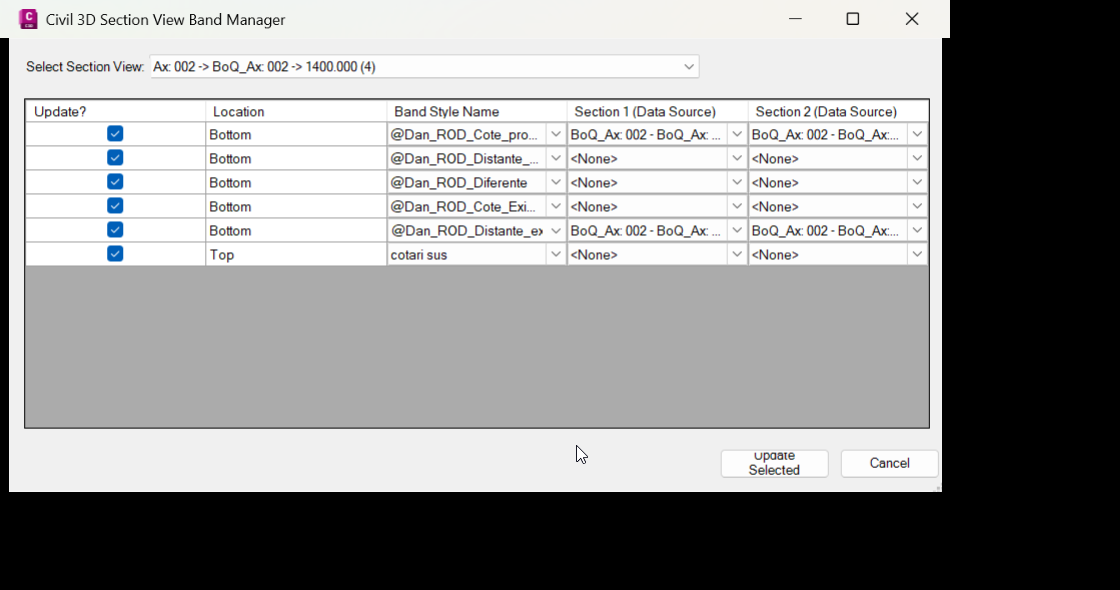
📘 UpdateSectionBandSets scans the active Civil 3D drawing, reads available SectionView objects, collects their existing top and bottom section view band rows, and presents the editable band configuration in a Windows Forms grid.
🔍 The user selects a Civil 3D Section View from the dialog, reviews each band row, and can adjust the band location, band style, and linked section data sources. This is useful when multiple Civil 3D section bands need to be standardized without opening several native dialogs manually.
📊 The grid displays practical columns such as Location, Band Style Name, Section 1 Data Source, and Section 2 Data Source. The program then applies the selected configuration back to the active SectionView using Civil 3D API band set objects.
🧠 The tool is designed for Civil 3D production workflows involving SectionView, sample lines, section sources, section data bands, segment bands, styles, band sets, and drawing annotation management. It does not create sample lines or section views; its main purpose is to update the band configuration of existing Civil 3D section views.
Helper function: (if any)
- 🧰 Command registration – the plugin exposes a Civil 3D command through
CommandMethodAttribute, with the launch methodLaunchSectionBandUpdaterDialogopening the updater form. - 🔍 Initial drawing scan –
LoadInitialDrawingDatareads the activeCivilDocument, finds alignments, sample line groups, sample lines, section views, sections, and section band styles. - 📐 Section View selection logic –
cmbSectionViewslists availableSectionViewobjects, andCmbSectionViews_SelectedIndexChangedrefreshes the grid when the user changes the selected Section View. - 📊 Band grid population –
PopulateGridBandsfillsdgvBandswith editable rows representing top and bottom section view bands. - 🧩 Band source mapping – metadata objects such as
SectionBandRowMeta,SectionViewMeta, andSectionViewBandItemkeep track ofSection1Id,Section2Id,BandStyleId,SampleLineId, andSectionViewId. - 🎨 Band style loading – the plugin reads Civil 3D style collections through
CivilApplication.ActiveDocument.Styles,BandStylesRoot,SectionViewSectionDataBandStyles, andSectionViewSegmentsBandStyles. - 🔄 Top and bottom band editing – helper calls such as
GetTopBandItems,SetTopBandItems,GetBottomBandItems, andSetBottomBandItemsseparate band locations and write them back to the selected Section View. - 🔒 Transaction-safe updates – the updater uses AutoCAD database transactions with
StartTransaction,GetObject, andCommitto apply changes safely to drawing objects. - 🔴 Error reporting – failed updates are reported through message boxes such as
Error applying changes to Section ViewandDatabase Error, making troubleshooting easier for Civil 3D users.
Functionalities:
- 🚀 Open Section View Band Manager – launches a focused Civil 3D dialog for editing section view band set data.
- 🔍 List Civil 3D Section Views – scans the active drawing and lets the user choose the target
SectionView. - 📊 Review band rows in a grid – displays top and bottom band entries with location, style, and data source columns.
- 🎨 Update band styles – lets the user assign Civil 3D section view band styles from available drawing style collections.
- 📐 Change section data sources – supports editing of Section 1 and Section 2 data sources used by band rows.
- 🔄 Update top and bottom bands – applies changes to both upper and lower section view band sets.
- 🧠 Use Civil 3D object identifiers – stores and applies
ObjectIdvalues so the correct Section View, sections, sample lines, and styles are targeted. - 🔒 Database-safe modification – uses AutoCAD transaction logic to reduce the risk of partial drawing edits.
- 📝 Clear update workflow – provides
Update SelectedandCancelactions for simple user control. - ✅ Success and error feedback – confirms successful updates and reports Civil 3D database errors when a change cannot be applied.
Result:
✅ The final result is a practical AutoCAD Civil 3D productivity plugin that speeds up Section View band set editing, improves style consistency, reduces manual Civil 3D dialog work, and helps CAD users manage section view annotation data more efficiently. It is especially useful for drawings with multiple Section Views, sample line sources, band styles, and production annotation requirements.
Images, animations etc.
XAML code:
<ResourceDictionary
xmlns="http://schemas.microsoft.com/winfx/2006/xaml/presentation"
xmlns:x="http://schemas.microsoft.com/winfx/2006/xaml"
xmlns:src="clr-namespace:Autodesk.Windows;assembly=AdWindows">

<src:RibbonToolTip x:Key="UpdateSectionBandSets">
<src:RibbonToolTip.ExpandedContent>
<StackPanel>
<TextBlock Background="AntiqueWhite" TextAlignment="Left">
<Bold>Function Syntax: UpdateSectionBandSets</Bold>
<LineBreak/>
<Bold>Version: 1.0 Date: 05.06.2026 2:49:03PM</Bold>
<LineBreak/>
<Hyperlink>N/A</Hyperlink>

short_description: |<LineBreak/>
<Bold><Run Foreground="DodgerBlue">SEO Description</Run></Bold><LineBreak/>
<Run Foreground="White">🚀 UpdateSectionBandSets is an AutoCAD Civil 3D .NET Framework plugin for editing Section View band sets, band styles, and section data sources.</Run><LineBreak/>
<Run Foreground="LimeGreen">It helps Civil 3D users update top and bottom section view bands faster, improve annotation consistency, and reduce repetitive manual drawing work.</Run><LineBreak/>
command: |<LineBreak/>
<Bold><Run Foreground="DodgerBlue">Main Command and Loading Method</Run></Bold><LineBreak/>
<Run Foreground="White">🧰 Load the plugin with </Run><Bold><Run Foreground="Orange">NETLOAD</Run></Bold><Run Foreground="White"> and select </Run><Bold><Run Foreground="Orange">UpdateSectionBandSets.dll</Run></Bold><Run Foreground="White">.</Run><LineBreak/>
<Run Foreground="White">🚀 Run </Run><Bold><Run Foreground="Orange">UpdateSectionBandSets</Run></Bold><Run Foreground="White"> to open the Civil 3D Section View Band Manager.</Run><LineBreak/>
<Run Foreground="White">📌 Target platform: AutoCAD Civil 3D x64 with a C# </Run><Bold><Run Foreground="Orange">.NET Framework 4.8</Run></Bold><Run Foreground="White"> plugin.</Run><LineBreak/>
<Run Foreground="White">🧩 Uses Civil 3D and AutoCAD managed assemblies such as </Run><Bold><Run Foreground="Orange">AeccDbMgd</Run></Bold><Run Foreground="White">, </Run><Bold><Run Foreground="Orange">Acdbmgd</Run></Bold><Run Foreground="White">, </Run><Bold><Run Foreground="Orange">Acmgd</Run></Bold><Run Foreground="White">, and </Run><Bold><Run Foreground="Orange">accoremgd</Run></Bold><Run Foreground="White">.</Run><LineBreak/>
description: |<LineBreak/>
<Bold><Run Foreground="DodgerBlue">Detailed Description</Run></Bold><LineBreak/>
<Run Foreground="White">📘 The program scans the active Civil 3D drawing and loads available </Run><Bold><Run Foreground="Orange">SectionView</Run></Bold><Run Foreground="White"> objects into a selection list.</Run><LineBreak/>
<Run Foreground="White">🔍 The user selects a Section View and reviews its top and bottom band rows inside an editable grid.</Run><LineBreak/>
<Run Foreground="White">📊 The grid exposes practical fields such as Location, Band Style Name, Section 1 Data Source, and Section 2 Data Source.</Run><LineBreak/>
<Run Foreground="White">🎨 The user can assign Civil 3D section view band styles and adjust the section data sources used by each band row.</Run><LineBreak/>
<Run Foreground="LimeGreen">The result is faster Section View band set editing, cleaner Civil 3D annotation management, and fewer repetitive manual steps.</Run><LineBreak/>
<Bold><Run Foreground="DarkRed">Important limitation:</Run></Bold><LineBreak/>
<Run Foreground="White">The tool updates band set configuration for existing Section Views; it does not create alignments, sample lines, corridors, surfaces, or new Section Views.</Run><LineBreak/>
helper_function: |<LineBreak/>
<Bold><Run Foreground="LimeGreen">Helper Logic</Run></Bold><LineBreak/>
<Run Foreground="White">🧰 Command registration system</Run><Run Foreground="White"> - </Run><Run Foreground="White">LaunchSectionBandUpdaterDialog opens the Section Band Updater dialog from the AutoCAD command line.</Run><LineBreak/>
<Run Foreground="White">🔍 Drawing data scan</Run><Run Foreground="White"> - </Run><Run Foreground="White">LoadInitialDrawingData reads the active CivilDocument, SectionViews, Sections, SampleLines, and band style collections.</Run><LineBreak/>
<Run Foreground="White">📐 Section View selector</Run><Run Foreground="White"> - </Run><Run Foreground="White">cmbSectionViews and CmbSectionViews_SelectedIndexChanged refresh the grid when the selected Section View changes.</Run><LineBreak/>
<Run Foreground="White">📊 Band grid population</Run><Run Foreground="White"> - </Run><Run Foreground="White">PopulateGridBands fills dgvBands with top and bottom Section View band rows.</Run><LineBreak/>
<Run Foreground="White">🧩 Metadata mapping</Run><Run Foreground="White"> - </Run><Run Foreground="White">SectionBandRowMeta, SectionViewMeta, SectionViewBandItem, and BandSetItem keep ObjectId references aligned with grid rows.</Run><LineBreak/>
<Run Foreground="White">🎨 Style collection access</Run><Run Foreground="White"> - </Run><Run Foreground="White">the plugin reads BandStylesRoot, SectionViewSectionDataBandStyles, and SectionViewSegmentsBandStyles from the Civil 3D document.</Run><LineBreak/>
<Run Foreground="White">🔄 Top and bottom band workflow</Run><Run Foreground="White"> - </Run><Run Foreground="White">GetTopBandItems, SetTopBandItems, GetBottomBandItems, and SetBottomBandItems manage band location-specific updates.</Run><LineBreak/>
<Run Foreground="White">🔒 Transaction-safe database updates</Run><Run Foreground="White"> - </Run><Run Foreground="White">StartTransaction, GetObject, and Commit apply changes safely to the AutoCAD database.</Run><LineBreak/>
<Run Foreground="White">🔴 Error handling</Run><Run Foreground="White"> - </Run><Run Foreground="White">MessageBox feedback reports success, database errors, and update failures.</Run><LineBreak/>
functionalities: |<LineBreak/>
<Bold><Run Foreground="LimeGreen">Functionalities</Run></Bold><LineBreak/>
<Run Foreground="White">🚀 Open Section View Band Manager - launches a focused Civil 3D dialog for section view band set editing.</Run><LineBreak/>
<Run Foreground="White">🔍 List Civil 3D Section Views - scans the active DWG and lets the user choose the target Section View.</Run><LineBreak/>
<Run Foreground="White">📊 Review band rows in a grid - displays top and bottom band entries with location, style, and data source columns.</Run><LineBreak/>
<Run Foreground="White">🎨 Update band styles - assigns Civil 3D section view band styles from available drawing style collections.</Run><LineBreak/>
<Run Foreground="White">📐 Change section data sources - edits Section 1 and Section 2 sources used by section view band rows.</Run><LineBreak/>
<Run Foreground="White">🔄 Update top and bottom bands - applies changes to both upper and lower Section View band sets.</Run><LineBreak/>
<Run Foreground="White">🧠 Use ObjectId-based mapping - targets the correct Section View, section sources, sample lines, and styles.</Run><LineBreak/>
<Run Foreground="White">🔒 Apply database-safe changes - uses AutoCAD transaction logic for safer drawing modification.</Run><LineBreak/>
<Run Foreground="White">✅ Confirm update results - reports successful Section View updates and database errors.</Run><LineBreak/>
result: |<LineBreak/>
<Bold><Run Foreground="DodgerBlue">Final Result</Run></Bold><LineBreak/>
<Run Foreground="White">✅ The final result is a productivity-focused AutoCAD Civil 3D plugin for faster Section View band set updates.</Run><LineBreak/>
<Run Foreground="LimeGreen">It improves drawing consistency, reduces manual Civil 3D dialog work, and supports better section annotation management in production DWG files.</Run><LineBreak/>
additional_info: |<LineBreak/>
<Bold><Run Foreground="DodgerBlue">Additional Notes</Run></Bold><LineBreak/>
<Run Foreground="White">📌 The uploaded package contains the compiled </Run><Bold><Run Foreground="Orange">UpdateSectionBandSets.dll</Run></Bold><Run Foreground="White"> and </Run><Bold><Run Foreground="Orange">UpdateSectionBandSets.pdb</Run></Bold><Run Foreground="White">.</Run><LineBreak/>
<Run Foreground="White">🧩 The description is based on compiled metadata, embedded UI strings, command names, and detected AutoCAD Civil 3D API usage.</Run><LineBreak/>
<Run Foreground="DarkRed">🔴 Test the command on a copy of the DWG before applying band set changes to production drawings.</Run><LineBreak/>
</TextBlock>

<Grid>
<Image Source="Image_000.png" Stretch="Uniform"/>
</Grid>

</StackPanel>
</src:RibbonToolTip.ExpandedContent>
</src:RibbonToolTip>
</ResourceDictionary>