
Short description
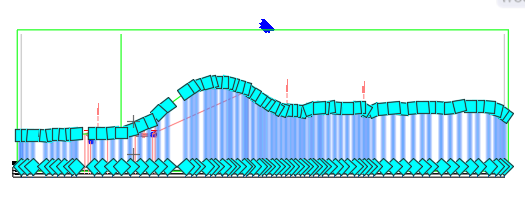
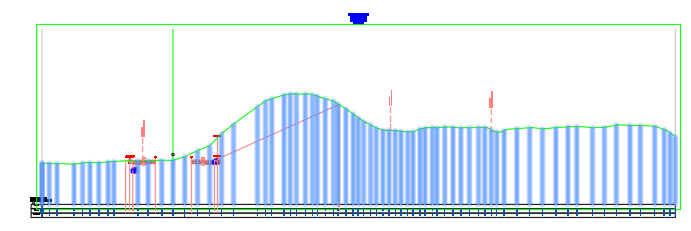
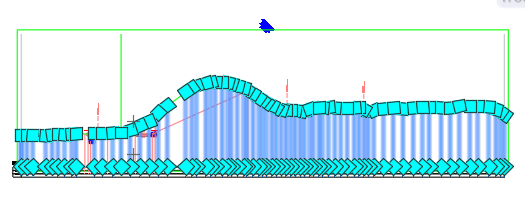
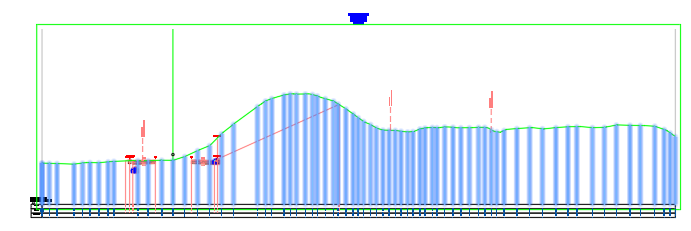
🚀 C3DExploder is an AutoCAD Civil 3D C# .NET plugin project with an AutoLISP loader that converts selected Civil 3D objects into native AutoCAD geometry. The tool helps Civil 3D users create AutoCAD polylines, 3D polylines, lines, rectangles, and MText labels from supported Civil 3D entities, while logging the conversion process for QA review, drafting cleanup, and AutoCAD deliverable preparation.
Command:
📌 Main command:
📋 Log command:
🧹 Clear command:
📘 Version command:
🎯 Single-object helper:
🧰 Loading method: load
📦 Required output file:
🎯 Target platform: Autodesk Civil 3D and AutoCAD with .NET Framework 4.8, x64, AutoCAD managed APIs, Civil 3D managed APIs, and Visual LISP support for the loader.
C3DEXPLODE.📋 Log command:
C3DEXPLODELOG opens the current daily log file in Notepad.🧹 Clear command:
C3DEXPLODECLEAR clears the in-memory session log.📘 Version command:
C3DEXPLODEVERSION prints the plugin version banner.🎯 Single-object helper:
C3DX1 is an AutoLISP wrapper that lets the user pick one object and call C3DEXPLODE.🧰 Loading method: load
C3DExploder.dll with NETLOAD, or load C3DExploder_Loader.lsp with APPLOAD so the LSP can resolve and load the DLL automatically.📦 Required output file:
C3DExploder.dll should be placed beside C3DExploder_Loader.lsp for the recommended loader workflow.🎯 Target platform: Autodesk Civil 3D and AutoCAD with .NET Framework 4.8, x64, AutoCAD managed APIs, Civil 3D managed APIs, and Visual LISP support for the loader.
Description:
🧠 C3DExploder is a Civil 3D to AutoCAD entity converter designed for users who need to simplify Civil 3D custom objects into native AutoCAD geometry. The project includes
The main workflow starts when the user loads
For each selected object, the command creates or reuses a target output layer based on the source layer name. Normally this layer is named with the suffix
The specialized conversion logic currently supports
This project is useful for Civil 3D design review, AutoCAD deliverable preparation, simplified CAD sharing, QA checking, drafting cleanup, and workflows where Civil 3D objects need to be represented as editable AutoCAD geometry. It does not directly modify
C3DExploder.cs, EntityExtensions.cs, C3DExploder.csproj, C3DExploder_Loader.lsp, and README.md.The main workflow starts when the user loads
C3DExploder.dll directly with NETLOAD or indirectly through C3DExploder_Loader.lsp. After the plugin loads, it prints a version banner for C3DExploder v4.0.001. The user then runs C3DEXPLODE and selects Civil 3D objects to convert.For each selected object, the command creates or reuses a target output layer based on the source layer name. Normally this layer is named with the suffix
_ACAD. If the source layer name is too long, the suffix is shortened to _AX. The plugin then chooses a specialized conversion strategy when available, or falls back to a generic AutoCAD EXPLODE command route for unsupported object types.The specialized conversion logic currently supports
AeccDbFeatureLine, AeccDbSection, AeccDbSectionCorridor, and AeccDbGraphCrossSection. Feature lines are converted into Polyline3d geometry, sections are converted into Line entities when section links are available, and section views are represented as a rectangular Polyline plus an MText label. Unsupported Civil 3D objects use the generic fallback route.This project is useful for Civil 3D design review, AutoCAD deliverable preparation, simplified CAD sharing, QA checking, drafting cleanup, and workflows where Civil 3D objects need to be represented as editable AutoCAD geometry. It does not directly modify
ProfileView styles, SectionView styles, Alignment geometry, corridors, labels, bands, point groups, pipe networks, or export tables. Its main purpose is Civil 3D object conversion into AutoCAD entities.
Helper function: (if any)
- 📋 Logging subsystem —
Log.Info,Log.Warn, andLog.Errorwrite timestamped messages to the AutoCAD command line and to persistent daily files in%APPDATA%\C3DExploder. - 📘 Version banner —
VersionInfo.Versionstores4.0.001, andVersionInfo.Bannercreates a visible load message with a timestamp. - 🧠 Exploder interface —
IEntityExploderdefines the shared conversion contract used by each object-specific exploder strategy. - 📌 Feature line exploder —
FeatureLineExploderreadsFeatureLine.GetPointswithFeatureLinePointType.AllPointsand creates a native AutoCADPolyline3d. - 📐 Section exploder —
SectionExploderattempts to access the Civil 3D sectionLinkscollection through reflection and creates AutoCADLineentities. - 🧩 Section fallback —
SectionExploder.FallbackBBoxcreates a closed bounding-boxPolylinewhen section link extraction is not available. - 📊 Section view exploder —
SectionViewExploderconvertsAeccDbGraphCrossSectioninto a rectangle and anMTextlabel using the object extents. - 🔄 Generic AEC fallback —
GenericAecExplodercommits the active transaction and calls the AutoCADEXPLODEcommand for unsupported object types. - 🧩 Strategy registry —
ExploderRegistrymaps Civil 3D object type names to specialized exploders and returns the generic fallback when no match exists. - 🎨 Layer helper —
LayerHelper.EnsureLayercreates target output layers and copies source layer color when possible. - 📐 Bounding-box extension —
GetBoundingBoxExtentssafely readsGeometricExtentsand falls back to a small origin-based box if extents cannot be read. - 🏷️ Safe name extension —
SafeNametries to read a Civil 3D objectNameproperty and falls back to the object handle. - 🔍 Civil type extension —
CivilTypeNameattempts to readObjectNameand falls back to the managed class name for type identification. - 📜 LSP DLL resolver —
C3DExploder:DllPathfindsC3DExploder.dllrelative toC3DExploder_Loader.lspor the current drawing folder. - 📦 LSP NETLOAD wrapper —
C3DExploder:Loadusesnetloadto load the managed DLL and reports success or failure to the command line.
Functionalities:
- 🚀 Convert Civil 3D objects to AutoCAD geometry — selected Civil 3D entities can be represented as native AutoCAD objects for easier editing, delivery, review, and compatibility.
- 📌 Convert feature lines — supported Civil 3D feature lines are converted into
Polyline3dobjects using all available feature line vertices. - 📐 Convert Civil 3D sections — supported sections are converted into AutoCAD
Lineentities when section link data is accessible. - 🧩 Use bounding-box fallback — when section link data is unavailable, the routine creates a rectangular
Polylinefrom the object extents. - 📊 Convert section views — supported section views are represented by a rectangle and an
MTextlabel. - 🔄 Fallback to AutoCAD EXPLODE — unsupported object types are sent through the standard AutoCAD
EXPLODEcommand route. - 🎨 Create sibling output layers — converted geometry is intended to be placed on a layer derived from the source layer with the suffix
_ACAD. - 🔒 Copy source layer color — newly created output layers inherit the source layer color when the source layer is available.
- 📋 Write persistent logs — conversion activity is written to daily log files under
%APPDATA%\C3DExploder. - 📂 Open the current log file —
C3DEXPLODELOGopens the active daily log file in Notepad for troubleshooting and QA review. - 🧹 Clear session log memory —
C3DEXPLODECLEARclears the active in-memory log list during the current AutoCAD session. - 📘 Print version information —
C3DEXPLODEVERSIONdisplays the plugin version and timestamped banner. - 🧰 Load from AutoLISP —
C3DExploder_Loader.lspsupports easier startup loading and exposes wrapper commands for the managed .NET commands. - 🧩 Extend with new converters — developers can add support for additional Civil 3D objects by implementing
IEntityExploderand registering the new strategy inExploderRegistry. - 🔐 Important limitation — specialized conversion is currently implemented only for feature lines, sections, section corridor objects, and graph cross sections.
- 🔴 Generic fallback caution — the generic fallback calls
EXPLODEdirectly on the selected original object, so it may not preserve the Civil 3D original and may not force the output onto the intended_ACADlayer. - 🔴 Batch processing caution — when the generic fallback route is used, the command breaks out of the object loop, so remaining selected objects may not be processed during that run.
- 🔴 Type routing review — the command routes by
ent.GetType().Name, while the project also definesCivilTypeNamebut does not use it in the main loop. This should be reviewed for Civil 3D object name compatibility. - 🔴 Build configuration requirement — the project depends on AutoCAD and Civil 3D managed references, a machine-specific props file, or the fallback AutoCAD 2024 reference paths.
- 🔐 Platform limitation — this plugin targets Autodesk Civil 3D and AutoCAD .NET Framework workflows, not plain AutoLISP-only environments.
Result:
📘 The final result is a Civil 3D to AutoCAD conversion workflow for simplifying selected Civil 3D entities into native AutoCAD geometry. Users can select supported Civil 3D objects, generate editable AutoCAD output, create organized sibling layers, and review conversion logs. This improves productivity, reduces manual tracing, supports faster QA checks, helps prepare AutoCAD deliverables, and gives CAD teams a repeatable framework for extending Civil 3D object conversion with additional C# exploder strategies.
Images, animations etc.
Additional info:
Based on / Source code:
Open Website
Share this page:
Subscribe
Login
0 Comments
Oldest
Categories: AutoCAD_Lips
Categories: AutoCAD_Lips