
Slope_00
Purpose: Label slopes between two picked points using multiple numeric and ratio formats Scope: Works entirely in 2D, producing TEXT entities placed and rotated along the measured segment Workflow: Configure options in a dialog (DCL), then pick two points repeatedly to place slope labels Output style: Percent, H:V integers, V:H integers, H:V decimals (x.xx:1), or V:H decimals (1:x.xx) Defaults: Below=No, Height=1, H=1, V=1, Precision=2, Format=%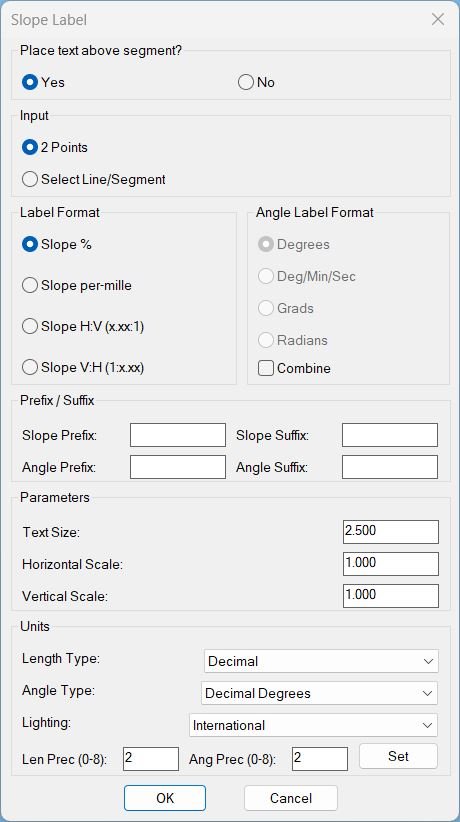
Slope_01
Sort / Purpose: Interactive slope-label placement tool for linework in Civil 3D / AutoCAD. • Type of tool: Dialog-driven annotation command that creates MTEXT labels. • Scope: Works on picked point pairs or on every segment of selected LINE / LWPOLYLINE / POLYLINE entities. • Goal: Quickly place readable slope (and optional angle) labels with user-controlled format, prefixes/suffixes and scaling.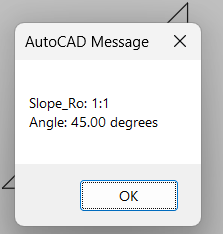
Slope_Ro
🧩 Slope_Ro calculates a slope ratio and angle from two user picked points.
📏 The current routine uses a fixed vertical run reference of 12 and reduces the calculated integer ratio using the greatest common divisor.
📢 The computed slope ratio and angle in degrees are displayed in an AutoCAD alert dialog.
Tags: 🏷️ Autocad Lisps, 🏷️ Polyline menu
XAML code:
<ResourceDictionary
xmlns="http://schemas.microsoft.com/winfx/2006/xaml/presentation"
xmlns:x="http://schemas.microsoft.com/winfx/2006/xaml"
xmlns:src="clr-namespace:Autodesk.Windows;assembly=AdWindows">
<src:RibbonToolTip x:Key="Test">
<src:RibbonToolTip.ExpandedContent>
<StackPanel>
<TextBlock Background="AntiqueWhite" TextAlignment="Left">
<Bold>Function Syntax: Command</Bold>
<LineBreak/>
<Bold>Version: 1 Date: 09.12.2025</Bold>
<LineBreak/>
<LineBreak/>
<Hyperlink>AI+Hyperlinkhttpsforums.augi.comshowthread.php107096-Slopes-and-angles-of-a-polyline-in-2d-autocadHyperlink</Hyperlink>
<LineBreak/>
<Bold>Description</Bold><LineBreak/>
This LISP implements a “slope label placer” with a DCL dialog. After the dialog, it runs in one of two input modes:<LineBreak/>
1) <Run Foreground="Red">2 Points</Run>: repeatedly pick point pairs; each pair creates one MTEXT label centered on the segment.<LineBreak/>
2) <Run Foreground="Red">Select Line/Segment</Run>: select LINE/LWPOLYLINE/POLYLINE; every segment of each selected object gets a label.<LineBreak/>
<LineBreak/>
Each label is an <Run Foreground="Red">MTEXT</Run> entity placed on the current layer, rotated to the segment direction, offset normal to the segment either “above” or “below.” The label text is a slope string in a chosen format, optionally followed by the segment angle on a second line. Both slope and angle can have independent prefix/suffix strings. The routine also exposes unit controls (LUNITS/AUNITS/LUPREC/AUPREC/LIGHTINGUNITS) directly in the dialog via a “Set” button.<LineBreak/>
<LineBreak/>
<Bold>Command</Bold><LineBreak/>
- <Run Foreground="Red">slope_p</Run> — launches the dialog and then runs the chosen mode.<LineBreak/>
<LineBreak/>
<Bold>Global state / defaults</Bold><LineBreak/>
The code uses global variables (persist only for the AutoCAD session unless you add getenv/setenv):<LineBreak/>
- <Run Foreground="DarkRed">*PLTXT-DCL*</Run> : temp DCL file path (created once per session; not deleted in this file).<LineBreak/>
- <Run Foreground="DarkRed">*PLTXT-TXTHGT*</Run> : text height; default to TEXTSIZE (fallback 2.0).<LineBreak/>
- <Run Foreground="DarkRed">*PLTXT-HSCALE*</Run> : horizontal scale applied to DX in slope computation; default 1.0.<LineBreak/>
- <Run Foreground="DarkRed">*PLTXT-VSCALE*</Run> : vertical scale applied to DY in slope computation; default 1.0.<LineBreak/>
- <Run Foreground="DarkRed">*PLTXT-ABOVE*</Run> : T means place label on one side (“above”); NIL means the opposite side (“below”). Default T.<LineBreak/>
- <Run Foreground="DarkRed">SPU_MODE</Run> : "pts" or "ent". Default "ent".<LineBreak/>
- <Run Foreground="DarkRed">SPU_FMT</Run> : slope format, default "pct". Choices: "pct", "permille", "hvdec", "vhdec".<LineBreak/>
- <Run Foreground="DarkRed">SPU_AFMT</Run> : angle text format, default "deg". Choices: "deg", "dms", "grad", "rad".<LineBreak/>
- <Run Foreground="DarkRed">SPU_COMB</Run> : include angle line? Default NIL (angle line off).<LineBreak/>
- Prefix/Suffix strings (default empty):<LineBreak/>
- <Run Foreground="DarkRed">SPU_SLP_PRE</Run>, <Run Foreground="DarkRed">SPU_SLP_SUF</Run> (for slope line)<LineBreak/>
- <Run Foreground="DarkRed">SPU_ANG_PRE</Run>, <Run Foreground="DarkRed">SPU_ANG_SUF</Run> (for angle line)<LineBreak/>
<LineBreak/>
<Bold>DCL dialog content (PLTXT-MAKE-DCL + PLTXT-SHOW-DIALOG)</Bold><LineBreak/>
The dialog is written to a temporary DCL file once (per session) and reused. It includes:<LineBreak/>
1) <Bold>Place text above segment?</Bold> Yes/No radio (controls <Run Foreground="DarkRed">*PLTXT-ABOVE*</Run>).<LineBreak/>
2) <Bold>Input</Bold> radio: <Run Foreground="DarkRed">2 Points</Run> vs <Run Foreground="DarkRed">Select Line/Segment</Run> (controls <Run Foreground="DarkRed">SPU_MODE</Run>).<LineBreak/>
3) <Bold>Label Format</Bold> radio column (controls <Run Foreground="DarkRed">SPU_FMT</Run>):<LineBreak/>
- Slope % (pct)<LineBreak/>
- Slope per-mille (permille)<LineBreak/>
- Slope H:V (x.xx:1) (hvdec)<LineBreak/>
- Slope V:H (1:x.xx) (vhdec)<LineBreak/>
4) <Bold>Angle Label Format</Bold> radio column (controls <Run Foreground="DarkRed">SPU_AFMT</Run>) plus <Bold>Combine</Bold> toggle (controls <Run Foreground="DarkRed">SPU_COMB</Run>).<LineBreak/>
- Combine ON means: angle is added as a second line in MTEXT. Combine OFF means: slope only.<LineBreak/>
- Note: The function name suggests enabling/disabling the angle radios, but the current implementation actually disables radios when Combine is ON (see “Notable quirks” below).<LineBreak/>
5) <Bold>Prefix / Suffix</Bold> edit boxes for slope and angle lines (stored in the SPU_* globals).<LineBreak/>
6) <Bold>Parameters</Bold>: Text Size, Horizontal Scale, Vertical Scale (populates *PLTXT-* globals).<LineBreak/>
7) <Bold>Units</Bold>: popups for Length Type (LUNITS), Angle Type (AUNITS), Lighting (LIGHTINGUNITS), plus Len Prec (LUPREC) and Ang Prec (AUPREC) edit boxes and a “Set” button applying them immediately.<LineBreak/>
8) OK/Cancel.<LineBreak/>
<LineBreak/>
<Bold>Unit handling</Bold><LineBreak/>
- <Run Foreground="DarkRed">SPU_SetUnits</Run> reads dialog values and sets system variables:<LineBreak/>
- <Run Foreground="DarkRed">LUPREC</Run> clamped 0..8<LineBreak/>
- <Run Foreground="DarkRed">AUPREC</Run> clamped 0..8<LineBreak/>
- <Run Foreground="DarkRed">LUNITS</Run> mapped from popup: Scientific(1), Decimal(2), Engineering(3), Architectural(4), Fractional(5)<LineBreak/>
- <Run Foreground="DarkRed">AUNITS</Run> mapped from popup: Decimal Degrees(0), DMS(1), Grads(2), Radians(3), Surveyor’s(4)<LineBreak/>
- <Run Foreground="DarkRed">LIGHTINGUNITS</Run> mapped from popup: Generic(0), American(1), International(2)<LineBreak/>
- <Run Foreground="DarkRed">SPU-GetLightingUnits</Run> and <Run Foreground="DarkRed">SPU-SetLightingUnits</Run> wrap getvar/setvar with catch-all for safety in versions where LIGHTINGUNITS may not exist.<LineBreak/>
<LineBreak/>
<Bold>Geometry intake: how segments are generated</Bold><LineBreak/>
In entity mode, selection is restricted to:<LineBreak/>
<Run Foreground="DarkRed">(ssget '((0 . "LINE,LWPOLYLINE,POLYLINE")))</Run><LineBreak/>
For each selected entity, <Run Foreground="DarkRed">PLTXT-GetSegListFromEntity</Run> returns a list of segments, each segment being a pair of UCS points:<LineBreak/>
- LINE → one segment: (start end).<LineBreak/>
- LWPOLYLINE / POLYLINE → extracts vertices and returns consecutive pairs: (p0 p1), (p1 p2), ... (no closing segment is added even if polyline is closed).<LineBreak/>
All points are transformed from WCS (0) to UCS (1) using <Run Foreground="DarkRed">(trans ... 0 1)</Run> before processing.<LineBreak/>
<LineBreak/>
<Bold>Label creation (PLTXT-CREATE-MTEXT)</Bold><LineBreak/>
For each segment defined by points p0 and p1:<LineBreak/>
1) Computes direction:<LineBreak/>
- dx = x1-x0, dy = y1-y0, ang = (angle p0 p1).<LineBreak/>
2) Applies horizontal/vertical scaling to the rise/run computation only:<LineBreak/>
- dxs = dx * *PLTXT-HSCALE*<LineBreak/>
- dys = dy * *PLTXT-VSCALE*<LineBreak/>
These do not change the MTEXT insertion point or rotation; they only alter the computed slope value.<LineBreak/>
3) Computes slope value (signed):<LineBreak/>
- If dxs == 0: treated as “infinite/vertical” special case (see below).<LineBreak/>
- Else slope = dys/dxs, and neg is true if slope < 0 (sign preserved).<LineBreak/>
4) Formats slope text depending on <Run Foreground="DarkRed">SPU_FMT</Run> using <Run Foreground="DarkRed">LUPREC</Run> as the numeric precision:<LineBreak/>
- "pct": slope% = ± (abs(slope)*100) with trailing "%".<LineBreak/>
- "permille": ± (abs(slope)*1000) with trailing "\\U+2030" (per-mille symbol).<LineBreak/>
- "hvdec": prints ±(run/rise):1. If rise==0, ratio=0.0 (so “0.00:1”).<LineBreak/>
- "vhdec": prints ±1:(rise/run). If run==0, ratio=0.0 (so “1:0.00”).<LineBreak/>
Vertical special case (dxs==0) outputs fixed strings:<LineBreak/>
- pct: "INF%"<LineBreak/>
- permille: "INF\\U+2030"<LineBreak/>
- hvdec: "0:1"<LineBreak/>
- vhdec: "1:0"<LineBreak/>
5) Applies slope prefix/suffix:<LineBreak/>
<Run Foreground="DarkRed">sTxt = slp_pre + baseSlope + slp_suf</Run><LineBreak/>
6) Optional angle line (only if <Run Foreground="DarkRed">SPU_COMB</Run> is true):<LineBreak/>
- Angle string computed by <Run Foreground="DarkRed">PLTXT-AngToString</Run> using <Run Foreground="DarkRed">SPU_AFMT</Run> and <Run Foreground="DarkRed">AUPREC</Run>.<LineBreak/>
- Formats:<LineBreak/>
- deg: decimal degrees + "%%d" (AutoCAD degree symbol).<LineBreak/>
- dms: D° M' S" with seconds to AUPREC decimal places.<LineBreak/>
- grad: (ang * 200/pi) + "g"<LineBreak/>
- rad: raw radians + " rad"<LineBreak/>
- Prefix/suffix applied to the angle line: ang_pre + angBase + ang_suf.<LineBreak/>
- MTEXT content becomes either:<LineBreak/>
- slope only: <Run Foreground="DarkRed">sTxt</Run><LineBreak/>
- slope + angle: <Run Foreground="DarkRed">sTxt \\P angTxt</Run> (\\P is the MTEXT newline).<LineBreak/>
7) Placement & rotation:<LineBreak/>
- Midpoint: (xm, ym) = midpoint(p0,p1).<LineBreak/>
- Normal vector (left-hand normal for the segment): nx = -sin(ang), ny = cos(ang).<LineBreak/>
- Offset distance: off = 2.0 * textHeight.<LineBreak/>
- If *PLTXT-ABOVE* is T: insertion point = midpoint + normal*off; else midpoint - normal*off.<LineBreak/>
- MTEXT rotation set to ang (group 50).<LineBreak/>
8) Creates an MTEXT entity via <Run Foreground="DarkRed">entmake</Run> with key fields:<LineBreak/>
- Layer: current layer (CLAYER)<LineBreak/>
- Style: current TEXTSTYLE<LineBreak/>
- Height: *PLTXT-TXTHGT*<LineBreak/>
- Width: height * 20.0 (wrap width; may cause wrapping on long prefixes).<LineBreak/>
- Attachment: group 71 = 5 (middle center attachment point).<LineBreak/>
- Text: group 1 = computed content.<LineBreak/>
<LineBreak/>
<Bold>Run-time loops</Bold><LineBreak/>
- <Run Foreground="DarkRed">PLTXT-Loop-2Pts</Run>: loops prompting for first point then second point; Enter terminates. Each valid pair creates one label.<LineBreak/>
- <Run Foreground="DarkRed">PLTXT-Loop-Ent</Run>: single selection set; each selected line or polyline has all its segments labeled. No interactive repetition except you can run the command again.<LineBreak/>
<LineBreak/>
<Bold>Notable quirks / implementation notes</Bold><LineBreak/>
1) <Bold>Combine toggle naming vs behavior</Bold>: The comment states “Enable/disable angle format radios based on SPU_COMB,” and the UI label is “Combine.” But the current implementation of <Run Foreground="DarkRed">SPU_UpdateAngEnable</Run> does:<LineBreak/>
<Run Foreground="DarkRed">(mode_tile k (if SPU_COMB 0 1))</Run><LineBreak/>
In DCL, mode_tile 0 = enabled, 1 = disabled. Therefore, when Combine is ON, angle radios are enabled; when Combine is OFF, they are disabled. That is the reverse of what the helper name suggests, but it is consistent with “only allow choosing angle format when you intend to show the angle.” Functionally, it is reasonable; the comment in the code is just misleading.<LineBreak/>
2) <Bold>Angle radios remain selectable even if Combine is ON</Bold>, but the chosen angle format only matters when Combine is ON (because otherwise angTxt is nil).<LineBreak/>
3) <Bold>Closed polylines are treated as open for labeling</Bold>: The code labels only consecutive vertex pairs; it does not include the closing segment from last vertex back to first, even if the polyline is closed. If you want to label the closing segment too, PLTXT-GetSegListFromEntity would need to add (last first) when closed.<LineBreak/>
4) <Bold>Vertical slope handling is “INF” strings</Bold>: For dxs==0, it does not attempt to compute sign; it outputs fixed strings (INF%). If you care about up vs down, you would need to incorporate dys sign into the INF case.<LineBreak/>
5) <Bold>Text width fixed at 20x height</Bold>: Long prefixes/suffixes may wrap unexpectedly. If you want always-single-line text, you would typically set width large or omit group 41, or compute width from string length.<LineBreak/>
6) <Bold>DCL file lifecycle</Bold>: The DCL is created once and stored in *PLTXT-DCL*. This code does not delete it at the end of the command. Over time, this leaves a temp DCL file behind until the OS temp directory is cleaned. If you want cleanup, you would delete it on unload or at command end when acceptable.<LineBreak/>
7) <Bold>No undo grouping</Bold>: The routine creates MTEXT entities but does not wrap operations in UNDO marks/groups. Users can still undo normally, but if you want single-step undo for an entire run, you would add an UNDO group/mark pattern around the loops.<LineBreak/>
<LineBreak/>
<Bold>Net effect</Bold><LineBreak/>
Running <Run Foreground="Red">slope_p</Run> gives a configurable workflow for stamping slope labels along individual picked segments or along all segments of selected lines/polylines. Slope formatting supports percent, per-mille, and ratio styles, with optional angle annotation in several angular unit formats, and with user-controlled unit precision and system unit settings directly from the dialog.<LineBreak/>
</TextBlock>
<Grid>
<Image Source="Slope_000.jpg" Stretch="Uniform"/>
</Grid>
<Grid>
<MediaElement
Source="Slope_000.gif"
Stretch="Uniform"
Visibility="Visible"/>
</Grid>
</StackPanel>
</src:RibbonToolTip.ExpandedContent>
</src:RibbonToolTip>
</ResourceDictionary>
Tags: 🏷️ Autocad Lisps, 🏷️ Polyline menu