
Short description
🔇 AnnoAllOff is an AutoCAD and Civil 3D AutoLISP utility that sets ANNOALLVISIBLE to 0 for selected Model/Layout tabs through a DCL picker.
🎛️ It helps users turn off global annotative visibility per tab while keeping control over which layouts are updated.
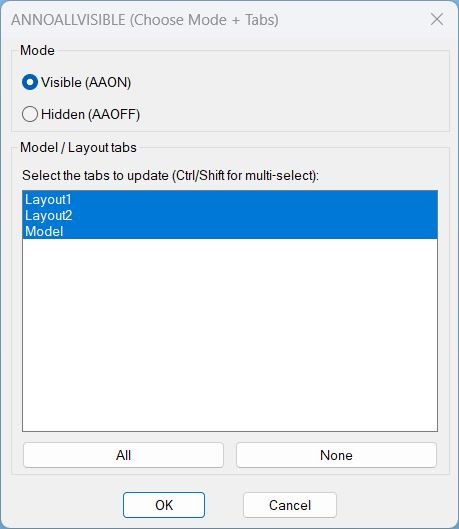
Command:
🚀 Main command: AAOFF
🎛️ Dialog title: ANNOALLVISIBLE -> 0 (Choose Tabs)
🧭 Workflow: choose Model and/or Layout tabs, then apply ANNOALLVISIBLE = 0 to the selected tabs.
Description:
🔇 AnnoAllOff is an SEO-friendly AutoCAD annotation visibility control tool for managing annotative object display across Model Space and Paper Space layouts.
🧩 The routine dynamically writes a temporary DCL file, lists all layout tab names from the active drawing, selects all tabs by default, and lets the user choose All, None, or a custom multi-selection.
📐 For each selected tab, the command switches CTAB to that tab, forces Paper Space when required, runs ANNOALLVISIBLE 0, and then restores the previous CTAB, TILEMODE, and MSPACE state.
📌 This is useful for AutoCAD and Civil 3D production drawings where annotative objects, labels, text, dimensions, and multileaders need controlled visibility per tab before review, plotting, or cleanup.
🧠 The script notes that ANNOALLVISIBLE is stored per Model tab and per Layout tab, not per viewport entity.
Helper function: (if any)
🧩 AAOFF:WriteDcl writes the temporary DCL picker for selecting Model/Layout tabs.
🧩 AAOFF:GetTabNames reads the active drawing Layouts collection and returns the available tab names.
🧩 AAOFF:MakeAllIndexString builds the DCL list-box selection string for selecting every tab by default.
🧩 AAOFF:IdxList->Names converts selected DCL list-box indices into layout tab names.
🧩 AAOFF:SetAnnoAllVisible0 switches through selected tabs, sets ANNOALLVISIBLE to 0, and restores the previous drawing tab state.
🧩 c:AAOFF loads the DCL dialog, fills the tab list, handles All/None/OK/Cancel actions, applies the setting, unloads the dialog, and deletes the temporary DCL file.
Functionalities:
✅ 🔇 Sets ANNOALLVISIBLE to 0 for selected tabs.
✅ 🎛️ Uses a DCL dialog to choose Model and Layout tabs.
✅ ✅ Selects all tabs by default for fast drawing-wide annotation visibility cleanup.
✅ 📋 Allows multi-select tab control with Ctrl/Shift selection.
✅ 🟢 Provides All and None buttons for quick selection management.
✅ 🧭 Switches CTAB to each selected tab before applying the setting.
✅ 📄 Forces Paper Space when processing layout tabs.
✅ 🔄 Restores the previous CTAB, TILEMODE, and MSPACE values after completion.
✅ 🧹 Cleans up the temporary DCL file after use.
✅ 📌 Avoids viewport-level confusion by treating ANNOALLVISIBLE as a per-tab setting.
Result:
🎯 The result is a controlled annotation visibility cleanup workflow for AutoCAD and Civil 3D drawings.
🔇 Users can turn off ANNOALLVISIBLE on all tabs or only selected layouts without manually switching each tab and typing the system variable.
📐 This supports plotting preparation, layout QA, annotative object cleanup, and drawing-standard workflows where visible annotation scales must be controlled per tab.
Images, animations etc.
XAML code:
<ResourceDictionary
xmlns="http://schemas.microsoft.com/winfx/2006/xaml/presentation"
xmlns:x="http://schemas.microsoft.com/winfx/2006/xaml"
xmlns:src="clr-namespace:Autodesk.Windows;assembly=AdWindows">
<src:RibbonToolTip x:Key="AnnoAllOnOff">
<src:RibbonToolTip.ExpandedContent>
<StackPanel>
<TextBlock Background="AntiqueWhite" TextAlignment="AnnoAllOnOff">
<Bold>Function Syntax: AnnoAllOnOff</Bold>
<LineBreak/>
<Bold>Version: 1.1 Date: 20.06.2026 6:38:54PM</Bold>
<LineBreak/>
<Hyperlink>AI+https://forums.autodesk.com/t5/autocad-forum/annotative-objects-not-displaying-in-layout-viewports/td-p/7949416</Hyperlink>
<LineBreak/>
<Bold><Span Foreground="DarkRed">AAVIS</Span> Description</Bold><LineBreak/>
This AutoLISP program provides a single command that lets the user set the AutoCAD system setting <Span Foreground="DarkRed">ANNOALLVISIBLE</Span> to either <Span Foreground="DarkRed">Visible</Span> (value <Span Foreground="DarkRed">1</Span>) or <Span Foreground="DarkRed">Hidden</Span> (value <Span Foreground="DarkRed">0</Span>) for a user-chosen set of drawing tabs (Model and Layouts).<LineBreak/>
It uses a dialog box (DCL) that is generated and loaded automatically from inside the LSP at runtime, so no separate DCL file is required to be installed or maintained by the user.<LineBreak/>
<Bold><Span Foreground="DarkRed">User Interaction</Span></Bold><LineBreak/>
• Run the command <Span Foreground="DarkRed">AAVIS</Span> in the AutoCAD command line.<LineBreak/>
• A dialog opens with two radio buttons:<LineBreak/>
• <Span Foreground="DarkRed">Visible (AAON)</Span> sets <Span Foreground="DarkRed">ANNOALLVISIBLE = 1</Span>.<LineBreak/>
• <Span Foreground="DarkRed">Hidden (AAOFF)</Span> sets <Span Foreground="DarkRed">ANNOALLVISIBLE = 0</Span>.<LineBreak/>
• In the same dialog, the user selects which tabs to update from a multi-select list containing <Span Foreground="DarkRed">Model</Span> and all <Span Foreground="DarkRed">Layout</Span> tabs.<LineBreak/>
• The user can use helper buttons:<LineBreak/>
• <Span Foreground="DarkRed">All</Span> selects all tabs in the list.<LineBreak/>
• <Span Foreground="DarkRed">None</Span> clears the selection in the list.<LineBreak/>
• Clicking <Span Foreground="DarkRed">OK</Span> applies the change to the selected tabs.<LineBreak/>
• Clicking <Span Foreground="DarkRed">Cancel</Span> exits without making changes.<LineBreak/>
<Bold><Span Foreground="DarkRed">Functionalities</Span></Bold><LineBreak/>
• Sets the AutoCAD variable <Span Foreground="DarkRed">ANNOALLVISIBLE</Span> to the chosen mode value (<Span Foreground="DarkRed">1</Span> or <Span Foreground="DarkRed">0</Span>) for the selected tabs.<LineBreak/>
• Supports three tab selection workflows:<LineBreak/>
• <Span Foreground="DarkRed">All</Span> tabs selected (fast global update).<LineBreak/>
• <Span Foreground="DarkRed">None</Span> selected (no action is performed).<LineBreak/>
• A user-defined subset (only the chosen tabs are modified).<LineBreak/>
• Automatically switches to each selected tab using <Span Foreground="DarkRed">CTAB</Span> and applies the setting.<LineBreak/>
• When a Layout tab is active, forces Paperspace by setting <Span Foreground="DarkRed">MSPACE</Span> to false before running the command, ensuring consistent behavior in layouts.<LineBreak/>
• Restores the user environment after completion by resetting:<LineBreak/>
• The previously active tab (<Span Foreground="DarkRed">CTAB</Span>).<LineBreak/>
• The previous Model or Layout mode (<Span Foreground="DarkRed">TILEMODE</Span>).<LineBreak/>
• The prior viewport mode in layouts (<Span Foreground="DarkRed">MSPACE</Span>) when applicable.<LineBreak/>
<Bold><Span Foreground="DarkRed">Important Behavior Notes</Span></Bold><LineBreak/>
• The selection list represents <Span Foreground="DarkRed">tabs</Span> (Model and Layouts), not individual viewport objects inside a layout.<LineBreak/>
• The program changes the annotation visibility setting at the tab level by issuing the AutoCAD command <Span Foreground="DarkRed">ANNOALLVISIBLE</Span> with the appropriate value.<LineBreak/>
• If the user selects no tabs and clicks OK, the program prints a message indicating no changes were made.<LineBreak/>
<Bold><Span Foreground="DarkRed">Files and Dependencies</Span></Bold><LineBreak/>
• Uses <Span Foreground="DarkRed">VLAX</Span> and therefore calls <Span Foreground="DarkRed">(vl-load-com)</Span>.<LineBreak/>
• Generates a temporary DCL file (for the dialog definition) at runtime and deletes it after the dialog closes, so no permanent DCL file remains on disk.<LineBreak/>
• Does not require the user to select blocks, objects, or viewports in the drawing area; all interaction is via the dialog list selection.<LineBreak/>
<Bold><Run Foreground="DodgerBlue">Description</Run></Bold><LineBreak/>
<Run Foreground="White">🧩 AnnoAllOff is an AutoCAD and Civil 3D AutoLISP utility designed for faster, cleaner CAD layer and drawing-management workflows.</Run><LineBreak/>
<Run Foreground="LimeGreen">📌 It provides a DCL picker for setting ANNOALLVISIBLE to 0 on selected Model/Layout tabs, helping control annotative object visibility before plotting, review, or cleanup.</Run><LineBreak/>
<Bold><Run Foreground="DodgerBlue">Function Syntax</Run></Bold><LineBreak/>
<Run Foreground="White">🚀 Main command: </Run><Bold><Run Foreground="Orange">AAOFF</Run></Bold><LineBreak/>
<Run Foreground="White">🎛️ Dialog: </Run><Bold><Run Foreground="Orange">ANNOALLVISIBLE -> 0 (Choose Tabs)</Run></Bold><LineBreak/>
<Bold><Run Foreground="DodgerBlue">SEO Optimized Overview</Run></Bold><LineBreak/>
<Run Foreground="White">🔇 This AutoCAD annotation visibility tool sets </Run><Bold><Run Foreground="Orange">ANNOALLVISIBLE</Run></Bold><Run Foreground="White"> to </Run><Bold><Run Foreground="Orange">0</Run></Bold><Run Foreground="White"> for selected Model and Layout tabs.</Run><LineBreak/>
<Run Foreground="White">🎛️ The routine dynamically creates a DCL dialog and lists the drawing tabs so the user can process All, None, or selected layouts.</Run><LineBreak/>
<Run Foreground="White">📐 It switches through the selected tabs, applies the system variable, and restores the previous drawing state after completion.</Run><LineBreak/>
<Run Foreground="White">📌 This is useful for AutoCAD and Civil 3D drawings containing annotative text, dimensions, labels, multileaders, and layout annotation that must be controlled before plotting or review.</Run><LineBreak/>
<Bold><Run Foreground="LimeGreen">Primary Workflow</Run></Bold><LineBreak/>
<Run Foreground="White">1️⃣ Run </Run><Bold><Run Foreground="Orange">AAOFF</Run></Bold><Run Foreground="White"> at the AutoCAD command line.</Run><LineBreak/>
<Run Foreground="White">2️⃣ Review the list of Model/Layout tabs in the DCL dialog.</Run><LineBreak/>
<Run Foreground="White">3️⃣ Use </Run><Bold><Run Foreground="DarkRed">All</Run></Bold><Run Foreground="White">, </Run><Bold><Run Foreground="DarkRed">None</Run></Bold><Run Foreground="White">, or Ctrl/Shift multi-select to choose tabs.</Run><LineBreak/>
<Run Foreground="White">4️⃣ Click OK to apply </Run><Bold><Run Foreground="Orange">ANNOALLVISIBLE = 0</Run></Bold><Run Foreground="White"> to the selected tabs.</Run><LineBreak/>
<Run Foreground="White">5️⃣ The routine restores the previous tab and model/paper-space state.</Run><LineBreak/>
<Bold><Run Foreground="LimeGreen">Functionalities</Run></Bold><LineBreak/>
<Run Foreground="White">✅ </Run><Bold><Run Foreground="LimeGreen">DCL tab picker</Run></Bold><Run Foreground="White"> - shows Model and Layout tabs in a multi-select list.</Run><LineBreak/>
<Run Foreground="White">✅ </Run><Bold><Run Foreground="LimeGreen">Default select all</Run></Bold><Run Foreground="White"> - prepares the dialog for full drawing processing by default.</Run><LineBreak/>
<Run Foreground="White">✅ </Run><Bold><Run Foreground="LimeGreen">Per-tab annotation visibility</Run></Bold><Run Foreground="White"> - applies ANNOALLVISIBLE to each selected tab.</Run><LineBreak/>
<Run Foreground="White">✅ </Run><Bold><Run Foreground="LimeGreen">State restoration</Run></Bold><Run Foreground="White"> - restores CTAB, TILEMODE, and MSPACE after processing.</Run><LineBreak/>
<Run Foreground="White">✅ </Run><Bold><Run Foreground="LimeGreen">Temporary DCL cleanup</Run></Bold><Run Foreground="White"> - unloads the dialog and deletes the generated DCL file.</Run><LineBreak/>
<Bold><Run Foreground="DodgerBlue">Important Commands and Functions</Run></Bold><LineBreak/>
<Run Foreground="White">🧩 </Run><Bold><Run Foreground="Orange">ANNOALLVISIBLE</Run></Bold><Run Foreground="White"> controls whether all annotation scales are visible.</Run><LineBreak/>
<Run Foreground="White">🧩 </Run><Bold><Run Foreground="Orange">CTAB</Run></Bold><Run Foreground="White"> is changed to process each selected tab.</Run><LineBreak/>
<Run Foreground="White">🧩 </Run><Bold><Run Foreground="Orange">TILEMODE</Run></Bold><Run Foreground="White"> and </Run><Bold><Run Foreground="Orange">MSPACE</Run></Bold><Run Foreground="White"> are restored after the operation.</Run><LineBreak/>
<Run Foreground="White">🧩 </Run><Bold><Run Foreground="Orange">load_dialog</Run></Bold><Run Foreground="White">, </Run><Bold><Run Foreground="Orange">new_dialog</Run></Bold><Run Foreground="White">, and </Run><Bold><Run Foreground="Orange">start_dialog</Run></Bold><Run Foreground="White"> manage the DCL picker.</Run><LineBreak/>
<Bold><Run Foreground="DarkRed">Important Notes</Run></Bold><LineBreak/>
<Run Foreground="White">⚠️ The tool sets ANNOALLVISIBLE to 0; it does not delete annotation or remove annotation scales.</Run><LineBreak/>
<Run Foreground="White">⚠️ The code comments specify that ANNOALLVISIBLE is stored per Model tab and per Layout tab, not per viewport entity.</Run><LineBreak/>
<Run Foreground="White">⚠️ The command changes tabs during execution, then restores the previous tab and model/paper-space state.</Run><LineBreak/>
<Bold><Run Foreground="Yellow">Tags</Run></Bold><LineBreak/>
<Run Foreground="Yellow">🏷️ AutoCAD, 🏷️ Civil 3D, 🏷️ AutoLISP, 🏷️ Visual LISP, 🏷️ DCL dialog, 🏷️ Annotation visibility, 🏷️ ANNOALLVISIBLE, 🏷️ Layouts, 🏷️ Model Space, 🏷️ Paper Space, 🏷️ Annotative objects, 🏷️ Drawing cleanup, 🏷️ CAD standards, 🏷️ Viewport workflow, 🏷️ CAD productivity</Run><LineBreak/>
</TextBlock>
<Grid>
<Image Source="Image_000.jpg" Stretch="Uniform"/>
</Grid>
</StackPanel>
</src:RibbonToolTip.ExpandedContent>
</src:RibbonToolTip>
</ResourceDictionary>