Short description
🪟 VportsPoly2Rectang is an AutoCAD and Civil 3D AutoLISP viewport shape conversion manager. 🔄 It detects rectangular and polygonal clipped viewports across layouts, supports filters and selection tools, and converts viewport clipping boundaries with undo-aware batch controls.
Command:
🚀 Main command: VportsPoly2Rectang
⚡ Alias command: VportShapeConv
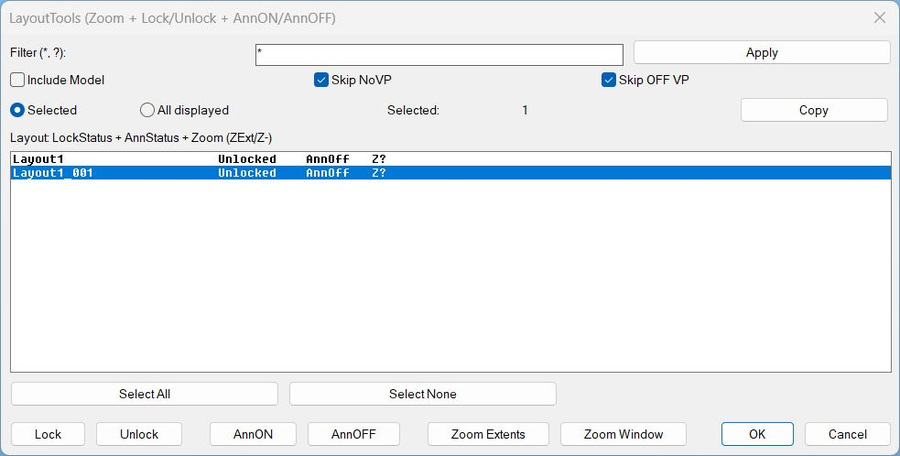
🧰 Opens an enhanced DCL manager for detecting, filtering, locking, zooming, and converting rectangular and polygonal clipped viewports.
Description:
🪟 VportsPoly2Rectang is an SEO-friendly AutoCAD viewport clipping utility for managing rectangular and non-rectangular viewports in paper space layouts.
🔍 The routine scans layout block table records using VLA iteration, which avoids unreliable ssget layout filtering when inactive layout tabs are involved.
🔄 It identifies polygonal clipped viewports through DXF clip references and non-rectangular viewport flags, then supports converting viewport shape states.
🔐 It includes lock/unlock status, viewport filtering, select all poly/rect viewport tools, zoom-to-selected, custom clip boundary options, and persisted settings.
🎯 This is useful for layout QA, clipped viewport cleanup, Civil 3D sheet production, and paper space viewport standardization.
Helper function: (if any)
🧩 VLA layout iteration scans each layout block table record reliably.
🧩 DXF group 340 and DXF 90 bit checks detect non-rectangular clipped viewports.
🧩 Registry helpers persist user settings between sessions.
🧩 DCL builders create the two-panel layout and viewport interface.
🧩 Undo helpers group batch conversion, lock, and unlock operations safely.
🧩 Zoom helpers switch layouts and focus the selected viewport.
Functionalities:
✅ 🪟 List viewports by layout with rectangular/poly status.
✅ 🔍 Filter visible viewports by All, Poly only, or Rect only.
✅ 🔐 Show and modify viewport locked/unlocked state.
✅ 🔄 Convert polygonal viewports to rectangular viewports.
✅ ✏️ Convert rectangular viewports to custom polygonal clipping boundaries.
✅ 🖱️ Select all poly viewports or all rectangular viewports quickly.
✅ 🔎 Zoom to the selected viewport for visual checking.
✅ 💾 Persist dialog options and clip boundary layer settings between sessions.
Result:
🎯 The result is a controlled viewport cleanup and conversion workflow for AutoCAD and Civil 3D sheet layouts.
🪟 Users can locate problematic polygonal viewports, lock or unlock viewport sets, convert clipping shapes, and standardize sheets more efficiently.
✅ The tool improves paper space QA for drawings with many layouts and mixed viewport types.
Images, animations etc.
XAML code:
<ResourceDictionary
xmlns="http://schemas.microsoft.com/winfx/2006/xaml/presentation"
xmlns:x="http://schemas.microsoft.com/winfx/2006/xaml"
xmlns:src="clr-namespace:Autodesk.Windows;assembly=AdWindows">

<src:RibbonToolTip x:Key="VportsPoly2Rectang">
<src:RibbonToolTip.ExpandedContent>
<StackPanel>
<TextBlock Background="AntiqueWhite" TextAlignment="Left">
<Bold>Function Syntax: VportsPoly2Rectang / VportShapeConv</Bold>
<LineBreak/>
<Bold>Version: 1.1 Date: 20.06.2026 6:38:56PM</Bold>
<LineBreak/>
<Hyperlink>AI+https://forums.autodesk.com/t5/visual-lisp-autolisp-and-general/xline-to-polyline/td-p/5504511</Hyperlink>
<LineBreak/>

<Bold><Run Foreground="DodgerBlue">🚀 Command Name</Run></Bold><LineBreak/>
<Run Foreground="White">🧩 Type </Run><Bold><Run Foreground="Orange">VportsPoly2Rectang</Run></Bold><Run Foreground="White"> at the AutoCAD command line.</Run><LineBreak/>
<Run Foreground="White">🧩 Type </Run><Bold><Run Foreground="Orange">VportShapeConv</Run></Bold><Run Foreground="White"> at the AutoCAD command line.</Run><LineBreak/>
<LineBreak/>
<Bold><Run Foreground="DodgerBlue">🧭 SEO Optimized Description</Run></Bold><LineBreak/>
<Run Foreground="White">🪟 VportsPoly2Rectang is an SEO-friendly AutoCAD viewport clipping utility for managing rectangular and non-rectangular viewports in paper space layouts.</Run><LineBreak/>
<Run Foreground="White">🔍 The routine scans layout block table records using VLA iteration, which avoids unreliable ssget layout filtering when inactive layout tabs are involved.</Run><LineBreak/>
<Run Foreground="White">🔄 It identifies polygonal clipped viewports through DXF clip references and non-rectangular viewport flags, then supports converting viewport shape states.</Run><LineBreak/>
<Run Foreground="White">🔐 It includes lock/unlock status, viewport filtering, select all poly/rect viewport tools, zoom-to-selected, custom clip boundary options, and persisted settings.</Run><LineBreak/>
<Run Foreground="White">🎯 This is useful for layout QA, clipped viewport cleanup, Civil 3D sheet production, and paper space viewport standardization.</Run><LineBreak/>
<LineBreak/>
<Bold><Run Foreground="LimeGreen">🧰 Main Workflow</Run></Bold><LineBreak/>
<Run Foreground="White">1️⃣ Run VportsPoly2Rectang or VportShapeConv.</Run><LineBreak/>
<Run Foreground="White">2️⃣ Select layouts and review detected rectangular or polygonal viewports.</Run><LineBreak/>
<Run Foreground="White">3️⃣ Filter the viewport list by All, Poly only, or Rect only.</Run><LineBreak/>
<Run Foreground="White">4️⃣ Convert clipping shapes, lock/unlock viewports, or zoom to selected viewports.</Run><LineBreak/>
<Run Foreground="White">5️⃣ Use undo-aware batch processing to review and roll back if needed.</Run><LineBreak/>
<LineBreak/>
<Bold><Run Foreground="LimeGreen">✅ Functionalities</Run></Bold><LineBreak/>
<Run Foreground="White">✅ 🪟 List viewports by layout with rectangular/poly status.</Run><LineBreak/>
<Run Foreground="White">✅ 🔍 Filter visible viewports by All, Poly only, or Rect only.</Run><LineBreak/>
<Run Foreground="White">✅ 🔐 Show and modify viewport locked/unlocked state.</Run><LineBreak/>
<Run Foreground="White">✅ 🔄 Convert polygonal viewports to rectangular viewports.</Run><LineBreak/>
<Run Foreground="White">✅ ✏️ Convert rectangular viewports to custom polygonal clipping boundaries.</Run><LineBreak/>
<Run Foreground="White">✅ 🖱️ Select all poly viewports or all rectangular viewports quickly.</Run><LineBreak/>
<Run Foreground="White">✅ 🔎 Zoom to the selected viewport for visual checking.</Run><LineBreak/>
<Run Foreground="White">✅ 💾 Persist dialog options and clip boundary layer settings between sessions.</Run><LineBreak/>
<LineBreak/>
<Bold><Run Foreground="DodgerBlue">🧩 Important Commands and Helper Functions</Run></Bold><LineBreak/>
<Run Foreground="White">🧩 VLA layout iteration scans each layout block table record reliably.</Run><LineBreak/>
<Run Foreground="White">🧩 DXF group 340 and DXF 90 bit checks detect non-rectangular clipped viewports.</Run><LineBreak/>
<Run Foreground="White">🧩 Registry helpers persist user settings between sessions.</Run><LineBreak/>
<Run Foreground="White">🧩 DCL builders create the two-panel layout and viewport interface.</Run><LineBreak/>
<Run Foreground="White">🧩 Undo helpers group batch conversion, lock, and unlock operations safely.</Run><LineBreak/>
<Run Foreground="White">🧩 Zoom helpers switch layouts and focus the selected viewport.</Run><LineBreak/>
<LineBreak/>
<Bold><Run Foreground="DodgerBlue">🎯 Practical Result</Run></Bold><LineBreak/>
<Run Foreground="White">🎯 The result is a controlled viewport cleanup and conversion workflow for AutoCAD and Civil 3D sheet layouts.</Run><LineBreak/>
<Run Foreground="White">🪟 Users can locate problematic polygonal viewports, lock or unlock viewport sets, convert clipping shapes, and standardize sheets more efficiently.</Run><LineBreak/>
<Run Foreground="White">✅ The tool improves paper space QA for drawings with many layouts and mixed viewport types.</Run><LineBreak/>
<LineBreak/>
<Bold><Run Foreground="DarkRed">⚠️ Important Notes</Run></Bold><LineBreak/>
<Run Foreground="White">⚠️ Viewport clipping changes can affect plotted sheet appearance; test on a copy or use undo after batch operations.</Run><LineBreak/>
<Run Foreground="White">⚠️ Custom Rect-to-Poly conversion requires a valid closed boundary object such as a polyline, circle, ellipse, or spline.</Run><LineBreak/>
<Run Foreground="White">⚠️ Locked viewport state should be reviewed after conversion to avoid accidental view movement.</Run><LineBreak/>
<LineBreak/>
<Bold><Run Foreground="Yellow">🏷️ Tags</Run></Bold><LineBreak/>
<Run Foreground="Yellow">🏷️ AutoCAD, 🏷️ Civil 3D, 🏷️ AutoLISP, 🏷️ Visual LISP, 🏷️ Viewport, 🏷️ Viewport Clipping, 🏷️ Polygonal Viewport, 🏷️ Rectangular Viewport, 🏷️ Paper Space, 🏷️ Layouts, 🏷️ DXF 340, 🏷️ Viewport Lock, 🏷️ DCL Dialog, 🏷️ CAD Automation, 🏷️ Sheet QA</Run><LineBreak/>


</TextBlock>

<Grid>
<Image Source="PNG" Stretch="Uniform"/>
</Grid>

<Grid>
<MediaElement
 Source="GIF"
 Stretch="Uniform"
 Visibility="Visible"/>
 </Grid>

</StackPanel>
</src:RibbonToolTip.ExpandedContent>
</src:RibbonToolTip>
</ResourceDictionary>