
XrefDrawingOrder

Short description

🧩 AutoCAD XrefDrawingOrder is a dialog-driven AutoLISP tool for arranging XREF draw order directly from a clear DCL interface.
📐 It helps CAD users, Civil 3D designers, BIM coordinators, and CAD managers control which external references appear above or below other xrefs in complex drawings.
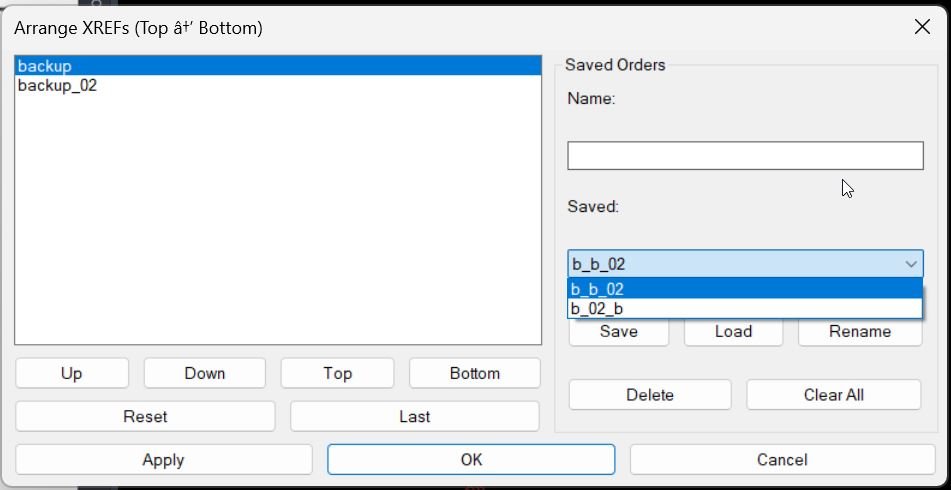
Image 000 20

Command:

🚀 Main commands:
– MXR
– MXR_DCL

🧰 Run MXR or MXR_DCL in the AutoCAD command line to open the Arrange XREFs dialog.

Description:

🧩 XrefDrawingOrder scans the active AutoCAD drawing for loaded XREF block definitions and presents them in an ordered list titled Arrange XREFs Top to Bottom.
🔄 The user can move xrefs Up, Down, Top, or Bottom, then apply the selected draw order without manually selecting every xref reference in model space.
📌 The command uses AutoCAD DRAWORDER logic to move each xref underneath the previous xref in the ordered list, creating a controlled stacked xref display.
💾 The utility also stores the last applied order inside the drawing with a Named Object Dictionary XRECORD, making the previous order available again with the Last button.
🗂️ Named saved orders can also be stored in MXR_XrefOrders.txt, making it possible to save, load, rename, delete, and clear reusable xref ordering presets.

Helper function: (if any)​

🧠 Main helper routines and implementation details:
– AT:GetXrefNames collects xref block names from the active document using ActiveX Blocks iteration.
– MXR:SSXref builds selection sets for xref INSERT references by block name.
– MXR:MoveUnder applies DRAWORDER with the Under option to place one xref below another.
– MXR:ApplyOrder walks the ordered xref list and applies the stacked draw order pair by pair.
– MXR:SaveLastOrder and MXR:LoadLastOrder store and restore the last order from the drawing Named Object Dictionary.
– MXR:LoadSaved, MXR:SaveSaved, MXR:DelSaved, and MXR:FindSavedByName manage named xref order presets.
– AT:XrefOrderDialog creates the temporary DCL dialog, handles Apply, OK, Cancel, list movement, saved order actions, and cleanup.

Functionalities:

🚀 Open a dedicated XREF ordering dialog with MXR or MXR_DCL.
📋 Automatically list xrefs found in the active drawing.
⬆️ Move selected xrefs upward in the display order.
⬇️ Move selected xrefs downward in the display order.
🔝 Send an xref to the top of the ordering list.
🔻 Send an xref to the bottom of the ordering list.
🔄 Reset the list to the current xref collection.
🕘 Reload the last applied xref order stored in the drawing.
💾 Save named xref order presets for repeated use.
📂 Load saved order presets and fill missing current xrefs automatically.
✏️ Rename saved presets from the DCL dialog.
🗑️ Delete selected saved presets or clear all saved presets.
✅ Apply the draw order while keeping the dialog open for iterative testing.
🟢 Use OK to apply the order and close the dialog.
🔴 Use Cancel to close without applying changes.

Result:

✅ The result is a faster AutoCAD xref draw order workflow for large reference-based drawings.
🧭 Users can control background surveys, layout sheets, design xrefs, utilities, corridors, alignments, basemaps, and annotation references with a reusable visual ordering workflow.
📐 The command reduces repetitive manual DRAWORDER operations and makes xref stacking more predictable in AutoCAD and Civil 3D production drawings.

Images, animations etc.
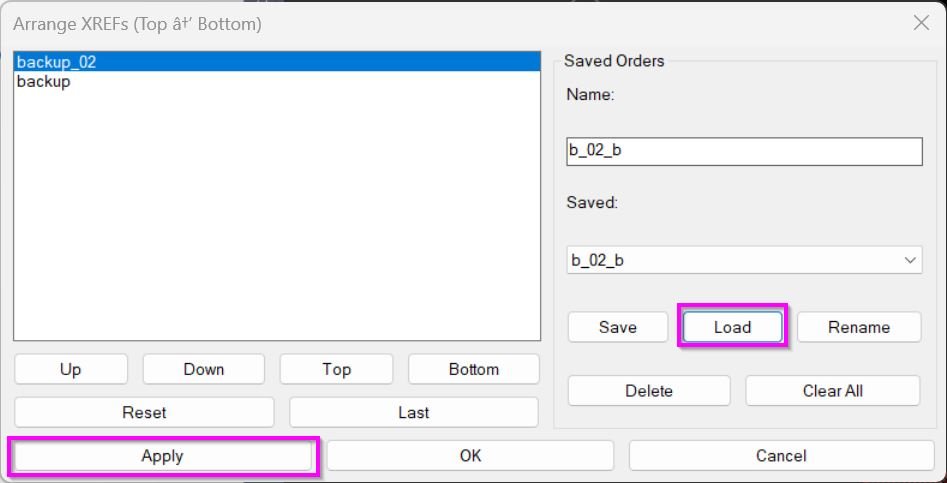
Image 000 20
Image 001 8
Pixel

XAML code:

Comming soon ...

Share this page:

Page Tag: 🏷️ Xref_menu

  • XrefDrawingOrder

    Short description Command: Description: Helper function: (if any)​ Functionalities: Result: Images, animations etc. XAML code: Expand Code ↓ Select Code Copy Code Expand Code ⬇ Select Code Copy Code Additional info: Based on / Source code: Share this page:

  • XrefOffsetLayer

    Short description Command: Description: Helper function: (if any)​ Functionalities: Result: Images, animations etc. XAML code: Expand Code ↓ Select Code Copy Code <ResourceDictionary xmlns="http://schemas.microsoft.com/winfx/2006/xaml/presentation" xmlns:x="http://schemas.microsoft.com/winfx/2006/xaml" xmlns:src="clr-namespace:Autodesk.Windows;assembly=AdWindows"> <src:RibbonToolTip x:Key="XrefOffsetLayer"> <src:RibbonToolTip.ExpandedContent> <StackPanel> <TextBlock Background="AntiqueWhite" TextAlignment="Left"> <Bold>Function Syntax: XREFOFFSETLAYER_006 / XREFOFFSETLAYER / XOL / XOFFSETCPLAYS_006 / XOFFSETCPLAYS</Bold> <LineBreak/> <Bold>Version: 1.0 Date: 20.07.2026 08:28:32</Bold> <LineBreak/> <Bold>Version: 1.0 Date: 20.07.2026…

  • XrNet

    Short description Command: Description: Helper function: (if any)​ Functionalities: Result: Images, animations etc. XAML code: Expand Code ↓ Select Code Copy Code <ResourceDictionary xmlns="http://schemas.microsoft.com/winfx/2006/xaml/presentation" xmlns:x="http://schemas.microsoft.com/winfx/2006/xaml" xmlns:src="clr-namespace:Autodesk.Windows;assembly=AdWindows"> <src:RibbonToolTip x:Key="UnReloadDetachSelectedXrefs"> <src:RibbonToolTip.ExpandedContent> <StackPanel> <TextBlock Background="AntiqueWhite" TextAlignment="Left"> <Bold>Function Syntax: XRNET / XRSPLIT / XRPREDEFINEDFOLDERS / XRSAVELOG</Bold> <LineBreak/> <Bold>Version: 0 Date: 18.09.2025</Bold> <Bold>Version: 1 Date: 14.01.2026</Bold> <LineBreak/> <Bold>Version: 2 Date:…

  • UnReloadDetachSelectedXrefs_vs.02

    Short description 🚀 XRNET is an AutoCAD and Civil 3D .NET Framework plugin designed for fast DWG xref and raster image reference management. It helps CAD users inspect, reload, unload, detach, validate, preview, export, repair, and apply external references directly from the active drawing. The main benefit is faster drawing cleanup, better xref control, fewer…

  • UnReloadDetachSelectedXrefs_01

    Short description UnReloadDetachSelectedXrefs Xref management dialog for filtering, selecting, zooming, saving lists, loading lists, and batch operations on xrefs in the current drawing. Command: Command UnReloadDetachSelectedXrefs Description: Description This lisp scans the current drawing for xref definitions and displays them in a multi-column dialog (Name, Type, Units, Layer) with synchronized selection across columns. It allows…

  • UnReloadDetachSelectedXrefs

    XAML code: Expand Code ↓ Select Code Copy Code <ResourceDictionary xmlns="http://schemas.microsoft.com/winfx/2006/xaml/presentation" xmlns:x="http://schemas.microsoft.com/winfx/2006/xaml" xmlns:src="clr-namespace:Autodesk.Windows;assembly=AdWindows"> <src:RibbonToolTip x:Key="UnReloadDetachSelectedXrefs"> <src:RibbonToolTip.ExpandedContent> <StackPanel> <TextBlock Background="AntiqueWhite" TextAlignment="Left"> <Bold>Function Syntax: XRNET / XRSPLIT / XRPREDEFINEDFOLDERS / XRSAVELOG</Bold> <LineBreak/> <Bold>Version: 0 Date: 18.09.2025</Bold> <Bold>Version: 1 Date: 14.01.2026</Bold> <LineBreak/> <Bold>Version: 2 Date: 08.04.2026</Bold> <LineBreak/> <Bold>Version: 3 Date: 07.07.2026 8:55:26AM</Bold> <LineBreak/> <Hyperlink>N/A</Hyperlink> <LineBreak/> <Bold><Run Foreground="DodgerBlue">SEO Description</Run></Bold><LineBreak/>…

  • CreatesXrefsLayersAssign_01

    Short description XrefLayers is a single-window tool to manage XREF insert layers: create per-XREF target layers, assign inserts to target layers, force all XREFs onto one existing layer, and zoom to a selected XREF extents. Command: XrefLayers Opens the dialog window. CreatesXrefsLayersAssign Alias that opens the same dialog window. Description: Main Purpose Scans the drawing…

  • CreatesXrefsLayersAssign

    XAML code: Expand Code ↓ Select Code Copy Code <ResourceDictionary xmlns="http://schemas.microsoft.com/winfx/2006/xaml/presentation" xmlns:x="http://schemas.microsoft.com/winfx/2006/xaml" xmlns:src="clr-namespace:Autodesk.Windows;assembly=AdWindows"> <src:RibbonToolTip x:Key="CreatesXrefsLayersAssign"> <src:RibbonToolTip.ExpandedContent> <StackPanel> <TextBlock Background="AntiqueWhite" TextAlignment="CreatesXrefsLayersAssign"> <Bold>Function Syntax: Command</Bold> <LineBreak/> <Bold>Version: 1 Date: 10.11.2025</Bold> <LineBreak/> <Hyperlink>N/A</Hyperlink> <LineBreak/> <Bold>Description</Bold><LineBreak/> <LineBreak/> This updated AutoLISP program provides a professional interface to manage <Run Foreground="DarkRed">XREF layers</Run> directly from a single dialog window in AutoCAD.<LineBreak/> It…

  • CreatesXrefsLayersAssign_vs.00

    Short description Xref → Own Layer Manager This AutoLISP routine scans the current drawing for attached xrefs, shows them in a dialog with a checkbox and a per xref layer popup, and lets the user create or assign layers for those xrefs in one place. The dialog is generated dynamically so it always shows the…

  • ZoomXref

    Short description Command: Description: Helper function: (if any)​ Functionalities: Result: Images, animations etc. XAML code: Expand Code ↓ Select Code Copy Code <ResourceDictionary xmlns="http://schemas.microsoft.com/winfx/2006/xaml/presentation" xmlns:x="http://schemas.microsoft.com/winfx/2006/xaml" xmlns:src="clr-namespace:Autodesk.Windows;assembly=AdWindows"> <src:RibbonToolTip x:Key="ZoomXref"> <src:RibbonToolTip.ExpandedContent> <StackPanel> <TextBlock Background="AntiqueWhite" TextAlignment="Left"> <Bold>Function Syntax: ZOOMXREF / SELECTXREF</Bold> <LineBreak/> <Bold>Version: 1.0 Date: 20.06.2026 6:39:04PM</Bold> <LineBreak/> <Hyperlink>N/A</Hyperlink> <LineBreak/> <Bold><Run Foreground="DodgerBlue">Function Syntax: ZoomXref</Run></Bold><LineBreak/> <Bold><Run Foreground="Orange">Command Name:</Run></Bold> <Bold><Run…