
Short description
🔁🧱 Replace selected AutoCAD block references with another block definition while preserving insertion point, rotation, scale, layer, normal, and optionally matching attribute values.
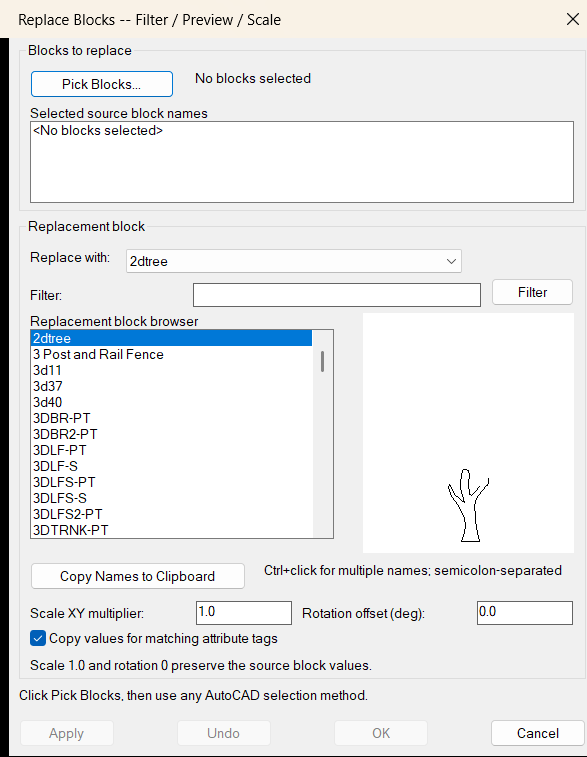
Command:
🚀 Primary command: ReplaceDrawingBlocks
⚡ Alias command: BRE
🧹 Reset command: ReplaceDrawingBlocksRESET
ℹ️ Version command: ReplaceDrawingBlocksVERSION
Run ReplaceDrawingBlocks or BRE in the AutoCAD command line to open the embedded DCL Replace Blocks dialog.
Description:
🔁 ReplaceDrawingBlocks is an AutoCAD AutoLISP utility for replacing selected block references in the current DWG with a chosen replacement block definition.
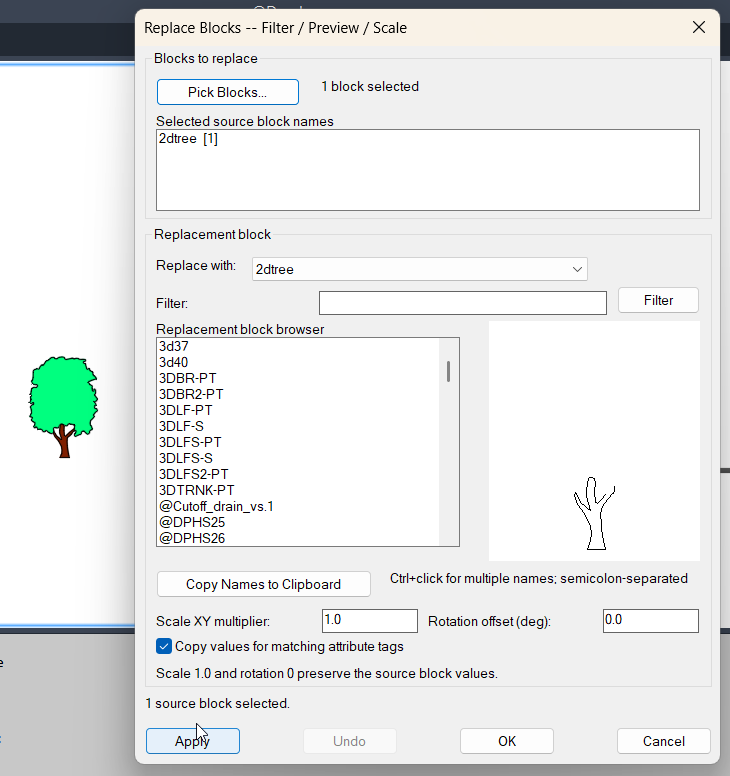
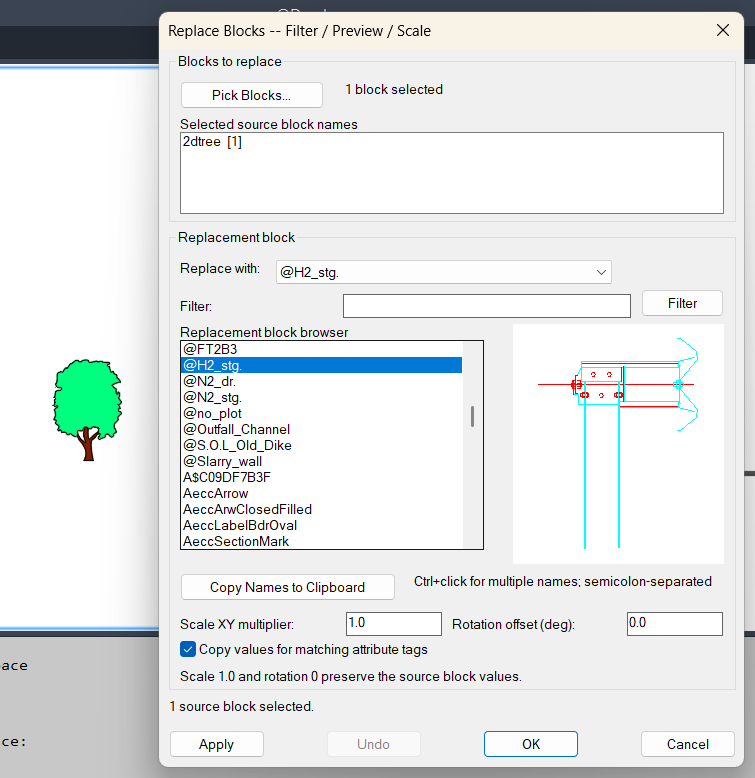
🪟 The workflow opens a dialog first, lets the user pick one or more INSERT block references, displays the selected source block names with quantities, then applies the replacement selected from a sorted block-definition dropdown.
📐 During replacement, the routine keeps the original block reference insertion point, X/Y/Z scale factors, signed mirrored scale values, rotation, layer, and normal direction. This makes the replacement suitable for production drawings where block position and orientation must remain unchanged.
🏷️ When the attribute-copy option is enabled, matching attribute tags are copied from the old block reference to the newly inserted block reference, helping preserve labels, IDs, quantities, and custom annotation values.
💾 The tool uses a restart-persistent configuration file under the user profile to remember the last replacement block, attribute-copy setting, and dialog X/Y position. It also keeps a session dialog-position variable so the dialog reopens in the previous screen location during the current AutoCAD session.
Helper function: (if any)
🛠️ ReplaceDrawingBlocks:GetInsertableBlockNames scans valid insertable block definitions and excludes xrefs and layout blocks.
🔍 ReplaceDrawingBlocks:SelectionCounts groups selected INSERT references by effective block name and displays quantities in the dialog.
🏷️ ReplaceDrawingBlocks:GetAttributeMap and ReplaceDrawingBlocks:ApplyAttributeMap copy matching attribute tag values between block references.
📐 ReplaceDrawingBlocks:ReplaceOne inserts the replacement block, restores signed scale values, applies layer and normal direction, transfers attributes when enabled, and deletes the original block reference.
🪟 ReplaceDrawingBlocks:WriteDCL writes a unique temporary embedded DCL dialog for each command run.
💾 ReplaceDrawingBlocks:ReadSettings and ReplaceDrawingBlocks:WriteSettings safely store and restore replacement options and dialog position without evaluating external file content.
Functionalities:
🔁 Replaces selected AutoCAD block references with another block definition.
🧱 Filters selection to INSERT entities using AutoCAD selection logic.
🪟 Opens a DCL dialog before selection, matching the intended pick-first-from-dialog workflow.
📋 Shows selected block names and counts inside the dialog.
📂 Provides a sorted replacement-block dropdown from insertable block definitions.
📐 Preserves insertion point, rotation, X scale, Y scale, Z scale, layer, and normal direction.
🪞 Restores signed scale factors after insertion so mirrored block references are retained.
🏷️ Optionally copies values for matching attribute tags from the original block to the replacement block.
↩️ Wraps the replacement operation in an AutoCAD undo mark.
💾 Remembers the replacement block, attribute-copy toggle, and dialog position between AutoCAD restarts.
🧹 Provides ReplaceDrawingBlocksRESET to remove saved settings and reset dialog state.
ℹ️ Provides ReplaceDrawingBlocksVERSION to confirm the active embedded DCL version.
⚡ Includes BRE as a compatibility alias for faster command-line access.
Result:
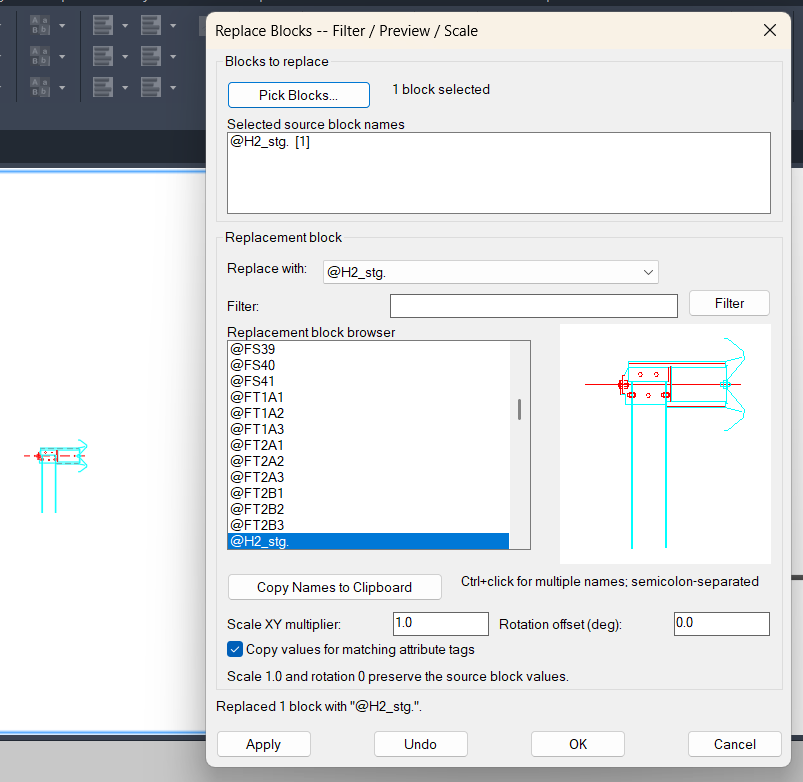
✅ The result is a faster and safer AutoCAD block replacement workflow. Users can replace many block references with a selected target block while keeping the original placement and appearance-critical transformation data.
📊 The command prints a replacement summary showing how many blocks were replaced and how many failed, making the result easier to verify after execution.
Images, animations etc.
XAML code:
<ResourceDictionary
xmlns="http://schemas.microsoft.com/winfx/2006/xaml/presentation"
xmlns:x="http://schemas.microsoft.com/winfx/2006/xaml"
xmlns:src="clr-namespace:Autodesk.Windows;assembly=AdWindows">

<src:RibbonToolTip x:Key="ReplaceBlocks">
<src:RibbonToolTip.ExpandedContent>
<StackPanel>
<TextBlock Background="AntiqueWhite" TextAlignment="Left">
<Bold>Function Syntax: BRE8 / BRE / BRE8RESET / BRE8VERSION / ReplaceDrawingBlocks / ReplaceDrawingBlocksRESET / ReplaceDrawingBlocksVERSION</Bold>
<LineBreak/>
<Bold>Version: 1.0 Date: 21.07.2026 7:14:41AM</Bold>
<LineBreak/>
<Bold>Version: 1.1 Date: 21.07.2026 7:43:45AM</Bold>
<LineBreak/>
<Hyperlink>https://www.cadtutor.net/forum/topic/77762-replace-block-with-block/</Hyperlink>
<LineBreak/>


<Bold><Run Foreground="DodgerBlue">ReplaceDrawingBlocks</Run></Bold><LineBreak/>
<Run Foreground="White">🔁 ReplaceDrawingBlocks is an AutoCAD AutoLISP utility for replacing selected block references with another block definition while preserving important reference properties.</Run><LineBreak/>
<Run Foreground="LimeGreen">The tool is useful for CAD cleanup, symbol replacement, block standardization, drawing maintenance, Civil 3D plan updates, and production DWG quality control.</Run><LineBreak/>
<Bold><Run Foreground="DodgerBlue">Main Commands</Run></Bold><LineBreak/>
<Run Foreground="White">🚀 Run </Run><Bold><Run Foreground="Orange">ReplaceDrawingBlocks</Run></Bold><Run Foreground="White"> to open the embedded DCL Replace Blocks dialog.</Run><LineBreak/>
<Run Foreground="White">⚡ Run </Run><Bold><Run Foreground="Orange">BRE</Run></Bold><Run Foreground="White"> as the short compatibility alias for the same replacement workflow.</Run><LineBreak/>
<Run Foreground="White">🧹 Run </Run><Bold><Run Foreground="Orange">ReplaceDrawingBlocksRESET</Run></Bold><Run Foreground="White"> to clear saved settings and dialog position.</Run><LineBreak/>
<Run Foreground="White">ℹ️ Run </Run><Bold><Run Foreground="Orange">ReplaceDrawingBlocksVERSION</Run></Bold><Run Foreground="White"> to confirm that the embedded DCL version 7 routine is active.</Run><LineBreak/>
<Bold><Run Foreground="DodgerBlue">SEO Optimized Description</Run></Bold><LineBreak/>
<Run Foreground="White">🧱 This AutoCAD block replacement tool opens a DCL dialog first, then lets the user pick one or more </Run><Bold><Run Foreground="Orange">INSERT</Run></Bold><Run Foreground="White"> block references to replace.</Run><LineBreak/>
<Run Foreground="White">📋 The selected source block names are displayed in the dialog with quantities, so the user can verify the replacement set before applying changes.</Run><LineBreak/>
<Run Foreground="White">📂 The replacement block is selected from a sorted list of insertable block definitions available in the current drawing.</Run><LineBreak/>
<Run Foreground="White">📐 The routine preserves insertion point, rotation, X scale, Y scale, Z scale, layer, and normal direction from the original block reference.</Run><LineBreak/>
<Run Foreground="White">🪞 Signed scale factors are restored after insertion, allowing mirrored block references to remain mirrored after replacement.</Run><LineBreak/>
<Run Foreground="White">🏷️ Matching attribute tag values can be copied from the old block reference to the replacement block reference.</Run><LineBreak/>
<Bold><Run Foreground="LimeGreen">Functionalities</Run></Bold><LineBreak/>
<Run Foreground="White">🔁 </Run><Bold><Run Foreground="LimeGreen">Replace selected blocks</Run></Bold><Run Foreground="White"> - replaces picked AutoCAD block references with a selected target block definition.</Run><LineBreak/>
<Run Foreground="White">🪟 </Run><Bold><Run Foreground="LimeGreen">Embedded DCL interface</Run></Bold><Run Foreground="White"> - creates a unique temporary DCL dialog for each command run.</Run><LineBreak/>
<Run Foreground="White">📋 </Run><Bold><Run Foreground="LimeGreen">Selection summary</Run></Bold><Run Foreground="White"> - lists selected block names and counts before replacement.</Run><LineBreak/>
<Run Foreground="White">📂 </Run><Bold><Run Foreground="LimeGreen">Replacement dropdown</Run></Bold><Run Foreground="White"> - displays valid insertable block definitions and excludes xrefs and layout blocks.</Run><LineBreak/>
<Run Foreground="White">📐 </Run><Bold><Run Foreground="LimeGreen">Geometry preservation</Run></Bold><Run Foreground="White"> - keeps insertion point, rotation, scale, layer, and normal direction.</Run><LineBreak/>
<Run Foreground="White">🏷️ </Run><Bold><Run Foreground="LimeGreen">Attribute transfer</Run></Bold><Run Foreground="White"> - optionally copies values for matching attribute tags from source to replacement.</Run><LineBreak/>
<Run Foreground="White">↩️ </Run><Bold><Run Foreground="LimeGreen">Undo protection</Run></Bold><Run Foreground="White"> - wraps the replacement process in an AutoCAD undo mark.</Run><LineBreak/>
<Run Foreground="White">💾 </Run><Bold><Run Foreground="LimeGreen">Persistent settings</Run></Bold><Run Foreground="White"> - saves the last replacement block, attribute-copy option, and dialog X/Y position.</Run><LineBreak/>
<Run Foreground="White">🛡️ </Run><Bold><Run Foreground="LimeGreen">Safe settings reader</Run></Bold><Run Foreground="White"> - reads the configuration as plain text and ignores malformed values.</Run><LineBreak/>
<Bold><Run Foreground="DodgerBlue">Practical Result</Run></Bold><LineBreak/>
<Run Foreground="White">✅ The final result is a controlled AutoCAD block replacement workflow that updates selected symbols while retaining the original placement, orientation, layer, scale, and optional attribute data.</Run><LineBreak/>
<Run Foreground="LimeGreen">This improves CAD productivity when replacing drawing symbols, standardizing block libraries, updating Civil 3D production plans, and cleaning large DWG files.</Run><LineBreak/>
<Bold><Run Foreground="DarkRed">Important Notes</Run></Bold><LineBreak/>
<Run Foreground="White">⚠️ The original selected block references are deleted after the replacement references are inserted.</Run><LineBreak/>
<Run Foreground="White">⚠️ Attribute values are copied only when the source and replacement blocks contain matching attribute tags.</Run><LineBreak/>
<Run Foreground="White">⚠️ The replacement block must already exist in the current drawing as an insertable block definition.</Run><LineBreak/>


</TextBlock>

<Grid>
<Image Source="Image_000.png" Stretch="Uniform"/>
</Grid>

<Grid>
<Image Source="Image_001.png" Stretch="Uniform"/>
</Grid>

<Grid>
<Image Source="Image_002.png" Stretch="Uniform"/>
</Grid>

<Grid>
<Image Source="Image_003.png" Stretch="Uniform"/>
</Grid>


</StackPanel>
</src:RibbonToolTip.ExpandedContent>
</src:RibbonToolTip>


<src:RibbonToolTip x:Key="ReplaceBlocks_1.0">
<src:RibbonToolTip.ExpandedContent>
<StackPanel>
<TextBlock Background="AntiqueWhite" TextAlignment="Left">
<Bold>Function Syntax: ReplaceDrawingBlocks / BRE / ReplaceDrawingBlocksRESET / ReplaceDrawingBlocksVERSION</Bold>
<LineBreak/>
<Bold>Version: 1.0 Date: 21.07.2026 7:14:41AM</Bold>
<LineBreak/>
<Hyperlink>https://www.cadtutor.net/forum/topic/77762-replace-block-with-block/</Hyperlink>
<LineBreak/>


<Bold><Run Foreground="DodgerBlue">ReplaceDrawingBlocks</Run></Bold><LineBreak/>
<Run Foreground="White">🔁 ReplaceDrawingBlocks is an AutoCAD AutoLISP utility for replacing selected block references with another block definition while preserving important reference properties.</Run><LineBreak/>
<Run Foreground="LimeGreen">The tool is useful for CAD cleanup, symbol replacement, block standardization, drawing maintenance, Civil 3D plan updates, and production DWG quality control.</Run><LineBreak/>
<LineBreak/>
<Bold><Run Foreground="DodgerBlue">Main Commands</Run></Bold><LineBreak/>
<Run Foreground="White">🚀 Run </Run><Bold><Run Foreground="Orange">ReplaceDrawingBlocks</Run></Bold><Run Foreground="White"> to open the embedded DCL Replace Blocks dialog.</Run><LineBreak/>
<Run Foreground="White">⚡ Run </Run><Bold><Run Foreground="Orange">BRE</Run></Bold><Run Foreground="White"> as the short compatibility alias for the same replacement workflow.</Run><LineBreak/>
<Run Foreground="White">🧹 Run </Run><Bold><Run Foreground="Orange">ReplaceDrawingBlocksRESET</Run></Bold><Run Foreground="White"> to clear saved settings and dialog position.</Run><LineBreak/>
<Run Foreground="White">ℹ️ Run </Run><Bold><Run Foreground="Orange">ReplaceDrawingBlocksVERSION</Run></Bold><Run Foreground="White"> to confirm that the embedded DCL version 7 routine is active.</Run><LineBreak/>
<LineBreak/>
<Bold><Run Foreground="DodgerBlue">SEO Optimized Description</Run></Bold><LineBreak/>
<Run Foreground="White">🧱 This AutoCAD block replacement tool opens a DCL dialog first, then lets the user pick one or more </Run><Bold><Run Foreground="Orange">INSERT</Run></Bold><Run Foreground="White"> block references to replace.</Run><LineBreak/>
<Run Foreground="White">📋 The selected source block names are displayed in the dialog with quantities, so the user can verify the replacement set before applying changes.</Run><LineBreak/>
<Run Foreground="White">📂 The replacement block is selected from a sorted list of insertable block definitions available in the current drawing.</Run><LineBreak/>
<Run Foreground="White">📐 The routine preserves insertion point, rotation, X scale, Y scale, Z scale, layer, and normal direction from the original block reference.</Run><LineBreak/>
<Run Foreground="White">🪞 Signed scale factors are restored after insertion, allowing mirrored block references to remain mirrored after replacement.</Run><LineBreak/>
<Run Foreground="White">🏷️ Matching attribute tag values can be copied from the old block reference to the replacement block reference.</Run><LineBreak/>
<LineBreak/>
<Bold><Run Foreground="LimeGreen">Functionalities</Run></Bold><LineBreak/>
<Run Foreground="White">🔁 </Run><Bold><Run Foreground="LimeGreen">Replace selected blocks</Run></Bold><Run Foreground="White"> - replaces picked AutoCAD block references with a selected target block definition.</Run><LineBreak/>
<Run Foreground="White">🪟 </Run><Bold><Run Foreground="LimeGreen">Embedded DCL interface</Run></Bold><Run Foreground="White"> - creates a unique temporary DCL dialog for each command run.</Run><LineBreak/>
<Run Foreground="White">📋 </Run><Bold><Run Foreground="LimeGreen">Selection summary</Run></Bold><Run Foreground="White"> - lists selected block names and counts before replacement.</Run><LineBreak/>
<Run Foreground="White">📂 </Run><Bold><Run Foreground="LimeGreen">Replacement dropdown</Run></Bold><Run Foreground="White"> - displays valid insertable block definitions and excludes xrefs and layout blocks.</Run><LineBreak/>
<Run Foreground="White">📐 </Run><Bold><Run Foreground="LimeGreen">Geometry preservation</Run></Bold><Run Foreground="White"> - keeps insertion point, rotation, scale, layer, and normal direction.</Run><LineBreak/>
<Run Foreground="White">🏷️ </Run><Bold><Run Foreground="LimeGreen">Attribute transfer</Run></Bold><Run Foreground="White"> - optionally copies values for matching attribute tags from source to replacement.</Run><LineBreak/>
<Run Foreground="White">↩️ </Run><Bold><Run Foreground="LimeGreen">Undo protection</Run></Bold><Run Foreground="White"> - wraps the replacement process in an AutoCAD undo mark.</Run><LineBreak/>
<Run Foreground="White">💾 </Run><Bold><Run Foreground="LimeGreen">Persistent settings</Run></Bold><Run Foreground="White"> - saves the last replacement block, attribute-copy option, and dialog X/Y position.</Run><LineBreak/>
<Run Foreground="White">🛡️ </Run><Bold><Run Foreground="LimeGreen">Safe settings reader</Run></Bold><Run Foreground="White"> - reads the configuration as plain text and ignores malformed values.</Run><LineBreak/>
<LineBreak/>
<Bold><Run Foreground="DodgerBlue">Practical Result</Run></Bold><LineBreak/>
<Run Foreground="White">✅ The final result is a controlled AutoCAD block replacement workflow that updates selected symbols while retaining the original placement, orientation, layer, scale, and optional attribute data.</Run><LineBreak/>
<Run Foreground="LimeGreen">This improves CAD productivity when replacing drawing symbols, standardizing block libraries, updating Civil 3D production plans, and cleaning large DWG files.</Run><LineBreak/>
<LineBreak/>
<Bold><Run Foreground="DarkRed">Important Notes</Run></Bold><LineBreak/>
<Run Foreground="White">⚠️ The original selected block references are deleted after the replacement references are inserted.</Run><LineBreak/>
<Run Foreground="White">⚠️ Attribute values are copied only when the source and replacement blocks contain matching attribute tags.</Run><LineBreak/>
<Run Foreground="White">⚠️ The replacement block must already exist in the current drawing as an insertable block definition.</Run><LineBreak/>


</TextBlock>

<Grid>
<Image Source="Image_000.png" Stretch="Uniform"/>
</Grid>

<Grid>
<Image Source="Image_001.png" Stretch="Uniform"/>
</Grid>

<Grid>
<Image Source="Image_002.png" Stretch="Uniform"/>
</Grid>

<Grid>
<Image Source="Image_003.png" Stretch="Uniform"/>
</Grid>


</StackPanel>
</src:RibbonToolTip.ExpandedContent>
</src:RibbonToolTip>


</ResourceDictionary>