
Short description
📏📐 AutoCAD AutoLISP utility for calculating total length or total area from selected CAD entities, copying Excel-ready formulas to the clipboard, and placing UCS-aware dynamic MTEXT field results in the drawing.
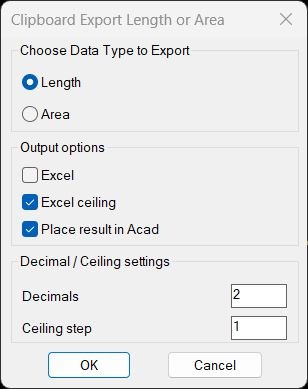
Command:
🚀 Main command: TotalLengthAreaDetailed. The command opens a DCL dialog where the user chooses Length or Area, Excel output, CEILING rounding, MTEXT placement, decimal precision, and optional Profile_002 profile conversion.
Description:
📏 TotalLengthAreaDetailed is a dialog-driven AutoCAD and Civil 3D measurement utility for quantity takeoff, CAD calculation review, and production documentation. It calculates either total length or total area from supported drawing entities and builds a detailed additive expression such as 1.25+3.50+2.00.
📋 The tool copies the final expression to the Windows clipboard as plain text, an Excel-ready formula, or a CEILING formula. This makes it practical for BoQ workflows, quantity checking, Excel reporting, cable route measurement, layer-based calculations, and CAD production summaries.
📝 When Place result in Acad is enabled, the routine inserts MTEXT in the current drawing at a user-picked point. The insertion is UCS-aware and the result can be created as dynamic AutoCAD field text where supported, so selected object values can remain linked to the source entities.
🏷️ Version 02 behavior places the result MTEXT on the first selected entity layer. The Acad_Length or Acad_Area layer result label also uses the first selected layer name, making the output easier to audit directly inside the drawing.
🧮 Area mode includes optional Profile_002 profile presets such as Profile_002, Profile_003, Profile_004, and Profile_005. These presets convert a summed area expression into a profile-based expression by dividing by the selected internal width.
Helper function: (if any)
🧩 Important helper functions:
– writeLengthAreaDCL: creates the temporary DCL dialog.
– radioLengthAreaDCL: handles dialog options, saved settings, toggles, precision, ceiling step, result mode, and Profile_002 profile selection.
– TotalLengthDetailed: processes length-capable entities and builds length expressions.
– TotalAreaDetailed: processes area-capable entities and builds area expressions.
– copy-to-clipboard: writes the final expression or Excel formula to the clipboard using htmlfile COM.
– format-excel-expr: creates plain, Excel, CEILING, or Profile_002 formulas.
– ctc-make-object-field and ctc-build-field-mtext: generate dynamic AutoCAD field text for supported source objects.
– insert-result-text: inserts UCS-aware MTEXT in the active drawing space and places it on the first selected entity layer.
Functionalities:
🚀 DCL dialog workflow for choosing Length or Area.
📏 Detailed total length calculation for lines, polylines, arcs, circles, ellipses, splines, mlines, regions, and mpolygons.
📐 Detailed total area calculation for closed polylines, circles, ellipses, regions, hatches, and mpolygons.
📋 Clipboard export as additive expression, Excel formula, or CEILING formula.
🧮 Optional Profile_002 profile conversion for profile-width based quantity extraction.
📝 Optional MTEXT placement in AutoCAD using UCS to WCS transformation.
🔗 Dynamic AutoCAD field support for object properties such as Length, ArcLength, Circumference, Perimeter, and Area where available.
🏷️ Version 02 selected-layer behavior for MTEXT placement and layer-labeled results.
💾 Persistent user settings through CTC_* environment variables.
🎯 Decimal precision and ceiling step controls.
🔐 Type-based object filtering with safe fallbacks for unsupported field properties.
Result:
✅ The result is a faster AutoCAD and Civil 3D quantity takeoff workflow: selected entities are measured, a clean expression is built, the value is copied for Excel, and an optional drawing annotation is inserted as MTEXT. Where possible, the MTEXT uses AutoCAD field expressions linked to the selected objects, while unsupported objects fall back to fixed numeric values.
Images, animations etc.
XAML code:
<ResourceDictionary
xmlns="http://schemas.microsoft.com/winfx/2006/xaml/presentation"
xmlns:x="http://schemas.microsoft.com/winfx/2006/xaml"
xmlns:src="clr-namespace:Autodesk.Windows;assembly=AdWindows">

<src:RibbonToolTip x:Key="TotalLengthAreaDetailed">
<src:RibbonToolTip.ExpandedContent>
<StackPanel>
<TextBlock Background="AntiqueWhite" TextAlignment="Left">
<Bold>Function Syntax: TotalLengthAreaDetailed</Bold>
<LineBreak/>
<Bold>Version: 1 Date: 07.07.2026 11:14:02AM</Bold>
<LineBreak/>
<Hyperlink>N/A</Hyperlink>
<LineBreak/>

<Bold><Run Foreground="DodgerBlue">🚀 Function Syntax: TotalLengthAreaDetailed</Run></Bold><LineBreak/>
<Bold><Run Foreground="Orange">Version: SEO-friendly description based on TotalLengthAreaDetailed v02</Run></Bold><LineBreak/>
<Hyperlink>N/A</Hyperlink><LineBreak/>
<LineBreak/>
<Bold><Run Foreground="DodgerBlue">📘 SEO Optimized Description</Run></Bold><LineBreak/>
<Run Foreground="White">📏 TotalLengthAreaDetailed is an AutoCAD and Civil 3D AutoLISP quantity takeoff utility for calculating total length or total area from selected drawing entities.</Run><LineBreak/>
<Run Foreground="White">📐 The routine builds a detailed additive expression, copies the result to the clipboard, and can place the calculation directly in the drawing as UCS-aware MTEXT.</Run><LineBreak/>
<Run Foreground="LimeGreen">✅ This makes it useful for CAD measurement checks, BoQ preparation, Excel reporting, quantity summaries, cable route measurement, profile calculations, and drawing-based audit annotations.</Run><LineBreak/>
<LineBreak/>
<Bold><Run Foreground="DodgerBlue">🧰 Main Command</Run></Bold><LineBreak/>
<Run Foreground="White">🚀 Run </Run><Bold><Run Foreground="Orange">TotalLengthAreaDetailed</Run></Bold><Run Foreground="White"> in the AutoCAD command line.</Run><LineBreak/>
<Run Foreground="White">The command opens a DCL dialog where the user chooses </Run><Bold><Run Foreground="Orange">Length</Run></Bold><Run Foreground="White"> or </Run><Bold><Run Foreground="Orange">Area</Run></Bold><Run Foreground="White"> and configures clipboard, Excel, CEILING, MTEXT, decimal, layer-label, and KK profile settings.</Run><LineBreak/>
<LineBreak/>
<Bold><Run Foreground="LimeGreen">⚙️ User Workflow</Run></Bold><LineBreak/>
<Run Foreground="White">1️⃣ Start the command </Run><Bold><Run Foreground="Orange">C:TotalLengthAreaDetailed</Run></Bold><Run Foreground="White">.</Run><LineBreak/>
<Run Foreground="White">2️⃣ Select </Run><Bold><Run Foreground="Orange">Length</Run></Bold><Run Foreground="White"> or </Run><Bold><Run Foreground="Orange">Area</Run></Bold><Run Foreground="White"> in the dialog.</Run><LineBreak/>
<Run Foreground="White">3️⃣ Configure Excel formula output, CEILING rounding, decimal precision, ceiling step, AutoCAD MTEXT placement, and result label mode.</Run><LineBreak/>
<Run Foreground="White">4️⃣ Select supported entities in the drawing.</Run><LineBreak/>
<Run Foreground="White">5️⃣ Optionally pick a UCS-aware insertion point for the drawing result text.</Run><LineBreak/>
<Run Foreground="White">6️⃣ Use the clipboard expression in Excel or keep the placed MTEXT annotation in AutoCAD.</Run><LineBreak/>
<LineBreak/>
<Bold><Run Foreground="LimeGreen">📏 Length Mode</Run></Bold><LineBreak/>
<Run Foreground="White">📌 Supported length objects include </Run><Bold><Run Foreground="Orange">LINE</Run></Bold><Run Foreground="White">, </Run><Bold><Run Foreground="Orange">POLYLINE</Run></Bold><Run Foreground="White">, </Run><Bold><Run Foreground="Orange">LWPOLYLINE</Run></Bold><Run Foreground="White">, </Run><Bold><Run Foreground="Orange">ARC</Run></Bold><Run Foreground="White">, </Run><Bold><Run Foreground="Orange">CIRCLE</Run></Bold><Run Foreground="White">, </Run><Bold><Run Foreground="Orange">ELLIPSE</Run></Bold><Run Foreground="White">, </Run><Bold><Run Foreground="Orange">SPLINE</Run></Bold><Run Foreground="White">, </Run><Bold><Run Foreground="Orange">MLINE</Run></Bold><Run Foreground="White">, </Run><Bold><Run Foreground="Orange">REGION</Run></Bold><Run Foreground="White">, and </Run><Bold><Run Foreground="Orange">MPOLYGON</Run></Bold><Run Foreground="White">.</Run><LineBreak/>
<Run Foreground="White">🔗 Where possible, the MTEXT result uses dynamic AutoCAD fields for properties such as Length, ArcLength, Circumference, and Perimeter.</Run><LineBreak/>
<LineBreak/>
<Bold><Run Foreground="LimeGreen">📐 Area Mode</Run></Bold><LineBreak/>
<Run Foreground="White">📌 Supported area objects include closed polylines, circles, ellipses, regions, hatches, and mpolygons.</Run><LineBreak/>
<Run Foreground="White">🔒 Open polylines do not contribute to area because the routine checks closed state before using polyline area.</Run><LineBreak/>
<Run Foreground="White">🔗 Where possible, the MTEXT result uses dynamic AutoCAD Area fields linked to the selected objects.</Run><LineBreak/>
<LineBreak/>
<Bold><Run Foreground="LimeGreen">🧮 KK Profile Workflow</Run></Bold><LineBreak/>
<Run Foreground="White">🟧 The dialog includes KK profile presets: </Run><Bold><Run Foreground="Orange">KK Gr. I i.F_220X275</Run></Bold><Run Foreground="White">, </Run><Bold><Run Foreground="Orange">KK Gr. II i.F_400X275</Run></Bold><Run Foreground="White">, </Run><Bold><Run Foreground="Orange">KK Gr. IIIa i.F_515X275</Run></Bold><Run Foreground="White">, and </Run><Bold><Run Foreground="Orange">KK Gr. IV i.F_700X285</Run></Bold><Run Foreground="White">.</Run><LineBreak/>
<Run Foreground="White">📊 When a KK profile is selected in Area mode, the expression is converted into a profile-width formula such as </Run><Bold><Run Foreground="Orange">(A+B+C)/0.4</Run></Bold><Run Foreground="White"> before Excel CEILING output is applied.</Run><LineBreak/>
<LineBreak/>
<Bold><Run Foreground="LimeGreen">📋 Clipboard and Excel Output</Run></Bold><LineBreak/>
<Run Foreground="White">📤 Base clipboard output is an additive expression such as </Run><Bold><Run Foreground="Orange">1.25+3.50+2.00</Run></Bold><Run Foreground="White">.</Run><LineBreak/>
<Run Foreground="White">🧾 Excel mode outputs </Run><Bold><Run Foreground="Orange">=expression</Run></Bold><Run Foreground="White">.</Run><LineBreak/>
<Run Foreground="White">🔢 Excel ceiling mode outputs </Run><Bold><Run Foreground="Orange">=CEILING(expression,step)</Run></Bold><Run Foreground="White"> and has priority over the normal Excel toggle.</Run><LineBreak/>
<LineBreak/>
<Bold><Run Foreground="LimeGreen">📝 AutoCAD MTEXT Result</Run></Bold><LineBreak/>
<Run Foreground="White">📌 The insertion point is transformed from UCS to WCS, so the annotation is placed correctly in custom UCS workflows.</Run><LineBreak/>
<Run Foreground="White">🏷️ Version 02 places the MTEXT on the first selected entity layer and uses that same selected layer name in the </Run><Bold><Run Foreground="Orange">Length_Layer</Run></Bold><Run Foreground="White"> or </Run><Bold><Run Foreground="Orange">Area_Layer</Run></Bold><Run Foreground="White"> label.</Run><LineBreak/>
<Run Foreground="White">🔄 Supported objects can generate dynamic field text, while unsupported field-readable properties fall back to fixed numeric values.</Run><LineBreak/>
<LineBreak/>
<Bold><Run Foreground="LimeGreen">💾 Saved Settings</Run></Bold><LineBreak/>
<Run Foreground="White">🧠 The tool stores dialog preferences using environment variables such as </Run><Bold><Run Foreground="Orange">CTC_LAST_OPTION</Run></Bold><Run Foreground="White">, </Run><Bold><Run Foreground="Orange">CTC_EXCEL</Run></Bold><Run Foreground="White">, </Run><Bold><Run Foreground="Orange">CTC_EXCEL_CEILING</Run></Bold><Run Foreground="White">, </Run><Bold><Run Foreground="Orange">CTC_PLACE_ACAD</Run></Bold><Run Foreground="White">, </Run><Bold><Run Foreground="Orange">CTC_PREC</Run></Bold><Run Foreground="White">, </Run><Bold><Run Foreground="Orange">CTC_CEIL_STEP</Run></Bold><Run Foreground="White">, </Run><Bold><Run Foreground="Orange">CTC_RES_MODE</Run></Bold><Run Foreground="White">, and </Run><Bold><Run Foreground="Orange">CTC_KK_PROFILE</Run></Bold><Run Foreground="White">.</Run><LineBreak/>
<Run Foreground="White">🔁 The next run opens with the last-used options, which speeds up repetitive CAD quantity takeoff workflows.</Run><LineBreak/>
<LineBreak/>
<Bold><Run Foreground="DodgerBlue">✅ Practical Result</Run></Bold><LineBreak/>
<Run Foreground="White">✅ TotalLengthAreaDetailed creates a reliable bridge between AutoCAD geometry, Civil 3D production drawings, Excel quantity formulas, and annotated drawing results.</Run><LineBreak/>
<Run Foreground="LimeGreen">🚀 The final workflow is faster measurement review, cleaner quantity documentation, better CAD audit trails, and more efficient BoQ preparation.</Run><LineBreak/>
<LineBreak/>
<Bold><Run Foreground="DarkRed">⚠️ Important Notes</Run></Bold><LineBreak/>
<Run Foreground="White">⚠️ Objects outside the command selection filters are not measured.</Run><LineBreak/>
<Run Foreground="White">⚠️ Dynamic field output depends on object property support inside AutoCAD.</Run><LineBreak/>
<Run Foreground="White">⚠️ Clipboard export depends on COM availability for the </Run><Bold><Run Foreground="Orange">htmlfile</Run></Bold><Run Foreground="White"> clipboard method.</Run><LineBreak/>
<Run Foreground="White">⚠️ In Area mode, zero-area or open-polyline contributions are excluded from the additive expression.</Run><LineBreak/>


</TextBlock>

<Grid>
<Image Source="Image_000.jpg" Stretch="Uniform"/>
</Grid>

</StackPanel>
</src:RibbonToolTip.ExpandedContent>
</src:RibbonToolTip>
</ResourceDictionary>
Leave a Reply
You must be logged in to post a comment.