
Short description
🔇 AnnoAllOff is an AutoCAD and Civil 3D AutoLISP utility that sets ANNOALLVISIBLE to 0 for selected Model/Layout tabs through a DCL picker.
🎛️ It helps users turn off global annotative visibility per tab while keeping control over which layouts are updated.
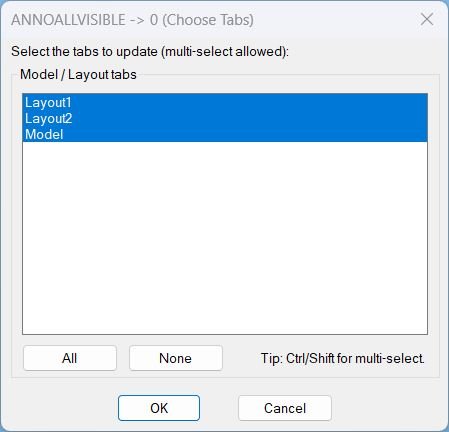
Command:
🚀 Main command: AAOFF
🎛️ Dialog title: ANNOALLVISIBLE -> 0 (Choose Tabs)
🧭 Workflow: choose Model and/or Layout tabs, then apply ANNOALLVISIBLE = 0 to the selected tabs.
Description:
🔇 AnnoAllOff is an SEO-friendly AutoCAD annotation visibility control tool for managing annotative object display across Model Space and Paper Space layouts.
🧩 The routine dynamically writes a temporary DCL file, lists all layout tab names from the active drawing, selects all tabs by default, and lets the user choose All, None, or a custom multi-selection.
📐 For each selected tab, the command switches CTAB to that tab, forces Paper Space when required, runs ANNOALLVISIBLE 0, and then restores the previous CTAB, TILEMODE, and MSPACE state.
📌 This is useful for AutoCAD and Civil 3D production drawings where annotative objects, labels, text, dimensions, and multileaders need controlled visibility per tab before review, plotting, or cleanup.
🧠 The script notes that ANNOALLVISIBLE is stored per Model tab and per Layout tab, not per viewport entity.
Helper function: (if any)
🧩 AAOFF:WriteDcl writes the temporary DCL picker for selecting Model/Layout tabs.
🧩 AAOFF:GetTabNames reads the active drawing Layouts collection and returns the available tab names.
🧩 AAOFF:MakeAllIndexString builds the DCL list-box selection string for selecting every tab by default.
🧩 AAOFF:IdxList->Names converts selected DCL list-box indices into layout tab names.
🧩 AAOFF:SetAnnoAllVisible0 switches through selected tabs, sets ANNOALLVISIBLE to 0, and restores the previous drawing tab state.
🧩 c:AAOFF loads the DCL dialog, fills the tab list, handles All/None/OK/Cancel actions, applies the setting, unloads the dialog, and deletes the temporary DCL file.
Functionalities:
✅ 🔇 Sets ANNOALLVISIBLE to 0 for selected tabs.
✅ 🎛️ Uses a DCL dialog to choose Model and Layout tabs.
✅ ✅ Selects all tabs by default for fast drawing-wide annotation visibility cleanup.
✅ 📋 Allows multi-select tab control with Ctrl/Shift selection.
✅ 🟢 Provides All and None buttons for quick selection management.
✅ 🧭 Switches CTAB to each selected tab before applying the setting.
✅ 📄 Forces Paper Space when processing layout tabs.
✅ 🔄 Restores the previous CTAB, TILEMODE, and MSPACE values after completion.
✅ 🧹 Cleans up the temporary DCL file after use.
✅ 📌 Avoids viewport-level confusion by treating ANNOALLVISIBLE as a per-tab setting.
Result:
🎯 The result is a controlled annotation visibility cleanup workflow for AutoCAD and Civil 3D drawings.
🔇 Users can turn off ANNOALLVISIBLE on all tabs or only selected layouts without manually switching each tab and typing the system variable.
📐 This supports plotting preparation, layout QA, annotative object cleanup, and drawing-standard workflows where visible annotation scales must be controlled per tab.
Images, animations etc.
XAML code:
<ResourceDictionary
xmlns="http://schemas.microsoft.com/winfx/2006/xaml/presentation"
xmlns:x="http://schemas.microsoft.com/winfx/2006/xaml"
xmlns:src="clr-namespace:Autodesk.Windows;assembly=AdWindows">
<src:RibbonToolTip x:Key="AnnoAllOff">
<src:RibbonToolTip.ExpandedContent>
<StackPanel>
<TextBlock Background="AntiqueWhite" TextAlignment="Left">
<Bold>Function Syntax: AAOFF</Bold>
<LineBreak/>
<Bold>Version: 1.1 Date: 20.06.2026 6:38:54PM</Bold>
<LineBreak/>
<Hyperlink>AI+https://forums.autodesk.com/t5/autocad-forum/annotative-objects-not-displaying-in-layout-viewports/td-p/7949416</Hyperlink>
<LineBreak/>
<Bold>Program purpose</Bold><LineBreak/>
This AutoLISP program defines the command <Bold><Span Foreground="DarkRed">AAOFF</Span></Bold> to help you set the AutoCAD system variable <Bold><Span Foreground="DarkRed">ANNOALLVISIBLE</Span></Bold> to <Bold><Span Foreground="DarkRed">0</Span></Bold> for user-selected tabs (Model and Layouts).<LineBreak/>
<Bold>What the user must do</Bold><LineBreak/>
The user runs the command <Bold><Span Foreground="DarkRed">AAOFF</Span></Bold> and then selects which tabs to update from a multi-select list.<LineBreak/>
<Bold>Key user interface behavior</Bold><LineBreak/>
The program builds a temporary <Bold><Span Foreground="DarkRed">DCL</Span></Bold> dialog at runtime, displays it, and deletes the temporary DCL file after use.<LineBreak/>
The dialog contains a list of all available tabs including <Bold>Model</Bold> and each <Bold>Layout</Bold> name.<LineBreak/>
Multi-selection is supported, and the dialog provides quick selection buttons.<LineBreak/>
<Bold>Functionalities</Bold><LineBreak/>
• <Bold>Builds a dialog dynamically</Bold> by writing a DCL definition into a temporary file (for example <Span Foreground="DarkRed">AAOFF.dcl</Span>).<LineBreak/>
• <Bold>Lists all drawing tabs</Bold> (Model plus all Layout tabs) by querying the active document layouts collection.<LineBreak/>
• <Bold>Defaults to selecting all tabs</Bold> when the dialog opens, so the operation applies everywhere unless the user narrows it down.<LineBreak/>
• <Bold>Provides selection shortcuts</Bold> via buttons:<LineBreak/>
• <Span Foreground="DarkRed">All</Span> selects every tab in the list.<LineBreak/>
• <Span Foreground="DarkRed">None</Span> clears the selection.<LineBreak/>
• <Bold>Applies the change per selected tab</Bold> by switching to each chosen tab using <Span Foreground="DarkRed">CTAB</Span> and then executing the command <Span Foreground="DarkRed">ANNOALLVISIBLE</Span> with value <Span Foreground="DarkRed">0</Span>.<LineBreak/>
• <Bold>For layout tabs, forces Paper Space</Bold> before applying the change by setting the document <Span Foreground="DarkRed">MSPACE</Span> state to false when <Span Foreground="DarkRed">TILEMODE</Span> indicates a layout environment.<LineBreak/>
• <Bold>Restores the prior environment</Bold> after processing, including restoring the previous <Span Foreground="DarkRed">CTAB</Span>, <Span Foreground="DarkRed">TILEMODE</Span>, and <Span Foreground="DarkRed">MSPACE</Span> values as applicable.<LineBreak/>
• <Bold>Handles no-selection and cancel cases</Bold> with clear console feedback and no changes applied when appropriate.<LineBreak/>
<Bold>Important technical notes</Bold><LineBreak/>
<Span Foreground="DarkRed">ANNOALLVISIBLE</Span> is stored per Model tab and per Layout tab, not per viewport entity, so the program correctly iterates through tabs rather than viewports.<LineBreak/>
The operation is implemented by calling the AutoCAD command line: <Span Foreground="DarkRed">._ANNOALLVISIBLE</Span> then <Span Foreground="DarkRed">0</Span> for each selected tab.<LineBreak/>
<Bold>Major components in the code</Bold><LineBreak/>
<Bold><Span Foreground="DarkRed">AAOFF:WriteDcl</Span></Bold> writes the dialog definition to a temporary DCL file.<LineBreak/>
<Bold><Span Foreground="DarkRed">AAOFF:GetTabNames</Span></Bold> returns a list of tab names including Model and layouts from the active document.<LineBreak/>
<Bold><Span Foreground="DarkRed">AAOFF:MakeAllIndexString</Span></Bold> generates the default selection string for the list box such as 0 1 2 ... n-1.<LineBreak/>
<Bold><Span Foreground="DarkRed">AAOFF:IdxList->Names</Span></Bold> converts the selected list box indices into tab name strings.<LineBreak/>
<Bold><Span Foreground="DarkRed">AAOFF:SetAnnoAllVisible0</Span></Bold> performs the tab switching and sets <Span Foreground="DarkRed">ANNOALLVISIBLE</Span> to <Span Foreground="DarkRed">0</Span>, then restores the original state.<LineBreak/>
<Bold><Span Foreground="DarkRed">c:AAOFF</Span></Bold> is the command entry point that orchestrates dialog creation, selection capture, execution, and cleanup.<LineBreak/>
<Bold>Outputs and user feedback</Bold><LineBreak/>
If the user selects one or more tabs, the program updates those tabs and exits quietly.<LineBreak/>
If the user selects nothing, it prints: A AOFF: Nothing selected. No changes made.<LineBreak/>
If the user cancels, it prints: A AOFF: Cancelled.<LineBreak/>
If the dialog cannot load, it prints: A AOFF: Could not load dialog.<LineBreak/>
<Bold><Run Foreground="DodgerBlue">Description</Run></Bold><LineBreak/>
<Run Foreground="White">🧩 AnnoAllOff is an AutoCAD and Civil 3D AutoLISP utility designed for faster, cleaner CAD layer and drawing-management workflows.</Run><LineBreak/>
<Run Foreground="LimeGreen">📌 It provides a DCL picker for setting ANNOALLVISIBLE to 0 on selected Model/Layout tabs, helping control annotative object visibility before plotting, review, or cleanup.</Run><LineBreak/>
<LineBreak/>
<Bold><Run Foreground="DodgerBlue">Function Syntax</Run></Bold><LineBreak/>
<Run Foreground="White">🚀 Main command: </Run><Bold><Run Foreground="Orange">AAOFF</Run></Bold><LineBreak/>
<Run Foreground="White">🎛️ Dialog: </Run><Bold><Run Foreground="Orange">ANNOALLVISIBLE -> 0 (Choose Tabs)</Run></Bold><LineBreak/>
<LineBreak/>
<Bold><Run Foreground="DodgerBlue">SEO Optimized Overview</Run></Bold><LineBreak/>
<Run Foreground="White">🔇 This AutoCAD annotation visibility tool sets </Run><Bold><Run Foreground="Orange">ANNOALLVISIBLE</Run></Bold><Run Foreground="White"> to </Run><Bold><Run Foreground="Orange">0</Run></Bold><Run Foreground="White"> for selected Model and Layout tabs.</Run><LineBreak/>
<Run Foreground="White">🎛️ The routine dynamically creates a DCL dialog and lists the drawing tabs so the user can process All, None, or selected layouts.</Run><LineBreak/>
<Run Foreground="White">📐 It switches through the selected tabs, applies the system variable, and restores the previous drawing state after completion.</Run><LineBreak/>
<Run Foreground="White">📌 This is useful for AutoCAD and Civil 3D drawings containing annotative text, dimensions, labels, multileaders, and layout annotation that must be controlled before plotting or review.</Run><LineBreak/>
<LineBreak/>
<Bold><Run Foreground="LimeGreen">Primary Workflow</Run></Bold><LineBreak/>
<Run Foreground="White">1️⃣ Run </Run><Bold><Run Foreground="Orange">AAOFF</Run></Bold><Run Foreground="White"> at the AutoCAD command line.</Run><LineBreak/>
<Run Foreground="White">2️⃣ Review the list of Model/Layout tabs in the DCL dialog.</Run><LineBreak/>
<Run Foreground="White">3️⃣ Use </Run><Bold><Run Foreground="DarkRed">All</Run></Bold><Run Foreground="White">, </Run><Bold><Run Foreground="DarkRed">None</Run></Bold><Run Foreground="White">, or Ctrl/Shift multi-select to choose tabs.</Run><LineBreak/>
<Run Foreground="White">4️⃣ Click OK to apply </Run><Bold><Run Foreground="Orange">ANNOALLVISIBLE = 0</Run></Bold><Run Foreground="White"> to the selected tabs.</Run><LineBreak/>
<Run Foreground="White">5️⃣ The routine restores the previous tab and model/paper-space state.</Run><LineBreak/>
<LineBreak/>
<Bold><Run Foreground="LimeGreen">Functionalities</Run></Bold><LineBreak/>
<Run Foreground="White">✅ </Run><Bold><Run Foreground="LimeGreen">DCL tab picker</Run></Bold><Run Foreground="White"> - shows Model and Layout tabs in a multi-select list.</Run><LineBreak/>
<Run Foreground="White">✅ </Run><Bold><Run Foreground="LimeGreen">Default select all</Run></Bold><Run Foreground="White"> - prepares the dialog for full drawing processing by default.</Run><LineBreak/>
<Run Foreground="White">✅ </Run><Bold><Run Foreground="LimeGreen">Per-tab annotation visibility</Run></Bold><Run Foreground="White"> - applies ANNOALLVISIBLE to each selected tab.</Run><LineBreak/>
<Run Foreground="White">✅ </Run><Bold><Run Foreground="LimeGreen">State restoration</Run></Bold><Run Foreground="White"> - restores CTAB, TILEMODE, and MSPACE after processing.</Run><LineBreak/>
<Run Foreground="White">✅ </Run><Bold><Run Foreground="LimeGreen">Temporary DCL cleanup</Run></Bold><Run Foreground="White"> - unloads the dialog and deletes the generated DCL file.</Run><LineBreak/>
<LineBreak/>
<Bold><Run Foreground="DodgerBlue">Important Commands and Functions</Run></Bold><LineBreak/>
<Run Foreground="White">🧩 </Run><Bold><Run Foreground="Orange">ANNOALLVISIBLE</Run></Bold><Run Foreground="White"> controls whether all annotation scales are visible.</Run><LineBreak/>
<Run Foreground="White">🧩 </Run><Bold><Run Foreground="Orange">CTAB</Run></Bold><Run Foreground="White"> is changed to process each selected tab.</Run><LineBreak/>
<Run Foreground="White">🧩 </Run><Bold><Run Foreground="Orange">TILEMODE</Run></Bold><Run Foreground="White"> and </Run><Bold><Run Foreground="Orange">MSPACE</Run></Bold><Run Foreground="White"> are restored after the operation.</Run><LineBreak/>
<Run Foreground="White">🧩 </Run><Bold><Run Foreground="Orange">load_dialog</Run></Bold><Run Foreground="White">, </Run><Bold><Run Foreground="Orange">new_dialog</Run></Bold><Run Foreground="White">, and </Run><Bold><Run Foreground="Orange">start_dialog</Run></Bold><Run Foreground="White"> manage the DCL picker.</Run><LineBreak/>
<LineBreak/>
<Bold><Run Foreground="DarkRed">Important Notes</Run></Bold><LineBreak/>
<Run Foreground="White">⚠️ The tool sets ANNOALLVISIBLE to 0; it does not delete annotation or remove annotation scales.</Run><LineBreak/>
<Run Foreground="White">⚠️ The code comments specify that ANNOALLVISIBLE is stored per Model tab and per Layout tab, not per viewport entity.</Run><LineBreak/>
<Run Foreground="White">⚠️ The command changes tabs during execution, then restores the previous tab and model/paper-space state.</Run><LineBreak/>
<LineBreak/>
<Bold><Run Foreground="Yellow">Tags</Run></Bold><LineBreak/>
<Run Foreground="Yellow">🏷️ AutoCAD, 🏷️ Civil 3D, 🏷️ AutoLISP, 🏷️ Visual LISP, 🏷️ DCL dialog, 🏷️ Annotation visibility, 🏷️ ANNOALLVISIBLE, 🏷️ Layouts, 🏷️ Model Space, 🏷️ Paper Space, 🏷️ Annotative objects, 🏷️ Drawing cleanup, 🏷️ CAD standards, 🏷️ Viewport workflow, 🏷️ CAD productivity</Run><LineBreak/>
</TextBlock>
<Grid>
<Image Source="Image_000.jpg" Stretch="Uniform"/>
</Grid>
<!-- Use MediaElement for GIF (static first frame) and Image as fallback -->
</StackPanel>
</src:RibbonToolTip.ExpandedContent>
</src:RibbonToolTip>
</ResourceDictionary>