
Short description
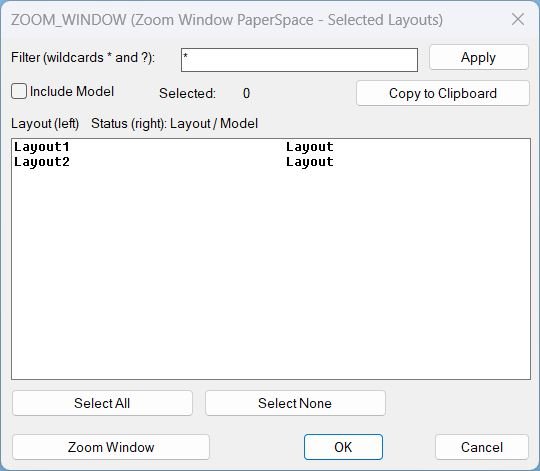
🔎 ZEZW is an AutoCAD and Civil 3D AutoLISP layout zoom tool for running Zoom Extents or Zoom Window on selected paper space layouts. 📑 It includes wildcard layout filtering, multi-select, select all/none, and clipboard support.
Command:
🚀 Main command: ZEZW
⚡ Alias command: _ZEZW
🔎 Opens a DCL dialog for Zoom Extents or Zoom Window operations on selected layouts.
Description:
🔎 ZEZW is an SEO-friendly AutoCAD layout view management utility for batch zoom operations in paper space.
📑 The command builds a unique DCL dialog, lists layout tabs, supports wildcard filtering with * and ?, and lets the user select multiple layouts.
🪟 Users can run Zoom Extents or define a Zoom Window workflow after the dialog closes for more stable command execution.
🎯 This is useful for plotting preparation, layout QA, Civil 3D sheet checking, and drawing cleanup before publish or PDF export.
Helper function: (if any)
🧩 Unique DCL name and temporary file creation reduce dialog naming conflicts.
🧩 Wildcard filter helpers show only matching layout tabs.
🧩 Multi-select helpers track selected layout indices.
🧩 Clipboard helpers copy selected layout names.
🧩 Zoom action helpers run after dialog close to improve AutoCAD stability.
Functionalities:
✅ 🔍 Filter layout names using wildcard patterns.
✅ 📑 Multi-select layouts for batch zoom operations.
✅ 🔎 Run Zoom Extents on selected layouts.
✅ 🪟 Run Zoom Window workflow on selected layouts.
✅ ☑️ Select all or clear all layout selections.
✅ 📋 Copy selected layout names to clipboard.
✅ 🧰 Keep the UI stable by running zoom actions after the dialog closes.
Result:
🎯 The result is a practical paper space zoom manager for drawings with many sheets.
🔎 Users can quickly normalize layout views or apply a consistent window zoom without manually visiting every tab.
✅ ZEZW improves plotting readiness and layout review efficiency.
Images, animations etc.
XAML code:
<ResourceDictionary
    xmlns="http://schemas.microsoft.com/winfx/2006/xaml/presentation"
    xmlns:x="http://schemas.microsoft.com/winfx/2006/xaml"
    xmlns:src="clr-namespace:Autodesk.Windows;assembly=AdWindows">

    <src:RibbonToolTip x:Key="Zoom Window">
        <src:RibbonToolTip.ExpandedContent>
            <StackPanel>
                <TextBlock Background="AntiqueWhite" TextAlignment="Left">
				<Bold>Function Syntax: LZW</Bold>
<LineBreak/>
<Bold>Version: 1.1 Date: 20.06.2026 6:38:56PM</Bold>
				<LineBreak/>
				<Hyperlink>AI+https://www.cadtutor.net/forum/topic/41748-zoom-extend-all-layouts/</Hyperlink>
<LineBreak/>

<Bold><Run Foreground="DodgerBlue">🚀 Command Name</Run></Bold><LineBreak/>
<Run Foreground="White">🧩 Type </Run><Bold><Run Foreground="Orange">ZEZW</Run></Bold><Run Foreground="White"> at the AutoCAD command line.</Run><LineBreak/>
<Run Foreground="White">🧩 Type </Run><Bold><Run Foreground="Orange">_ZEZW</Run></Bold><Run Foreground="White"> at the AutoCAD command line.</Run><LineBreak/>
<LineBreak/>
<Bold><Run Foreground="DodgerBlue">🧭 SEO Optimized Description</Run></Bold><LineBreak/>
<Run Foreground="White">🔎 ZEZW is an SEO-friendly AutoCAD layout view management utility for batch zoom operations in paper space.</Run><LineBreak/>
<Run Foreground="White">📑 The command builds a unique DCL dialog, lists layout tabs, supports wildcard filtering with * and ?, and lets the user select multiple layouts.</Run><LineBreak/>
<Run Foreground="White">🪟 Users can run Zoom Extents or define a Zoom Window workflow after the dialog closes for more stable command execution.</Run><LineBreak/>
<Run Foreground="White">🎯 This is useful for plotting preparation, layout QA, Civil 3D sheet checking, and drawing cleanup before publish or PDF export.</Run><LineBreak/>
<LineBreak/>
<Bold><Run Foreground="LimeGreen">🧰 Main Workflow</Run></Bold><LineBreak/>
<Run Foreground="White">1️⃣ Run ZEZW or _ZEZW.</Run><LineBreak/>
<Run Foreground="White">2️⃣ Filter layout names with * and ? when needed.</Run><LineBreak/>
<Run Foreground="White">3️⃣ Select the target layout tabs.</Run><LineBreak/>
<Run Foreground="White">4️⃣ Choose Zoom Extents or Zoom Window.</Run><LineBreak/>
<Run Foreground="White">5️⃣ Let the zoom command run after the dialog closes.</Run><LineBreak/>
<LineBreak/>
<Bold><Run Foreground="LimeGreen">✅ Functionalities</Run></Bold><LineBreak/>
<Run Foreground="White">✅ 🔍 Filter layout names using wildcard patterns.</Run><LineBreak/>
<Run Foreground="White">✅ 📑 Multi-select layouts for batch zoom operations.</Run><LineBreak/>
<Run Foreground="White">✅ 🔎 Run Zoom Extents on selected layouts.</Run><LineBreak/>
<Run Foreground="White">✅ 🪟 Run Zoom Window workflow on selected layouts.</Run><LineBreak/>
<Run Foreground="White">✅ ☑️ Select all or clear all layout selections.</Run><LineBreak/>
<Run Foreground="White">✅ 📋 Copy selected layout names to clipboard.</Run><LineBreak/>
<Run Foreground="White">✅ 🧰 Keep the UI stable by running zoom actions after the dialog closes.</Run><LineBreak/>
<LineBreak/>
<Bold><Run Foreground="DodgerBlue">🧩 Important Commands and Helper Functions</Run></Bold><LineBreak/>
<Run Foreground="White">🧩 Unique DCL name and temporary file creation reduce dialog naming conflicts.</Run><LineBreak/>
<Run Foreground="White">🧩 Wildcard filter helpers show only matching layout tabs.</Run><LineBreak/>
<Run Foreground="White">🧩 Multi-select helpers track selected layout indices.</Run><LineBreak/>
<Run Foreground="White">🧩 Clipboard helpers copy selected layout names.</Run><LineBreak/>
<Run Foreground="White">🧩 Zoom action helpers run after dialog close to improve AutoCAD stability.</Run><LineBreak/>
<LineBreak/>
<Bold><Run Foreground="DodgerBlue">🎯 Practical Result</Run></Bold><LineBreak/>
<Run Foreground="White">🎯 The result is a practical paper space zoom manager for drawings with many sheets.</Run><LineBreak/>
<Run Foreground="White">🔎 Users can quickly normalize layout views or apply a consistent window zoom without manually visiting every tab.</Run><LineBreak/>
<Run Foreground="White">✅ ZEZW improves plotting readiness and layout review efficiency.</Run><LineBreak/>
<LineBreak/>
<Bold><Run Foreground="DarkRed">⚠️ Important Notes</Run></Bold><LineBreak/>
<Run Foreground="White">⚠️ Zoom operations alter the view state of selected layouts.</Run><LineBreak/>
<Run Foreground="White">⚠️ Zoom Window depends on the user providing a valid window selection when prompted.</Run><LineBreak/>
<Run Foreground="White">⚠️ Use filters carefully to avoid applying zoom actions to the wrong layout set.</Run><LineBreak/>
<LineBreak/>
<Bold><Run Foreground="Yellow">🏷️ Tags</Run></Bold><LineBreak/>
<Run Foreground="Yellow">🏷️ AutoCAD, 🏷️ Civil 3D, 🏷️ AutoLISP, 🏷️ Visual LISP, 🏷️ ZEZW, 🏷️ Zoom Extents, 🏷️ Zoom Window, 🏷️ Layout Tabs, 🏷️ Paper Space, 🏷️ Wildcard Filter, 🏷️ DCL Dialog, 🏷️ Clipboard, 🏷️ Plot Preparation, 🏷️ CAD QA</Run><LineBreak/>


</TextBlock>

<Grid>
<Image Source="Image_000.jpg" Stretch="Uniform"/>
</Grid>


                <!-- Use MediaElement for GIF (static first frame) and Image as fallback -->


            </StackPanel>
        </src:RibbonToolTip.ExpandedContent>
    </src:RibbonToolTip>
</ResourceDictionary>